Allen-Bradley PLC Guide: Controllers, Software and Selection
Choose and work with an Allen-Bradley PLC using catalog- and version-scoped controller, software, task, I/O, commissioning, troubleshooting and migration evidence.
Direct answer
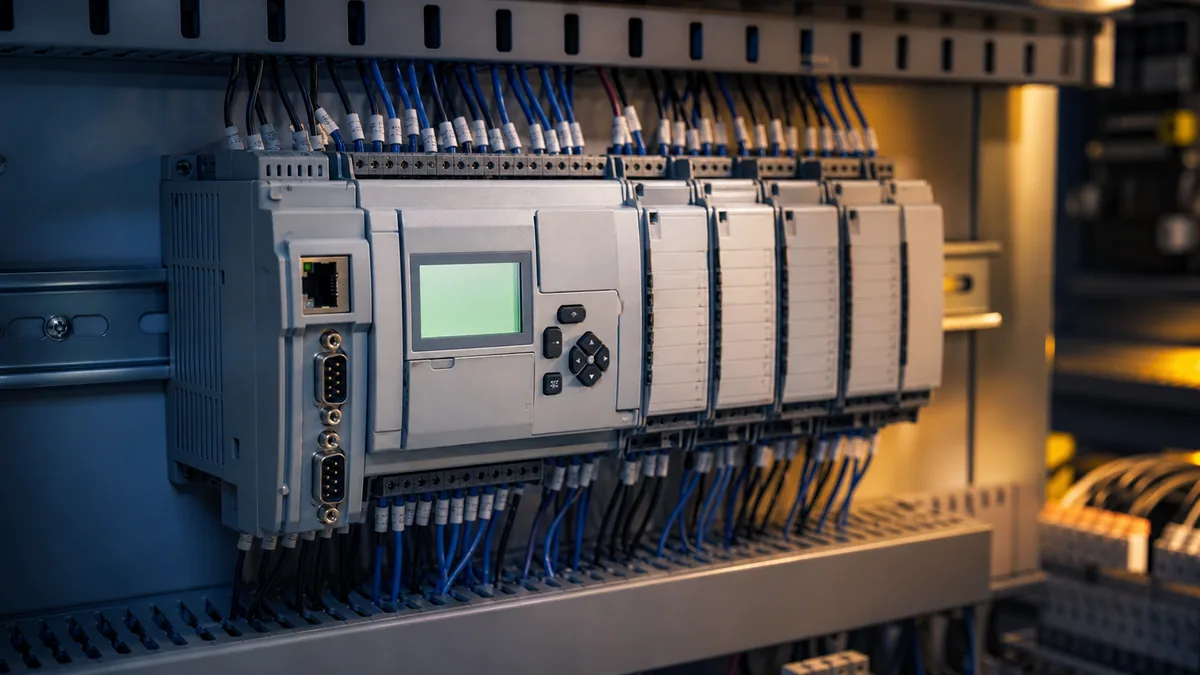
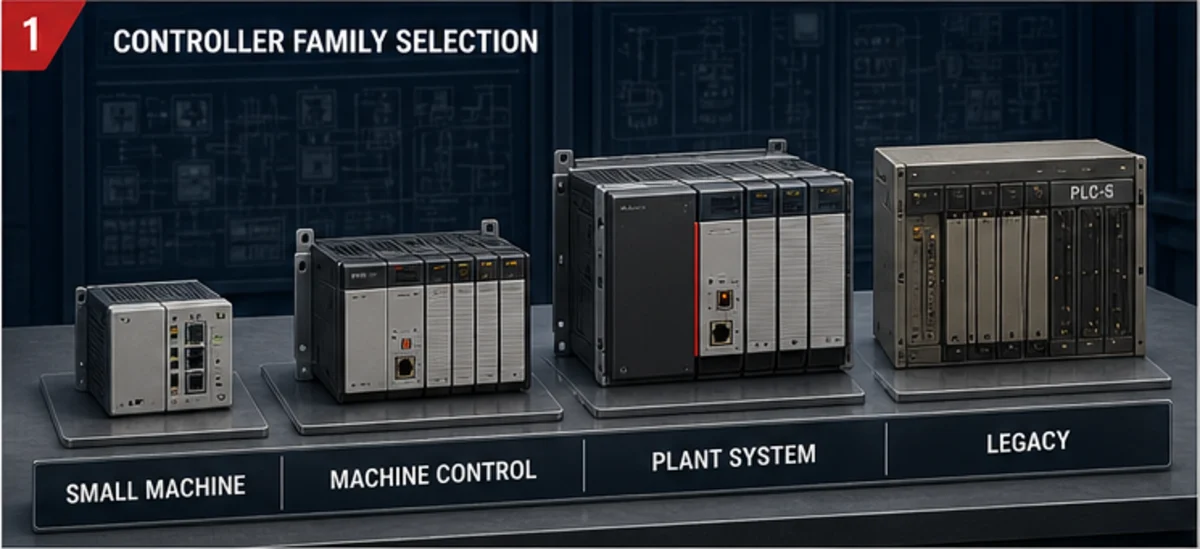
An Allen-Bradley PLC is an industrial controller sold under the Allen-Bradley hardware brand by Rockwell Automation. The name does not identify one interchangeable PLC. It can refer to a Micro800 small-controller system, a CompactLogix or Compact GuardLogix machine-control system, a ControlLogix or GuardLogix plant-scale system, or a legacy PLC-5, SLC 500 or MicroLogix installation. Each family has its own catalog numbers, supported I/O, communications, engineering software, firmware rules and lifecycle state.
Choose the controller only after freezing the application contract: required local and remote I/O by signal type, task periods and worst-case execution, network connections, motion axes, process functions, safety allocation, environmental approvals, redundancy/availability, cybersecurity, software versions, spares and migration obligations. Do not choose from a family nickname, a generic I/O count, an online price or a program that happens to open on one engineer's laptop.
For current Logix systems, match the exact controller catalog and firmware major revision to a compatible Studio 5000 Logix Designer release through Rockwell's Product Compatibility and Download Center. Rockwell's ControlLogix 5590 documentation states that controller firmware and Logix Designer must use the same major revision; its public version 38 material is therefore evidence for version 38 systems, not permission to apply version 38 assumptions to every 5370, 5380, 5570, 5580, GuardLogix or legacy controller. Micro800 projects use a different tool and version model, commonly Connected Components Workbench; SLC 500 and MicroLogix maintenance commonly uses RSLogix 500; PLC-5 maintenance uses RSLogix 5.
Download the Allen-Bradley PLC selection manifest, conveyor I/O and tag contract and 24-case controller acceptance matrix.
What this established page owns
This page owns the broad Allen-Bradley programmable controller selection and system-orientation question: brand terminology, current and legacy family roles, software compatibility, Logix execution architecture, a worked control example, commissioning evidence and migration decisions.
The Allen-Bradley PLC programming guide owns the detailed programming workflow across Logix and Micro800. The MicroLogix family guide owns MicroLogix catalog, addressing and RSLogix 500 maintenance depth. The MicroLogix 1400 tutorial owns that controller-specific path. The Allen-Bradley diagnosis guide owns fault isolation. The RSLogix 500 versus RSLogix 5000 guide owns the legacy-versus-Logix software distinction. Training and certification pages own learning-provider and credential questions.
Keeping those tasks separate prevents a high-volume brand page from turning into shallow, conflicting versions of every Rockwell topic.
Allen-Bradley and Rockwell terminology
| Term | Precise use | Do not assume |
|---|---|---|
| Allen-Bradley | Rockwell Automation hardware brand used on controllers, I/O, drives and other industrial products | that every product sharing the brand uses one project format or programming tool |
| Rockwell Automation | manufacturer and publisher of the product documentation, software and lifecycle records | that “Rockwell PLC” narrows the controller catalog |
| PLC | common industry term for a programmable logic controller | that PLC, PAC, safety controller and process controller requirements are interchangeable |
| Logix 5000 | controller architecture and programming model spanning supported ControlLogix, CompactLogix and related systems | that every Logix catalog supports every instruction, task, language, motion or safety feature |
| Studio 5000 Logix Designer | engineering application for supported Logix 5000 controller projects | that an installed version matches the target firmware or opens every historical project unchanged |
| RSLogix 5000 | earlier name in the Logix Designer product lineage | that it is RSLogix 500 or that its version is suitable for the target |
| RSLogix 500 | legacy engineering software associated with SLC 500 and MicroLogix systems | that it opens an ACD Logix project or uses tag-based Logix organization |
| Connected Components Workbench (CCW) | engineering environment used for supported Micro800 and connected-component workflows | that Micro800 is a small CompactLogix or that CCW version rules equal Logix rules |
| EtherNet/IP | ODVA's CIP application layer over standard Ethernet technologies | generic Ethernet connectivity, an Internet protocol, or proof that two devices share compatible objects/profiles |
| GuardLogix / Compact GuardLogix | safety-capable Logix controller families used within documented safety architectures | that a controller name alone validates a machine safety function |
Select a controller family by system responsibility
Rockwell's current programmable-controller surface includes Micro800 offerings, CompactLogix 5380-class machine controllers and ControlLogix systems including newer 5590 material. It also exposes mature or discontinued families because installed plants still need documentation, repair and migration support. A family description is therefore a routing aid; the exact selection guide and product lifecycle record control the decision.
| Family or installed-base class | Typical responsibility | Engineering environment | Questions that decide fit | Evidence required before selection |
|---|---|---|---|---|
| Micro800 | compact standalone machine, simple cell or connected component application | current supported CCW/FactoryTalk design workflow for exact catalog | onboard/expansion I/O, communication role, program size, motion/function needs, HMI/drive integration | 2080 selection guide, controller user manual, software/firmware compatibility, sample task timing |
| CompactLogix 5380 / Compact GuardLogix 5380 | modular machine, cell, skid, line segment, integrated I/O/network/motion and safety where supported | compatible Studio 5000 Logix Designer major release | Compact 5000 I/O topology, EtherNet/IP connections, task load, axes, safety level/partner, process options | 1769-SG003 selection guide, exact CPU/module manuals, PCDC compatibility, connection/task budget |
| ControlLogix 5580 / 5590 and GuardLogix variants | larger coordinated system, plant/process control, high connection/compute needs, chassis modularity, safety/process/redundancy where supported | compatible Studio 5000 release and related FactoryTalk tools | chassis/modules, availability, process/safety allocation, motion, networks, cybersecurity, memory and task performance | current 1756 selection/user manuals, module compatibility, firmware baseline, network and availability design |
| CompactLogix 5370 or earlier supported/mature Logix | installed machine or controlled brownfield continuation | project-matched Studio 5000/RSLogix 5000 lineage | exact lifecycle status, firmware, replacement constraints, 1769 I/O and network dependencies | native archive, upload/compare, PCDC matrix, catalog-by-catalog lifecycle and migration plan |
| SLC 500 / MicroLogix | installed legacy address-based control | RSLogix 500 and catalog-specific communications | available native source/comments, processor/module status, battery/memory, DH+/DH-485/serial/Ethernet dependencies | verified native backup, chassis/module/cable inventory, lifecycle lookup, recovery proof, conversion tests |
| PLC-5 | installed legacy rack/process system | RSLogix 5 and legacy network tooling | I/O scanner/adapter roles, DH+/Remote I/O, source completeness, migration outage and risk | native backup, data/instruction inventory, network map, catalog lifecycle and staged cutover evidence |
Why this table does not publish universal I/O or price limits
“CompactLogix supports N I/O” is usually an incomplete statement. A practical limit can depend on the exact controller, local versus network I/O, module family, connection count, requested packet interval, motion load, task schedule, firmware and system architecture. Price changes by catalog, software entitlement, region, distributor, currency, support agreement and date. Use a dated matched bill of material and current distributor quote instead of copying a single CPU price into a design.
The same caution applies to lifecycle. Rockwell uses catalog-level states such as Active, Active Mature, End of Life and Discontinued. A family page may say “some” bulletin numbers are discontinued while another catalog remains orderable or supported. Record the status and lookup date for every CPU, power supply, rack, communication module, I/O module, terminal base, programming cable and software entitlement that the machine depends on.
Freeze a selection manifest before comparing catalog numbers
| Manifest field | Minimum content | Why it changes controller selection |
|---|---|---|
| machine/process responsibility | operating modes, states, sequences, PID loops, recipe/phase needs, coordinated units | distinguishes a compact sequence from coordinated machine or process architecture |
| I/O schedule | quantity by type, voltage/range, isolation, resolution, update, diagnostics, spare policy | total points alone hides high-speed, analog, specialty and safety requirements |
| execution contract | continuous/periodic/event tasks, periods, priorities, watchdogs, latency and jitter budget | establishes compute and scheduling evidence rather than “fast PLC” marketing |
| network contract | adapters/scanners, connections, RPIs, produced/consumed data, messaging, HMI/SCADA, third-party devices | network role and connection capacity can control the choice before raw I/O count |
| motion | axis type/count, coordination, update group, drive and safety-motion requirements | motion support is catalog, firmware and application specific |
| safety allocation | safety requirement specification, functions, integrity/performance targets, devices, reaction-time budget | prevents ordinary PLC logic from being mistaken for validated safety control |
| availability | tolerated outage, redundancy, repair time, spares, backup/restore and recovery objectives | can require a different chassis, network, controller or operating concept |
| environment/approval | temperature, vibration, enclosure, hazardous location, marine/industry and regional approvals | exact catalog suffix and certification matter |
| lifecycle | required service horizon, plant standard, installed spares, migration window and skills | a technically capable product can still be the wrong lifecycle choice |
| engineering baseline | software release, firmware, operating system, activation, source control, libraries and workstation image | a controller without a reproducible toolchain is not supportable |
| cybersecurity | zones/conduits, account/role model, ports/services, remote access, patch and recovery plan | functionality and security controls must coexist within OT availability constraints |
| acceptance | simulations, bench/HIL, FAT, SAT, safety validation and retained evidence | forces every selection claim to end in a testable deliverable |
The downloadable selection manifest adds owner, source, revision, required value, offered value, evidence and disposition columns. Do not let “TBD” become an implicit acceptance criterion.
Match engineering software, controller and firmware
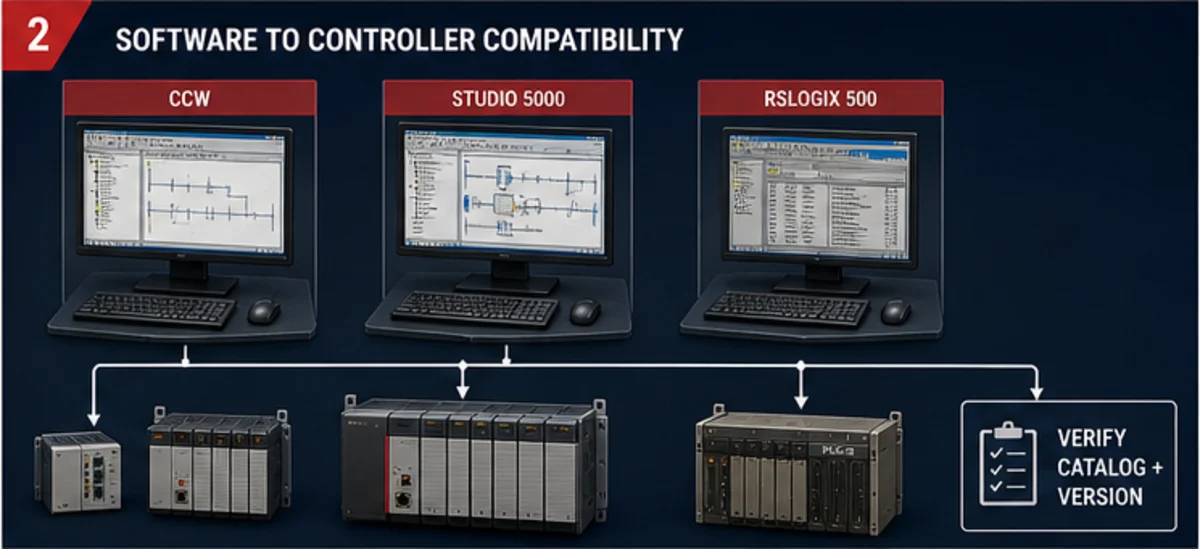
| Controller/project class | Primary project tool | Critical compatibility rule | Native artifact to retain | Wrong assumption to avoid |
|---|---|---|---|---|
| supported ControlLogix/CompactLogix Logix project | Studio 5000 Logix Designer / earlier RSLogix 5000 lineage as applicable | match controller firmware and Logix Designer major revision; verify exact catalog in PCDC | ACD plus exported source where policy requires, version/build, controller catalog/firmware and compare record | newest installed version automatically supports every controller or old option |
| Micro800 | Connected Components Workbench or currently documented supported workflow | controller project and firmware rules differ from Logix; verify exact catalog and installed version | CCW native project, controller/project version, libraries and hardware configuration | Micro800 project can be opened as a CompactLogix ACD file |
| SLC 500 / MicroLogix | RSLogix 500 | processor series/OS, communication path and project compatibility are catalog specific | RSS native project with comments/symbols, processor/module inventory and upload/compare evidence | an uploaded binary necessarily contains the original documentation and engineering intent |
| PLC-5 | RSLogix 5 | processor, channel/network and project compatibility are legacy-system specific | native project, data tables, channel configuration, comments and recovery workstation | conversion is a one-click equivalent behavior guarantee |
| Logix virtual testing | supported Logix Emulate or FactoryTalk Logix Echo route for compatible targets | emulator product/version/controller support and behavior limits must match the project | emulator version/configuration, test fixtures, result trace and known differences | emulation proves physical I/O, network, motion, safety or machine behavior |
Rockwell's September 2025 Tasks, Programs, and Routines manual records an important current boundary: references to CompactLogix 5480 were removed because Logix Designer versions 38 and later do not support that controller. That is exactly why “install the latest Studio 5000” is not a recovery procedure. A maintenance workstation may need multiple controlled software versions, compatible operating-system support, valid activations, communication drivers, option profiles and a documented route to the controller.
For Micro800, Rockwell's CCW guide explains a different relationship: controller firmware does not need to equal the controller project version, but it must be at least the project version. Apply that statement only to the covered Micro800 workflow. Do not transfer it to Logix systems, where the documented same-major relationship controls.
Minimum clean-workstation recovery proof
- start from the approved workstation image or virtual machine, not the original engineer's laptop;
- install the documented software version/build, patches, communication components, AOPs/EDS files and libraries;
- prove the license/activation can be restored under the organization's entitlement;
- open the native project with no silent conversion and record every warning;
- verify controller catalog, firmware revision, modules, keying and network configuration;
- compile/verify the project and export a diagnostic result;
- compare against the protected baseline or an authorized upload;
- prove the approved online path without making a change; and
- retain hashes, installation media/source, credentials escrow procedure and recovery evidence.
Understand Logix task, program, routine and tag execution
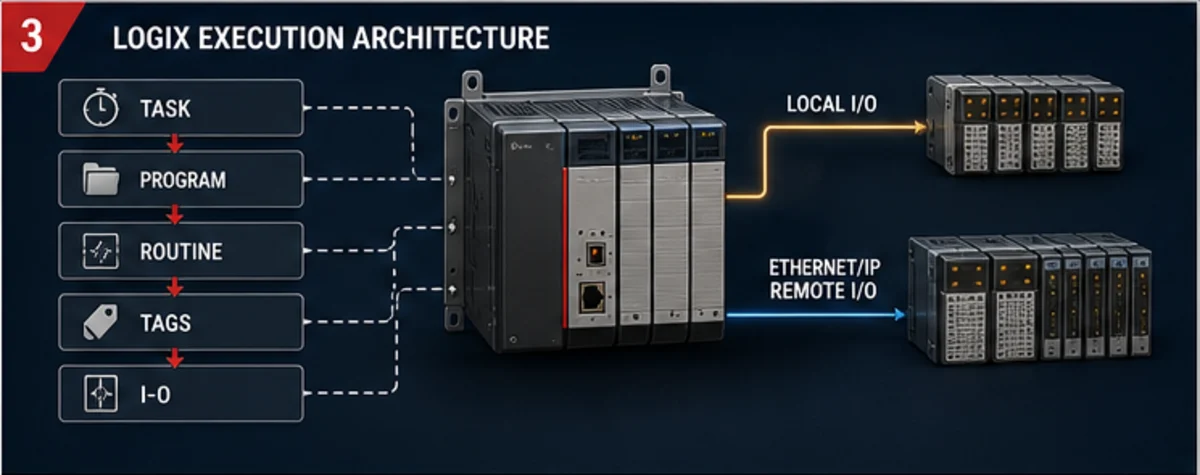
Rockwell defines tasks as the scheduling mechanism, programs as groups of routines and program-scoped tags, and routines as executable logic blocks. A program must be scheduled in a task. When the task triggers, scheduled programs execute in their configured order. Each program begins at its assigned main routine; other routines require a call path such as a JSR or the relevant platform mechanism. Controller-scoped tags are broadly available; program-scoped tags belong to their program. Exact limits depend on controller and software version.
| Layer | Design decision | Evidence during commissioning | Common failure |
|---|---|---|---|
| task | continuous, periodic or event trigger; period; priority; watchdog | actual/max scan, trigger interval and overlaps from task monitoring | periodic work placed in continuous task; priority starvation; watchdog treated as capacity target |
| program | responsibility boundary, schedule order, program parameters/tags and fault routine | program scheduled, correct main routine, required parameters connected | program exists but is unscheduled or wrong main routine assigned |
| routine | LD/ST/FBD/SFC language, call path, side effects and state ownership | executing state plus call-condition evidence and observed outputs | green power-flow display mistaken for proof a JSR branch executed this scan |
| tags | controller/program scope, data type, alias/base, produced/consumed role and ownership | cross-reference, live value, quality/connection and single-writer review | duplicate writers, stale consumed data or alias hiding the physical source |
| I/O connection | module identity/keying, RPI, ownership/listen-only, fault action and channel config | module status, connection health, input/output timestamp and field observation | healthy controller mistaken for healthy module/channel/field device |
Use periodic tasks when the function needs a defined cadence and budget. Monitor actual and worst-observed execution, elapsed trigger interval and overlap count. A task period is not the same as end-to-end input-to-output latency: module update, network scheduling, task phase, preemption, program order, output update and field-device response all contribute.
Do not run normal operation close to the watchdog. Rockwell documents a watchdog response when scheduled programs take too long or higher-priority interruption causes the task to exceed its watchdog. Design with measured headroom under representative HMI, message, network, motion, diagnostic and online-service load.
Live mini-lab
Try it: press START, then STOP
A stop-dominant seal-in rung: START latches the motor output through its own contact, and STOP breaks the circuit.
Watch the output lamp: it stays on after START until you press STOP.
Free to start · runs in your browserOpens plcsimulationsoftware.com — same team
Worked example: conveyor motor command, feedback and timeout
This example shows a standard control pattern, not a safety program. The validated safety system produces a permitted status such as SafetyPermissive; ordinary PLC logic uses that status to inhibit its command. The standard PLC must not be presented as the safety function unless the complete safety architecture, controller, program, I/O, signatures, reaction time and validation are designed accordingly.
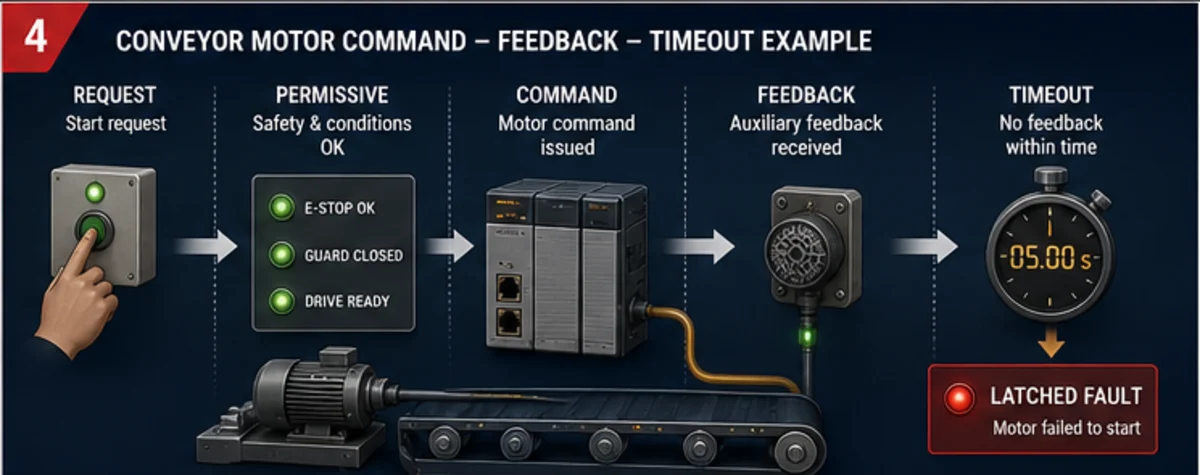
I/O and tag contract
| Tag | Owner/source | Meaning when TRUE | Invalid or fault behavior | Retention/reset |
|---|---|---|---|---|
AutoMode |
mode arbiter | automatic sequence owns ordinary motor request | mode conflict inhibits new start | not retained unless the approved mode design says otherwise |
StartPB |
local/HMI request adapter | one start request is present | stuck input must not create repeated starts | convert to a controlled edge/request |
StopHealthy |
ordinary stop/request chain | standard stop path permits operation | FALSE removes ordinary command | level-sensitive; separate from safety function |
SafetyPermissive |
safety-system status interface | validated safety controller/relay permits ordinary command | FALSE removes ordinary command and records cause | standard program must not force or synthesize it |
DriveReady |
starter/drive status | final control element can accept a command as defined | stale/invalid inhibits start | source quality and age required for network data |
MotorRunRequest |
sequence | application wants motor operation | rejected with explicit reason | clear on stop/fault/mode loss according to design |
MotorRunCmd |
motor object | ordinary output request is authorized | false on lost permissive/fault | not evidence of motor motion |
MotorAux |
contactor/drive feedback | auxiliary/status input has the documented operating meaning | missing after command starts timeout | independent of output tag |
MotorStartTmr |
motor object | response-time measurement active | done creates first-out failure | reset when command is absent or feedback proves response |
MotorStartFail |
motor object | command lacked feedback within accepted time | latches first-out and removes command | reset only after cause clear, command off and policy conditions met |
ResetPB |
authorized operator request | one reset request edge | held reset does not generate repeated resets | edge-qualified and cause-gated |
The downloadable tag contract adds address/channel, data type, normal state, source quality, alarm text, test stimulus and observed evidence. In a real Logix project, use a UDT/Add-On Instruction or plant-standard motor object when it has been reviewed and version controlled. The pattern below describes behavior; it is not copy-paste production code.
Ladder-style behavior contract
| Rung/function | Logic intent | Important edge case |
|---|---|---|
| start authorization | StartAllowed := AutoMode AND StopHealthy AND SafetyPermissive AND DriveReady AND NOT MotorStartFail |
a permissive restored while Start is held must not create an undocumented restart |
| request latch | latch only from an accepted start edge; release on stop, mode loss, safety-permissive loss or fault | avoid a self-sealing output that hides why the request persisted |
| output command | MotorRunCmd := MotorRunRequest AND StartAllowed |
do not copy MotorRunCmd into “Running” feedback |
| response timer | timer active while MotorRunCmd AND NOT MotorAux |
define equality/scan behavior around the threshold and measured field response |
| start failure | latch first-out when timer completes before feedback | capture command, feedback, permissives, module/connection state and timestamp before reset |
| feedback-loss supervision | when a proven running state loses feedback, apply a separately defined debounce and fault policy | distinguish start failure from feedback lost during run |
| reset | accept a rising edge only when command/request are off, cause is clear and reset authority is valid | reset must not start the motor or erase the evidence before it is retained |
Scan-by-scan trace
Assume a 20 ms periodic application task and a 3,000 ms configured feedback limit for this example. Those numbers are teaching assumptions, not universal motor values.
| Application scan | Start edge | StartAllowed | RunRequest | RunCmd | MotorAux | timer state | first-out/result |
|---|---|---|---|---|---|---|---|
| 100 | 0 | 1 | 0 | 0 | 0 | reset | stopped and ready |
| 101 | 1 | 1 | 1 | 1 | 0 | begins | start accepted |
| 102 | 0 | 1 | 1 | 1 | 0 | accumulates | command present; response not yet proven |
| 115 | 0 | 1 | 1 | 1 | 1 | resets | running feedback proven within limit |
| 240 | 0 | 0 because StopHealthy=0 |
0 | 0 | 1 briefly | reset | ordinary stop removes command; field feedback decay is observed |
| 245 | 0 | 0 | 0 | 0 | 0 | reset | stopped feedback proven |
For a failure run, if MotorAux remains false through the accepted timer boundary, latch MotorStartFail, capture the pre-fault snapshot and remove the ordinary output command according to the control narrative. Do not reset just to see whether it happens again; diagnose output module/channel, control power, overload/drive state, final element, auxiliary wiring, input module/channel and logic ownership in order.
Commission from project claim to field response
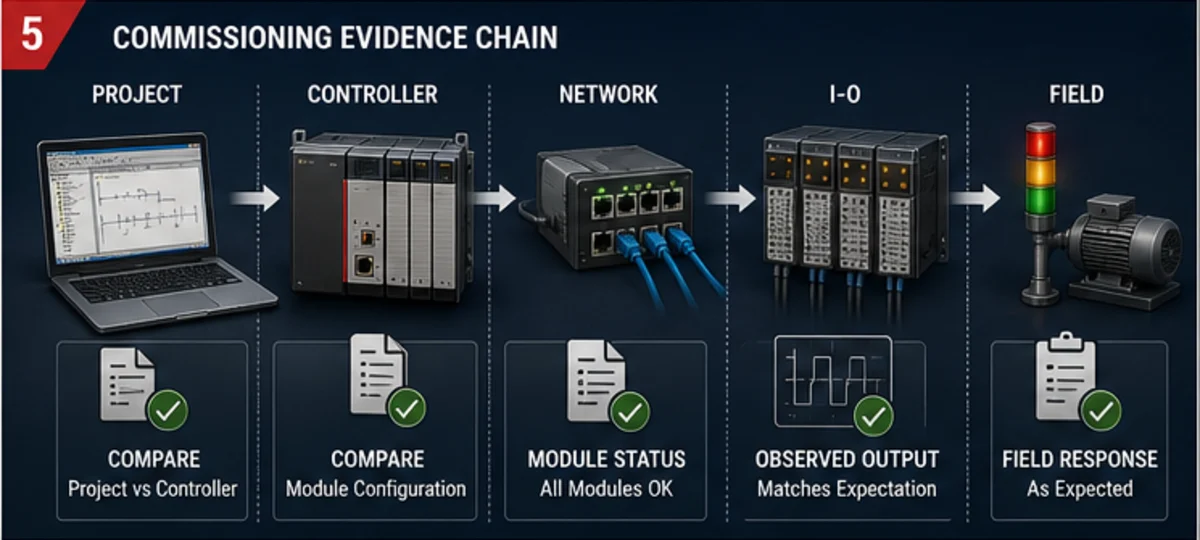
| Evidence zone | Inspect | Expected evidence | Do not conclude from it alone |
|---|---|---|---|
| project baseline | native file, controller catalog/revision, modules, AOPs, task schedule, comments and signature/hash | approved project opens/verifies with controlled warnings and matches baseline | that the controller contains this exact file |
| controller | identity, mode, firmware, major/minor faults, task monitor, time and change/audit state | correct target, no unexplained fault/overlap and measured headroom | that every I/O connection and field device is healthy |
| network | topology, adapter identity, connection state, RPI, error counters, time sync and data age | expected devices/configuration and fresh data under representative load/loss recovery | that a “green” connection has correct assembly, scale or semantic mapping |
| I/O module/channel | module keying/status, channel config, raw value, diagnostic and force state | correct module/configuration with channel behavior matching the test | that wiring and the field element responded |
| output/control circuit | output command, channel indication, measured approved circuit state, overload/drive/contactor state | command propagates through the documented electrical/control chain | that the load moved or process outcome occurred |
| field response | auxiliary feedback, independent sensor, actual speed/position/flow/pressure or operator-observed approved result | commanded and observed state agree inside the allowed time | that all abnormal, restart and safety paths passed |
Rockwell warns that forcing an input, output, produced or consumed tag overrides normal behavior and can cause unexpected machine motion. Treat force use as a controlled hazardous activity: identify the base/alias tag, predict the result, clear personnel from the machine area, obtain authority, time-bound the force, display force state, remove it and verify no force remains. A force is never a substitute for correcting logic, wiring or configuration.
Twenty-four acceptance cases grouped by risk
The downloadable matrix contains prerequisites, stimulus, expected evidence, result, deviation and retest owner for all 24 cases.
| Group | Cases | Required proof |
|---|---|---|
| compatibility | exact catalog/firmware/software opens; compile/verify; clean-workstation restore | no silent target substitution; all warnings disposed; source and workstation reproducible |
| task execution | periodic cadence, worst load, priority interaction, watchdog margin | actual/max scan, trigger interval and zero unexplained overlaps under representative load |
| I/O identity | module match, keying policy, channel config, fault action | installed modules and channels match approved design and fail as declared |
| normal motor sequence | start, seal, stop, command-to-feedback, feedback-to-stopped | every transition occurs once and within accepted limits |
| abnormal motor sequence | start inhibited, missing feedback, feedback lost, stuck Start, mode loss, restart | no undocumented start; first-out survives; output and alarm follow cause/effect |
| network | device loss, stale data, reconnect and wrong-device/configuration case | data invalidates predictably; recovery requires expected state/authorization |
| online service | compare, authorized online edit procedure, force governance and rollback | change identity, tested effect, final baseline and zero residual forces |
| recovery/migration | native backup restore, power cycle, retained/nonretained state and converted-project regression | deterministic restart, recoverable toolchain and documented deviations |
Troubleshoot an Allen-Bradley system by first divergence
| Symptom | First evidence comparison | Likely branches | Strong next artifact |
|---|---|---|---|
| project will not open | file revision versus installed Logix Designer/RSLogix/CCW and target catalog | wrong major version, unsupported controller, missing option profile/library, damaged archive | PCDC matrix, project header/report and known-good native backup |
| cannot connect | workstation interface/path versus controller address/port and network state | wrong driver/path, duplicate IP, VLAN/firewall, USB/serial cable, controller mode/power | physical/link evidence, route table and controller identity from approved path |
| controller faults on run | major fault code/type versus task/routine and recent change | watchdog, array/subscript, math, module/configuration, program fault | first-out fault record, task monitor and exact source location before clear |
| module has warning/fault | configured module/keying versus installed catalog/revision/status | wrong module, keying, power, connection, RPI, channel config | module properties/status and catalog photograph/inventory |
| input LED changes but tag does not | field/terminal/module LED versus raw input tag and alias/base reference | wrong slot/channel, alias, stale consumed data, program mapping | module raw data and cross-reference |
| rung true but output does not energize | rung result versus output tag, force state, module/channel and circuit | another writer, force, inhibited/faulted module, wrong address, output fault | cross-reference, forces display, module diagnostics and approved measurement |
| output energizes but machine does not move | output/channel/circuit state versus final element and feedback | control power, overload/drive, contactor/valve, wiring, mechanical/load issue | command-feedback trace and source-to-load measurements |
| intermittent timeout | event timestamp versus task overlap, network age, module/input state and process response | scheduling/load, network interruption, bounce, field device or mechanical delay | synchronized trend/event packet retaining first divergence |
| values differ between controllers/HMI | source tag versus produced/consumed/message/HMI mapping and data age | wrong scope/map, stale connection, scaling/type or duplicate source | raw value at each boundary plus configuration artifact |
| issue began after online change | change/audit state versus accepted/tested/assembled edits and baseline | unfinished edits, changed task order, instruction side effect or uncommitted documentation | edit status, audit record, compare and rollback package |
| issue returns after power cycle | retained/state behavior versus initialization and nonvolatile load policy | stale retained command, missing first-scan init, old image load, device restart order | startup trace, storage/load configuration and state ownership register |
| legacy upload lacks comments | uploaded controller image versus native documented project | symbols/comments were workstation metadata, wrong baseline or undocumented field change | compare with all candidate native archives; preserve current upload before conversion |
The troubleshooting rule is simple: start with the expected evidence chain, find the first boundary where observed state diverges, and stay at that boundary until the difference is explained. Do not use program download, firmware flash, module replacement or mass fault clearing as the first diagnostic step.
Brownfield migration is a controlled behavior change
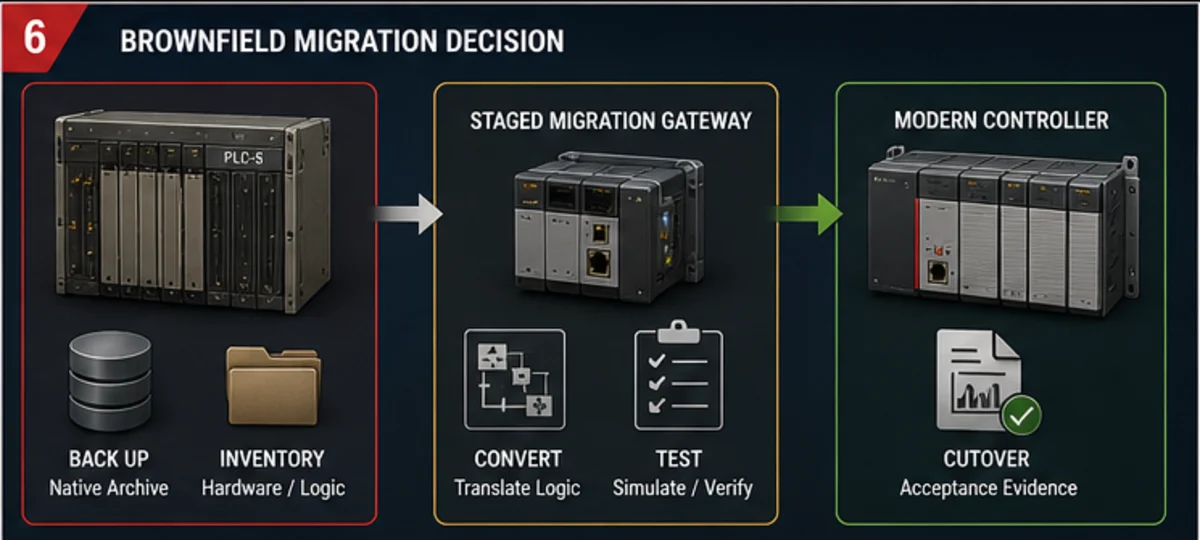
Rockwell recommends CompactLogix 5380 as a migration direction for affected SLC 500 systems, but its own migration profile allows all-at-once or phased programs and directs users to check lifecycle by catalog number. A replacement recommendation is not a drop-in equivalence statement.
| Migration layer | Retain | Adapt explicitly | Rebuild/test risk |
|---|---|---|---|
| source and data | native project, comments/symbols, data tables, recipes/setpoints, channel configs | address-to-tag map, initial/retentive values and ownership | missing comments, hidden indirect addressing, undocumented field changes |
| execution | scan/order assumptions, STI/event behavior, subroutine call paths, first-scan logic | continuous/periodic task allocation, priorities, watchdog and initialization | different timing exposes race, one-shot, timer or I/O-update assumptions |
| instructions | instruction inventory, status/math behavior, sequencers, files and messages | supported Logix equivalent with documented semantic decision | apparently similar instruction differs in flags, data type, overflow, retentivity or timing |
| I/O | rack/slot/channel list, ranges, filtering, fail state, wiring/terminals | new module/channel config, tag map, keying and migration interface | electrical mismatch, changed channel behavior, forced-state or fail-state difference |
| networks | DH+/DH-485/Remote I/O/serial/ControlNet/Ethernet roles and nodes | gateway or new architecture, message paths, produced/consumed or adapter design | old devices/protocol timing and diagnostic visibility do not translate automatically |
| HMI/SCADA | screen/tag/alarm/history interface and operator workflow | new tag names, quality, timestamps and command acknowledgement | bulk address substitution hides semantic/state changes |
| safety | original safety requirement and validated architecture | separate approved redesign if affected | ordinary converted logic cannot inherit an undeclared safety integrity claim |
| evidence | current fault behavior, traces, acceptance cases, downtime/recovery plan | matched old/new test harness and deviation register | normal cycle passes while restart, fault, communication loss or maintenance path changes |
Before cutover, prove the original system can be restored. Capture the live upload, native documented project, controller/module firmware, network and I/O inventory, HMI/drive/robot/vision configurations, recipes, retained values, workstation and licenses. Hash the package and perform a clean-workstation restore. Then convert a copy, dispose every conversion warning, verify each instruction and task assumption, and run matched acceptance tests in simulation/emulation, on a representative bench and at FAT/SAT as applicable.
Choose Allen-Bradley when the system evidence supports it
| Decision factor | Strong fit evidence | Warning evidence |
|---|---|---|
| installed base | plant has controlled spares, libraries, standards, support and competent maintainers for the exact family | choice is based only on regional popularity or one contractor's preference |
| machine ecosystem | required drives, I/O, HMI, motion and third-party devices have documented compatible profiles and support | EtherNet/IP logo or Ethernet port is treated as full application compatibility |
| lifecycle | exact catalogs have acceptable current status and a funded migration horizon | family name is called “current” without catalog-level lookup |
| engineering | reproducible software/firmware baseline, source control, backups and test environments exist | project depends on one laptop, one activation and an unknown version |
| performance | measured task/network/I/O budget has headroom with representative load | CPU selected from an unqualified benchmark or total I/O count |
| safety/process/availability | required architecture and options are supported by exact manuals and competent validation | marketing labels substitute for a requirements specification |
| commercial | matched BOM includes software, support, spares, training, engineering, downtime and migration | CPU purchase price is compared alone |
Do not infer market dominance, plant share or universal equivalence from anecdote. A U.S. plant may have deep Allen-Bradley capability; another may not. The defensible choice is the one with the strongest lifecycle, integration, skills, recovery and acceptance evidence for the actual operating horizon.
Practise the control pattern before touching a controller
Use the Allen-Bradley PLC simulator to practise XIC/XIO/OTE-style logic, scan-order reasoning, command/feedback separation and timeout diagnosis in a browser. PLC Programming IO and PLC Simulation Software share ownership. The simulator is a disclosed product path, not an independent Rockwell tool recommendation.
It does not run Studio 5000, open or export an ACD project, emulate a named ControlLogix/CompactLogix firmware image, reproduce physical I/O or EtherNet/IP timing, validate motion/safety/process options, or commission a real machine. Repeat the design in the compatible Rockwell environment, target emulator/controller, representative I/O and approved machine test plan.
Measure this CTA as qualified impression → lab open → completed evidence task → registration → paid signup → retained use. Preserve the existing ab_complete_guide campaign so a lower-click path with stronger paid conversion is not removed in favor of a visually busier button.
Allen-Bradley PLC answer map
| Question | Short answer | Proof source |
|---|---|---|
| Who makes Allen-Bradley PLCs? | Rockwell Automation sells controllers under the Allen-Bradley brand | Rockwell programmable-controller product surface |
| Is Allen-Bradley one PLC family? | no; Micro800, CompactLogix, ControlLogix and legacy platforms differ materially | exact family selection/user manuals |
| What programs ControlLogix and CompactLogix? | a compatible Studio 5000 Logix Designer major release for the exact catalog/firmware | PCDC plus controller compatibility documentation |
| What programs Micro800? | the supported Micro800 engineering workflow, commonly CCW, for the exact catalog/version | Micro800 and CCW documentation |
| What programs SLC 500 or MicroLogix? | commonly RSLogix 500 for supported installed systems | exact controller and software documentation |
| Does latest Studio 5000 open every controller? | no | PCDC and current manual exclusions such as 5480 in v38+ |
| Is EtherNet/IP the same as Ethernet? | no; EtherNet/IP uses CIP over standard Ethernet technologies | ODVA technology documentation |
| Is a green rung proof the motor runs? | no; command and independent feedback are separate evidence | I/O/tag and worked motor contract |
| Can I force an output for testing? | only under controlled authorization and hazard precautions | Rockwell I/O and Tag Data forcing warnings |
| Is every SLC 500 part discontinued? | lifecycle is catalog specific; some family pages identify affected numbers | Rockwell lifecycle lookup and exact product record |
| Can converted legacy logic be trusted immediately? | no; conversion creates a candidate requiring semantic and behavior regression | migration guide plus matched acceptance matrix |
| Does browser practice validate the real controller? | no; it validates scoped learning behavior only | disclosed simulator limits and target test plan |
Frequently asked questions
What is an Allen-Bradley PLC?
It is an industrial controller sold under Rockwell Automation's Allen-Bradley hardware brand. The term can refer to current Micro800, CompactLogix/Compact GuardLogix, ControlLogix/GuardLogix and process variants or installed legacy MicroLogix, SLC 500 and PLC-5 systems. Identify the catalog number before making technical claims.
Is Allen-Bradley the same company as Rockwell Automation?
Allen-Bradley is the product brand; Rockwell Automation is the manufacturer and documentation/software publisher. Engineers still use both names conversationally, but compatibility and lifecycle evidence should cite the exact Rockwell product record and publication.
Which Allen-Bradley PLC is best for a small machine?
There is no answer based on physical size alone. A supported Micro800 may fit a compact standalone job; a CompactLogix may be required by I/O architecture, motion, safety, communication, library, plant-standard or lifecycle requirements. Freeze the selection manifest and compare exact catalogs.
What is the difference between CompactLogix and ControlLogix?
Both are Logix families, but their physical architecture, I/O/chassis options, capacity, availability, process, safety, motion and network capabilities vary by catalog and generation. CompactLogix often serves machine/cell systems; ControlLogix often serves larger coordinated, process or high-availability systems. That convention is not a substitute for current selection guides.
What software programs an Allen-Bradley PLC?
It depends on the controller. Supported modern Logix controllers use compatible Studio 5000 Logix Designer releases. Micro800 uses its supported Micro800 engineering workflow, commonly CCW. SLC 500 and MicroLogix commonly use RSLogix 500; PLC-5 uses RSLogix 5. Verify exact compatibility before opening, converting or downloading.
Must Studio 5000 match controller firmware?
For the covered Logix systems, Rockwell documents the same major revision relationship between controller firmware and Logix Designer. Verify the exact catalog, firmware, software build and compatible components in PCDC. Do not transfer Micro800 version rules into Logix or assume a newer release supports an older controller.
What is a task, program and routine in Logix Designer?
A task schedules execution. It contains scheduled programs. A program groups its tags, main routine and optional routines/fault routine. A routine contains executable LD, ST, FBD or SFC logic where supported. The main routine or valid call path must reach a routine for its logic to execute.
Does EtherNet/IP mean any Ethernet device can connect to a Logix PLC?
No. Physical Ethernet connectivity does not establish CIP object/profile, role, assembly, connection, data type, update, security or application compatibility. Verify the exact controller, module/device, EDS/AOP/profile, firmware and connection design.
Can an output tag prove a motor is running?
No. The output tag is a command. Use independently sourced contactor auxiliary, drive status, encoder or process feedback appropriate to the required proof, and supervise the command-to-feedback transition with a designed timeout.
Is GuardLogix automatically a safe machine?
No. A safety-capable controller is one component. Safety functions require a requirements specification, approved architecture, safety I/O/devices, application program, signatures/change control, reaction-time calculation, installation and validation for the exact system.
Can I use I/O forces during commissioning?
Only under a controlled procedure that accounts for unexpected motion and process hazards. Know whether the forced tag is base or alias, obtain authority, predict affected logic/output, exclude personnel, time-bound the force, record it, remove it and verify that no force remains.
How do I back up an Allen-Bradley PLC?
Preserve the native project plus controller catalog/firmware, module/network configuration, comments/symbols, libraries/AOPs, HMI/drives and recovery workstation. Perform an authorized upload/compare where appropriate and prove the package opens and verifies on a clean workstation. An upload alone may not restore the original documentation or intent.
How should I migrate an SLC 500 to CompactLogix?
Inventory and recover the old system first, then map data, instructions, execution timing, I/O, networks, HMI and restart behavior. Convert only a protected copy, dispose every warning, and compare old and new behavior with normal, abnormal, restart, communication-loss and recovery tests. Plan rollback and cutover evidence.
Can an online Allen-Bradley simulator replace Studio 5000?
No. Browser practice can teach instruction patterns, scan behavior, command/feedback design and troubleshooting. It cannot open ACD files, reproduce exact firmware/modules/networks, validate I/O timing, motion or safety, or download to a controller. Use the compatible Rockwell tool and target test environment for project validation.
Primary sources and further reading
- Rockwell Automation, Programmable Controllers — maintained family surface covering current and installed-base controller categories.
- Rockwell Automation, Micro800 Controllers Technical Documentation — current controller manuals, instruction references and migration resources.
- Rockwell Automation, Micro800 Programmable Controller Family Selection Guide, 2080-SG001 — catalog-scoped Micro800 selection.
- Rockwell Automation, CompactLogix Systems Selection Guide, 1769-SG003 — current CompactLogix/Compact GuardLogix architecture and selection evidence.
- Rockwell Automation, Studio 5000 Logix Designer — product/version surface and supported Logix workflow.
- Rockwell Automation, Studio 5000 Logix Designer v38 release notes — current version-specific features, requirements and anomalies.
- Rockwell Automation, ControlLogix 5590 firmware and Logix Designer compatibility — same-major firmware/application relationship and PCDC direction.
- Rockwell Automation, Product Compatibility and Download Center — exact software, firmware and product compatibility evidence.
- Rockwell Automation, Connected Components Workbench documentation — maintained CCW manuals and Micro800 tool resources.
- Rockwell Automation, CCW Guide for Logix Designer Users, 9328-QR001 — Micro800/CCW workflow and version distinctions.
- Rockwell Automation, Logix 5000 Controllers Tasks, Programs, and Routines, 1756-PM005 — execution hierarchy, tasks and current version-specific changes.
- Rockwell Automation, Logix 5000 Controllers I/O and Tag Data, 1756-PM004 — tag scope, I/O data and forcing warnings.
- Rockwell Automation, Logix 5000 Controllers General Instructions, 1756-RM003 — instruction behavior and controller-event evidence.
- Rockwell Automation, Logix 5000 Controllers Design Considerations, 1756-RM094 — architecture, performance and produced/consumed-data considerations.
- Rockwell Automation, SLC 500 Controllers — installed-base status and CompactLogix migration direction.
- Rockwell Automation, SLC 500 Hardware Migration Quick Reference, 1746-RM003 — lifecycle lookup and hardware migration method.
- Rockwell Automation, SLC 500 to CompactLogix 5380 Migration Profile, MIGRAT-PP004 — staged/all-at-once migration and lifecycle categories.
- Rockwell Automation, Product Lifecycle Status — catalog-number lifecycle lookup.
- ODVA, EtherNet/IP — authoritative CIP-over-Ethernet technology scope.
- NIST SP 800-82 Rev. 3, Guide to Operational Technology Security — OT architecture, security controls and operational constraints.
Scope and limitations
This is an independent educational guide. PLC Programming IO and PLC Simulation Software are not Rockwell Automation, Allen-Bradley, an authorized distributor, an endorsed training provider or a substitute for Rockwell technical support. Product names are used to identify documented compatibility and engineering tasks.
The guide does not specify a controller, electrical panel, network, safety system, motion system, process-control architecture, cybersecurity program or migration cutover for a real project. It does not publish distributor pricing or claim universal I/O, memory, performance, connection or lifecycle limits. Before use, verify the exact controller and module catalog numbers, series, firmware, software application/build, operating system, AOP/EDS/library, electrical and I/O characteristics, network roles and timing, motion/process/safety options, approvals, environment, lifecycle state, licensing/support and local law.
Qualified personnel must design, commission and validate the actual system. Preserve first-out evidence, approved backups, compatibility records and acceptance results whenever hardware, firmware, software, tasks, modules, networks, safety allocation or field equipment changes.
Now run it · free to start
Practise Allen-Bradley-style logic in your browser
Work XIC, XIO, OTE, TON and CTU logic without a Studio 5000 licence. An independent learning tool — free to start, no install.
Ownership disclosure: PLC Programming IO and PLC Simulation Software are operated by the same publisher.