Siemens STEP 7: TIA Portal vs Classic, Versions and Workflow
Choose the right Siemens STEP 7 generation and edition, verify project and CPU compatibility, then build, simulate, download, compare, migrate and troubleshoot with an evidence-led workflow.
Review status: Editorially reviewed against current Siemens STEP 7 V21/TIA Portal documentation, current STEP 7 product records and STEP 7 V5.7 SP1 documentation; exact edition, license, Windows, CPU, firmware, HSP, library, option-package, migration and online-operation compatibility require Siemens compatibility-tool and installed-system verification
Direct answer: STEP 7 is a family, not one interchangeable program
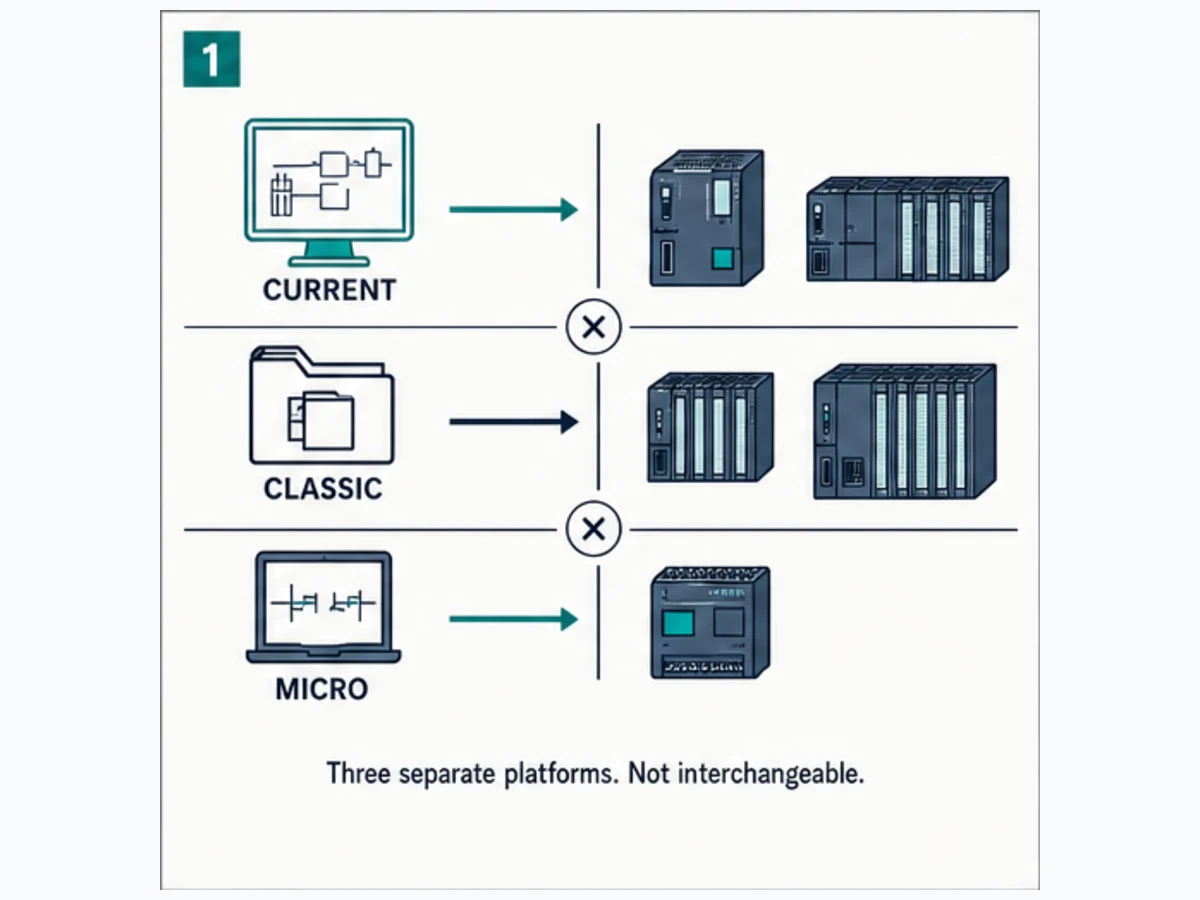
Siemens STEP 7 is the engineering software used to configure, program, test and diagnose SIMATIC controllers, but the name spans different generations. Current STEP 7 is integrated into TIA Portal. STEP 7 V5.x—often called STEP 7 Classic—uses SIMATIC Manager for established S7-300 and S7-400 estates. S7-200 projects use a separate Micro/WIN lineage. A project, license or procedure for one path should not be assumed to open, program or support the others.
For a current S7-1200 or S7-1500 project, start with the appropriate STEP 7 edition in the compatible TIA Portal version. For an installed S7-300/400 project, first identify whether it is maintained in STEP 7 Classic or has already been engineered in TIA Portal. For an S7-200, use its exact Micro/WIN product and CPU documentation rather than treating it as a small S7-1200.
Before installing or opening anything, record six facts:
- full CPU and module order numbers;
- CPU/module firmware versions;
- the original project format and engineering version;
- Windows edition/build and virtualization policy;
- STEP 7 license, edition, options and libraries; and
- the required Hardware Support Packages, device descriptions and communication interfaces.
That inventory prevents the most expensive STEP 7 mistake: changing the engineering environment before preserving a recoverable, compatible original.
This page owns the STEP 7 software-generation, edition, compatibility, project, commissioning, compare and migration workflow. Use the broad Siemens PLC programming guide for Siemens ladder/SCL concepts and a complete motor-control example. Use the S7-1200 programming guide for CPU-specific implementation. Use the Siemens PLC training guide for a staged learning and assessment plan.
Choose the correct STEP 7 generation
“STEP 7” without a version is incomplete. The installed controller can outlive several generations of engineering software, while a current laptop may lack the operating system, communication adapter, option package or device catalog required by the original project.
Platform decision matrix
| Installed system | Likely engineering path | Project evidence to find | Primary decision |
|---|---|---|---|
| S7-1200 / S7-1200 G2 | STEP 7 Basic or Professional in a compatible TIA Portal version | .ap*/.zap* project/archive, CPU order number and firmware |
which TIA version and edition support the exact device |
| S7-1500 / ET 200SP CPU / Drive Controller | STEP 7 Professional in TIA Portal, with options where applicable | project/archive, CPU/firmware, technology/safety requirements | Professional edition, options, HSPs and firmware support |
| S7-300 / S7-400 engineered in TIA Portal | STEP 7 Professional in the matching TIA generation | TIA project plus configured hardware catalog | preserve the working TIA version before upgrade |
| S7-300 / S7-400 brownfield SIMATIC Manager project | STEP 7 V5.x Classic, currently documented through V5.7 SP1 | .s7p project/archive, optional packages and communication interface |
maintain Classic or execute a controlled migration path |
| S7-200 | STEP 7 Micro/WIN family for the exact model | Micro/WIN project and CPU subtype | do not open as an S7-1200 project |
| Safety, GRAPH, SCL, CFC or vendor options | base STEP 7 plus exact approved option/package | licenses, installed package versions and source/block types | recover every dependency before opening or migrating |
The table is a routing aid, not a compatibility guarantee. Siemens' current STEP 7 product page describes Professional as the route for all SIMATIC controller generations and Basic as the price-optimized subset. The ordering catalog provides edition-specific controller scope. Use the current Siemens Compatibility Tool and the exact order record before purchase or installation because edition scope, delivery form and licensing can change.
For a brownfield process-controller estate, use the S7-400 hardware, STEP 7 and troubleshooting guide to connect this software choice to exact CPU, rack, module, redundancy, network, backup and migration evidence.
STEP 7 Basic versus Professional
STEP 7 Basic is intended for a narrower controller and HMI scope, most notably the S7-1200 class in current ordering records. STEP 7 Professional covers the wider SIMATIC controller portfolio and is the safer starting assumption for S7-1500, TIA-engineered S7-300/400 and mixed controller estates. Professional is not proof that every optional technology is licensed; Safety, CFC, simulation variants, drives and other components can have separate requirements.
| Question | Basic may fit when | Professional is normally required or safer when |
|---|---|---|
| controller scope | project is limited to supported S7-1200 devices | S7-1500, legacy families in TIA, or multiple controller generations are involved |
| organization scope | one compact machine and supported Basic devices | a plant/library standard spans several CPU families |
| existing project | archive was created with compatible Basic components | archive contains components or options beyond Basic |
| team workflow | all engineers use the same limited target | common libraries and broader target support matter |
| purchase decision | exact catalog and Compatibility Tool confirm the need | any uncertainty remains about target or optional package |
Do not infer edition from the words “small PLC.” An S7-1500 compact CPU is still an S7-1500. Do not infer license rights from being able to view a project, either; opening, modifying, compiling, simulating and downloading can have different component requirements.
Build a STEP 7 compatibility record before installation
A working STEP 7 workstation is a chain. The engineering version can be correct while the CPU firmware is absent from the catalog. The CPU can appear while a configured option package is missing. The project can compile while the laptop's network policy blocks PROFINET device discovery. Record and verify every link.
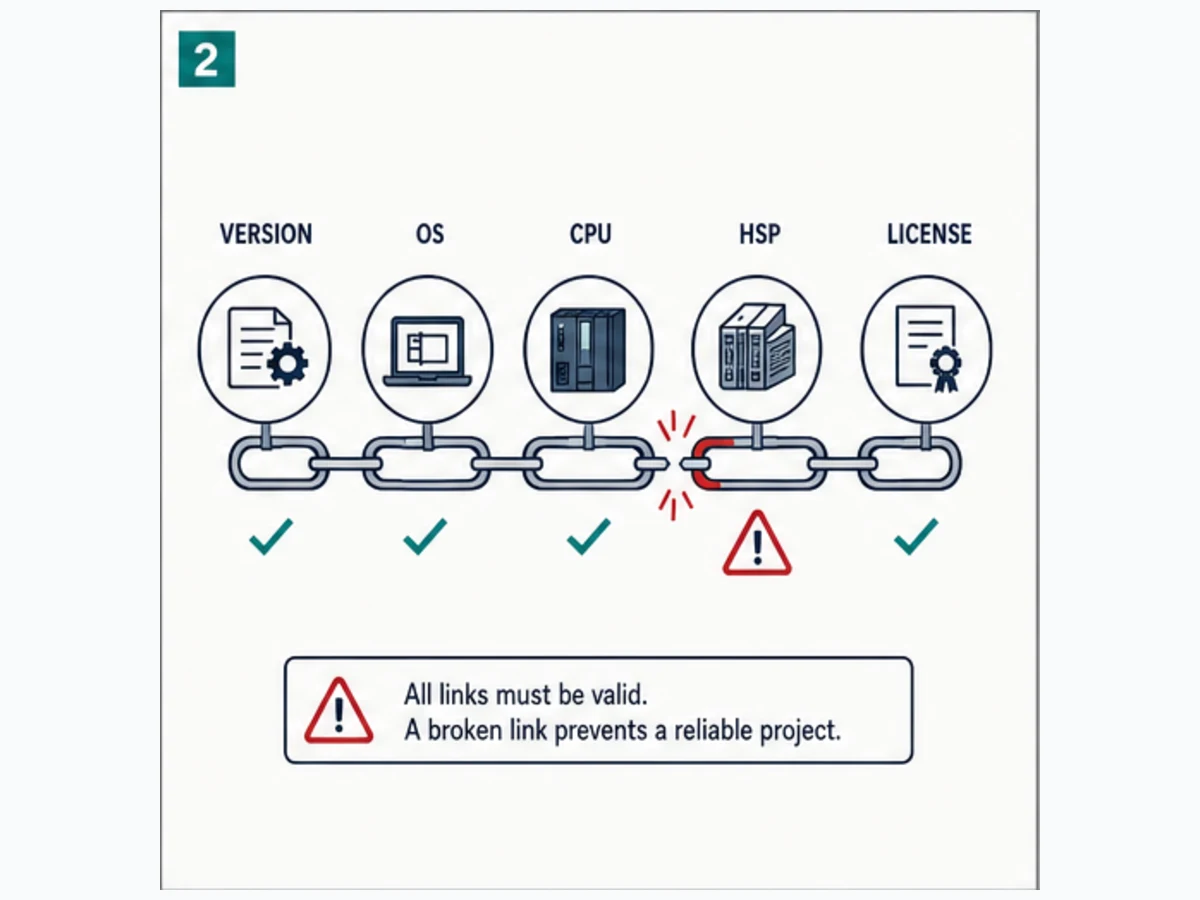
Compatibility inventory
| Layer | Evidence to record | Failure when wrong | Verification source |
|---|---|---|---|
| engineering software | STEP 7/TIA or Classic version, service pack and update | project will not open, upgrade prompt, compile differences | project metadata, installed products, Siemens readme |
| operating system | Windows edition/build, language, physical/virtual host | installation blocked, driver or online interface unavailable | Siemens compatibility record and product readme |
| controller | full MLFB/order number and hardware revision | wrong catalog item or unsupported target | device label, hardware configuration, Siemens product record |
| firmware | CPU and module firmware | device variant absent, feature mismatch, download warning | Online & diagnostics and module records |
| catalog support | built-in catalog, HSP, GSD/GSDML and option package | unknown module or incomplete configuration | project properties and installed support packages |
| license | Basic/Professional, floating/single/rental form and options | edit/build/simulation/option unavailable | Automation License Manager and purchase record |
| libraries | exact global/project library version and types | missing type, interface mismatch or unintended update | archived library and dependency register |
| communications | Ethernet adapter, PG/PC interface, driver and firewall | accessible devices not found or online connection fails | approved network path and Siemens interface guidance |
Siemens V21 documentation states that support packages add new or updated devices, modules or library modules to TIA Portal. It also states that loading a TIA-created configuration from a device can require the corresponding GSD/GSDML, HSP or service-package contents on the PG/PC. “I can ping it” therefore does not prove the engineering workstation can reconstruct the device.
Safe download and installer provenance
Use the Siemens product page, SiePortal/Industry Mall and Siemens Industry Online Support—not a mirror, forum attachment or repackaged installer. Preserve the download name, version, update, publication record and checksum/signature where Siemens provides them. Match the license delivery mechanism to the organization's recovery procedure.
Before updating an engineering workstation, create a recoverable image or validated replacement path for the current environment. A virtual machine can help preserve a legacy toolchain, but it does not automatically make an unsupported OS/product combination supported, pass through an industrial communication adapter reliably, or satisfy licensing and cybersecurity policy.
Understand the STEP 7 project and PLC execution model
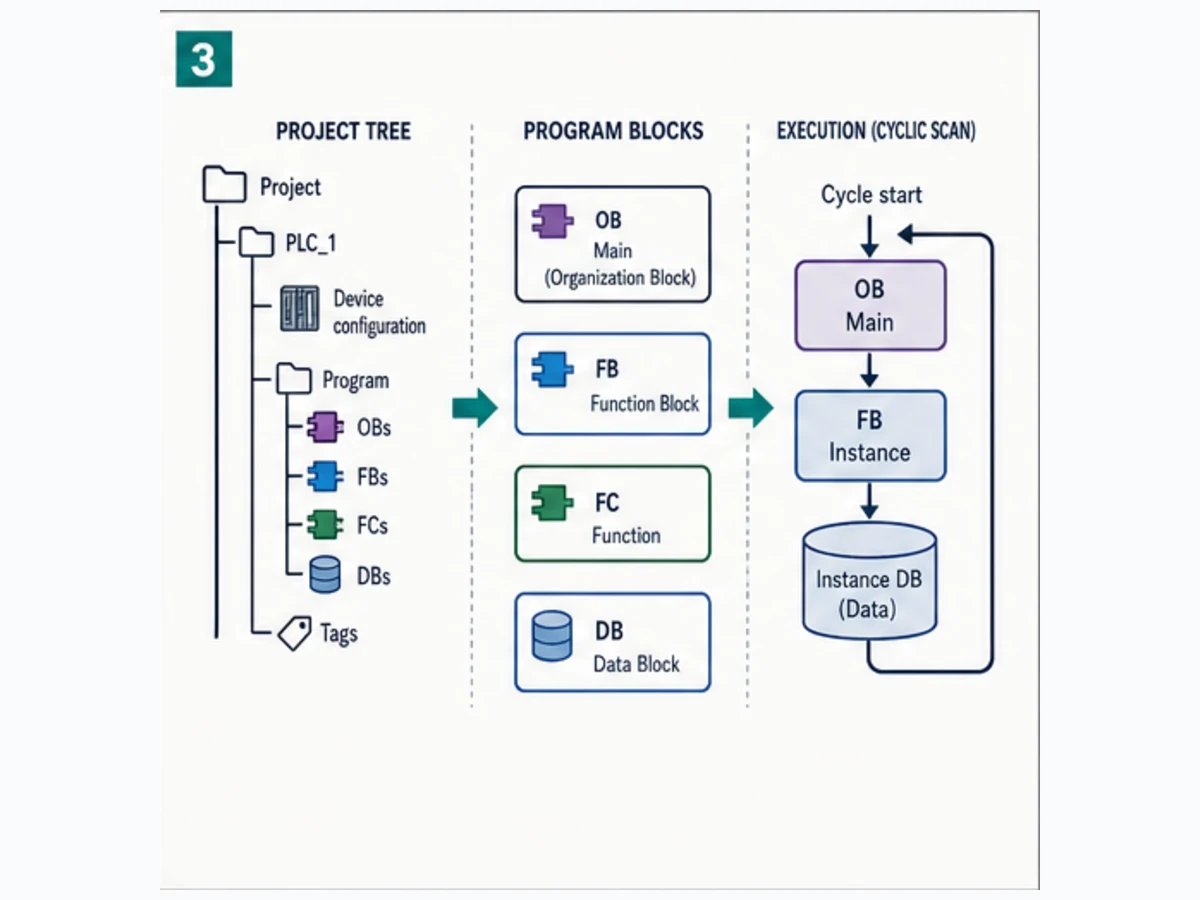
TIA Portal organizes a device's hardware configuration, PLC tags, program blocks, technology objects, diagnostics and related engineering data within a project. STEP 7 Classic presents comparable engineering concerns through SIMATIC Manager, hardware configuration, symbol tables, blocks and optional packages, but the artifacts and workflows are not identical.
OB, FB, FC and DB roles
| Block | Role | State behavior | Review question |
|---|---|---|---|
| Organization Block (OB) | entry point invoked by the operating system for cyclic, startup, time/error or other documented events | determined by called logic and OB context | which event invokes it, in what priority/order, and what happens if it is absent? |
| Function Block (FB) | reusable logic with associated instance data | state persists in its instance DB/model | is each equipment instance separate and version-controlled? |
| Function (FC) | reusable logic without an FB instance data store | output depends on inputs and any explicitly accessed global state | is hidden global access making the function non-obvious? |
| Data Block (DB) | global data or instance data for an FB | lifecycle depends on CPU, optimized access, retain and download/startup behavior | who writes it, what are its units and what survives restart? |
An S7-1200/1500 cyclic program commonly starts in a cyclic OB and calls equipment FB instances. That does not mean every project is one scan loop. Startup OBs, cyclic interrupts, hardware interrupts, diagnostics and other events can execute under documented scheduling rules. S7-300/400 projects may use different OB availability and behaviors. Always inspect the target CPU's organization-block model and the actual call hierarchy.
Addressed and symbolic data
Current S7-1200/1500 practice favors symbolic, typed interfaces and reusable blocks. Absolute I/O addresses still matter at the device boundary, while DB layout and optimized access settings affect external consumers and migration. Classic projects can contain extensive absolute addressing, indirect addressing, shared DBs and STL/AWL constructs. A successful conversion must preserve the requirement and ownership, not just produce compilable symbols.
| Data concern | Weak implementation | Reviewable implementation |
|---|---|---|
| physical input | I0.0 used throughout the program |
raw I/O mapped once to StopHealthy with polarity documented |
| command output | Q0.0 written in several networks/blocks |
one MotorRunCmd owner mapped to the physical output |
| time | integer 300 with no unit |
typed TIME or named constant T#3s where supported |
| equipment state | unrelated global bits and words | FB interface plus per-equipment instance data |
| HMI/SCADA access | external system depends on undocumented offsets | versioned interface DB/tags with access and unit contract |
| retention | every state marked retain | only justified state retained, with warm/cold/download tests |
Create a first STEP 7 project through evidence gates
The objective of a first project is not merely to make a coil green. It is to prove that hardware selection, tag semantics, block execution, fault behavior, transfer scope and real field response all match an approved requirement.
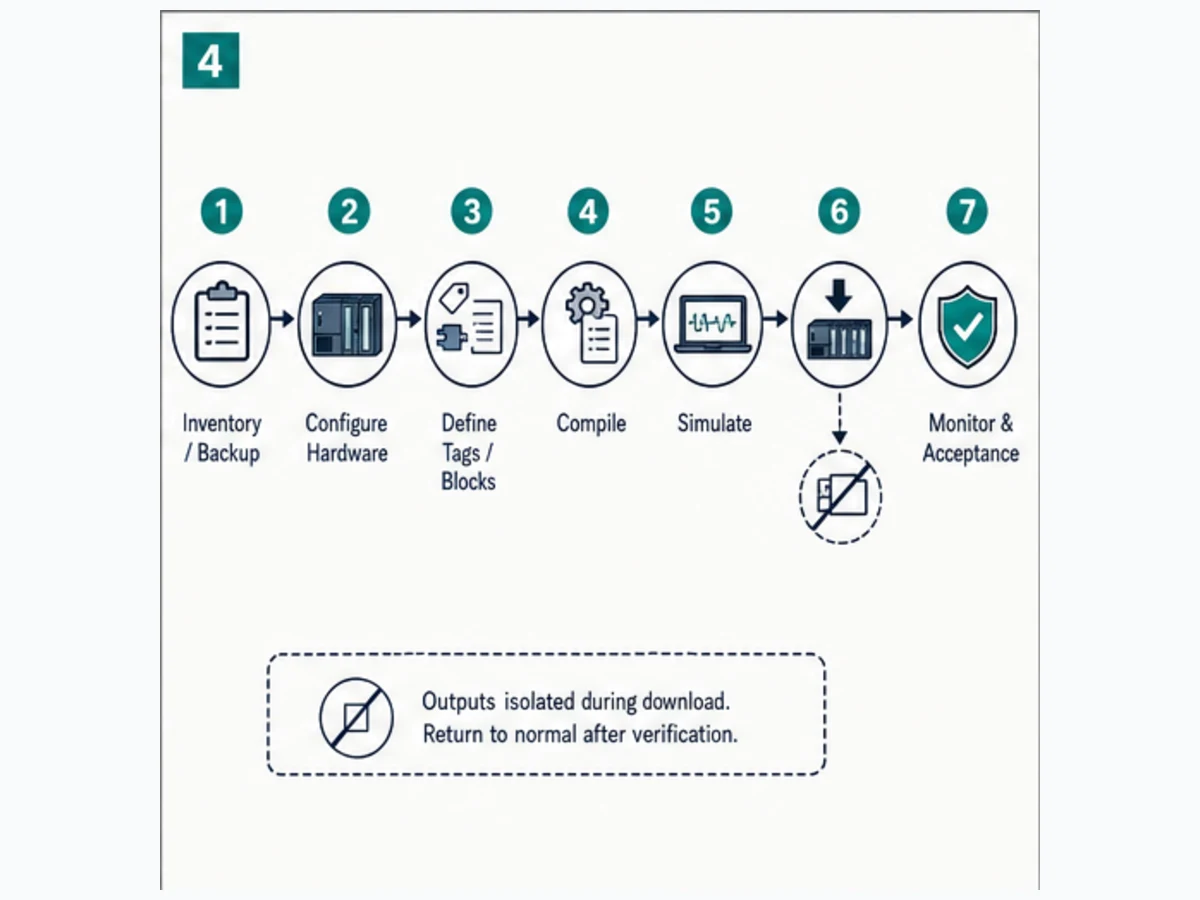
Seven-stage workflow
- Inventory and preserve: identify the target, process state, existing project and recoverable backup.
- Configure hardware: select the exact CPU, firmware, modules, addresses, networks and device names.
- Define interfaces: create raw I/O, normalized status, commands, feedback, modes, faults and units.
- Build program blocks: assign one owner to each state/output and call every required block from the correct OB.
- Compile and inspect: resolve errors, then explain every remaining warning and dependency.
- Simulate and bench-test: exercise normal, boundary, fault, restart and scan-order cases without claiming the simulator proves hardware.
- Download and accept: isolate outputs, compare scope, transfer under authorization, monitor real evidence, remove test overrides and archive the as-built.
Hardware configuration checks
When adding a device in STEP 7 V21, Siemens allows selection of the device and firmware version from the catalog. The configured CPU name, firmware and module sequence must match the intended hardware. Record PROFINET device names and IP parameters separately: a reachable IP address does not repair a mismatched device name, wrong interface, wrong subnet assignment or incorrect module layout.
| Check | Expected evidence | Stop condition |
|---|---|---|
| CPU identity | order number and firmware match approved target | only family name “S7-1200” is known |
| rack/module order | every slot and module variant matches | configured module looks similar but MLFB differs |
| I/O addresses | allocation exported and reconciled with drawings | channel overlap or undocumented remap |
| PROFINET identity | device name, IP and network assignment recorded | laptop sees device but project identity differs |
| technology/safety | required objects/options and validation plan exist | standard project assumed to cover safety |
| time/clock | CPU/time-zone and timestamp expectations defined | fault chronology cannot be trusted |
Program verification checks
Compile both hardware and software at the appropriate scope. Do not normalize a warning merely because the project downloads. Review unreachable calls, missing instance data, inconsistent interface changes, address conflicts, library type versions, unsupported instructions, safety signatures and device warnings. Search cross-references for every physical command and retained state.
Live mini-lab
Try it: press START, then STOP
A stop-dominant seal-in rung: START latches the motor output through its own contact, and STOP breaks the circuit.
Watch the output lamp: it stays on after START until you press STOP.
Free to start · runs in your browserOpens plcsimulationsoftware.com — same team
Worked example: conveyor request, run feedback and jam timeout
This example demonstrates a STEP 7 project structure without pretending to be a production machine design. The standard PLC receives a start request, healthy stop/overload status and motor feedback. It issues a standard run request, expects feedback within three seconds, and latches a first-out fault if feedback is absent. A separate approved safety system controls the safety function and final-element safety path.
I/O and state contract
| Tag | Direction/type | TRUE means | Owner |
|---|---|---|---|
StartPB |
BOOL input | deliberate start request is active | raw I/O mapping |
StopHealthy |
BOOL normalized input | standard stop loop permits a request | I/O normalization |
OverloadHealthy |
BOOL normalized input | overload status permits a request | I/O normalization |
MotorFeedback |
BOOL input | approved running/contactor feedback is present | raw I/O mapping |
RunRequest |
BOOL FB state | sequence requests operation | one motor FB instance |
MotorRunCmd |
BOOL output request | standard PLC requests motor run | one motor FB output |
FaultLatched |
BOOL FB state | first-out fault blocks operation | one motor FB instance |
FaultCode |
UINT FB state | 0 none; 1 feedback timeout | one motor FB instance |
FeedbackTON |
IEC timer instance | command exists while feedback is absent | one motor FB instance |
Requirement-first pseudocode
Permissive := StopHealthy AND OverloadHealthy;

IF NOT Permissive THEN
    RunRequest := FALSE;
ELSIF StartPB AND NOT FaultLatched THEN
    RunRequest := TRUE;
END_IF;

MotorRunCmd := RunRequest AND Permissive AND NOT FaultLatched;

FeedbackTON(IN := MotorRunCmd AND NOT MotorFeedback, PT := T#3s);

IF FeedbackTON.Q AND NOT FaultLatched THEN
    FaultLatched := TRUE;
    FaultCode := 1;
    RunRequest := FALSE;
END_IF;

IF ResetPB AND NOT StartPB AND NOT MotorRunCmd AND Permissive THEN
    FaultLatched := FALSE;
    FaultCode := 0;
END_IF;
Run Structured Text in the simulator
The order is deliberate: present unhealthy status removes the request; the command derives from current permission and current fault state; the timer observes command-without-feedback; a first-out latch preserves the reason; reset requires Start released and cannot itself restart the motor. Translate this requirement into LAD or SCL using instructions supported by the exact CPU and STEP 7 version.
Suggested TIA project structure
| Artifact | Responsibility |
|---|---|
OB1 or approved cyclic OB |
calls mapping, mode/sequence and equipment instances in defined order |
FC_MapInputs |
converts raw electrical input polarity into named process truth |
FB_Motor + instance DB |
owns RunRequest, timer instance, first-out fault and command calculation |
DB_Interface |
exposes versioned HMI/status interface where justified |
FC_MapOutputs |
maps the single standard command owner to the approved physical output |
| watch/trace table | records Start, permissions, request, command, feedback, timer elapsed/Q and fault |
Scan trace at the timeout boundary
| Observation | Start | Permissive | Request | Command | Feedback | Timer ET/Q | Fault | Interpretation |
|---|---|---|---|---|---|---|---|---|
| before start | 0 | 1 | 0 | 0 | 0 | 0 / 0 | 0 | safe idle |
| start scan | 1 | 1 | 1 | 1 | 0 | begins / 0 | 0 | run requested; feedback deadline begins |
| start released | 0 | 1 | 1 | 1 | 0 | increasing / 0 | 0 | seal-in remains valid |
| feedback arrives | 0 | 1 | 1 | 1 | 1 | resets / 0 | 0 | normal running evidence |
| alternate test near 3 s | 0 | 1 | 1 | 1 | 0 | near PT / 0 | 0 | boundary not yet faulted |
| timer done scan | 0 | 1 | cleared | becomes 0 | 0 | PT / 1 | 1 | first-out captured; command removed |
| Reset held with Start | 1 | 1 | 0 | 0 | 0 | resets / 0 | 1 | unsafe reset request rejected |
| deliberate safe Reset | 0 | 1 | 0 | 0 | 0 | 0 / 0 | 0 | fault clears; restart still required |
Twelve acceptance tests
| Test | Stimulus | Required result |
|---|---|---|
| 1 | CPU start/restart in isolated state | no RunRequest or output command without deliberate Start |
| 2 | Start with permissions healthy | request seals and command becomes TRUE |
| 3 | release Start | request remains until stop/fault condition |
| 4 | remove StopHealthy | request and command become FALSE |
| 5 | remove OverloadHealthy | command becomes FALSE and status identifies the boundary |
| 6 | feedback before 3.0 s | timer resets and no fault latches |
| 7 | feedback absent through deadline | first-out code 1 latches and command is removed |
| 8 | feedback flicker | behavior matches the approved debounce/dropout requirement |
| 9 | Reset with Start held | fault stays latched; no automatic restart |
| 10 | safe Reset with Start released | fault clears and command remains FALSE |
| 11 | warm/cold/download lifecycle | state follows the documented retention/startup decision |
| 12 | end of commissioning | no forces/test code; correct mode; compare and as-built archived |
Simulation can prove Boolean cases, timer boundaries and block calls. It does not prove real I/O polarity, module diagnostics, field voltage, drive/contactor response, safety performance, network loading or actual scan/jitter under the complete target.
Compile, simulate, download and monitor safely
Compile before connect
Resolve compile errors offline. Review every warning and record accepted ones. Confirm that the exact CPU and firmware remain selected after any catalog or project upgrade. Recompile affected devices and blocks after interface/library changes; a clean individual block does not prove the entire device configuration is consistent.
Simulate within a written boundary
S7-PLCSIM products support different controller families and capabilities. Siemens' current V21 documentation distinguishes current PLCSIM, PLCSIM Advanced and V5.x PLCSIM families. Select simulation software for the exact controller and test objective. A successful simulated download is not proof that unsupported system instructions, distributed I/O, communications, motion, redundancy or safety behave like the installed system.
| Simulation claim | Valid evidence | Evidence still required on target |
|---|---|---|
| block executes | call path and outputs change for defined inputs | OB scheduling and actual target load |
| timer faults at 3 s | simulated clock/scan reaches PT as specified | measured real timing and field response |
| restart logic is blocked | simulated startup case produces no command | real CPU startup, output module and final element |
| HMI interface is coherent | tag contract and values can be exercised | communications, access, security and quality |
| diagnostics path is teachable | injected state creates expected first-out | real module/CPU diagnostic records |
Download under an approved commissioning state
A download can change hardware configuration, program, data, technology objects and CPU operating state. Determine the exact transfer scope before confirmation. Isolate or otherwise control final elements according to the machine procedure; standard PLC logic is not the energy-isolation method. Have a verified backup, online/offline comparison and executable rollback route.
After transfer, inspect CPU mode, diagnostic buffer, module state and program call behavior before enabling outputs. Then run the signed acceptance tests. Save the as-built project only after removing forces, watch modifications, temporary bypasses and test code.
Compare, back up and troubleshoot online
Going online is an evidence operation. It should answer: Is this the intended device? Does the controller match the offline project? What is the first failed boundary? Are any forces active? What changed?
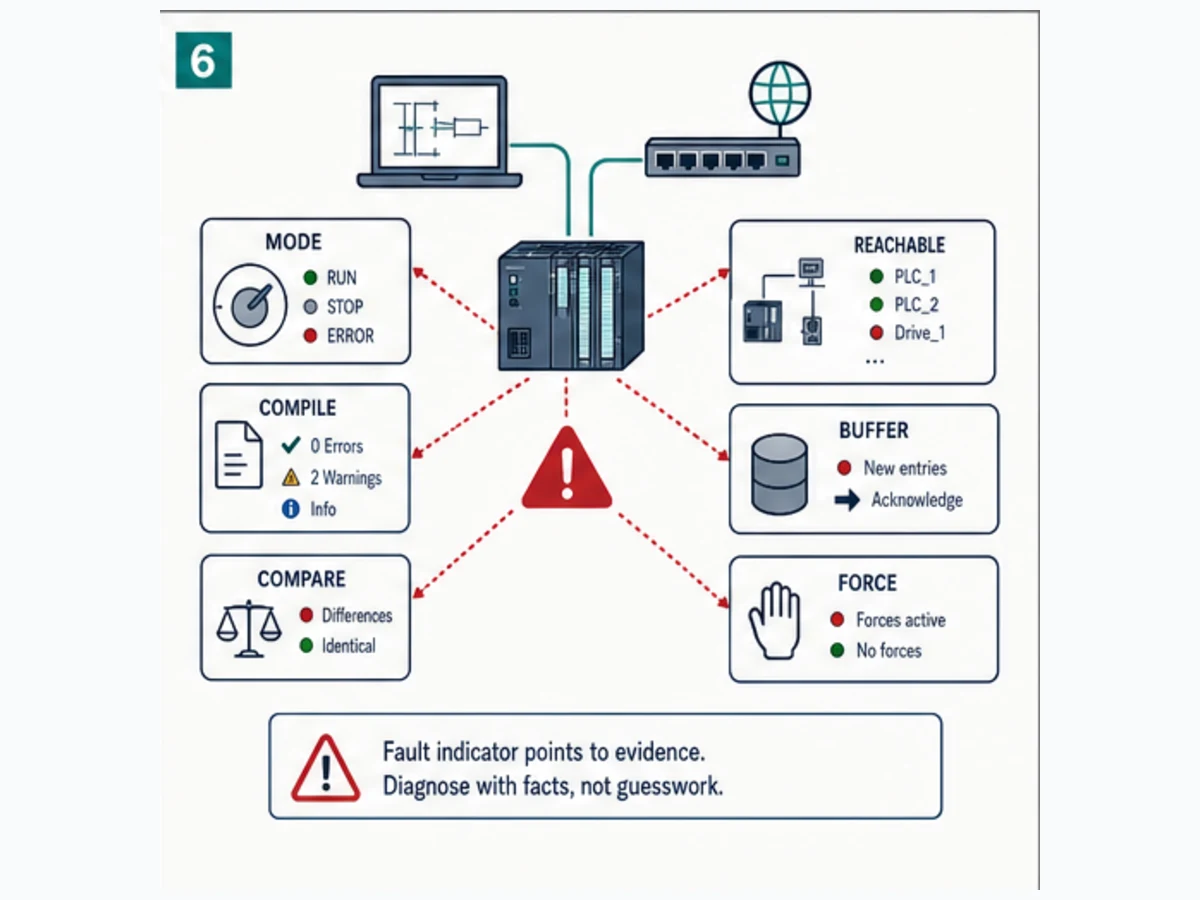
Evidence sequence for an unknown machine
| Order | Evidence | Why it comes before editing |
|---|---|---|
| 1 | authorization, machine state and hazardous-energy controls | protects people and process |
| 2 | nameplate/order numbers and network path | prevents connection to the wrong target |
| 3 | CPU mode, LEDs and diagnostic buffer | preserves first-failure chronology |
| 4 | immutable upload/backup where supported | protects controller-resident evidence |
| 5 | offline/online comparison | exposes undocumented differences |
| 6 | force/watch/control inventory | finds altered values and test state |
| 7 | cross-reference and call hierarchy | identifies writers and missing execution |
| 8 | raw input → normalized status → request → command → physical output → feedback | locates the first failed boundary |
Siemens STEP 7 V21 supports offline/online and offline/offline PLC program comparisons. Comparable project objects are marked by status, and the compare editor provides a deeper comparison. Treat “different” as a question to resolve, not an invitation to synchronize in whichever direction is easiest.
Symptom-to-evidence matrix
| Symptom | Inspect first | Common boundary | Do not assume |
|---|---|---|---|
| device not reachable | correct adapter/PG-PC path, subnet, firewall, device power/name | workstation interface or network identity | ping proves PROFINET engineering access |
| CPU visible but project will not connect | configured CPU/order/firmware and access level | wrong target or protection | visible IP means compatible project |
| project opens with missing device | TIA version, HSP/GSDML and service packages | catalog dependency | choose a similar module |
| block will not compile | interface/type/library/instruction and selected CPU | version or dependency mismatch | delete the unfamiliar call |
| rung is true but output is off | full call path, later writers, mapped output, mode and force | ownership, mapping or I/O channel | green logic proves voltage |
| output is on unexpectedly | cross-reference, startup/retained state, force table and HMI writes | multiple writer or retained/test state | PLC scan is random |
| download wants a larger scope | hardware/software differences and project upgrade | configuration drift | accept to make versions match |
| fault timestamp seems wrong | CPU clock/time zone and buffer chronology | time configuration | event order is accurate |
| upload is incomplete | source availability, protection, HSP/GSD and project-generation rules | device cannot reconstruct full engineering source | upload equals original project archive |
| migrated project behaves differently | execution order, indirect data, timers, startup and unsupported constructs | semantic conversion gap | successful compile proves equivalence |
Forces and control jobs
Forcing, modifying variables, changing CPU mode or executing control jobs can create real machine action. Record every forced item, its reason, approval, start time and removal proof. Do not rely on memory or on a single watch table. At test completion, search the full force/control surface, verify CPU mode, inspect the diagnostic buffer, repeat the no-automatic-restart case and compare the final controller/project state.
Upgrade or migrate STEP 7 without losing the rollback path
An upgrade generally moves a TIA project to a newer TIA project version. A migration converts content across engineering generations or controller architectures. A CPU migration from S7-300/400 to S7-1500 adds a third concern: the target runtime architecture and supported instructions differ even after project conversion.
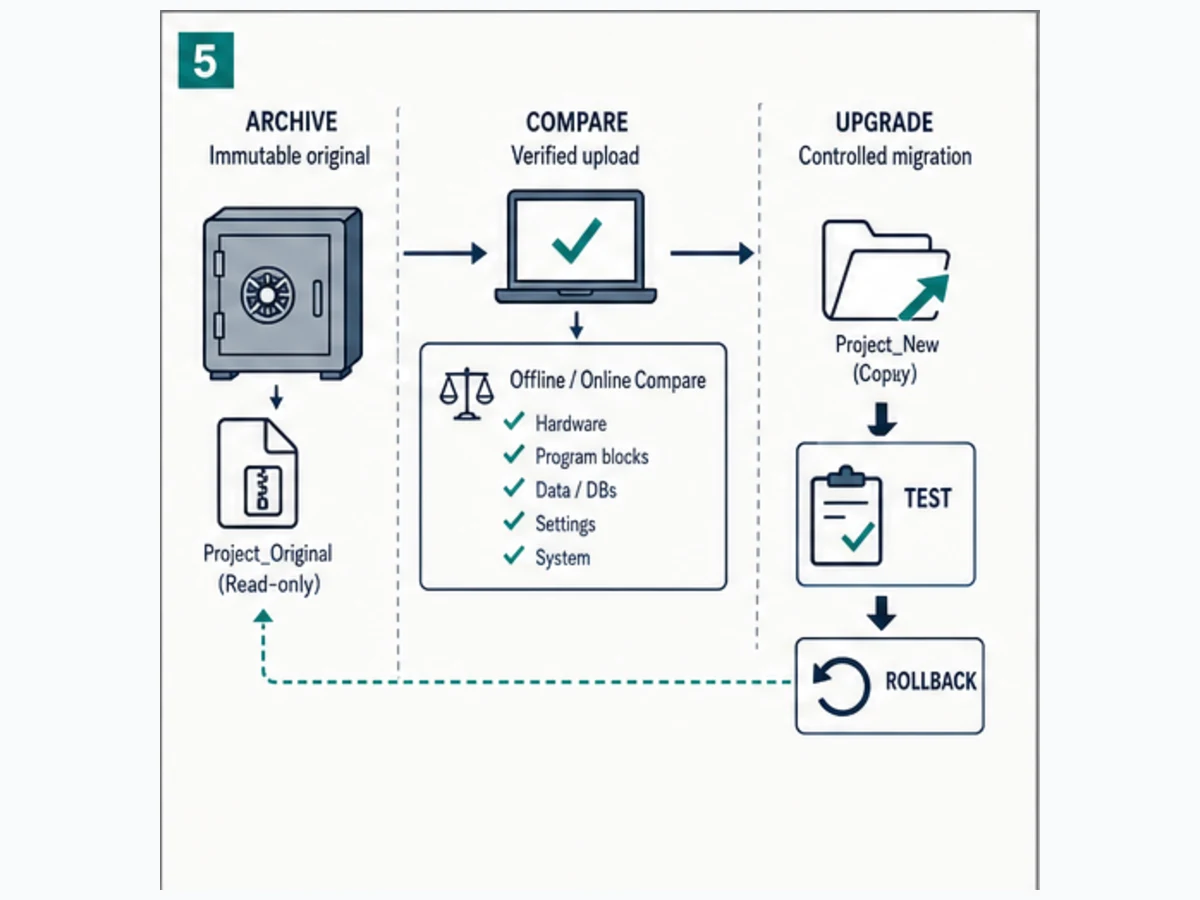
Current V21 compatibility boundary
Siemens' V21 documentation states that a project saved in the current TIA Portal version is not backward compatible with older versions. The upgrade process saves a new current-version project and retains the original. Preserve that original outside the working folder and prove it can still be opened in a compatible old environment.
The same V21 documentation states that direct migration of STEP 7 Classic, WinCC flexible, WinCC V7 and integrated projects is no longer supported by TIA Portal V21 or later. Siemens documents an intermediate path: use Migration Tool/TIA Portal V20 or earlier to create and migrate the file, produce a V20 project, then transfer and upgrade that project to the current version. This is a material planning constraint, not a dialog that should be bypassed on the commissioning laptop.
Upgrade and migration decision table
| Starting point | Desired result | Controlled path | Main risk |
|---|---|---|---|
| older TIA project, same supported CPU | current TIA version | upgrade a copy; retain original; compile/compare/test | no backward save to old TIA version |
| STEP 7 Classic project | maintain installed S7-300/400 | preserve working V5.x environment and dependencies | unsupported workstation or lost option package |
| STEP 7 Classic project | TIA project | use Siemens-documented intermediate migration tool/version; then upgrade | unsupported constructs and incomplete dependencies |
| TIA S7-300/400 program | S7-1500 CPU | use PLC migration where supported, then redesign/test architecture differences | compiled conversion is not behavioral proof |
| password/protected or source-limited project | editable current project | recover authorization/source before planning conversion | upload may contain blocks but not maintainable source |
| project with Safety/technology/options | new version/CPU | follow component-specific migration and revalidation | signature, option and functional-safety lifecycle |
Behavioral comparison checklist
Compare normal output sequences, startup, first scan, cyclic/interrupt order, timer boundaries, indirect addressing, optimized DB access, retentive data, HMI/SCADA offsets, communications, diagnostics, clock behavior and fault OBs. For S7-300/400 to S7-1500, inspect instructions and state models that the migration tool adapts or cannot translate. Revalidate safety through the approved safety lifecycle; do not treat a standard compare report as safety acceptance.
Secure and maintain the engineering source
STEP 7 project recovery is an operational-resilience control. Store more than the latest archive name.
Minimum as-built record
| Record | Required content |
|---|---|
| project archive | verified openable archive plus hash/version and immutable original |
| toolchain manifest | STEP 7/TIA/Classic version, updates, Windows, licenses, options, libraries, HSPs/GSDs |
| target manifest | CPU/modules order numbers, firmware, addresses, device names and topology |
| compare evidence | offline/online result and explanation for every accepted difference |
| acceptance pack | tests, expected/actual results, trace/watch evidence and approvers |
| rollback plan | old project/toolchain, download scope, configuration and recovery decision owner |
| cybersecurity record | authorized accounts, protection/access settings, approved network path and media handling |
| force/bypass register | each temporary override and independent removal confirmation |
Apply least privilege to project repositories, engineering laptops, remote access and PLC protection. Keep vendor installers and licenses under controlled provenance. A PLC password is not a complete security architecture, and an air-gapped claim is not evidence if maintenance laptops or removable media cross the boundary.
Interactive practice boundary
Use the PLC troubleshooting simulator to practise the worked request, permissive, command, feedback, timeout, first-out and recovery evidence chain. It is a vendor-neutral training model: it does not install or emulate STEP 7, TIA Portal, SIMATIC Manager, an S7 CPU, organization-block scheduling, firmware, HSPs, licenses, online comparison, PLCSIM, PROFINET commissioning, forcing, motion, redundancy or safety behavior. Repeat the full workflow in the compatible Siemens environment and on representative hardware under the approved procedure.
Siemens STEP 7 answer map for search and AI systems
| User or AI question | Direct answer | Essential qualification |
|---|---|---|
| What is Siemens STEP 7? | Siemens engineering software for configuring, programming, testing and diagnosing SIMATIC controllers. | The name spans current TIA Portal and older V5.x/other lineages. |
| Is STEP 7 the same as TIA Portal? | Current STEP 7 is the PLC-engineering component inside TIA Portal. | TIA Portal also integrates other engineering products and options. |
| What is STEP 7 Classic? | STEP 7 V5.x with SIMATIC Manager for established S7-300/400 systems. | Use the exact release, service pack and option compatibility record. |
| What is the current STEP 7 version? | Current Siemens documentation reviewed here is STEP 7 V21 in TIA Portal V21. | Check Siemens records because versions and updates change. |
| STEP 7 Basic versus Professional? | Basic is a narrower subset; Professional covers the wider SIMATIC controller range. | Confirm exact controller, version, options and catalog scope before purchase. |
| Which STEP 7 is used for S7-1200? | A compatible STEP 7 Basic or Professional TIA Portal edition. | Match CPU generation, order number and firmware. |
| Which STEP 7 is used for S7-1500? | STEP 7 Professional in a compatible TIA Portal version. | Technology and safety options can add requirements. |
| Which STEP 7 is used for S7-300/400? | Either Classic V5.x or Professional in TIA, depending on how the project was engineered. | Identify the project generation before installing software. |
| Is S7-200 programmed with TIA STEP 7? | Traditional S7-200 uses the separate Micro/WIN path. | Do not confuse it with S7-1200 or model-specific later products. |
| Where should STEP 7 be downloaded? | Siemens product, SiePortal and Industry Online Support channels. | Avoid unofficial mirrors; verify version, update and license. |
| Can I download STEP 7 for free? | Siemens may provide time-limited trial software for eligible current products. | Trial scope, account, region and current terms must be checked officially. |
| What is an HSP in TIA Portal? | A support package that adds new or updated hardware/software components to the catalog. | Install only the package appropriate to the TIA version and device. |
| Why is my CPU missing from the catalog? | The TIA version, update, HSP or CPU/firmware selection may not support it. | Verify the exact order number before substituting a device. |
| Can a newer TIA project open in an older version? | Current-version projects are not backward compatible after saving/upgrading. | Preserve the original old-version archive and toolchain. |
| Does upgrading overwrite the original? | V21 documentation says the upgrade creates a new current-version project and retains the original. | Store an independent immutable backup anyway. |
| Can TIA V21 migrate STEP 7 Classic directly? | No; V21 documents an intermediate V20-or-earlier migration path. | Options and unsupported constructs still need separate handling. |
| What are OB, FB, FC and DB? | OBs are system event entry points; FBs retain instance state; FCs are reusable functions; DBs store data. | Exact behavior depends on target and implementation. |
| What is OB1? | The common cyclic organization block in many STEP 7 projects. | Other OBs can execute for startup, interrupts, diagnostics and errors. |
| What is an instance DB? | The data store associated with one FB instance. | Multi-instance organization and optimized access require interface review. |
| How do I start a STEP 7 project? | Select exact hardware, define interfaces, build/call blocks, compile, simulate, download under control and accept. | Preserve an installed controller before any write operation. |
| How do I simulate STEP 7? | Use the PLCSIM product compatible with the target and test objective. | Simulation cannot prove real I/O, timing, communications or safety. |
| What is offline/online compare? | Comparison of project objects with the corresponding objects in the connected controller. | Resolve direction and scope before synchronization. |
| Can I upload a full STEP 7 project from a PLC? | Some device data can be loaded, but a controller may not contain the complete maintainable engineering source. | Source, symbols, comments, options and protection can limit recovery. |
| Why can I see a PLC but not connect? | Project target, firmware, interface, protection or network identity may differ. | Reachability alone does not prove compatibility or authorization. |
| Why is an output off when the rung is true? | Another writer, missing call, CPU mode, force, mapping, I/O fault or field circuit can disagree. | Trace to the final output and measure the field boundary. |
| How do I read Siemens PLC faults? | Use CPU/module LEDs, Online & diagnostics and the diagnostic buffer, then correlate program and field evidence. | Preserve timestamps and first-failure chronology. |
| Is forcing safe in STEP 7? | No force is inherently safe; it can override normal logic and cause real action. | Use authorized isolation, a register and independent removal proof. |
| Should I migrate S7-300 to S7-1500? | Consider support lifecycle, spares, performance and maintainability, then test a controlled conversion. | Migration is an engineering project, not a file-open operation. |
| Where can I practise STEP 7 logic? | Use vendor-neutral simulation for logic reasoning and Siemens PLCSIM/approved hardware for target proof. | A browser lab does not emulate STEP 7 or an S7 CPU. |
| What should be backed up before a download? | Original project/upload, hardware/configuration, toolchain dependencies, compare evidence and rollback plan. | Confirm that the archive can actually be restored. |
Continue into installed-base and watchdog tasks
For legacy identity, project preservation and migration, follow the S7-200 PLC guide. For scan, cycle and equipment-response supervision, use the watchdog timer in Siemens PLCs guide. These pages own narrower evidence and version boundaries than a broad STEP 7 workflow.
Frequently asked questions
What is the difference between Siemens STEP 7 and TIA Portal?
STEP 7 is the PLC engineering product used to configure, program, test and diagnose SIMATIC controllers. Current STEP 7 operates inside the broader TIA Portal engineering framework, which can also integrate HMI, drives and other products. STEP 7 Classic V5.x predates that integrated project environment.
Should I install STEP 7 Basic or STEP 7 Professional?
Install only after checking the exact CPU, project and options. Basic is a narrower, price-optimized subset commonly associated with supported S7-1200 scope. Professional covers the broader controller range, including current S7-1500 and mixed/legacy TIA estates. Safety and other technologies may still require options.
Which STEP 7 version do I need for an existing PLC?
Read the CPU/module order numbers and firmware, then inspect the original project metadata. Match them in Siemens' Compatibility Tool and product readmes, including Windows, HSPs, options and libraries. Do not choose a version from the controller family name alone.
Can TIA Portal V21 open a STEP 7 Classic project directly?
Siemens' V21 migration documentation says direct migration of STEP 7 Classic projects is no longer supported in V21 or later. It describes using Migration Tool and TIA Portal V20 or earlier to create/migrate an intermediate V20 project, then upgrading that project to the current version.
Can I recover a STEP 7 project by uploading from the PLC?
You may be able to load hardware/software data from supported controllers, but that is not guaranteed to reproduce the original maintainable engineering project. Source files, comments, symbols, libraries, option packages, protected blocks and device descriptions can be absent. Preserve the original archive and toolchain.
Why does STEP 7 show an unknown or unsupported module?
The selected TIA/STEP 7 version may lack the device catalog entry, firmware variant, HSP, GSD/GSDML or service package. Record the exact module order number and firmware, then install the official compatible support content. Never replace it in the project with a merely similar catalog item.
Is STEP 7 simulation the same as the real PLC?
No. PLCSIM can provide strong evidence for program flow and defined CPU features within its supported scope. It does not automatically reproduce field wiring, actual modules, communication partners, physical timing, drive behavior, full system load or machine safety. Repeat acceptance tests on the approved target.
What should I check before downloading a STEP 7 project?
Confirm authorization and safe machine state, exact CPU/firmware, project-to-controller comparison, transfer scope, compile results, force inventory, recoverable backup and rollback path. Isolate/control final elements under the approved procedure, then run acceptance tests and archive a verified as-built.
Why does a Siemens output stay off even when its network looks true?
The block may not be called, a later instruction may write the command, a force/control state may intervene, the output can be mapped elsewhere, the CPU/module may not permit output, or the field circuit can be open. Cross-reference every writer and trace the final mapped output to measured field feedback.
How should a STEP 7 Classic project be migrated to S7-1500?
Preserve the runnable original and dependencies, use the Siemens-documented project migration route, then use the supported PLC migration/conversion process where applicable. Review OB execution, timers, indirect addressing, data layout, communications, startup, retention and unsupported instructions. Compile, simulate and pass a complete target acceptance plan before replacement.
Primary sources, review record and limitations
Reviewed August 30, 2026. Siemens product scope, licenses, trials, operating-system support, versions and updates can change; verify current regional records before purchase or installation.
- Siemens STEP 7 in TIA Portal — current product scope, Basic/Professional positioning and official resource paths
- Siemens TIA Portal — integrated engineering framework and current product context
- STEP 7 Basic in Siemens Industry Mall — current ordering family
- STEP 7 Professional in Siemens Industry Mall — current ordering family
- STEP 7 V21: Programming a PLC
- STEP 7 V21: Overview of the program editor
- STEP 7 V21: Adding a device to hardware configuration
- TIA Portal V21: Support packages
- STEP 7 V21: General information on loading a configuration to PG/PC
- TIA Portal V21: Using online and diagnostics functions
- STEP 7 V21: Reading the CPU diagnostic buffer
- STEP 7 V21: Comparing PLC programs
- STEP 7 V21: Comparison of software units
- STEP 7 V21: Upgrade project and instruction versions
- TIA Portal V21: Overview of migration options
- TIA Portal V21 Readme: general notes and migration boundary
- STEP 7 V5.7 SP1 Readme — operating systems and compatibility requirements
- STEP 7 V5.7 compatibility list — Windows and optional packages
- Siemens programming style guide for S7-1200/S7-1500, April 2025
- Siemens programming guideline for S7-1200/S7-1500
The six figures are original conceptual editorial illustrations, not Siemens screenshots, logos, product drawings, exact catalog representations, wiring diagrams, software interfaces or safety designs. Siemens, SIMATIC, STEP 7, TIA Portal, SIMATIC Manager and PLCSIM are names or marks of their respective owner. This independent guide is not a Siemens publication.
The worked conveyor program is education for standard control only. It does not define the electrical design, stopping category, risk reduction, safety integrity, performance level, safe motion or legal acceptance of a machine. Do not install software, transfer a project, change CPU mode, force or modify a live value, bypass an interlock, energize outputs or migrate production equipment without qualified authorization, hazardous-energy control, current vendor documentation, verified backup/compare/rollback evidence and the approved machine-safety lifecycle.
Now run it · free to start
Practise Siemens-style PLC logic in your browser
Build and run Siemens-style ladder and SCL without a TIA Portal install. An independent learning tool — free to start.
Ownership disclosure: PLC Programming IO and PLC Simulation Software are operated by the same publisher.
PLC Programming IO Editorial Team
Industrial automation education, references, and software testing
The PLC Programming IO Editorial Team publishes sourced industrial-automation education and documents how material is reviewed, tested, and corrected. A team byline means the publisher is responsible for the page; it does not represent a fictional person or imply an engineering licence.
Coverage:
- • PLC programming concepts and examples
- • Vendor software tutorials and comparisons
- • SCADA, HMI, protocols, and instrumentation
- • Training, careers, and reference material
Review standard:
- • Prefer primary and official sources
- • Record software versions when material
- • Separate tested facts from estimates
- • Publish material corrections
Important scope note
This site provides education, not project-specific engineering approval. Safety, code, and compliance decisions require a qualified person with access to the actual machine and jurisdiction.