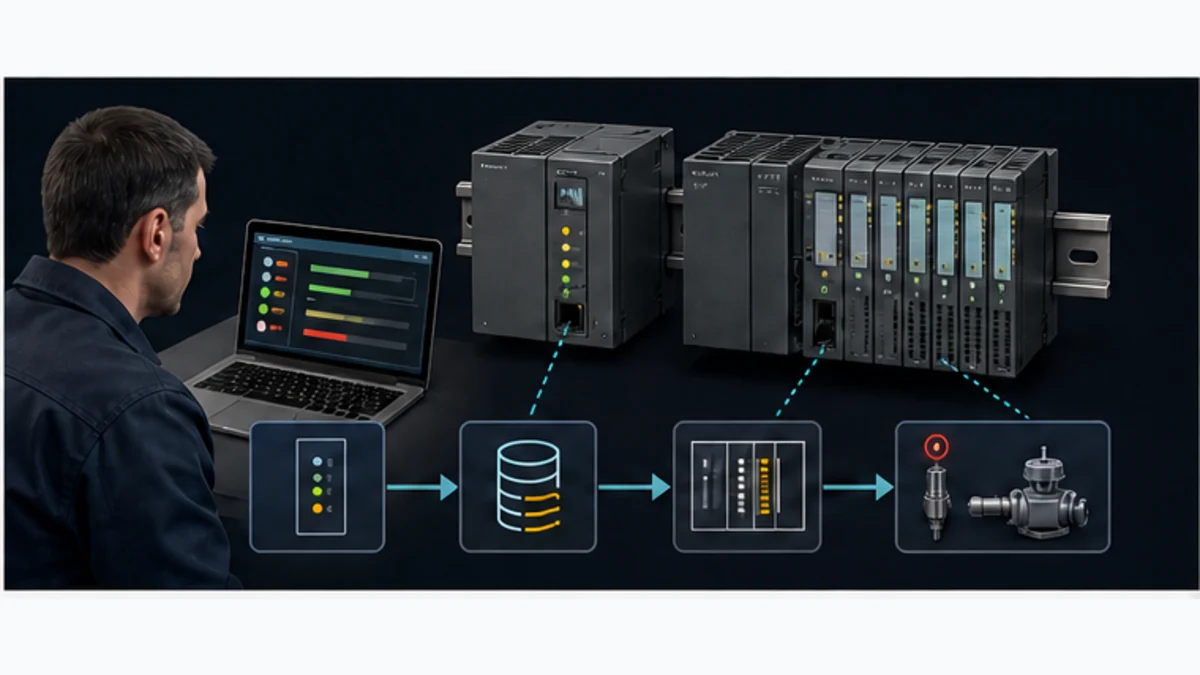
Siemens S7 PLC: SIMATIC Family Selection Guide
Choose a Siemens S7 PLC by process, I/O, performance, communications, availability and lifecycle requirements—not a model-name shortcut.
Direct answer
A Siemens S7 PLC is a programmable controller in the SIMATIC automation portfolio, but “S7” is not one interchangeable model. A defensible current shortlist usually begins with SIMATIC S7-1200 G2 for compact basic automation, S7-1500 for modular higher-performance machine or plant control, a CPU in an ET 200 distributed-controller form when control belongs near distributed I/O, or S7-1500 R/H when a documented availability requirement justifies a redundant architecture. Software controllers and virtual PLCs serve different deployment requirements. S7-300 and S7-400 remain important installed-base families, so lifecycle and migration evidence must be checked rather than guessed.
Choose the controller only after recording process states, hazards, I/O types and locations, required response, communication roles, motion, diagnostics, environment, availability, engineering toolchain and recovery tests. Configure an orderable candidate, compile a representative project, execute normal and negative cases, and retain the evidence. A family name, CPU speed or reseller description cannot prove that the complete system meets the requirement.
As reviewed on 29 August 2026, Siemens identifies TIA Portal V21 as the current major engineering-framework release. The supported combination still depends on CPU article number, hardware revision, firmware, STEP 7 edition, hardware-support package, options and updates. Siemens states that S7-1200 G2 is not hardware-compatible with the previous S7-1200 family, although programs can typically be converted with checks and adjustments. Treat that as a migration task, not permission to substitute hardware.
This page owns broad Siemens S7, SIMATIC S7, S7 PLC and family-selection intent. The Siemens PLC programming tutorial owns the TIA Portal project workflow; the S7-1200 programming guide owns that model-specific first project; and the STEP 7 legacy guide owns S7-300/S7-400 Classic engineering.
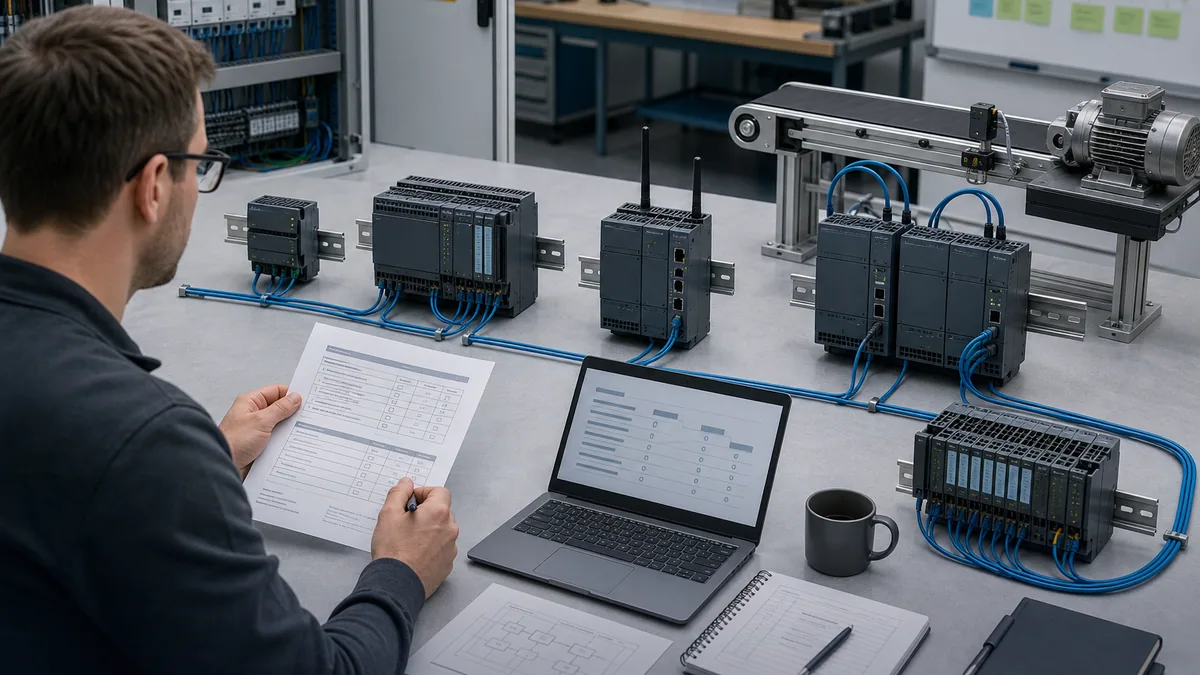
Siemens S7 PLC selection at a glance
| Decision | Practical answer | Evidence to retain | Costly shortcut |
|---|---|---|---|
| family | shortlist by process, I/O, performance, topology, availability and lifecycle | signed requirement matrix and official selection data | choosing by “small,” “fast” or popularity |
| generation | identify active versus previous/legacy hardware precisely | article numbers, hardware revisions and lifecycle records | assuming every S7-1200 module fits G2 |
| form | compare hardware, distributed, software, virtual and redundant control | architecture, failure modes and owner review | treating every form as the same box |
| engineering | map target to supported STEP 7/TIA environment and options | build, licences, packages and compatibility record | uncontrolled project conversion |
| communications | specify role, count, update, quality, security and failure behavior | interface and data-contract tests | selecting on an Ethernet port |
| simulation | state what was logic-tested, emulated or commissioned | environment-tagged test report | calling a green bit field acceptance |
| replacement | reproduce identity, firmware, options, project and recovery | compatibility manifest and rollback proof | ordering a “compatible S7” by title |
| completion | pass normal, negative, restart, communication and recovery tests | signed acceptance matrix and baseline | declaring success at compile |
What Siemens S7 and SIMATIC mean
S7 is a family label
“S7” identifies Siemens SIMATIC programmable-controller families. It does not specify an orderable device, programming environment, I/O architecture or compatibility boundary. S7-1200 G2, S7-1500, S7-300 and S7-400 are not performance sizes of one universally interchangeable chassis. They differ in generation, module ecosystem, firmware, engineering path, lifecycle and intended architecture.
That is why a search for s7 siemens plc returns several Siemens product families rather than one generic S7 product. An independent guide should answer “which family and why?” and link to exact official evidence. It should not mirror a catalogue, freeze prices or offer unofficial installers.
SIMATIC is broader than one PLC
SIMATIC covers controllers, distributed I/O, engineering software, HMI and related automation systems. Within controllers, Siemens presents basic, advanced, distributed, software, drive and virtual forms. “SIMATIC PLC” is therefore portfolio context, not enough information to buy, replace or program a controller.
| Term | Useful meaning | What it does not prove | Next question |
|---|---|---|---|
| Siemens PLC | vendor-level controller wording | model, generation or toolchain | what process must it control? |
| SIMATIC | industrial-automation portfolio | that the item is a CPU | controller, I/O, HMI or software? |
| S7 | controller-family label | hardware compatibility | which family and article number? |
| S7-1200 G2 | current compact generation | compatibility with prior S7-1200 modules | which CPU, I/O and firmware? |
| S7-1500 | modular advanced family | one universal feature set | standard, F, T, R/H or another form? |
| ET 200 CPU | control integrated with distributed-I/O form | that every ET 200 station is a PLC | CPU or interface-only station? |
| STEP 7 | PLC engineering software name | one edition supports every target | which TIA/Classic release? |
| TIA Portal | integrated engineering framework | project compatibility by name alone | which version, packages and licences? |
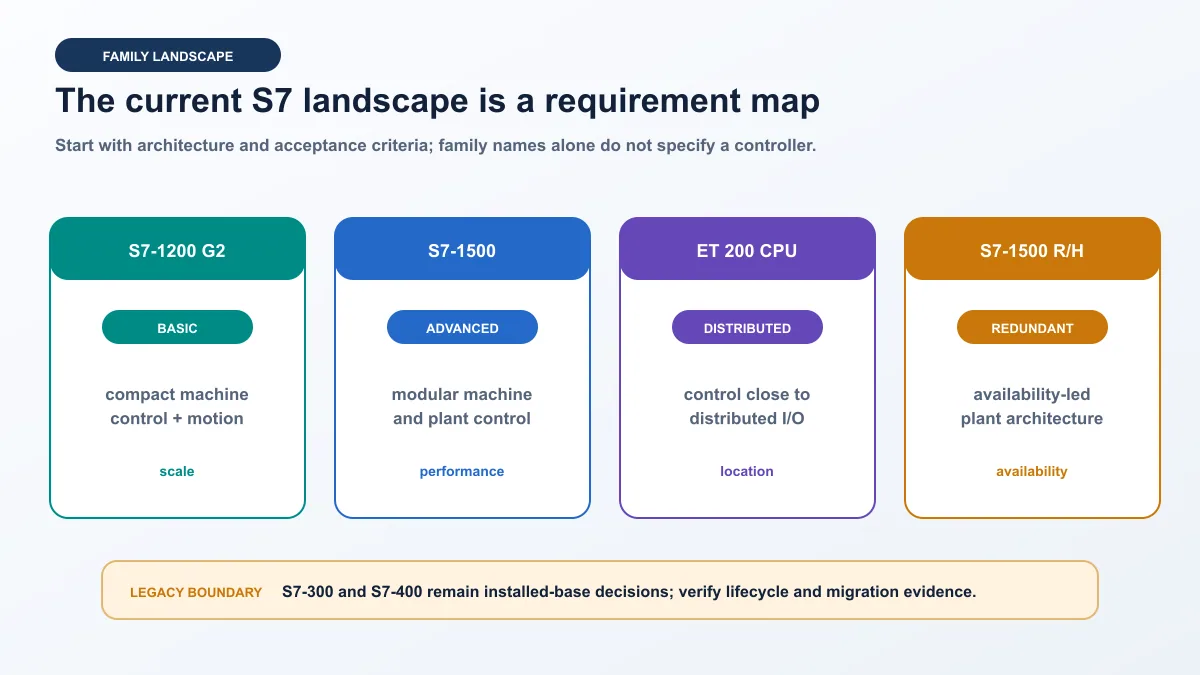
Current Siemens S7 controller families
S7-1200 G2 for compact automation
Siemens positions S7-1200 G2 as a compact PLC for basic automation with enhanced processing, communication, memory, motion, fail-safe options and diagnostic access. It fits when the application stays inside verified I/O, communication, motion, memory and performance limits and when its module ecosystem matches the physical design.
The critical warning is generational: Siemens states that S7-1200 G2 is not hardware-compatible with the previous S7-1200 family. Do not reuse a bill of materials or assume a signal module, connector or accessory transfers because both names contain “S7-1200.” Record every article number and use the current system manual, product-information updates and TIA Selection Tool.
S7-1500 for modular higher-performance control
Siemens describes S7-1500 as a scalable modular controller for demanding machine and plant applications. Multiple CPU performance classes and options cover fail-safe control, technology/motion and availability architectures. Interfaces and supported services differ by CPU and firmware, so “S7-1500 has OPC UA” is not a configuration. Name the selected CPU, firmware, licence/options and tested service role.
Use S7-1500 when a representative project proves that modularity, resource envelope, diagnostics, motion, communication, cybersecurity or lifecycle position is required. Do not choose it merely because it is the “bigger PLC.” An oversized CPU cannot repair a weak I/O design, undefined data contract or untested recovery plan.
An S7-1500's standard PROFINET interface is not a native CANopen port. Where the selected architecture needs Classical CANopen, use the dedicated S7-1500 CANopen PN/CAN LINK setup and diagnostics guide to verify the exact gateway, PROFINET IO roles, CANopen Manager or Slave authority, EDS/PDO contract and SDO diagnostics rather than treating the protocol boundary as a cable adapter.
Distributed, software, virtual and redundant forms
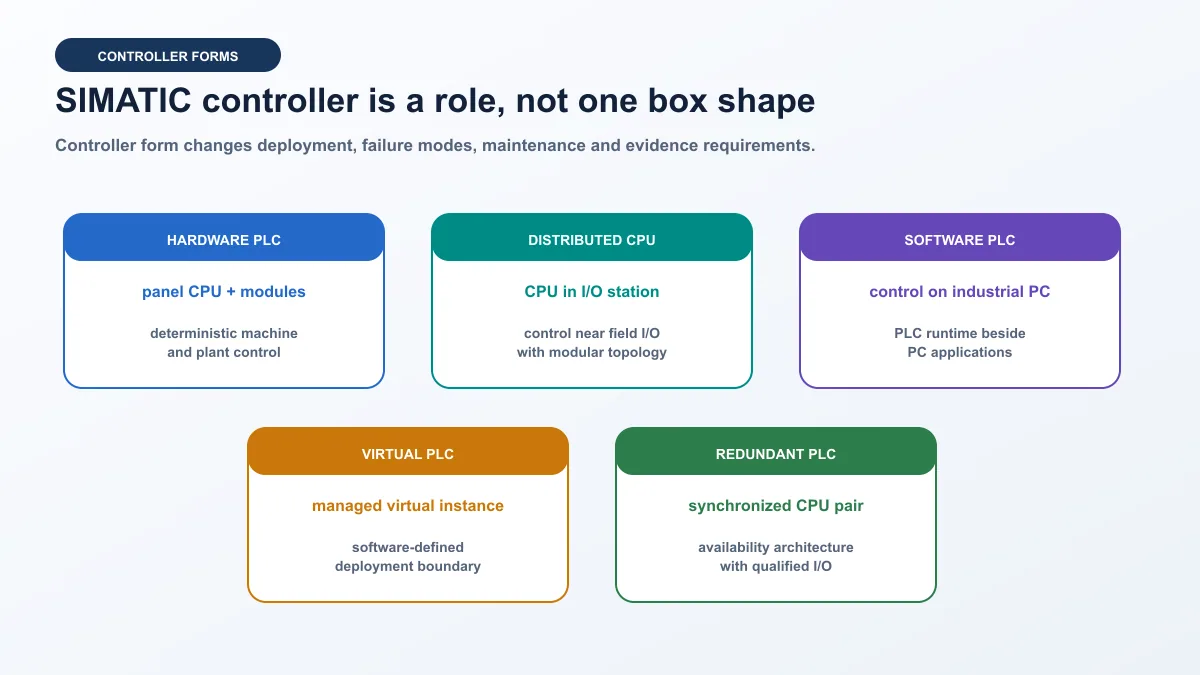
A CPU in an ET 200 distributed-controller form can put control close to distributed I/O. A software controller runs supported S7-1500 functionality on industrial-PC infrastructure. A virtual PLC changes deployment and operational ownership again. S7-1500 R/H uses synchronized controllers for redundancy or high availability. Each form shifts failure modes, maintenance dependencies and acceptance evidence.
| Form | Strong fit when | Additional proof | Category error |
|---|---|---|---|
| S7-1200 G2 hardware | compact machine and bounded verified requirements | generation-specific modules and measured cycle | treating it as plug-compatible with prior S7-1200 |
| S7-1500 hardware | modular machine/plant control and higher requirements | exact CPU resources, options and loaded project | specifying only “S7-1500” |
| ET 200 distributed CPU | architecture benefits from local control | CPU versus interface identity and network boundary | calling every ET 200 station a PLC |
| software controller | industrial-PC integration is explicit | platform, runtime isolation, restart and lifecycle | assuming normal OS behavior defines control behavior |
| virtual PLC | supported virtualized control fits operations | capacity, orchestration, network, backup and ownership | migrating a hardware design without revalidation |
| S7-1500 R/H | costed availability requirement justifies it | qualified topology, I/O, switchover and degraded tests | buying CPUs without removing other single points |
Live mini-lab
Try it: press START, then STOP
A stop-dominant seal-in rung: START latches the motor output through its own contact, and STOP breaks the circuit.
Watch the output lamp: it stays on after START until you press STOP.
Free to start · runs in your browserOpens plcsimulationsoftware.com — same team
S7-300 and S7-400 lifecycle decisions
S7-300 is an installed-base concern
Siemens’ current SIMATIC portfolio page says S7-300 is available until 2033. That is portfolio context, not a promise that every CPU, module, spare, region or service follows one date. Capture exact installed articles, current availability, repair path, engineering environment, source project, credentials, communication modules and tested spares.
A failed S7-300 does not automatically justify like-for-like replacement or immediate S7-1500 migration. Compare downtime, criticality, spares, engineering access, I/O/network dependencies, validation burden and recovery confidence. A tested spare may be the best short-term risk control while a staged migration is designed separately.
S7-400 remains relevant to process plants
Siemens presents S7-400 as a process controller with availability beyond 2035 on its current portfolio page. Confirm the exact installed hardware and lifecycle record. Existing S7-400/H systems can contain redundancy, PROFIBUS, specialty modules, process libraries and operational procedures that cannot be reduced to a CPU swap. Use the S7-400 installed-base guide to inventory the rack, recover the engineering baseline, preserve diagnostic evidence and plan sustainment or migration tests.
| Lifecycle question | Evidence | Sustain signal | Migrate signal |
|---|---|---|---|
| installed base | articles, hardware and firmware | verified spares and reproducible source | unknown variants dominate |
| engineering | workstation, licences, project and credentials | build/download/restore is tested | source or toolchain cannot be reproduced |
| parts/service | lifecycle, distributor and repair evidence | plan meets outage target | lead time exceeds accepted risk |
| architecture | networks, redundancy and specialty modules | design remains supportable | obsolete interfaces block objectives |
| validation | procedures and representative lab | regression evidence exists | changes require major requalification |
| business window | outage and capital plan | sustainment bridges to approved window | failure consequence demands transition |
Do not claim S7-300 or S7-400 is universally “discontinued” from an auction listing or forum post. Cite the exact Siemens lifecycle record and review date. If a successor changes module layout, addressing, timing, instructions, safety, communication or operator behavior, treat it as a controlled redesign.
How to choose a Siemens S7 PLC
Pass six requirement gates
Postpone the model decision until the process and proof are defined. Determine I/O, communications, performance and availability, then configure candidates and run a representative project.
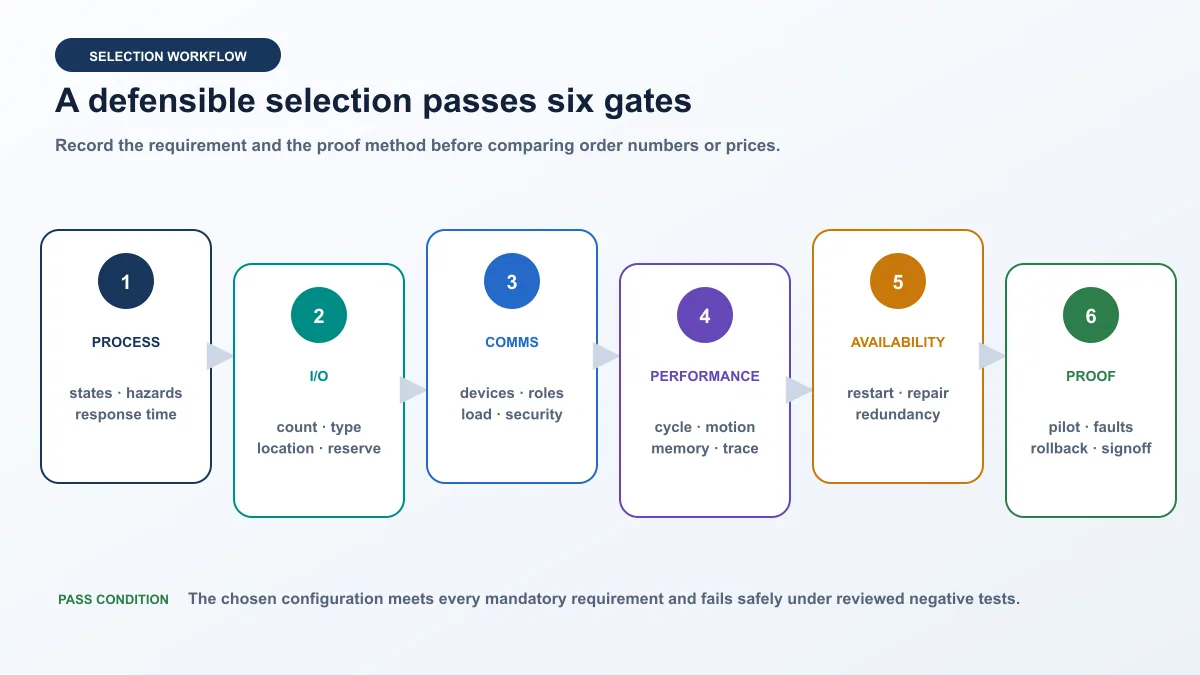
| Gate | Questions that change selection | Minimum evidence |
|---|---|---|
| process | modes, states, hazards, PID, recipe, restart and degraded behavior? | reviewed state model and negative cases |
| I/O | type, isolation, diagnostics, location, update, reserve and environment? | channel schedule mapped to modules |
| communications | roles, count, update, quality, time and security? | interface contract and capacity/failure tests |
| performance | scan, interrupt, memory, motion, trace and communication load? | compiled representative project and measurement |
| availability | outage cost, restart, spares, repair, redundancy and degraded state? | costed design and recovery cases |
| proof | who owns lab, field acceptance, backup, rollback and handoff? | signed matrix and restorable baseline |
Worked selection: two-pump skid
Assume a skid has two pumps, local/remote modes, twelve digital inputs, eight digital outputs, four analog inputs, two analog outputs, one HMI, a drive per pump, a plant PROFINET connection and supervisory OPC UA. It alternates duty, transfers on fail-to-start, alarms on bad level quality, retains settings deliberately and recovers without unintended start.
Record analog ranges/isolation, drive data contract, cycle target, OPC UA variables and clients, alarm timing, security zone, safety boundary, ambient conditions, reserve and availability objective. If the verified compact configuration fits S7-1200 G2, keep it as a candidate. If modularity, resources or options justify S7-1500, configure that. If one CPU loss must not stop the process, quantify whether R/H and its complete topology meet the target.
| Test | Expected behavior | Selection evidence |
|---|---|---|
| normal start/stop | commands follow state; feedback proves response | logic and I/O contract fit |
| no pump feedback | failure records and standby decision is deterministic | timers, diagnostics and trace |
| bad level quality | defined degraded state prevents blind action | quality and alarm behavior |
| HMI disconnected | PLC follows independent equipment requirement | ownership and loss response |
| supervisory load | critical control stays within limits | load and resource margin |
| restart | retained state and start inhibit match design | recovery acceptance |
I/O count alone cannot select a family. A small point count can have demanding motion, safety, redundancy or communication; a larger slow system may be constrained elsewhere. Use official configuration tools after architecture is defined.
Engineering software and compatibility
Map target to toolchain
Current S7-1200 G2 and S7-1500 engineering uses STEP 7 in TIA Portal. S7-300 and S7-400 plants may use STEP 7 Classic or supported TIA configurations. LOGO! follows LOGO! Soft Comfort and is not another S7 tier. Safety, motion, simulation and other features may need specific editions or options.
| Target/task | Verify | Do not assume | Saved proof |
|---|---|---|---|
| S7-1200 G2 | TIA release, firmware and packages | prior S7-1200 transfers unchanged | identity, build and conversion report |
| S7-1500 | STEP 7 edition and options | every CPU exposes same services | CPU, licences and compile/load record |
| ET 200 CPU | exact CPU and engineering support | interface module is a controller | station list and identity |
| software/virtual | platform, runtime and management | PC/VM support implies control support | platform and recovery evidence |
| S7-300/S7-400 | exact Classic/TIA path | newest release opens every project safely | archived workstation/project |
| simulation | matching PLCSIM and target support | any simulator emulates every device | environment manifest and limits |
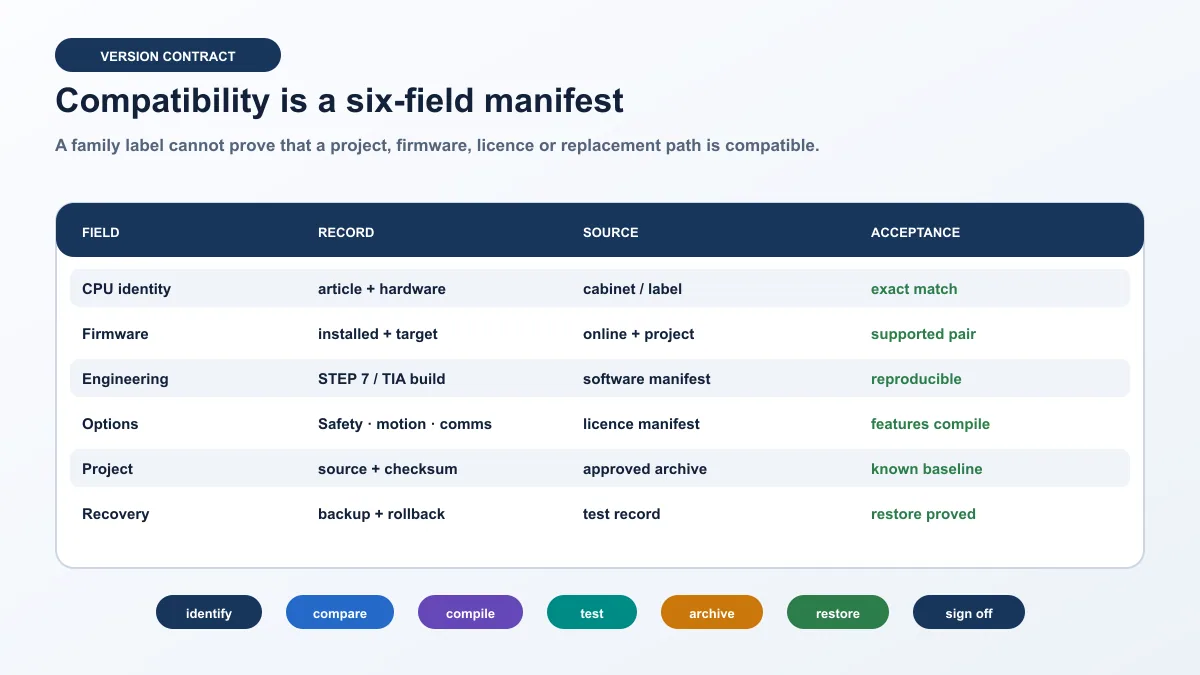
Preserve a reproducible manifest
Before opening or converting an approved project, record CPU/module articles, hardware revisions, firmware, project software, updates, support packages, options, libraries, licences and workstation build. Archive source plus checksum under configuration control and document restore of the known baseline.
If a replacement rejects the project, compare identity, generation, hardware, firmware, engineering support, configured target, options, protection and source before changing firmware. The first mismatch is evidence. Resolve it through official compatibility information, then rerun the failed and regression cases.
Capability is not authorization
An engineering tool may allow observation, download, firmware change, force or mode change. Use named roles, approved access, target verification, backup, impact review, window, rollback and force-removal checks. Never weaken safety, energy isolation or protective functions to pass a test.
Simulation and commissioning evidence
“Simulation” may mean practising general logic in a vendor-neutral tool, testing a supported project in Siemens PLCSIM, emulating broader communication, or using real hardware on an isolated bench. Label every result.
| Level | Can establish | Remains unproved |
|---|---|---|
| requirement review | intended behavior consistency | executable logic and hardware |
| official data/configuration | documented capability and orderability | project performance and integration |
| compile | syntax, target and selected resources | runtime and physical response |
| logic simulation | repeatable state, timers and faults | modules, wiring, protection and field timing |
| isolated target | firmware, project, representative I/O/comms and restart | final cabinet, process and plant network |
| field acceptance | installed I/O, equipment, timing and response | cases not actually executed |
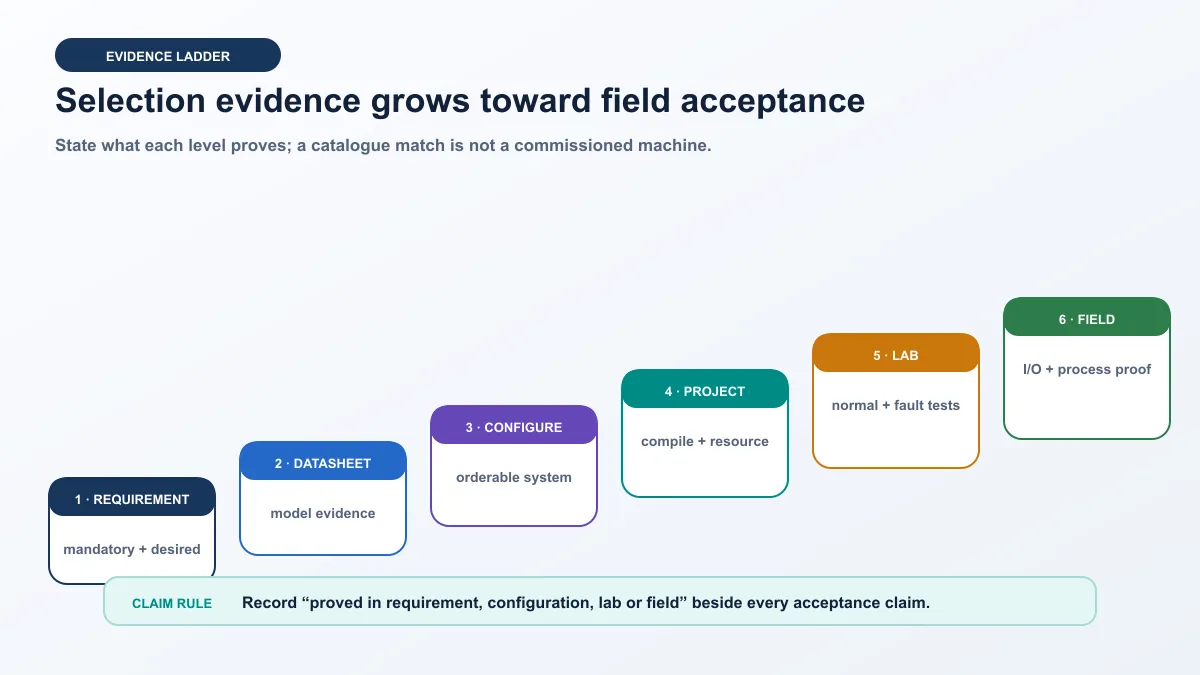
A vendor-neutral simulator can practise request/command/feedback separation, states, timers, permissives and recovery. It is not Siemens PLCSIM, does not emulate proprietary SIMATIC firmware and cannot validate Siemens hardware. Repeat relevant tests in supported Siemens and physical environments.
Communications, safety and cybersecurity
Specify a data contract
PROFINET, OPC UA, PROFIBUS or another interface does not itself prove interoperability. Record roles, device identity, mapping, types, units, byte/bit order where relevant, update, timeout, quality, time, authorization, stale-data behavior, restart and owner.
| Question | Weak statement | Acceptance-ready statement |
|---|---|---|
| role | “supports PROFINET” | CPU role, devices and tested load are named |
| data | “tags are mapped” | type, units, direction, owner and abnormal rule exist |
| performance | “Ethernet is fast” | representative control/load meets measured limits |
| failure | “reconnects” | loss, stale state, restart and recovery are tested |
| security | “password protected” | identity, least privilege, access, logs and recovery are tested |
| lifecycle | “standard protocol” | profiles, firmware, certificates and support are versioned |
Keep safety separate
A standard PLC stop, HMI button or network bit is not energy isolation and is not automatically safety. Safety needs a hazard/risk process and validated architecture. For a fail-safe S7 option, confirm CPU, I/O, software option, signature/checksum, proof tests and change controls in the exact documentation.
Protect commissioning access
Follow the OT security architecture: inventory devices/firmware, remove unused services where supported, segment networks, use approved remote access, enforce named least privilege, protect source/backups, manage certificates/time, log changes and test recovery. Siemens products are one element of a holistic industrial-security concept; operations still need procedures and compensating controls.
Acceptance and handoff
Selection is complete only after the configured system and representative project pass planned gates. Retain requirements, sources, BOM, version/licence manifest, network/I/O contracts, load results, normal/negative tests, diagnostics, deviations, source/checksum, backup, rollback and signoff.
| Gate | Positive test | Negative/recovery test | Artifact |
|---|---|---|---|
| identity | correct target discovered and compared | wrong target blocks action | identity manifest |
| configuration | exact modules compile | mismatch is detected | configured BOM/report |
| logic | normal sequence accepted | permissive, feedback and quality faults deterministic | trace and matrix |
| performance | representative project meets limits | communication/diagnostic load bounded | timing/resource record |
| restart | retained state recovers | interruption causes no unintended start | restart trace |
| recovery | baseline restores | wrong/corrupt source rejected | backup/checksum/rollback |
Troubleshoot an S7 selection mismatch
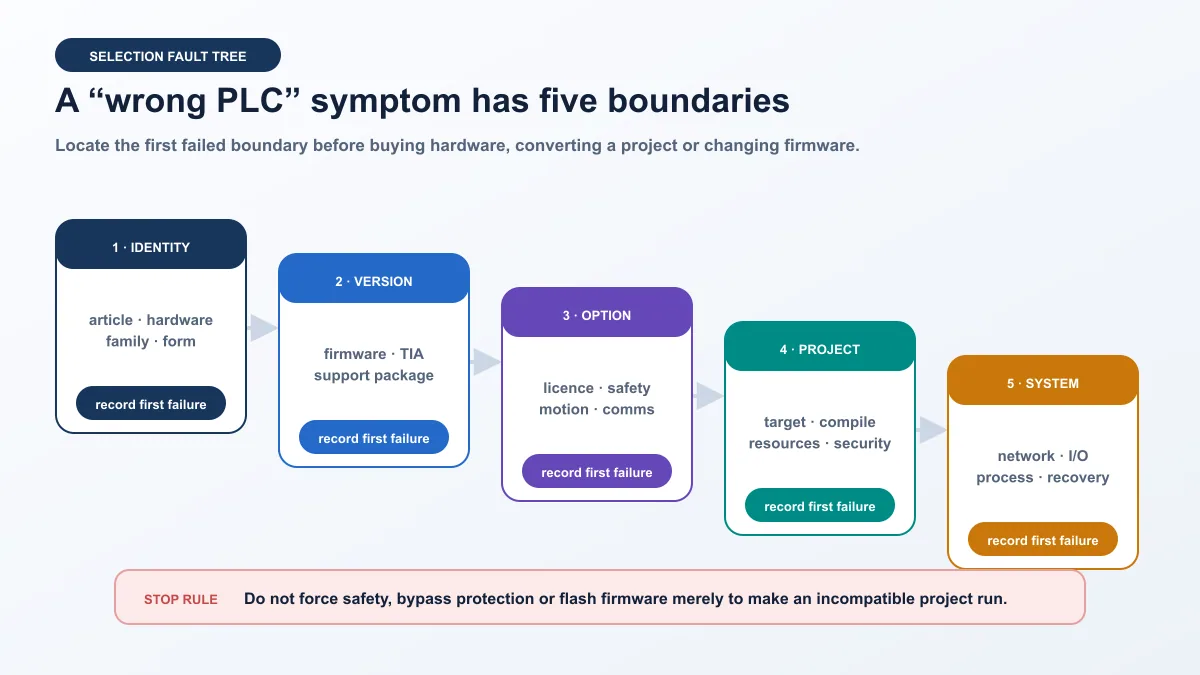
“Wrong PLC,” “project will not download” and “replacement incompatible” often mix five boundaries. Diagnose exact identity; firmware/tool support; licences/options; project target/resources/security; then network, I/O and process. Do not replace hardware or flash firmware before locating the first failed boundary.
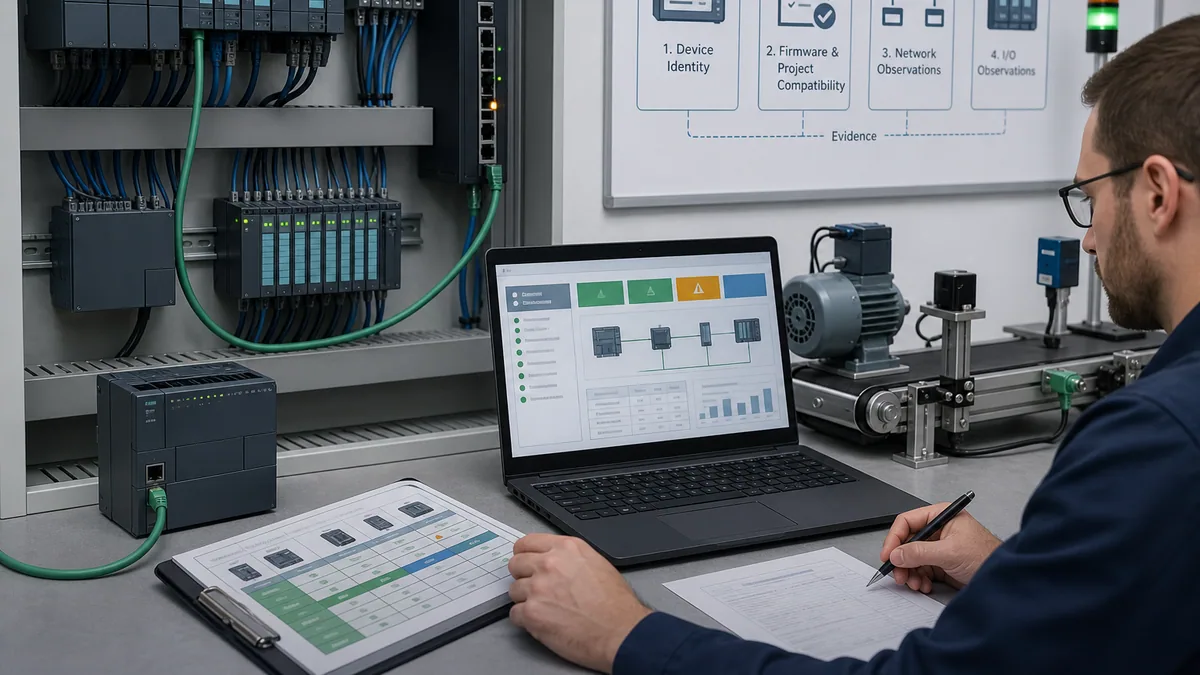
| Symptom | First evidence | Boundary | Safe next test |
|---|---|---|---|
| target unavailable | CPU article/hardware and configured target | generation/catalogue | compare supported catalogue/package |
| firmware warning | installed/project firmware and support | version | review approved compatibility path |
| feature will not compile | option and licence/package manifest | option/CPU | compile representative feature on exact target |
| download blocked | identity, protection, access and state | authorization/target | read-only identity and approved access check |
| module mismatch | articles versus project tree | I/O generation | reconcile every slot and wiring impact |
| CPU runs, machine does not | mode, diagnostics, state, command, I/O, feedback | application/field | trace first request-to-feedback divergence |
| intermittent communication | topology, load, quality and time | network/data contract | reproduce one controlled failure |
| restart surprise | retention, startup state and requests | recovery | execute approved restart matrix |
After a change, restore baseline, rerun the failed case, then regress normal operation, permissive loss, feedback contradiction, communication loss, restart and recovery. Record observations, not “fixed.” Never force safety or bypass protective devices to accelerate diagnosis.
Siemens S7 PLC answer map
| Question | Concise answer | Evidence |
|---|---|---|
| What is Siemens S7? | A controller family in SIMATIC, not one model. | terms and family map |
| What does SIMATIC S7 mean? | SIMATIC is broader; S7 identifies controller families. | terminology table |
| S7-1200 G2 or S7-1500? | Decide from measured requirements and representative proof. | six gates |
| Is ET 200SP a PLC? | Some products have CPUs; others are I/O interfaces. | controller forms |
| Is S7-300 discontinued? | Siemens says available until 2033 at portfolio level; verify exact articles. | lifecycle |
| Which software programs S7? | Current families use STEP 7/TIA; legacy paths vary. | toolchain |
| Can S7 be simulated? | Supported logic can; field behavior remains unproved. | evidence levels |
| Why reject a replacement project? | Compare identity, version, option, project and system in order. | fault tree |
| How is selection proved? | Configure, compile, test normal/negative/recovery and retain evidence. | acceptance |
| Where learn programming? | Continue to the distinct Siemens programming owner. | canonical links |
Frequently asked questions
What is a Siemens S7 PLC?
A Siemens S7 PLC is a programmable controller in the SIMATIC portfolio. S7 identifies multiple families and generations, not one interchangeable product. Record exact family, article, hardware revision and firmware before selecting software, modules or replacement.
What is the difference between SIMATIC and S7?
SIMATIC is the broader automation portfolio, including controllers, distributed I/O and engineering systems. S7 is a controller-family label used for S7-1200 G2, S7-1500, S7-300 and S7-400. A SIMATIC item is not necessarily a CPU.
Should I choose S7-1200 G2 or S7-1500?
Choose S7-1200 G2 when a verified compact configuration meets process, I/O, communication, motion, safety, performance and lifecycle requirements. Choose the appropriate S7-1500 when modularity, resources, options or architecture require it. Test a representative project; do not decide from I/O count alone.
Is S7-1200 G2 compatible with older S7-1200 modules?
Siemens states S7-1200 G2 is not hardware-compatible with the previous S7-1200 family. Programs can often be converted with checks, but hardware, accessories, configuration and behavior need controlled migration review using exact articles and current documentation.
Is Siemens S7-300 discontinued?
Siemens’ current portfolio page states S7-300 is available until 2033. That is portfolio-level context, not a universal promise for every article or region. Verify exact CPU/modules in official lifecycle data and maintain a tested spare, repair or migration plan.
What software programs Siemens S7 PLCs?
Current S7-1200 G2 and S7-1500 use STEP 7 in TIA Portal. S7-300 and S7-400 plants may use STEP 7 Classic or supported TIA paths. Edition, version, packages, libraries, licences and PLCSIM depend on exact target/features.
Can a Siemens S7 PLC be simulated without hardware?
Supported logic and selected behavior can be tested in matching Siemens simulation. A vendor-neutral simulator teaches the general control pattern. Neither proves physical I/O, module diagnostics, protection, safety, final load or process response.
Is an ET 200 station a PLC?
Not always. ET 200 includes distributed-I/O interface stations and products with controller CPUs. Check the exact module. A remotely controlled I/O station is not a PLC merely because it communicates over PROFINET.
When should I use S7-1500 R/H?
Use R/H only when a quantified availability requirement justifies synchronized controllers and the complete qualified topology. Test switchover, network/I/O behavior, degraded operation, repair, synchronization, restart and recovery. Redundant CPUs do not remove every single point.
How do I troubleshoot an incompatible Siemens replacement PLC?
Compare full identity, firmware/engineering support, licences/options, target/resources/protection, then modules, network, I/O and process. Record the first mismatch, resolve one cause through official guidance and rerun the failed plus regression tests.
Official sources, review scope and limitations
This independent guide was reviewed on 29 August 2026. Product pages, lifecycle, software support and catalogues change; verify exact articles and combinations at the point of work.
- Siemens SIMATIC automation portfolio
- Siemens SIMATIC controller selection guide
- Siemens S7-1200 G2 overview and compatibility FAQ
- Siemens S7-1200 G2 system manual
- Siemens S7-1500 product overview
- Siemens S7-1500 and ET 200MP system manual
- Siemens S7-1500 R/H overview
- Siemens S7-1500 R/H system manual
- Siemens STEP 7 in TIA Portal
- Siemens TIA Portal V21 release
- Siemens S7-1200/S7-1500 programming guideline
- Siemens S7-1500 diagnostics manual
- Siemens S7-1500 communication manual
- Siemens TIA Selection Tool
- Siemens SIMATIC Automation Tool
- Siemens industrial cybersecurity
- NIST SP 800-82 Rev. 3
- CISA ICS advisories
- OSHA control of hazardous energy
Exact capacities, interfaces, option rights, compatibility and safety suitability are deliberately not generalized. Exact Siemens manuals, current product information, the safety lifecycle and employer procedures take precedence. Original diagrams and generated lab scenes are explanatory assets, not Siemens drawings, tested product photographs or certification evidence.
Now run it · free to start
Practise Siemens-style PLC logic in your browser
Build and run Siemens-style ladder and SCL without a TIA Portal install. An independent learning tool — free to start.
Ownership disclosure: PLC Programming IO and PLC Simulation Software are operated by the same publisher.