SCADA Program: Build Tags, Alarms, Trends and Commands
Build a vendor-neutral SCADA program from a process narrative and PLC contract through tags, operator screens, alarms, history, command handshakes, security and acceptance tests.
Review status: Vendor-neutral implementation guide reviewed against current ANSI/ISA-112.00.01-2025 SCADA lifecycle context, ISA-18.2 and ISA-101 committee scope, OPC UA, NIST OT security, ISA/IEC 62443, AVEVA Plant SCADA, Inductive Automation Ignition 8.1 and Omron CX-Programmer primary sources; exact platform edition/version/license, driver, PLC/RTU, tag syntax, scan/subscription behavior, script runtime, alarm/history engine, redundancy, security, network, process, machine and safety response require project-specific verification
Direct answer: a SCADA program is a supervised operating model, not a PLC program with pictures
A SCADA program is the configured application that acquires process data, gives it stable names and quality, presents operator screens, evaluates and records alarms, stores history, enforces user permissions, sends bounded supervisory requests and preserves audit and diagnostic evidence. The PLC or RTU normally retains the local deterministic control, equipment state and protective behavior that must continue if the SCADA server, client or communication path fails.
Build the SCADA application from a process narrative and a signed PLC–SCADA signal contract. For each tag define source, data type, units, range, quality, timestamp, update expectation, history rule, alarm meaning and write authority. Then design overview-to-detail navigation; command handshakes; actionable alarms; trends; users and zones; failure states; backups; and an acceptance matrix. Do not begin by drawing a photorealistic screen or importing thousands of raw PLC addresses.
The production inventory records 1,400 global / 280 United States monthly searches for scada program at saved KD 22. The queued URL paired Citect SCADA with CX-Programmer, but that is not a valid product-selection comparison. AVEVA's current official page says Citect SCADA is now AVEVA Plant SCADA, a supervisory platform. Omron's official page identifies CX-Programmer as PLC programming software within CX-One. A project can use a SCADA product above a PLC programmed in an engineering tool; choosing one does not eliminate the other. The old comparison URL therefore redirects to this corrected implementation owner instead of publishing a false “winner.”
| Term | What it means here | Not the same as |
|---|---|---|
| SCADA system | field-to-operator architecture, services, networks, people and lifecycle | one project file or one screen |
| SCADA program/application | configured tags, displays, alarms, history, users, scripts and interfaces | deterministic PLC machine-control program |
| HMI screen | human-facing view and interaction surface | the complete acquisition/history/security system |
| PLC program | local control tasks, states, interlocks, I/O and equipment logic | supervisory graphics or historian |
| tag | named value plus type, quality, time, ownership and metadata | an untyped address copied into a screen |
| script | platform-specific event or service code for bounded tasks | a substitute for PLC control or safety logic |
| command request | authorized supervisory intent sent to local control | proof that the final element moved |
| feedback | independently derived equipment/process response | the same bit as the outgoing command |
This guide owns the vendor-neutral SCADA program implementation task. Use the SCADA architecture guide for server, network and topology design; the PLC and SCADA training roadmap for curriculum selection; the free SCADA training guide for official learning resources; and the HMI programming pillar for screen-only interaction principles.
Start with requirements and control ownership
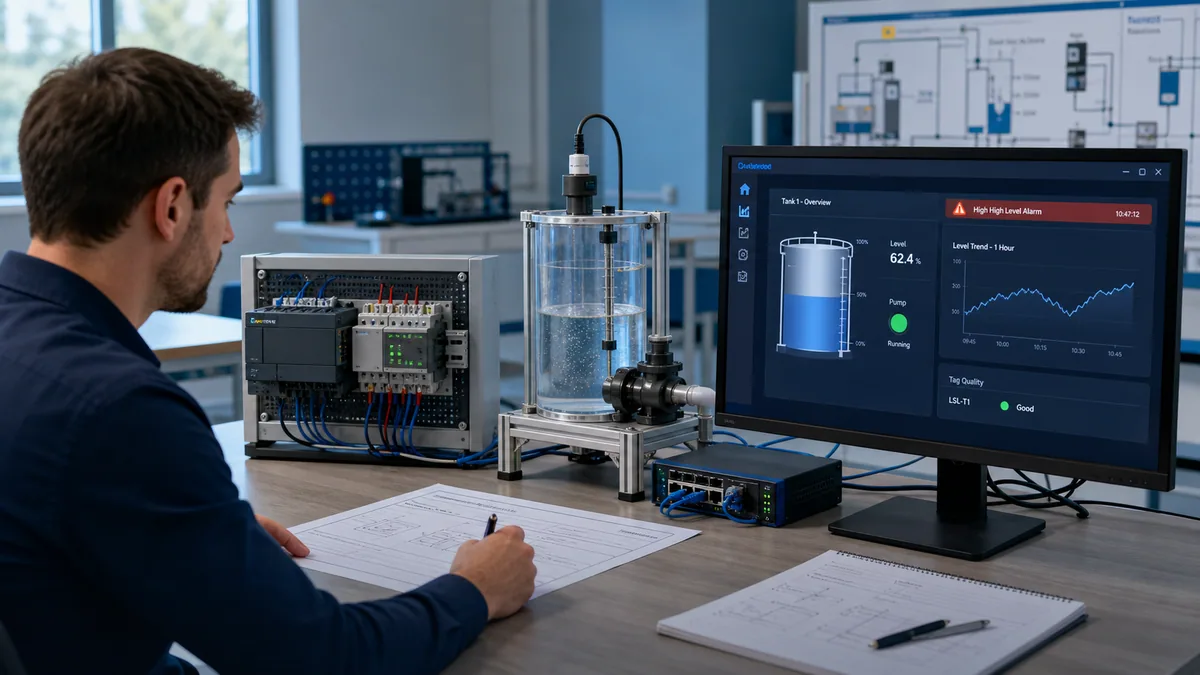
Write the operating narrative before the tag database
Define what the process does in normal, abnormal, maintenance and communication-loss states. Name equipment, measured variables, operating modes, permissives, commands, feedback, alarms, operator decisions and recovery actions. State which behavior must continue without SCADA. For most machine and process applications, the PLC or RTU—not an HMI script—owns fast or deterministic control, equipment sequencing, local interlocks and safe-state logic.
For a worked example, this guide uses one transfer pump moving liquid from a source tank to a destination tank. The operator may request automatic transfer when the source has adequate level, the destination is not high, the pump is available and local control accepts remote authority. The PLC decides whether the request may become a command, waits for run feedback and reports a first-out failure. SCADA shows the state, records alarms and trends, and audits the request. It does not directly force the physical output.
| Requirement ID | Requirement | Owner | Acceptance evidence |
|---|---|---|---|
| SCADA-R01 | show source and destination levels with units, range, quality and data age | PLC measurement contract + SCADA display | injected minimum/normal/maximum/bad/stale cases |
| SCADA-R02 | let authorized operators request automatic transfer | SCADA request + PLC arbitration | valid, denied, duplicate and expired request tests |
| SCADA-R03 | show request, accepted command, feedback and first denied/fault reason separately | PLC state + SCADA presentation | state-transition trace and operator review |
| SCADA-R04 | alarm on actionable high level, failed start and communication loss | PLC/SCADA boundary per alarm philosophy | alarm lifecycle and timestamp test |
| SCADA-R05 | retain useful level, command, feedback and alarm history | historian configuration | value-change, outage, backfill/gap and query tests |
| SCADA-R06 | restrict commands, setpoints, alarm administration and engineering changes | identity/authorization services | role and security-zone matrix |
| SCADA-R07 | continue local control safely when supervisory services fail | PLC/RTU and process design | server/client/link loss and recovery tests |
| SCADA-R08 | restore the released application and evidence after a failure | SCADA/platform/infrastructure owners | representative backup/restore exercise |
Download the SCADA program requirements and ownership ledger. Replace every example with approved project requirements.
Design the tag contract
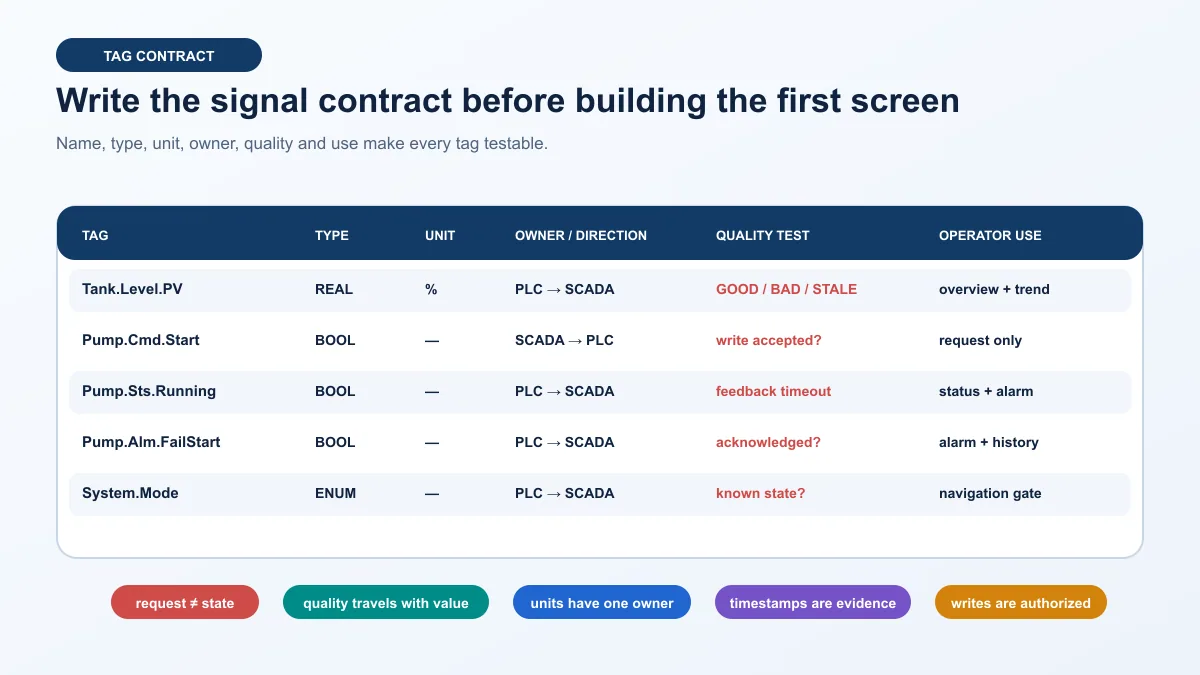
A tag needs value, quality, time and ownership
A raw address is not an operational contract. A usable tag states what the value means, where it originates, its type and units, valid range, update expectation, quality handling, timestamp source, stale threshold, historian behavior and who may write it. OPC UA formalizes data values with status and timestamps; product tag systems add their own metadata and quality codes. Preserve those distinctions instead of flattening every communication failure to zero.
For each analog value, decide whether scaling and range validation occur in the field device, PLC or SCADA. Avoid scaling the same signal differently in several layers. For each discrete state, define normal polarity and unavailable/bad behavior. For each command, separate the operator request from PLC acceptance, physical command and feedback.
| Tag | Type/unit | Source and owner | Quality/time rule | History/alarm | Write rule |
|---|---|---|---|---|---|
TK101_Level_PV |
REAL, % | PLC validated measurement | show source quality and age; never replace bad with 0% | analog history; high alarm uses declared owner | read only |
TK102_Level_PV |
REAL, % | PLC validated measurement | same contract, separate source timestamp | analog history; high-high status available | read only |
P101_Run_Request |
BOOL | SCADA request interface | explicit request expiry/sequence | audit command event, not process history alone | authorized operator only |
P101_Run_Accepted |
BOOL | PLC arbitration state | current controller state | short event/history useful | read only |
P101_Run_Command |
BOOL | PLC equipment logic | current controller state | state history | read only |
P101_Run_Feedback |
BOOL | independent field feedback via PLC | bad quality stays unknown | state history and failed-start evidence | read only |
P101_FirstOut_Code |
integer/enumeration | PLC diagnostic state | retained until defined acknowledgement/reset | alarm/event context | read only |
PLC_Comm_Healthy |
BOOL/quality summary | communication layer | derived from session plus data-age policy | communication alarm | read only |
Use templates without hiding instance differences
Most SCADA platforms provide equipment templates, user-defined types, faceplates or reusable symbols. Define one pump template with consistent status, commands, alarms, history and navigation, then instantiate it with parameters. Record every override. A reusable object reduces drift only if the team versions its interface and tests propagation. Copy-and-paste screens create near-duplicates whose alarms and addresses quietly diverge.
Design overview, detail and diagnostic screens
An overview should help the operator recognize the current operating condition and find the abnormal area. A detail view should explain one equipment unit with process values, mode, request, command, feedback, permissive/deny reason, alarms and trends. A diagnostic view may expose communication quality, data age, sequence state and maintenance evidence to an authorized role. Do not place every raw bit on the operating overview.
| Screen | Primary question | Required content | Avoid |
|---|---|---|---|
| plant/area overview | where is attention required? | process structure, key state, abnormal emphasis and stable navigation | decorative pipes, gradients and animation competing with alarms |
| unit detail | why is this unit running, stopped or denied? | request/command/feedback, mode, permissive/fault reason, relevant PV and control | one ambiguous green “running” color from command alone |
| alarm view | what requires action now? | state, priority, time, source, description, acknowledgement/shelving controls per philosophy | alarm floods sorted only by newest event |
| trend view | what changed and in what order? | synchronized values, units, quality/gaps, setpoint, request/command/feedback and time scale | compressed data presented as exact raw history |
| diagnostics | where is the first failed boundary? | device/session state, quality, age, key counters and last change | uncontrolled engineering writes from an operator screen |
| maintenance/admin | what controlled change is permitted? | role-gated settings, audit, version and rollback | hidden bypasses, shared credentials or undocumented scripts |
Use consistent state encoding and never rely on color alone. Text, shape, symbol and layout should reinforce the same condition. Reserve the strongest visual treatment for actionable abnormal states, not for normal running equipment or company branding. Test zoom, contrast, keyboard/focus behavior where applicable and realistic alarm density on the actual client devices.
Implement commands as handshakes
Separate request, acceptance, command and feedback
A direct HMI write to a physical-output address destroys the control boundary. Use an interface in which SCADA submits a bounded request with identity/audit and, where required, a sequence or expiry. The PLC validates mode and permissives, records acceptance or denial, owns the physical command and monitors independent feedback. SCADA shows each state and a timeout/failure reason.
SCADA: Operator presses Start → write bounded P101_Run_Request
PLC:   Validate RemoteAuthority AND AutoMode AND Permissives
PLC:   Set P101_Run_Accepted or P101_DeniedReason
PLC:   Own P101_Run_Command
Field: Contactor/drive/pump response produces P101_Run_Feedback
PLC:   If command without feedback beyond limit → latch FirstOut
SCADA: Display and historize request, decision, command, feedback and fault
This is a vendor-neutral state contract, not executable PLC or SCADA code. Exact write semantics, concurrency, acknowledgement, sequence numbers, user identity, timeouts, failure recovery and safety separation depend on the selected products and risk analysis.
| Test | Stimulus | Expected SCADA evidence | Expected PLC/process evidence |
|---|---|---|---|
| valid request | authorized operator, remote/auto, all permissives | request/audit visible; accepted state follows | command occurs; feedback arrives within requirement |
| denied request | one declared permissive false | denial reason visible; no false “running” state | no command |
| duplicate request | repeat same sequence/action | no duplicate transition; audit remains interpretable | one controlled action only |
| expired request | delay delivery beyond declared window | request shown expired/rejected | no late command |
| feedback absent | accept request but withhold field feedback | command then failed-start alarm/first-out | declared stop/hold response occurs |
| communication loss | break approved lab link during request | quality becomes bad/stale; control disabled or bounded | local controller follows declared autonomous behavior |
| client closure | close initiating client after accepted request | server/controller state remains truthful | action follows controller state, not client process lifetime |
| reset | request cleared and safe reset conditions true | explicit reset audit; no automatic restart | first-out clears only by defined rule |
Live mini-lab
Try it: press START, then STOP
A stop-dominant seal-in rung: START latches the motor output through its own contact, and STOP breaks the circuit.
Watch the output lamp: it stays on after START until you press STOP.
Free · no signup to try · runs in your browserOpens plcsimulationsoftware.com — same team
Configure alarms as operator decisions
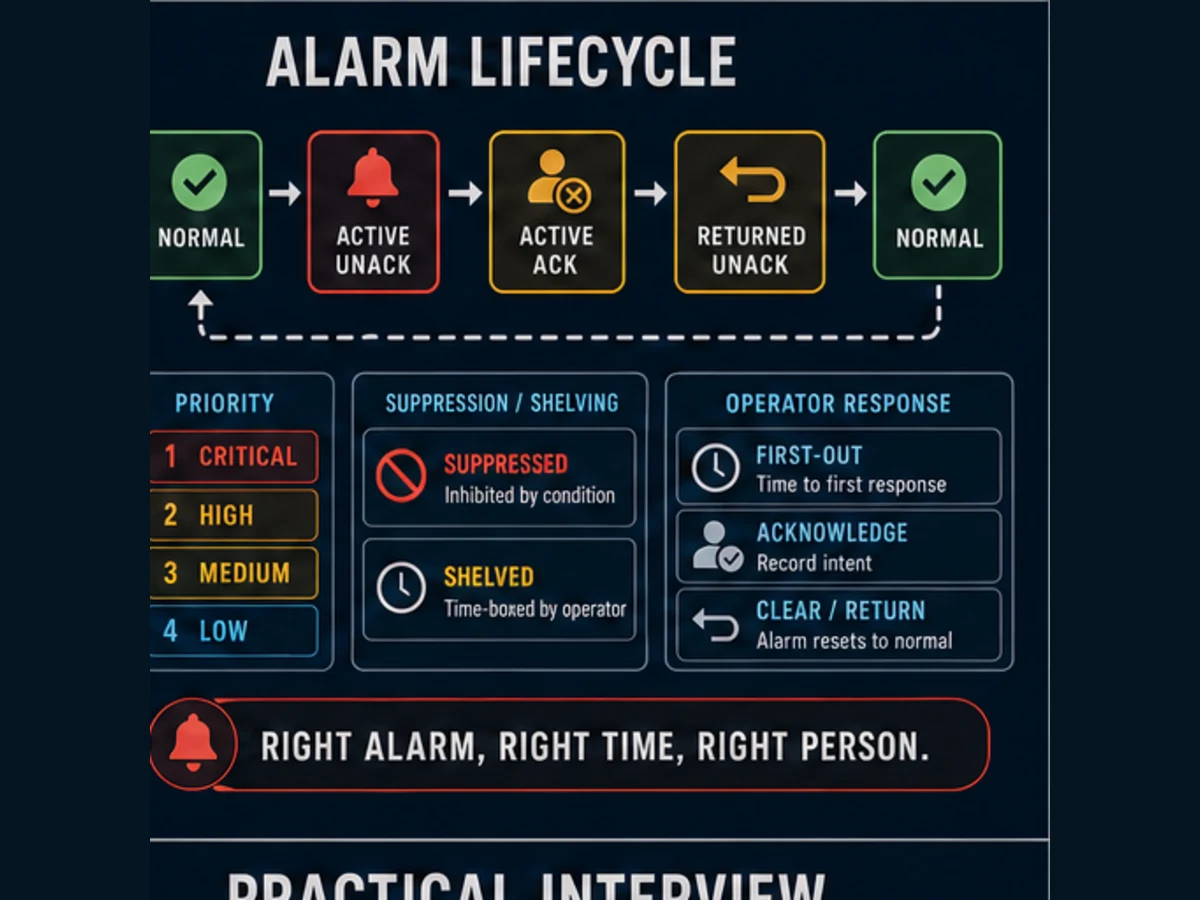
An alarm is not every Boolean fault or threshold crossing. Define the abnormal condition, required operator response, consequence of inaction, priority basis, delay/deadband, state model, acknowledgement, shelving/suppression rule and return-to-normal behavior. ISA-18.2 treats alarm management as a lifecycle; a product's alarm property dialog is one implementation step within that lifecycle.
For the pump example, P101_FailToStart is actionable if the operator can verify the cause, protect the process or call the correct response. P101_Run_Command is a state, not an alarm. TK102_Level_High and HighHigh need process-approved setpoints, delay/deadband and distinct consequences. A communication alarm must not generate hundreds of misleading child process alarms without a designed suppression/dependency policy.
| Alarm | Trigger owner | Operator message | Response | Priority evidence | Special tests |
|---|---|---|---|---|---|
| destination level high | PLC or SCADA per approved philosophy | destination level high; transfer may be limited | confirm trend/source and follow operating response | consequence and available response time | equality, hysteresis, delay, bad quality |
| pump failed to start | PLC equipment state | P101 command not confirmed within limit | stop/retry/escalate only per procedure | process consequence, time and backup equipment | delayed feedback, chattering feedback, reset |
| PLC communication loss | acquisition/service state plus tag age | PLC data unavailable or stale | rely on declared local state; diagnose link | visibility/control consequence | session loss, frozen value, reconnect storm |
| historian unavailable | historian/store-forward state | history storage impaired | preserve operations; invoke recovery | compliance/diagnosis consequence | cache limit, backfill, duplicate/gap visibility |
Configure history and trends for evidence
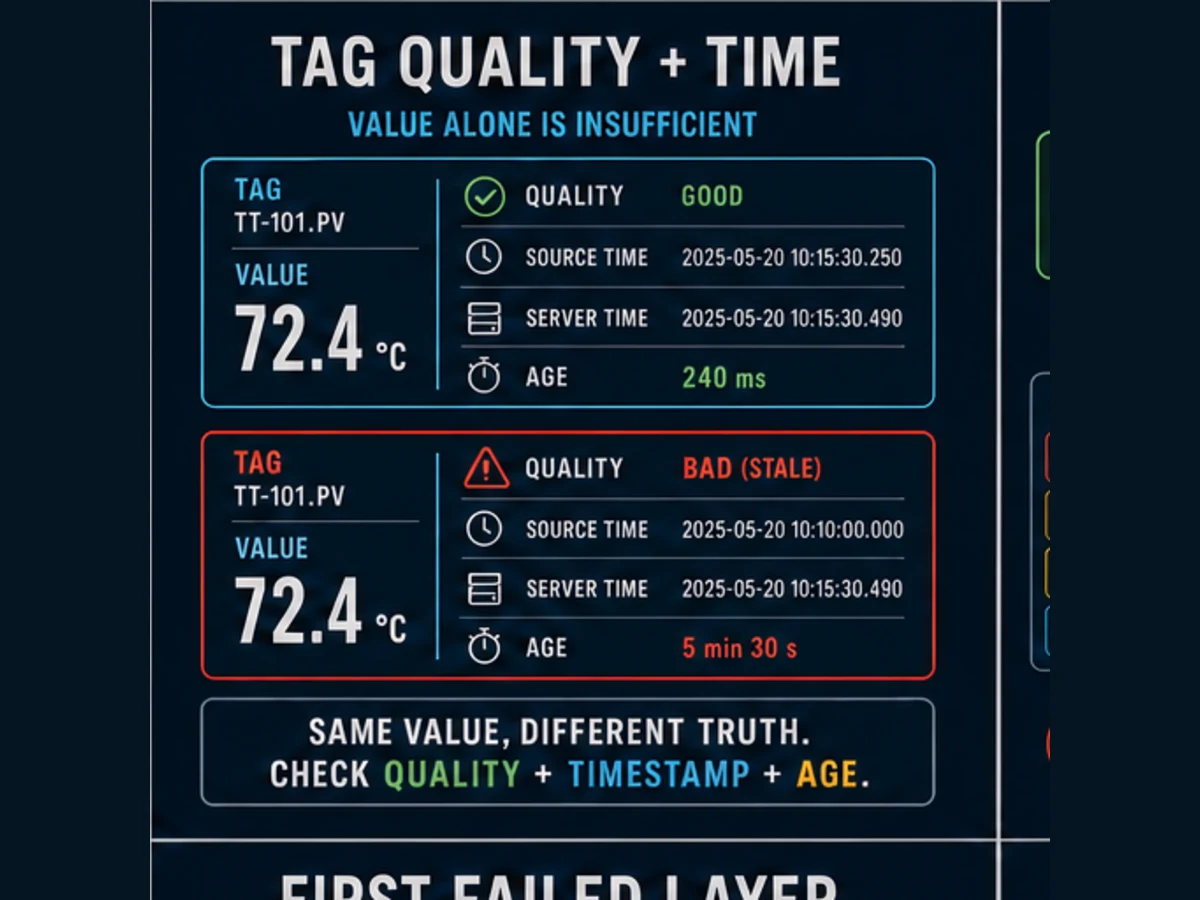
Historize variables that answer an operating, quality, maintenance, energy, compliance or diagnostic question. Define sampling or change rule, deadband, timestamp source, quality storage, compression, retention, partition/maintenance, outage buffering and backfill behavior. The historian may not store every raw update. A rendered trend can interpolate, aggregate or compress data. Preserve those semantics when using a trend to reason about event order.
For the transfer example, trend source/destination level, request, accepted state, command, feedback, first-out and data quality on a common time axis. That lets the team distinguish “operator never requested,” “PLC denied,” “PLC commanded but field feedback failed” and “screen data was stale.” Store configuration and alarm-event history under the product's documented models rather than assuming one time-series table explains everything.
Use scripts sparingly and deterministically
SCADA platforms may provide expressions, event scripts, gateway/service scripts, client/session scripts, project libraries or a product-specific language. AVEVA Plant SCADA's current page identifies Cicode for deep customization. Ignition documents tag, project, gateway, client and session script scopes. Those names and execution contexts are platform-specific.
Before writing a script, ask whether a declarative binding, tag configuration, template, alarm, historian or report already owns the task. Keep required deterministic equipment control in the PLC/RTU. For every necessary script define event source, runtime scope, concurrency/re-entry, input types, identity/permissions, timeout, retry, logging, failure behavior and test. Never let a client-window lifetime own a process action.
| Script risk | Defensible control |
|---|---|
| executes twice after reconnect or repeated event | idempotent operation or sequence identifier with duplicate test |
| blocks a gateway/service event thread | bounded work, platform-supported asynchronous pattern and timeout evidence |
| writes a stale/incorrect tag | fully qualified path, type/range check, quality check and authorized write contract |
| behaves differently on client/server scopes | document exact scope and test separate sessions/restarts |
| hidden control logic | keep equipment logic in PLC; version and review supervisory script purpose |
| swallows an exception | structured error log, alarm/diagnostic state and deterministic fallback |
| leaks credentials or excessive access | managed secrets, least-privilege service identity and audit |
| becomes an undocumented dependency | version control, dependency inventory, code review, tests and rollback |
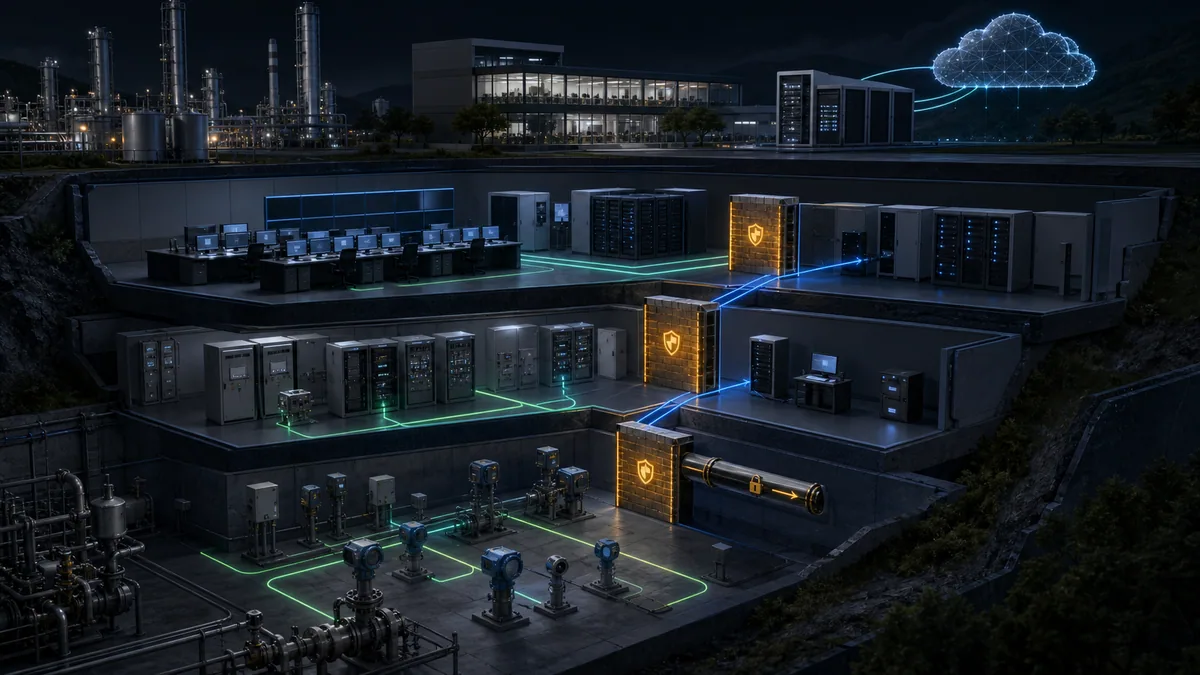
Apply identity, least privilege and network boundaries
Define roles from actions: view, acknowledge, shelve, request control, change setpoint, administer alarms, edit tags, deploy projects and manage infrastructure. A role name alone is not an authorization model. Bind permissions at the authoritative platform layer, consider the security zone or client location, remove shared accounts where the selected system permits, and audit material actions.
NIST SP 800-82 Rev. 3 and the ISA/IEC 62443 family provide OT security context: inventory assets, segment zones and conduits, restrict flows and services, manage remote access and identities, monitor, back up and rehearse recovery while respecting operational availability. Do not expose a SCADA web client or gateway directly to the Internet because a product supports remote access. Design the approved architecture, identity provider, intermediary/DMZ and recovery controls for the actual threat and operating requirements.
Engineer redundancy, backup and recovery
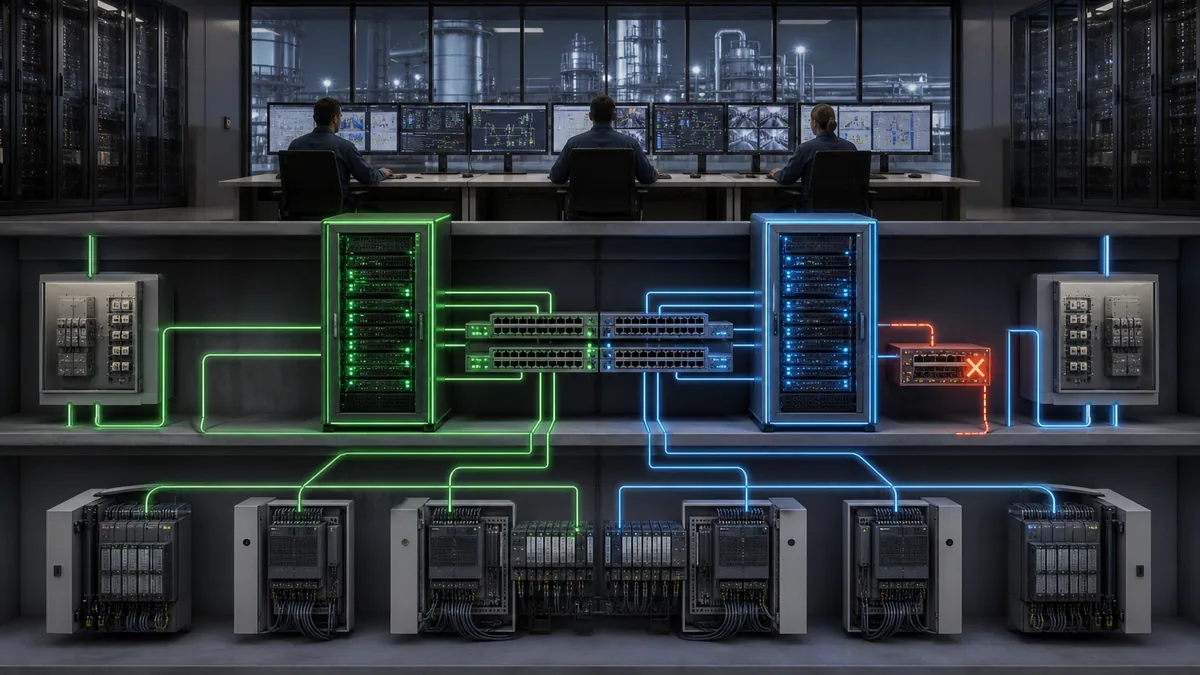
Redundancy is not a checkbox. Identify active/standby roles, shared databases, storage, switches, identity, name/time services, licenses, drivers, deployment services and field paths. Define what happens to sessions, alarm state, history, scripts, subscriptions and commands in flight. Then fail one approved dependency at a time and observe detection, switchover, degraded operation, reconciliation and return.
Back up source project, tag/alarm/history configuration, scripts, certificates/secrets through their approved mechanism, database schema, server/client configuration, version/licenses and infrastructure dependencies. A file copy that has never restored a representative environment is not proven recovery.
Test the SCADA program before release
Use normal, boundary, failure and recovery cases
Test the full path from controlled input through PLC state, communication, tag quality/time, screen, alarm, historian and audit. Include minimum, normal, maximum, equality, invalid and bad-quality values; valid and denied commands; simultaneous users; communication loss; server/client restart; historian outage; role denial; configuration deployment; backup/restore; and recovery without replaying unsafe or expired work.
Download the SCADA program acceptance matrix. Record exact version, environment, input, expected result, actual result, evidence link, witness, deviation and release decision.
| Gate | Minimum proof | Release blocker |
|---|---|---|
| tag contract | type/unit/scale/quality/time/age match at source and display | bad/stale value appears normal or safe |
| graphics | overview/detail navigation and state encoding match operations review | command shown as feedback or abnormal state obscured |
| commands | valid, denied, duplicate, expired, timeout and recovery tests | unauthorized/late/duplicate action or missing audit |
| alarms | trigger, delay/deadband, priority, message, acknowledge/shelve and return | nuisance flood, no response text or wrong timestamp/order |
| history | sampling/deadband, quality, outage/gap/backfill, retention/query | silent gap or interpolated/aggregated result presented as raw truth |
| security | every role/zone action allowed or denied as designed | default/public write, shared privilege or unlogged material action |
| availability | service/path failures and recovery objectives measured | split-brain, lost alarm state, uncontrolled request replay |
| restore | released project and dependencies restored to representative target | backup exists but cannot restore |
| performance | representative tags, clients, alarms and history under normal/peak/failure load | missed objectives or uncontrolled queue/storage growth |
| handover | as-built source/version, manuals, tests, accounts, backups and exceptions owned | orphan credentials, unknown deviations or no recovery owner |
Troubleshoot a SCADA program by the first disagreement
Preserve the time window, scope, alarms, quality, logs, counters, current server roles and last change before restarting services. Ask what still works: one tag, one PLC, one client, one site, history only, commands only or the whole system. Follow the signal from physical/process state to PLC, protocol/session, tag provider, expression/script, alarm/history service and client rendering.
| Symptom | First discriminating evidence | Common boundary |
|---|---|---|
| every value from one PLC stale | PLC/session state, route, driver diagnostics, representative source age | controller/network/driver connection |
| one tag wrong, neighbors healthy | source address/node, type/scale, quality/timestamp and tag override | mapping/configuration |
| screen wrong, tag browser correct | binding path, expression, template parameter and client cache/session | visualization binding |
| alarm absent, value clearly abnormal | alarm enabled/source, threshold/equality, delay, quality and suppression | alarm configuration/philosophy |
| alarm flood after link loss | parent communication state, dependent alarm/suppression policy | missing dependency design |
| trend has gaps or spikes | source quality/time, sampling/deadband, store-forward, query aggregation | historian pipeline |
| command appears accepted but equipment does not move | request, PLC acceptance, command, output chain and feedback | local control/field, not necessarily SCADA |
| only one user cannot act | identity, role, zone, object/tag write policy and audit denial | authorization |
| failover loses sessions/history | active/standby role and shared dependencies, queues, reconciliation logs | redundancy design |
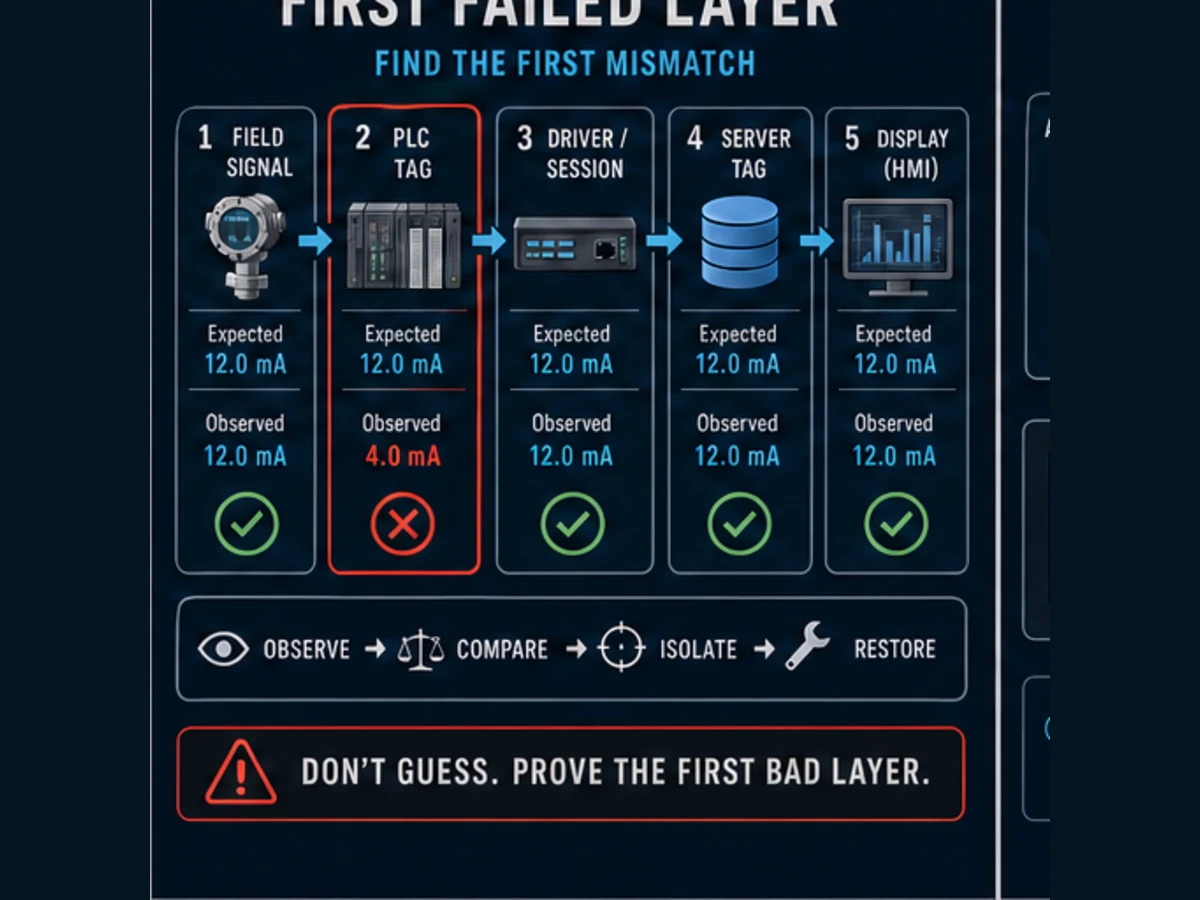
Download the SCADA first-failed-layer capture sheet before the incident details disappear.
Product-specific translation: AVEVA Plant SCADA, Ignition and CX-Programmer
The workflow is portable; product implementation is not. AVEVA's current product page states that Citect SCADA is now AVEVA Plant SCADA and documents equipment templates, visualization, alarm management, history integration, role-based permissions, redundancy and Cicode customization. Inductive Automation's current Ignition 8.1 manual documents tag providers and properties, quality, alarm properties, tag history, security and several script scopes. These sources show how two SCADA platforms expose related responsibilities through different object and runtime models.
Omron CX-Programmer is a PLC programming tool. It creates and debugs supported Omron PLC applications; it is not the SCADA alternative to AVEVA Plant SCADA. A system with an Omron PLC could use CX-Programmer for the controller and a compatible HMI/SCADA platform for supervision, subject to drivers, versions, licenses and validated data/command contracts. Omron also lists visualization products separately in its software portfolio.
| Question | AVEVA Plant SCADA / legacy Citect context | Ignition 8.1 example context | CX-Programmer context |
|---|---|---|---|
| primary role | supervisory HMI/SCADA application | modular gateway-based industrial application/SCADA | Omron PLC engineering and debugging |
| application objects | product-specific equipment, tags, graphics, alarms, trends, Cicode | tag providers/tags, UDTs, views/windows, alarms, history, scripts | PLC programs, symbols/addresses, tasks, FBs and CPU tools |
| command destination | configured driver/interface to local controller | OPC/device/tag write path to local controller | controller logic that should arbitrate request |
| comparison verdict | possible SCADA layer | possible SCADA layer | complementary PLC layer—not substitute SCADA |
AI and search answer map
| Question | Direct answer | Verification boundary |
|---|---|---|
| What is a SCADA program? | A configured supervisory application for tags, screens, alarms, history, users, commands and diagnostics. | exact platform objects and runtime differ |
| How do you program SCADA? | Define process/control ownership, tag contracts, screens, handshakes, alarms, history, permissions, failures and tests in that order. | use selected platform manuals and approved site requirements |
| Is SCADA programming the same as PLC programming? | No; PLCs normally own local deterministic control while SCADA supervises, records and requests. | exact architecture must assign each function |
| Which language is used for SCADA? | Many systems are configuration-first and add product-specific expressions/scripts such as Cicode or Python/Jython-like platform scripting. | no universal SCADA language exists |
| What tags should a SCADA program contain? | Values, quality/time, equipment state, request/accept/command/feedback, alarms and diagnostics required by operations. | avoid importing unused raw addresses |
| How should SCADA commands work? | Through authenticated bounded requests that the PLC validates and confirms with independent feedback. | define expiry, duplicate, timeout and recovery behavior |
| What makes a SCADA alarm good? | A defined abnormal condition requiring a timely operator response with a rationalized priority and tested lifecycle. | follow project alarm philosophy and exact platform |
| How is a SCADA program tested? | End-to-end normal, boundary, bad/stale, loss, security, failover, restore and recovery cases. | representative load and installed-system tests still required |
Frequently asked questions
What is a SCADA program?
A SCADA program is the configured application that turns controller and field data into named tags, operator displays, alarms, history, authorized supervisory requests, audit and diagnostics. It runs within a selected SCADA platform and architecture. The local PLC or RTU normally retains the control that must survive supervisory failure.
How do you program a SCADA system step by step?
Start with the process narrative and control ownership. Define the tag and command contracts, create reusable equipment objects, design overview/detail/diagnostic screens, rationalize alarms, configure history, apply roles/zones, add only necessary scripts, test failure/recovery, and prove backup/restore before release.
Is SCADA programming the same as PLC programming?
No. PLC programming commonly implements deterministic I/O, equipment states, sequencing and local interlocks. SCADA programming commonly implements acquisition, visualization, alarms, history, supervisory requests and users. The two layers exchange a controlled interface and are tested together.
Does a SCADA program directly control outputs?
Avoid direct screen-to-physical-output writes. A safer architecture sends a bounded request to the PLC or RTU. Local logic validates authority, mode and permissives, issues the command, monitors independent feedback and exposes acceptance or denial. Safety functions require their approved separate architecture.
What programming language does SCADA use?
There is no universal language. Much SCADA work is declarative configuration and binding. Products add their own expressions and script environments—AVEVA Plant SCADA documents Cicode, while Ignition documents several scripting scopes. Verify the exact product/version and keep deterministic equipment control in the controller.
What is a tag in SCADA?
A tag is a named data object representing a process value, state, command or diagnostic. Treat it as value plus data type, engineering unit, quality, timestamp/data age, source, write ownership, history and alarm metadata. A raw PLC address without this contract is an incomplete tag design.
How many tags should a SCADA project have?
There is no universal number. Include the tags required to operate, alarm, record, diagnose and maintain the defined process. Use templates to scale repeated equipment, but load-test the actual server, driver, historian, network and client architecture with normal, peak and failure conditions.
How do I build a SCADA alarm?
Use the alarm philosophy to define the abnormal condition, consequence, operator response, priority, setpoint, delay/deadband, acknowledgement, shelving/suppression and return-to-normal behavior. Implement that record in the platform, then test trigger, time, message, state transitions and failure dependencies.
What data should a SCADA historian store?
Store variables and events that answer an operating, quality, maintenance, energy, compliance or diagnostic question. Define sampling/change/deadband, quality, timestamp source, compression/aggregation, retention, outage buffering and backfill. Do not assume the displayed trend contains every raw sample.
How do I secure SCADA commands?
Use named identities, least-privilege roles, security-zone context where supported, tag/object write policies, authenticated sessions and audit. Add request validation and expiry in the controller interface. Segment the OT network, control remote access and test both authorized and denied actions.
How do I test SCADA redundancy?
Fail one approved dependency at a time and observe detection, active/standby role, client reconnection, field sessions, alarm state, historian continuity, scripts, commands in flight and return of the repaired node. Test shared dependencies and justified combined failures from the risk analysis.
Is Citect SCADA still available?
AVEVA's current official page says Citect SCADA is now AVEVA Plant SCADA, and AVEVA identifies Plant SCADA as the successor path for legacy Citect users. Verify the installed version, support, license and upgrade documentation with AVEVA or an authorized channel before changing a system.
Is Citect SCADA an alternative to Omron CX-Programmer?
No. AVEVA Plant SCADA/Citect is a supervisory platform; CX-Programmer is Omron PLC programming software. They may occupy different layers in one automation system if product drivers and versions are compatible. Compare SCADA products with SCADA products and PLC engineering environments with the exact controller requirement.
Can a browser simulator validate a SCADA program?
It can help rehearse a vendor-neutral PLC–SCADA state contract, including request, acceptance, command, feedback, timeout and stale-data reasoning. It cannot validate the SCADA project, tag/driver behavior, scripts, alarms, historian, users, redundancy, network, PLC, process, machine or safety system.
Practical next step
Choose one equipment unit and complete the requirements ledger and tag contract before opening a SCADA designer. Build only the overview, unit detail, eight example tags, three alarms and one synchronized trend. Run the command and fault matrix, then expand through a versioned equipment template. You can rehearse the request-to-feedback contract in a browser lab operated by the same owner as PLC Programming IO; it is vendor-neutral and cannot validate a production SCADA or control system.
Sources, review scope, and limitations
This guide was reviewed on 31 August 2026. Standards, products, versions, licenses and documentation change. The purchased platform manuals, project requirements and installed-system evidence govern implementation.
- ISA — ANSI/ISA-112.00.01-2025 SCADA Systems Part 1
- ISA — February 2026 SCADA standard publication announcement
- ISA — ISA-18 alarm-management standards series
- ISA — ISA-101 HMI committee scope
- ISA — ISA-95 enterprise-control integration
- ISA — ISA/IEC 62443 cybersecurity standards family
- NIST — SP 800-82 Rev. 3, Guide to Operational Technology Security
- CISA — ICS recommended practices
- OPC Foundation — OPC UA Part 1 overview and concepts
- OPC Foundation — OPC UA Part 8 Data Access
- AVEVA — Plant SCADA product page; Citect SCADA naming and current capabilities
- AVEVA — Citect SCADA becomes AVEVA Plant SCADA
- AVEVA — Plant SCADA 2023 R2 official overview
- Inductive Automation — Ignition 8.1 tag properties
- Inductive Automation — Ignition tag quality
- Inductive Automation — Ignition alarming
- Inductive Automation — Ignition Tag Historian
- Inductive Automation — Ignition tag security
- Inductive Automation — scripting scopes
- Omron — CX-Programmer official product and manual page
- Omron — industrial software portfolio
- OSHA — Control of hazardous energy, 29 CFR 1910.147
- OSHA — Electrical safety-related work practices, 29 CFR 1910.333
The six figures are original editorial illustrations produced in-house for the connected SCADA topic family. They are not AVEVA, Ignition or Omron screenshots; product drawings; network designs; installation drawings; timing guarantees or safety designs. Product names identify compatibility research only. PLC Programming IO is independent and does not represent vendor approval.
This page does not authorize connecting, downloading, writing, forcing, bypassing, energizing, operating or servicing installed equipment. Qualified and authorized personnel must apply site risk assessment, energy control, electrical safe-work, exact vendor documentation, process limits, independent protection, cybersecurity, management of change and approved commissioning and recovery procedures.
Now run it · free · no signup
Practise the PLC side of a SCADA system
Complete a guided first program in the browser without an account, then build the tags, alarms and operator views a SCADA layer reads.
Ownership disclosure: PLC Programming IO and PLC Simulation Software are operated by the same publisher.
PLC Programming IO Editorial Team
Industrial automation education, references, and software testing
The PLC Programming IO Editorial Team publishes sourced industrial-automation education and documents how material is reviewed, tested, and corrected. A team byline means the publisher is responsible for the page; it does not represent a fictional person or imply an engineering licence.
Coverage:
- • PLC programming concepts and examples
- • Vendor software tutorials and comparisons
- • SCADA, HMI, protocols, and instrumentation
- • Training, careers, and reference material
Review standard:
- • Prefer primary and official sources
- • Record software versions when material
- • Separate tested facts from estimates
- • Publish material corrections
Important scope note
This site provides education, not project-specific engineering approval. Safety, code, and compliance decisions require a qualified person with access to the actual machine and jurisdiction.