HMI Programming for PLC Systems: Architecture, Tags and Lifecycle
HMI programming turns operator tasks and process state into a tested interface across screens, PLC tag contracts, commands, alarms, trends, recipes, access control and lifecycle evidence. This guide explains the complete system and routes each specialist task to its detailed implementation owner.
Reviewed and updated August 31, 2026
HMI programming is the engineering work of defining how operators observe, command and diagnose an automated system through a human-machine interface. It includes operator-task analysis, navigation, PLC tag contracts, reusable equipment objects, command handshakes, data quality, alarms, trends, recipes, user permissions, testing, deployment, backup and controlled change.
The HMI should request actions and display state truthfully; the PLC remains the owner of deterministic machine or process control. A Start button should write an explicit request, not a physical output. The PLC validates mode, command ownership, permissives, interlocks and sequence state, then publishes accepted/rejected/completed status and independent field feedback. Loss of the HMI must not silently sustain or create an unsafe command.
This pillar is the broad architecture and lifecycle owner. Use the step-by-step HMI programming tutorial to build a complete pump screen, the HMI screen-design guide for detailed display hierarchy and visual treatment, PLC–HMI communication for protocol/tag transport, and HMI alarms, events and trends for the alarm and historian lifecycle.
Download the HMI tag-contract template, HMI project lifecycle checklist and 30-case HMI acceptance matrix.
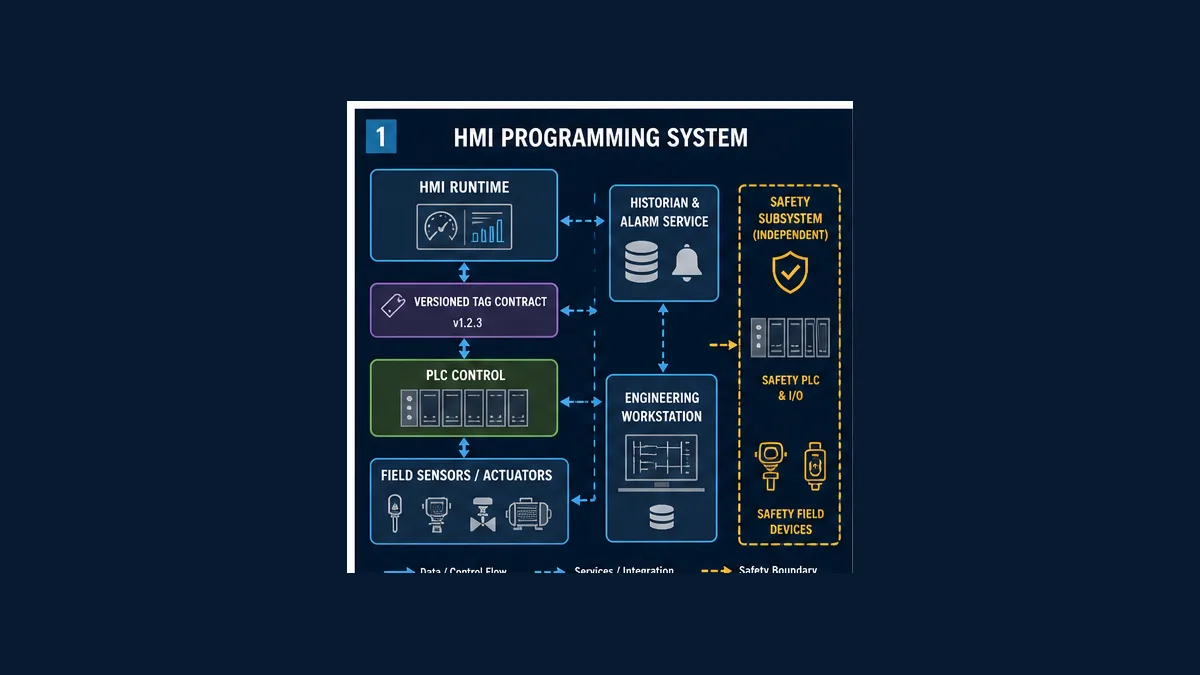
HMI programming at a glance
| Surface | Engineering owner | Minimum contract | Failure that must be visible |
|---|---|---|---|
| command control | PLC application with HMI request interface | request identity, authorization, accepted/rejected/completed result | stale request, missing feedback, timeout, wrong mode |
| process display | source PLC/data service | value, unit, quality, age, valid range/source | bad or stale data must not look live |
| equipment faceplate | reusable HMI object plus PLC equipment model | state, mode, availability, command result, feedback, first-out diagnostic | contradictory command/state and unavailable reason |
| alarm | alarm philosophy/lifecycle owner | abnormal condition, consequence, response, time, priority and state | flood, chatter, bad quality, hidden suppression |
| trend/history | historian/data owner | source, sample/change rule, timestamp, quality, retention | gaps, compression, clock error, interpolation ambiguity |
| recipe/setpoint | process/application owner | staged values, units/ranges, version, approval, commit result | partial write, wrong product/equipment, rejected value |
| users/security | asset owner and OT-security program | named identity, role, location/session constraints, audit | shared account, excessive write access, unlogged change |
| safety status | safety-function owner | permitted mirrored status only | standard HMI/PLC mistaken for safety decision |
What HMI programming is not
It is not merely drawing a P&ID, changing colors when a Boolean changes, or binding hundreds of raw PLC addresses. It does not move deterministic control responsibility into an operator panel. It does not make a standard touchscreen a safety device. It does not prove a field action because a write returned successfully. And it does not end at factory acceptance: runtime monitoring, operator feedback, backups, upgrades and management of change are part of the lifecycle.
The deliverables that make an HMI maintainable
| Deliverable | What it decides | Review evidence |
|---|---|---|
| HMI philosophy | principles, lifecycle, roles, display/alarm/security conventions | approved owner, scope and revision |
| style guide/object library | typography, symbols, states, interaction and reusable faceplates | representative normal/abnormal examples |
| operator-task and display hierarchy | who must decide what, under which operating conditions | task-to-screen traceability and navigation test |
| tag/interface contract | direction, source, type, unit, range, quality, age, access and test | PLC/HMI review and import/map artifact |
| alarm rationalization | condition, consequence, response, time, priority, class and suppression rules | rationalization record and state tests |
| recipe/setpoint contract | staged/validated/committed behavior and ownership | failure/recovery and audit cases |
| cybersecurity design | accounts, roles, zones, remote access, logging, hardening and recovery | architecture, product settings and site-program approval |
| acceptance and release pack | tests, issues, configuration, backups and rollback | witnessed FAT/SAT, operator review and signed disposition |
Continue Learning
Build and design the interface
Frequently Asked Questions
What is HMI programming?
HMI programming is the engineering of operator-facing screens and their system behavior: task and navigation design, PLC tag contracts, reusable equipment objects, command validation and confirmation, data quality, alarms, trends, recipes, roles, security, testing, deployment, backup and controlled lifecycle change.
Does the HMI control the machine or does the PLC?
The HMI requests actions and presents state. The PLC or other approved controller should own deterministic control logic, validate mode, ownership, permissives, interlocks and ranges, operate outputs and supervise independent feedback. Safety functions belong to the designed safety-related control system.
What should I learn first for HMI programming?
Start with the machine/process operating states and operator tasks, then learn the PLC data model and request-versus-feedback contract. Build one reusable equipment object, test bad data and command rejection, and only then expand into alarm, trend, recipe, security and deployment features on a selected platform.
What tags should an HMI read from a PLC?
Read stable application state: equipment state and mode, availability with reasons, independent feedback, process values with units/quality/age, command results, alarms and diagnostics. Avoid binding routine graphics directly to raw I/O or temporary internal bits without a documented diagnostic purpose.
Should an HMI button write directly to a PLC output?
No. It should write a request or setpoint interface. The PLC validates authorization, owner, mode, permissives, interlocks and sequence state before commanding the output, then reports accepted/rejected/completed status and field feedback.
How do you stop an HMI command replaying after reconnect?
Use a documented handshake such as a consumed request with acknowledgement or a sequence/identity contract, expire or clear authorization on loss as required, and test held presses, duplicate requests, multiple clients, HMI restart, PLC restart and network restoration. Reconnect should not itself be a new Start authorization.
What is a high-performance HMI?
It is an HMI designed through a lifecycle and operator-task philosophy to make normal performance, deviations and abnormal conditions understandable. It uses intentional hierarchy, consistent objects, restrained state coding, embedded context and tested interaction. It is not defined by making every screen gray or copying a style checklist without operator/process evidence.
What is the difference between HMI and SCADA?
HMI is the operator interaction and visualization surface. SCADA is a supervisory system that can include multiple HMI clients plus servers, communications, alarms, historians and distributed control/monitoring functions. A local machine panel is an HMI without necessarily being a plant-wide SCADA system.
How should bad or stale PLC data appear on an HMI?
It must not look like healthy live truth. Define quality and age thresholds, mark or replace the value with an explicit bad/stale state, show the loss source, inhibit writes that cannot be validated and retain last-known values only with unmistakable age/quality context.
Do I need an alarm for every PLC fault?
No. An alarm should represent an abnormal condition requiring timely operator awareness or action. Other conditions may be events, status, maintenance diagnostics, interlocks or protective trips. Rationalize consequence, response and available response time before consuming operator alarm attention.
How should HMI recipes be programmed?
Treat the recipe as a coherent transaction: select an identified version, stage values, show differences, validate types/units/ranges/equipment/process state and permissions, then commit as one accepted or rejected version with result and audit evidence. Avoid independent writes that can leave a partially applied recipe.
Can an HMI be used for safety controls?
A standard HMI may display permitted safety status and request ordinary control actions, but it is not automatically part of a safety function. Required safety sensors, logic, communications and final elements must be selected, designed and validated under the applicable safety requirements and exact product manuals.
How do you test an HMI program?
Test state transitions and failures: commands accepted/rejected/timed out, missing feedback, bad/stale data, disconnect/reconnect, roles, multiple clients, alarms, trends, recipes, restarts, performance and restore. Progress from static review and simulation to PLC/HMI integration, representative hardware, FAT, SAT and separate safety validation as applicable.
Can I learn HMI programming without a real PLC and panel?
You can learn operator-task modeling, tag contracts, state/command logic and failure reasoning through browser labs and vendor simulators. Exact drivers, data types, scan/update timing, runtime behavior, panel performance, physical feedback, network/security and safety still require the approved target environment and staged commissioning evidence.