PLC and SCADA Training: 12-Week Lab Roadmap
Follow a connected PLC-to-SCADA curriculum with prerequisites, weekly labs, tag contracts, alarm and historian exercises, fault injection, course-selection checks and reproducible portfolio evidence.
Review status: Vendor-neutral curriculum and lab designs reviewed against current PLCopen, Siemens, Rockwell Automation, Schneider Electric, AutomationDirect, CODESYS, Inductive Automation, OPC Foundation, Modbus Organization, ISA, NIST and OSHA sources; exact software access, versions, hardware, hazards, credentials and site procedures require learner- and platform-specific verification
Direct answer
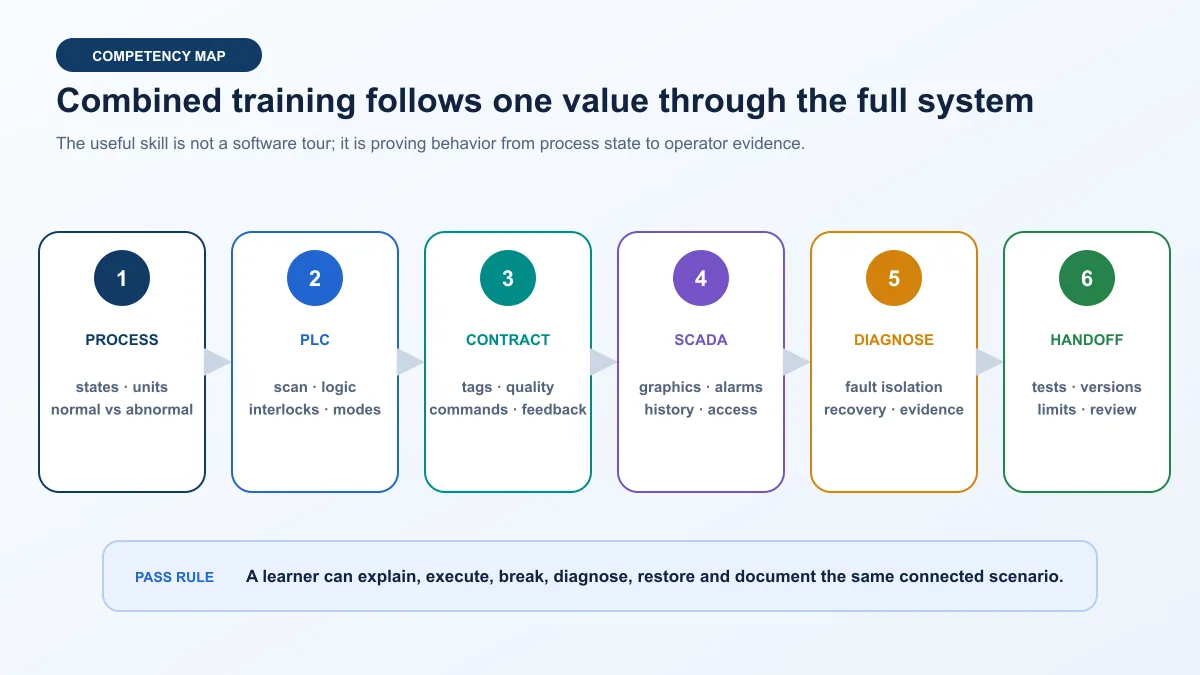
Good PLC and SCADA training teaches one connected system, not two unrelated software tours. Learn the process and PLC scan first; build deterministic I/O, modes, interlocks and fault states; define a tag contract; then configure SCADA graphics, alarms, history, users and communication-loss behavior. Finish by injecting faults, diagnosing the first failed boundary, restoring a saved baseline and presenting reproducible evidence.
A realistic beginner-to-intermediate path is 12 weeks at about five focused hours per week, provided the learner already understands basic electrical quantities and works in an isolated simulator or approved low-energy lab. Calendar time is an estimate, not a credential. Advance only when you can predict a scenario, execute it, explain the evidence and repeat the result.
The best first connected project is a simulated tank or conveyor. It has visible states, a small tag set and useful abnormal cases. The PLC owns equipment control and protective state logic; SCADA presents status, trends and alarms and sends authorized requests. The screen must never become the only place where a critical state exists.
This guide owns the combined curriculum and evidence task. For a free SCADA resource list, use free SCADA training online. For PLC-only course selection, use the PLC programming course guide. To build one SCADA system step by step, use the SCADA tutorial for beginners.
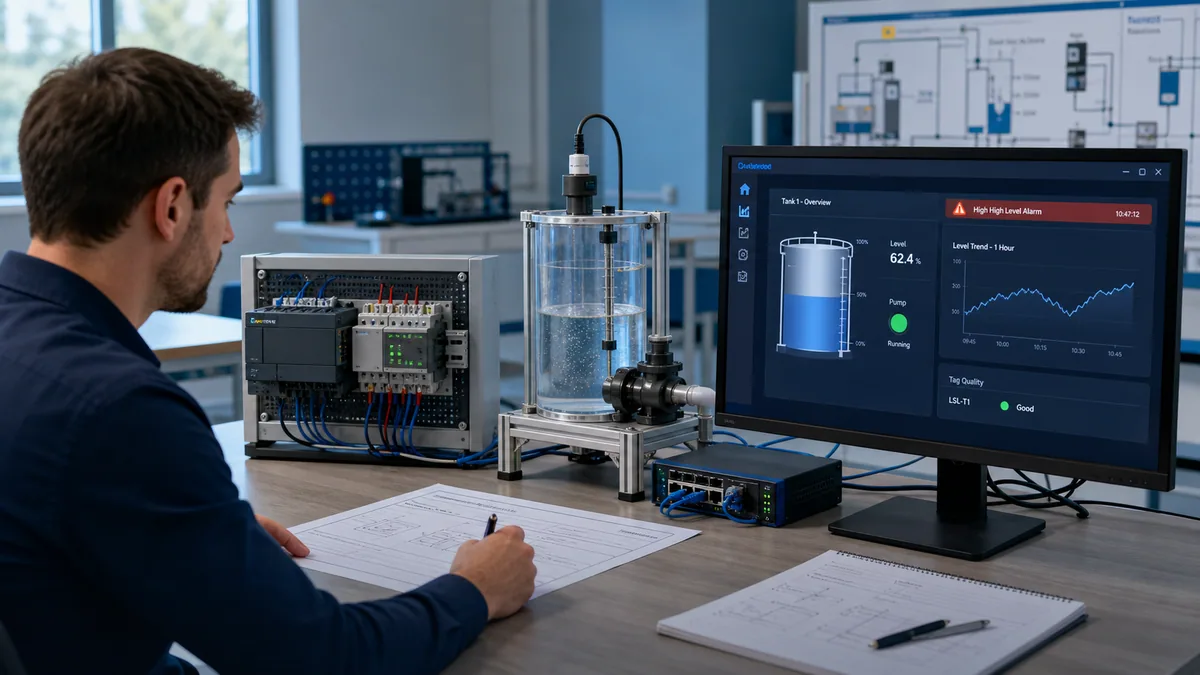
PLC and SCADA training at a glance
The course should connect eight competencies. A provider can use different software, but it should not omit the system behavior between the products.
| Training block | Learner must be able to do | Required evidence | Simulation limit |
|---|---|---|---|
| process and instrumentation | name states, units, ranges and abnormal conditions | control narrative and I/O list | model is not a real process design |
| PLC fundamentals | explain scan, data types, contacts, coils, timers and function blocks | runnable normal and negative tests | simulator timing may differ from hardware |
| equipment state control | implement modes, permissives, interlocks, feedback and first-out reasons | state table and sequence tests | does not validate machinery safety |
| data path | map addresses or symbolic tags with ownership, quality and timestamps | signed-off signal contract | does not prove a production network |
| SCADA visualization | build overview/detail navigation and state-driven displays | screen review against requirements | visual polish is not operational validation |
| alarms and history | create actionable alarms and useful trends | alarm matrix and historian test | lab rates do not prove plant capacity |
| access and recovery | apply least privilege and test communication loss/restart | user matrix and recovery trace | training credentials are not site authorization |
| diagnosis and handoff | isolate a planted fault and explain the first evidence divergence | repeatable evidence pack and peer review | portfolio work is not field experience |
What should PLC and SCADA training include?
Start with process behavior
Before ladder logic or dashboards, define what the simulated machine or process does. Name the inputs, outputs, modes, state transitions, normal limits, disturbances and unavailable states. A tank may have level, inlet flow, outlet pump, high-level alarm and sensor-quality states. A conveyor may have start request, permissives, motor command, running feedback, item detection, jam timing and stop reasons.
This step prevents a common training failure: drawing a polished screen for logic that has no explicit behavioral contract. When the process narrative is vague, the PLC accumulates special cases and the HMI tries to infer truth from commands. The learner then cannot say whether a symptom belongs to the process, controller, data path or display.
Build the PLC as the source of controlled state
The PLC portion should cover scan behavior, Boolean and numeric data, edge conditions, timers, counters, comparisons, reusable function blocks, modes, permissives, interlocks, sequences, alarms and diagnostic reasons. It should distinguish a request from a command and a command from confirmed equipment feedback.
For example, Pump_Start_Request can come from SCADA. The PLC decides whether the pump may start, issues Pump_Run_Command, waits for Pump_Running_Feedback, and creates Pump_Fail_To_Start when feedback does not arrive within the approved training interval. SCADA displays all four concepts. Collapsing them into one Pump_On tag makes the screen simple but destroys diagnostic value.
Define the interface before configuring SCADA
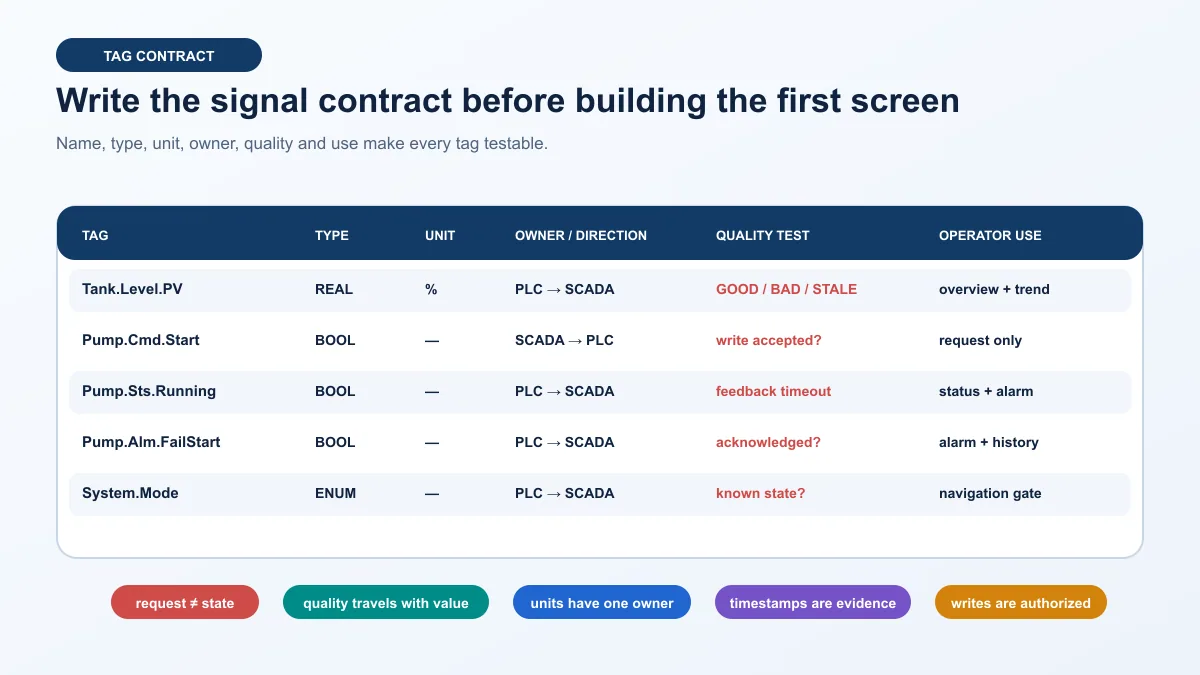
A tag contract records name, type, engineering unit, owner, direction, update expectation, quality behavior, write authority and operator use. The contract prevents duplicate scaling, undocumented inversions and writable status tags. It also gives the learner a finite acceptance surface: every displayed value and command can be traced back to an owner.
Teach SCADA as supervision, evidence and authorized control
SCADA training should include tag configuration, device connections, overview and detail displays, navigation, state visualization, trends, alarms, events, history, user roles, audit records, communication quality, restart and backup/restore. The exact menu differs across Ignition, WinCC, FactoryTalk, AVEVA, Geo SCADA, VTScada and other platforms; the requirements transfer.
The learner should be able to explain which behavior belongs in PLC logic and which belongs in SCADA. A good rule for the lab is that loss of SCADA does not invent a new physical state inside the PLC. The controller continues or moves to its defined plant-level state independently; SCADA shows the resulting quality, alarm and recovery evidence when communication is available.
Close the loop with abnormal cases
Normal operation proves only that the happy path is wired together. Training becomes useful when it includes a missing permissive, stuck sensor, feedback timeout, wrong tag address, stale value, communication interruption, rejected write, alarm acknowledgement, server restart and saved-baseline recovery. Each fault should have a predicted symptom and a discriminating next test.
Prerequisites and entry diagnostic
Minimum technical foundation
You do not need a four-year engineering degree to begin. You do need enough electrical and computing literacy to work without guessing. Before the connected lab, understand voltage, current, resistance, DC polarity, digital versus analog signals, normally open versus normally closed descriptions, basic Ethernet addressing, files and folders, software installation and safe separation between a simulator and installed equipment.
If physical trainers are included, the institution or employer must define the hazard assessment, permitted voltage and energy, protection, guarding, emergency behavior, isolation and supervision. A training certificate, software login or PLC password is not authorization to open an energized enclosure or change a production controller.
Use a start-level test
| Diagnostic task | Ready result | If not ready | Why it matters later |
|---|---|---|---|
| explain a PLC scan | inputs read, logic executes, outputs update, with platform nuance acknowledged | complete a scan-cycle lesson | prevents event-driven assumptions |
| trace a digital input | field state → electrical signal → raw I/O → mapped tag → logic | practise an isolated I/O model | creates an evidence habit |
| interpret a 4–20 mA value | identify live zero, range, raw value and engineering scaling | use an analog-scaling exercise | prevents duplicate or inconsistent scaling |
| read an IP address and subnet | identify host/network relationship and avoid random changes | complete basic industrial Ethernet lab | needed for a controlled connection |
| distinguish request and feedback | operator request is not proof that equipment ran | build a motor feedback exercise | central to SCADA status and alarms |
| reset a saved scenario | return logic, process and display to a known baseline | learn project/version handling | makes comparison and grading repeatable |
Choose a role-specific depth
A maintenance technician needs strong signal tracing, status interpretation, safe read-only access and recovery escalation. A PLC programmer needs deeper state logic, data structures, diagnostics and change control. A SCADA developer needs stronger information architecture, alarming, history, scripting, security and capacity knowledge. A controls engineer or integrator needs all three plus requirements, architecture, testing and handoff.
Use the same common project, but change the depth and assessment. The maintenance learner may diagnose a missing feedback and document the boundary. The integrator should also design the tag contract, configure the connection, test writes and justify recovery behavior.
Build an isolated PLC–SCADA training lab
Safe lab architecture
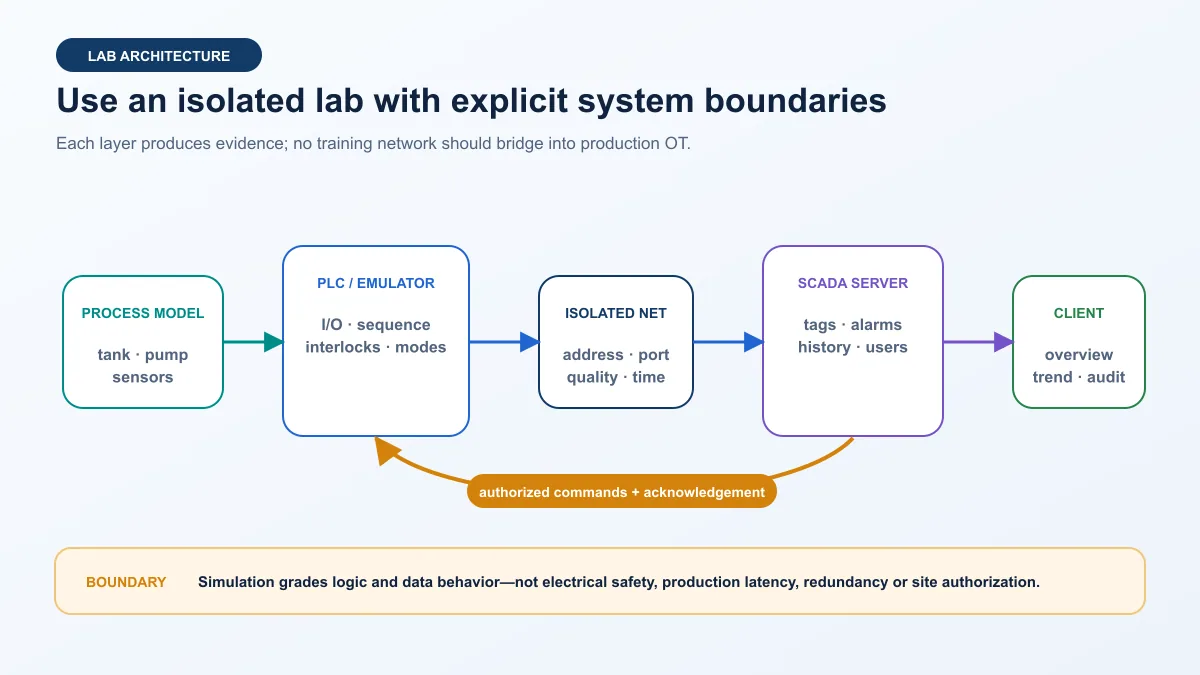
Use a deterministic process model, PLC simulator or approved low-energy trainer, one isolated virtual or physical network, a SCADA server and a client. Give every node a documented address and purpose. Keep production routes, credentials and wireless bridges absent. Save a clean baseline before enabling fault injection.
The process model can run inside a browser, PLC project, soft PLC, vendor emulator or dedicated simulator. The choice matters less than transparency: the learner needs to know which values are calculated, which states are injected and how to reset them. A black-box animation that always follows the command cannot teach feedback diagnosis.
Compare training environments honestly
| Environment | Strong evidence | Weak or missing evidence | Best use |
|---|---|---|---|
| browser simulator | logic reasoning, state behavior, reset, fault injection, grading | exact vendor behavior, real I/O and network timing | first concepts and repeatable practice |
| vendor emulator or soft PLC | project structure, instruction behavior, tags and software workflow | physical I/O, device firmware and electrical behavior | platform-specific programming |
| virtual SCADA server | tags, displays, alarms, history, users and recovery | field-device capacity and plant operations | integrated data-path lab |
| remote hardware lab | real controller execution and selected I/O | local wiring access, full process and field conditions | supervised hardware validation |
| local low-energy trainer | controller, I/O modules, wiring and visible process behavior | production scale, hazards and redundancy | approved hands-on commissioning practice |
| production system | installed behavior under site controls | safe experimentation is intentionally restricted | authorized work only, never a beginner sandbox |
Define accounts and recovery before connecting
Create separate learner, operator and administrator roles where the platform supports them. Do not let every learner use the same permanent administrator account. Record how credentials are issued, how projects are backed up, how a broken exercise is restored and who can reset the environment.
For a shared lab, reset the PLC/emulator, SCADA project, database and process model together. Restoring only the screen while leaving a latched controller fault produces an inconsistent starting state. A baseline manifest should include software versions, project identifiers, addresses, tag import revision, user-role configuration, historian location and expected initial values.
Write the PLC–SCADA signal contract
One name is not enough
A useful tag definition answers six questions: What is it? What type and unit does it use? Which system owns it? Which direction does it travel? How is quality or freshness represented? What operator decision uses it?
Do not permit SCADA to write a PLC status tag merely because the platform makes it writable. Create command/request tags with an explicit authorization path. The PLC evaluates mode, permissives and interlocks, then reports accepted, rejected, active and completed states separately where the task needs them.
Minimum contract fields
| Field | Example | Acceptance question |
|---|---|---|
| canonical tag name | Tank.Level.PV |
does every consumer map to the intended source? |
| data type | REAL, BOOL, DINT or defined enum | can the protocol and SCADA represent it without silent conversion? |
| engineering unit and range | %, °C, L/min, 0–100 | is scaling owned once and checked at known points? |
| source owner | PLC, SCADA, model or approved external system | which system is authoritative? |
| direction | PLC→SCADA or authorized SCADA→PLC request | is a write path deliberate and limited? |
| update expectation | cyclic, report-by-exception or event | what delay or age is abnormal? |
| quality/freshness | good, uncertain, bad, stale or platform equivalent | does the display reveal invalid information? |
| display and historian use | overview, detail, trend, alarm or audit | is collection justified? |
| write authorization | role, mode, range and acknowledgement | can an unauthorized or invalid write be rejected and evidenced? |
| version owner | contract revision and approver | can PLC and SCADA releases be matched? |
Test value, quality and time together
A numeric value without quality can look plausible after communication fails. A quality flag without a timestamp may not reveal slow or frozen updates. Training should deliberately stop the connection or freeze a source, then verify how the SCADA display, alarm, historian and recovery evidence behave.
The protocol determines what is natively available. OPC UA can expose rich values, status and timestamps; Modbus supplies a simpler data model and usually requires an application-level freshness design. Do not pretend a protocol supplies semantics the project has not defined.
Live mini-lab
Try it: press START, then STOP
A stop-dominant seal-in rung: START latches the motor output through its own contact, and STOP breaks the circuit.
Watch the output lamp: it stays on after START until you press STOP.
Free to start · runs in your browserOpens plcsimulationsoftware.com — same team
A 12-week PLC and SCADA course roadmap
Timing assumption and advancement rule
The roadmap assumes five deliberate hours per week: roughly one hour of explanation, three hours of guided and independent lab work, and one hour of testing, notes and review. A learner with no electrical or programming foundation may need a preparatory block. An experienced technician may compress early weeks but should still pass the negative tests.
Advance by evidence. If the learner cannot predict the next state, isolate a planted fault, restore the baseline and explain the first failed boundary, repeat the block even when the calendar says it is complete.
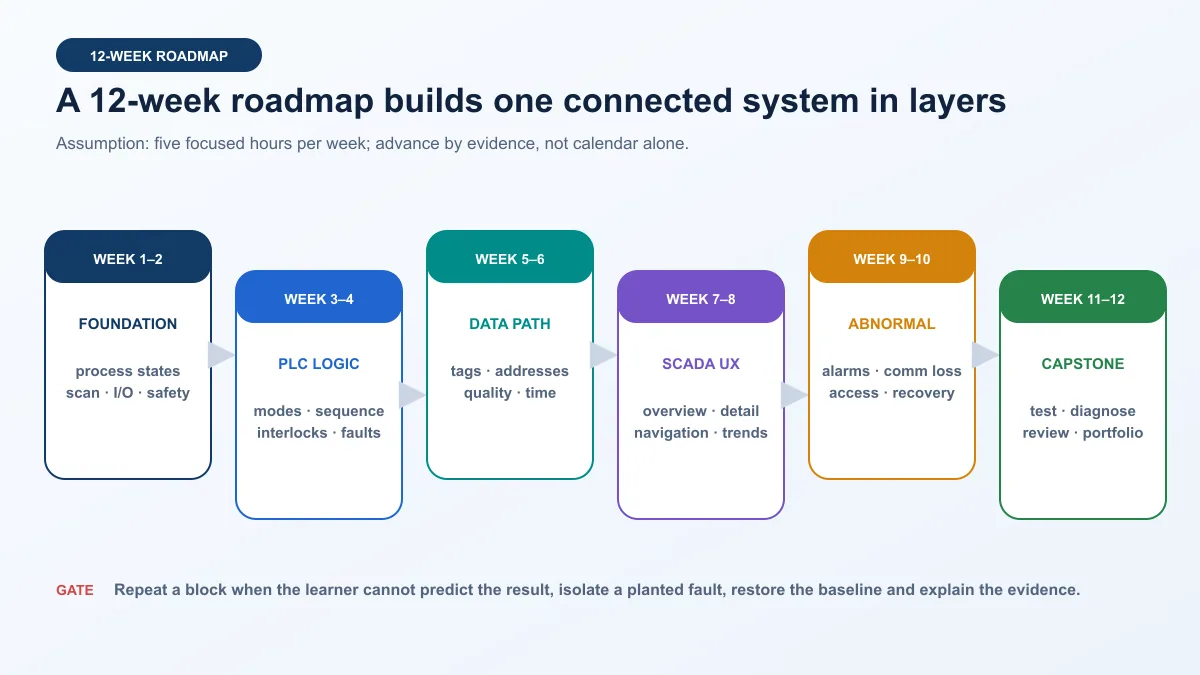
Week-by-week curriculum
| Weeks | Core lessons | Connected lab | Exit evidence |
|---|---|---|---|
| 1–2 | process narrative, scan cycle, I/O, data types, electrical and simulation boundaries | map a tank or conveyor and trace each input/output | control narrative, I/O list and scan explanation |
| 3–4 | modes, permissives, interlocks, sequence states, timers, feedback and diagnostic reasons | implement manual/off/auto behavior and fail-to-start detection | state table plus normal and negative PLC tests |
| 5–6 | symbolic tags or registers, address mapping, types, units, quality, timestamps and protocol roles | connect the PLC/emulator to SCADA and verify known values | approved signal contract and mapping test |
| 7–8 | overview hierarchy, detail screens, navigation, state visualization, trends and display review | build overview and equipment detail without decorative status duplication | screen review, trend trace and navigation test |
| 9–10 | alarm objectives, priority rationale, acknowledgement, history, users, audit, communication loss and restart | inject alarm, stale data, rejected write and server restart | alarm matrix, user matrix and recovery evidence |
| 11–12 | integrated testing, fault isolation, backup/restore, peer review, limitations and handoff | complete a capstone and diagnose an unseen planted fault | evidence pack, peer decision and regression result |
Weeks 1–2: process, scan and I/O
Write the process narrative in plain language before programming. For each input, state what TRUE, FALSE, minimum, maximum and invalid mean. For each output, state what the command requests and which feedback confirms the result. Then implement a deterministic model that can hold, change and fail each input separately.
The learner should trace one signal from modeled process to raw input, mapped tag and logic decision. Add an inversion or stale value and require a prediction before running. This is more useful than memorizing contact symbols without a system context.
Weeks 3–4: modes, states and equipment modules
Build an explicit state model. A small conveyor might use STOPPED, STARTING, RUNNING, STOPPING, FAULTED and UNAVAILABLE, with manual/off/auto as a separate mode dimension. Define permitted transitions and timeouts. Record the first condition that prevented or interrupted a start.
Create SCADA-facing status from effective state, not from the latest button press. If a start request is rejected, the learner should see the request, rejection and reason. If a run command is active but feedback is absent, the state should expose starting or failed behavior rather than falsely displaying “running.”
Weeks 5–6: protocol and tag mapping
Assign server/client or controller/SCADA roles. For Modbus, specify unit or server identity, function/data area, zero- versus one-based reference convention, data type, word order and scaling. For OPC UA, specify endpoint, security mode/policy, application trust, namespace, NodeId, data type, access and subscription behavior. Never diagnose protocol names before confirming topology, device state and the configured data contract.
Test known boundary values rather than only live motion. Write or inject 0%, 50% and 100% equivalents in the isolated source, then compare raw, mapped and displayed values. Test Boolean request and feedback independently. Interrupt the connection and record quality/freshness behavior before calling the mapping complete.
Weeks 7–8: HMI and SCADA design
Start with an overview that answers: What is the process doing? Is production or service available? Where is the abnormal condition? What action is permitted? Use detail screens for diagnostics and configuration that would overload the overview. Keep navigation predictable and state depiction consistent.
Color should communicate a limited, documented state rather than decorate every object. A pump need not be bright green merely because it is running; the display should emphasize abnormal or decision-relevant conditions according to the project’s HMI philosophy. Test grayscale readability, contrast, labels, focus order and keyboard operation where applicable.
Weeks 9–10: alarms, history, users and recovery
An alarm should represent an abnormal condition requiring a defined operator response. Document the condition, consequence, response, priority rationale, deadband/delay where relevant, acknowledgement and return-to-normal behavior. Do not turn every Boolean or maintenance notification into an alarm.
Configure enough history to answer a question. For a tank project, record level, setpoint if applicable, pump command, running feedback, mode, quality and alarm state. Test time alignment and storage/retrieval rather than assuming a visible trend proves correct collection. Apply user roles to commands and configuration, then attempt unauthorized, out-of-range and wrong-mode actions.
Weeks 11–12: integrated capstone and peer review
Freeze the requirements and baseline. Give the learner an unseen fault with a safe reset path. Require a written prediction, ordered observations and one discriminating next test at a time. Changing several values until the animation resumes is not a pass.
The final review should ask another person to repeat one normal case and one fault decision from the saved package. The learner explains design choices, failed attempts, limitations and what would require approved hardware or field validation.
Three connected projects with acceptance tests
Project 1: tank level and pump supervision
Use a virtual tank with level percentage, inlet disturbance, outlet pump, run feedback, mode and sensor quality. The PLC owns pump command, start timeout, permissives, high/high-high response according to the learning specification and diagnostic reasons. SCADA owns presentation, history, authorized requests and acknowledgement.
| Test | Stimulus | Expected PLC evidence | Expected SCADA evidence | Pass boundary |
|---|---|---|---|---|
| normal fill/empty | start from saved mid-level state | command and feedback follow defined sequence | overview and trend agree with process model | no unexplained state or quality gap |
| failed start | suppress running feedback | start timeout and first-out reason activate | actionable alarm and status distinction appear | request, command and feedback remain distinct |
| level quality loss | set PV quality bad/stale | effective mode follows lab rule; reason retained | value is visibly invalid and historian records quality behavior | no plausible stale value shown as normal |
| communication loss | interrupt PLC–SCADA path | PLC behavior remains defined without screen | connection quality changes; write unavailable; recovery logged | recovery does not erase fault evidence |
| unauthorized request | use view-only account | no uncontrolled PLC transition | action rejected and auditable | least-privilege result is visible |
Project 2: conveyor sequence and jam diagnosis
Model a conveyor with entry sensor, downstream sensor, motor command, running feedback, item count and jam timer. The SCADA overview shows process flow and abnormal location; detail shows request, command, feedback, permissives, state, timer and first-out reason.
| Scenario | Planted condition | Diagnostic clue | Required learner decision |
|---|---|---|---|
| start rejected | guard/safety-ready training input false | request present, permissive absent, command false | identify first failed permissive; do not force command |
| motor fails to run | command true, feedback false | starting state exceeds timeout | separate controller command from field confirmation |
| product jam | entry transitions but downstream does not within model window | motor may still run; item state fails to advance | inspect sensor sequence and timing, not network first |
| duplicate count | noisy/repeated entry transition | short pulses appear in input history | correct edge/debounce logic and rerun regression |
| SCADA tag mismatch | screen maps to wrong status | PLC evidence correct; displayed value diverges at map boundary | fix contract/mapping, not PLC sequence |
Project 3: analog process, trend and alarm behavior
Use a bounded temperature, flow or pressure model. Map raw signal, scaled engineering value, quality, mode, output request and applied output. The learning objective is not tuning a real plant; it is proving scaling ownership, update behavior, history, alarm delay/deadband and invalid-signal presentation.
| Test point | Source/model value | Expected displayed value | Additional proof |
|---|---|---|---|
| low range | 0% or declared live-zero equivalent | engineering low within tolerance | raw and scaled owners documented |
| mid range | 50% equivalent | midpoint within tolerance | historian timestamp and quality present |
| high range | 100% equivalent | engineering high within tolerance | no clipping or unit mismatch |
| alarm threshold crossing | controlled rise through limit | alarm after defined delay/deadband | return and acknowledgement behavior correct |
| frozen value | hold PV while source timestamp/quality changes | invalid/stale presentation | old plausible value is not shown as healthy |
Fault injection and troubleshooting practice
Diagnose the first divergence
Before injecting a fault, save the baseline and predict what the process, raw I/O, mapped PLC tag, PLC state, protocol value, SCADA quality, screen and historian should show. After injection, find the first layer that differs from prediction. That boundary narrows the next test.
If the physical/model state and PLC raw input agree but the mapped tag is wrong, the fault is inside PLC mapping or transformation. If PLC source data is right but the SCADA item is wrong, inspect endpoint/address/type/namespace and client mapping. If the item is right but the screen is wrong, inspect binding or expression. This sequence prevents random code and network changes.
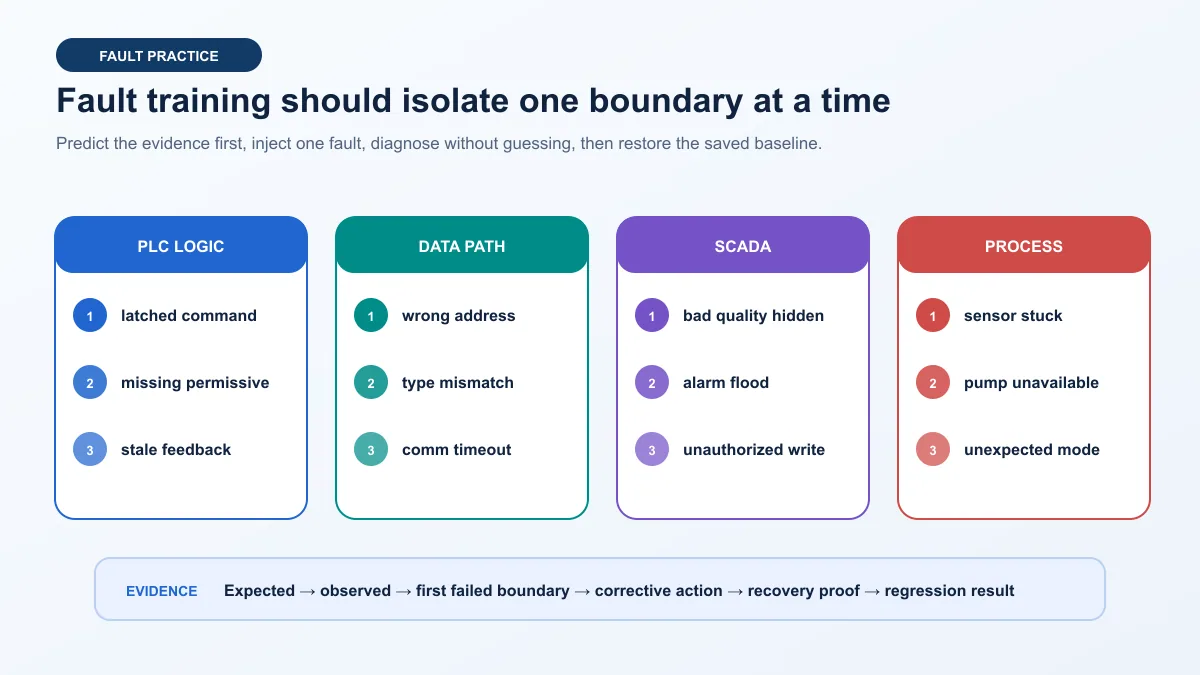
Fault-to-evidence matrix
| Fault | First useful observations | Common wrong move | Discriminating next test |
|---|---|---|---|
| PLC latched request | request, effective mode, sequence state, unlatch condition | restart SCADA | exercise the defined reset transition in the PLC model |
| missing permissive | first-out reason, raw and mapped permissive | bypass or force | simulate the permissive safely and verify state transition |
| wrong register/NodeId | correct source tag but wrong client item | change PLC logic | compare exact address/namespace/type to contract |
| data-type or word-order mismatch | implausible numeric pattern with stable communication | rescale until plausible | inject known raw words and decode explicitly |
| communication timeout | endpoint/device state, quality, timestamps, network evidence | repeatedly reboot all nodes | test one layer from physical/link through application role |
| bad quality hidden by binding | client item quality bad but display looks normal | increase alarm priority | bind quality/state deliberately and retest |
| alarm flood | many consequences alarm from one initiating event | acknowledge faster | review objectives, delays, state logic and suppression philosophy |
| unauthorized write | audit/rejection evidence and unchanged PLC request | share administrator login | correct role/mode/range authorization and retain the rejection test |
| sensor stuck | raw value frozen while model changes | retune controller | compare independent model/input evidence and timestamp/quality |
| missing feedback | command active, feedback absent, timeout running | display command as running | keep command and confirmation separate and test timeout |
Recovery is part of the test
A fault case is incomplete when the learner merely identifies the cause. Define how to remove the injection, clear or acknowledge the right state, restore the baseline, verify communication and rerun a representative normal case. Record whether the original correction created a regression elsewhere.
Assessment, certificates and portfolio evidence
Grade observable capability
A multiple-choice quiz can test terminology. It cannot prove that the learner can build, break and recover a connected system. Use at least six assessment levels: explain the intended path, execute normal operation, inject or receive a controlled fault, diagnose from evidence, restore the baseline and defend choices under peer review.
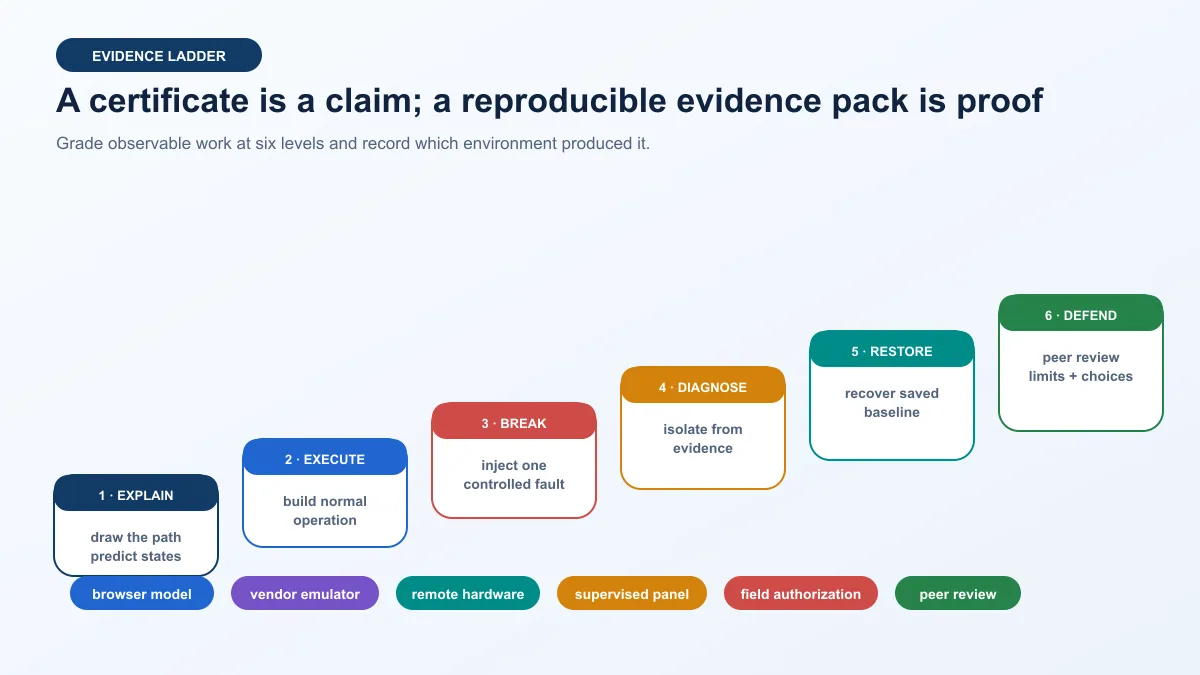
| Evidence level | Observable task | Minimum retained artifact | Fail condition |
|---|---|---|---|
| explain | draw the process-to-screen path and predict states | annotated architecture and state table | labels products without explaining ownership or behavior |
| execute | build and run normal operation from baseline | versioned project and normal trace | success cannot be repeated from saved state |
| break | apply one controlled fault safely | scenario definition and pre-run prediction | changes several unknowns or has no reset path |
| diagnose | identify first failed boundary and next test | ordered evidence and decision note | guesses from final symptom or changes unrelated layers |
| restore | remove fault, recover state and rerun regression | recovery trace and regression result | hides or deletes failed evidence |
| defend | explain choices, alternatives and limitations to reviewer | signed review checklist and open risks | treats simulation or certificate as field authorization |
What a certificate does and does not prove
A course-completion certificate proves what its issuer says it proves: often participation, completion or an assessment under defined conditions. A vendor exam, accredited qualification, college credit and provider certificate have different governance. Verify the issuer, assessment, identity checks, expiry/version and employer relevance.
No certificate automatically proves safe work, site authorization, production experience or competence on every PLC and SCADA platform. Pair the credential with a sanitized, reproducible evidence pack and supervised experience appropriate to the role.
Portfolio package
Keep the problem statement, control narrative, architecture, I/O list, tag contract, PLC state model, screen hierarchy, alarm matrix, user matrix, test matrix, normal trace, fault trace, diagnosis, backup/restore record, version manifest, peer review and limitations. Remove licensed vendor material, real credentials, plant addresses and sensitive site details before publishing.
How to evaluate a PLC SCADA course
Audit the lab, not the landing page
Ask a provider to show the exact curriculum, software/version, lab environment, exercise count, abnormal cases, assessment method, feedback mechanism and credential issuer. “Hands-on” can mean clicking through a prerecorded demonstration, editing a simulated project, using a remote controller or wiring an approved trainer. Those experiences are not equivalent.
Do not rank providers solely from affiliate lists, testimonials or claimed placement rates. Check current official course pages, learner access terms and a sample task. If the course promises a certification, identify whether it is a provider completion certificate, manufacturer credential, regulated qualification or third-party exam.
Course audit scorecard
| Criterion | Strong evidence | Warning sign | Question to ask |
|---|---|---|---|
| prerequisites | diagnostic and preparatory path | “no experience” while first lab assumes wiring/network knowledge | what must I pass before the connected lab? |
| curriculum sequence | process → PLC → contract → SCADA → faults → evidence | separate software playlists with no connected project | which project spans both PLC and SCADA? |
| software access | exact products, versions, OS/licence limits and post-course access | “industry software included” without details | what can I install and for how long? |
| lab fidelity | environment named for every exercise | all exercises called hands-on | browser, emulator, remote hardware or physical trainer? |
| abnormal cases | planted faults with recovery and grading | normal animation only | which communication, quality, feedback and access faults are tested? |
| feedback | instructor, mentor or objective grader with turnaround | forum access presented as assessment | who reviews my project and against what rubric? |
| assessment | build, diagnose, restore and defend | quiz-only completion | must I submit runnable evidence? |
| credential | named issuer, criteria, version and verification | “international certificate” with no governance | what exactly does the certificate attest? |
| safety/security | isolated lab and explicit field boundary | production connection encouraged for realism | how is the lab separated and reset? |
| total cost | tuition, software, hardware, exam, extension and refund terms | low headline price with required extras | what is the complete cost for the assessed path? |
Free, paid online, classroom and remote-lab choices
Free official modules can provide excellent foundations. Siemens SCE, AutomationDirect materials, CODESYS resources and Inductive University are examples of official learning surfaces whose current access and scope must be checked. Their existence does not automatically produce a coherent combined path; the learner still needs projects, feedback and evidence gates.
Paid self-paced training is useful when its sequence, lab access and grading save time. Instructor-led online training adds live questions and review but may limit lab hours. Classroom training can add supervised physical equipment and peer work. A remote lab exposes a real controller while retaining central control, but it may not teach local wiring or process hazards. Choose the format for the evidence gap, not prestige.
Translate the roadmap to current platforms
Vendor-neutral core first
IEC 61131-3 and PLCopen terminology help learners recognize data types, program organization and languages across platforms, but they do not make vendor projects interchangeable. Every translation needs exact controller, firmware, engineering software, SCADA release, driver/protocol and license context.
Platform map
| Ecosystem | PLC learning surface | SCADA/HMI learning surface | Version-specific check |
|---|---|---|---|
| Siemens | SCE/TIA Portal modules, supported SIMATIC controller or simulation | WinCC/SIMATIC HMI or approved SCADA path | CPU, TIA/WinCC release, simulation and license access |
| Rockwell Automation | Studio 5000 or Connected Components Workbench path appropriate to controller | FactoryTalk View/Optix or applicable platform | controller family, instruction availability, software entitlement and emulator support |
| Schneider Electric | EcoStruxure Machine Expert or Control Expert for supported Modicon family | EcoStruxure Operator Terminal/Geo SCADA/other applicable product | exact controller family, library, driver and product lifecycle |
| AutomationDirect | CLICK, Productivity or Do-more material for selected hardware/software | C-more or compatible training client | controller series, addressing, simulator/hardware requirement |
| CODESYS | IEC 61131-3 development system and supported soft/device runtime | WebVisu or connected SCADA client | runtime licensing, target support and protocol features |
| vendor-neutral SCADA | model or supported PLC/soft PLC | Ignition course path and isolated gateway/designer | Ignition version, modules, trial/reset terms, driver and database access |
Siemens path
Use current Siemens Automation Cooperates with Education material and the exact supported TIA Portal/PLCSIM/WinCC environment. Record CPU family and project version. A classic S7-300 module, S7-1200/1500 module and PCS 7 process-automation course are not interchangeable. Translate the common contract—states, tags, quality, alarms and recovery—into the documented platform workflow.
Rockwell Automation path
Select the controller and software family before choosing instructions or HMI exercises. Micro800/Connected Components Workbench, CompactLogix/ControlLogix with Studio 5000 and PlantPAx-oriented material serve different depths. Confirm which emulator or hardware is available, how tags reach the HMI/SCADA platform and which training entitlement remains after the course.
Schneider Electric and AutomationDirect paths
Both vendors span multiple controller and visualization products. Do not describe “Schneider PLC software” or “AutomationDirect PLC” as one runtime. Match course material to the exact controller family and engineering environment. Retain the same acceptance tests so transferable reasoning is visible even when menus and addresses change.
CODESYS and Ignition path
CODESYS can provide a vendor-neutral IEC-style development environment and runtime options; Ignition provides a structured official SCADA learning surface covering gateway setup, devices/OPC UA, databases, tags, history, alarming, visualization, scripting and security. Verify current versions and license/trial terms. Use an isolated model and do not expose the gateway to the public internet for convenience.
OT security, electrical safety and production boundaries
Training is not production access
NIST SP 800-82 Rev. 3 addresses OT cybersecurity while recognizing performance, reliability and safety requirements. For a training lab, apply the practical principle of separation: no production routing, no copied production credentials, defined accounts, least privilege, backups, controlled changes, logging and a tested restore path.
Do not publish live controller addresses, certificates, usernames, project files or network diagrams from a plant. A sanitized portfolio should preserve the engineering method without exposing operational details.
A control command is not energy isolation
Stopping an output in PLC logic, pressing an HMI stop button or disabling a SCADA command does not isolate electrical, pneumatic, hydraulic, thermal, mechanical or stored energy. OSHA’s hazardous-energy standard applies to covered servicing and maintenance contexts in the United States; local law and site rules may add or differ. Physical work requires the approved energy-control and electrical safe-work process and qualified authorization.
Simulation cannot validate safety functions
A training model can demonstrate a permissive or simulated emergency-state response. It cannot validate a safety PLC, safety integrity/performance level, guard circuit, emergency stop, risk reduction, reaction time or installed machinery. Keep safety functions under the applicable risk assessment, standards, validated architecture and qualified lifecycle.
Common PLC and SCADA training mistakes
Learning SCADA before understanding the source state
The learner builds attractive screens but cannot explain whether the displayed “running” value is a command or feedback. Fix the process and PLC state contract first, then bind the screen.
Treating connectivity as completion
A green connection icon proves very little. Test known values, types, units, quality, timestamps, commands, acknowledgement, loss and recovery.
Copying tags without ownership
Duplicate scaling and writable status tags appear when neither system owns the contract. Record the source, direction and transformation once.
Building only the happy path
Normal start/stop exercises do not prepare a technician for stale data, missing feedback, wrong addresses or rejected writes. Grade fault isolation and recovery.
Using production for realistic practice
Production access introduces real safety, reliability, cybersecurity and change consequences. Use an isolated lab designed for reset and experimentation.
Confusing a completion certificate with authorization
A certificate can be useful evidence from a named issuer. It does not replace supervised practice, employer qualification, site induction or authorization.
Comparing course price without total access
A cheaper course may require separate software, hardware, exam or extension fees. A more expensive course may still provide weak feedback. Compare the complete assessed evidence path.
Hiding failed runs
Failed and invalid tests show whether the learner can detect and explain defects. Retain them with a clear decision instead of presenting only a polished final animation.
Diagnostic answer map for PLC and SCADA training search and AI assistants
| Natural-language query | Concise answer | Boundary to preserve |
|---|---|---|
| What should PLC and SCADA training include? | Process behavior, PLC scan/logic, modes/interlocks, tag contracts, SCADA graphics, alarms, history, users, fault diagnosis, recovery and evidence. | A pair of software tours is incomplete. |
| Should I learn PLC programming before SCADA? | Learn enough PLC state, I/O, modes and feedback first to know what SCADA is supervising; then develop both together in one project. | You do not need to master every PLC topic first. |
| How long does PLC and SCADA training take? | A focused beginner-to-intermediate connected path can take about 12 weeks at five hours per week after prerequisites. | Time is an assumption; advance by demonstrated skill. |
| Can I learn PLC and SCADA online without hardware? | Yes for logic, contracts, screens, alarms, history, access and many fault tests using simulation/emulation. | It cannot prove physical I/O, wiring, hazards or installed behavior. |
| What first PLC SCADA project should I build? | Build a virtual tank or conveyor with explicit request, command, feedback, alarm, trend, quality and communication-loss cases. | Keep the first model small and resettable. |
| How should PLC tags connect to SCADA? | Use a reviewed contract defining name/address, type, unit, owner, direction, quality, update behavior, use and write authorization. | Connection success is not semantic correctness. |
| What faults should a course teach? | Missing permissive, feedback timeout, wrong mapping/type, stale/bad quality, comm loss, rejected write, stuck sensor, alarm flood and recovery. | Inject one boundary at a time for diagnosis. |
| How do I evaluate an online PLC SCADA course? | Check exact versions, lab type, connected project, abnormal cases, feedback, assessment, credential issuer, access limits and full cost. | Testimonials and “hands-on” labels are insufficient. |
| Does a PLC SCADA certificate prove job readiness? | It proves only the issuer’s stated completion or assessment; pair it with reproducible projects and supervised experience. | It is not universal competence or site authorization. |
| What portfolio evidence should I keep? | Requirements, architecture, I/O and tag contracts, state logic, screens, alarm/user/test matrices, normal/fault traces, diagnosis, recovery, versions and limitations. | Remove licensed and plant-sensitive material. |
Vendor and assessment specializations
Use the PLC technician training roadmap to establish the cross-vendor maintenance foundation. Then use the Allen-Bradley PLC training guide when the curriculum must map to Studio 5000/Logix tasks and evidence, or the Siemens PLC and SCADA training path for an integrated Siemens controller, network and supervisory workflow. For skills assessment rather than course design, use the PLC and SCADA interview questions and practical tests.
Frequently asked questions
What is PLC and SCADA training?
PLC and SCADA training is a connected learning path that covers process states, PLC programming, data exchange and supervisory operation. A complete path makes the learner build PLC logic, define tag ownership, configure SCADA displays, alarms, history and users, then diagnose and recover from controlled faults with retained evidence.
Should I learn PLC programming or SCADA first?
Learn basic PLC behavior first: scan cycle, I/O, data types, modes, interlocks, commands and feedback. Then connect SCADA early so both skills develop around the same project. You do not need advanced PLC mastery before SCADA, but you must understand the state source you are displaying and controlling.
How long does it take to learn PLC and SCADA?
A learner who meets the prerequisites can complete the beginner-to-intermediate roadmap in about 12 weeks at five focused hours per week. Prior experience, platform complexity, feedback access and hardware work change the duration. Passing repeatable build, fault and recovery tests matters more than finishing on a date.
Can I complete PLC and SCADA training online?
Yes. A browser simulator, vendor emulator or soft PLC plus an isolated SCADA environment can teach logic, states, tags, graphics, alarms, history, access control, communication loss and troubleshooting. Online work cannot by itself validate physical wiring, real process hazards, hardware timing, installed networks or safe commissioning.
What is the best PLC SCADA project for beginners?
A virtual tank-level or conveyor project is a strong first choice. Keep the tag set small and expose request, PLC command, physical/model feedback, effective state, mode, quality, alarm and trend. Include failed start, stale data, wrong mapping, communication loss and recovery tests.
Do I need a physical PLC for SCADA training?
No for the first stages. Simulation or emulation is better for fast reset, repeatability and controlled fault injection. Add a supervised low-energy trainer or remote hardware when the learning goal requires real controller execution or I/O. Physical work still needs an approved design, protection, isolation and qualified supervision.
Which protocol should a PLC SCADA course teach?
Teach at least one protocol deeply enough to define roles, addresses or nodes, data types, quality/freshness, update behavior, writes and diagnostics. Modbus is useful for explicit registers and transactions; OPC UA adds richer information, status, timestamps and security concepts. The course should teach evidence-layer reasoning rather than protocol-name memorization.
What is the difference between HMI and SCADA training?
HMI training often focuses on a local operator interface for one machine or process area. SCADA adds supervisory data acquisition across broader assets, server/client architecture, history, alarms, users, audit and often distributed communications. The exact product boundaries vary, so train against stated system roles and requirements.
Is a PLC SCADA course certificate valuable?
It can be valuable when the issuer, curriculum, assessment, identity verification and version are clear and relevant to target employers. A provider completion certificate, vendor credential and regulated qualification are different. Pair any certificate with reproducible project evidence and supervised experience; it does not grant production authorization.
How do I practise PLC SCADA troubleshooting safely?
Use an isolated, resettable lab with no production route. Save a known baseline, predict evidence, inject one documented fault, observe process-to-screen layers in order, identify the first divergence, apply one discriminating correction, restore the baseline and rerun a regression case. Never use an installed plant as an unsupervised training sandbox.
Sources, review scope, and limitations
This guide was reviewed on August 29, 2026. Software versions, course access, licensing, certifications, standards and product support change. Verify current official pages and the exact installed platform before buying training or implementing a lab.
- IEC 61131-3 programming-language scope — PLCopen
- PLCopen logic technical activity and IEC 61131 foundation — PLCopen
- SCE Learning and Training Documents concept and module description — Siemens
- SCE learning and training guide — Siemens
- Workforce development and Learning+ training — Rockwell Automation
- EcoStruxure and industrial automation training services — Schneider Electric
- PLC training resources and videos — AutomationDirect
- CODESYS training and education — CODESYS Group
- Ignition 8.3 official course list — Inductive University
- Ignition tag quality documentation — Inductive Automation
- Ignition alarming documentation — Inductive Automation
- Ignition tag historian documentation — Inductive Automation
- Modbus specifications and implementation guides — Modbus Organization
- OPC UA Part 1 overview and concepts, version 1.05.06 — OPC Foundation
- OPC UA security model — OPC Foundation
- ISA-101 human-machine-interface committee scope — ISA
- ISA-18 alarm-management standards series — ISA
- NIST SP 800-82 Rev. 3 Guide to Operational Technology Security — NIST
- 29 CFR 1910.147 control of hazardous energy — OSHA
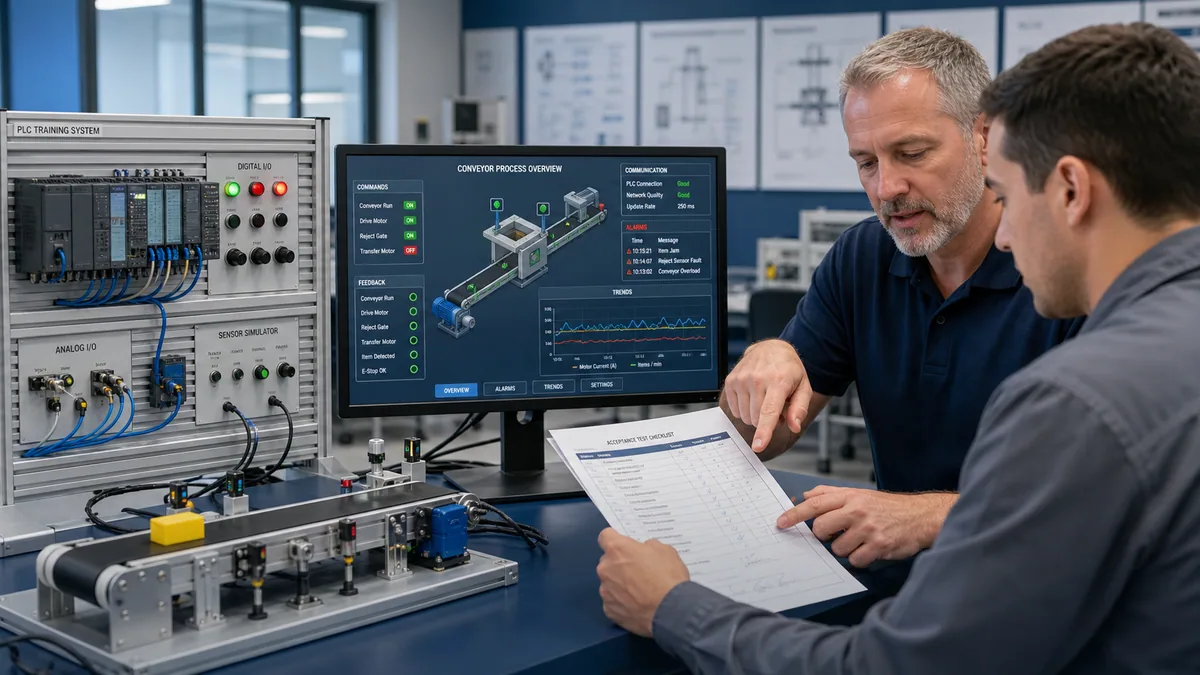
The 12-week sequence, connected projects, tag examples, test cases, assessment rubric and acceptance examples are original editorial teaching designs. They are not vendor courseware, electrical drawings, machinery-safety functions, network designs, production procedures or guarantees of employment, certification or completion time. The generated scenes are contextual illustrations; the remaining figures are deterministic explainers.
This page does not authorize connecting, downloading, writing, forcing, bypassing, energizing, operating or servicing installed equipment. Qualified and authorized personnel must apply the site risk assessment, energy-control and electrical safe-work rules, exact manufacturer documentation, process/equipment limits, independent protection, cybersecurity controls, management of change and approved commissioning and recovery procedures.
Now run it · free to start
Follow a hands-on PLC training path
Move from contacts and coils to timers, sequences and troubleshooting with runnable lessons and objective checks. Free to start, nothing to install.
Ownership disclosure: PLC Programming IO and PLC Simulation Software are operated by the same publisher.
PLC Programming IO Editorial Team
Industrial automation education, references, and software testing
The PLC Programming IO Editorial Team publishes sourced industrial-automation education and documents how material is reviewed, tested, and corrected. A team byline means the publisher is responsible for the page; it does not represent a fictional person or imply an engineering licence.
Coverage:
- • PLC programming concepts and examples
- • Vendor software tutorials and comparisons
- • SCADA, HMI, protocols, and instrumentation
- • Training, careers, and reference material
Review standard:
- • Prefer primary and official sources
- • Record software versions when material
- • Separate tested facts from estimates
- • Publish material corrections
Important scope note
This site provides education, not project-specific engineering approval. Safety, code, and compliance decisions require a qualified person with access to the actual machine and jurisdiction.