Siemens PLC SCADA: TIA Portal and WinCC Connected Project
Design, build and test a Siemens PLC–SCADA project with TIA Portal and WinCC: target selection, tag contracts, commands, alarms, history, users, communication loss and commissioning evidence.
Review status: Editorially reviewed against current Siemens WinCC, TIA Portal V21, WinCC Unified tag, communication, alarm and handshake documentation plus current OT-security guidance; exact CPU, firmware, WinCC edition, panel or PC target, licensing, drivers, limits, redundancy and simulation behavior require verification for the installed versions
Direct answer
A Siemens PLC SCADA system normally combines a SIMATIC controller—often an S7-1200 or S7-1500—with a SIMATIC WinCC visualization/runtime target. TIA Portal can provide a connected engineering environment for compatible STEP 7 and WinCC targets, but “Siemens PLC + WinCC” is not one universal product combination. Before building screens, identify the CPU and firmware, TIA Portal release, WinCC edition, panel or PC runtime, communication channel, tag and client limits, required options, license and deployment architecture.
Build the project from an explicit PLC–SCADA contract: the PLC owns deterministic machine or process state, permissives, commands, feedback validation, timeouts and ordinary control recovery; SCADA supervises, visualizes, records, alarms and submits authorized requests. Connect known devices, map typed tags with units and ownership, design request/accepted/command/feedback states, show quality and data age, rationalize alarms, configure history and user roles, then commission loss and recovery paths as thoroughly as normal operation.
This guide owns the Siemens-specific connected-project workflow. Use the SCADA tutorial for beginners for platform-neutral foundations, the Siemens STEP 7 guide for PLC engineering generations, and the S7-1200 OPC UA guide for that protocol role. The diagrams and tag names here are original teaching models, not WinCC screenshots, importable projects, production network drawings or field procedures.
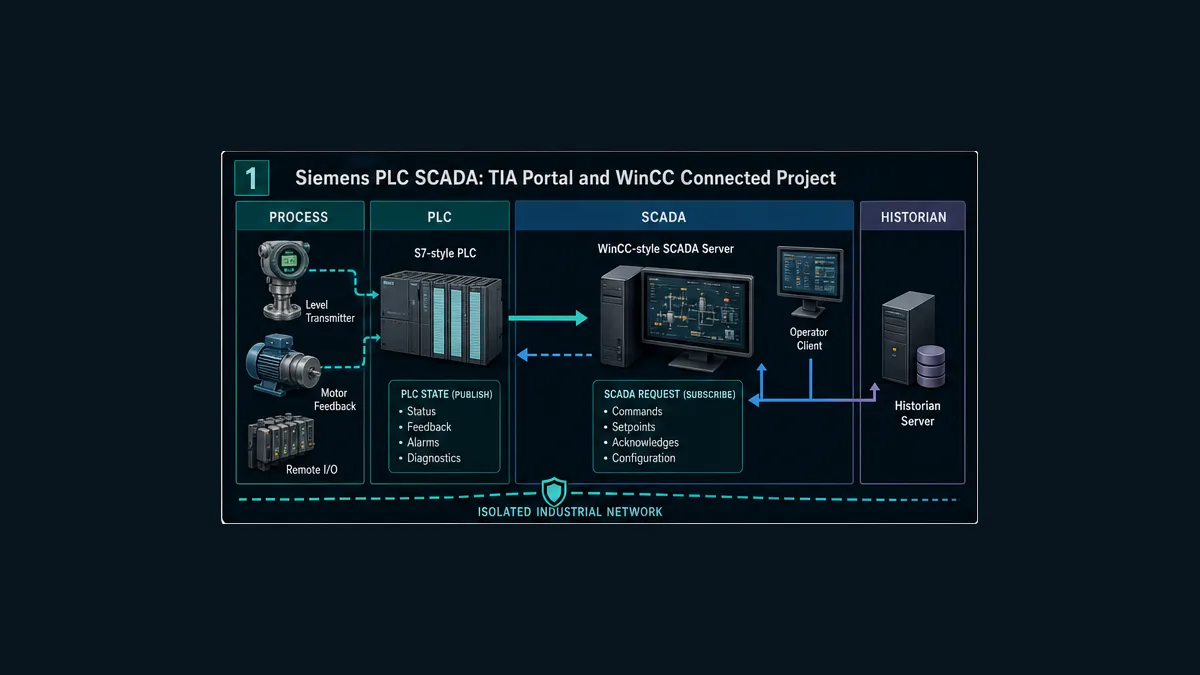
Decide what “Siemens SCADA” means for this project
WinCC is a product family, not one interchangeable runtime
Siemens currently presents SIMATIC WinCC as a portfolio. WinCC Unified uses web technologies and spans compatible panel- and PC-based targets. Other installed systems may use WinCC Professional in TIA Portal or the separately maintained classic WinCC SCADA lineage. Exact functionality, migration, scripting, redundancy, archiving, clients and licensing vary by product and version.
Do not begin with “select WinCC” in a bill of materials. Begin with requirements and an exact target manifest:
| Requirement | Decision evidence | Version-specific verification |
|---|---|---|
| local operator station | screen size, environment, input method, performance and availability | supported Unified/Comfort panel, firmware and engineering release |
| PC-based plant supervision | tag count, clients, archives, scripts, reports, options and resilience | WinCC PC runtime edition, operating system and license |
| distributed SCADA | servers, clients, geographic areas, bandwidth, failover, time and recovery objectives | architecture and option support in the exact WinCC generation |
| PLC engineering integration | shared project, symbolic tags, connection management and change workflow | compatible STEP 7/WinCC/TIA releases and target devices |
| third-party integration | OPC UA or another documented channel, identity, security and semantics | server/client roles, CPU/runtime options, certificates and limits |
| training or proof lab | resettable model, simulator support, users, alarms, history and fault injection | what the exact simulation licenses emulate and omit |
An S7-1200 connected to one Unified panel is not architecturally equivalent to an S7-1500 feeding redundant plant servers and multiple clients. The first may be machine HMI with selected logging; the second may be a full supervisory system. Searchers use “HMI” and “SCADA” loosely, so the page must state the target rather than arguing from the label.
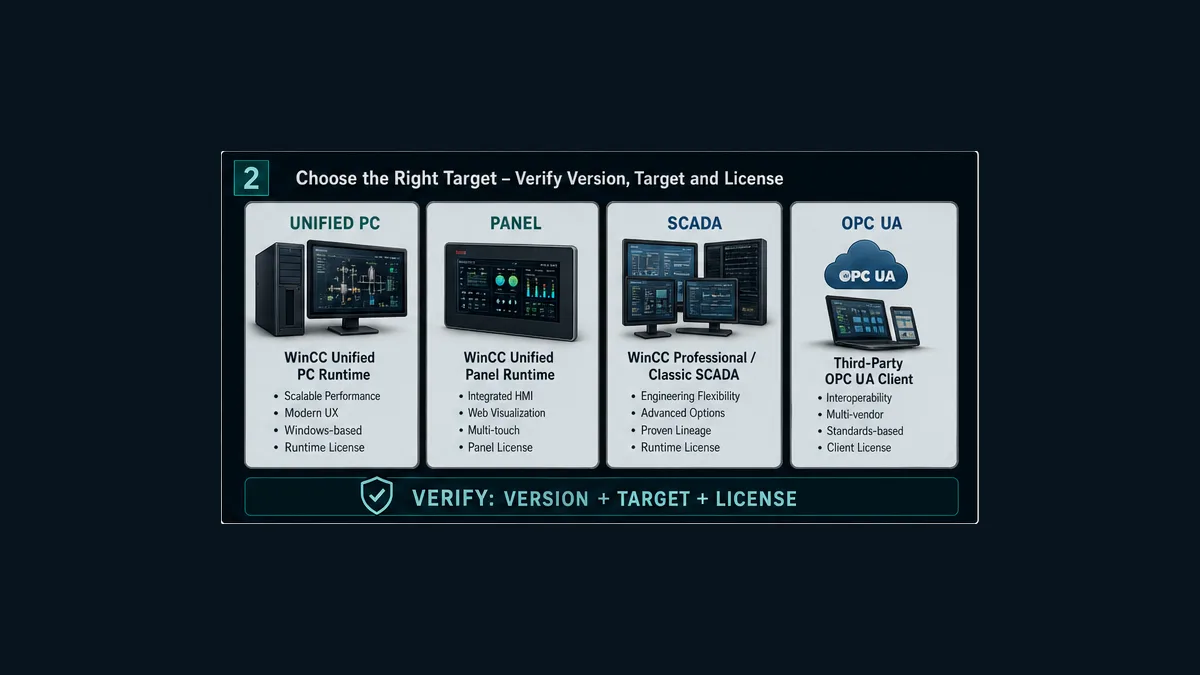
Build a compatibility manifest before a project
Record CPU catalog, firmware and memory; TIA Portal version; STEP 7 edition; WinCC edition/version/update; engineering workstation operating system; panel firmware or PC runtime OS; communication interfaces; option packages; licenses; certificates; database/archive location; client/browser requirements; and backup/restore tools. Link each to an official compatibility or product reference.
If the system is being migrated, retain the source project and installed runtime before conversion. Current TIA Portal documentation has version-specific migration boundaries, and not every STEP 7 Classic, WinCC flexible, WinCC V7 or integrated project moves directly into the newest release. An intermediate engineering version may be required. Treat conversion as a controlled engineering change with rollback and regression, not as a file-open operation.
Define PLC and SCADA ownership
The PLC remains the authoritative control-state owner
SCADA should not invent physical truth. For pump P001, the operator can request Start, but PLC logic decides whether the request is acceptable, issues the run command, waits for independent running feedback, detects failure and owns the reset/restart state machine. SCADA displays each state and records the user interaction.
| Concept | Owner in the teaching project | Question it answers |
|---|---|---|
StartRequest |
WinCC user action | what did an authorized operator ask for? |
AcceptedRequestId |
PLC request handler | did the controller accept this exact request? |
RunCommand |
PLC equipment logic | what ordinary-control intent was sent to the output path? |
RunningFeedback |
field/device feedback mapped by PLC | what independent evidence says the motor is running? |
FailToStart |
PLC diagnostic logic | did command fail to produce feedback within the approved time? |
| alarm acknowledgement | WinCC alarm lifecycle | has a user recognized the displayed alarm? |
| fault reset acceptance | PLC state logic | are reset conditions met and did the controller clear the fault? |
| restart | operator/sequence plus PLC logic | should operation begin again after recovery? |
One Pump_On Boolean cannot answer these questions. If the screen writes it true and also uses it as running status, a failed motor can appear to run. Separating request, acceptance, command and feedback creates a diagnosable system.
SCADA supervises without becoming a safety function by accident
WinCC can display and request ordinary control actions. It is not automatically an independent protection layer because a screen looks like a trip panel. Emergency stops, machinery safety, burner management, high-integrity trips and other risk reduction require the applicable hazard and safety lifecycle. Loss of SCADA must not erase the controller’s defined plant behavior.
Write the communication-loss sentence for each area: “If the WinCC connection is unavailable, the S7 controller will continue, hold, stop or transition according to the approved controller/process design; SCADA requests are unavailable, displayed values become bad/stale, and recovery is audited.” The correct controller response is process-specific.
Create the Siemens PLC–SCADA tag contract
Download the Siemens PLC–SCADA tag-contract worksheet. It provides an original nineteen-row contract for a pump, analog level, alarm, communications diagnostics, user audit and project revision. Map it to the exact WinCC and PLC project rather than importing names blindly.
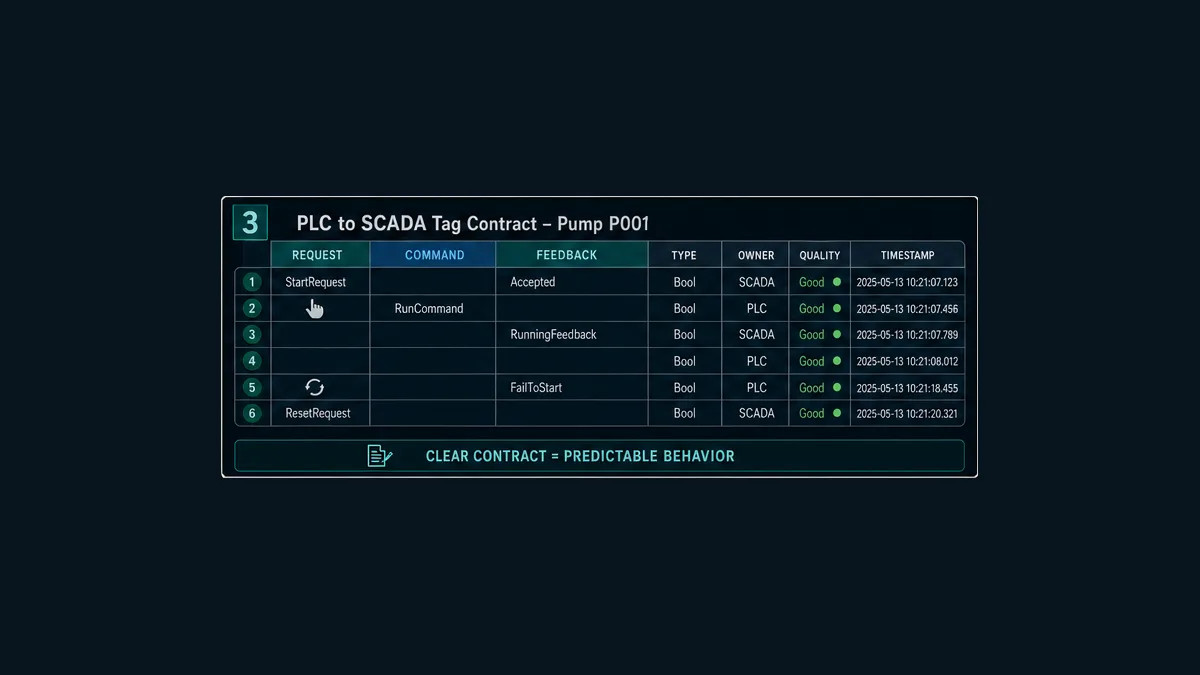
Required contract fields
| Field | Example | Defect prevented |
|---|---|---|
| stable identity | P001_RunningFeedback |
screen bound to similarly named but wrong equipment |
| PLC path/address | symbolic DB member or documented absolute address where required | connection succeeds but reads wrong memory |
| type | Bool, Real, enumeration or structure |
bit/word/float mismatch and invalid coercion |
| units/range | %, °C, bar, 0–100 |
double scaling and missing operator context |
| owner/direction | PLC→SCADA or authorized SCADA→PLC request | multiple writers and circular truth |
| access | read, operator request, engineering only | unintended write exposure |
| quality | source diagnostic plus communication quality | plausible stale number painted as good |
| timestamp/age | source/server time and maximum age | delayed data treated as current |
| update policy | acquisition group/subscription and render needs | unknown latency and excessive traffic |
| history | on change/deadband/periodic plus max interval | archives that omit important state or waste storage |
| alarm/event role | status, event or rationalized alarm | every bit becoming an alarm |
| acceptance evidence | boundary stimulus and expected result | mapping accepted by visual inspection only |
| version owner | contract, PLC and WinCC release IDs | projects drift without detectable mismatch |
Optimized versus absolute addressing is a design choice
Modern Siemens projects commonly use symbolic access where supported. Some legacy channels or third-party integrations require absolute offsets and non-optimized data organization. Do not toggle optimized access globally to make one connection work without measuring the effect on data layout, code, migration and other clients. Select the communication mechanism first, then design a stable published interface appropriate to it.
A SCADA interface DB or structured interface can isolate visualization tags from internal PLC implementation. It still requires versioning. Renaming a member, changing a type or reorganizing a structure can be a breaking interface change even when the PLC logic compiles.
Live mini-lab
Try it: press START, then STOP
A stop-dominant seal-in rung: START latches the motor output through its own contact, and STOP breaks the circuit.
Watch the output lamp: it stays on after START until you press STOP.
Free · no signup to try · runs in your browserOpens plcsimulationsoftware.com — same team
Connect the PLC and WinCC target in TIA Portal
A reviewable connected-project sequence
- Create or open the controlled TIA Portal project at the verified version.
- Add the exact CPU and configure its firmware-compatible hardware, interface and protection settings.
- Add the exact HMI/SCADA engineering target or define the approved external communication architecture.
- Configure the industrial network and documented communication connection; do not infer a protocol role from an Ethernet cable or interface label.
- Create the PLC’s published SCADA interface with stable typed tags, units, owner and access.
- Create or generate WinCC external tags against that interface and separately define internal HMI tags.
- Build navigation and reusable equipment displays around states and tasks, not around raw tag count.
- configure rationalized alarms, history, users, audit and system diagnostics for the selected runtime.
- compile PLC and WinCC targets; review every warning rather than treating zero errors as validation.
- simulate or deploy to an isolated approved target, then execute the acceptance matrix including abnormal states and communication loss.
- archive as-left projects, versions, licenses, certificates, evidence and rollback artifacts together.
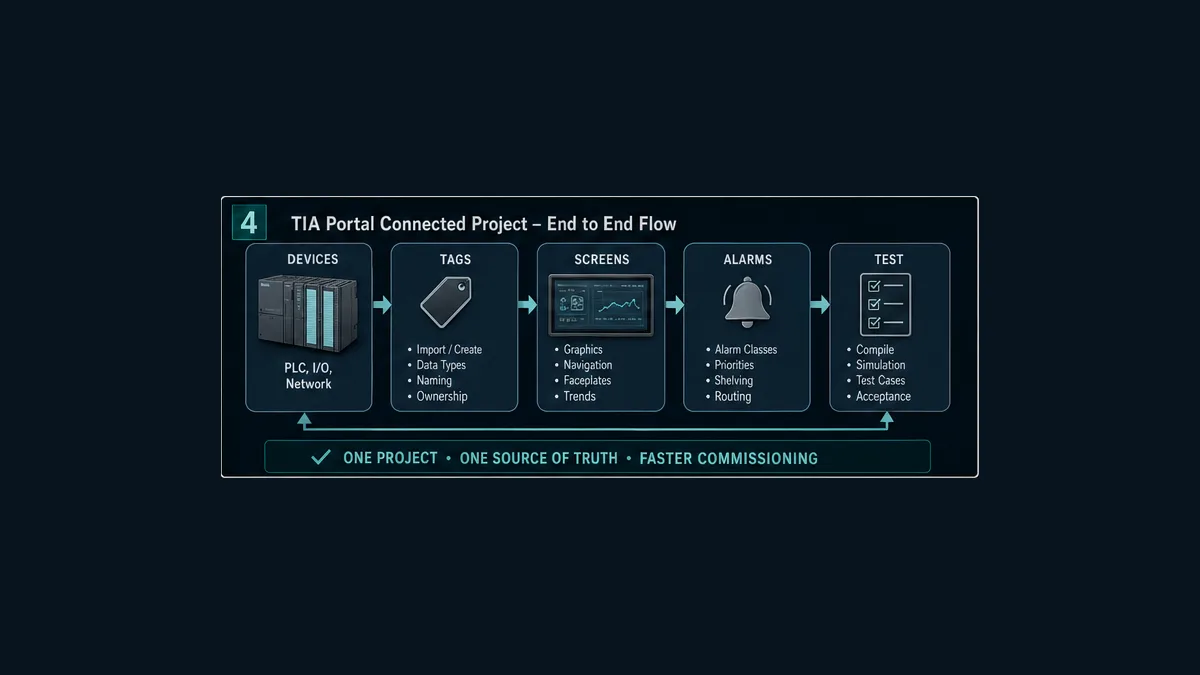
External tags versus internal tags
An external WinCC tag represents or exchanges data with a connected controller or source. An internal tag exists within the HMI/runtime for visualization, navigation, calculations or UI state. Use external tags for authoritative plant/process data and bounded requests. Use internal tags for presentation state that should not masquerade as controller truth.
Do not use a screen-local internal Boolean as proof that a pump started. If it is useful to animate button press or navigation, name and style it as UI state. Running indication must come from the approved feedback path with quality and age.
Direct SIMATIC communication versus OPC UA
For a compatible Siemens PLC and WinCC target in a connected TIA project, the documented SIMATIC communication path may offer tight symbolic integration. OPC UA is useful when the architecture requires a standards-based server/client boundary, curated interfaces, certificates and vendor-neutral clients. Neither is automatically more secure or more suitable without configuration.
Document:
| Boundary | Direct compatible WinCC path | OPC UA path |
|---|---|---|
| role | WinCC connection to supported SIMATIC controller | identify which system is server and which is client |
| data model | TIA-integrated symbolic/external tags where supported | published server interface and browsed/configured nodes |
| security | controller/runtime protection and connection settings | policies, certificates, trust, users/roles and rights |
| lifecycle | shared project/version dependencies | server-interface version plus client mapping lifecycle |
| diagnosis | connection and tag diagnostics | session, subscription, certificate, status-code and node diagnostics |
| selection | supported Siemens integration and engineering workflow | interoperable interface or architectural separation requirement |
PROFINET is important for Siemens controller/device networking, but a WinCC connection shown on a PROFINET-capable Ethernet interface does not mean SCADA tags are PROFINET IO process data. State the actual HMI/SCADA communication channel and role.
Implement a reliable command handshake
Avoid a blind momentary bit
A simple HMI momentary write can be missed, repeated or left ambiguous across delay and reconnection. Siemens Automation Framework documentation describes PLC–HMI handshake patterns and their tradeoffs; the exact supported implementation and required sequence depend on the runtime and controller project.
For a consequential Start request, the teaching contract uses:
SCADA: StartRequest + RequestId + authenticated user/time
PLC: validate mode, permissives, state and RequestId
PLC: AcceptedRequestId OR RequestRejected + reason
PLC: RunCommand
field/PLC: RunningFeedback
PLC: FailToStart if feedback is absent after approved delay
SCADA: show Requested → Accepted → Commanded → Running or Failed
This is a transaction model, not Siemens code syntax. The project can implement the contract in LAD, FBD, SCL or a library pattern appropriate to the CPU and standard.
Make reset and restart separate
Alarm acknowledgement tells the alarm system a user recognized an alarm. Reset request asks PLC logic to clear a latched diagnostic when reset conditions are valid. Restart begins operation again. Combining all three in one HMI button can hide an active cause and unexpectedly restart equipment.
| User action | System that decides | Expected response |
|---|---|---|
| acknowledge alarm | WinCC alarm lifecycle and role | mark recognized; active condition can remain |
| request fault reset | PLC diagnostic/equipment logic | accept or reject with reason; do not auto-command run unless specified |
| request start | PLC equipment/sequence logic | validate a new request and await feedback |
| silence audible indication | alarm presentation layer | silence according to philosophy; alarm state remains truthful |
| shelve eligible alarm | WinCC alarm management and role | time-bounded, visible and audited suppression from normal presentation |
Design screens around operator decisions
Use hierarchy and abnormal evidence
An area overview should show process purpose, operating mode, key constraints, abnormal states and navigation. An equipment detail should show request, effective mode, command, feedback, interlocks/permissives, first-out fault and controlled actions. A diagnostic view can expose raw connection, quality, timestamps and mapping information to authorized users without overwhelming normal operations.
Colors should have a documented meaning. Do not use bright green decoratively if green means normal/running. Show bad/stale data using a consistent non-normal treatment and text/icon cue; color alone is insufficient. Display units and useful ranges. Test at target resolution, scaling, browser/client, theme and lighting conditions where applicable.
Show value, quality and time together
The number 72.4% can be current good data, last-known data after connection loss, a substituted test value or a mis-scaled raw count. WinCC and the selected communication path have version-specific tag-quality and timestamp semantics. Map those explicitly.
For important signals expose:
- numeric or state value;
- engineering unit and credible range;
- quality/status category;
- source and/or server timestamp where meaningful;
- calculated age against a maximum accepted age;
- substituted, forced, simulated or maintenance state; and
- owner/source identity.
When communication fails, prevent writes and stop presenting the last value as current. Do not automatically blank every value if operations require last-known context; show last-known distinctly with age and bad/stale quality according to the approved philosophy.
Configure alarms as a lifecycle
An alarm is an abnormal condition requiring a defined operator response in time. A status is current state. An event records something that happened. RunningFeedback = true is usually status; “Start requested” is usually an event; “Pump failed to start” may be an alarm if the operator has an approved response.
Each rationalized alarm needs:
| Field | Question |
|---|---|
| cause | what physical, controller or communication condition creates it? |
| consequence | what happens if no response occurs? |
| operator response | what specific authorized action is expected? |
| time available | how quickly must the response occur? |
| priority | what consequence/time logic assigns priority? |
| threshold/delay/deadband | how are noise and short transients handled without hiding hazards? |
| source/timestamp | is detection in PLC or WinCC, and what time is authoritative? |
| acknowledgement | who may acknowledge and what does acknowledgement mean? |
| return/reset | when does it clear, and is a PLC reset separate? |
| suppression/shelving | what designed or operator-managed cases are allowed and audited? |
| evidence | which boundary tests prove the lifecycle? |
Siemens WinCC editions have distinct alarm configuration and runtime models. Some alarms can originate from controller events or tags; exact timestamp, acknowledgement and state behavior depends on configuration and version. Verify the current WinCC manual and retain an event trace through active, acknowledged, returned and reset states.
Configure history for questions, not decoration
Before creating archives, state the question each tag must answer. A temperature PV may need trend and compliance evidence. A request/command/feedback chain needs event order. A high-rate analog diagnostic may be captured temporarily rather than stored forever.
| History policy | Useful for | Risk to test |
|---|---|---|
| periodic | slowly changing values and regular reporting | aliasing, excess storage or missed short events |
| on change | discrete states and meaningful analog changes | no record during long steady periods without a maximum interval |
| deadband/compression | reducing analog storage | hiding changes significant to diagnosis or compliance |
| event-driven | alarms, commands, user and configuration actions | timestamp origin, buffering and ordering across nodes |
| temporary high-rate trace | commissioning and intermittent faults | storage/performance load and retention handling |
Test live-versus-historical values, quality storage, timestamps, timezone/UTC conversion, daylight-saving display where relevant, runtime restart, connection loss, store-and-forward behavior where supported, archive destination loss, retention and export. A smooth trend can be misleading if the product interpolates over missing samples; display or report gaps honestly.
Configure identities, roles and audit
Use named users or an approved identity integration supported by the exact runtime. Define least-privilege roles for view, acknowledge, command, setpoint/mode, maintenance, engineering, user administration and audit export. Disable or govern default and shared accounts. Protect engineering actions more strongly than screen viewing.
Audit at least consequential requests, accepted/rejected results, mode and setpoint changes, alarm acknowledgement/shelving, login/logout/failure, user/role administration, configuration deployment and time changes where supported. Record who, when, where, target, old/new value or request ID, and result. Retention, cryptographic protection and regulatory expectations are project-specific.
NIST SP 800-82 Rev. 3 recommends OT-aware security architecture, access control, remote-access governance, monitoring and recovery while accounting for safety and availability. Do not expose an engineering station, PLC or WinCC runtime directly to the public internet for convenience. Remote access requires the site’s approved segmented architecture and authorization.
Simulate the connected project without overstating coverage
A useful learning lab can combine a PLC program or deterministic process model with a supported PLCSIM route and WinCC simulation/runtime. Exact co-simulation, communication drivers, panels, redundancy, options, certificates, scripts, performance and licenses vary by release. Confirm what the selected simulation actually executes.
The lab should still be designed as if evidence matters:
- begin from a resettable baseline with a version manifest;
- map one small pump-and-tank interface rather than hundreds of anonymous tags;
- implement request/accept/command/feedback/timeout/reset;
- create overview, detail, alarm, history and diagnostics screens;
- use at least viewer and operator roles plus an engineering boundary;
- inject missing feedback, bad PV, stale data, rejected command and communication loss;
- restore each fault and prove no stale request or unexpected restart;
- export synchronized evidence and archive the baseline.
Simulation proves logic and configuration only within its model. It does not prove wiring, analog accuracy, network load, clock infrastructure, cybersecurity appliances, actuator response, process hazards, panel performance or real redundancy.
Troubleshoot by the first failed layer
Predict the expected state at each boundary, then compare observations. The first boundary that disagrees with prediction is more useful than the screen symptom.
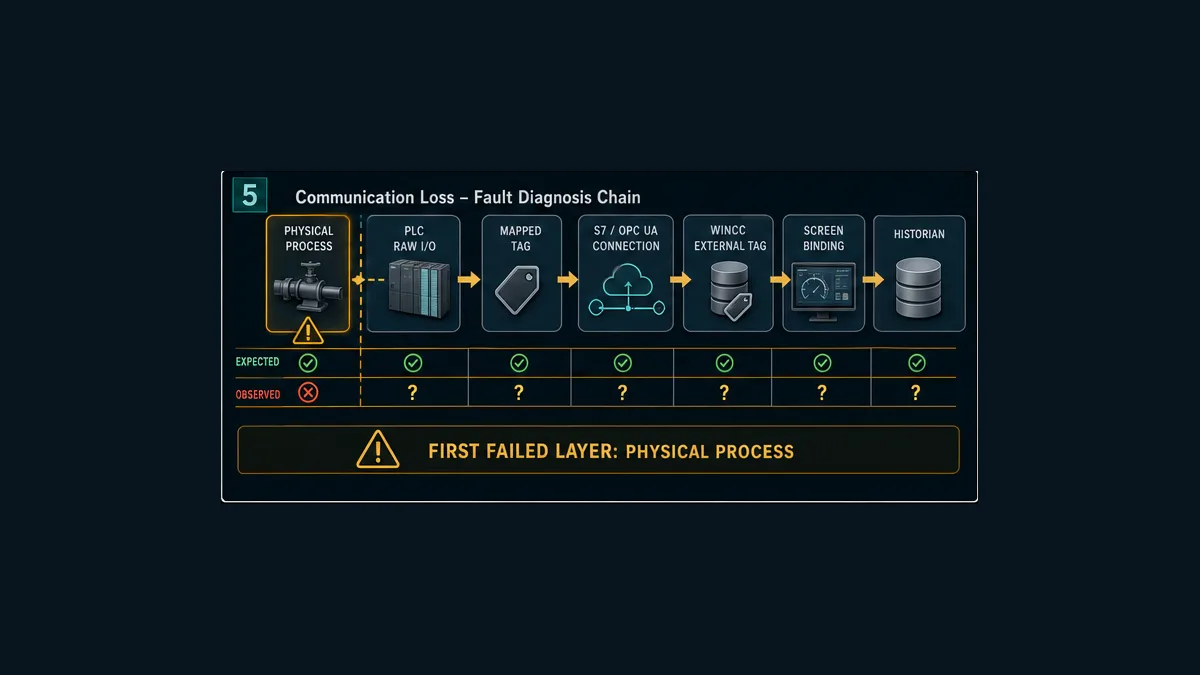
| Layer | Expected evidence | Common mismatch |
|---|---|---|
| physical/model process | independent state or injected source | process never changed or test assumption is wrong |
| PLC raw I/O/diagnostic | channel value and module/device health | wiring, device, module, networked I/O or channel configuration |
| mapped PLC interface | typed scaled state with quality | wrong DB member, scaling, state logic or force/substitution |
| controller task/state | command, feedback timeout and first-out | code not called, mode blocks it or state retained unexpectedly |
| connection | intended endpoint, online session and current updates | IP/name/path, driver, protection, certificate, CPU/runtime state |
| WinCC external tag | expected path, type, value, quality and time | stale mapping, incompatible type, wrong tag or access |
| expression/screen | bound object uses the external tag correctly | internal tag, expression, animation or visibility defect |
| alarm | source and lifecycle state | wrong threshold, delay, acknowledgement or source ownership |
| historian | stored value, quality and timestamp | archive policy, service, destination, buffer or query defect |
Symptom-to-evidence examples
| Symptom | Do not assume | First checks |
|---|---|---|
| WinCC value frozen | PLC stopped | external-tag quality/time, connection state, PLC online value and archive time |
| button animates but pump does not start | PLC ignored HMI | request write/result, request ID, rejection reason, mode and permissives |
| PLC shows running but screen does not | network failure | published interface member, external tag path/type and screen binding |
| live value correct, trend wrong | PLC scaling problem | archive tag, policy, quality, timestamp, query period and aggregation |
| alarms arrive late | slow PLC scan | source timestamp, acquisition, alarm processing, network and clock evidence |
| reconnection starts equipment | normal recovery | stale request, retained state, request deduplication and PLC restart design |
| one client differs | server data wrong | client cache/session, screen revision, user role and deployed runtime version |
Commission with sixteen connected tests
Download the Siemens PLC–SCADA acceptance matrix. It covers compatibility, network identity, tag mapping, scaling, quality/staleness, accepted and rejected commands, feedback timeout, acknowledgement versus reset, alarm lifecycle, history, roles, communication loss, restart, performance and backup/restore.
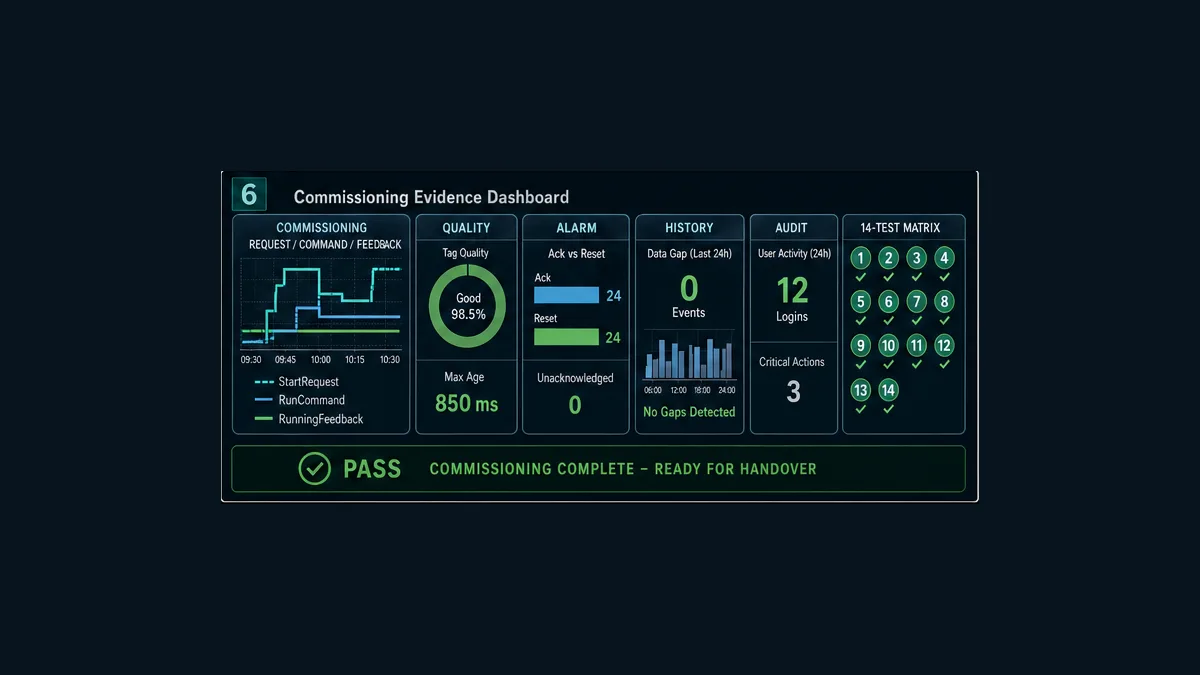
Evidence pack for handover
Retain the compatibility manifest; network and connection schedule; approved tag contract; screen and alarm design reference; alarm rationalization; archive policy and capacity assumptions; user/role matrix; certificate and trust ownership without exposing secrets; compiler logs and reviewed warnings; PLC online compare; deployed WinCC runtime revision; completed tests; synchronized trends and events; performance results; backup/restore proof; as-left projects; change approvals; open deviations; and rollback instructions.
Do not place passwords, private keys or production secrets inside general handover documents. Record their approved custody and recovery process.
Frequently asked questions
What is Siemens PLC SCADA?
It is a supervisory system in which a SIMATIC PLC owns deterministic control state and a SCADA/HMI platform—commonly a SIMATIC WinCC runtime—visualizes, alarms, records and submits authorized requests. The exact architecture can be one panel or a distributed server/client system, so identify the target and versions.
Is WinCC the SCADA software for Siemens PLCs?
WinCC is Siemens’ HMI/SCADA portfolio and provides documented connections to compatible SIMATIC controllers. It is not one interchangeable product: Unified panel, Unified PC, Professional and classic WinCC lineages have different targets, features and lifecycle. Third-party SCADA can also connect through a supported interface.
Is TIA Portal the same as WinCC?
No. TIA Portal is an engineering framework for compatible automation products. WinCC is the visualization/SCADA product family engineered partly through TIA Portal for applicable targets. A WinCC runtime is what executes the deployed visualization; licenses and target support remain version-specific.
Can S7-1200 connect to WinCC SCADA?
Supported combinations exist, but the answer depends on CPU/firmware, TIA version, WinCC target/edition, communication channel, tag requirements, security and license. Verify the exact compatibility path rather than assuming every S7-1200 and WinCC version pair works identically.
Can S7-1500 connect to WinCC Unified?
Yes in supported combinations documented by Siemens. Verify TIA/WinCC release, CPU firmware, runtime target, connection and protection settings, tag/interface design, license and performance limits for the installed system.
How do I connect a Siemens PLC to SCADA in TIA Portal?
Add the verified PLC and WinCC target, configure their network and documented connection, publish a stable typed PLC interface, create external WinCC tags, build screens/alarms/history/users, compile both targets and execute normal, abnormal, loss and recovery tests. Menu labels vary by version.
Should WinCC write directly to PLC command bits?
Use bounded request tags or a documented handshake for consequential actions. PLC logic should validate role-independent process conditions, accept or reject the request, own the final command and report feedback/result. A direct write may be acceptable for a deliberately simple low-consequence case only when its failure semantics are specified and tested.
What is the difference between an HMI request and PLC feedback?
A request is what the user asks for. The PLC may accept or reject it. A command is the PLC’s output intent after logic. Feedback independently indicates device or process response. Showing one Boolean for all three creates false status and poor troubleshooting.
How should WinCC show bad or stale PLC data?
Map value, communication/source quality, timestamps and maximum age. Use a consistent visible treatment with text or icon cues, prevent unauthorized writes and distinguish last-known from current data. Test source fault, communication loss, runtime restart and recovery separately.
Is alarm acknowledgement the same as PLC fault reset?
No. Acknowledgement records recognition in the alarm lifecycle. PLC reset asks controller logic to clear a latched diagnostic when approved reset conditions are true. Restart is another separate action. The interface should not imply one automatically performs the others.
Can I use OPC UA between S7-1200 or S7-1500 and WinCC?
OPC UA is available in supported CPU/runtime roles and versions, but options, licenses, server interfaces, certificates, limits and rights differ. Use it when its architectural boundary is required; do not add it merely because it is a standard.
Is a PROFINET cable the same as a WinCC SCADA connection?
No. Ethernet/PROFINET-capable interfaces provide network connectivity, but SCADA tag exchange uses a documented communication channel and roles. A screen’s connection label does not make WinCC a generic PROFINET IO Controller or Device.
Can I test Siemens PLC and WinCC without physical hardware?
Many logic, screen, tag, alarm, history, role and failure cases can be tested with supported simulators and isolated runtimes. Exact PLC–HMI co-simulation and communication depend on versions and licenses. Simulation does not validate physical I/O, installed timing, field devices, process hazards or production security.
What should I test before deploying a WinCC project?
Test compatibility, endpoint identity, every tag’s type/units/ownership, scaling, quality/stale states, command acceptance/rejection, feedback timeout, alarms, history, roles/audit, communication loss/recovery, runtime and PLC restart, representative performance and backup/restore. Retain synchronized evidence.
Sources, review scope and limitations
This guide was reviewed on August 31, 2026. Siemens product names, editions, options, documentation and licensing change. Verify current regional product pages, the exact installed help and Siemens compatibility tools before selection or deployment.
- Industrial operations and supervisory control: SIMATIC WinCC SCADA systems — Siemens
- SIMATIC WinCC systems portfolio — Siemens
- SIMATIC WinCC Unified — Siemens
- SIMATIC WinCC Unified Engineering — Siemens
- TIA Portal V21 documentation — Siemens
- WinCC communication with SIMATIC and other controllers — Siemens
- WinCC Unified V19: Visualizing Processes system manual — Siemens
- WinCC V8.1: Working with WinCC, Part 2 — Siemens
- Automation Framework V2.2: PLC–HMI handshake — Siemens
- WinCC Unified V21: automatic handshake for array tags — Siemens
- TIA Portal V21: using online and diagnostics functions — Siemens
- TIA Portal V21: comparing PLC programs — Siemens
- TIA Portal V21: overview of migration options — Siemens
- S7-1200 V20: OPC UA server interfaces, rights and limits — Siemens
- NIST SP 800-82 Rev. 3, Guide to Operational Technology Security — NIST
- ISA-101 HMI lifecycle standards — ISA
- ISA-18 alarm management series — ISA
- 29 CFR 1910.147, control of hazardous energy — OSHA
The architecture, pump transaction, tag contract, diagnostic tables, acceptance matrix and six generated illustrations are original editorial teaching material. They are not an executable TIA project, WinCC screen set, network design, tag import, P&ID, electrical drawing, safety system or cybersecurity architecture.
This page does not authorize connecting, downloading, editing online, forcing, bypassing, energizing, operating or testing installed equipment. Qualified, authorized personnel must apply the site hazard assessment, hazardous-energy and electrical safe-work rules, process limits, safety lifecycle, independent protection, cybersecurity architecture, manufacturer instructions, licensing, backups, management of change, commissioning plan and rollback procedure.
Now run it · free · no signup
Practise the PLC side of a SCADA system
Complete a guided first program in the browser without an account, then build the tags, alarms and operator views a SCADA layer reads.
Ownership disclosure: PLC Programming IO and PLC Simulation Software are operated by the same publisher.
PLC Programming IO Editorial Team
Industrial automation education, references, and software testing
The PLC Programming IO Editorial Team publishes sourced industrial-automation education and documents how material is reviewed, tested, and corrected. A team byline means the publisher is responsible for the page; it does not represent a fictional person or imply an engineering licence.
Coverage:
- • PLC programming concepts and examples
- • Vendor software tutorials and comparisons
- • SCADA, HMI, protocols, and instrumentation
- • Training, careers, and reference material
Review standard:
- • Prefer primary and official sources
- • Record software versions when material
- • Separate tested facts from estimates
- • Publish material corrections
Important scope note
This site provides education, not project-specific engineering approval. Safety, code, and compliance decisions require a qualified person with access to the actual machine and jurisdiction.