PLC Technician Training: Skills, Labs and Job-Ready Assessment
A competency-gated PLC technician training roadmap covering electrical controls, digital and analog I/O, ladder logic, drives, HMI, networks, safe diagnosis and hidden-fault assessment.
PLC technician training in one answer
PLC technician training should teach a learner to restore and verify a controlled machine, not merely to write ladder logic. The training sequence should follow the real evidence path: hazardous-energy and electrical boundaries; drawings and control power; sensors and digital/analog I/O; PLC execution and logic; relays, contactors, drives and actuators; HMI and industrial networks; then systematic troubleshooting, controlled recovery and documentation.
A job-ready learner can receive an unfamiliar symptom, establish a safe and authorized test boundary, identify the first disagreement between field condition and expected process result, make or recommend the smallest justified correction, repeat normal and abnormal tests, and hand over evidence another technician can understand. Online lessons and simulation can build logic and diagnosis. A guarded bench adds meters, modules and devices. Supervised field work adds the process, energy, access, communication and production judgment that software cannot emulate.
Training rule: do not graduate a learner because they watched every module or made one sequence run. Graduate each competency only after an unseen practical task produces repeatable evidence without unsafe work, random edits or hidden instructor help.
What this roadmap owns—and what adjacent pages retain
This is the role-specific technician training owner. It does not replace:
| Next task | Specialist owner | Boundary |
|---|---|---|
| broad programmer learning | PLC beginner roadmap | programming-first curriculum across languages and projects |
| choosing a credential | PLC certification roadmap | issuer, eligibility, exam, provider and cost decisions |
| deep field diagnosis | PLC troubleshooting method | system-level symptom-to-repair workflow |
| I/O fault isolation | PLC input and output troubleshooting | channel, wiring, mapping and module diagnosis |
| motor/drive faults | PLC motor and drive troubleshooting | starter, drive, motor, feedback and load boundaries |
| technician career/pay | PLC programmer and technician salary guide | duty-based occupation and offer comparison |
| exact vendor implementation | Allen-Bradley training and Siemens programming | target tool, device and platform workflow |
Define the PLC technician role before choosing training
“PLC technician” is not one standardized occupation. A plant may use it for an industrial electrician who diagnoses controllers, an instrumentation technician who loop-checks transmitters, a maintenance technician who restores packaging machinery, or a controls specialist who makes supervised PLC/HMI changes. Training must reflect the actual authority and recurring work.
The US Bureau of Labor Statistics does not publish a single PLC-technician occupation. Its current industrial machinery mechanics and maintenance workers profile describes adjacent duties such as reading technical manuals, diagnosing, repairing/replacing, calibrating and running initial tests. BLS also notes that training routes vary and that on-call, night/weekend and overtime work may occur. Treat that as one US occupational reference—not a universal job description, salary claim or licensing rule.
| Role variant | Typical first responsibility | Training emphasis | Authority that must be defined locally |
|---|---|---|---|
| production maintenance technician | restore a previously operating machine | drawings, I/O, common instructions, device status and first-disagreement diagnosis | isolation, live testing, forces, online changes and component replacement |
| electrical controls technician | diagnose control power, panels, outputs, motors and PLC interfaces | electrical theory, diagrams, safe test practice, control components and I/O | electrical licence/qualification, energized work and panel access |
| instrumentation technician | verify measurement/control loops and instruments | calibration, loop checks, analog signals, units/quality, valves and process evidence | calibration authorization, hazardous area and process isolation |
| automation/controls technician | maintain PLC, HMI, drives and industrial networks | project structure, backups, diagnostics, communication, versions and changes | engineering access, downloads, cybersecurity and release approval |
| commissioning technician | prove panel/device/site installation against test criteria | I/O checks, network/device setup, sequences, punch lists and evidence | energization, test responsibility, temporary overrides and acceptance sign-off |
| mechatronics technician | diagnose electrical, mechanical, pneumatic/hydraulic and controller interaction | cross-domain system behavior and root-cause isolation | craft boundary, mechanical stored energy and site work permits |
The US Department of Labor advanced-manufacturing apprenticeship page lists pathways such as electrical technician, maintenance mechanic and mechatronics technician. Registered apprenticeship is one structured US route; qualification names, hours and legal scope vary by program and country. Verify the relevant employer, regulator, trade body or awarding institution.
Build competence in four evidence environments
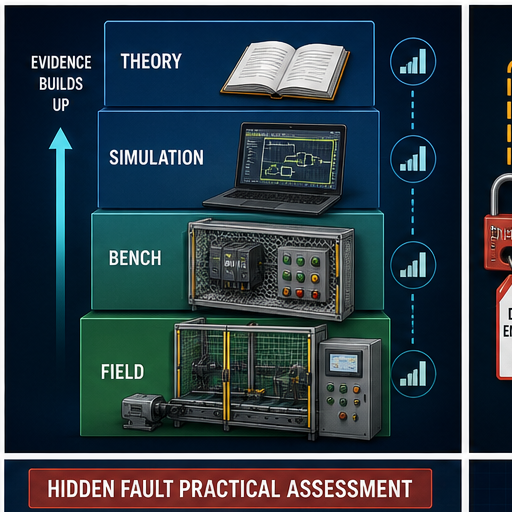
| Environment | Strong evidence | Cannot prove by itself |
|---|---|---|
| theory/classroom | vocabulary, calculations, drawings, standards, documented procedures and predicted behavior | execution under pressure, instrument use or physical response |
| software simulation | scan reasoning, ladder/ST state, timers, fault injection and repeatable logic tests | exact vendor target, I/O electronics, wiring, device dynamics or safety |
| guarded low-energy bench | wiring, module/channel status, meters, sensors, relays, drives and target-tool workflow | production process, site networks, high-energy work or full machine hazards |
| supervised field | actual drawings, devices, process, permits, shift communication and production recovery | competence beyond observed tasks or another site/platform automatically |
A good program labels which environment produced every result. “Completed analog module” should state whether the learner calculated scaling on paper, simulated values, wired a training transmitter or loop-checked an installed instrument.
Start with hazardous-energy and electrical boundaries
Training must distinguish an operational control—such as an HMI stop—from energy isolation. In the United States, OSHA 29 CFR 1910.147 requires an energy-control program, procedures, training and inspections for covered servicing/maintenance where unexpected energizing, startup or stored-energy release can injure. It distinguishes authorized, affected and other employees and requires role-appropriate training. Other countries and work types have their own requirements.
This article does not teach a universal isolation procedure. The employer/site must identify electrical, mechanical, pneumatic, hydraulic, thermal, gravitational, chemical and other stored energy, define authorization and verification, and train the worker on the specific equipment and law.
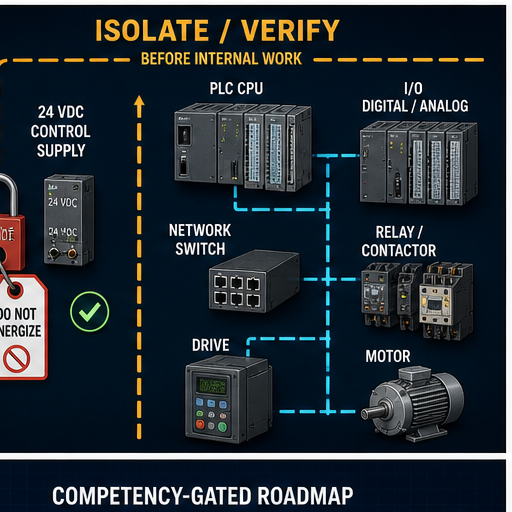
Electrical foundation gate
Before troubleshooting inside a panel, a learner should be able to explain and safely demonstrate on approved training equipment:
| Competency | Practical proof | Failure if skipped |
|---|---|---|
| control vs power circuit | trace source, protective device, control element, coil/load and return | mistakes low-current logic for energy isolation |
| NO/NC physical contacts | compare de-energized physical state, energized state and program truth | misreads an input or bypasses fail-safe intent |
| relays/contactors/overloads | identify coil, poles, auxiliary status and trip/reset behavior | blames PLC output for downstream device/protection state |
| 24 VDC reference and field power | measure approved trainer supply/reference and explain common/source path | makes invalid measurements or creates reference faults |
| motor/drive interface | separate run request, enable, reference, status, fault and feedback | equates command with rotation/process response |
| drawings | navigate title/revision, power, control, terminal, cable and I/O references | diagnoses using an obsolete or wrong circuit |
| safe test boundary | state authorization, expected reading, instrument/category and abort condition before measurement | “probe until something changes” behavior |
Follow the complete machine signal path
Technicians resolve faults faster when software, electrical and mechanical claims are joined into one chain.
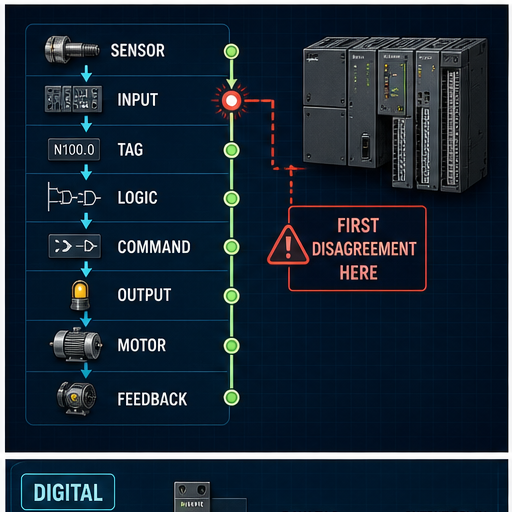
| Boundary | Healthy claim | Technician evidence |
|---|---|---|
| process → sensor | the physical condition exists and the sensor is suitable/actuated | observation or approved independent measurement plus sensor indication |
| sensor → input terminal | the electrical signal reaches the correct terminal/reference | drawing, approved measurement and terminal identity |
| terminal → module channel | channel electronics/configuration interpret the signal | module/channel LED/status, diagnostics and exact configuration |
| module → raw tag | project mapping delivers the correct current value | cross-reference, raw value, update/connection state and timestamp/age |
| raw → validated tag | scaling, range and quality produce a usable engineering value | formula, units, range/quality flags and injected boundaries |
| validated tag → request | mode/sequence requests action | current state, owner and transition evidence |
| request → command | permissives/interlocks/faults authorize the output | one command writer and first false authorization term |
| command → output/device | mapping/module/network deliver the request | output tag, force status, module/device status and path |
| device → actuator/process | contactor/drive/valve/motor/load responds | device status plus qualified field/process evidence |
| response → feedback | independent signal proves the response | feedback source, input path and response timing |
Request, command and feedback must stay separate
If ConveyorAutoRequest is true, the sequence wants motion. If ConveyorCommand is false, a mode, permissive, interlock or fault blocked it. If ConveyorCommand is true while ConveyorRunning stays false, the first disagreement is downstream of application authorization. A single “ConveyorOn” bit cannot explain those three states.
Master digital and analog I/O with quality
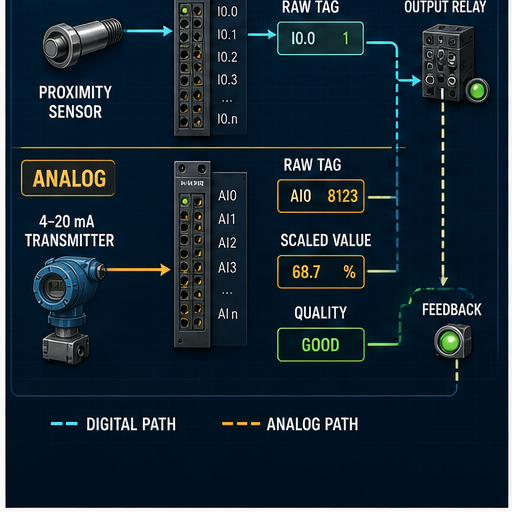
Digital I/O lab
Use a guarded 24 VDC trainer with a documented circuit. The learner should:
- identify input type and field/reference scheme from the exact trainer drawing;
- predict terminal voltage and channel state for both sensor states;
- observe field device, terminal/test point, channel indicator/diagnostic and raw tag;
- map raw input to a meaningful validated tag;
- command a relay/output only through the normal authorization path;
- compare output tag, channel, relay state and independent feedback; and
- inject one open circuit, incorrect mapping or blocked permissive and diagnose it without random edits.
Do not universalize “sinking” and “sourcing” from one diagram. Terminology can be used from device or circuit perspective. State the exact module, field device, reference and current path.
Worked 4–20 mA scaling example
Assume a teaching transmitter represents 0–10.0 bar over 4–20 mA and a module reports a normalized current value in mA. At 12.0 mA:
fraction = (12.0 mA − 4.0 mA) / (20.0 mA − 4.0 mA) = 0.5
pressure = 0.0 bar + 0.5 × (10.0 − 0.0) bar = 5.0 bar
| Injected value | Expected scaled value | Quality example | Required discussion |
|---|---|---|---|
| 3.6 mA | do not blindly extrapolate | under-range/bad according to approved limits | open circuit, transmitter fault, range and module diagnostics are distinct possibilities |
| 4.0 mA | 0.0 bar | good if channel/age valid | live zero is not the same as no signal |
| 12.0 mA | 5.0 bar | good | confirm formula, unit and endpoints |
| 20.0 mA | 10.0 bar | good | test inclusive high endpoint and alarm comparison separately |
| 21.0 mA | policy-dependent | over-range/bad or uncertain | consumer fallback must be specified, not guessed |
| frozen 12.0 mA | still looks like 5.0 bar | stale if update-age evidence fails | believable value can be invalid |
Exact raw counts, under/overrange thresholds, burnout behavior, isolation, update and channel status are module/transmitter specific. Read the controlled manuals and loop documentation. Calibration, adjustment, channel simulation and full loop checking are different activities.
Live mini-lab
Try it: press START, then STOP
A stop-dominant seal-in rung: START latches the motor output through its own contact, and STOP breaks the circuit.
Watch the output lamp: it stays on after START until you press STOP.
Free · no signup to try · runs in your browserOpens plcsimulationsoftware.com — same team
Learn PLC execution and logic for diagnosis
The IEC 61131-3:2025 Edition 4 public scope describes ST, LD and FBD plus SFC structuring elements. A technician does not need every instruction before being useful. They need to predict common logic in the configured execution model and know where state can hide.
| Logic topic | Technician question | Practical gate |
|---|---|---|
| task/scan/call path | Does this logic execute, when, and with which data update? | show scheduled task/program/routine or POU path and execution observation |
| contacts/comparisons | What makes this expression true? | trace Boolean and numeric terms without confusing symbols with field contact types |
| coils/assignments | Who writes this command or state? | cross-reference all writers and explain execution order |
| seal-in/set-reset | What retains state and what has priority? | simultaneous start/stop/set/reset plus restart test |
| timers/counters/edges | Which state persists and what happens at the boundary? | one scan below/at/above preset and skipped-call test |
| sequences | Which state is active and which transition is blocked? | state/transition trace with stop/fault priority |
| analog alarms | Are value, unit, quality, delay/deadband and reset correct? | endpoint, bad-quality, hysteresis and stale-value tests |
| reusable blocks | Which instance contains the state? | compare two instances and prove no shared/wrong instance assumption |
Avoid the training cliché that every PLC performs one indivisible “read inputs, run all logic, update all outputs” loop. Targets can have multiple tasks, asynchronous I/O/communication updates and pre-emption. Teach the simplified model first, then require the learner to retrieve the exact target’s task and I/O behavior.
Add devices, HMI and networks without losing the process
Relays, contactors, overloads and drives
A technician should map each device state into the evidence chain:
| Device evidence | It means | It does not necessarily mean |
|---|---|---|
| PLC command true | application authorized the request | output channel or field device received it |
| digital output indicator true | channel logic/status is on under documented conditions | correct voltage/current reaches the device or load responds |
| contactor auxiliary true | auxiliary contact changed | motor rotation, direction, speed or process effect is correct |
| drive “running” status | drive reports its defined running state | shaft/load/process achieved required behavior |
| motor-current value | current is measured/reported | healthy torque, coupling, direction or flow |
| process feedback | selected instrument saw response | every mechanical/electrical component is healthy |
Train on the exact starter or drive documentation. Run command, enable, speed/reference, ready, active, warning, fault, status word and safety-related signals have different meanings. Standard PLC status is not a safety channel unless designed and validated as such.
HMI and alarms
The HMI is a consumer and requester, not proof of the physical process. Teach:
- display value plus unit, quality and age;
- request/accepted/command/feedback states;
- alarm condition, delay, latch, acknowledgement, reset and return-to-normal;
- user/role and command ownership;
- device/runtime/PLC communication status; and
- what an operator should do next, without unsafe implied instructions.
Industrial networks
An entry technician needs a layer/boundary model before protocol trivia:
device power/link → physical media/port → network identity/configuration
→ controller connection/session → cyclic/request data → mapped tag
→ application quality/age → HMI/process consumer
Do not start by changing IP addresses. Capture the symptom, asset and expected topology; check device power/link and controller/device diagnostics; confirm exact identity and connection; then inspect data mapping and application quality. NIST SP 800-82 Rev. 3 frames OT security around operational performance, reliability and safety. Engineering access, remote connections and privileged changes should follow the site’s authorization, least-privilege, logging and recovery controls.
Practise hidden faults with an evidence score
Tutorials say which feature to use. A technician assessment hides the cause and constrains the allowed actions.
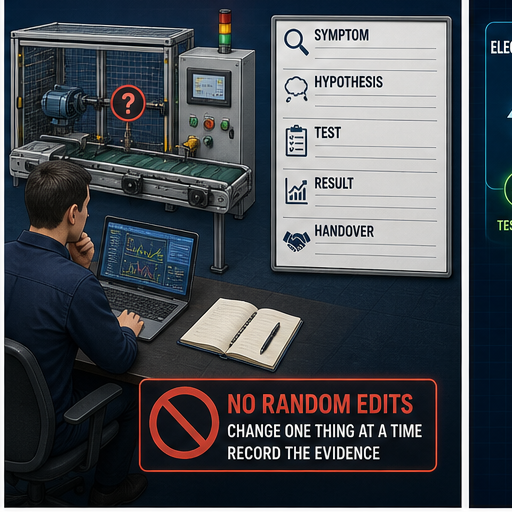
Worked hidden-fault scenario: conveyor will not start in Auto
Known healthy design: an automatic request is accepted when mode is Auto, downstream ready is true, guard/safety status permits ordinary control, overload is healthy and no start-fail is latched. ConveyorCommand drives the normal output path. Running feedback must arrive within 2.0 s.
Presented symptom: operator reports “Conveyor 2 will not start after maintenance.” No fault has been revealed to the learner.
| Step | Learner action | Example evidence | Scoring rule |
|---|---|---|---|
| scope | confirm equipment, time, last work, current state and authorization | Conveyor 2; photo-eye work completed; Auto request visible; no physical intervention authorized | no test until scope and safety boundary are stated |
| expected chain | draw request→authorization→command→output→device→feedback | expected AutoRequest=1, DownstreamReady=1, Command=1, output and feedback |
names the decision points before browsing |
| observe | compare state without editing | request 1; Auto 1; guard status 1; overload 1; downstream ready 0; command 0 | finds first false term at authorization boundary |
| test hypothesis | inspect downstream-ready source and quality | communication mapping shows stale/invalid downstream status after device replacement | one bounded test distinguishes mapping/connection from real downstream state |
| correct/escalate | restore approved mapping/configuration or hand off within authority | corrected device identity/mapping under change procedure; no rung change | rejects bypass of the permissive |
| verify | run normal, downstream-blocked, communication-loss, stop and restart cases | command/feedback/state/quality traces and five passes | proves recovery plus protective behavior |
| handover | record cause, change, version, tests and remaining risk | exact component/configuration and evidence links | another technician can reproduce the result |
The planted fault could instead be a field input, module inhibit, wrong alias, mode owner, force, latched timeout, device local mode or missing feedback. The learner must discover it. The evaluator must avoid hinting through file names or a fault-specific task title.
Hidden-fault scoring model
| Domain | Points | Zero-score condition |
|---|---|---|
| safe scope and authorization | 15 | unauthorized measurement/change, bypass or unsafe act |
| symptom and initial-state capture | 10 | starts changing before preserving state |
| system model and hypothesis | 15 | no expected chain or unfalsifiable guesses |
| efficient boundary tests | 20 | random edits/forces/parts swapping without evidence |
| correct root cause and action | 15 | symptom suppressed while cause remains |
| normal/abnormal/restart verification | 15 | only one happy-path start observed |
| documentation and handover | 10 | no attributable change/result record |
Download the 20-scenario hidden-fault assessment matrix (CSV). It separates simulation, guarded-bench and supervised-field suitability so training does not imply the wrong authorization.
Use competency gates, not a calendar promise
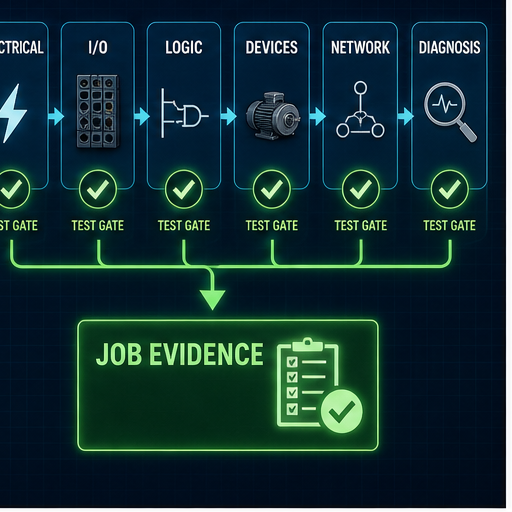
The sample cadence below assumes part-time study and access to the stated environment. Move faster or slower based on gate results. Supervised field competence normally takes longer than a short course.
| Stage | Suggested focus window | Required evidence gate |
|---|---|---|
| 0. role and safety scope | 1 week | role/duty map, local qualification check and approved training boundaries |
| 1. drawings/electrical controls | 2–3 weeks | trace three circuits; identify energy/control boundary; pass guarded trainer measurements |
| 2. PLC execution and ladder | 2–3 weeks | six-scan traces, motor logic, timer boundaries and restart tests |
| 3. digital/analog I/O | 2–3 weeks | sensor/output path, scaling/quality and three seeded I/O faults |
| 4. equipment/HMI | 2 weeks | request-command-feedback motor/drive plus quality-aware HMI/alarm states |
| 5. industrial networks | 1–2 weeks | one device-to-consumer path and loss/wrong-identity/stale-data diagnosis |
| 6. diagnosis/recovery | 2–4 weeks | five hidden faults across different boundaries at ≥80% score with no safety zero |
| 7. supervised field/capstone | employer/program specific | mentor-signed observed-task log, tests, handover and explicit authorization scope |
The 40-competency record
Use the downloadable PLC technician competency matrix (CSV). Each row records environment and one of four evidence states:
NOT_STARTED— no assessed attempt;KNOWLEDGE_ONLY— can explain/predict but has not performed;GUIDED— completed with prompts or step-by-step procedure;INDEPENDENT_WITHIN_SCOPE— completed an unseen task safely and repeatably within stated authorization.
“Independent” never expands legal or site authorization. A learner can independently diagnose a simulated mapping fault yet remain unauthorized to access a production cabinet.
Evaluate online, classroom, bench and employer programs
| Program feature | Why it matters | Evidence to request |
|---|---|---|
| role-specific outcomes | avoids a programmer course marketed to maintainers | task list mapped to technician duties |
| entry assessment | keeps advanced labs from becoming rushed fundamentals | scored prerequisite and remediation plan |
| lab ratio/access time | practical skill requires control of the station | learners per station, usable hours and remote-lab expiry |
| hidden faults | tests diagnosis rather than tutorial imitation | number, boundary diversity, scoring and reset between learners |
| exact platform | vendor workflow and diagnostics are version/product specific | controller, firmware, software, HMI, network and drive manifest |
| electrical/instrument practice | bridges tag status to real signals | guarded equipment, supervision, instruments and permitted tasks |
| safety program | defines what learners may observe, isolate, measure and change | instructor competence, risk assessment, procedure and emergency plan |
| assessment integrity | makes completion evidence meaningful | unseen tasks, identity controls, pass criteria, retake and feedback |
| instructor field depth | supports boundary-spanning diagnosis | recent relevant maintenance/commissioning experience |
| handover quality | real maintenance is shift/team work | required fault report, change record and portfolio artifact |
Use the 25-question PLC technician training-provider audit (CSV) to compare written evidence rather than landing-page promises.
Rockwell’s current CCP153 maintenance/troubleshooting course targets restoring a previously operational ControlLogix system and covers project execution, digital/analog/remote I/O, controller/power/noise and online work. Siemens’ current regional TIA-SERV2 listing targets commissioning and troubleshooting technicians with extensive exercises. These demonstrate role-specific vendor training patterns, not universal curricula or recommendations for every plant.
For “PLC technician training near me,” verify local employer recognition, travel/shift fit, exact equipment and supervised hands-on hours. For “PLC technician training online,” require remote or take-home practical evidence and a clear plan for supervised physical skills. A long video library is not a lab.
Certification and qualification choices
ISA’s current CCST Body of Knowledge weights Level I heavily toward calibration, maintenance, repair and troubleshooting, with additional startup/commissioning/loop-check and documentation domains. Its requirements page has education/training/work-experience criteria. The credential may fit an experienced control-systems technician; it is not an entry-level PLC-brand course.
The PLC certification roadmap compares CST Associate, CCST, vendor paths and regional qualifications. Before paying, check:
- whether the target role requests the exact credential;
- official eligibility and audit evidence;
- whether assessment includes relevant technician tasks;
- vendor/platform and regional scope;
- renewal/continuing-development obligations; and
- which field evidence the credential still does not provide.
Do not claim “certified PLC technician” from a generic course-completion PDF unless that is the issuer’s exact title and scope.
Build job-ready evidence without leaking plant information
| Evidence artifact | Include | Remove or disclose |
|---|---|---|
| signal-tracing record | symptom, expected chain, first disagreement and evidence | customer names, real addresses, credentials and restricted drawings |
| logic project | synthetic requirement, I/O, states, code and tests | label simulation/target and your authorship |
| analog worksheet | range, raw values, units, quality and boundary results | module-specific assumptions without the matching source |
| network case | generic topology, device/connection/data/quality diagnosis | routable/site IPs, usernames, remote-access detail |
| hidden-fault report | initial state, hypothesis, controlled test, cause, repair and retest | do not publish employer incidents without approval |
| backup/change example | asset/project/tool identity, compare, change, rollback and verification | use training projects; never expose production source |
| mentor log | observed task, supervision level, result and feedback | clarify that observation is not a licence or universal authorization |
A strong interview demonstration lasts ten minutes: explain the requirement, show the evidence chain, inject a fault you did not solve by editing code, identify the first disagreement, restore the normal path, run one abnormal case and state what remains unproved.
Practise the software evidence boundary
PLC Programming IO and PLC Simulation Software share the same operator. The following practice links are product-owned learning paths, not independent endorsements or issuer-approved technician assessments.
They can support scan, logic, state, timing, fault-injection and evidence practice. They do not reproduce the vendor project/compiler, controller/firmware, task/I/O electronics, panel, instruments, drive, motor, industrial network, physical process, energy-control procedure or safety system. Measure scenario start, completed evidence case, registration, paid signup and retained use by CTA—not click-through alone—before changing or removing either technician path.
Answer map for search and AI-assisted training questions
| Natural-language question | Short, citable answer | Best section |
|---|---|---|
| What should PLC technician training include? | safety/electrical boundaries, drawings, I/O, logic, devices, HMI/networks, diagnosis, recovery and documentation | direct answer and curriculum |
| How do I become a PLC technician? | map local role/qualification, learn in theory/simulation/bench, then pass supervised practical gates | role and evidence environments |
| Can I train as a PLC technician online? | logic and diagnostic method yes; physical I/O, instruments, isolation and field judgment require supervised practice | evidence environments and provider review |
| How long is PLC technician training? | duration varies; graduate competencies, not a calendar; supervised field judgment takes longer than a short course | competency roadmap |
| Do PLC technicians need electrical training? | yes for roles that interface with control power, I/O, relays, drives and motors, within local qualification/authorization | electrical gate |
| What is the difference between PLC programmer and technician training? | programmer training emphasizes creating applications; technician training emphasizes interpreting, diagnosing, restoring and verifying systems | role definition |
| Which PLC brand should a technician learn? | the installed platform repeatedly used by target employers after transferable foundations | provider/vendor section |
| What is the first-disagreement troubleshooting method? | compare adjacent field-to-process boundaries and stop at the first mismatch | signal path |
| How do I troubleshoot a PLC input? | compare sensor, terminal, module channel, mapping, raw tag, validated tag and consumer | I/O and signal path |
| How do I scale 4–20 mA in a PLC? | normalize measured current between endpoints, map to engineering range, carry quality and test boundaries | analog worked example |
| Why can a PLC command be true but a motor not run? | output path, device, protection, motor/load or feedback can disagree downstream | devices and signal chain |
| What practical test should a PLC technician pass? | an unseen fault with safe scope, captured state, hypotheses, bounded tests, root cause, recovery and handover | hidden-fault assessment |
| Is ISA CCST a PLC technician certification? | broader control-systems technician certification with calibration, maintenance, troubleshooting, startup and documentation scope | certification section |
| What should I ask a PLC training provider? | outcomes, entry gate, labs, hidden faults, exact platform, physical practice, safety, assessment and instructor evidence | provider table |
| What belongs in a PLC technician portfolio? | synthetic signal trace, logic, analog, network, hidden-fault, change/recovery and mentor evidence with privacy controls | job evidence |
| Does a simulator make me job-ready? | it builds modeled software evidence but cannot prove field, electrical, target, process or safety competence | practice boundary |
Choose a vendor or assessment branch
After the shared technician foundation, use the Allen-Bradley PLC training route for Logix-specific practice, the Siemens PLC training guide for STEP 7/TIA learning, or the Siemens PLC and SCADA training guide for an integrated supervisory path. Use the PLC/SCADA interview and practical-assessment guide and the broader automation engineer interview guide to test whether learning produced observable troubleshooting and handoff evidence.
Frequently asked questions
What does a PLC technician do?
A PLC technician may maintain, diagnose, commission or support automated equipment by reading drawings, inspecting controller/I/O/device status, tracing signals, testing equipment, documenting faults and making authorized changes. Exact duties and legal scope vary by employer and jurisdiction.
What should I learn first for PLC technician work?
Start with work/safety boundaries, electrical drawings, control power, relays/contactors and sensors. Then learn PLC I/O and scan behavior. Programming symbols without the physical path create fragile troubleshooting skills.
How long does PLC technician training take?
There is no defensible universal duration. Prior electrical/maintenance experience, lab access, platform breadth and supervision change the timeline. Use assessed competency gates; real field judgment normally takes sustained supervised work beyond a short online course.
Can PLC technician training be completed online?
Only partly. Theory, simulation, scan traces, ladder, state, HMI/network concepts and hidden software faults work online. Wiring, measurement, devices, isolation and production recovery require suitable guarded equipment and supervised site practice.
Do I need a degree to become a PLC technician?
Not for every role. Routes include technical college, trade qualification, apprenticeship, employer training and experience. Engineering or regulated electrical work may require specific education, registration or licensing. Check the actual local role.
Do I need PLC technician certification?
Not universally. A relevant credential can help when employers request it, but practical evidence, local qualification, platform experience and supervised work may matter more. Verify the exact issuer, prerequisites and scope before paying.
Is ISA CCST suitable for beginners?
CCST has formal education/training/work-experience requirements and is broader than beginner PLC programming. ISA’s CST Associate certificate or another foundation path may be nearer for an eligible early-career learner; verify current official criteria.
Which PLC brand should a technician learn first?
Choose the ecosystem repeatedly used by target employers or the current plant after learning transferable electrical, I/O, logic and diagnostic concepts. Do not buy software or hardware before checking exact controller, version and course lab requirements.
What is the most important PLC troubleshooting skill?
Building the expected field-to-process evidence chain and finding its first disagreement. This prevents random code edits and separates sensor, wiring, module, mapping, logic, output, device, feedback and process causes.
Should a PLC technician learn Structured Text?
Yes, enough to read assignments, conditions, state machines, loops and function-block calls used in the installed project. Ladder remains important, but modern systems can mix LD, ST, FBD and SFC-related structures.
Should a PLC technician learn industrial networks?
Yes. At minimum, trace device power/link, identity/configuration, controller connection, data mapping, quality/age and consumer behavior. Exact protocol and cybersecurity access should follow the installed platform and site policy.
Can a PLC technician bypass an interlock to test a machine?
Not merely because diagnosis would be faster. Bypasses, forces and overrides require approved authority, risk controls, scope, time limit, indication, tests and removal verification. Safety functions need their own engineered lifecycle and procedures.
What equipment is useful for PLC technician training?
A guarded low-voltage panel with documented power, PLC I/O, switches/sensors, analog source/transmitter, relay/contactor representation, small drive/motor or safe process model, network device, HMI and fault-injection points is useful. Equipment must match the training risk assessment and supervision.
How do I prove PLC technician skills to an employer?
Show a concise synthetic portfolio and perform an unseen practical task: state the safety boundary, trace a symptom, identify the first disagreement, correct or escalate within authority, run normal/abnormal/restart tests and produce a clear handover.
Official sources, review date and limitations
Reviewed 31 August 2026. Primary and official sources:
- IEC 61131-3:2025 Edition 4—Programming languages
- ISA Certified Control Systems Technician
- ISA CCST Body of Knowledge
- ISA CCST requirements
- ISA CCST preparation/publication resources
- OSHA 29 CFR 1910.147—Control of hazardous energy
- OSHA hazardous-energy overview
- US BLS: Industrial machinery mechanics, maintenance workers and millwrights
- US Department of Labor: Advanced Manufacturing apprenticeships
- Rockwell Automation Certificate Programs—Logix Maintainer context
- Rockwell Studio 5000 ControlLogix Maintenance and Troubleshooting, CCP153
- Rockwell ControlLogix Fundamentals and Troubleshooting, CCP299
- Siemens SITRAIN: SIMATIC S7 Commissioning and Troubleshooting with TIA Portal
- Siemens SITRAIN: SIMATIC Service 1 in TIA Portal
- Siemens SITRAIN: regional Certified Service Technician exam example
- CODESYS: online monitoring and breakpoint behavior
- NIST SP 800-82 Rev. 3—Guide to OT Security
This roadmap is educational and cannot define the reader’s authorization, competency, electrical qualification, energy-control procedure or safe test method. Course names, versions, prices, availability and certification requirements can change; verify them with the issuer/provider immediately before enrollment. Worked values and fault scenarios are training assumptions. No software exercise validates a physical machine, field repair, regulatory compliance or safety function.
Now run it · free · no signup
Prove the PLC skills employers ask about
Work real controls exercises in the browser so you can explain the logic in an interview, not just recite it. Free, no signup to try your first program.
Ownership disclosure: PLC Programming IO and PLC Simulation Software are operated by the same publisher.


