Ladder Logic Simulator Online: Practice, Tests and Limits
Choose a ladder-logic simulator by runnable behavior, scan visibility, tests, persistence and honest vendor boundaries, then practise six evidence-led examples.
Review status: Editorially reviewed against cited IEC and current vendor documentation plus the disclosed PLC Simulation Software product-facts record; browser behavior, accounts, plans and scenario access can change, while vendor project syntax, runtime, I/O, timing and safety remain outside a generic online lab
Direct answer: use online ladder logic for practice, not target validation
An online ladder-logic tool is useful when it lets you build or run a rung, control input states, inspect rung continuity and internal state scan by scan, reset predictably, and compare the result with an explicit test matrix. It is not a substitute for Studio 5000, TIA Portal, CODESYS, TwinCAT, Sysmac Studio, EcoStruxure Machine Expert, GX Works or another target engineering environment. It cannot prove that a project compiles for a selected PLC, that physical I/O is wired correctly, or that a machine is safe.
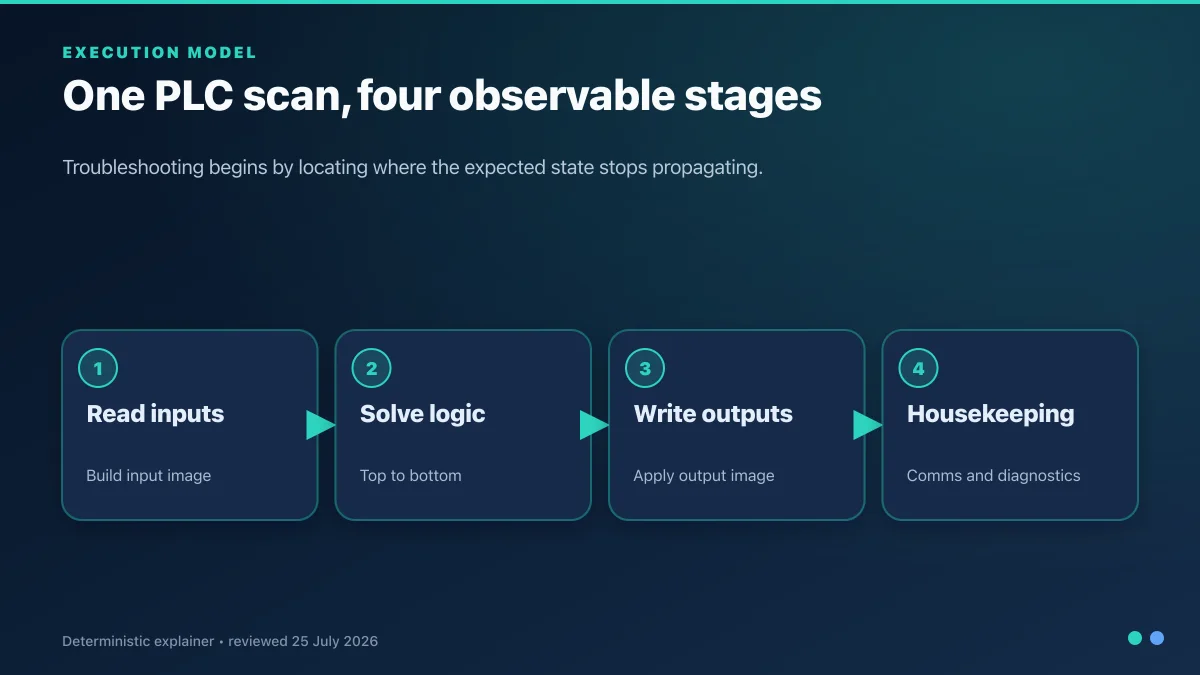
The broad definition, scan model and first-program workflow belong to the complete ladder-logic tutorial. This software page owns a different task: deciding whether a browser editor or simulator is fit for a specific learning exercise, running bounded examples, and knowing when to move to vendor software and hardware.
The production queue records ladder logic simulator at 830 global and 290 United States monthly searches at KD 24. The newer retained ladder research also found plc ladder logic simulator at 1,600 global searches and KD 17. Those are adjacent phrases for this same simulator-selection task, not permission to launch a generated CCW emulator versus ladder logic online duplicate. That comparison route now redirects here; CCW/Micro800 is handled as one vendor-specific option inside the broader decision.
Use this sequence:
- choose one skill and an expected scan-by-scan result;
- verify the tool exposes the instructions and state you need;
- build or select a minimal rung with symbolic inputs, state and output;
- execute normal, boundary and fault histories—not only one happy state;
- save the rung, input history, observed result and explanation;
- recreate the accepted behavior in the exact vendor environment; and
- commission physical I/O and equipment under the site's controlled procedure.

Keep four ladder-logic surfaces separate
The phrase “online ladder logic” is often used for tools with very different claims. Select the layer that matches the task.
| Surface | Best use | Evidence it can produce | Evidence it cannot produce |
|---|---|---|---|
| browser learning lab | Boolean, scan, timer/counter, state and troubleshooting practice | disclosed learning-dialect result, input history, state trace and score | target project compile, exact instruction behavior or physical I/O |
| vendor offline simulator/emulator | project-specific logic and documented controller behaviors | compiled project, supported simulated CPU/instruction states and vendor diagnostics | excluded modules, real electrical timing, final element or process |
| SoftPLC/runtime on a computer | runtime/application integration for a supported target | exact runtime build, task and mapped virtual/real interfaces | unrelated vendor controller behavior or machine acceptance |
| physical PLC/trainer | hardware, I/O, communications and restart validation | exact CPU/module/firmware, measured signals, timings and feedback | production-process behavior beyond the connected test setup |
A diagram-only editor may be valuable for sketching but is not a simulator. A simulator that changes a coil after a button press may still hide scan order, internal state and reset behavior. A tool that exports a generic file does not necessarily generate a valid Studio 5000, TIA Portal or other vendor project.
CCW Micro800 Simulator versus a browser ladder lab
Rockwell Automation's current records make this a layer decision rather than a universal “which is better?” contest. Connected Components Workbench (CCW) version 23 Standard Edition is a free Windows download and includes a 10-minute runtime demo of Micro800 Simulator. CCW Developer Edition requires activation/subscription and includes the full Micro800 Simulator plus Archive Manager. Those products are appropriate when the goal is a supported Micro800 project and the exact selected edition/controller is compatible.
Rockwell also introduced FactoryTalk Design Workbench as the next-generation Micro Control Systems environment. As reviewed on 31 August 2026, version 1 supports Micro800 programming and transition from CCW versions 22/23, while Rockwell's public page lists application simulation under version 2 planned for Q4 2026. A planned feature is not a current capability. Recheck the product page and PCDC before selection.
| Decision | Browser ladder lab | CCW Standard v23 | CCW Developer v23 | FactoryTalk Design Workbench v1 |
|---|---|---|---|---|
| fastest Boolean/scan practice | immediate browser entry if the live access path allows | multi-gigabyte Windows installation | same installation plus activation | installed/on-prem environment with browser-based access |
| Micro800 project evidence | no | project/programming environment; simulator demo boundary | full Micro800 Simulator included | current Micro800 programming for supported controllers |
| simulation duration/access | product-plan and scenario boundary must be checked live | 10-minute Micro800 Simulator runtime demo | full simulator through licensed edition | do not infer planned v2 application simulation in v1 |
| vendor instruction/project fidelity | declared learning dialect only | supported Micro800/CCW project scope | supported Micro800/CCW project scope | supported version-1 Micro800 project scope |
| physical I/O and machine proof | no | no | no | no |
| best fit | learning and repeatable browser exercises | short Micro800 proof or free project entry | sustained Micro800 simulation/development | current/new Micro800 engineering and migration evaluation |
Use the same bounded exercise in both layers: implement stop-dominant seal-in logic, a feedback timeout, one counter edge and a reset rule; record time to first run, visible state, unsupported instruction, persistence, project artifact and defect diagnosis. Choose from observed fit, not a synthetic score. A browser lab may be the better first learning step and CCW/FactoryTalk the necessary target step; they can be sequential rather than substitutes.
Current product disclosure
PLC Programming IO and PLC Simulation Software share ownership. The product's public versioned facts record is available at plcsimulationsoftware.com/product-facts.json. Use that record and the live pricing/access pages for current catalog and plan facts; do not treat an editorial description as a promise that every scenario, feature or paid tier remains unchanged.
The relevant claim is narrower: the browser product offers learning-oriented PLC scenarios and ladder practice. It does not program a physical PLC or emulate a named vendor controller. That boundary appears beside the conversion path because qualified signups matter more than clicks from readers who expected a free vendor download.
Evaluate an online ladder editor with inspectable criteria
| Criterion | Minimum useful behavior | Stronger evidence | Red flag |
|---|---|---|---|
| instruction semantics | direct/negated contacts and ordinary coil have stated truth behavior | set/reset, timer, counter and edge behavior documented per learning dialect | symbols shown without execution definition |
| scan visibility | energized path and final state visible | scan step/history and before/after internal state | animation with no reproducible state table |
| input control | learner can set known Boolean states | ordered input events and simultaneous-condition tests | only a canned animation |
| state reset | repeatable initial state | warm/cold/reset cases disclosed separately | reload produces unexplained retained state |
| testability | expected result can be stated before run | reusable matrix, score and defect explanation | “completed” means only reaching a screen |
| persistence | save/export or documented account history | revision, attempt history and shareable evidence | work disappears without warning |
| accessibility | keyboard/focus/labels and responsive controls | mobile interaction and reduced-motion behavior | critical state conveyed only by color |
| product boundary | named learning dialect and exclusions | versioned capability record and dated tests | claims to replace all PLC software |
| conversion | clear next action tied to the exercise | free entry, visible plan boundary and attribution | surprise signup/paywall before any proof |
Download the online ladder-tool scorecard, ladder practice test matrix, and vendor handoff record. The templates keep marketing claims separate from observed behavior.
Example 1: direct contacts, negated contacts and one coil
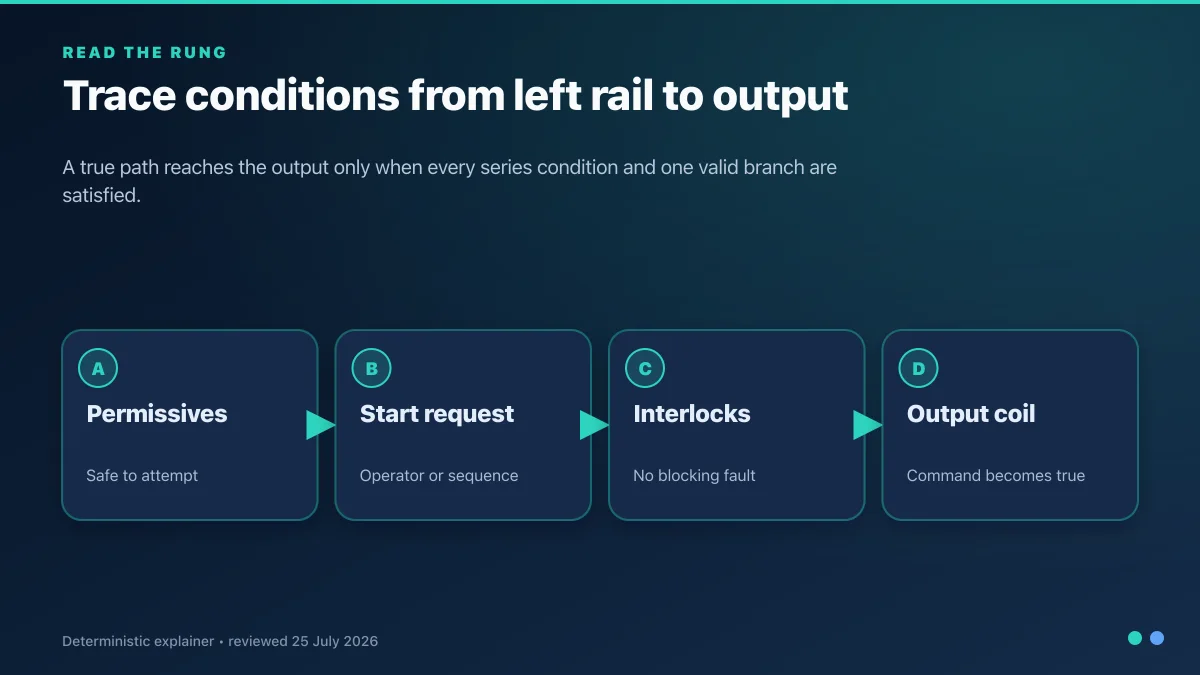
Treat a contact as a Boolean test, not a statement about a physical switch. A direct contact assigned to Permit passes when Permit = 1. A negated contact assigned to Fault passes when Fault = 0. In series, the rung equation is:
RunRequest = Permit AND NOT Fault
| Permit | Fault | Expected RunRequest |
|---|---|---|
| 0 | 0 | 0 |
| 0 | 1 | 0 |
| 1 | 0 | 1 |
| 1 | 1 | 0 |
Run all four cases. A simulator should show which contact stops continuity, not only the final coil. Then explain the result in words: the output request is true only when permission exists and no fault is represented. Do not label RunRequest as proof that a motor runs.
Example 2: series AND and parallel OR
Series paths require every test on that path. Parallel branches allow any complete branch to pass. For two starts and one common permit:
RunRequest = Permit AND (LocalStart OR RemoteStart)
Test each start separately, both together, neither, and every case with Permit = 0. Then move the branch incorrectly so it bypasses Permit; a good exercise should fail the prohibited cases and explain why the branch boundary changed the equation.
| Case | Permit | LocalStart | RemoteStart | Expected request | Learning point |
|---|---|---|---|---|---|
| A | 1 | 0 | 0 | 0 | no branch true |
| B | 1 | 1 | 0 | 1 | local branch passes |
| C | 1 | 0 | 1 | 1 | remote branch passes |
| D | 1 | 1 | 1 | 1 | OR remains Boolean true |
| E | 0 | 1 | 1 | 0 | common permit constrains both branches |
Example 3: seal-in state and dominant stop behavior
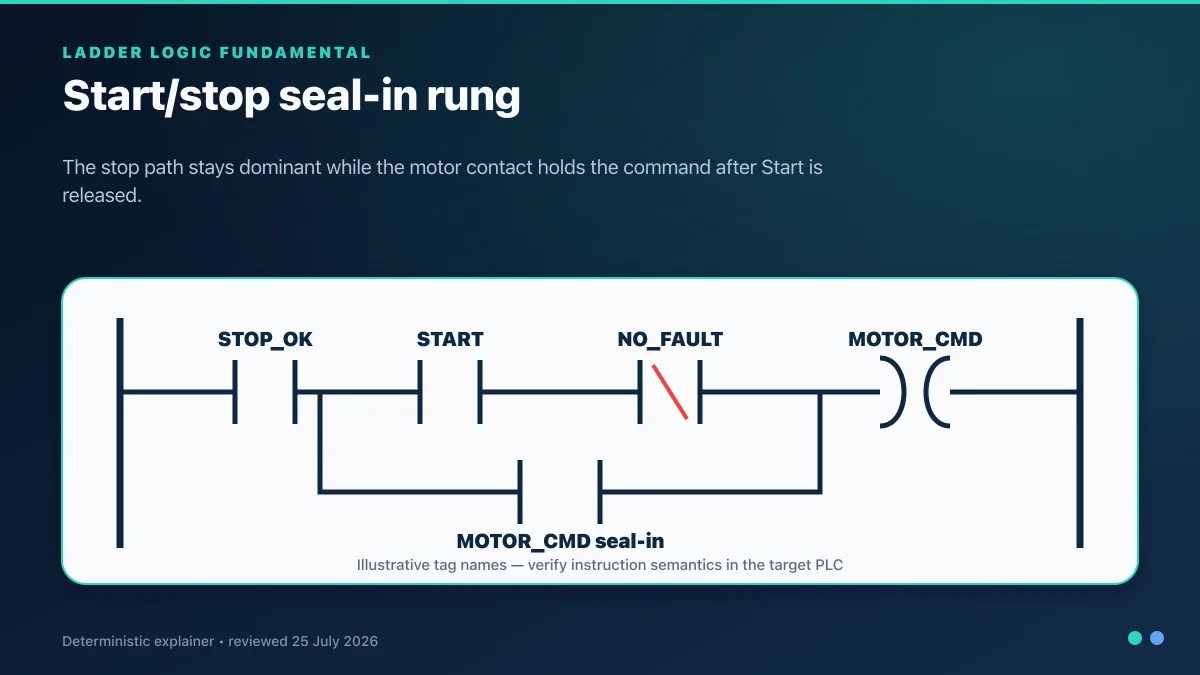
A seal-in circuit uses an ordinary coil's state contact in parallel with a momentary start request. A stop/permissive path must constrain both the start and holding branches. Write the requirement before the rung:
RunState_next = StopHealthy AND (StartRequest OR RunState_previous)
That equation is a teaching model; a target project must account for instruction order, mode ownership, initialization, feedback, and any vendor-specific scan behavior. Test histories, not just combinations:
- reset with every command false;
- make stop healthy;
- press start for one execution;
- release start and confirm state remains true;
- open stop and confirm state clears;
- restore stop without start and confirm no automatic restart; and
- apply start and stop together and confirm the declared stop-dominant result.
Example 4: timer, counter and edge behavior
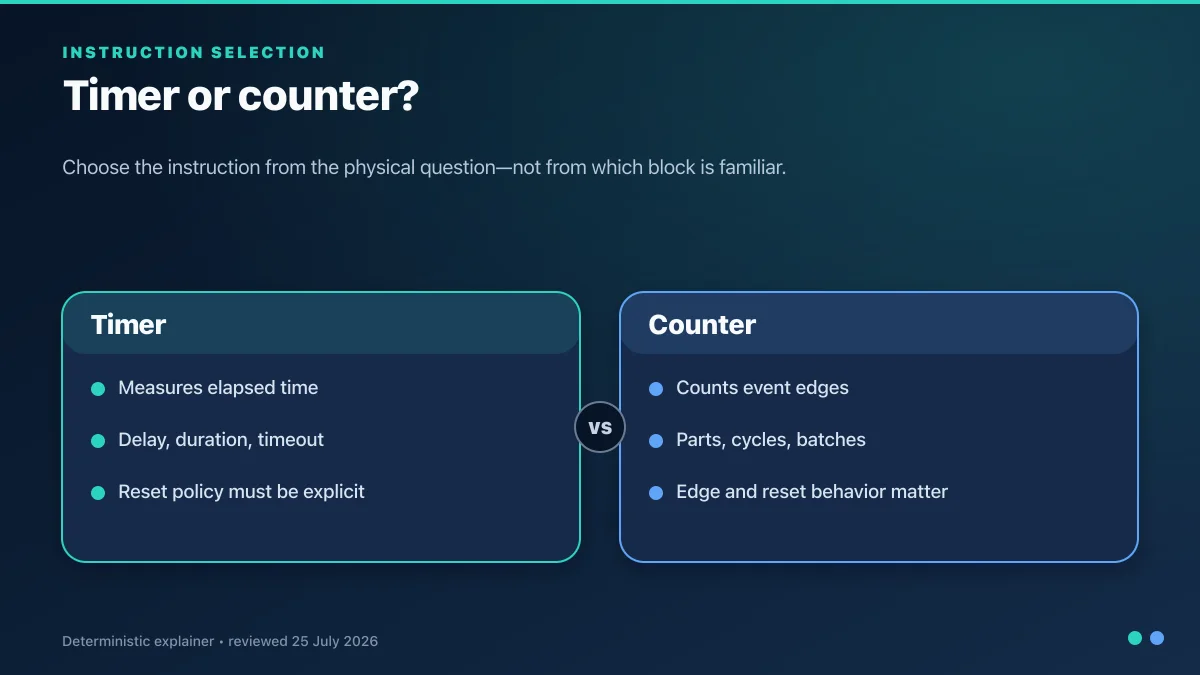
Do not select an instruction because its symbol looks familiar. Select it from the physical question.
| Question | Likely learning instruction | Must be visible in the simulator |
|---|---|---|
| has a condition remained true for a duration? | on-delay timer | enable, accumulated/elapsed value, done state and reset behavior |
| should an output remain true after a condition becomes false? | off-delay timer | input transition, timed output and retrigger behavior |
| should a pulse last a declared time? | pulse/timed state | trigger edge, active state and repeated-trigger rule |
| how many false-to-true product events occurred? | rising edge plus counter | previous/current input, edge pulse, count and reset |
| did one Boolean change this execution? | rising/falling edge detector | stored history, startup and conditional-call behavior |
Timer and counter names do not guarantee portable behavior. Time bases, preset/elapsed types, equality behavior, retentive state, reset, overflow and scan timing differ across target platforms. An online tool should state its learning semantics; the vendor handoff record then maps each concept to the exact instruction manual.
Example 5: sequence state instead of a long chain of latches
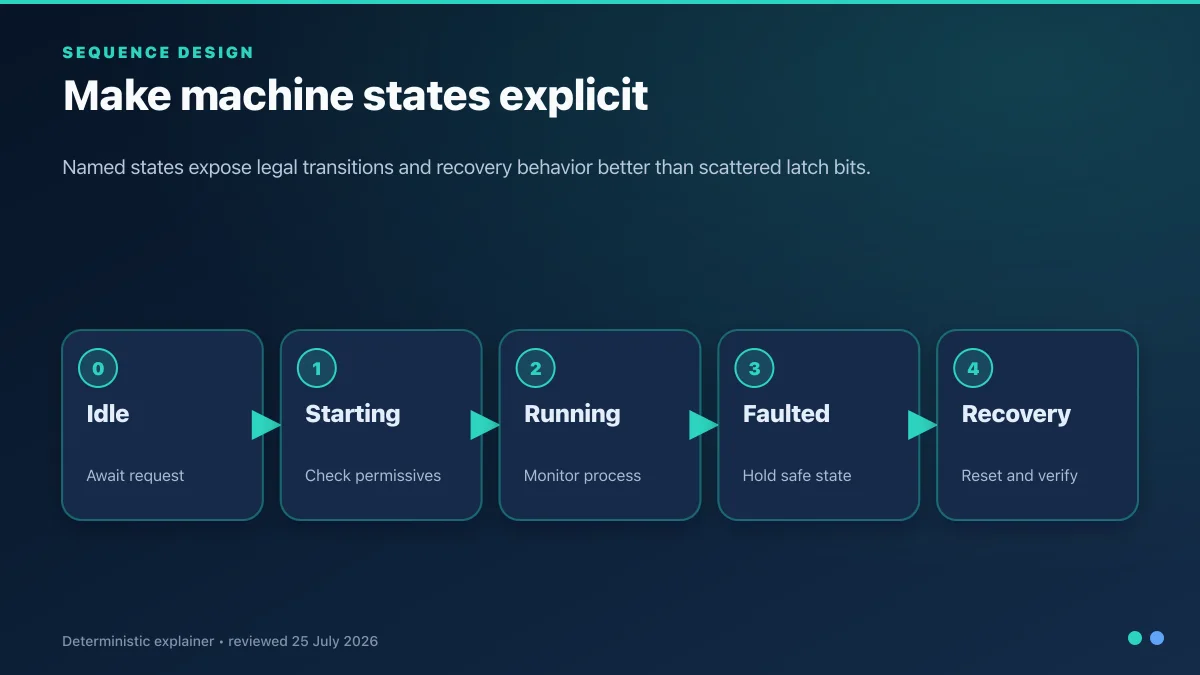
For a fill–mix–drain exercise, use named states and explicit transitions:
| State | Command | Exit condition | Timeout/fault test |
|---|---|---|---|
| Idle | valves and mixer off | authorized start and initial conditions valid | start rejected when initial state is wrong |
| Filling | inlet request | level-high feedback | level does not arrive before timeout |
| Mixing | mixer request | mix timer done | mixer feedback absent or permit lost |
| Draining | outlet request | level-low feedback | level remains high or outlet unavailable |
| Complete | all process commands off | acknowledgement/reset | repeated start must not skip initialization |
| Faulted | commands at declared fallback | fault cause cleared and reset authorized | reset rejected while cause persists |
Test every transition, not only the normal state order. Remove feedback, repeat a sensor, apply a start in the wrong state and reset during an active cause. This teaches the difference between a command sequence and physical proof.
Example 6: diagnose the first failed condition
A useful online exercise should inject faults without asking the learner to guess. For a motor request that does not produce run feedback, inspect in order:
- the input/event history that created the request;
- the permit/interlock that first blocks the rung;
- the command/state bit and any later writer;
- the learning output mapping;
- simulated feedback behavior; and
- the feedback timeout and first-out reason.
| Symptom | Evidence first | Likely learning boundary | Target-hardware handoff |
|---|---|---|---|
| rung never becomes true | input values and contact truth | Boolean equation or wrong test polarity | field device, wiring, raw tag and mapping |
| rung true, coil false | coil type, later writers and execution order | duplicate ownership or state semantics | task/program order and external writes |
| coil true, feedback false | output mapping and injected device state | command/feedback contract | module, supply, load, final element and physical feedback |
| timer never completes | call history, enable, elapsed and reset | intermittent condition or skipped execution | target time base, task period and instruction behavior |
| counter skips/doubles | raw event versus edge pulse | level counted instead of transition | input filter, pulse width and high-speed hardware |
| sequence stuck | current state, transition and timeout reason | missing feedback or hidden prerequisite | process condition, instrument, actuator and communications |
A dated hands-on test protocol for an online tool
Run this protocol on the exact browser, account state and plan you intend to use. Record date, product version/facts revision, viewport and whether a feature required signup or payment.
| Gate | Test | Passing evidence |
|---|---|---|
| entry | open the claimed free/editor path in a fresh session | first useful rung or scenario is reachable with access boundary visible |
| Boolean | execute all direct/negated four-state cases | observed truth table matches documented dialect |
| branching | run every OR branch and common-permit failure | branch boundaries produce expected equation |
| state | press/release/stop/simultaneous/reset seal-in history | state follows declared scan equation |
| time | run timer below/equal/above preset and interrupted cases | elapsed/done/reset semantics are inspectable |
| events | run slow, held, bounced and repeated edge/counter inputs | event count and startup behavior are explainable |
| sequence | pass normal and inject feedback/timeout faults | state, reason and recovery are visible |
| persistence | save, reload, sign out/in and reset as applicable | work and state persistence match product claim |
| accessibility | keyboard, labels, focus, zoom and mobile controls | critical action/state is usable and not color-only |
| handoff | recreate one accepted rung in target vendor software | differences are recorded, not silently normalized |
What should move to the vendor environment?
Transfer requirements and tests, not screenshots or assumed syntax. Record the target CPU, firmware, engineering release, task/routine, input/output mapping and each instruction substitution.
| Learning concept | Target questions |
|---|---|
| direct/negated contact | what does the vendor instruction test, and how is field polarity mapped? |
| ordinary coil | when does it write false, and are there other writers or external ownership? |
| set/reset | which write wins, how is state initialized, and is memory retained? |
| timer | time base, preset/elapsed types, equality, reset, retention and task dependency? |
| counter/edge | transition definition, startup history, overflow and input pulse capture? |
| sequence | state ownership, restart, timeouts, modes, command/feedback and first-out? |
| online changes/forces | permissions, accepted/tested/assembled states, audit and removal procedure? |
Browser acceptance proves that the learner can reason about the exercise. Vendor simulation proves only the documented simulated surfaces of the compiled target project. A hardware test proves the connected configuration under its test conditions. None substitutes for the site's safety validation.
Frequently asked questions
Can I practise ladder logic online for free?
Many browser tools offer some free access, but the useful boundary varies: editing, running, saving, scenarios, grading or history may require an account or paid plan. Test the current path in a fresh session and check the live access/pricing disclosure. Free access does not imply vendor-project export or physical PLC support.
What is the best online ladder logic simulator?
The best choice is the one that supports the exact learning task with documented semantics, controllable inputs, visible internal state, repeatable reset, test histories, accessibility and honest limitations. Score observed behavior rather than feature-count marketing. Use vendor software when the goal is a target PLC project.
Is an online ladder editor the same as a PLC simulator?
No. An editor may only draw or save rungs. A simulator executes a declared model of instructions and state. Even a working simulator may use a learning dialect rather than a vendor runtime. Ask what executes, when it executes, what state persists and which instructions are unsupported.
Can online ladder logic program a real PLC?
Only if a specific product explicitly supports the exact controller/runtime and documented deployment path. A generic browser learning lab normally cannot. Use the controller vendor's supported engineering environment, communication path, project backup and commissioning procedure for physical hardware.
Can I use online ladder logic on a phone or tablet?
A responsive browser tool may run on mobile, but execution support does not guarantee usable editing. Test touch targets, keyboard access, zoom, scrolling, drag/drop alternatives and state visibility. Complex rung creation is usually easier on a larger screen even when scenarios work on mobile.
What should my first online ladder exercise be?
Start with two Boolean inputs and one output request. Run the complete four-row truth table, then add one parallel branch and a common constraint. Only after you can predict every result should you add state, timers, counters or a multi-step sequence.
How do I test a ladder seal-in circuit online?
Use an ordered history: reset, make stop healthy, pulse start, release start, open stop, restore stop without start, and apply start/stop together. Record state after each execution and prove no unintended restart. A single screenshot with the coil on is insufficient.
Do online timers behave like Studio 5000 or TIA Portal timers?
Not necessarily. Time base, data types, reset, retentive behavior, preset equality, elapsed updates and task interaction vary. Treat browser semantics as the declared learning dialect, then map and retest the requirement in the exact target instruction/manual.
Is the CCW Micro800 Simulator free?
Rockwell's current version-23 product evidence says the free CCW Standard Edition includes a 10-minute runtime demo of Micro800 Simulator. The activated Developer Edition includes the full simulator and Archive Manager. Verify the current edition, controller and licence in Rockwell's PCDC and sales/subscription records before relying on it.
Is FactoryTalk Design Workbench the replacement for CCW?
Rockwell describes FactoryTalk Design Workbench as the next-generation Micro Control Systems software and supports transition from CCW versions 22 and 23. As of this page's 31 August 2026 review, the public roadmap puts application simulation in version 2 planned for Q4 2026, so version-1 selection must use its released capability—not the roadmap.
Can a ladder simulator test wiring faults?
It can inject an abstract bad input, output failure or missing feedback when the scenario models that boundary. It cannot measure voltage, current, polarity, isolation, terminal continuity, module diagnostics or a physical field device. Use approved drawings and qualified hardware tests for wiring.
Is ladder power flow real electricity?
No. Highlighted ladder continuity visualizes Boolean truth through an evaluated network. It does not prove energized field wiring or load current. Separate input value, program request, mapped output, module state and physical feedback.
Why is the online ladder coil true but the simulated motor does not run?
Check whether the coil is an internal request, whether another writer changes it, whether an output mapping exists, and whether the scenario models availability or feedback. In a real system the remaining boundaries include module health, power, wiring, final element and process conditions.
Can I export online ladder logic to Allen-Bradley, Siemens or Mitsubishi software?
Do not assume so. File formats, instructions, tag models, tasks, hardware configurations and protection are vendor- and version-specific. Even when a tool exports text or a diagram, recreate or import only through a documented path and compile/test the exact target project.
Does an online ladder course count as PLC certification?
Course completion can document learning but is not automatically a vendor, employer, regulatory or accredited certification. Check the issuing organization, assessed competencies, proctoring, validity period and recognition for the role. Keep a portfolio with requirements, runnable tests and explanations.
Can online ladder logic validate a safety circuit?
No. A generic browser lab can teach Boolean reasoning but cannot validate safety requirements, architecture, response time, diagnostics, component suitability, wiring or lifecycle evidence. Required safety functions need qualified engineering and the applicable safety standards, product manuals and validation plan.
Primary sources, product evidence and limits
Reviewed 31 August 2026. The platform sources define representative target semantics; they do not make the browser dialect equivalent to those platforms.
- IEC 61131-3:2025 programming-language standard record — IEC
- Logix Designer v38 bit instructions — Rockwell Automation
- Output Energize behavior — Rockwell Automation
- Output Latch behavior — Rockwell Automation
- Output Unlatch behavior — Rockwell Automation
- Logix 5000 Ladder Diagram manual, 1756-PM008 — Rockwell Automation
- Logix 5000 IEC 61131-3 compliance manual — Rockwell Automation
- S7-1200 Easy Book ladder contacts, coils and duplicate-address discussion — Siemens
- S7-1200 system manual and program execution — Siemens
- Contact and coil behavior — Schneider Electric
- Set and reset coil behavior — Schneider Electric
- IEC ladder elements — Schneider Electric
- Ladder coil, negated coil and set/reset behavior — CODESYS
- Ladder Diagram editor — Beckhoff Automation
- GX Works3 operating manual index — Mitsubishi Electric
- Sysmac Studio operation manual — Omron
- PLC Simulation Software versioned product facts
- Control of hazardous energy, 29 CFR 1910.147 — OSHA
- Connected Components Workbench version 23 Standard download — Rockwell Automation PCDC
- Connected Components Workbench edition and Micro800 Simulator boundaries — Rockwell Automation
- Connected Components Workbench edition description — Rockwell Automation commerce
- FactoryTalk Design Workbench current product and roadmap — Rockwell Automation
- FactoryTalk Design Workbench Getting Results Guide FTDW-GR001 — Rockwell Automation
The figures are original conceptual/editorial learning diagrams, not screenshots, compilable vendor projects, electrical drawings, safety logic or field procedures. This page does not authorize downloads, forces, bypasses, wiring work or machine tests. Use exact target documentation and controlled procedures.
Continue with the correct specialist
PLC Programming IO Editorial Team
Industrial automation education, references, and software testing
The PLC Programming IO Editorial Team publishes sourced industrial-automation education and documents how material is reviewed, tested, and corrected. A team byline means the publisher is responsible for the page; it does not represent a fictional person or imply an engineering licence.
Coverage:
- • PLC programming concepts and examples
- • Vendor software tutorials and comparisons
- • SCADA, HMI, protocols, and instrumentation
- • Training, careers, and reference material
Review standard:
- • Prefer primary and official sources
- • Record software versions when material
- • Separate tested facts from estimates
- • Publish material corrections
Important scope note
This site provides education, not project-specific engineering approval. Safety, code, and compliance decisions require a qualified person with access to the actual machine and jurisdiction.