Mitsubishi FX3U PLC: Programming, Troubleshooting and Migration
Identify an FX3U CPU and extensions, preserve its GX Works2-era project, trace I/O and faults, and plan migration before the published production-discontinuation dates.
Review status: Editorially reviewed against Mitsubishi Electric FX3U hardware, programming, communication, engineering-software and April/May 2026 production-discontinuation sources plus IEC, NIST, CISA and OSHA references; exact product code, region, hardware version, firmware, project, software build/license, cable/driver, adapter, special block, terminal, electrical circuit, network, program behavior, lifecycle, migration, machine and safety response require installed-system and current manufacturer verification
Direct answer: FX3U is a specific installed-base PLC, not shorthand for every FX controller
The Mitsubishi FX3U is an FX3-generation MELSEC-F compact PLC used in a large installed base of machines. Identify the complete CPU code and every connected board, adapter, special-function block and extension before selecting software, a cable or a replacement. FX3U, FX3UC, FX3G and the newer FX5U are related family names, not interchangeable products. Even two FX3U CPU labels can describe different point counts, power/output configurations and electrical circuits.
For an existing FX3U, the safest first objective is not “download a program.” It is to preserve the machine's recoverable evidence: label photographs, bill of materials, original project, engineering environment, parameters, HMI/drive/network configuration, online comparison and a known rollback path. Mitsubishi Electric's global bulletin FAM-A-0116-B, issued in April 2026 and revised in May 2026, publishes an FX3U/FX3UC make-to-order start of 1 January 2028, order acceptance through 31 March 2028, production discontinuation on 30 September 2028, and repair support through 30 September 2035, subject to parts availability. Recheck the exact product and regional status when acting; a future global schedule is not a promise of local stock or a drop-in successor.
The recorded keyword evidence assigns plc fx3u 1,500 global and 10 United States monthly searches. The saved wider research also records mitsubishi fx3u plc at 1,500 global, 20 United States and KD 11. No dedicated current FX3U SERP snapshot was captured before the Mangools allowance ended, so this guide does not invent a live result mix, extra volume or a separate difficulty score.
| If you need to… | This guide helps you… | It cannot decide without the installed system |
|---|---|---|
| identify an FX3U | decode the evidence fields and choose exact manuals | the full suffix, revision, modules and regional variant |
| connect to it | build the CPU–project–software–interface chain | cable electronics, driver, password and site authorization |
| troubleshoot it | trace the first failed power/I/O/logic/output/feedback boundary | hazardous-energy controls, live-test procedure or machine intent |
| modify its logic | specify, compare and test a small behavior change | vendor-ready code, timing, retention or restart behavior by assumption |
| migrate to FX5 | inventory exceptions and prove behavior on a pilot | terminal, module, instruction, network or safety equivalence by family name |
This page owns the FX3U-specific installed-base programming, diagnosis, lifecycle and migration task. Use the Mitsubishi FX family guide to select across FX generations, the FX5U guide for an exact current-generation first project, the FX2N legacy guide for FX2N recovery and the Mitsubishi programming tutorial for the broader engineering workflow.
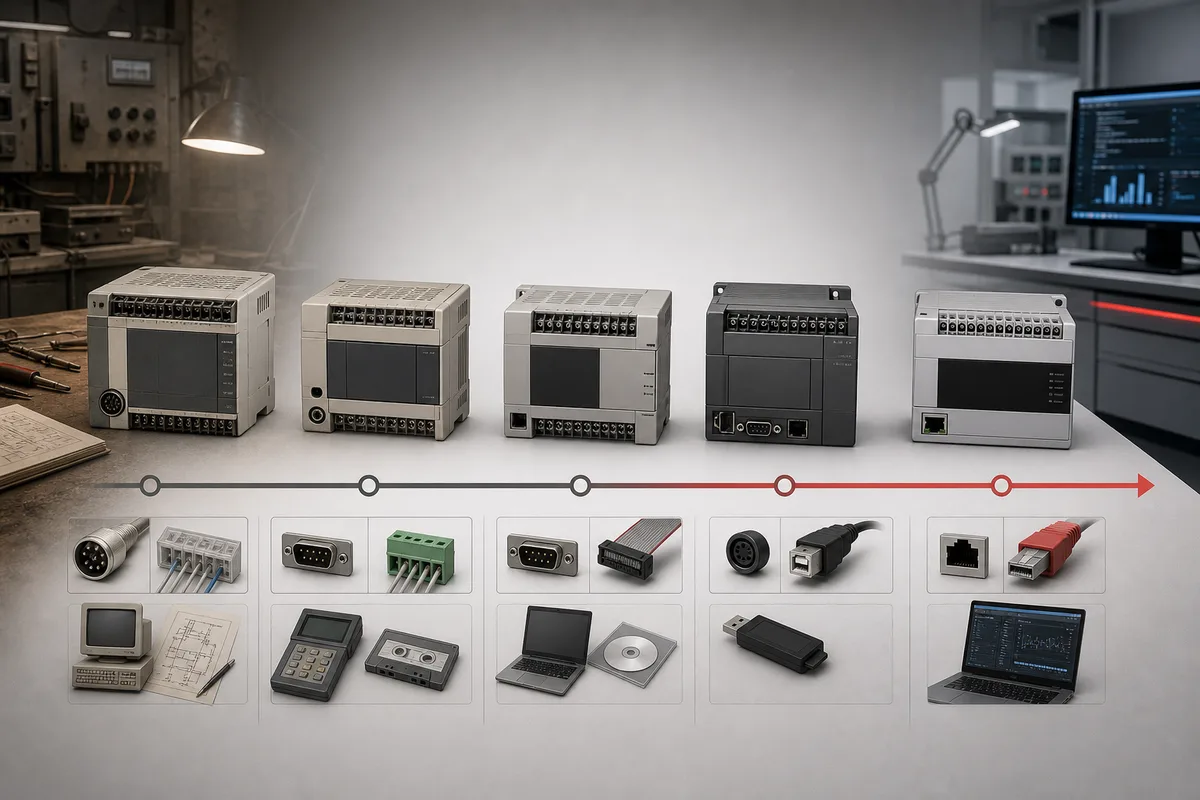
Build an FX3U identity and compatibility record
Capture the whole product code
The current Mitsubishi manual search identifies FX3U CPU variants across 16, 32, 48, 64, 80 and 128 point classes and multiple suffix families. Treat those strings as document selectors, not as a memorized decoder. A point count does not tell you the complete mix of inputs and outputs. Suffix segments such as MR, MT or MS identify an output-family choice, while segments such as ES, DS, DSS and UA1 distinguish supply/output or regional configurations. The exact hardware manual's model table and terminal diagram must establish what the full installed code means.
Do not infer relay, transistor or triac/solid-state circuitry from enclosure appearance. For a transistor output, the exact suffix and diagram must also establish sink/source convention and common arrangement. Do not infer input supply, terminal common, pulse capability, removable-terminal compatibility or load rating from another point class.
| Record field | Capture | Why it matters |
|---|---|---|
| CPU identity | complete label, serial/revision evidence and clear panel photo | selects hardware limits, project target and lifecycle line item |
| power/output suffix | every character after the point count | controls supply, output circuit, commons, wiring and replacement |
| left/right extensions | order code, position, cable/connector and terminal photo | identifies bus, power, I/O and address dependencies |
| boards/adapters | exact board/adapter code and occupied interface | distinguishes serial, Ethernet or another role from a similar connector |
| special blocks | model, buffer-memory use, parameters and field device | controls project logic and migration work |
| project | filename, timestamp, checksum, source provenance and target CPU | establishes whether the offline source is credible |
| engineering environment | GX product, version/build, OS/VM, license and driver | makes future access reproducible |
| protection | documented owner, password state and authorized route | prevents destructive erase or unauthorized bypass |
| operating baseline | LEDs, scan/timing evidence, key values, alarms and cycle | lets a repair or migration prove equivalent behavior |
| lifecycle evidence | bulletin/document revision, region and access date | prevents stale procurement assumptions |
Download the FX3U identity and compatibility record. Use one row per physical item and attach the approved drawings or label photographs outside the public worksheet.
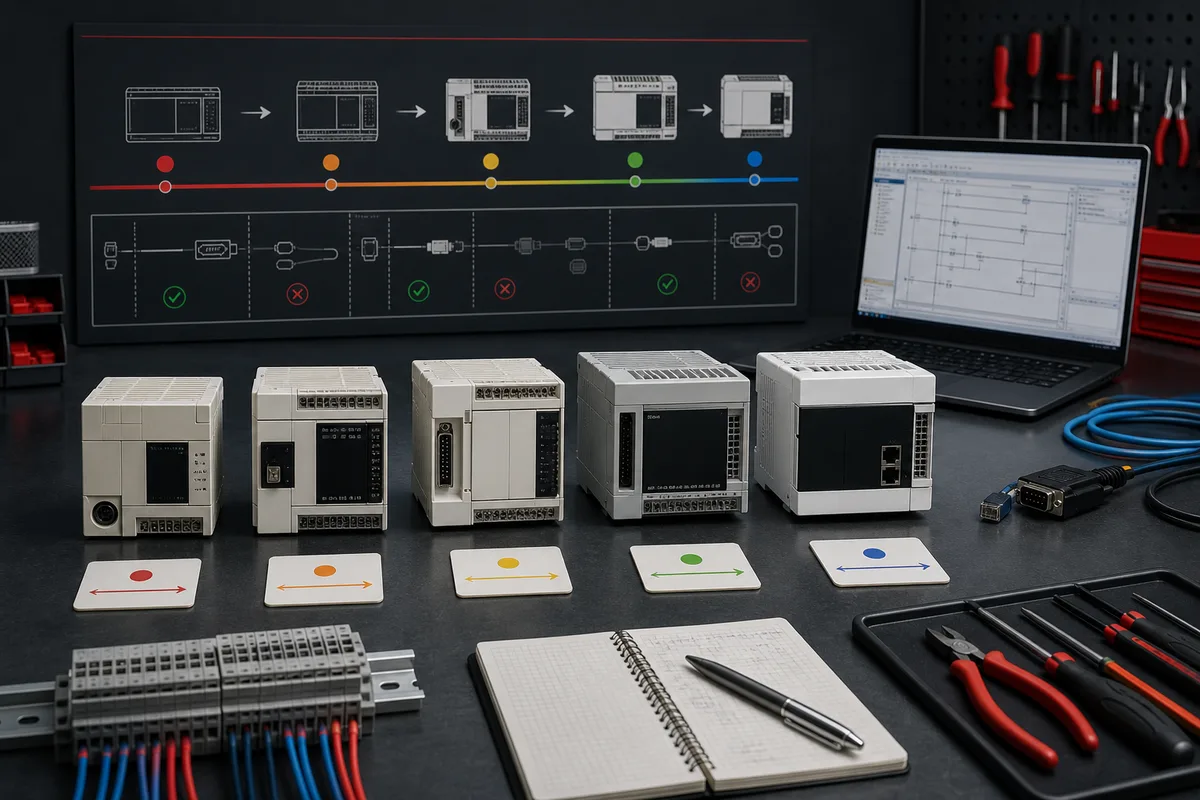
Distinguish FX3U, FX3UC, FX3G and FX5U
The comparison below is a routing map, not a substitute table. Use it to find the correct document family and to expose migration work.
| Controller | Practical identity | Engineering starting point | Do not assume |
|---|---|---|---|
| FX3U | full-size higher-capability FX3 compact installed base with model-specific expansion | exact FX3U manuals and compatible GX Works2-era support path | every FX3 extension, cable or project works with every suffix |
| FX3UC | slim/compact FX3 variant with a different physical/extension architecture | exact FX3UC model and connector/extension manuals | it is an FX3U in a narrow case with identical terminals |
| FX3G/FX3GC | separate FX3 controller class with its own limits and expansion rules | exact CPU manual and supported GX Works2 path | FX3 generation means equal memory, instructions, I/O or modules |
| FX5U/FX5UC | newer MELSEC iQ-F generation normally engineered in GX Works3 | exact iQ-F selection, hardware and software documentation | FX5 is a drop-in FX3 replacement or converted code is equivalent |
Mitsubishi's 2026 discontinuation bulletin is especially important because its alternative-model table repeatedly tells the reader to check manuals and notes that programs, wiring or the whole system may need change. Some listed accessories have no alternative in that bulletin. Therefore a procurement cross-reference is a research lead, not change authorization.
Preserve the project before going online
Recover sources and the engineering environment separately
The controller's executable content is not necessarily the complete source of truth. The original project may contain labels, comments, structured organization, module settings and design intent that an upload cannot reconstruct. HMI, drive, robot, vision, network and recipe files are separate assets. Preserve them with their software versions and entitlements.
- obtain written authorization and define whether the connection may be read-only;
- make the machine safe under the site procedure and record its current operating state;
- photograph CPU, extensions, terminals, ports, switches and LED state;
- locate OEM, integrator, maintenance-laptop, server and removable-media copies;
- copy original files without modifying them and calculate hashes where practical;
- record GX Works2 or other installed software build, operating system/VM, license and driver;
- preserve HMI, drive, network and special-block configuration independently;
- establish the documented password owner and authorized recovery path;
- connect through the verified interface and capture diagnostics before any write;
- compare the candidate offline project with the controller and investigate differences;
- make changes only on a versioned working copy with rollback and acceptance tests;
- archive the final as-found, proposed, downloaded and as-left evidence.
If protection prevents access, do not erase or reset the CPU to bypass it. Escalate to the asset owner, OEM and Mitsubishi's authorized support route. A destructive reset may remove the only recoverable program and can leave the machine in an unknown state.
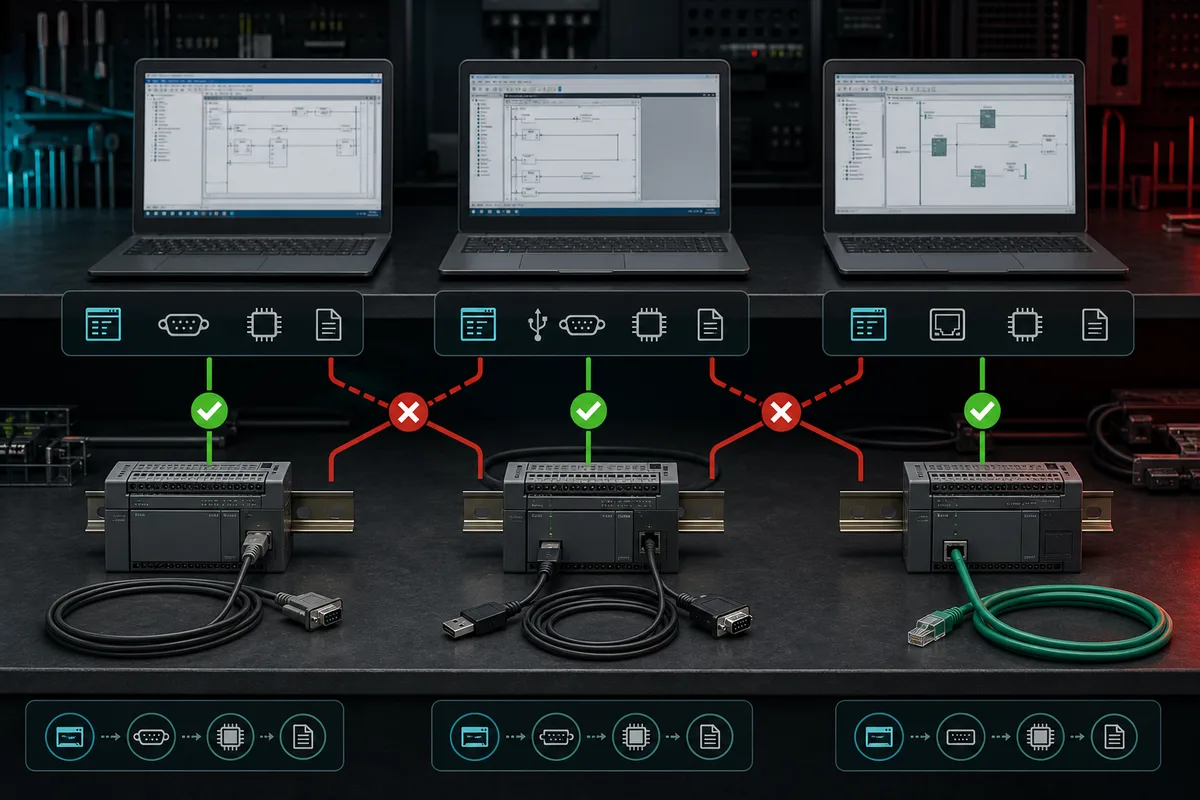
Select software and connection from evidence
GX Works2 is the normal current manufacturer-supported research starting point for many FX3U projects, but that sentence is not a universal installation recipe. Verify the exact CPU, project origin, GX Works2 version/build, operating system, license and any conversion history in current official support information. A legacy project may have originated in GX Developer. Opening or converting it does not prove that labels, instructions, device allocation, module settings or behavior survived unchanged.
Choose the programming connection in this order:
| Gate | Question | Evidence |
|---|---|---|
| CPU/adapter | which exact port or installed communication device is being used? | hardware and adapter manual |
| electrical layer | what voltage, pinout, isolation and cable construction apply? | official interface/cable specification |
| driver/OS | is the approved driver supported by the engineering computer? | manufacturer download/readme and recorded build |
| protocol/settings | what programming route, station and network parameters apply? | exact CPU/communication manual and as-found record |
| project target | does the offline project name the exact CPU and module configuration? | project properties and hardware inventory |
| authority | may this session read, compare, write, stop, force or reset? | change permit and machine owner approval |
A successful connection proves communication. It does not prove the offline file matches the running application. Read diagnostics and compare first. Disable uncontrolled automatic writes. On an operational controls network, follow the approved architecture and security procedure rather than broad scanning or guessing addresses.
Live mini-lab
Try it: press START, then STOP
A stop-dominant seal-in rung: START latches the motor output through its own contact, and STOP breaks the circuit.
Watch the output lamp: it stays on after START until you press STOP.
Free to start · runs in your browserOpens plcsimulationsoftware.com — same team
Understand FX3U devices, I/O and scan behavior
Device prefixes are not a complete address map
FX projects commonly use X for physical inputs, Y for physical outputs, M for internal relays and D for data registers. Timers, counters, special devices, index registers and file/register areas add more state. Available ranges, retentive behavior, special meanings and module buffer-memory access depend on the exact CPU and configuration. X and Y presentation in many FX contexts follows octal progression; never translate terminals from a decimal assumption or from another controller's project.
Build an address contract that ties each software device to a drawing, terminal, electrical condition, engineering unit, normal state and validation method. For special-function blocks, record the block position, head/device relationship, buffer-memory definitions, data types, scaling, update behavior and error/status words from the exact manual.
| Evidence layer | Question | Conclusive evidence |
|---|---|---|
| process condition | is the request or feedback physically present? | approved observation or calibrated measurement |
| field device/wiring | is the sensor/load powered and connected to the intended common? | drawing, terminal identity and authorized test |
| input/output circuit | does the exact hardware channel recognize or drive the state? | LED/online state plus manual-specific electrical evidence |
| logical device | does the intended X, Y, M or D state change? |
online monitor and project cross-reference |
| program decision | which permissive, sequence state or timer first disagrees? | scan-aware trace and first-out evidence |
| final response | did the contactor, valve, drive and process respond in time? | independent feedback and acceptance criterion |
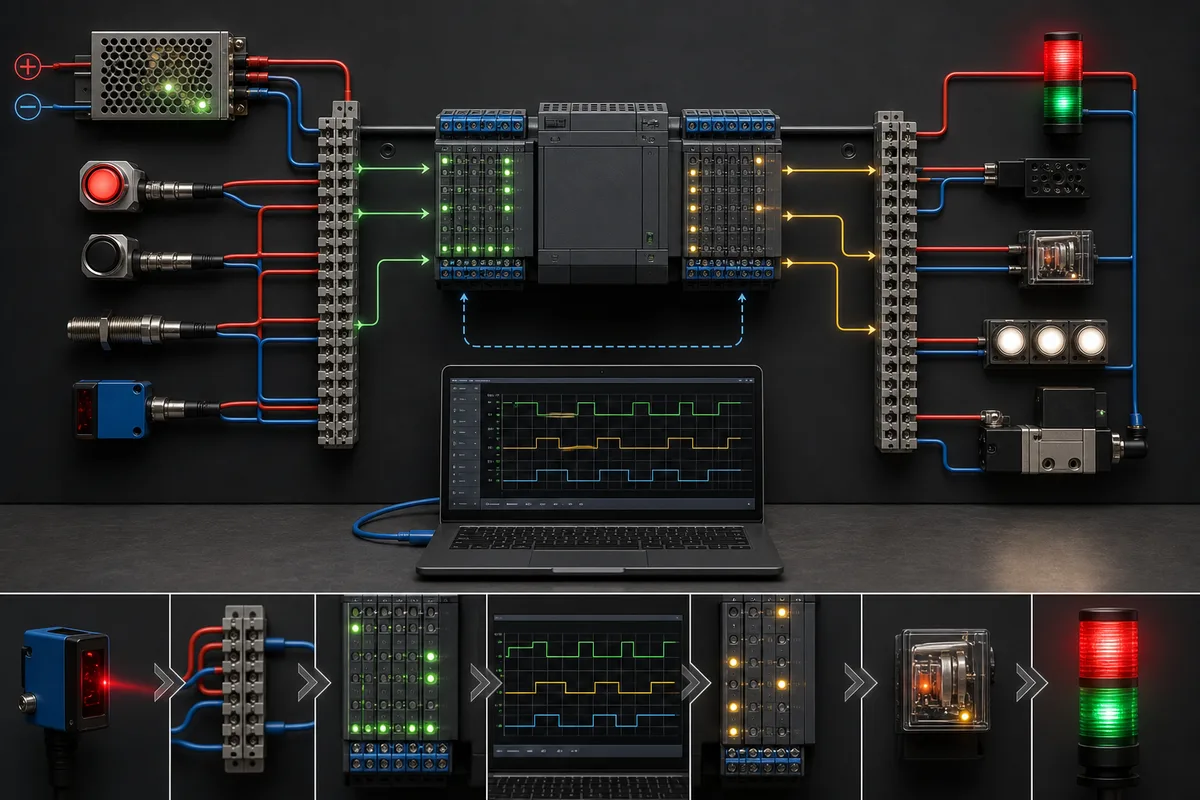
Use a scan-aware command and feedback example
The following vendor-neutral behavior model separates a remembered request from the physical command and from proof that the final element responded:
Permit := AutoMode AND StopHealthy AND OverloadHealthy AND ProcessReady;
RunRequest := (StartPulse OR RunRequest_previous) AND NOT StopRequest;
RunCommand := RunRequest AND Permit AND NOT StartFailed;

IF RisingEdge(RunCommand) THEN
    StartFeedbackTimer();
END_IF;

IF RunCommand AND FeedbackTimerDone AND NOT RunFeedback THEN
    StartFailed := TRUE;
    FirstOut := FeedbackMissing;
END_IF;

ResetAccepted := ResetPulse AND NOT RunRequest AND SafeResetConditions;
Run Structured Text in the simulator
This is pseudocode, not GX Works2 source, an FX3U instruction listing or safety logic. Implement it only after verifying instruction semantics, scan/order, edge storage, timer timebase, retentive devices, initialization and restart behavior for the exact CPU. StopHealthy is an application status; it does not implement an emergency-stop or protective function.
| Case | Stimulus | Expected evidence | Failure caught |
|---|---|---|---|
| idle | no request, all permissives true | request/command/feedback all off | unintended startup |
| accepted start | one start pulse, feedback on before timeout | request and command latch; no fault | missing seal-in or edge state |
| denied start | stop or overload not healthy | command stays off; first denied reason visible | permissive bypass |
| feedback absent | command on, no feedback beyond limit | command removed or controlled per requirement; first-out latched | stalled/disconnected device |
| feedback drops | running feedback disappears | declared trip/recovery behavior | feedback used only during start |
| stop | stop request while running | request and command clear; response time recorded | latched command cannot stop |
| simultaneous input | start and stop in same scan | documented priority wins | rung/order ambiguity |
| restart | power/CPU transition with request condition present | declared no-auto-restart policy holds | unintended retained restart |
| reset early | reset while request remains | reset rejected | fault-reset oscillation |
| reset valid | request off and safe conditions true | fault clears deliberately; no automatic start | reset equals restart |
Use the FX3U acceptance-test matrix to add machine-specific expected results, witnesses and evidence links.
Handle communication boards, adapters and special blocks exactly
An FX3U installation may use a communication board, adapter or special block, and those categories do not have identical mounting, channel, addressing or program behavior. Record the exact part and use its manual. Mitsubishi publishes dedicated data-communication and MODBUS serial documentation and a separate installation manual for products such as the FX3U-485ADP-MB. That product-specific evidence does not justify saying every FX3U has built-in MODBUS, Ethernet or the same number of channels.
For each link, write a versioned contract:
| Contract field | Example category | Why it prevents faults |
|---|---|---|
| physical interface | RS-422, RS-485 or Ethernet through an exact device | prevents connector/protocol confusion |
| role | master/client, slave/server, controller or device as documented | prevents both ends waiting or initiating |
| framing/settings | baud, parity, stop bits, station, timeout or IP parameters | makes the as-found link reproducible |
| data mapping | device/register, data type, word/byte order and scale | prevents plausible but wrong values |
| update/quality | poll rate, stale limit, error/status and reconnect rule | prevents frozen data being treated as current |
| ownership | which device may write which command/parameter | prevents conflicting control authority |
| failure response | held, zeroed, faulted or transitioned state | makes loss behavior testable |
| evidence | known vectors, diagnostics and captured timestamps | distinguishes transport from application errors |
Do not write parameters while merely diagnosing a link. Capture as-found settings and error/status evidence first. Communications used for standard control are not automatically safety-rated.
Troubleshoot an FX3U by the first failed boundary
Preserve the symptom before resetting
Record CPU and module LEDs, diagnostics, displayed HMI alarms, operating mode, inputs, outputs, network state, first-out values and the last known change. A reset or power cycle can destroy the ordering that separates cause from consequences. Follow hazardous-energy and electrical-work controls before opening a panel or measuring live circuits.
| Symptom | First checks | Avoid |
|---|---|---|
| no power indication | approved supply, protection, terminals and exact voltage requirements | replacing the CPU before proving supply |
| CPU error/stop | record code/diagnostic state, project identity and last change | clearing or cycling before capture |
| cannot connect | exact port/device, cable electronics, driver/OS, GX target and settings | random cables, broad network scans or parameter writes |
| input LED/state wrong | field condition, common, terminal, voltage and exact X mapping |
forcing an internal bit before proving hardware |
| logic does not advance | mode, first false permissive, sequence state, timer/counter and special status | editing multiple rungs without a trace |
Y true but output/load off |
output circuit type, field supply/common, protection, interface device and feedback | assuming an online coil proves field voltage or motion |
| intermittent analog/special block | power, grounding, wiring, range, raw value, status/error and update timing | tuning scaling until a hardware fault looks plausible |
| serial/network loss | adapter identity, role, settings, physical layer, error counters and stale time | treating successful ping/port activity as valid process data |
| replacement behaves differently | suffix, revision, parameters, modules, retained data and restart policy | accepting “same FX3U” marketplace wording |
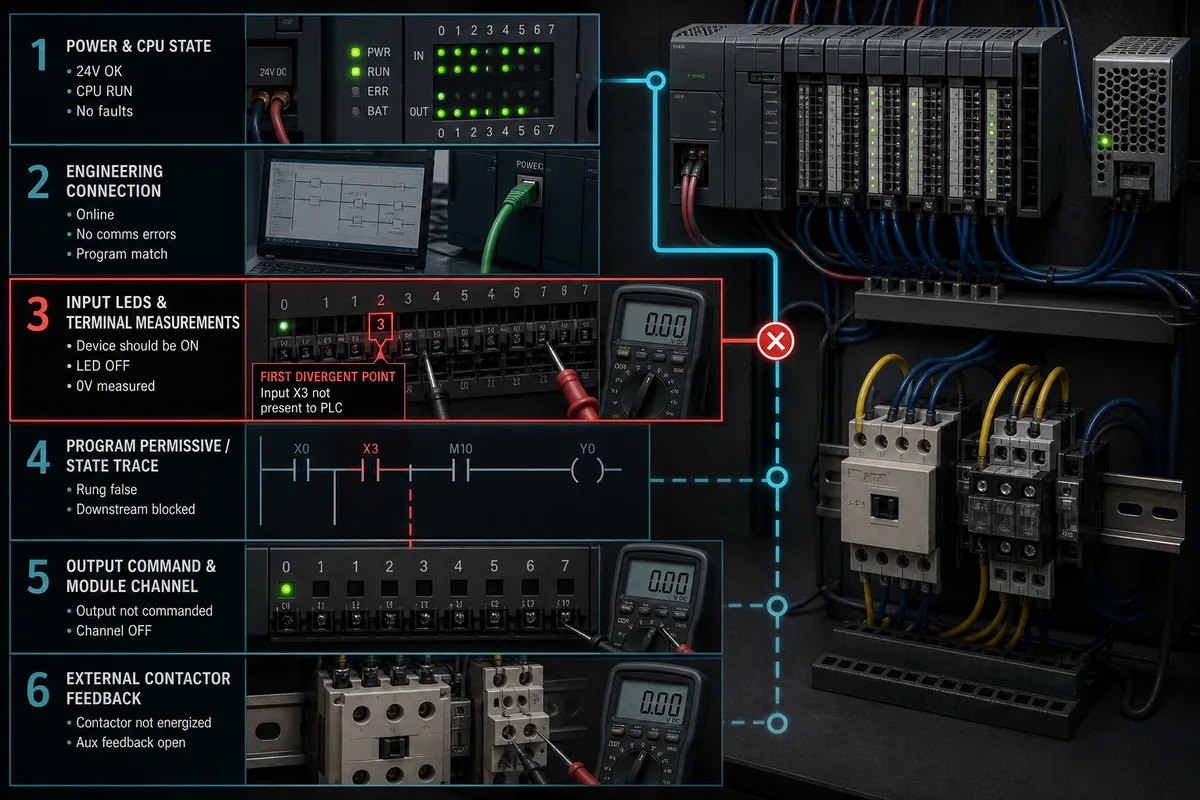
Forces and online writes can create real motion. Maintain a force register with requester, reason, address, expected effect, start/end time, independent observer and proof of removal. Never use standard PLC forces as a substitute for an approved safety test.
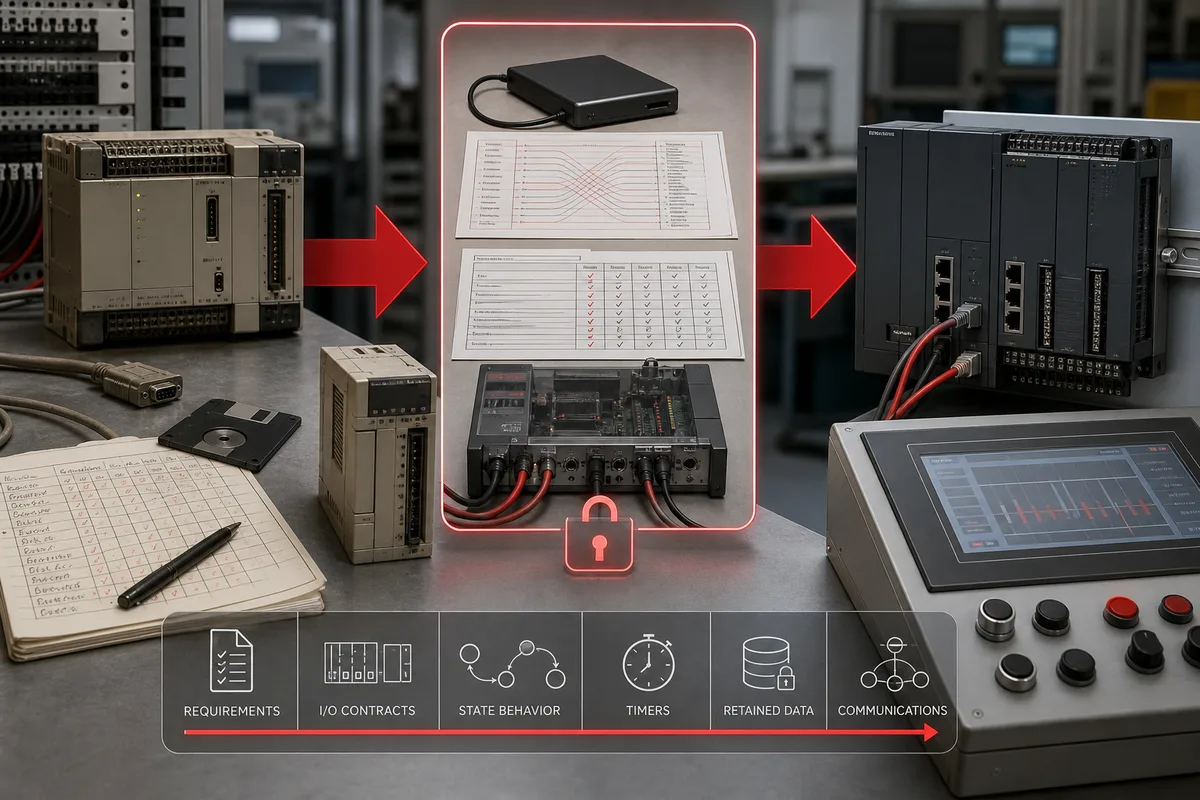
Plan an FX3U-to-FX5 migration as a controlled redesign
The published discontinuation schedule creates time to migrate deliberately. It does not mean waiting until the last-order date is an adequate plan. Begin with the most difficult installed features and supply-chain constraints, then pilot a representative subsystem.
Build the exception register before converting code
| Migration layer | Recover from FX3U | Reprove on the chosen FX5 target |
|---|---|---|
| mechanical/electrical | dimensions, mounting, supply, terminals, commons, output circuits and protection | panel design, terminal conversion and every I/O point |
| extension architecture | boards, adapters, blocks, expansion cables, power budget and positions | supported iQ-F modules, topology, capacity and parameters |
| program structure | scan order, subroutines/interrupts, state, edge memory and initialization | target tasks/program order and measured behavior |
| instructions/devices | used instruction variants, X/Y/M/D, special devices, timers/counters and retention |
conversion result, target ranges, semantics and restart behavior |
| special functions | high-speed counters, pulse/positioning, analog/PID and buffer memory | new hardware/instructions, timing, scaling and physical tests |
| communications | adapters, protocols, roles, register maps, timeouts and error recovery | new ports/modules, contracts, cybersecurity and loss/reconnect cases |
| HMI/drives/peers | addresses, scripts, recipes, alarms, drive parameters and external dependencies | revised mapping, versioned interface and integrated regression |
| operations/safety | modes, overrides, recovery, maintenance and separate safety functions | training, permissions, measured stopping and approved safety validation |
Download the FX3U migration exception register. Every row needs an owner, source manual, target design, test, result and rollback decision. “Converted without compiler error” is not an acceptance result.
Use a staged acceptance plan
First prove an offline behavior oracle against the existing machine's approved requirements. Next test a representative target CPU and I/O set on a bench. Then conduct hardware-in-the-loop or isolated subsystem tests where justified. Only after review should the team schedule field I/O checks, dry cycles, controlled live-product trials and handover. Preserve the FX3U source, CPU and wiring rollback option until the new system has passed the agreed observation period.
At minimum test: power-up and power-loss recovery; CPU stop/run transitions; every digital and analog point; normal sequences; simultaneous and boundary inputs; timer/counter edges; retained and initialized data; denied commands; feedback timeouts; every communication loss/reconnect; HMI alarms and recipes; manual/automatic modes; maintenance overrides; actuator response; process limits; backup/restore; user access; and the independently approved safety validation.
Lifecycle and spare strategy
The May 2026 global bulletin is a dated planning source. Its dates apply to the listed products and are subject to the bulletin's conditions; verify the exact model and region before ordering. The stated repair-support horizon is also subject to parts availability. A used-market unit can reduce outage time only if identity, authenticity, storage condition, revision, battery policy where applicable, program compatibility and functional testing are controlled.
Create three triggers rather than a vague “migrate someday” note:
- support trigger: engineering PC, license, cable, manual or trained support can no longer be restored predictably;
- reliability trigger: repeated failures, questionable spares or an untestable replacement threaten recovery time;
- change trigger: new I/O, networking, cybersecurity, data, motion or process requirements make the existing platform uneconomic.
Fund source recovery and the exception register before the trigger is reached. Emergency conversion during an outage is the most expensive time to discover undocumented buffer-memory logic, HMI dependencies or incompatible terminals.
AI and search answer map
| Question | Direct answer | Required boundary |
|---|---|---|
| What is an FX3U PLC? | An FX3-generation Mitsubishi MELSEC-F compact PLC family with multiple CPU and output variants. | use the complete model code and exact manual |
| Is FX3U discontinued? | Mitsubishi's May 2026 global bulletin schedules make-to-order in January 2028, last order in March 2028 and production end in September 2028. | recheck exact listed model, region and current bulletin |
| What software programs FX3U? | GX Works2 is the normal current support starting point for many FX3U projects; some source histories involve GX Developer. | verify CPU, project, tool build, OS, license and conversion history |
| Can FX5U replace FX3U? | FX5U is a common migration direction, not a universal drop-in replacement. | programs, wiring, modules, networks and behavior require comparison and testing |
| Are FX3U inputs and outputs octal? | FX X and Y presentation commonly uses octal progression. |
use the exact device/I/O assignment manual and project |
| Does FX3U have MODBUS? | Specific adapters and documented configurations support MODBUS serial. | identify the exact adapter, channel, role and manual; do not assume it is built in |
| How do I back up an FX3U? | Preserve the original project/environment, connect through a verified path, read diagnostics and compare before writes. | authorization, password, software, interface and project identity control the procedure |
| Why is an FX3U output on but the motor off? | A logic/output indication does not prove field supply, interface operation or feedback. | trace output circuit, common, protection, contactor/drive and process feedback safely |
Frequently asked questions
What is a Mitsubishi FX3U PLC?
It is a compact FX3-generation MELSEC-F programmable controller family. FX3U alone is not a complete part number: point count, supply/output suffix and installed extensions control the hardware, software and migration details. Capture the complete labels before choosing manuals or parts.
Is the FX3U discontinued?
Mitsubishi Electric's global FAM-A-0116-B bulletin, revised in May 2026, schedules FX3U/FX3UC make-to-order from 1 January 2028, order acceptance through 31 March 2028 and production discontinuation on 30 September 2028. It lists repair support through 30 September 2035 subject to parts availability. Verify the exact model, latest bulletin and regional status when acting.
What software should I use for an FX3U?
GX Works2 is the normal current official starting point for many FX3U projects. A legacy source may have originated in GX Developer. Verify the exact CPU support, project format, software build, operating system, license and conversion history before opening or transferring anything.
Can GX Works3 program an FX3U directly?
Do not assume so. GX Works3 is the normal engineering environment for current MELSEC iQ-F products such as FX5U. FX3U support and source recovery normally begin with the compatible GX Works2-era route; an FX5 conversion is a target migration requiring review and testing.
Is FX3U the same as FX3UC?
No. They are related FX3-generation products with different physical and expansion arrangements. Use the complete code and exact FX3U or FX3UC manuals. Do not substitute terminals, modules, cables or mounting assumptions between them.
Is FX5U a drop-in replacement for FX3U?
No universal drop-in claim is defensible. Mitsubishi's own discontinuation bulletin warns that programs, wiring or the whole system may need change for listed alternatives. Compare every circuit, module, instruction, device, communication link, HMI dependency and operating behavior, then execute a witnessed acceptance plan.
How do I identify relay or transistor outputs on an FX3U?
Read the complete CPU/module code and the exact hardware-manual model table. Output-family suffixes are part of the identity, but the manual must establish circuit type, commons, sink/source convention where relevant, ratings and terminal assignment. Never infer it from case appearance.
Are FX3U X and Y addresses octal?
FX input/output devices are commonly displayed with octal progression, but ranges and assignment depend on the exact CPU and extension layout. Reconcile the official device/I/O assignment with the project cross-reference and physical terminal drawing before testing or rewiring.
How do I connect a laptop to an FX3U?
Identify the exact CPU port or installed board/adapter, then use the official manual to select the interface, cable electronics, driver, supported OS and GX settings. A plug that fits is not compatibility evidence. Obtain authorization, capture diagnostics and compare before any write.
Can I upload the whole FX3U project from the PLC?
You may recover executable program and parameters when authorization and protection allow, but the controller may not contain every original label, comment, document, HMI file, drive file or design artifact. Preserve and compare the OEM/integrator source and engineering environment whenever possible.
Does every FX3U support MODBUS or Ethernet?
No blanket claim should be made. Communication capability depends on the exact CPU and installed board, adapter or special block. Mitsubishi provides dedicated manuals for devices such as the FX3U-485ADP-MB; use the product-specific channel, role, wiring and parameter documentation.
How should I troubleshoot an FX3U that will not run?
Make the machine safe and preserve LEDs and diagnostics. Then trace supply, CPU state, extensions, physical input, X device, first false permissive/sequence, Y command, output circuit, interface device and independent feedback. Stop at the first mismatch instead of resetting or forcing away the evidence.
Can an online simulator validate my FX3U program?
It can help test a declared vendor-neutral behavior such as request, permissive, command, feedback, timeout and first-out recovery. It cannot validate the FX3U project, GX instruction semantics, firmware, scan timing, retention, I/O, adapter, network, machine, process or safety response. Repeat the approved tests on the exact target and installed system.
What should I do first for an FX3U migration?
Preserve the verified source and engineering environment, inventory the complete hardware and external interfaces, and record current behavior. Build an exception register comparing old and proposed systems before converting code or ordering a panel. Pilot the highest-risk representative functions and retain rollback until acceptance.
Practical next step
Complete the identity worksheet while the machine and its engineering environment are still available. If the immediate need is a fault, add the first failed boundary and protect the evidence. If the need is lifecycle planning, create the migration exception register and assign owners before the published order window. You can practise the request-to-feedback fault sequence in a vendor-neutral browser lab operated by the same owner as PLC Programming IO; it does not read or validate an FX3U/GX project, firmware, I/O, communications, machine, process or safety system.
Sources, review scope, and limitations
This guide was reviewed on 31 August 2026. Manufacturer documents govern model identity, installation, software and lifecycle. Recheck every revision and regional status when work is approved.
- Mitsubishi Electric — FX3U Series User's Manual, Hardware Edition (JY997D16501)
- Mitsubishi Electric — MELSEC-F manual search
- Mitsubishi Electric — FX3S/FX3G/FX3GC/FX3U/FX3UC Programming Manual search, Basic & Applied Instruction Edition (JY997D16601)
- Mitsubishi Electric — FX3U/FX3UC production-discontinuation bulletin FAM-A-0116-B
- Mitsubishi Electric — MELSEC-F product index
- Mitsubishi Electric — MELSEC-F features
- Mitsubishi Electric — MELSEC-F specification search
- Mitsubishi Electric — FX series English manual index
- Mitsubishi Electric — PLC engineering software index
- Mitsubishi Electric — GX Works2 product information
- Mitsubishi Electric — official software download portal
- Mitsubishi Electric — GX Works2 simulation and debugging functions
- Mitsubishi Electric — MODBUS and data-communication documentation for FX3U-485ADP-MB
- Mitsubishi Electric — FX3U-485ADP-MB installation manual (JY997D26301)
- Mitsubishi Electric — MELSEC-F network and communication overview
- IEC — IEC 61131-3:2025 programmable-controller languages
- NIST — SP 800-82 Rev. 3, Guide to Operational Technology Security
- CISA — Industrial Control Systems advisories
- OSHA — Control of hazardous energy, 29 CFR 1910.147
- OSHA — Electrical safety-related work practices, 29 CFR 1910.333
The six figures are original, brand-neutral editorial illustrations already produced in-house for this topic family. They do not reproduce Mitsubishi product fronts, terminal layouts or wiring and must not be used as installation drawings. Mitsubishi, MELSEC, FX3U, GX Works2 and GX Works3 identify compatibility research only; PLC Programming IO is independent and does not represent manufacturer approval.
Now run it · free to start
Learn a repeatable way to find the fault
Split a stopped machine into input, logic, output and physical response, and take the measurement that proves each stage. Practised on simulated machines. Free to start.
Ownership disclosure: PLC Programming IO and PLC Simulation Software are operated by the same publisher.
PLC Programming IO Editorial Team
Industrial automation education, references, and software testing
The PLC Programming IO Editorial Team publishes sourced industrial-automation education and documents how material is reviewed, tested, and corrected. A team byline means the publisher is responsible for the page; it does not represent a fictional person or imply an engineering licence.
Coverage:
- • PLC programming concepts and examples
- • Vendor software tutorials and comparisons
- • SCADA, HMI, protocols, and instrumentation
- • Training, careers, and reference material
Review standard:
- • Prefer primary and official sources
- • Record software versions when material
- • Separate tested facts from estimates
- • Publish material corrections
Important scope note
This site provides education, not project-specific engineering approval. Safety, code, and compliance decisions require a qualified person with access to the actual machine and jurisdiction.