What a P&ID actually tells you
A P&ID is a controlled schematic of process equipment, connected piping, valves, instruments and control relationships. It helps engineering, operations, controls, safety and maintenance teams agree on how the process is assembled and observed. It is not a scaled layout, wiring diagram, fabrication isometric or complete PLC logic specification.
The useful reading habit is to separate three layers: the physical process path, the measurement/control path, and the cross-document evidence. A line on the page may represent pipe, pneumatic signal, electrical signal or software relationship depending on the legend.
How to read a P&ID in 8 passes
- 1
Read the title block and legend
Confirm drawing number, area, revision, issue status, standards, abbreviations and project-specific symbols before interpreting line styles.
- 2
Find the process boundary
Identify upstream feeds, downstream destinations, battery/package limits and tie-in references to other sheets.
- 3
Follow major process flow
Trace line numbers and arrows through vessels, pumps, exchangers, filters and other equipment. Note branches and recycles.
- 4
Read equipment and valve tags
Connect equipment IDs to data sheets and motor/equipment lists. Check valve type, actuator, normal position and fail-action annotations.
- 5
Trace one instrument loop
Start at the sensing element or transmitter, follow the signal to indication/control, then follow the output to the final element.
- 6
Identify safeguards and alarms
Find independent switches, shutdown functions, relief devices and annotations, then trace them to the approved safety/control requirements.
- 7
Reconcile the registers
Compare the controlled instrument index, I/O list, line/valve lists, data sheets, cable schedule and cause-and-effect matrix.
- 8
Record discrepancies
Use the project change process. Do not decide privately that one document always wins; document ownership and revision status determine resolution.
Original educational atlas
Search common P&ID symbol families
Use these illustrations to learn the visual grammar, then use the legend and approved standard for the actual project.
12 symbols shown
Instruments
Field instrument
A field-mounted measurement or function identified by the letters and loop number.
Location convention comes from the project legend.
Instruments
Panel or shared display function
An indicated/control function shown with a location or accessibility line.
Line count/style varies with the adopted legend and standard edition.
Valves
Manual isolation valve
A manually operated valve used to isolate or route the process.
Body and actuator symbols can be project-specific.
Valves
Control valve
A modulating final element commanded by a controller or control function.
Fail action, actuator and positioner need separate detail.
Valves
Check valve
A non-return device intended to prevent reverse flow.
Tagging and symbol orientation follow the project convention.
Valves
Generic valve
An on/off or otherwise classified valve when the drawing supplies actuator details.
Do not infer fail state from the bow-tie alone.
Equipment
Centrifugal pump
Rotating equipment that adds hydraulic energy to the liquid.
Driver, standby arrangement and package boundary may be separate.
Equipment
Process vessel
A pressure or atmospheric vessel containing the process inventory.
Nozzle, internals and design details are schematic.
Equipment
Heat exchanger
Equipment transferring heat between process or utility streams.
Shell/tube and plate symbols differ.
Lines & signals
Process pipe
A physical process or utility piping connection.
Line number, class and size syntax are project-controlled.
Lines & signals
Instrument signal
A signal path between measurement, control and final-element functions.
Dash pattern alone is meaningless without the drawing legend.
Lines & signals
Software / data link
A logical signal, network or internal control-system connection.
Protocol, ownership and data validity belong in other documents.
Worked loop
Vessel level control, read left to right
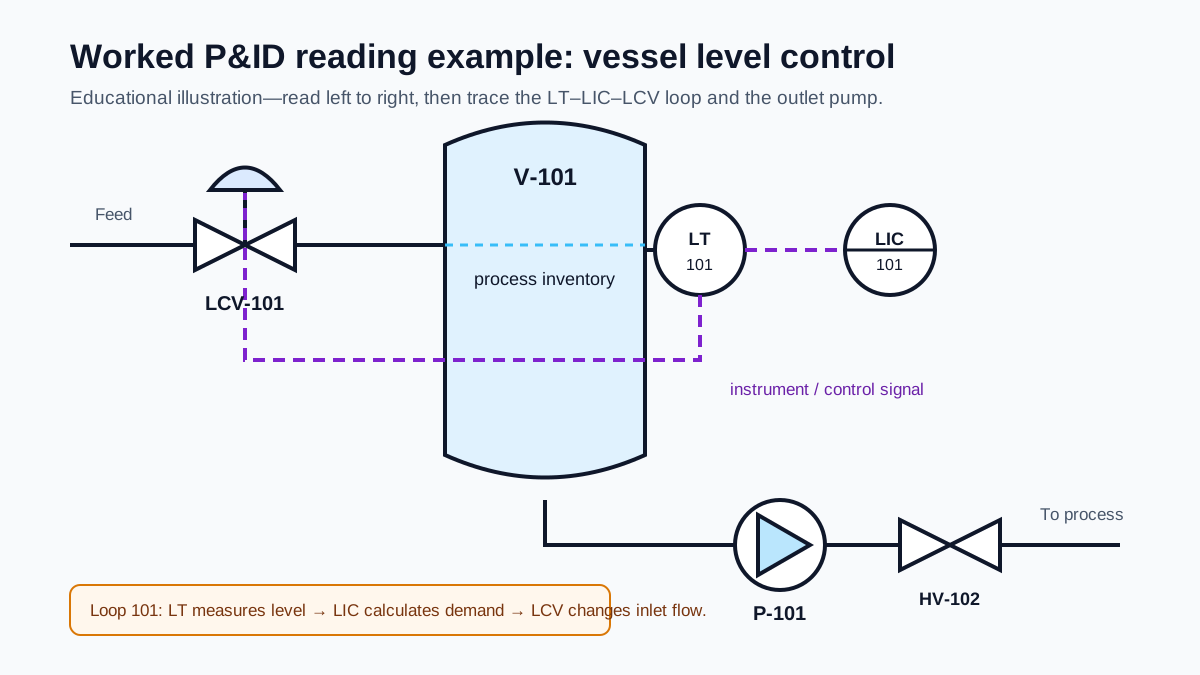
1. Physical path
Feed crosses LCV-101 into V-101. Liquid leaves the vessel through P-101 and an outlet isolation valve.
2. Control path
LT-101 measures level. LIC-101 compares it with setpoint and changes the demand to LCV-101.
3. Missing detail
Range, I/O, cable, valve fail action, mode behavior and trips must be confirmed in other controlled documents.
How instrument tags work
A tag combines function letters with a loop number according to the adopted identification convention. The first letter commonly identifies the measured/initiating variable; subsequent letters describe functions or modifiers. The same loop number groups related functions, but project numbering rules vary.
| First letter | Variable | Example |
|---|---|---|
| F | Flow | FIT — flow indicating transmitter |
| L | Level | LSHH — level switch high-high |
| P | Pressure | PIC — pressure indicating controller |
| T | Temperature | TT — temperature transmitter |
| A | Analysis / composition | AIT — analytical indicating transmitter |
| S | Speed / frequency | SIC — speed indicating controller |
| Z | Position / dimension | ZSO — position switch open |
Common function letters
Letter meaning depends on position and context. Do not decode a tag from a casual internet list when the project legend or licensed standard is available.
| Letter | Common function |
|---|---|
| I | Indicate / display |
| T | Transmit |
| C | Control |
| S | Switch |
| A | Alarm |
| R | Record |
| H / L | High / low modifier |
| V | Valve or final-control function in the adopted convention |
P&ID line information
A process line may encode size, service, sequence/number, piping class and insulation or tracing information. The exact order is project-specific. Signal lines use different patterns for pneumatic, electrical, hydraulic, capillary or software relationships—but line patterns have no safe universal meaning outside the drawing legend.
Line number
Unique controlled identity and cross-reference to a line list.
Size & class
Nominal size and piping material/specification boundary.
Service
Process or utility duty, fluid and design context.
Direction & tie-in
Normal flow direction and continuation to another sheet or system.
The P&ID document contract
The drawing becomes reliable when every neighboring register has a defined owner and reconciliation rule. Exact one-to-one matching is not universal: an intelligent transmitter may create several data values, a hardwired status may not appear on a process drawing, and package internals may be governed by vendor documents.
| Document | What should reconcile | Typical mismatch to catch |
|---|---|---|
| Instrument index | tag, service, device type, range and data-sheet reference | renamed or removed instrument remains ordered |
| I/O list | signal-bearing tags, ranges, units, type and control-system owner | drawing shows transmitter while PLC expects a switch |
| Valve/equipment list | tag, type, duty, normal/fail position and package owner | actuator/fail action differs from narrative |
| Cause-and-effect | initiating tags, trip conditions and demanded effects | P&ID annotation lacks delay/reset behavior |
| Loop/wiring drawings | tag, terminals, barriers, power and signal path | wrong polarity or intermediate termination |
| Control narrative | modes, permissives, sequence, failures and recovery | visual loop does not define bad-signal response |
Standards and project legends
ISA lists ANSI/ISA-5.1-2024, Instrumentation and Control — Symbols and Identification. ISA also publishes related standards and technical reports for documentation, loop diagrams and process displays. Other projects use ISO/IEC, EN/DIN, company or owner conventions.
The production rule is simple: use the edition and convention named by the contract, then put a complete legend on the drawing set. The illustrations on this page are original educational artwork and intentionally do not reproduce protected standard tables.
P&ID review checklist
Frequently asked questions
What is a P&ID?
A piping and instrumentation diagram is a detailed process-engineering drawing that shows equipment, piping, valves, instruments, control functions and their relationships. Its exact scope and notation are controlled by the project drawing standard and legend.
Is every instrument in the I/O list shown on the P&ID?
Not necessarily. Process instruments normally reconcile across the controlled registers, but package internals, electrical statuses, virtual tags, network diagnostics and machine signals may be owned on other drawings. Define the document contract and resolve discrepancies through change control rather than assuming one document always wins.
What is the current ISA-5.1 edition?
ISA lists ANSI/ISA-5.1-2024, Instrumentation and Control — Symbols and Identification. Projects may contractually use another edition or company standard, so the drawing legend and project specification remain essential.
What is the difference between a PFD and a P&ID?
A process flow diagram presents major equipment, process streams and design conditions at a higher level. A P&ID adds the piping, valves, instruments and control relationships needed for detailed design, hazard review, operation and maintenance. Project deliverable definitions vary.
Can I use the symbol atlas as an official ISA legend?
No. The atlas is original educational artwork that teaches common visual families. Use the licensed standard, project legend and approved company specification for production drawings.
Build the connected document set
Instrument index template
Control tags, ranges, signal interfaces and device status.
Open →PLC I/O list builder
Map signals into modules, channels, cables and PLC tags.
Open →Cable schedule template
Trace field and panel endpoints, cores, routes and test status.
Open →Control narrative template
Define modes, permissives, sequences, failures and recovery.
Open →Cause-and-effect template
Map initiating causes to trips, alarms and test evidence.
Open →Loop-check procedure
Prove the installed signal from field stimulus to HMI and alarm.
Open →