S7-1200 OPC UA Server Setup and Troubleshooting
Configure an S7-1200 OPC UA server in TIA Portal with the correct CPU, firmware, license, server interface, tag rights, certificates, subscriptions and acceptance tests.
Review status: Editorially reviewed against current Siemens TIA Portal V21, S7-1200, S7-1200 G2 and OPC Foundation documentation; exact catalog, firmware, license, limits and security policy require project-specific verification
Direct answer
To configure S7-1200 OPC UA, first identify the exact CPU catalog, hardware generation, firmware and TIA Portal version. Then confirm that combination supports the OPC UA server role and determine its runtime-license requirement. Enable the server in the CPU properties, define and download a curated OPC UA server interface, grant only the required tag read/write rights, configure a signed-and-encrypted endpoint, establish certificate trust deliberately, compile and download the project, and validate browse, read, subscription, quality, write rejection/acceptance and reconnect behavior from an approved client.
Do not begin by entering an endpoint URL into a client. “S7-1200” now spans the established S7-1200 line and S7-1200 G2, and capability changed across engineering releases. Siemens documents the established S7-1200 server from firmware V4.4. Its TIA Portal V20 documentation requires a Basic OPC UA runtime license and a downloaded server interface. Siemens' V20 comparison initially listed no OPC UA server for S7-1200 G2, while the current V21 functional description for S7-1200 G2 firmware V4.1 documents a server and explicitly says both compact families have no OPC UA client. That version history is why a forum statement such as “the 1200 supports OPC UA” is not an adequate compatibility record.
For an external SCADA, MES, historian or test workstation reading the CPU, the normal role is S7-1200 = OPC UA server and external application = OPC UA client. The server publishes only the nodes you intentionally expose. Client-side browsing, a green connection icon or a Good service result does not prove that the value is current, correctly typed, in the intended engineering unit or safe to write. Acceptance has to preserve endpoint identity, certificate identity, namespace URI, NodeId, data type, value, StatusCode, source/server timestamps where supported, update behavior and the PLC-side effect.
This page owns the S7-1200-specific implementation task. Use the OPC UA complete tutorial for protocol-wide concepts, information models and cross-vendor architecture. Use the Siemens PLC programming guide for the wider TIA Portal development workflow and the Siemens S7 family guide for controller selection. This guide does not provide a universal license SKU, endpoint, password, certificate or capacity figure for every CPU and firmware.
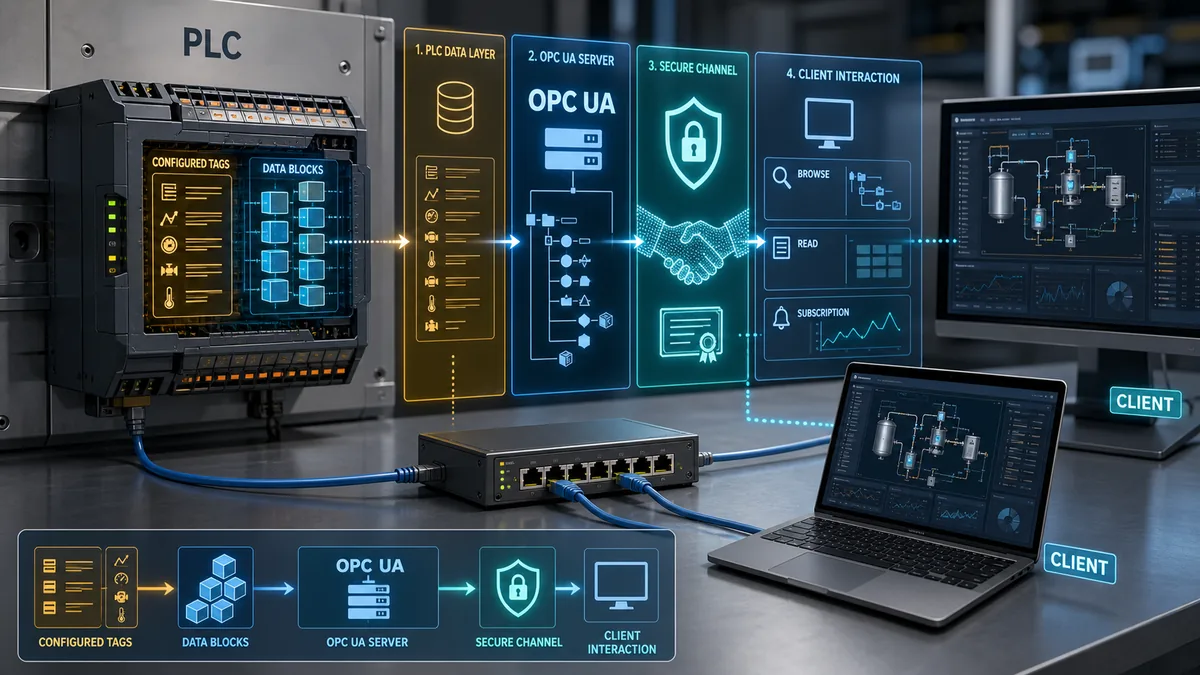
Decide whether this is the correct owner and controller role
| Task | Correct owner or role | Why |
|---|---|---|
| Configure an established S7-1200 CPU as a UA server | this guide plus the exact Siemens manual | CPU/firmware/license/interface details are product-specific |
| Configure an S7-1200 G2 server | this guide plus current V21/G2 documentation | support changed after the initial G2 engineering release |
| Make a compact S7-1200 act as a general OPC UA client | do not assume support | current Siemens V21 comparison says S7-1200 and S7-1200 G2 have no OPC UA client |
| Learn endpoints, sessions, namespaces and information models | OPC UA complete tutorial | these are protocol-wide concepts rather than one CPU workflow |
| Choose S7-1200 versus S7-1500 | Siemens S7 family owner | client role, standard interface, alarms/events, capacity and lifecycle can change the controller decision |
| Prove an MES or SCADA data contract | this guide plus the consuming-system design | a successful connection does not prove value semantics or process behavior |
Verify model, firmware, TIA Portal and license before configuration
Record identity from evidence
Capture the complete CPU catalog and hardware version from the label, firmware from approved online/device evidence, configured device version from the project, TIA Portal/STEP 7 version and update level, server/client role, required runtime license, purchased license selection and the exact documentation revision used. Preserve screenshots or an exported configuration with the commissioning record.
An old project that opens successfully is not enough. The configured device can differ from the installed CPU; a project can contain retained settings for a disabled server; and an upgrade can change certificate, interface or security behavior. Compile messages are evidence, not administrative noise. Resolve warnings about disabled protection, unsupported policies, exceeded nodes or missing licenses before the functional test.
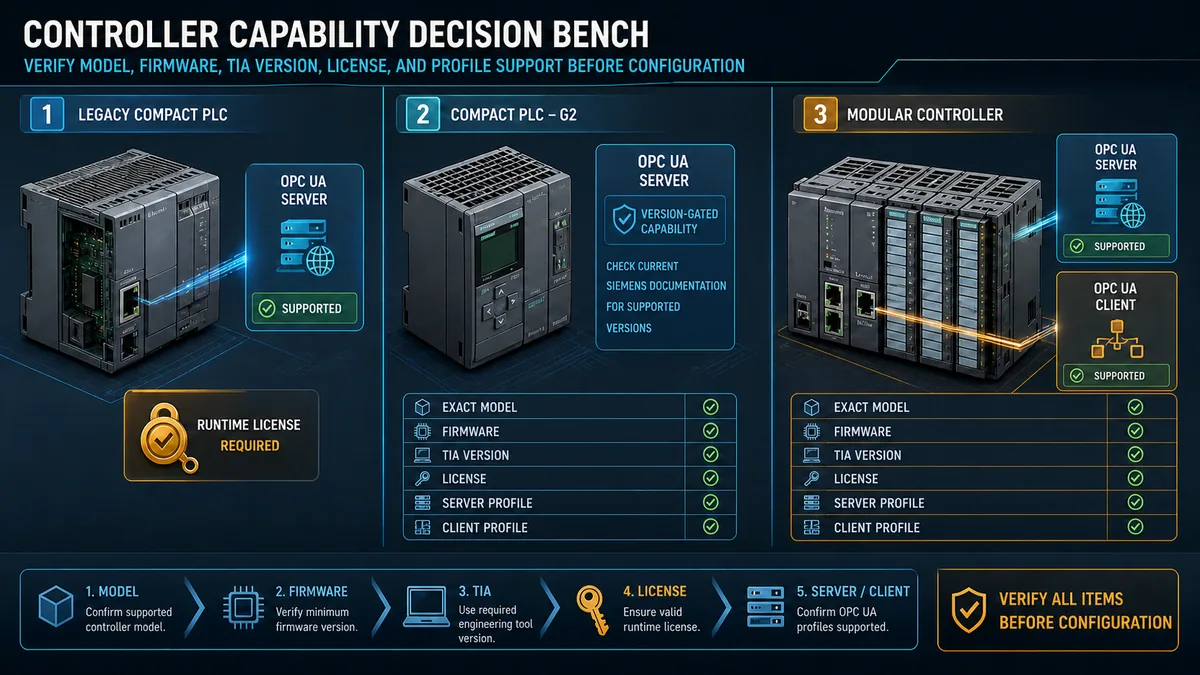
Treat S7-1200 generations as separate compatibility rows
| Compatibility row | Current documented boundary | Engineering consequence |
|---|---|---|
| established S7-1200 | OPC UA server documented from firmware V4.4; V20/V21 instructions describe activation, license and custom interface | verify exact CPU/firmware and Basic runtime-license selection in project properties |
| S7-1200 G2 at initial V20 comparison | V20 comparison listed no OPC UA server | an early project or conclusion cannot be assumed to gain the later feature automatically |
| S7-1200 G2 in V21 functional description | firmware V4.1 is documented with an OPC UA server | use the current G2 manual, supported TIA version and exact CPU limits |
| compact CPU as UA client | V21 comparison says S7-1200 and S7-1200 G2 have no OPC UA client | if PLC-to-UA-server client behavior is required, re-evaluate architecture/controller rather than inventing an instruction path |
| S7-1500 | broader server feature set and documented client capability on supported CPUs/firmware | do not copy its standard-interface, alarm/event, client or capacity claims down to S7-1200 |
The phrases “legacy” and “G2” here distinguish architectures, not value judgments. An established S7-1200 may be the right installed-base server. A G2 CPU may be the right new compact target. The decision is controlled by supported roles, information-model requirements, capacity, security lifecycle, spares and validated application behavior.
Configure the S7-1200 OPC UA server in TIA Portal
Build a controlled configuration baseline
- Back up and compare the running project under the site's approved change procedure.
- Select the exact CPU and verify configured firmware against installed firmware.
- In CPU properties, enable the OPC UA server and acknowledge the security guidance.
- In runtime licenses, select the purchased license type required by that configured CPU.
- Give the OPC UA application a stable, meaningful identity that fits the certificate and naming plan.
- Create a user-defined server interface or supported companion-specification mapping.
- Map only approved PLC tags or DB elements and remove unnecessary read/write exposure.
- Configure endpoint security, application certificate, trusted clients and user permissions.
- Set session/subscription limits and sampling behavior from the capacity estimate.
- Compile hardware and software, resolve warnings, download in the authorized window and verify diagnostics.
Siemens states that the server is disabled by default. Enabling it and selecting a license are separate steps. The application name becomes part of server identity and can be represented in a certificate. Changing identity after client commissioning can therefore require certificate regeneration, trust-list updates and client configuration changes.
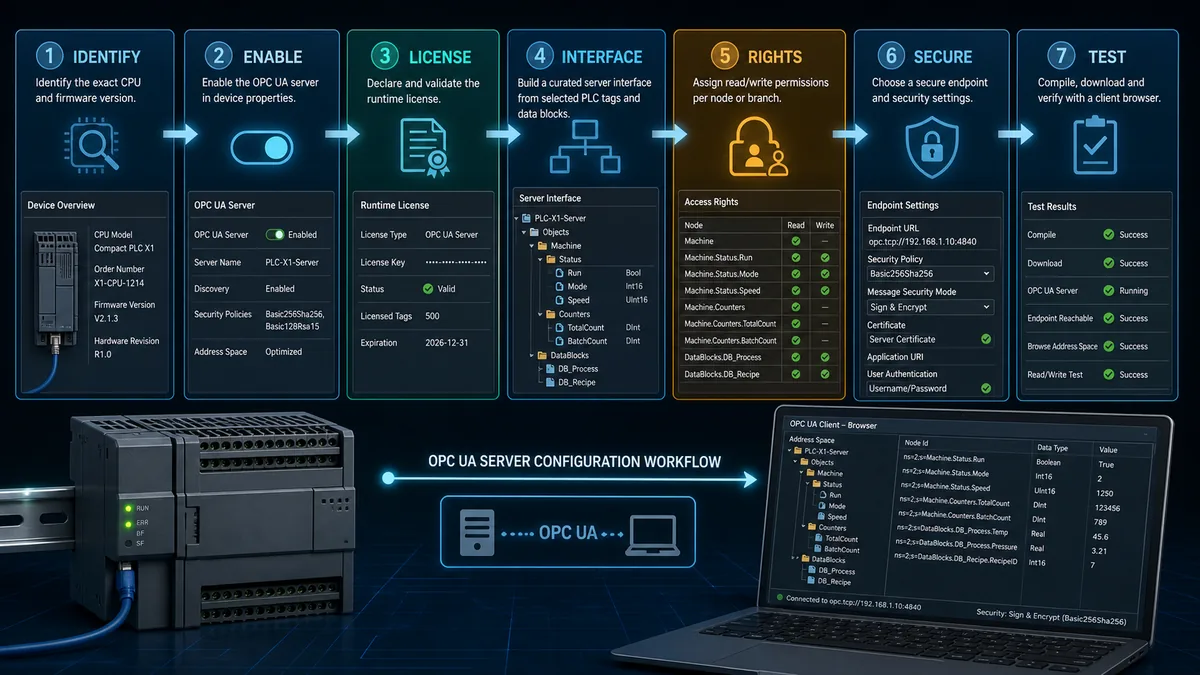
Compile before treating the endpoint as real
Compilation checks whether the selected device accepts the interface, mappings, methods and configured limits. Download then changes the running device. Keep those steps separate in the test record. “Compiles” proves configuration consistency within the tool; “server starts” proves runtime activation; “client browses” proves discoverability and trust/authorization to some extent; none alone proves the application contract.
| Gate | Positive evidence | Negative case to test |
|---|---|---|
| device support | exact CPU/firmware accepts OPC UA configuration | unsupported or mismatched configured device is rejected |
| license | purchased type is declared and runtime diagnostics are clear | absent/mismatched license does not become an unexplained connection fault |
| server start | server state/diagnostic buffer shows expected operation | disabled server remains unreachable without weakening firewall/security |
| interface | intended nodes browse with expected namespace and types | unapproved PLC variables do not appear |
| rights | read-only and writable nodes behave differently as specified | write to read-only/unauthorized node is rejected |
| client | approved application establishes the intended secure session | untrusted application/certificate is rejected |
Live mini-lab
Try it: press START, then STOP
A stop-dominant seal-in rung: START latches the motor output through its own contact, and STOP breaks the circuit.
Watch the output lamp: it stays on after START until you press STOP.
Free to start · runs in your browserOpens plcsimulationsoftware.com — same team
Design a stable OPC UA server interface
Expose an interface, not the whole PLC program
The S7-1200 does not provide the S7-1500 “standard SIMATIC” server interface. Siemens requires a defined and downloaded server interface. This is an architectural advantage when used deliberately: the PLC program can evolve behind a stable, versioned contract while clients see only approved nodes.
Create interface variables around consumer decisions and failure modes. A motor object might expose command acceptance, effective mode, availability, running feedback, trip state, trip code, maintenance state, value quality and last-change time—not every internal latch. A measurement object might expose engineering value, units, validity, source status, range and timestamp. A recipe write path should separate requested values, validation result, accepted values, commit state and audit outcome.
Record namespace URI and semantic identity
Namespace indexes are assigned at runtime and can change; a client contract should retain the namespace URI and resolve the current index after connection. A raw NodeId string copied from one endpoint is incomplete without namespace identity, data type and interface revision. Stable symbolic identifiers help, but they still require controlled versioning and a compatibility policy.
| Contract field | Example evidence | Failure prevented |
|---|---|---|
| endpoint identity | application URI, endpoint URL, certificate fingerprint | connection to the wrong server |
| namespace identity | namespace URI plus current resolved index | wrong node after namespace order changes |
| node identity | stable identifier and BrowsePath | brittle manual browsing or accidental alias |
| data representation | OPC UA type, array shape, engineering units, range | plausible but misinterpreted value |
| access | read, write, method and role requirements | excessive privilege or unexpected rejection |
| quality and time | StatusCode, source/server time behavior, stale rule | “last good” value treated as live truth |
| lifecycle | interface version, compatibility and deprecation rule | silent break after PLC download |
| test | known value, negative write, disconnect/reconnect and restart | configuration accepted without behavioral proof |
Siemens' tag settings distinguish accessibility and writability. Removing “Writable from HMI/OPC UA” should produce read-only behavior. Removing accessibility—or removing the tag from the S7-1200 server interface—should make it unavailable to clients. Test those negative states. A cybersecurity review should reject an interface whose proof consists only of a successful administrator browse.
Configure certificates, endpoints and user access securely
Establish application trust deliberately
OPC UA application certificates identify the server and client applications. On first connection, untrusted applications should not be silently accepted. Compare certificate identity and fingerprint through an approved out-of-band path, confirm the application URI and hostnames, approve only the intended certificate or issuing CA, and retain the decision owner and expiry date.
Certificate validation depends on correct time and naming. Siemens warns that modules with an incorrect date/time can evaluate certificates as invalid. A client that connects by IP while the certificate contains a DNS hostname can also produce a hostname validation problem. Decide the naming and time architecture before commissioning, then test renewal and replacement—not only initial trust.
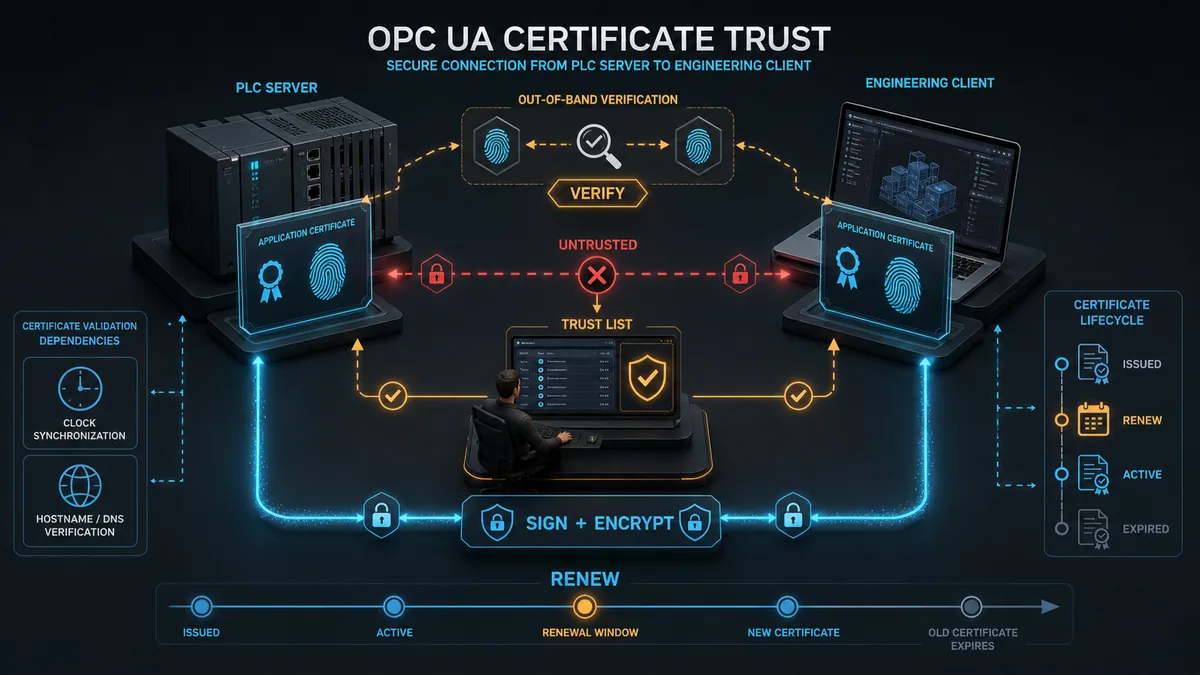
Prefer the strongest mutually supported endpoint
Siemens recommends Basic256Sha256 with Sign and Encrypt in its V20 guidance and says the None endpoint and guest authentication should be exceptional. Treat that as a starting rule subject to the exact CPU/client profiles and the site's current security standard. Disable unused policies. Do not expose an unsecured commissioning endpoint permanently merely because one legacy client cannot negotiate a supported secure profile.
| Security control | Acceptance evidence | Unsafe shortcut |
|---|---|---|
| network boundary | approved source/destination/port flow and denied non-required paths | broad route because OPC UA is “secure” |
| server identity | client validates expected application certificate and hostname | warning accepted without fingerprint check |
| client identity | server trusts only approved client applications or CA chain | automatic trust of every first connection |
| user authentication | named user/role with least required function | shared administrator or anonymous write |
| message security | approved policy with signing and encryption | permanent None endpoint |
| tag rights | minimal read/write exposure in interface and program | every DB accessible/writable |
| certificate lifecycle | owner, expiry alarm, renewal/revocation and recovery test | certificate discovered only after expiry |
| audit/diagnostics | failed trust, login and service events reach monitoring | repeated reconnect with no investigation |
Engineer subscriptions and capacity from requirements
Do not poll every tag at the fastest interval
An OPC UA subscription has monitored items, sampling intervals, queue sizes, deadbands, publishing intervals and keepalive/lifetime behavior. These are not decorative client settings. They determine load, event fidelity, stale-data detection, reconnect behavior and how quickly a consumer can make a decision.
Start from the consumer's required detection time and the physical signal's meaningful rate. Use subscriptions for change-driven updates, appropriate deadbands for noisy analogue values, and explicit queue/discard behavior for events that cannot be silently overwritten. Preserve a heartbeat or server-state signal so “no change” can be distinguished from “no communication.”
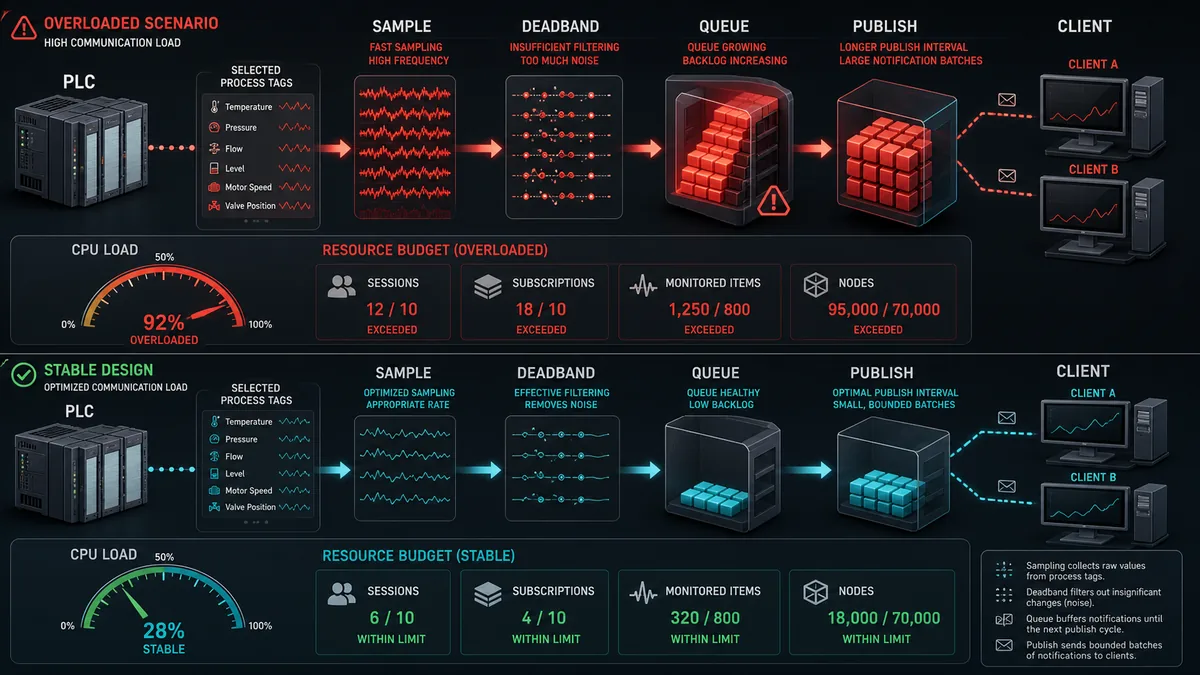
Use exact limits from the configured CPU manual
Siemens' V20 S7-1200 and current V21 S7-1200 G2 documentation both publish compact-server limits such as two server interfaces, 2,000 nodes, 18 namespaces, 20 methods, 50 concurrent subscriptions and five subscriptions per session in the cited configurations. Those figures are useful sizing gates, not a promise for every catalog and firmware. Other limits—sessions, monitored items, sampling intervals, methods, arguments and shared communication resources—also matter. Recheck the exact manual and compile the actual project.
| Capacity question | Design input | Acceptance method |
|---|---|---|
| how many clients/sessions | SCADA, MES, historian, engineering and diagnostic consumers plus recovery overlap | connect representative clients and confirm session diagnostics/limits |
| how many subscriptions | per-client functional grouping and redundancy behavior | establish all subscriptions concurrently and inspect revised values |
| how many monitored items | selected nodes × clients/subscriptions | validate compile/runtime limits and worst-case notifications |
| how fast | source dynamics, decision deadline, CPU/network budget | measure change-to-client latency at normal and upset load |
| how much history during outage | client queue, server queue and downstream buffer policy | disconnect, change values, reconnect and verify declared loss/replay behavior |
| how stale is unacceptable | process risk and consumer action | stop updates without changing value and verify stale/quality alarm |
| how much write traffic | authorized requests, rate limits and program validation | burst approved/invalid requests and verify deterministic rejection/outcome |
Commission the data contract with positive and negative tests
Prove identity, semantics and lifecycle
Use a distinctive known value whose data type and engineering meaning are unambiguous. Browse the interface, record namespace URI and NodeId, read the value with StatusCode and time, change the source under controlled conditions, and verify the client receives the correct change. Then test restart, network interruption, certificate rejection, unauthorized user, read-only write, out-of-range request, stale source and restored operation.
For writable nodes, a successful OPC UA Write service only proves that the server accepted the service at that boundary. The PLC program should place external requests into a validated request/accept/reject handshake. Check mode, permissives, range, rate, sequence and expiry before changing the effective command or parameter. Return a result and confirm process feedback. Do not let a remote write bypass machine safety, local authority or the controlled operating-state model.
| Test case | Expected server/client evidence | Required PLC/application evidence |
|---|---|---|
| approved secure connection | trusted identities, approved policy, named user/session | diagnostic count and authorized consumer record agree |
| untrusted certificate | secure channel rejected and event visible | no tag data or write effect |
| known-value read | expected NodeId/type/value/StatusCode/time | source PLC tag and engineering unit agree |
| subscription change | bounded notification latency and sequence | source change is controlled and recorded |
| communication loss | bad/stale state appears within requirement | local PLC control continues according to design |
| read-only write | service rejected | source/effective value unchanged |
| allowed request | accepted request/result trace | range, mode, permissives and final feedback prove outcome |
| CPU/client restart | session/subscription rebuilt without duplicate control action | safe startup and command ownership preserved |
| certificate expiry/replacement | planned rejection/renewal behavior | trust update and rollback evidence retained |
| overload boundary | revised intervals/status or controlled rejection | CPU task/process performance remains within acceptance |
Troubleshoot S7-1200 OPC UA in evidence order
Stop at the first failed boundary
Test endpoint resolution and reachability before changing certificates. Prove server enablement and runtime-license diagnostics before rebuilding interfaces. Prove time, certificate chain, application URI and hostname before weakening the security policy. Prove user rights and node exposure before editing the PLC value. Finally, distinguish a good service response from a correct process result.
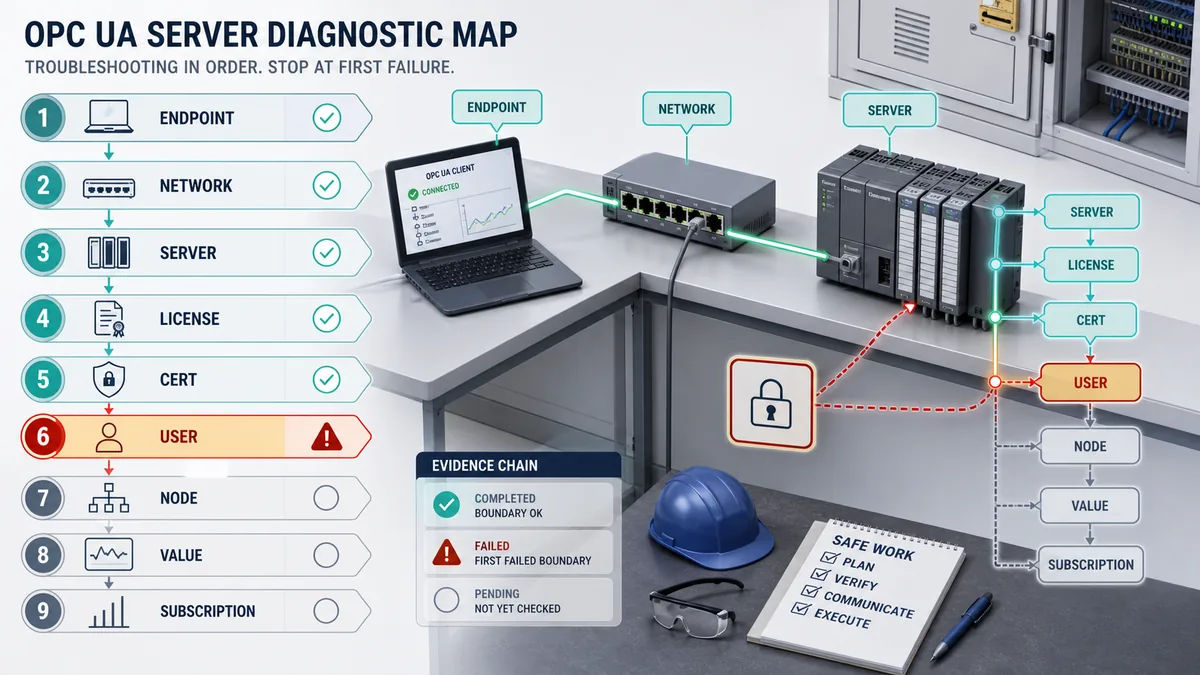
| Symptom | First discriminating checks | Avoid |
|---|---|---|
| connection refused/timeout | exact endpoint, DNS/IP, route/firewall, TCP reachability, server enabled/state | accepting insecure policy or changing PLC logic |
Bad_CertificateUntrusted |
both trust lists, fingerprint, chain, time, application URI and hostname | trust-all or disabling validation |
| login succeeds but browse is empty | server interface downloaded, node mapping, accessibility and user rights | exposing whole DB as administrator |
| node browses but read fails | data type support, read right, node revision and server diagnostics | changing NodeId randomly |
| write returns not writable/denied | writable attribute, server/user rights and designed request path | granting broad write access |
write is Good but process does not change |
request/accept/reject state, mode, permissives, range and effective value | bypassing PLC validation |
| value is plausible but stale | StatusCode, source/server timestamps, heartbeat and last-success age | treating last displayed value as live |
| updates are slow/intermittent | revised sampling/publishing interval, queue, deadband, sessions, items and CPU load | forcing every item to fastest rate |
| works by IP but not hostname or reverse | endpoint URL returned by server, DNS/NAT and certificate SAN | suppressing hostname errors permanently |
| stops after certificate renewal | new certificate identity, client/server trust stores and expiry overlap | restoring an expired private key from backup |
Diagnostic answer map for search and AI-assisted commissioning
| User or AI query | Concise answer | Required qualification |
|---|---|---|
| Does S7-1200 support OPC UA? | Established S7-1200 CPUs support an OPC UA server from documented firmware V4.4; current V21 also documents an S7-1200 G2 server. | Verify the exact catalog, firmware, TIA version, license and profile in the current manual. |
| Can S7-1200 be an OPC UA client? | Current Siemens V21 comparison says the S7-1200 and S7-1200 G2 have no OPC UA client. | Do not infer client support from pages whose navigation titles mention several CPU families. |
| Does S7-1200 OPC UA need a license? | Siemens documents a Basic runtime license for the established S7-1200 server. | Confirm the required and purchased type shown by the exact configured CPU and release. |
| How do I enable OPC UA on S7-1200? | Enable the server in CPU properties, select the required runtime license, configure security/interface, compile and download. | The server is disabled by default; use an authorized change window. |
| Why is the S7-1200 OPC UA address space empty? | The S7-1200 requires a defined/downloaded server interface and accessible mapped tags. | Also verify user permissions, correct endpoint and that the client is not filtering nodes. |
| What port does S7-1200 OPC UA use? | Use the endpoint URL generated/configured for the exact server; OPC UA TCP commonly uses 4840. | Do not open a broad firewall rule or assume every project retains the default. |
| How do I trust an OPC UA certificate? | Verify fingerprint, application identity, URI, hostname, validity and chain out of band, then add only the approved certificate or CA to the trust list. | Correct controller time and a renewal/revocation process are required. |
| Why can I read but not write an S7-1200 tag? | The tag may lack writable permission, user authorization or a mapped writable node, or the program may reject the request. | Preserve least privilege; do not expose the whole DB to solve one request. |
| How many OPC UA nodes can an S7-1200 expose? | The cited V20/V21 compact-server configurations publish a 2,000-node interface limit. | Recheck exact CPU/firmware and all related session, subscription and method limits. |
| How do I troubleshoot S7-1200 OPC UA? | Trace endpoint, network, server/license, time/certificate, user, interface/node, type/value/quality, subscription and resource evidence in order. | Stop at the first failed boundary before changing unrelated settings. |
Frequently asked questions
Does the Siemens S7-1200 have an OPC UA server?
Yes for supported combinations. Siemens documents the established S7-1200 server from firmware V4.4 and documents S7-1200 G2 server support in the current TIA Portal V21/G2 firmware V4.1 material. Exact catalog, configured device, firmware, license and profile still need verification.
Can an S7-1200 act as an OPC UA client?
Do not assume it can. Siemens' current V21 functional comparison says both S7-1200 and S7-1200 G2 have no OPC UA client, while supported S7-1500 CPUs provide the client role. Use that requirement in controller/architecture selection.
What license is required for S7-1200 OPC UA?
Siemens' established S7-1200 documentation calls for a Basic OPC UA runtime license and shows the required/purchased selection under CPU runtime-license properties. Confirm the current license for the exact CPU and region rather than copying an old SKU.
How do I configure the S7-1200 OPC UA server in TIA Portal?
Verify the device and firmware, enable the server, declare the runtime license, set application identity, create and map a server interface, limit tag rights, configure secure endpoints/certificates/users, size subscriptions, compile, download and run positive/negative acceptance tests.
Why can my OPC UA client connect but see no S7-1200 tags?
The server can be reachable while its downloaded server interface contains no approved nodes for that user. Check interface mapping, accessible tag attributes, user authorization, compilation/download state, namespace and client filters without broadly exposing the PLC program.
Why does S7-1200 OPC UA report an untrusted certificate?
The peer certificate or issuing CA is not in the relevant trust list, or validation fails because of time, hostname, URI, chain or validity. Verify the certificate out of band and correct the failed identity boundary; do not enable trust-all or permanently select None.
Should I use polling or subscriptions for S7-1200 data?
Use subscriptions when change-driven delivery fits the requirement, then engineer sampling, publishing, deadband, queue, keepalive and stale detection. Polling can suit bounded diagnostic reads, but fast polling of every tag wastes CPU and network capacity.
What is the S7-1200 OPC UA node limit?
The cited Siemens V20 S7-1200 and V21 S7-1200 G2 limit pages state 2,000 nodes for those configurations. This is only one sizing constraint; verify interfaces, namespaces, methods, sessions, subscriptions and monitored items for the exact CPU.
Is a Good OPC UA write proof that the machine accepted a command?
No. It proves success at the OPC UA service/server boundary. The PLC should validate mode, authority, range, sequence, permissives and expiry, expose accept/reject state, and confirm the final process feedback. Safety functions remain separate.
How should S7-1200 OPC UA be acceptance-tested?
Test approved and untrusted connections, known-value type/quality/time, browse/read/subscription, allowed and denied writes, communication loss, stale handling, CPU/client restart, certificate renewal, capacity upset and recovery. Record expected and observed evidence with all versions.
Sources, review scope, and limitations
This guide was reviewed on August 30, 2026 against current public Siemens TIA Portal V21 and manual material plus normative OPC Foundation and NIST sources. Siemens documentation navigation sometimes groups S7-1200, S7-1200 G2 and S7-1500 on one page even when a subsection applies to fewer CPUs. Every implementation claim therefore needs the exact page's stated product/validity, not only its navigation title. Product catalogs, firmware, TIA updates, licenses, limits, security profiles and lifecycle can change after review.
- Siemens TIA Portal V21 — S7-1200 G2 compared with S7-1200 and S7-1500
- Siemens TIA Portal V21 — enabling the S7-1200 OPC UA server
- Siemens S7-1200 V20 — downloadable server interfaces and runtime license
- Siemens S7-1200 V20 — OPC UA server limitations
- Siemens S7-1200 G2 V21 — OPC UA server limitations
- Siemens TIA Portal V20 — managing S7-1200 OPC UA read/write rights
- Siemens TIA Portal V20 — OPC UA security settings
- Siemens TIA Portal V21 — S7-1200 certificate manager
- Siemens application example — modeled S7-1200 OPC UA server interface
- Siemens S7-1200 system manual
- Siemens S7-1200 G2 system manual
- OPC Foundation Part 4 — application and certificate security procedures
- OPC Foundation Part 2 — certificate management
- OPC Foundation Part 1 — certificate lifecycle and centralized management
- NIST SP 800-82 Rev. 3 — Guide to Operational Technology Security
This page is educational and vendor-specific only at the documented configuration level. It does not authorize access, a PLC download, a firewall change, certificate approval, remote write, production test or safety-function modification. Perform work through the site's change, cybersecurity and safe-work controls. Validate the exact installed hardware, firmware, engineering software, license, server interface, certificates, identities, network, value semantics, capacity, process behavior and recovery in an isolated or approved representative environment before production use.
Now run it · free to start
Follow plant data from sensor to SCADA
Fieldbus versus Ethernet, Modbus, EtherNet/IP, PROFINET, OPC UA and MQTT, then SCADA layers and alarms, taught on simulated equipment. Free to start.
Ownership disclosure: PLC Programming IO and PLC Simulation Software are operated by the same publisher.
PLC Programming IO Editorial Team
Industrial automation education, references, and software testing
The PLC Programming IO Editorial Team publishes sourced industrial-automation education and documents how material is reviewed, tested, and corrected. A team byline means the publisher is responsible for the page; it does not represent a fictional person or imply an engineering licence.
Coverage:
- • PLC programming concepts and examples
- • Vendor software tutorials and comparisons
- • SCADA, HMI, protocols, and instrumentation
- • Training, careers, and reference material
Review standard:
- • Prefer primary and official sources
- • Record software versions when material
- • Separate tested facts from estimates
- • Publish material corrections
Important scope note
This site provides education, not project-specific engineering approval. Safety, code, and compliance decisions require a qualified person with access to the actual machine and jurisdiction.