PLC Program Backup, Upload, Download and Restore: Recovery Runbook
Build a complete, verifiable PLC recovery package; distinguish upload from download; preserve source and live state; and restore through gated identity, compare, rollback and acceptance tests.
Review status: Editorially reviewed against current Siemens S7-1200 V4.7 and S7-1500-class backup/upload material, Rockwell Studio 5000 Logix Designer v38 and 2025 import/export documentation, Schneider Electric Machine Expert V2.2 archive/source-transfer documentation, current Beckhoff TwinCAT 3 archive and target-compare documentation, current Mitsubishi GX Works3 operating documentation, NIST SP 800-82 Rev. 3 and NIST contingency/backup controls; exact controller, engineering-tool, firmware, hardware profile, library, source protection, online state, retentive data, memory card, boot application, safety signature, licensing, restore and process response require vendor- and target-specific verification
Direct answer
A PLC program backup is recoverable only when you can open it, resolve its exact dependencies, build or compare it, identify the intended target, restore every required automation layer and pass controlled acceptance tests. Copying one project file—or uploading logic from a running controller—does not automatically create a complete recovery package.
Use the direction words consistently:
- Upload / read from PLC: controller → engineering workstation.
- Download / write to PLC: engineering workstation → controller.
- Archive: package a project and its selected dependencies/files for storage or transfer.
- Backup: capture a defined set of source, configuration and possibly controller state for a defined recovery point.
- Restore: return selected system layers to an approved prior state, then verify them before release.
Before any download, independently confirm the machine, CPU serial/order number, rack/slot, firmware, network path and current operating state. Preserve an as-found backup/diagnostic record, compare the approved package with the target, classify current/retentive/recipe data, confirm rollback, remove or control energy as required, then use the vendor procedure. A wrong-direction or wrong-target transfer can stop production, overwrite the only current program, initialize values, change I/O/network behavior or defeat evidence needed for recovery.
Download the complete automation recovery manifest, 15-gate restore runbook and 20-test recovery acceptance matrix.
This page owns PLC program recovery engineering. The PLC reliability and maintenance guide remains the lifecycle/maintenance owner, while PLC CPU, power and memory troubleshooting owns live CPU, power and storage faults.
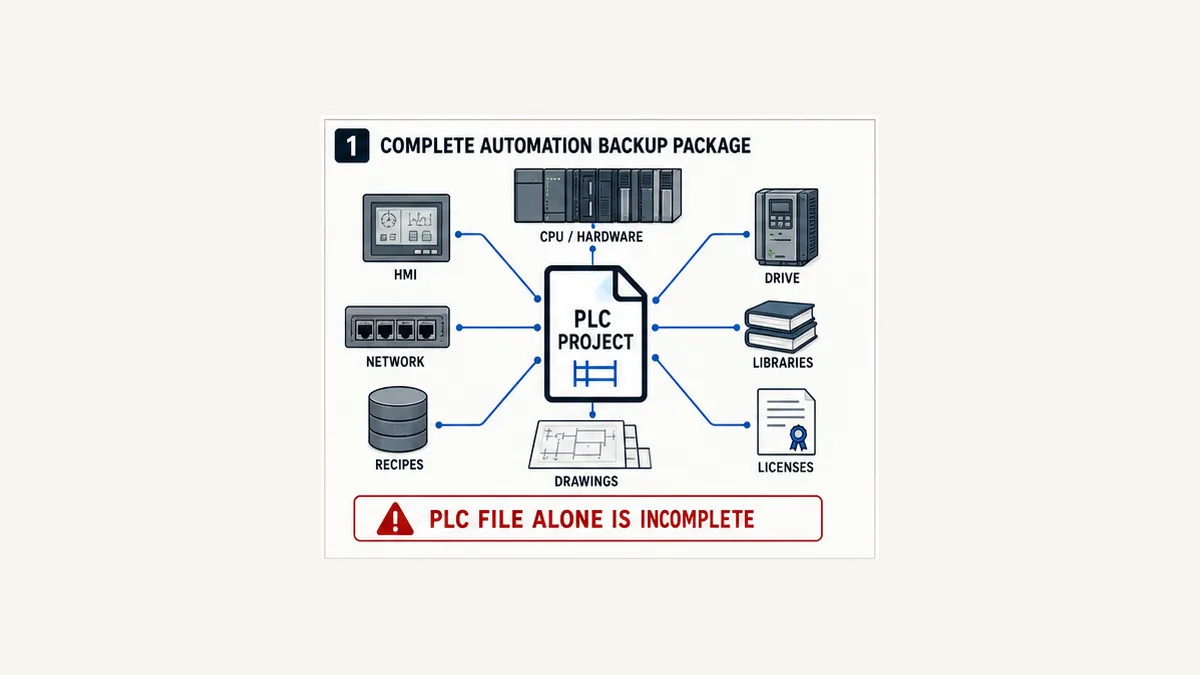
Define what “PLC backup” must recover
Recovery scope begins with a business function
Start from the required outcome: “restore Packaging Line 1 to the approved recipe and verified automatic sequence on an identical spare CPU within four hours,” not “save the PLC file.” This exposes dependencies and gives the team measurable recovery-time and recovery-point objectives.
| Recovery objective | Required contents | Typical omission |
|---|---|---|
| reopen and maintain source | native project, exact tool/update, libraries, profiles, options, licence and comments | uploaded executable lacks original source/rendering information |
| replace failed CPU | source/image, hardware/firmware compatibility, I/O/network parameters, boot behavior and startup data | code exists but replacement module or firmware differs |
| reproduce as-found production | project plus approved current/retentive values, recipes, calibrations and external device state | archived initial values overwrite tuned live values |
| restore whole machine | PLC, HMI, drives, motion, robots, gateways, remote I/O, managed switches and time services | controller runs but devices will not communicate |
| recover safety-related application | controlled safety project, exact target, signature/CRC and required validation evidence | standard project copy omits or invalidates the safety identity |
| investigate incident | immutable as-found capture, diagnostics, clock context, compare and chain of custody | recovery action overwrites first-out evidence |
One package can support several objectives, but its manifest must state which were actually tested. A file that opens is not proof that it can replace a CPU. A CPU image that boots is not proof that the machine’s HMI, drives, I/O or safety lifecycle is restored.
Capture the source, executable, configuration and data separately
Think in layers:
- Source project: logic, declarations, comments, hardware tree, symbols, alarm configuration and engineering metadata.
- Resolved build environment: tool version/update, compiler, device profiles, hardware support packages, fixed libraries, add-ons and licences.
- Compiled/boot application: executable form the runtime loads; this may not contain maintainable source.
- Initial values: values stored in the project for initialization/download.
- Current and retentive values: tuning, accumulated counts, timer/counter state or parameters that changed online.
- Recipes and production data: separate data stores with their own ownership and validity.
- Device and infrastructure configurations: HMI, drive, safety, network and gateway settings.
- Temporary state: forces, overrides, bypasses, simulation bits and incomplete online changes, which should normally be recorded and removed rather than preserved as an operating baseline.
Different vendor backup/upload/archive operations include different subsets. The manifest must record the chosen operation and verified contents rather than labelling every output “full backup.”
Upload versus download: direction matters
Upload reads; download writes
In current Rockwell Logix Designer help, Upload transfers the program from controller to computer, while Download transfers from computer to controller. That direction is widely used but still verify the exact vendor UI and language translation. Avoid ambiguous instructions such as “load the PLC program.”
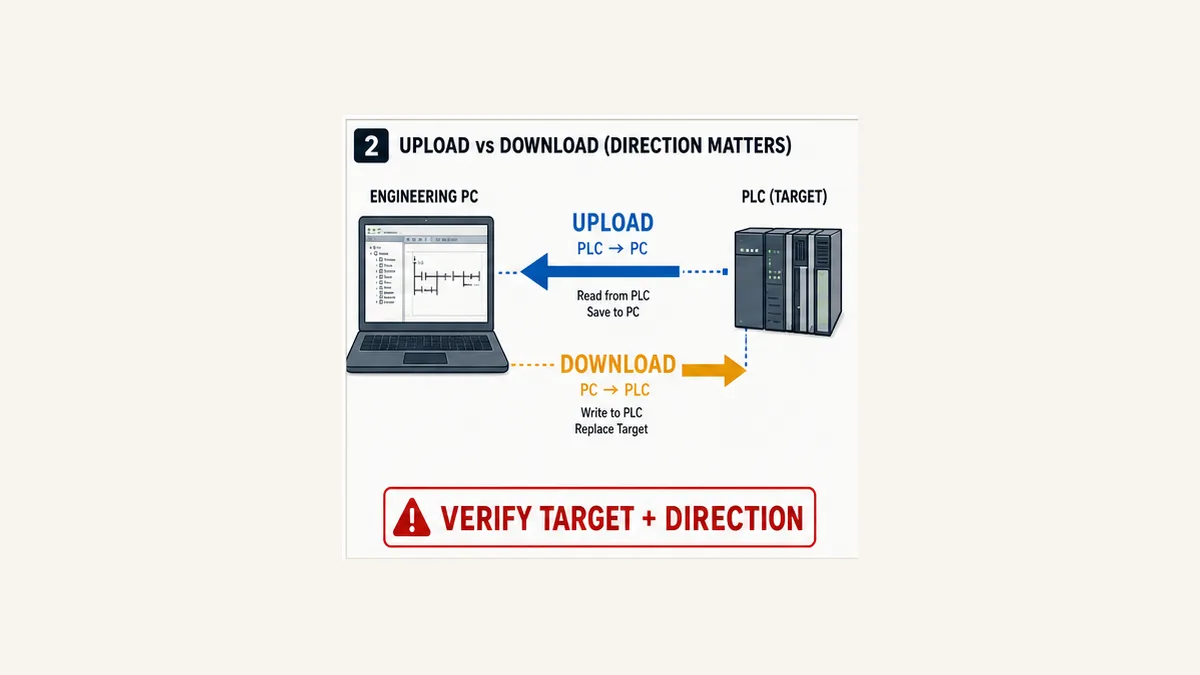
An upload is not necessarily original source
Controller-resident content depends on what the platform stores and what was included during the original download. Examples from current official documentation illustrate why the boundary matters:
- Siemens differentiates Backup from online device, Upload from device (software) and Upload device as new station; documented content differs among them. Current S7-1200 material shows a backup can include areas that ordinary uploads do not, and only retentive tag values are included in the cited backup behavior.
- Rockwell
.ACD, full-project.L5K/.L5Xand component.L5Xexports serve different purposes. Saving online can prompt to upload current tag values, showing that project structure and current values are distinct decisions. - Schneider Machine Expert source upload requires a source archive to have been downloaded to the controller. Its documentation identifies additional items such as referenced devices, libraries and visualization profiles that may be needed on another workstation.
- Beckhoff distinguishes solution/project archives and PLCopenXML. Its documentation warns that PLCopenXML covers a subset and does not ensure complete compatibility. Target project comparison/update also depends on source storage on the target.
- Mitsubishi GX Works3 documents program restoration information needed to reconstruct/render projects read from supported controllers; without it, read/verify capabilities can be limited.
Therefore, label an emergency upload accurately: “controller-derived recovery capture, contents verified as follows,” not “master source” until a semantic comparison proves it.
| Operation | Good use | Does not automatically prove |
|---|---|---|
| online upload/read | preserve controller-resident logic/configuration before work | original comments, libraries, source structure, every device or current value |
| native archive | package selected project/dependency content | target runtime is identical or archive opens on a clean system |
| textual export | version diff, independent inspection and secondary recovery form | full fidelity for every editor object or protected component |
| controller/memory image | fast replacement on supported matching hardware | maintainable source or compatibility with another model/firmware |
| file copy | creates another copy | integrity, provenance, completeness or restore success |
| online compare | identifies supported project/target differences | process is safe to download or current data is preserved |
Build a complete automation recovery package
Required technical inventory
For each controlled system, record:
| Surface | Minimum recovery evidence |
|---|---|
| PLC CPU | manufacturer, family, exact order/catalog number, serial, firmware, key/mode and time |
| modules | rack/slot, exact modules/revisions, removable media and channel parameters |
| engineering software | product, edition, version/update/build, OS, compiler and installer provenance |
| dependencies | device profiles, hardware packages, libraries, add-ons and fixed versions |
| PLC project | native archive, text export where supported, online compare and project checksum |
| current data | approved retentive/current-value snapshot, source, timestamp and restore policy |
| HMI/SCADA | native editable project, runtime version, communications, alarms/users and licences |
| drives/motion/robots | exact hardware/firmware, motor/feedback, parameters and safety-related identity |
| networks | IP/name/VLAN/ring/NAT/firewall/time-sync configurations and managed-device backups |
| documentation | I/O list, drawings, cause-and-effect, FDS/SDS, test records and deviations |
| secrets | reference to controlled credential/certificate/key store and recovery custodian—never plaintext in the ordinary archive |
| safety | separate approved project, signature/CRC, hardware/firmware and validation scope |
The downloadable manifest provides one row per asset. Add vendor-specific fields rather than deleting the generic ownership, integrity, location and last-verified columns.
Include two recovery forms where practical
Keep the native vendor archive because it normally preserves the most editing fidelity. Also retain a supported text/XML/component export or human-readable report where practical. The secondary form supports diffing, long-term inspection and partial reconstruction if the binary format becomes unreadable. It is not automatically a drop-in replacement.
For example, Rockwell supports entire-project .L5K or .L5X exports and component .L5X; Beckhoff supports native archives and PLCopenXML with an explicit fidelity warning. Validate what imports into a clean project and which objects, references or visual layouts change.
Preserve provenance, integrity and confidentiality
Create the recovery point before the change
A controlled backup record should answer:
- Which physical system and exact controller produced this capture?
- Was the system running, stopped, faulted or in a maintenance mode?
- Which operation produced each file?
- What was included and excluded?
- Which engineer and approved change/incident authorized it?
- Which project was believed to be the source baseline?
- What did the online compare show?
- Were current values, recipes, forces and safety identity captured separately?
- What cryptographic hash identifies every immutable artifact?
- Where are the primary, offline and independent copies?
- When and on what representative target was restore last proven?
Use a strong approved hash such as SHA-256 to detect accidental or unauthorized file change. A matching hash proves only that two byte sequences match; it does not prove the file is safe, approved, complete or compatible. Store approval metadata and signatures separately from the package so an attacker or accidental overwrite cannot replace both evidence and artifact together.
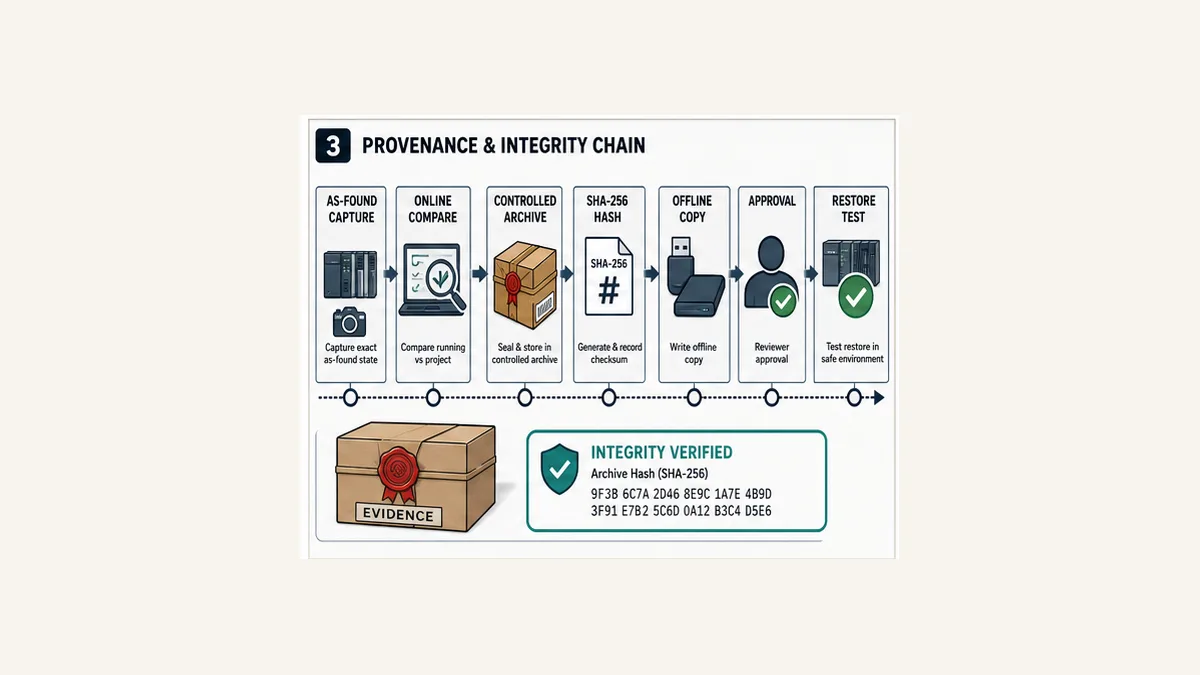
Use multiple protected copies
Follow the organization’s approved backup architecture, including an independent/offline or otherwise isolated copy resistant to the same credential compromise, ransomware event, storage failure or site incident. Encrypt sensitive archives at rest and in transit. Restrict write/delete authority, log access, test key recovery and monitor retention/expiry.
Do not place passwords, private keys or reusable credentials in a general engineering ZIP or spreadsheet. Store a reference, owner and tested retrieval procedure. A recovery archive without its legitimate access path is incomplete; one that exposes production secrets is a new incident source.
Live mini-lab
Try it: press START, then STOP
A stop-dominant seal-in rung: START latches the motor output through its own contact, and STOP breaks the circuit.
Watch the output lamp: it stays on after START until you press STOP.
Free · no signup to try · runs in your browserOpens plcsimulationsoftware.com — same team
Current values, retentive state and recipes
Separate code identity from process state
A program can be correct while its runtime state is unsafe or economically damaging. Common mutable data includes:
- PID tuning and control limits;
- recipes, formats and product selections;
- calibration/scaling coefficients;
- accumulated counts and runtime hours;
- sequence state and batch identity;
- learned positions, offsets and motion data;
- alarm setpoints and delay/deadband values;
- network or device identifiers changed online; and
- retentive equipment availability or maintenance state.
Decide per tag/range whether recovery should use the approved project initial value, the last valid production value, a signed recipe, a manually verified field value or a forced re-commissioning step. Do not bulk-restore every current value. A latched command, stale batch step or bypass from the incident state may be exactly what must not return.
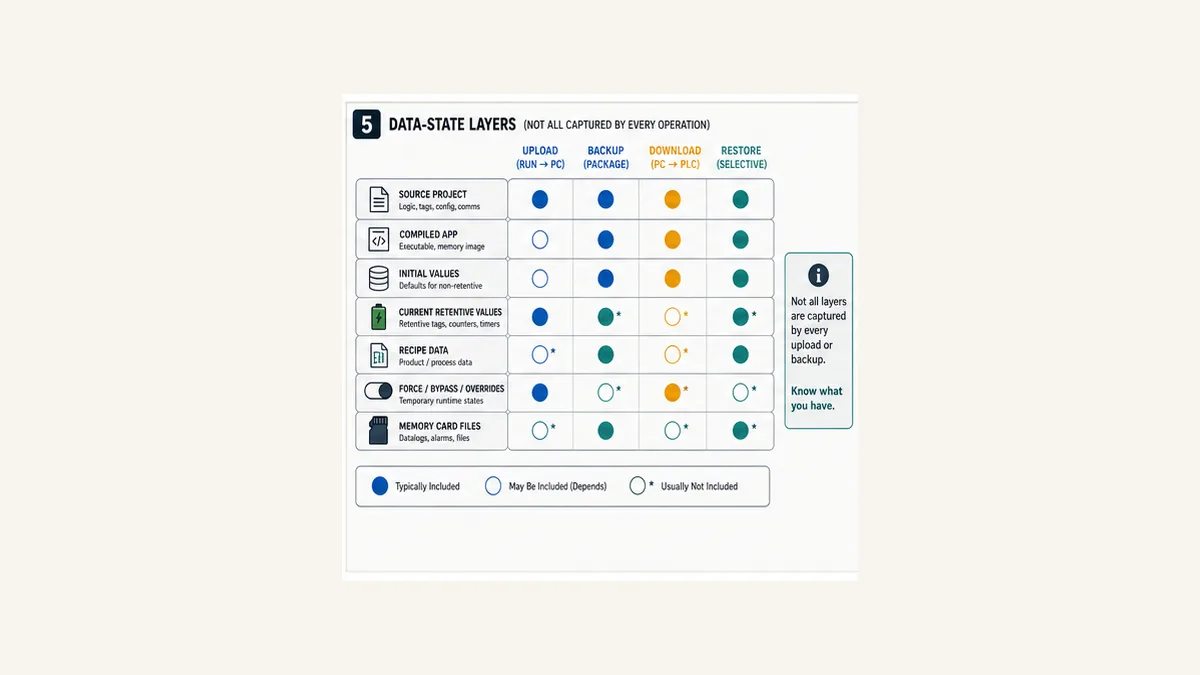
Snapshot is not authorization to restore
A current-value snapshot records evidence at a moment. Before reusing it, validate timestamp, process state, units, data owner, plausible range, equipment replacement and the reason for rollback. If a motor, transmitter or mechanism was replaced, yesterday’s learned offsets or accumulated state may no longer be valid.
For recipes, retain the authoritative data source, version/schema, product/batch association and import validation. HMI or MES data may not live in the PLC project even when the controller consumes it.
Verify the archive on a clean recovery workstation
Opening the file is only gate one
Use an authorized, controlled workstation or virtual recovery environment that does not inherit the original engineer’s undocumented caches. Then:
- retrieve the package through the documented custodian path;
- verify hashes and approval metadata before extraction;
- scan according to cybersecurity policy;
- install the exact engineering tool/update and verify licence recovery;
- install the recorded hardware/device profiles and add-ons;
- resolve fixed library versions without silently substituting “latest”;
- open the native archive without converting it in place;
- build/compile from a clean state and preserve errors/warnings;
- export a fresh semantic/text representation and compare with the stored export;
- open linked HMI, drive, network and safety projects in their exact tools; and
- record the time and human skills required.
If the tool offers a conversion, clone the archive and perform conversion on a working copy. Preserve the original. Record every converted component and determine whether returning it to the older runtime remains possible.
| Recovery verification gate | Minimum pass evidence | What a failure means |
|---|---|---|
| retrieve and verify | approved package identity, matching hash and intact extraction log | the candidate cannot yet be trusted as the selected recovery point |
| recreate engineering environment | recorded tool build, licence, device packages and fixed libraries installed from controlled sources | the archive depends on an undocumented workstation state |
| open and build cleanly | native project opens without in-place conversion and produces a retained build report | source, dependency or compiler compatibility is incomplete |
| compare semantic exports | fresh text/export agrees with the stored approved representation or every difference is classified | a silent conversion or dependency change may have altered meaning |
| open dependent projects | HMI, drive, network, motion and safety artifacts open in their exact documented environments | the package restores only the PLC, not the automation system |
| record recovery effort | elapsed time, required roles, unresolved warnings and licence/tool constraints are captured | the stated recovery-time objective is not supported by evidence |
Prove a representative restore without using production as the test target
Use a compatible spare, test rack, offline emulator only for supported layers, or a controlled scheduled recovery exercise. A simulator may prove logic execution but not physical module configuration, memory-card behavior, firmware compatibility, device profiles, industrial network identity or real I/O response.
The test should include archive retrieval, environment build, target identity, transfer, cold/warm/power restart, I/O and communication checks, retentive-state policy, force/bypass inspection, positive/negative sequence cases and rollback. Measure recovery time from request to accepted service, not just download duration.
Fifteen-gate restore runbook
Gate 1–5: authorize, make safe, identify and preserve
- Authorize: confirm incident/change scope, outage, roles and communications.
- Safe state: operations and safety owners establish the required energy and access condition.
- Target identity: independently record exact controller, rack/slot, firmware, serial, network route and machine.
- Preserve as found: capture diagnostics, mode, memory/storage health, clock, forces/bypasses and current supported backup/upload before overwriting anything.
- Select package: verify recovery-point provenance, hash, approval and exact scope.
Stop if identity or direction is uncertain. Naming a communication shortcut “Line1 PLC” is not independent verification. Read the controller identity and compare it with the asset register and physical panel.
Gate 6–10: compatibility, difference, rollback and transfer
- Compatibility: prove tool, OS, CPU/firmware, module profiles, libraries, options and licences.
- Scope/difference: compare approved package with the target and classify logic, hardware, safety and value differences.
- Rollback: identify the independent rollback package, method, decision trigger and time bound.
- Download: select the exact target/path and execute the vendor-documented transfer only after a peer verifies target and direction.
- Mode/restart: apply the approved startup, boot/nonvolatile and operating-mode sequence; inspect diagnostics before requesting operation.
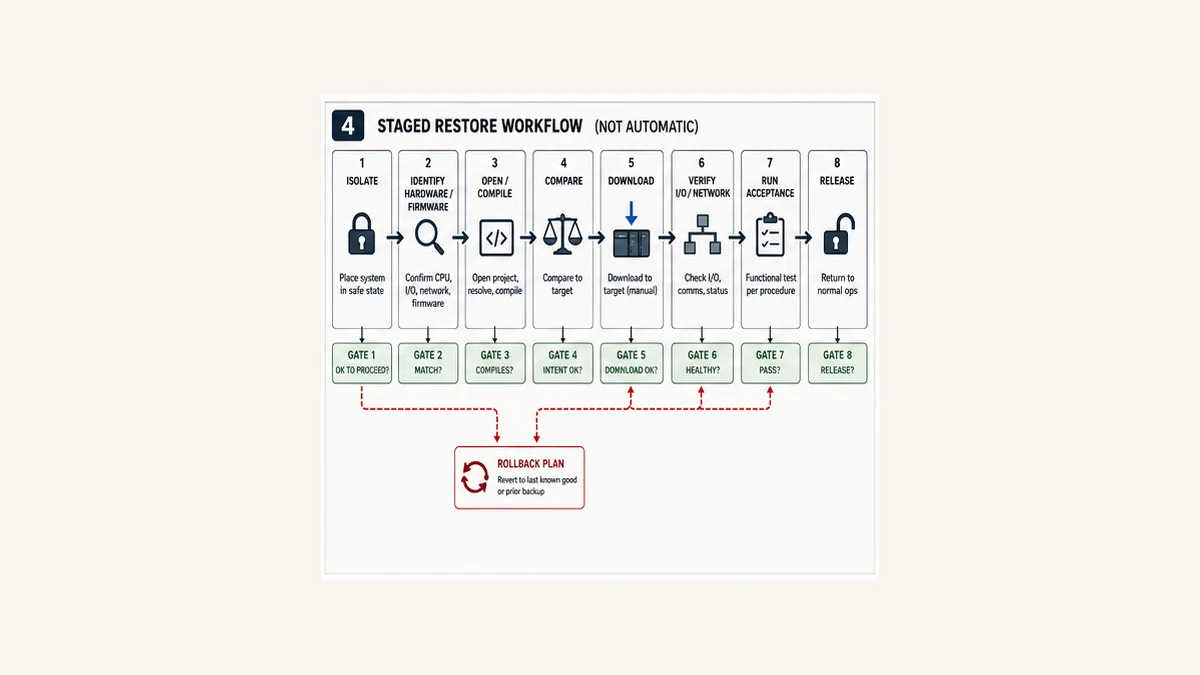
Gate 11–15: configuration, temporary state, testing and closeout
- Configuration: verify rack, channels, fieldbus, remote I/O, time sync, HMI, drives, motion and gateways.
- Temporary state: independently prove forces, overrides, bypasses, simulation and test values are cleared or formally controlled.
- Functional test: execute negative as well as positive sequence, alarm, timeout, restart and interlock cases.
- Release: operations, engineering and functional-safety roles accept the result and monitoring plan.
- Closeout: archive the as-left package, hash, compare, actual recovery time, deviations and lessons without overwriting the prior baseline.
The runbook download contains a stop condition and accountable owner for every gate. A failed gate pauses the workflow; it is not a checkbox to waive verbally during downtime.
Vendor-specific recovery boundaries
Siemens TIA Portal and SIMATIC CPUs
Current S7-1200 V4.7 and S7-1500-class documentation distinguishes four useful operations: snapshot of monitored values, upload from device software, upload device as new station and backup from online device. The supported content differs. A current documented backup can include hardware configuration, software blocks, PLC tags, technology objects, memory-card contents and specific retentive actual values; ordinary upload operations do not necessarily include the same state.
Record exact CPU and TIA Portal version, required hardware catalog/support packages, password/access protection, SIMATIC Memory Card contents, firmware, fail-safe status and safety signature where relevant. Never generalize one CPU manual’s table to every S7 generation.
Rockwell Studio 5000 Logix Designer
The native .ACD file, full-project .L5K/.L5X exports and component .L5X exports have different purposes. Current Save As documentation notes that, while online, Logix Designer can prompt to upload tag values before saving so current tuning/configuration changes can be represented. Decide whether those values belong in the recovery point and preserve the pre-upload source separately.
Verify controller family/catalog, firmware major/minor compatibility, Logix Designer version, profiles/AOPs, Add-On Instructions, safety signature, motion/drive/device configuration, nonvolatile image/load setting, communication path and every installed force. An .ACD filename is not target identity.
Schneider Electric Machine Expert / CODESYS-derived environments
Machine Expert documentation shows that source upload requires an archive on the controller, normally created by source download. To reconnect from a second PC without a new download, it calls for fixed library and compiler versions and selected archive content such as referenced devices, referenced libraries and visualization profiles. A runtime application alone is therefore not evidence that maintainable project source can be recovered.
Record boot application identity separately from the editable project and source archive. Verify user rights, target device, compiler, visualization/device profiles and archive contents.
Beckhoff TwinCAT 3
TwinCAT can archive the full solution (.tszip/current archive form depending version) or a PLC project (.tpzip), while PLCopenXML supports exchange with an explicit completeness limitation. Its project-node documentation includes target comparison/update only where source storage on the target supports it.
Recover the full solution when it owns I/O, EtherCAT topology, routes, tasks, NC/motion and PLC projects—not just the PLC subtree. Record TwinCAT XAE/XAR build, target platform, installed functions, licences, libraries, routes, EtherCAT device revisions and boot-project state.
Mitsubishi GX Works3
Current GX Works3 documentation distinguishes Write to PLC, Read from PLC, verification and backup/restoration. It also documents program restoration information containing rendering and local-label definition information; for supported CPUs, omitting this information during write can prevent later project reconstruction/read and detailed verification.
Record CPU series, firmware, GX Works3 version, module profiles, label/restore information, device memory/file-register handling, SD-card backup policy and safety project/signature. “Read succeeded” does not prove the recovered project matches original editing structure.
Troubleshooting failed backup or restore
| Symptom | Likely boundary | Decisive evidence | Safe direction |
|---|---|---|---|
| project will not open | corrupt archive, wrong tool version, missing add-on or encrypted/protected content | hash, extraction log and exact tool/dependency manifest | preserve original; recover matching environment |
| project opens but will not compile | unresolved/wrong libraries, profiles, compiler or source conversion | clean build log and dependency versions | install exact approved versions; do not substitute silently |
| cannot go online without download | project/runtime identity or build metadata mismatch | vendor compare/login diagnostic | recover correct original/archive and target source metadata |
| upload lacks comments or structure | source/restoration information was not stored | vendor upload capability and original download settings | label as controller-derived capture; find controlled source |
| download option unavailable | mode, keyswitch, access rights, firmware/path or safety authorization | target status and vendor diagnostic | resolve authorization/compatibility; do not bypass protection |
| wrong modules after restore | hardware catalog, project target or module revision mismatch | physical rack versus offline hardware diff | stop before field operation; correct approved configuration |
| PLC runs but HMI/drive is offline | external configuration or network identity omitted | device diagnostics and configuration manifests | restore/compare the missing discipline package |
| machine starts in wrong step/state | current/initial/retentive/recipe policy incorrect | data-layer decision and restart trace | return safe, restore approved state or reinitialize deliberately |
| values look right but outputs wrong | force, bypass, simulation, polarity or I/O map | force table, cross-reference and physical I/O test | clear unexplained temporary state and test chain |
| safety signature changed | project, hardware, firmware or compile difference | approved safety identity and lifecycle record | stop; functional-safety owner assesses and validates |
| memory-card replacement changes startup | nonvolatile image/load behavior or card content mismatch | card image, controller load setting and power-cycle test | use exact supported procedure and representative test |
| rollback takes longer than outage | untested archive, missing tool/licence or incomplete acceptance | timestamped rehearsal and failed gate | revise recovery design; do not call it proven |
Twenty acceptance tests
The downloadable matrix expands methods and evidence. The minimum suite covers:
- native archive extraction;
- exact engineering-tool compatibility;
- library/profile/add-on/licence resolution;
- clean offline compilation;
- semantic/text comparison;
- read-only target identity;
- separate as-found capture;
- current/initial/retentive/recipe scope;
- boot/nonvolatile behavior on a representative target;
- rack, module, channel and I/O parameters;
- industrial network identity and communications;
- HMI/SCADA tag, alarm and history integration;
- drive and motion configuration;
- cleared forces, bypasses, simulations and test values;
- safety identity and affected validation;
- warm, cold and power restart policy;
- positive and negative functional sequence tests;
- actual rollback after an injected failed gate;
- end-to-end recovery time; and
- retrieval and hash verification of an independent copy.
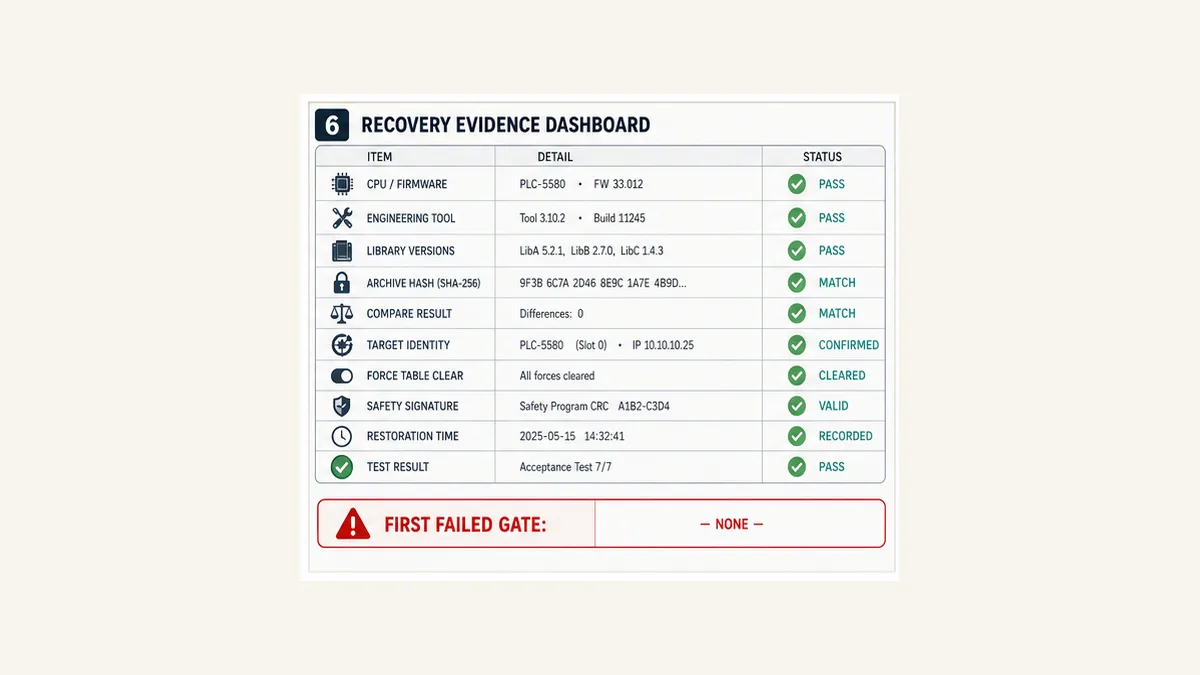
Practice fault-state diagnosis before the outage
The PLC troubleshooting simulator can help a team rehearse evidence-first logic checks and positive/negative acceptance thinking before a real recovery exercise.
Disclosure: PLCProgramming.io and PLCSimulationSoftware.com share ownership. The browser simulator does not open vendor archives, connect/upload/download to PLCs, emulate firmware or memory cards, reproduce retentive data, restore HMI/drives/networks, validate safety signatures or prove physical I/O. Use it only for generic diagnostic practice. Measure click, scenario start, registration and paid conversion together rather than removing a smaller high-intent CTA based only on traffic.
Answer map for engineers and AI assistants
| Question | Concise answer |
|---|---|
| Is a copied PLC project file a backup? | It is one candidate asset; it is recoverable only with dependencies, integrity, target compatibility and a passed restore test. |
| What is PLC upload? | Reading supported controller-resident content from PLC to engineering workstation. |
| What is PLC download? | Writing an approved project/application from engineering workstation to the selected controller. |
| Does uploading recover the original PLC source? | Not always; it depends on platform and whether source/rendering information was stored. |
| Does a backup include current values? | Only if the exact operation supports them and they were selected; project initial values are a different layer. |
| Should forces be restored? | Normally preserve them as incident evidence and prove they are cleared; any required temporary control needs explicit authorization. |
| What proves backup integrity? | Matching approved hashes prove byte integrity, while provenance and restore tests prove different requirements. |
| Can I test restore by downloading to production? | Use a compatible spare/test target or controlled exercise where possible; production should not be the first restore test. |
| What is the first restore gate? | Authority and an approved safe system condition, followed by independent target identity. |
| When is recovery complete? | After system dependencies, startup state, temporary controls and negative/positive acceptance tests pass and accountable owners release it. |
Frequently asked questions
How do I back up a PLC program?
Create a controlled native archive and supported secondary export, capture an online as-found backup/upload where authorized, record exact hardware/firmware/tool/libraries, classify current and retentive data, include HMI/drive/network dependencies, hash and protect the files, then prove restore on a representative target. Follow the exact vendor procedure.
What is the difference between PLC upload and download?
Upload normally transfers supported content from controller to engineering PC. Download transfers the workstation project/application to the controller and can overwrite or initialize target content. Verify the exact UI, target and arrow direction before confirmation.
Can I upload a PLC program without the original project?
Often some content can be recovered, but completeness varies. Source comments, libraries, hardware context, local-label rendering, safety/protected components or current data may be absent. Preserve the upload and label it accurately; compare it with any controlled source before treating it as master.
Does a PLC program backup include tag values?
Not universally. Native project initial values, current online values, retentive values, recipes and memory-card files are separate layers. Current Siemens and Rockwell documentation provide examples where supported backup/save choices change value inclusion. Record the exact operation and test it.
Should I back up the PLC while it is running?
Use the vendor-supported online operation and approved site procedure. Capture process/mode/time context because changing values can make a multi-file backup internally inconsistent. For high-consequence systems, coordinate a defined stable state or record the limitation.
How often should PLC programs be backed up?
Create a verified recovery point before and after approved changes and at a risk-based interval for mutable data. Frequency should follow recovery-point objectives, change rate and consequence. Regular copying does not replace periodic open/build/restore tests.
How do I know which PLC backup is current?
Use controlled revision, machine/CPU identity, timestamp, change reference, online compare, approval and cryptographic hashes. Filename dates alone are weak evidence, and “latest” is not necessarily the approved last-known-good recovery point.
Can I restore a PLC backup to a different CPU model?
Do not assume compatibility. Verify supported migration, firmware, memory, I/O, communication, motion and safety behavior in official documentation and a controlled target test. Replacement with a different model is an engineering change, not merely restoration.
Do I need to back up the HMI and drives too?
Yes when they are required for the machine function. HMI tags/alarms/users, drive motor/feedback parameters, remote-I/O mappings, gateway settings and managed network configurations may not exist in the PLC project. The recovery manifest should identify every discipline owner.
Should PLC backups contain passwords and private keys?
Do not store plaintext secrets in the ordinary project package. Include controlled references, custodians and tested recovery procedures for credentials, certificates and keys. Encrypt sensitive archives and restrict/log access under policy.
What is the safest way to test a PLC restore?
Use the exact archived package on a clean authorized workstation and a compatible spare or representative test target. Verify boot, restart, I/O, communications, current/initial values, forces, safety identity, functional tests and rollback. Measure end-to-end recovery time.
What should I check before downloading a PLC program?
Confirm authority and safe state, physical machine, CPU/slot/serial/firmware, communication path, upload/download direction, approved archive/hash, compatibility, online differences, current-value policy, force/bypass state, rollback and acceptance plan. Stop on any ambiguous identity.
Can a memory card be the PLC backup?
It may hold a supported nonvolatile image or project-related content, but model and configuration determine what it contains and how it loads. Verify image revision, load-on-power behavior, compatibility, provenance and power-cycle restore on a representative target. Keep editable source separately.
What is the difference between backup and disaster recovery?
A backup is a captured set of assets. Disaster recovery is the people, access, tools, dependencies, runbook, safe-state coordination, tested restoration, rollback, acceptance and communications needed to restore the business function within objectives.
Primary sources and review trail
Reviewed 31 August 2026. Engineering tools, firmware and product backup behavior change; retain exact manuals with each recovery package.
- Siemens S7-1200 V4.7 system manual — backup/upload modes, supported contents, memory-card and retentive-value boundaries.
- Siemens S7-1500 system manual — current SIMATIC system backup/restore and commissioning context.
- Rockwell Logix Designer Upload/Download quick start — transfer direction, path and operating-mode context.
- Rockwell Logix Designer Save As —
.ACD,.L5K/.L5Xand online tag-value prompt. - Rockwell Logix 5000 Import/Export manual — current full-project and component export formats.
- Schneider Machine Expert archive on download — source archive creation and required additional content.
- Schneider Machine Expert source upload — controller source-archive prerequisite and extraction workflow.
- Schneider Machine Expert transfer to another workstation — fixed compiler/library/profile and boot-project requirements.
- Beckhoff TwinCAT PLC project export/import — project archives and PLCopenXML fidelity boundary.
- Beckhoff TwinCAT PLC project node — archive, target compare and target-update/source-storage behavior.
- Mitsubishi GX Works3 Operating Manual — read/write, verification, program restoration information and backup/restore.
- NIST SP 800-82 Rev. 3 — OT security, availability and operational constraints.
- NIST SP 800-53 Rev. 5 CP-9 — system backup control and protection/testing concepts; use the official NIST catalog for organizational implementation.
- CISA Cross-Sector Cybersecurity Performance Goals — current prioritized backup and recovery expectations.
- ISA/IEC 62443 series overview — industrial security lifecycle, roles and system context.
Scope and limitations
This guide does not authorize connection, upload, download, mode change, memory-card manipulation or physical machine testing. Exact vendor menus and content differ by controller, firmware and engineering-tool version. Follow controlled energy, change, cybersecurity and functional-safety procedures with qualified personnel. Never use an unverified archive or unidentified target during a production outage merely because its filename looks current.
Now run it · free · no signup
Skip the installer and run PLC logic now
Run one guided program in your browser without an account or card, then create a free account when you want the practice library.
Ownership disclosure: PLC Programming IO and PLC Simulation Software are operated by the same publisher.
PLC Programming IO Editorial Team
Industrial automation education, references, and software testing
The PLC Programming IO Editorial Team publishes sourced industrial-automation education and documents how material is reviewed, tested, and corrected. A team byline means the publisher is responsible for the page; it does not represent a fictional person or imply an engineering licence.
Coverage:
- • PLC programming concepts and examples
- • Vendor software tutorials and comparisons
- • SCADA, HMI, protocols, and instrumentation
- • Training, careers, and reference material
Review standard:
- • Prefer primary and official sources
- • Record software versions when material
- • Separate tested facts from estimates
- • Publish material corrections
Important scope note
This site provides education, not project-specific engineering approval. Safety, code, and compliance decisions require a qualified person with access to the actual machine and jurisdiction.