Quick decision
Choose by required network behavior, not price or an arbitrary number of devices. A five-node motion or redundant-I/O segment may demand carefully managed switching, while a larger isolated unicast monitoring network may have modest requirements. Record traffic, recovery, diagnostics, security and lifecycle needs before selecting a catalog number.
Default production bias
If downtime diagnosis, remote support, a ring, multicast or security zoning matters, the support evidence usually favors a managed device. “Managed” is still only a category—verify exact capabilities.
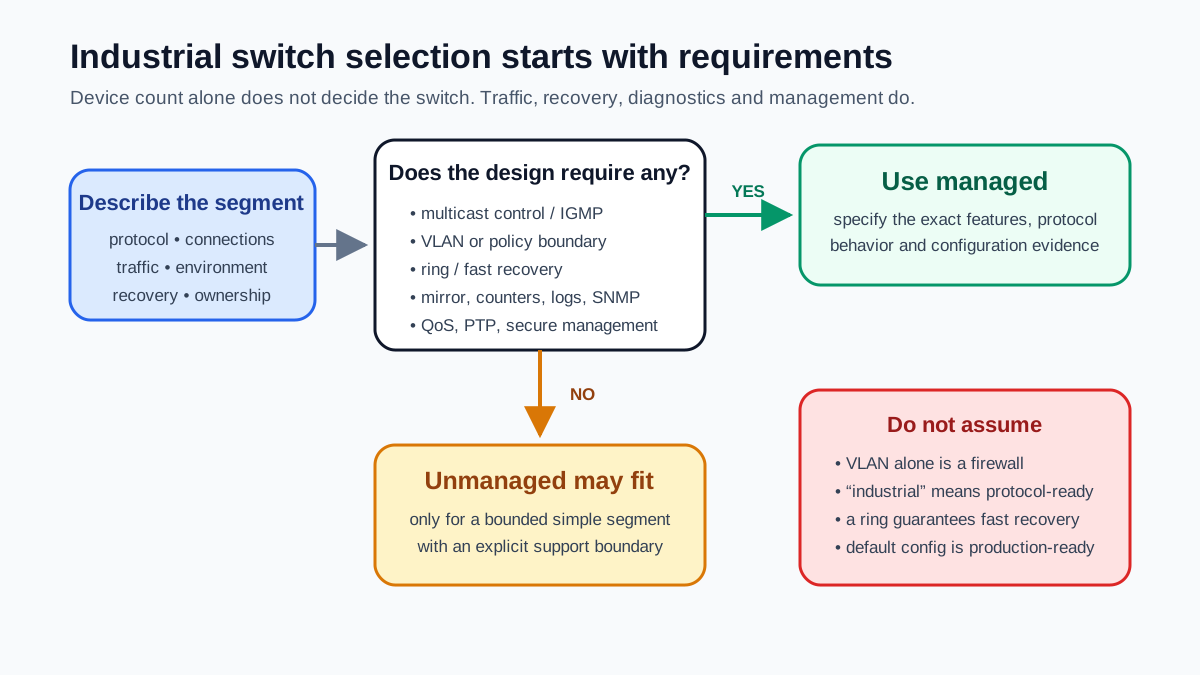
Managed vs unmanaged comparison
| Requirement | Unmanaged | Managed | Design question |
|---|---|---|---|
| Basic frame forwarding | Yes | Yes | Are speed, duplex, media and port count compatible? |
| Multicast management | No user control | IGMP snooping/querier features vary | Which connections use multicast and where is the querier? |
| VLANs / segmentation | No | Common; feature depth varies | What routed/firewall policy separates the zones? |
| Traffic priority | No user control | QoS queues and markings vary | Which PROFINET/EtherNet/IP/time traffic needs priority? |
| Fast ring/recovery | No managed protocol | RSTP, MRP, DLR or vendor options vary | What topology and maximum recovery time are approved? |
| Diagnostics | Link LEDs only | Counters, events, topology, SNMP/syslog vary | What evidence must maintenance see without a packet capture? |
| Port mirroring | No | Common on managed devices | Can a technician capture traffic without disrupting production? |
| Time synchronization | Transparent forwarding only | PTP behavior/support varies | Does the application require a specific time profile? |
| Administration security | No interface | Credentials, roles, HTTPS/SSH and services vary | How will configuration be hardened, backed up and audited? |
| Configuration recovery | None | Export/import or replace workflows vary | Can a failed switch be replaced within the recovery target? |
When unmanaged can be reasonable
- Bounded machine island: one support owner, known unicast traffic, no ring, no VLAN boundary and failure impact accepted.
- Temporary bench setup: non-production equipment with no need for remote diagnostics or security segmentation.
- Simple port expansion: a deliberately documented downstream island where flooding and hidden ports cannot impair the parent segment.
An unmanaged switch can still create a larger failure domain and hide the exact device/link causing errors. Record that support tradeoff.
When managed is required by the design
- Multicast optimization: EtherNet/IP connections or other multicast sources need controlled delivery and a correct IGMP design.
- Availability: a ring or redundant path has a specified protocol, topology and measured recovery time.
- Security zones: VLANs, ACLs, hardened management and routing/firewall boundaries are part of the architecture.
- Performance: real-time traffic, congestion risk, QoS or precision time needs verified behavior.
- Operations: remote status, alarms, port counters, topology and mirroring are required for support.
Seven managed-switch features to specify
01
IGMP snooping and querier
Snooping limits multicast forwarding to interested ports. The segment still needs correct querier behavior, timeouts and validation; enabling one checkbox is not a complete design.
02
VLANs and routed boundaries
VLANs separate broadcast domains. Define inter-VLAN routing, ACLs/firewalls, allowed conduits and management access. VLAN alone is not a security gateway.
03
QoS and queues
Confirm the switch recognizes/retains required priorities and has enough queues/buffer behavior for the congestion cases in the protocol design.
04
Redundancy protocol
Select a protocol compatible with the devices and topology, prevent loops, document the ring manager/owner and measure failover under representative traffic.
05
Diagnostics and mirroring
Specify counters, topology, link alarms, event export and a practical packet-capture path. Decide where the data is monitored and retained.
06
Time synchronization
Check PTP/NTP profile, transparent/boundary clock behavior, residence-time support and expected accuracy if synchronized motion/events depend on it.
07
Secure lifecycle management
Change default credentials, restrict management paths, disable unused services, use supported encrypted protocols, archive configuration and control firmware.
Worked example: PLC, remote I/O, drives and HMI
A packaging cell has one PLC, two remote-I/O adapters, four drives, an HMI, a vision system and an uplink to the plant operations zone. The I/O connections include multicast-capable EtherNet/IP traffic. Maintenance needs port diagnostics and packet capture; the cell must be segmented from operations by an approved routed/firewall boundary.
Selection
Managed industrial switch with required speed/media, IGMP behavior, VLAN/QoS, mirror port, SNMP/syslog, secure management and environmental rating.
Configuration
Document port/device map, VLANs, allowed uplink, IGMP querier location, QoS handling, disabled ports/services, users and time source.
Acceptance
Capture baseline counters/traffic, prove multicast containment, test uplink/security policy, verify diagnostics, archive configuration and record replacement steps.
Commissioning checklist
Primary references
- ODVA, Securing EtherNet/IP Networks — multicast management and network security context.
- PI, PROFINET Design and Installation Guidelines — design, prioritization and commissioning resources.
- CISA, ICS recommended practices — defense-in-depth and network-segmentation guidance.
Frequently asked questions
What is the main difference between managed and unmanaged switches?+
An unmanaged switch forwards Ethernet frames with no user configuration or useful operational visibility. A managed switch exposes features such as VLANs, multicast management, traffic priority, redundancy, port counters, mirroring, events and secure administration. The exact feature set varies by model.
Does EtherNet/IP always require a managed switch?+
No universal rule says every EtherNet/IP segment must use a managed switch, but connections can use multicast and production networks commonly need IGMP management, diagnostics, segmentation or redundancy. Use the ODVA guidance and the actual connection/traffic design rather than a device-count shortcut.
Can VLANs replace an industrial firewall?+
No. VLANs create logical Layer-2 separation, but enforcement between zones requires controlled Layer-3 routing, ACLs and often a stateful industrial firewall according to the security architecture. Protect switch management as well.
Can managed and unmanaged switches be mixed?+
Yes, when the topology explicitly accounts for the unmanaged island. A downstream unmanaged switch hides port-level diagnostics and floods multicast/broadcast within that island, so confirm traffic, failure impact, environmental duty and supportability.
Is a “smart” or “lightly managed” switch enough?+
It can be if it provides every required feature and protocol behavior. Product labels are inconsistent; specify IGMP snooping/querier behavior, QoS, VLAN, redundancy, time synchronization, diagnostics, security and environmental ratings individually.
EtherNet/IP PLC guide
Connections, CIP traffic and commissioning.
PROFINET tutorial
Devices, real-time traffic and diagnostics.
IEC 62443 guide
Zones, conduits and OT security lifecycle.