VFD Programming with PLC: Control, Feedback and Integration
Integrate a variable frequency drive with a PLC using explicit command, speed-reference and status contracts, safe source ownership, feedback timeouts, network-loss recovery and test evidence.
Direct answer
To control a variable frequency drive (VFD) with a PLC, define three separate contracts:
- commands and reference from PLC to drive—enable/run/stop/direction/reset plus a bounded speed or torque demand;
- status and actual values from drive to PLC—ready, remote owner, operation enabled, running, at reference, actual speed/current, warning, fault and raw code; and
- loss and recovery behavior—what happens if an analog wire opens, cyclic network data becomes stale, the drive changes to local control, power returns or the PLC restarts.
Use hardwired digital I/O for simple run/status, an analog channel for a continuous reference when its signal chain is acceptable, or an industrial network when source ownership, cyclic commands, actual values and diagnostics justify the extra configuration. Do not infer “running” from the PLC’s own Run bit. Require independent drive status/feedback and a timeout. Do not hold Reset continuously. On communication recovery, require healthy fresh status, correct remote/reference owner, released old request and explicit reauthorization so the motor cannot restart merely because a connection returned.
Keep four planes distinct: protected electrical power, ordinary PLC control, status/diagnostics and the independently designed safety function. Safe Torque Off (STO) is not an ordinary Run command, electrical isolation or universal proof of zero speed. Follow the exact drive, motor, safety and machine design.
Download the PLC–VFD command/status contract, 28-case integration acceptance matrix and complete vendor-neutral ST interface example.
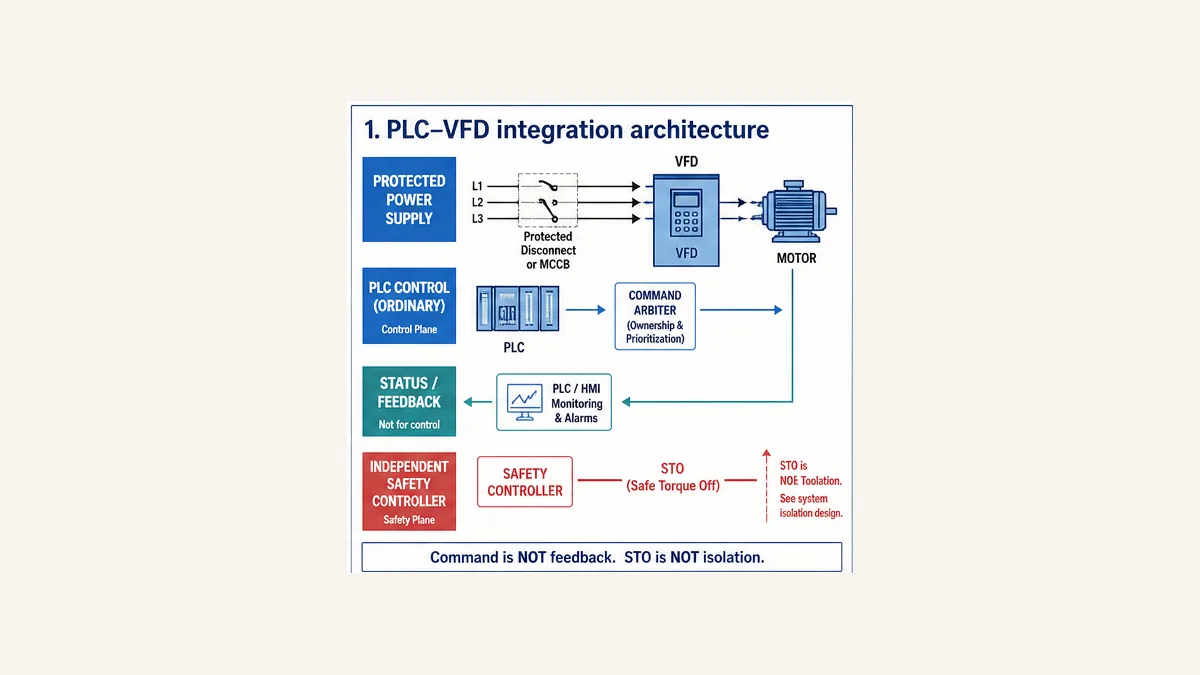
What this canonical owns
This established page owns PLC–VFD application integration: control-method selection, command/reference/status design, PLC logic, analog/network evidence, loss recovery and a worked conveyor example. The VFD setup and wiring guide owns supply/motor/cabinet/EMC wiring, motor data, ramps and physical commissioning. The VFD fault troubleshooting guide owns DC-bus, output, motor, thermal and drive fault-code diagnosis. The PLC motor/drive troubleshooting guide owns broad source-to-load isolation across starter, drive and motor systems.
This division avoids four pages giving shallow versions of the same answer. Use the specialist page when the decisive question is wiring, a trip code or a motor/power fault; stay here when the PLC command, reference, feedback, ownership or network contract is the problem.
Build the PLC–VFD interface contract
Separate requests, accepted state and proof
| Layer | PLC/VFD values | Engineering question | Failure if omitted |
|---|---|---|---|
| request | Enable, Run, Stop, Direction, Reset edge, SpeedDemand | what does the application want now? | HMI/sequence writes drive bits directly with no owner |
| arbitration | Auto/Manual/Local, command owner, reference owner, permissives | who is authorized and which source wins? | drive is local while PLC displays automatic |
| drive state | Ready, switched/operation enabled, warning, fault | can the selected drive profile accept the command? | connection healthy is mistaken for drive ready |
| feedback | Running, AtReference, ActualSpeed, Current | did the drive/motor response match the request? | Run bit is copied into “Motor running” |
| communications | ConnectionHealthy, DataAge, profile/assembly/telegram ID | is cyclic data fresh and correctly mapped? | stale words remain plausible after loss |
| evidence | state, previous state, first fault, raw drive code, timestamps | why did behavior change? | reset destroys the only useful cause |
| safety status | STO/safety channel state for display where permitted | what does safety subsystem report? | standard PLC status is treated as safety decision |
The interface object should translate vendor-specific terminals, bits, words and scaling into a stable application contract. Keep the raw control/status words and raw fault code visible for diagnosis. A normalized Faulted Boolean is useful; discarding the raw code is not.
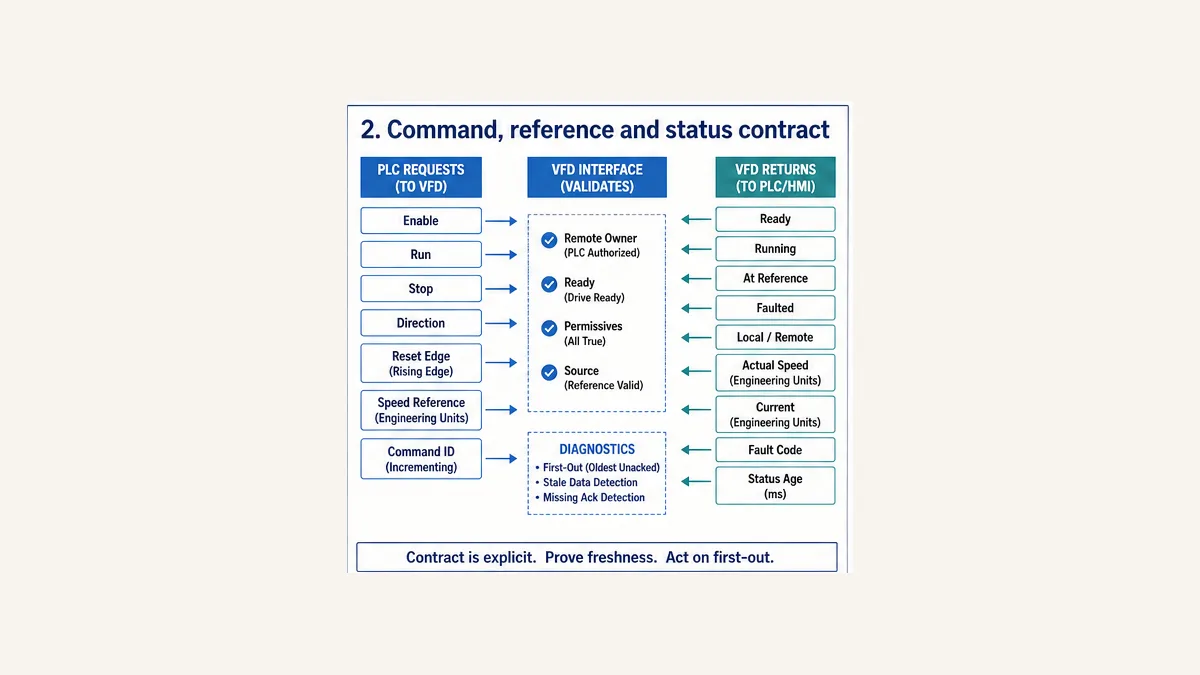
Define ownership for every mode
| Machine mode | Command owner | Reference owner | Transition rule |
|---|---|---|---|
| Off/isolated servicing | none | none | site hazardous-energy procedure controls isolation |
| local maintenance | authorized local station/keypad | bounded local reference | PLC automatic requests inhibited; source shown clearly |
| manual HMI | PLC manual arbiter | PLC/HMI bounded setpoint | permissives, feedback and timeout remain active |
| automatic | PLC sequence/process controller | recipe or control-loop result through limiter | mode entry is not a Start edge |
| communication loss | no ambiguous owner | defined safe/controlled fallback | command removed/controlled per risk assessment; alarm first-out |
| reconnect/restart | none until reauthorized | zero/safe reference until accepted | request release, healthy source and new authorization required |
| safety demand | safety system owns safety sub-function | ordinary reference irrelevant | validated safe response; standard PLC observes only permitted status |
One writer should own each VFD command and reference. The HMI, automatic sequence, maintenance mode and network adapter issue requests into that arbiter; they do not all write the drive control word. Expose rejected-command reasons such as NotRemote, NotReady, PermissiveFalse, StaleStatus and FaultActive.
Choose digital I/O, analog reference or network control
Compare evidence, not cable count alone
| Method | Command/reference capacity | Useful strengths | Design risks | Minimum commissioning evidence |
|---|---|---|---|---|
| hardwired digital I/O | run/stop/direction/reset and preset speeds | simple point tests; visible states; low protocol dependency | many wires, limited status, two-/three-wire and source/sink semantics vary | point-to-point state table, electrical levels, assigned terminal functions |
| digital run + analog reference | discrete commands plus continuous 0–10 V or 4–20 mA demand | broad compatibility; signal measurable at terminals | range/mode/common/shield/open-wire/scaling errors; sparse diagnostics | 0/50/100% raw and measured chain plus loss response |
| cyclic industrial network | control word, reference, status word, actual values and diagnostics | rich state, fewer signal conductors, scalable device diagnostics | wrong profile/assembly/telegram/byte order, stale data, ownership and reconnect | exact config file/profile, cyclic map, word/scale tests, age/loss/recovery trace |
| hybrid | safety separately; run/status hardwired; setpoint/diagnostics network | independent selected surfaces and serviceability | conflicting sources if arbitration is unclear | owner/source status under every mode and loss combination |
The diagram’s “wire counts” are conceptual, not design quantities. Network cable count does not include power, safety, auxiliary or topology requirements. Analog distance and accuracy depend on the actual module, cable, grounding, environment and drive manual; do not reuse universal distance claims.
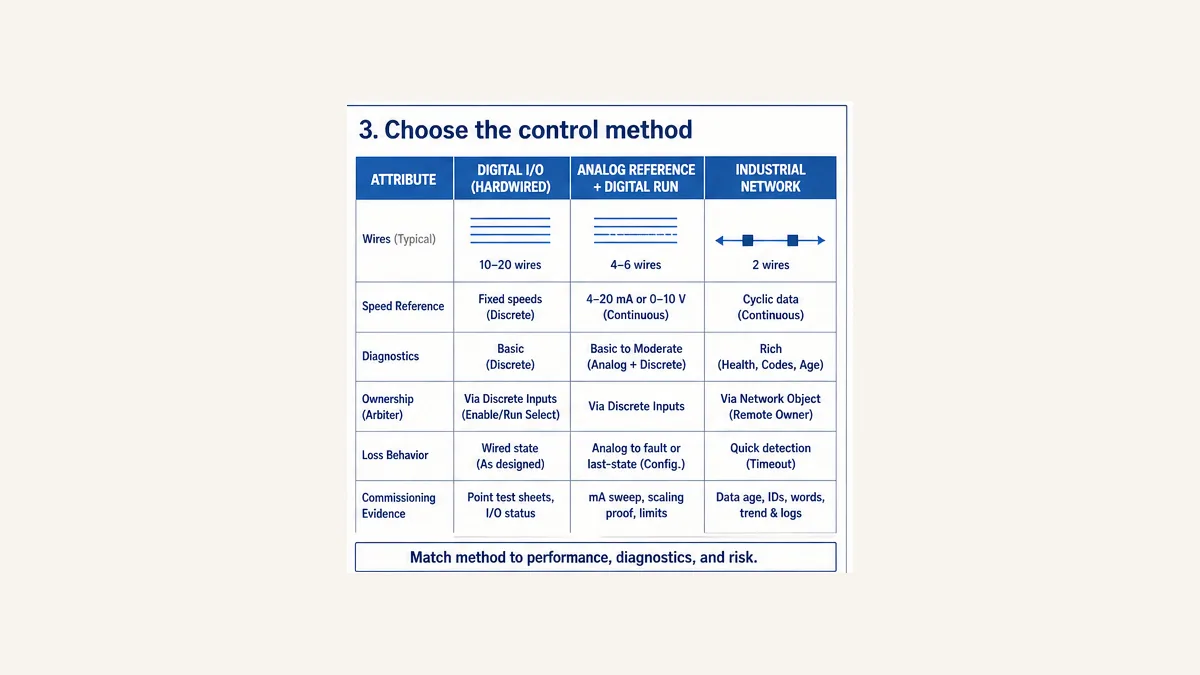
Hardwired digital command and status
Two-wire and three-wire are drive functions, not universal diagrams
A two-wire arrangement commonly uses a maintained Run state. A three-wire arrangement commonly uses momentary Start/Stop behavior with a drive-internal latch. Exact terminal functions, stop priority, source/sink electrical logic, internal/external 24 V supply and restart behavior vary by drive and parameter set.
Document each signal:
| Signal | PLC direction | Electrical/function proof | Logic requirement |
|---|---|---|---|
| Run/Enable | output to drive | drive terminal assignment and measured ON/OFF state | default false; one owner; feedback timeout |
| Direction | output to drive | forward/reverse terminal/profile mapping | stop/zero-speed transition policy before reversal |
| Reset | output to drive | reset function and required pulse width | one controlled pulse after cause clear; not held |
| Ready | input from drive | relay/transistor assignment and polarity | required before Start; source freshness visible |
| Running | input from drive | exact status definition | independent of Run command; do not claim shaft motion unless proven |
| At reference | input from drive | drive tolerance/assignment | stable-time/tolerance contract if process needs it |
| Fault | input from drive | active polarity and fail-state design | latch first-out before reset |
Do not label a standard PLC input “Emergency Stop” and then treat its ordinary logic as the safety function. A safety demand belongs to the validated safety control system and drive safety manual. A standard PLC may receive a mirrored status for sequence/HMI use without becoming the safety decision-maker.
Stop and reset semantics
Drives can expose ramp stop, coast/freewheel stop, quick stop and safety sub-functions. Names and control-word bit polarity vary. Select the stop response from the machine/process and safety design; do not use one bit value copied from another profile.
A fault reset should be edge/command based, permitted only after the initiating cause is cleared, the run request is released, feedback is stopped and the operator/control authority is correct. Reset must not hide a recurring drive code or cause immediate restart.
Analog speed-reference control
Scale engineering units once and prove every link
Keep the application setpoint in meaningful units such as hertz, rpm, metres per second or percent of an approved range. Apply quality, minimum, maximum and rate limits before converting to the analog module’s raw representation. Use the exact analog module configuration—not a universal 0–4095, 0–27648 or ±32767 formula.
For a conceptual 4–20 mA receiver configured so 4 mA = 0 Hz and 20 mA = 60 Hz:
Current_mA = 4 mA + (Demand_Hz / 60 Hz) × 16 mA
Expected checkpoints are 4 mA at 0 Hz, 12 mA at 30 Hz and 20 mA at 60 Hz. The PLC raw counts at those points depend on the exact output module range/format. A 0–10 V chain would use its own end points. Verify:
- PLC engineering demand;
- clamped/rate-limited demand;
- module raw word and channel status;
- measured safe terminal signal under the approved procedure;
- VFD displayed input/reference;
- drive commanded output frequency; and
- actual speed/feedback appropriate to the configuration.
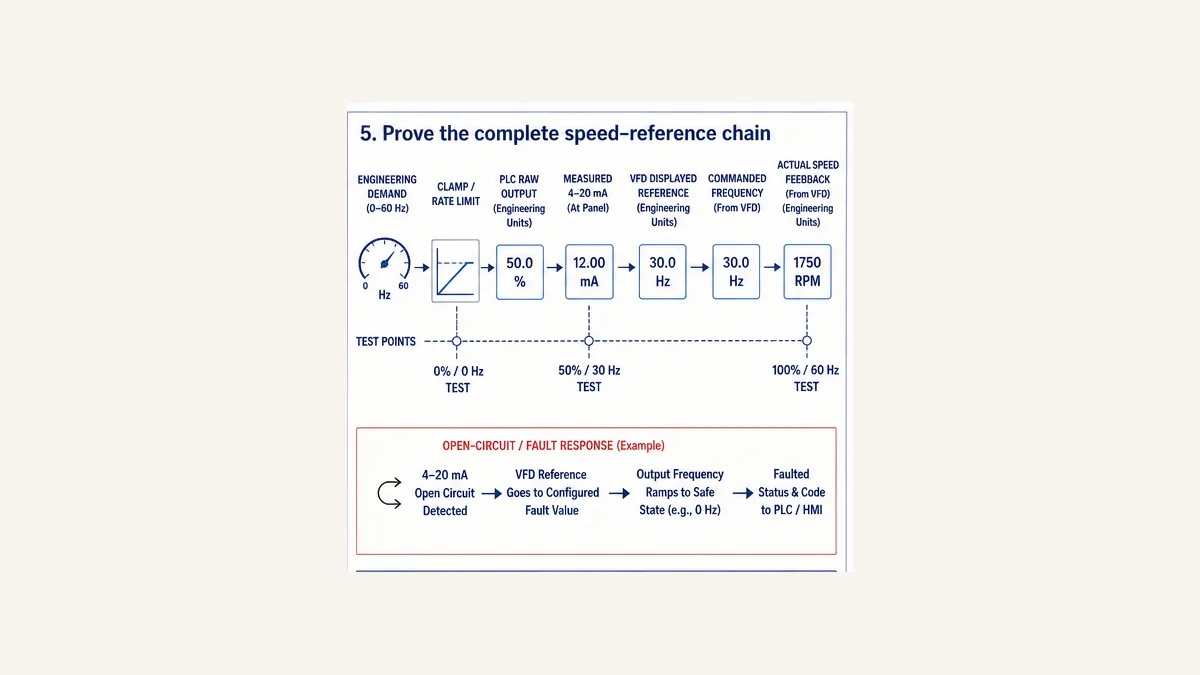
Define open-wire and out-of-range behavior
Configure and test what the drive/application does below range, above range and on open circuit. For 4–20 mA, values below the live zero can support diagnosis when both endpoints implement it. Do not assume every drive automatically faults or stops; some can hold last value, select a fixed fallback or follow configured loss behavior. The chosen response is a cause/effect decision.
Keep analog common/reference/shield and protective earth distinct according to the device manuals. Prove noise and stability at stopped, low, mid and high load/speed. If an analog signal is used only for demand, a separate status path is still required.
Industrial-network VFD control
Configure the profile before writing bits
EtherNet/IP, PROFINET/PROFIdrive and Modbus can all move drive data, but they do not share a universal word map.
- A Siemens SINAMICS G120 Standard Telegram 1 example uses PLC-to-drive control word
STW1plus speed setpoint and drive-to-PLC status wordZSW1plus actual speed. Its bit meanings and normalization come from the applicable SINAMICS/PROFIdrive documentation. - ABB’s ACS580 fieldbus control uses a selected drive profile, Control Word, Status Word, references and actual values; its function blocks and adapter configuration require matching mappings/profile parameters.
- Schneider’s Altivar control surfaces expose control word, status word, reference and actual speed through product/library-specific I/O mapping.
- Danfoss FC 301/302 supports selectable control profiles and configurable status-word meaning tied to the installed fieldbus.
- Rockwell PowerFlex 520 behavior depends on exact model, adapter/embedded interface, assemblies/AOP and parameter settings.
- Modbus defines messages, data models and function codes; the drive manual defines which register contains which command/status and how it is scaled.
Never copy a hexadecimal start word from a forum without tracing the selected profile state machine and every bit. Keep a versioned mapping register:
| Mapping field | Record |
|---|---|
| exact drive | catalog/frame/firmware/options |
| adapter/interface | catalog/firmware and connection type |
| config artifact | EDS/GSDML/DTM/library/AOP version |
| profile | vendor profile, PROFIdrive, CiA 402-derived or product-specific selection |
| cyclic layout | assembly/telegram/register list and byte/word order |
| command outputs | control word, reference(s), command ID if designed |
| status inputs | status word, actual(s), raw warning/fault and safety status where permitted |
| normalization | raw min/max, engineering units, sign and reference parameter |
| freshness | expected update, timeout, age source and loss state |
| ownership | local/remote/reference channel and arbitration proof |
Separate connection from healthy control
A green network connection is only one condition. Healthy automatic control requires the correct device identity/configuration, fresh expected input data, correct remote command owner, correct reference owner, ready/status state, valid scaling and no blocking fault/safety demand.
Use data-age supervision even when the PLC platform exposes a connection bit. Retain the last received values for evidence but mark them stale and stop using them for control after the specified threshold. The drive’s own communication-loss timeout/function and the PLC response must agree; otherwise the PLC may think it requested a ramp stop while the drive holds last speed or faults on a different schedule.
NIST SP 800-82 Rev. 3 treats PLCs and other OT devices as cyber-physical systems with performance, reliability and safety requirements. Place VFD networks in the documented OT architecture, restrict engineering/parameter access, manage device/config files and credentials, and test unauthorized or unexpected writes. Network reachability is not authorization to change a live drive parameter.
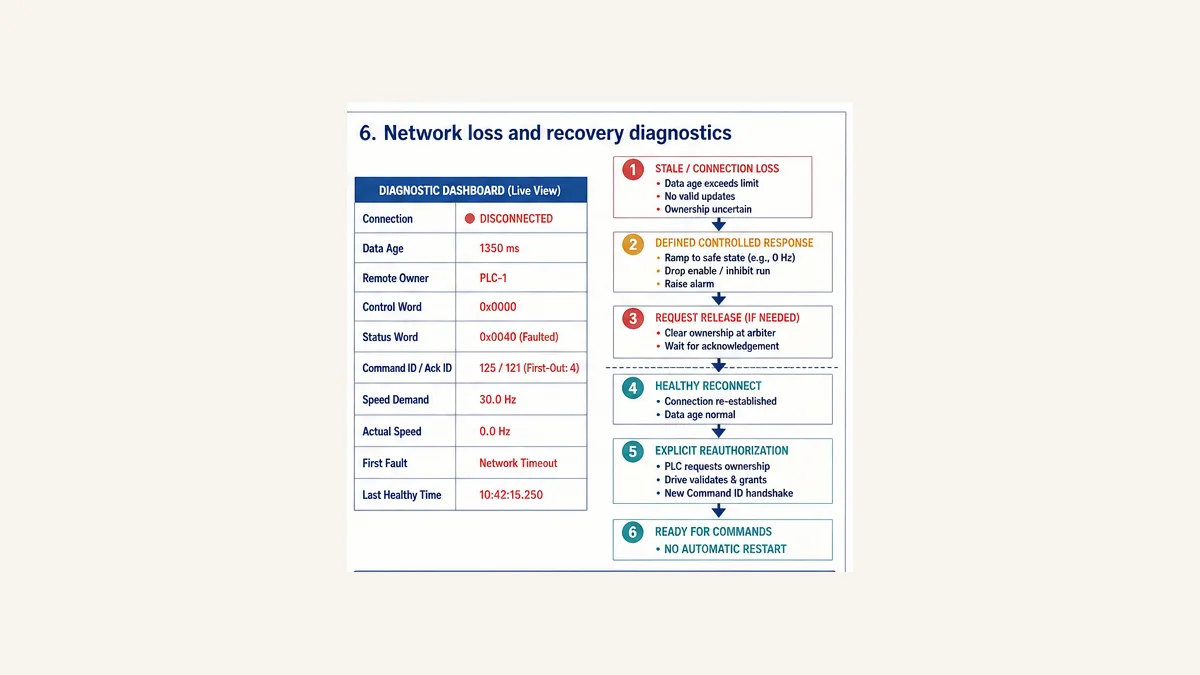
Network loss and controlled recovery
Never restart because packets resumed
On stale data or connection loss:
- latch the first integration cause with last healthy time and raw states;
- apply the project-defined controlled response at PLC and drive;
- remove/clear command ownership as required;
- wait for safe/stopped feedback or enter the defined fault path;
- require the initiating command released where applicable;
- on reconnect, verify identity, configuration, data freshness, drive state, source and reference owner;
- obtain explicit reauthorization/new command; and
- prove no automatic restart under held-request, PLC restart and drive restart cases.
Worked conveyor interface
Define the operating contract
The example controls an ordinary conveyor VFD interface with five states: Idle, Starting, Running, Stopping and Faulted. It assumes vendor mapping has already produced typed inputs InterfaceHealthy, RemoteOwner, DriveReady, DriveFaulted, RunningFeedback and AtReference.
| State | Commands | Normal transition | Failure transition |
|---|---|---|---|
| Idle | Run false; demand zero | Start edge + Auto + permissives + healthy/remote/ready → Starting | invalid state → Faulted |
| Starting | Run true; bounded demand | Running feedback before timeout → Running | drive fault, interface loss or start timeout |
| Running | Run true; bounded/rate-limited demand | Stop/permissive policy → Stopping | drive fault, interface loss, feedback/tracking failure |
| Stopping | Run false; demand zero/defined stop input | Running feedback false → Idle | stop timeout; interface-loss policy can finish in Faulted |
| Faulted | Run false; demand zero | healthy authorized reset → Idle | remain latched |
The downloadable ST uses deterministic task ticks for teaching. Translate them into target timers or an exact periodic-task contract and test equality. It contains no I/O address, network stack, drive-profile control word, safety output or physical stop design.
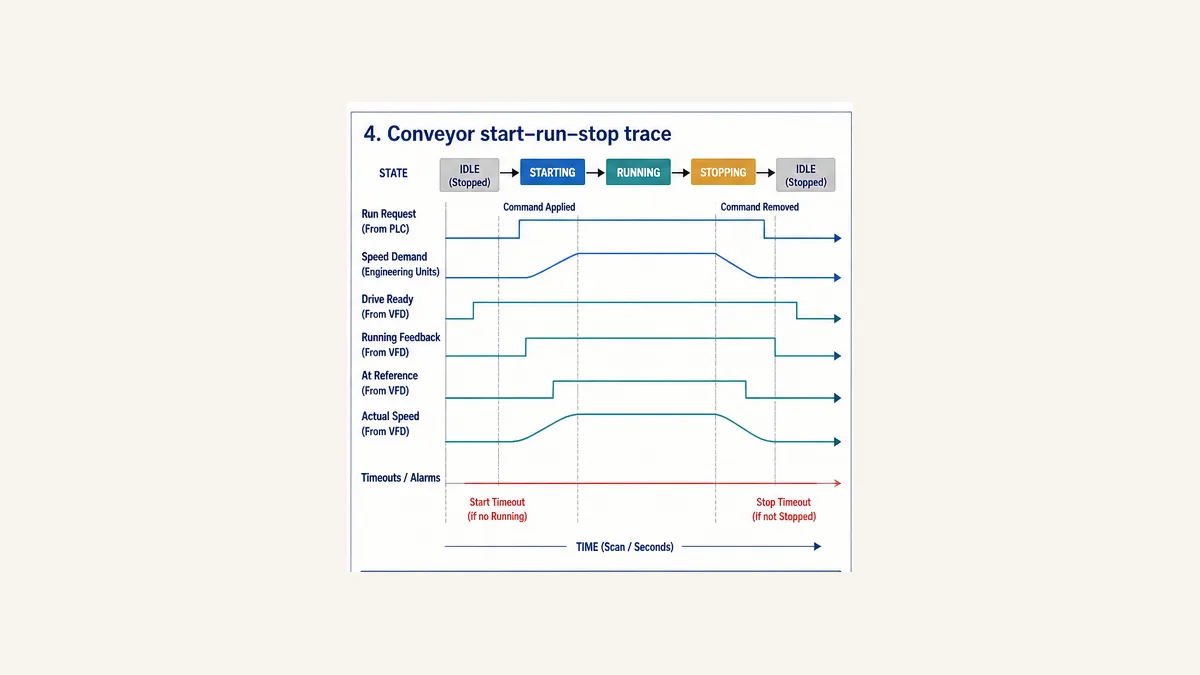
Scan-by-scan start and stop trace
| Execution | State at entry | Request/status | Run and demand | State after commit | Evidence |
|---|---|---|---|---|---|
| 0 | Idle | no Start; Ready/Remote true | false / 0 Hz | Idle | healthy idle |
| 1 | Idle | Start edge true | false / 0 Hz | Starting | accepted start; timer zero |
| 2 | Starting | Running false | true / 35 Hz | Starting | waiting for feedback |
| 3 | Starting | Running true | true / 35 Hz | Running | transition reason feedback |
| 4 | Running | AtReference true | true / 35 Hz | Running | command and proof healthy |
| 5 | Running | Stop true | true / 35 Hz for current-state execution | Stopping | stop accepted |
| 6 | Stopping | Running true | false / 0 Hz | Stopping | waiting for stopped feedback |
| 7 | Stopping | Running false | false / 0 Hz | Idle | stop proved |
The state changes at the end of the call, so the new state’s outputs begin on the following call. A project may deliberately remove Run in the same execution that sees Stop; if so, implement an explicit output-arbitration phase and test the task/output timing. The important rule is one documented owner and one reproducible trace.
PLC logic details that prevent unsafe surprises
Make defaults and output ownership explicit
Every call of the interface block should begin from conservative output defaults: Run false, Reset false and speed demand zero. The active state can then assert only the outputs it owns. This prevents an output left true in one state from leaking into another after a transition or an exception. It also makes code review simple: search for every write to RunCmd, ResetCmd and SpeedDemand and confirm there is one arbitration path.
The downloadable ST example deliberately separates the state evaluated on this scan from the state committed for the next scan. That two-phase pattern avoids depending on statement order when several transitions become true together. It also records the first transition reason instead of allowing a later condition to overwrite it.
The example is a teaching adapter, not paste-and-run drive code. Its deterministic tick counters assume a known periodic call. Replace them with the target's timers or prove the exact task period and counter range. Likewise, verify LIMIT, enumeration, integer conversion and edge-detection syntax in the selected IEC 61131-3 tool. Bind vendor data only at the adapter boundary: no physical I/O address, control-word bit, telegram, assembly, Modbus register, STO channel or motor parameter belongs inside the vendor-neutral state machine.
Supervise source, feedback and tracking separately
One timer cannot explain every failure. Use distinct evidence windows:
| Supervision | Starts when | Clears when | Typical first-out evidence |
|---|---|---|---|
| start response | Run is actually issued in Starting | Running feedback is accepted | requested/issued time, ready/remote state, raw status word |
| stop response | Run is removed in Stopping | Running feedback is false | stop type, current, actual frequency, raw status |
| interface freshness | expected cyclic/analog status stops updating | new valid data passes freshness checks | last update, age, connection state, device identity |
| reference tracking | Running and demand should be attainable | AtReference/actual-value tolerance is restored | command, actual, current limit, ramp and load state |
| source ownership | automatic control is requested | drive reports expected command/reference owner | local/remote and source-selection status |
Do not start a tracking timeout during an intentional acceleration ramp unless the allowed time includes that ramp and process inertia. Do not continuously reset the tracking timer on any movement; reset it only when the documented tolerance is achieved. If AtReference is a drive bit, confirm its precise tolerance and delay semantics. For a process that needs shaft-motion proof, add the appropriate independent sensor rather than claiming that output frequency proves physical rotation.
Treat stop, reverse and restart as state transitions
A direction change is not merely inverting a Boolean. Define whether the application must ramp to zero, prove Running = false, prove zero speed from an appropriate feedback source, wait a mechanical dwell, or use a drive-supported controlled reversal. Conveyors with product, hoists, winders and positive-displacement pumps can require very different responses. Interlocks and safety functions come from the machine risk assessment.
For ordinary restart logic, test at least these distinct events:
- a normal Stop followed by a new Start;
- a permissive lost while running and later restored;
- a drive fault followed by cause removal and reset;
- loss and restoration of cyclic communications;
- PLC warm/cold restart while the drive remains powered;
- drive power cycle while the PLC keeps a request true;
- transfer from local to remote and manual to automatic; and
- restoration after a safety demand.
The safe result is application-specific, but accidental restart must not be an undocumented side effect of a held request, retained bit, re-established connection or mode transition. Record which event requires request release, acknowledgement, reset and a new start edge.
PLC PID control or the VFD's internal PID?
Do not let two controllers fight for the same actuator. Select one owner of the final speed demand for each operating mode.
| Decision factor | PLC PID is often useful when | VFD internal PID is often useful when | Evidence to retain |
|---|---|---|---|
| coordination | several devices, valves or sequences share the process objective | one drive and one local process variable form a self-contained loop | control narrative and owner by mode |
| communications | PLC already receives trustworthy, timely process feedback | drive has a direct local transmitter and must respond without network dependence | sensor path, update/age and loss test |
| visibility | plant standards require central trends, recipes and diagnostics | local commissioning/service simplicity has priority | setpoint, PV, output, limits and mode trend |
| fallback | sequence can define a coordinated degraded state | local loop must hold a bounded function on upstream loss | simulated loss/recovery result |
| tuning lifecycle | controls team owns common libraries and versioning | drive commissioning team owns the application | approved tuning record and firmware/config backup |
Whichever controller owns the demand, validate process-value range and quality before enabling automatic mode. Bound minimum/maximum output, rate of change and any forbidden speed bands. Define anti-windup behavior when the VFD is at a limit, unavailable or not the reference owner. Manual-to-auto transfer should be deliberately bumpless where the process requires it, not assumed. Never publish generic Kp, integral-time or derivative-time values as if they transfer between fan pressure, pump flow and conveyor tension loops.
If the drive reports current limit, torque limit or a ramp state, expose that status so a slow response is not misdiagnosed as a badly tuned PID. A controller cannot force the motor beyond configured drive, motor or mechanical limits.
VFD energy savings: where the affinity-law shortcut applies
For centrifugal fans and pumps operating in the applicable variable-torque region, ideal affinity relationships say flow varies approximately with speed, pressure/head with speed squared and power with speed cubed. That explains why reducing speed instead of throttling can produce substantial savings in suitable systems. It is not a guarantee that every motor at 80% speed consumes exactly 51.2% of its previous input power.
The US Department of Energy's VFD evaluation protocol requires measured operating information and distinguishes variable-torque applications from other loads. Real savings depend on the system curve, static head, duty cycle, existing control method, VFD efficiency, motor efficiency, minimum process service and operating hours. Constant-torque conveyors, positive-displacement pumps, hoists and winders do not inherit the same cubic shortcut.
| Application | Typical control objective | Important integration evidence | Energy claim discipline |
|---|---|---|---|
| centrifugal fan | pressure, flow or temperature | damper state, pressure/flow PV, minimum ventilation, resonance bands | calculate from measured baseline/duty, not a fixed percentage |
| centrifugal pump | pressure, flow or level | system/static head, minimum flow, valve state, dry-run and cavitation protections | model and measure actual system curve |
| positive-displacement pump | flow/pressure within equipment limits | relief path, minimum/maximum speed, torque and process protection | do not apply centrifugal cubic-law estimate |
| conveyor | line speed or production rate | load, acceleration, tracking, jam and mechanical stop behavior | quantify production/process benefit separately from energy |
| hoist/elevator function | controlled motion and holding | brake coordination, load direction, safety and regeneration | specialist engineered analysis required |
| winder/unwinder | line speed/tension | diameter calculation, torque limits, dancer/load-cell feedback | evaluate the whole motion/process cycle |
Record input energy and relevant process output before and after the change over representative duty periods. A lower kW reading with lost pressure, flow or throughput is not an equivalent-service saving.
Commission PLC–VFD integration in controlled layers
Physical drive installation, motor data, protection, EMC, cable, grounding and initial motor commissioning belong in the exact manuals and the VFD setup and wiring guide. The integration pass begins once authorized personnel have established a safe test condition.
1. Freeze the interface and configuration identity
Record drive/model/firmware, adapter/interface, parameter backup, motor nameplate/configuration, command source, reference source, profile/telegram/assembly/register map, engineering scales, stop/loss functions and PLC software versions. Save the approved artifacts. A later technician should be able to prove which map the PLC expects without reverse-engineering live words.
2. Prove ownership before permitting motion
With Run inhibited, move through local, manual, automatic, communication-loss and reconnect states. Confirm that the HMI shows the actual command and reference owner. Try rejected requests deliberately. The system should say why a start is blocked—NotRemote, NotReady, StaleStatus, PermissiveFalse or another defined cause—not merely display “not running.”
3. Prove reference endpoints and sign
For analog control, compare 0%, 50% and 100% engineering demand with module raw value, safely measured signal, drive-displayed input/reference and commanded output. Include below-range/open-wire behavior. For network control, test zero, positive intermediate, maximum permitted and—only where designed—negative/reverse values. Verify raw normalization, sign and byte/word order.
4. Prove command/status state without copying it
Exercise Ready, Run, Running, AtReference, Warning, Fault and Reset under controlled conditions. Confirm that PLC Running follows independent status and not the outgoing command. Capture start and stop traces with request time, output time, drive status and actual value. Prove that reset is a bounded edge and cannot start the motor.
5. Inject integration failures
Open or substitute the approved test points for analog loss, stale cyclic input, drive local mode, not-ready state, active fault, failed start feedback, loss of AtReference and failed stop feedback. Use a simulation, test rack or authorized commissioning procedure appropriate to the hazard. Do not create unsafe live faults merely to tick a test box.
6. Prove restart and recovery
Hold a Start request while communications are interrupted and restored. Repeat for PLC restart, drive power return and local-to-remote transfer. The expected result must match the cause/effect design and be recorded. Verify fresh identity/status and new authorization before run is reissued. Test ordinary controls and safety functions as separate evidence sets.
Diagnose a PLC-controlled VFD from the evidence boundary
When a drive does not behave, locate the first boundary where expected and observed values diverge. Avoid changing several parameters at once.
| Symptom | First comparison | Likely integration branches | Strong next evidence |
|---|---|---|---|
| network is green but drive will not run | ConnectionHealthy versus Ready/Remote/owner/status state | wrong source, profile state, permissive or stale application data | raw control/status words and selected source |
| keypad runs motor but PLC does not | local owner versus remote command/reference owner | drive still local, wrong terminal/network source, missing enable | drive owner display and parameter/config backup |
| low demand produces full speed | PLC units → raw output → measured signal → drive reference | 0–10 V/4–20 mA mismatch, scale endpoints, analog common, min/max/reference selection | 0/50/100% evidence-chain table |
| requested speed sign is wrong | normalized reference and drive direction source | signed/unsigned conversion, word order, reverse bit/source | raw hex/decimal and drive-displayed reference |
| drive follows speed but PLC actual is zero | drive actual display versus mapped actual word | wrong assembly/telegram/register, scale or stale tag | live raw word and mapping artifact |
| motor runs but PLC says stopped | drive status bit versus normalized Running | wrong status bit/polarity or copied/latched tag | raw status word while stopped/running |
| nuisance communication fault | update/age trace versus timeout settings | network load/topology, task timing, adapter or mismatched PLC/drive timeouts | packet/connection diagnostics and timestamped age |
| motor restarts after reconnect | held request and recovery state | drive loss function holds command, PLC reasserts retained Run, no reauthorization gate | loss/reconnect state trace |
| analog reference is noisy | measured signal versus raw demand/drive input | routing, shield/common, grounding, supply or channel configuration | min/mid/max trend under representative load |
| Running true but not AtReference | demand, actual, ramp and current/torque limit | load, configured ramp, min/max, skipped band or limit state | drive actual/current/limit status trend |
| reset has no effect | raw active fault/cause and reset edge | cause remains active, wrong bit/profile state, pulse not accepted | first-out code and control/status transition |
| reset causes immediate restart | request release and Faulted exit criteria | Run held true, reset coupled to start, state not reauthorized | scan trace from fault through reset |
| profile word is rejected | selected profile state machine and word order | wrong enable sequence, profile, byte order or command bits | annotated bit transition against official manual |
| stop times out | Run removal, stop mode, actual frequency/current | command not accepted, long decel, current/DC-bus limit, load drives motor | drive stop/ramp/limit status plus actual trend |
If the first divergence is in supply, DC bus, output, motor, thermal behavior or a drive trip code, continue in the VFD fault troubleshooting guide. If it lies across contactor/drive/motor/load architecture more broadly, use the PLC motor and drive troubleshooting guide.
Use an acceptance matrix, not a successful first start
The downloadable 28-case PLC–VFD integration acceptance matrix covers command ownership, reference endpoints, status, feedback, timeouts, network loss, restart, mode transfer and security/configuration controls. Assign every case a test level, responsible person, prerequisites, expected observation, actual evidence and disposition.
| Evidence level | Best use | What it cannot establish alone |
|---|---|---|
| browser logic lab | state ownership, edges, timeouts, traces and operator explanation | exact compiler, fieldbus, electrical, motor or safety behavior |
| target PLC simulation/emulation | target syntax, task timing, retentivity and block integration | real drive profile, module electronics or motor/process response |
| hardware-in-the-loop/test bench | adapter map, cyclic timing, I/O ranges and selected drive configuration | final machine mechanics, installed EMC, load and site safety response |
| FAT | integrated panel/software behavior and documented fault injection | installed process conditions that only exist on site |
| SAT/commissioning | final wiring, actual process/load and approved cause/effect | future changes unless configuration/evidence stay controlled |
| safety validation | safety requirements, architecture, diagnostic coverage and measured response | ordinary PLC sequence correctness unless included separately |
Passing cases should preserve raw observations, not only a green checkbox. Useful artifacts include a timestamped command/status trace, configuration checksum/version, analog endpoint sheet, raw word captures, fault/recovery screenshots and signed deviations. Re-run affected cases after drive replacement, firmware or profile changes, mapping edits, PLC task changes, motor changes or revised stop/loss behavior.
Practise the contract before touching a live drive
Use the interactive VFD simulator to rehearse command arbitration, speed demand, drive status, start/stop timing and fault recovery against a visible conveyor process. Pair it with the downloadable contract, ST example and test matrix so the exercise produces reviewable evidence instead of an isolated animation.
The simulator is useful for learning, design review and pre-commissioning logic checks. It does not reproduce a specific PowerFlex, SINAMICS, ACS580, Altivar or VLT firmware image; physical I/O; network adapter timing; motor/load physics; EMC; braking; protection; STO; safe speed; or machine risk. Validate those boundaries on the exact target and under the project's approved procedures. This disclosure keeps the call to action technically honest and makes the lab valuable to the engineer evaluating it.
Measure this page-to-product path as a funnel: qualified CTA impression, lab open, first scenario started, scenario completed, registration, paid signup and retained use. Keep the blog_vfd_top campaign and exact page term intact so a lower-volume CTA that produces better paid conversion is not removed merely because another button wins raw clicks.
PLC–VFD answer map
| Question | Short answer | Proof to collect |
|---|---|---|
| What does a PLC send to a VFD? | authorized command state plus a bounded reference | normalized output and raw terminal/word mapping |
| What comes back? | ready/owner/state, running/at-reference, actual values and raw diagnostic code | independent status and data-age trace |
| Is a network connection bit enough? | no; it does not prove ready, remote owner, fresh correct mapping or motor response | identity/config, owner, raw status and actual value |
| Is Run proof that the motor runs? | no; it is a request | drive status and, where required, independent shaft/process feedback |
| Is STO the same as Stop? | no; STO is a defined safety sub-function, not an ordinary process stop or isolation | safety requirements and validation for the exact drive/machine |
| Can one register map fit all drives? | no; the product/profile/adapter/version defines it | versioned map and official manual |
| How is speed scaled? | application units → bounds/rate → device raw → drive normalization | endpoints, sign, measured/interpreted reference and actual |
| What happens on network loss? | the project-defined coordinated PLC/drive response | age/loss trace and drive loss-function setting |
| What happens on reconnect? | verify state and require explicit reauthorization | held-request and recovery acceptance cases |
| Where should PID run? | in one selected owner per mode | mode/owner narrative and loss/manual-auto tests |
| Does a VFD always save energy? | no; savings are application/duty/baseline dependent | measured energy and equivalent process service |
| What should the simulator prove? | generic logic/state evidence before target integration | scenario trace plus target/HIL/FAT/SAT follow-up |
When a drive reports earth-leakage or ground-fault behavior, move from command programming to the VFD ground-fault troubleshooting guide. It separates drive output, cable, motor, measurement and installation evidence; changing run logic or suppressing a trip is not a diagnosis.
Frequently asked questions
How do you connect a PLC to a VFD?
First select and document the command, reference and status interfaces. A simple design may use digital outputs for Run/Direction/Reset, an analog output for speed and relay/transistor inputs for Ready/Running/Fault. A networked design maps a control word/reference and status word/actual values using the exact product profile, telegram or assembly. In both cases, separately design protected power and the machine safety functions from the official manuals and risk assessment.
Is analog, digital I/O or network control best for a VFD?
There is no universal best method. Digital I/O is easy to point-test but provides limited data. Analog offers a continuous reference but needs range, common, shielding, scaling and wire-loss proof. A network gives richer state and diagnostics but creates profile, configuration, freshness, ownership and recovery obligations. Choose the least-complex interface that can prove the required command, response and failure behavior.
Can a PLC analog output connect directly to a VFD analog input?
Only when the exact module and drive input are electrically compatible and configured for the same signal type and range, with the required common/reference, isolation and wiring practice. Verify the official manuals. Prove engineering value, raw module value, safely measured signal, drive-displayed reference and actual response at several endpoints.
What is the difference between a VFD Run command and Running feedback?
Run is PLC intent. Running feedback is the drive's report of a defined operating state. Neither automatically proves shaft motion under all conditions. Use separate tags and a response timeout; add an appropriate independent motion/process sensor if the machine requires physical proof.
What are a VFD control word and status word?
A control word is a bit-encoded network command interpreted through the selected drive profile/state machine. A status word reports drive state through the corresponding profile. Bit meaning, enable sequence, polarity and supported functions vary by product/profile. The pair only makes sense with the exact manual and configuration artifact.
Are VFD Modbus register addresses universal?
No. The Modbus specification defines message structures, data models and function codes. The VFD manufacturer defines its register addresses, meanings, data types, scaling, permitted writes and sometimes address-offset notation. Use the exact drive/firmware manual and verify raw reads before enabling writes.
How should PLC speed demand be scaled for a VFD?
Keep the application demand in engineering units, apply quality/minimum/maximum/rate rules, then convert once in the product adapter. Verify zero, intermediate and maximum values, sign, raw counts/words, the drive's interpreted reference and actual feedback. Do not assume common-looking raw ranges are interchangeable between PLC modules or drive profiles.
How do you detect stale VFD feedback?
Track the age or sequence/change evidence of expected cyclic data in addition to the platform connection indication. Mark old data stale after the designed threshold and stop using it for control. Capture the last healthy timestamp, raw state and first-out cause. Coordinate this threshold with the drive's own communication-loss timeout and response.
What should a VFD do when PLC communications fail?
The answer comes from process and machine risk, not a universal rule. The design may require a ramped stop, coast, fault, bounded fallback or a coordinated function. Configure both PLC and drive consistently, test actual loss duration and response, and prevent unreviewed hold-last-command behavior.
How do you prevent a VFD restarting when communication returns?
On loss, clear or invalidate ordinary command authorization. On reconnect, prove correct device/configuration, fresh status, expected remote/reference owner and the required stopped/safe state. Require the old request released where designed and accept a new authorization/start action. Test this with a held Start request, PLC restart and drive power return.
Should PID control run in the PLC or in the VFD?
Choose one output owner per mode. PLC PID can suit coordinated multi-device logic and centralized trends; drive PID can suit one local transmitter and a self-contained loop. In either location, verify sensor quality, bounds, rate limits, anti-windup, manual/automatic transfer and loss behavior. Do not run two uncoordinated controllers against one speed reference.
How much energy does a VFD save?
There is no defensible fixed percentage. Suitable centrifugal fan/pump systems may benefit strongly from reduced-speed control, but savings depend on the measured baseline, system curve/static head, duty cycle, existing throttling, efficiencies, minimum service and hours. Constant-torque and positive-displacement loads do not follow the same cubic approximation. Measure energy alongside equivalent process output.
Is Safe Torque Off the same as stopping the VFD?
No. IEC 61800-5-2 defines drive safety sub-functions, including STO. STO is not an ordinary Run/Stop command, electrical isolation or universal zero-speed proof. Design and validate the required safety functions using the exact drive safety manual and machine risk assessment; apply hazardous-energy control procedures when servicing requires isolation.
Can a browser VFD simulator validate a real machine?
It can validate generic sequence assumptions, command ownership, timeout logic, state traces and operator understanding. It cannot validate exact PLC syntax, drive firmware/profile, electrical signals, network timing, motor/load behavior, protection, EMC or safety functions. Follow it with target emulation, hardware-in-the-loop or test bench work, FAT/SAT and separate safety validation as applicable.
Primary sources and further reading
- Rockwell Automation, PowerFlex 520-Series Adjustable Frequency AC Drive User Manual product page — current product manual access and revision context.
- Rockwell Automation, PowerFlex 520-Series User Manual, 520-UM001 — installation, I/O, programming, communications, faults and Safe Torque Off boundaries for the covered models.
- Siemens, SINAMICS G120 with SINA_SPEED at S7-1200 — Standard Telegram 1 control/status and speed setpoint/actual example.
- Siemens, SINAMICS G120C Operating Instructions — exact drive commissioning, interfaces, functions and diagnostics.
- PI, PROFIdrive drive-technology profile — profile purpose and drive/application-class context.
- PI, PROFIdrive Profile for Drive Technology download — normative profile document access.
- ABB, ACS580 Standard Control Program Firmware Manual — sources, fieldbus control, words, references, actual values, functions and faults.
- ABB Automation Builder help, DrvControlACS — ABB drive-control function-block interface and behavior.
- ABB, FMBT-21 Modbus/TCP Adapter Module User's Manual — adapter configuration, mapping and communication-loss behavior.
- Danfoss, VLT AutomationDrive FC 301/302 Programming Guide — parameters, control sources, profiles/status and diagnostics.
- Danfoss, VLT AutomationDrive FC 301/302 product and documentation page — maintained product documentation/software access.
- Schneider Electric Machine Expert, Control_ATV — Altivar control block commands, status and mapping surface.
- Schneider Electric, ATV340 Control Signal Diagnostics — command/reference channel and control-signal troubleshooting.
- Schneider Electric Machine Expert, Altivar reference/status mapping — library-specific references and drive status.
- Modbus Organization, Modbus specifications — maintained specification downloads and protocol context.
- Modbus Application Protocol Specification V1.1b3 — data model, messages and function-code definitions; not a product register map.
- ODVA, EtherNet/IP — CIP over standard Ethernet technologies and device-network context.
- ODVA, CIP Motion — coordinated-drive profile context distinct from generic cyclic VFD command integration.
- NIST SP 800-82 Rev. 3, Guide to Operational Technology Security — OT architecture, threat, security-control and operational constraint guidance.
- US Department of Energy, Uniform Methods Project Chapter 18: Variable Frequency Drives — measurement/verification method, applicable applications and affinity-law context.
- IEC 61800-5-2:2016, Adjustable speed electrical power drive systems—Safety requirements—Functional — drive safety sub-functions and product safety requirements.
- US OSHA 29 CFR 1910.147, The control of hazardous energy — hazardous-energy control requirements in its jurisdiction and scope.
Scope and limitations
This guide is a vendor-neutral PLC–VFD integration method. It does not provide a wiring design, protection coordination, motor/VFD sizing, harmonic/EMC study, braking or regeneration design, hazardous-location assessment, machine risk assessment, safety design, lockout/tagout procedure, or universal parameter/register/word map. Names such as Ready, Running and AtReference are normalized concepts; exact definitions vary.
Before use, verify the drive catalog/frame/firmware, adapter, options, motor, electrical system, PLC/module, profile/telegram/assembly/register map, task timing, signal ranges, source ownership, stop/loss/restart behavior, process/load, safety requirements and local law. Qualified personnel must commission and validate the actual system. Preserve first-out evidence, versioned configuration and test records whenever the integration changes.


