Modbus RTU over RS-485: Wiring, Frames, CRC and Diagnostics
Build and diagnose Modbus RTU over RS-485 from the physical trunk and serial settings through frames, register mapping, timing, commissioning evidence, and fault isolation.
Modbus RTU over RS-485: the direct answer
Modbus RS-485 normally means Modbus RTU messages carried over a two-wire EIA/TIA-485 electrical network. Modbus defines the request, response, address, function, data and CRC rules; RS-485 defines how electrical bits travel on the differential pair. To make the link work, prove both layers separately: construct a valid Modbus transaction, and commission the exact cable, topology, polarity, reference, termination, bias and transceivers required by the installed devices.
The shortest dependable workflow is to record one communication contract, wire a linear trunk, match baud/parity/data/stop settings at every endpoint, send one small read to one known register, capture the request and response, validate the CRC and returned identity, then expand the poll list. A green serial-port indicator does not prove correct register data; a valid request in software does not prove the RS-485 waveform reaches the server.
Download the Modbus RTU transaction contract (CSV) to freeze roles, serial settings, frame fields, typed register meaning, timing and failure behavior before commissioning.
This guide was technically reviewed on August 29, 2026 against the Modbus Organization’s application and serial-line specifications, current semiconductor guidance, vendor product manuals, NIST OT guidance and US hazardous-energy rules. Exact terminals, supported functions, register meanings, response times, transceiver loads and safety controls remain product-, firmware- and site-specific.
Safety boundary: de-energize and control hazardous energy where the work falls within the applicable procedure. Do not connect a grounded oscilloscope, USB adapter, analyser or temporary reference conductor to an energized control network until a competent person has verified isolation, common-mode limits, instrument category, grounding and process consequences.
Separate the protocol from the electrical layer
The four contracts in one working link
A useful mental model has four contracts. Treating them as one vague “Modbus problem” encourages random changes.
| Contract | What it owns | Evidence that passes | Evidence that does not prove it |
|---|---|---|---|
| Application data | coil/register meaning, access, type, scale, units, word order | controlled register map plus a known physical or simulated value | a response with function code 03 |
| Modbus RTU | server address, function, PDU data, frame boundary, CRC, exception behavior | captured request/response decoded byte by byte | voltage transitions on A/B |
| Serial/UART | baud, data bits, parity, stop bits, turnaround and port mode | identical documented settings and clean character decoding | matching terminal labels |
| RS-485 physical layer | two-/four-wire mode, polarity, pair, reference, topology, termination, bias, isolation | approved drawing, inspection and measured signal margin | a correct register offset in the PLC |
RS-485 can carry protocols other than Modbus. Modbus serial messages can use electrical interfaces identified by the serial-line guide, although two-wire EIA/TIA-485 is the common multipoint implementation. Buying an “RS-485 device” therefore does not prove it speaks Modbus RTU, and selecting a Modbus library does not add a physical transceiver to a controller.
Roles and naming
The current Modbus application specification uses client for the device that initiates a request and server for the device that responds. Many serial-line manuals and installed products still use master and slave. This guide uses client/server for the behavior and shows legacy labels where they appear in manuals or software.
One serial client normally controls transaction timing on a Modbus RTU bus. Each addressed server listens, validates the frame, and responds only when the request applies to it. Address 0 is broadcast in the serial model: servers do not send a response to a broadcast. Server addresses 1 through 247 are available at the protocol layer, but that number is not an electrical-segment guarantee or a performance target.
Owner map for narrower tasks
| If the job is mainly… | Use this owner |
|---|---|
| understanding the entire Modbus family and data model | Modbus protocol guide |
| approving general RS-485 construction and waveform evidence | RS-485 wiring and diagnosis |
| drawing one two-wire terminal-to-terminal network | two-wire RS-485 wiring diagram |
| choosing impedance, capacitance, shield and conductor construction | RS-485 twisted-pair cable guide |
| translating 40001-style references into transmitted offsets | Modbus registers and addressing |
| distinguishing timeout, CRC rejection and exception response | Modbus fault diagnosis |
| routing TCP transactions to serial devices | Modbus TCP converter guide |
Define the endpoint contract before wiring
Record exact device identities
Start with controlled manuals for the exact PLC CPU or communication module, serial adapter, gateway and server device. Record model, hardware revision, firmware, port and connector. A family brochure is not enough when two siblings use different terminal polarity, built-in termination or supported functions.
For each endpoint, capture whether the port is RS-232, RS-422 or RS-485; whether RS-485 is two-wire or four-wire; whether direction control is automatic; whether the common/reference conductor is required; whether termination or bias is internal, switchable or external; and whether the port is isolated. Confirm the permitted common-mode range and the site grounding design before joining equipment powered from different references.
Freeze one serial settings schedule
All endpoints on one RTU segment must decode the same character format. Do not rely on “default” after commissioning: defaults can differ by product, firmware or reset state.
| Setting | Contract field | Acceptance evidence | Frequent failure |
|---|---|---|---|
| Mode | RTU, not ASCII or vendor free-port | configuration export or photograph | client RTU, server ASCII |
| Baud | one supported rate for every node | exact setting plus measured test | one replacement left at factory rate |
| Data bits | normally 8 for RTU | endpoint manual and setting | generic terminal program left at 7 bits |
| Parity | even, odd or none as supported | same value everywhere | one node at none on an even-parity bus |
| Stop bits | per selected parity/product rule | documented character format | 8N1 assumed where device requires another format |
| Server address | unique responding address | schedule and one-node poll | duplicate addresses respond together |
| Response timeout | derived from wire, processing and gateway time | measured distribution plus margin | copied value hides a slow/failing device |
| Inter-request delay | product/process requirement | poll trace at worst case | next request begins before recovery is complete |
The Modbus serial-line guide describes even parity as the default and describes two stop bits when no parity is implemented. An installed device may expose only supported combinations. Configure what the exact manuals permit, make every endpoint identical, and retain the final schedule.
Define the data contract
For the first test point, record the human reference from the device manual, transmitted zero-based offset, Modbus table, function code, access, width, signedness, byte order inside a register, word order across registers, scale, engineering unit, valid range, freshness limit and safe behavior when quality is bad.
Do not begin with a write. Select a changing but non-hazardous read-only or operationally safe value whose expected result can be independently observed. Writes require separate authorization, range validation, interlocks and recovery because a protocol-valid value can still be unsafe for the process.
Wire the RS-485 trunk
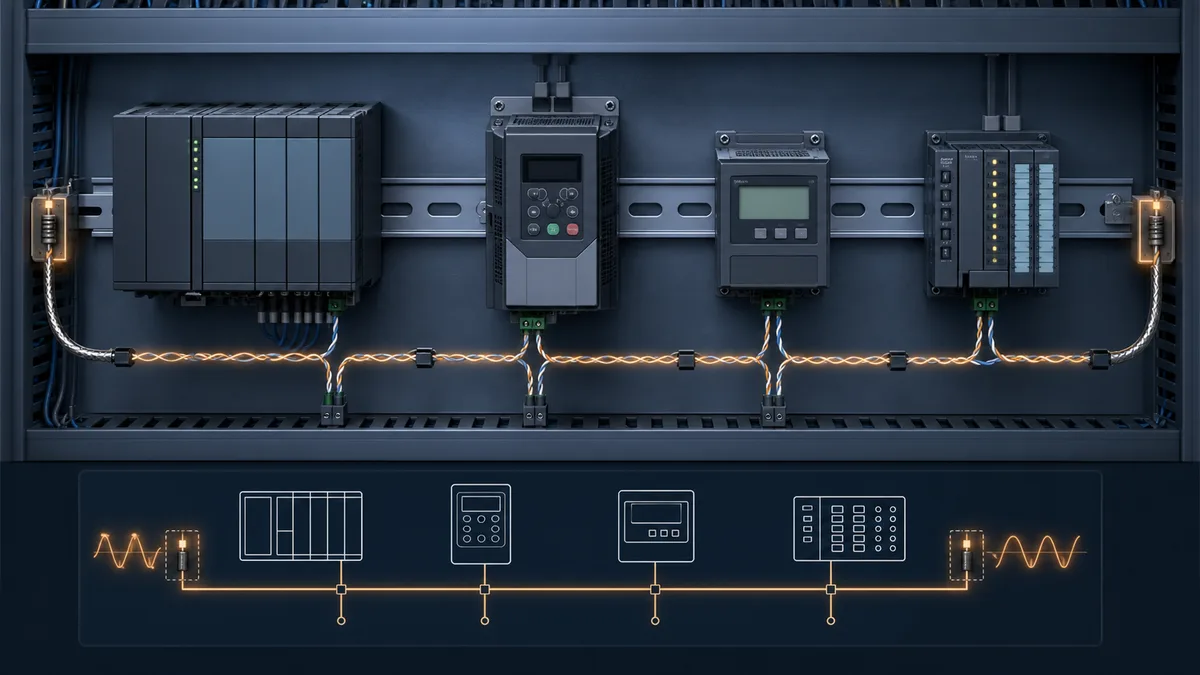
Use a linear bus with short drops
Trace one main cable from physical end to physical end and connect devices along that trunk. Avoid passive stars and long branches because impedance discontinuities create reflections. A layout that looks like a star on a drawing can be made of separately repeated segments, but each electrical segment still needs its own documented topology and end treatment.
Stub acceptance depends on signal edge rate, cable propagation and receiver margin—not merely configured baud. Keep drops as short as the vendor design requires. If the building or machine geometry requires branches, use an approved repeater, hub or gateway architecture and test each resulting segment.
Map polarity by function, not letters alone
A, B, +, -, D0, D1, Rx/Tx+ and Rx/Tx- are not guaranteed to mean the same thing across manufacturers. The Modbus serial guide defines D1 as the positive line relative to D0 for a binary 1 condition, but installed product labels may follow another convention.
| Endpoint | Printed terminals | Controlled manual says | Project net name | Proof |
|---|---|---|---|---|
| PLC serial module | A(-), B(+) | B is positive in idle/mark condition | DATA_POS / DATA_NEG | manual revision and measured idle state |
| energy meter | D+, D-, COM | D+ maps to positive data conductor | DATA_POS / DATA_NEG / REF | exact model wiring sheet |
| USB adapter | T/R+, T/R-, GND | two-wire auto-direction port | DATA_POS / DATA_NEG / REF | adapter datasheet and bench loop |
The names in this table are an example method, not universal pin assignments. Populate the project table from the actual manuals. Do not use trial-and-error swapping as the primary commissioning method on an energized installation.
Treat common, shield and protective earth separately
The signal common or reference conductor helps keep receivers within their allowed common-mode range. The cable shield controls electromagnetic coupling. Protective earth serves electrical safety. They can meet at intentional points in a complete design, but their names are not interchangeable and a drain wire is not automatically a signal return.
Shield bonding depends on cable construction, EMC zone, device connections, equipotential bonding and site standard. “Ground one end” is not a universal rule. Follow the approved installation design and exact vendor documents, especially across buildings, drives, long runs and lightning/surge exposure.
Engineer termination, bias and cable as one system
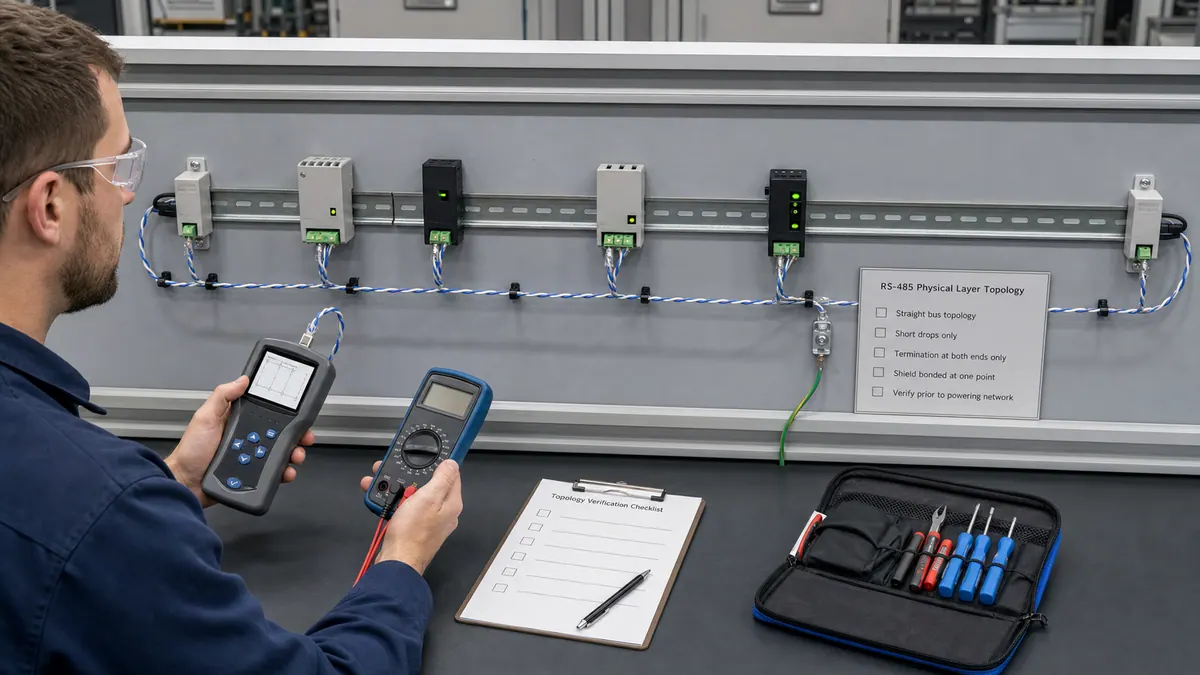
Place termination at electrical ends
Parallel termination is normally placed at the two physical ends of a sufficiently long or fast differential transmission line, with a value matched to the cable and transceiver design. It is not “one resistor per device.” Too many terminators reduce differential amplitude; a missing or misplaced terminator can permit reflections. Some products include switchable termination networks, so an external resistor can create an accidental third load.
Do not infer the correct resistor from a generic article. Confirm the cable’s characteristic impedance, device requirement, built-in network and actual segment ends. TI’s termination guidance explains why line length relative to signal transition time matters; the configured bit rate alone does not describe edge speed.
Provide one intentional idle-state strategy
When every driver is disabled, a receiver still needs a defined idle state. Modern transceivers may include internal fail-safe behavior; some networks require external line polarisation/bias; some devices contain switchable bias. Multiple strong bias networks can fight each other and load the bus.
| Design item | Required decision | Acceptance record |
|---|---|---|
| End termination | none, one product network, or external matched network at each physical end | drawing plus resistance/inventory check under the approved state |
| Idle-state bias | integrated receiver fail-safe or one external/project network | calculations/manuals plus idle measurement |
| Unit load | exact receiver loading and permitted device count | transceiver/device data and segment schedule |
| Cable | impedance, capacitance, conductor, shield, temperature and installation rating | approved cable datasheet |
| Isolation/reference | permitted common-mode range and isolation boundary | power/reference diagram and risk review |
| Surge/EMC | route, separation, bonding and protection by zone | site EMC and protection design |
There is no responsible universal table that says every Modbus RS-485 network supports one distance at each baud rate. Maximum reach is a system result involving cable loss and capacitance, edge rate, topology, stubs, transceiver drive, unit loads, termination, common-mode voltage, noise, isolation and required error margin. Use vendor limits as bounds and prove the installed segment.
Understand the Modbus RTU frame
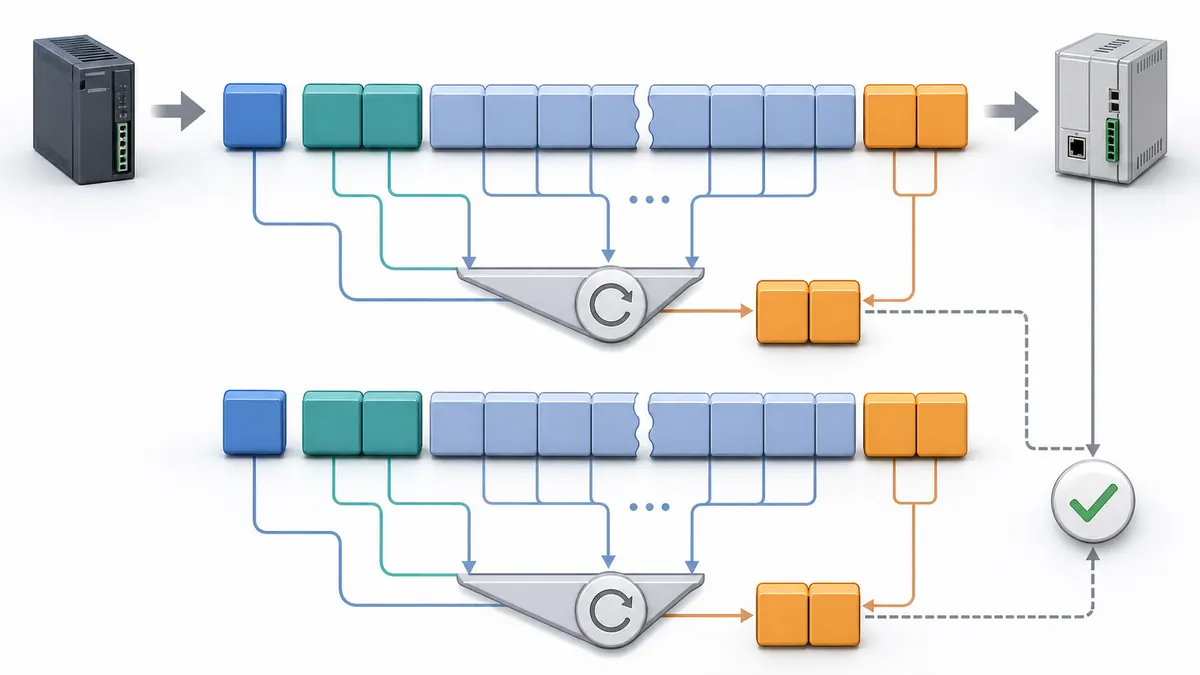
Frame boundaries and fields
An RTU frame is separated from adjacent frames by silence. Its address field is one byte. The PDU begins with a one-byte function code followed by function-specific data. The CRC-16 field is transmitted low-order byte first.
| Field | Example request bytes | Meaning | Validation |
|---|---|---|---|
| Server address | 01 |
addressed server 1 | matches segment schedule |
| Function | 03 |
read holding registers | supported by exact server |
| Starting offset | 00 00 |
zero-based offset 0 | maps to documented point |
| Quantity | 00 02 |
two 16-bit registers | within device/function limit |
| CRC | C4 0B |
CRC over preceding six bytes, low byte first | independently recalculated |
The complete request 01 03 00 00 00 02 C4 0B asks server 1 to read two holding registers from transmitted offset 0. A sample response 01 03 04 00 FA 01 F4 DA 15 returns byte count 4 and two words, decimal 250 and 500, before its CRC. These values are a protocol example, not a register map for a real device.
Download the known Modbus RTU frame vectors (CSV) and compare the raw bytes, low-byte-first CRC field and expected outcome with the selected driver or analyzer.
Function and exception behavior
| Function | Normal use | Response proof | Important boundary |
|---|---|---|---|
01 |
read coils | bit count and packed states | unused high bits in final byte need handling |
02 |
read discrete inputs | bit count and packed states | read-only table |
03 |
read holding registers | byte count and register words | meaning/order remain device-specific |
04 |
read input registers | byte count and register words | not interchangeable with function 03 |
05 |
write one coil | echoed address/value | validate command authority and process effect |
06 |
write one register | echoed address/value | one word does not define type or scale |
0F |
write multiple coils | echoed start and quantity | request packing must match quantity |
10 |
write multiple registers | echoed start and quantity | multiword writes can require device-specific atomicity |
If a server accepts the frame but cannot perform the function, it can return an exception response with the high bit set in the function code. A function 03 exception therefore appears as 83, followed by an exception code and CRC. That is evidence of a responsive protocol path. It is not the same as a timeout, an invalid CRC that the server discards, or unreadable UART characters.
Calculate timing and poll capacity
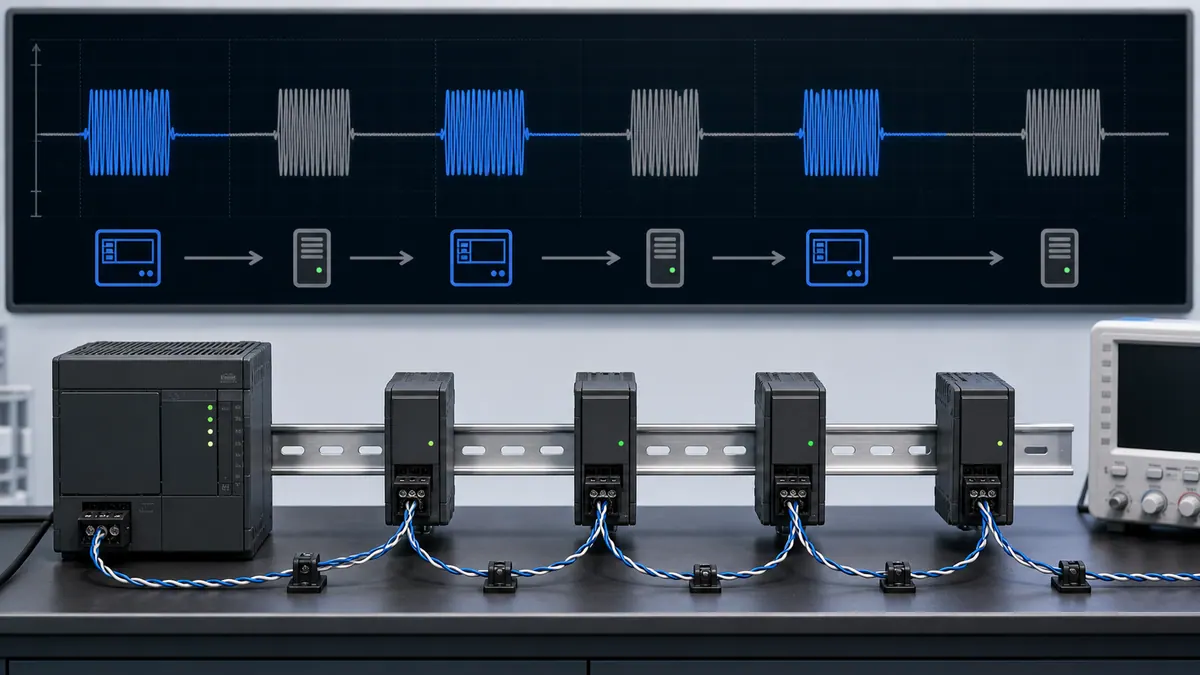
Character and frame timing
Character time is the number of transmitted bits per character divided by baud rate. An 8E1 character has one start bit, eight data bits, one parity bit and one stop bit: 11 bits. At 9,600 bit/s, one character takes about 1.146 ms.
For baud rates up to and including 19,200 bit/s, the Modbus serial guide expresses the inter-character and inter-frame timers as 1.5 and 3.5 character times. Above 19,200 bit/s it recommends fixed values of 750 µs and 1.750 ms for compliant implementation. Some endpoints impose longer timing. The controlled device manuals and capture decide the project value.
| Timing component | Worked 9,600 bit/s, 8E1 example | Project input |
|---|---|---|
| Character time | 11 / 9600 = 1.146 ms |
actual character format and baud |
| 8-byte request wire time | 8 × 1.146 = 9.17 ms |
request length |
| 3.5-character boundary | 3.5 × 1.146 = 4.01 ms |
specification/product rule |
| Server processing/turnaround | measured, for example 12 ms |
worst supported operating state |
| 9-byte response wire time | 9 × 1.146 = 10.31 ms |
response length |
| Nominal successful transaction | about 35.5 ms including one shown boundary |
confirmed start/end convention |
Use this arithmetic to set an initial timeout, then measure the distribution at startup, normal load, maximum requested quantity and the slowest supported server operation. Add justified margin. Test delay, silence, exception and corrupt frames. The final timeout must also satisfy the process’s maximum data-age and recovery requirements.
Poll scheduling and stale data
Group contiguous points only where the device map permits it. Fast control/status points, slower measurements and diagnostic/configuration data can use different poll classes. Avoid retry storms: repeated timeouts consume the bus and can make every healthy point stale.
For each transaction retain last-attempt time, last-valid time, outcome, exception or validation reason, consecutive-failure count and data age. Update the value and quality atomically only after server identity, function, byte count, CRC and data conversion pass. A connected port is not a quality bit.
Translate registers into typed PLC data
Reference numbers are not transmitted addresses
The Modbus PDU carries a zero-based address field. Human documents often write references such as 40001, but that notation is not sent on the wire and conventions vary. A software field labelled “address” might expect 0, 1, 40001 or a full reference depending on the tool.
| Manual point | Table/function | Human reference | Transmitted offset | Width | Interpretation |
|---|---|---|---|---|---|
| status word | holding / 03 | 40001 | 0 | 1 word | bit field defined by device |
| measured value | holding / 03 | 40002 | 1 | 1 word | signed integer × documented scale |
| total | holding / 03 | 40003–40004 | 2 | 2 words | 32-bit order confirmed by test |
| alarm state | discrete input / 02 | 10001 | 0 | 1 bit | read-only Boolean |
This is a translation example, not a universal table. Preserve the original manual reference beside the transmitted offset so another engineer can audit the mapping.
Multi-register values need a word-order test
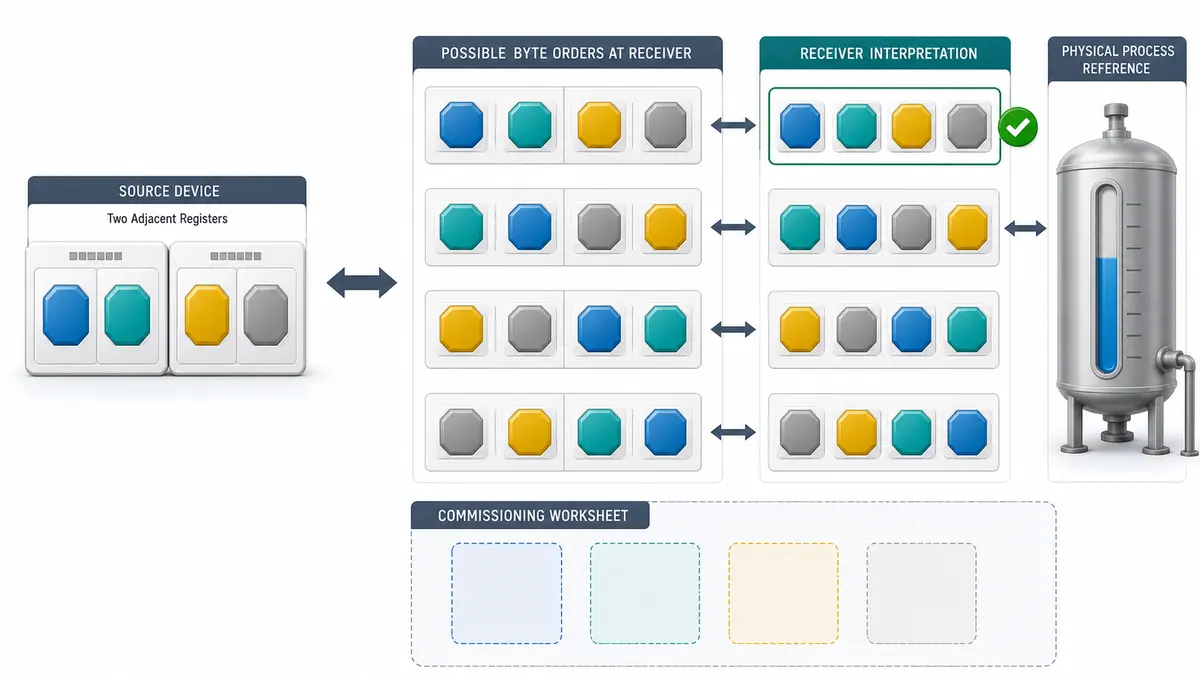
Each 16-bit register is transported with its most significant byte first. The order of multiple registers representing a 32-bit integer or floating-point value is not universally defined by the application specification. Device manuals and a known-value test must determine word order. Preserve raw words alongside the converted value during commissioning.
The PLC tag contract should include value, engineering unit, quality, timestamp or age, raw words, source server/function/offset and conversion revision. Validate NaN/infinity where floating point is possible, signed bounds, reserved values, scale and range before the data drives alarms or control.
Build a bounded PLC transaction state machine
One request owns the port at a time
A robust client does more than call a read block continuously. It sequences IDLE → ISSUE → WAIT → VALIDATE → PUBLISH with explicit EXCEPTION, TIMEOUT, REJECT and RECOVER outcomes. It does not overwrite the published value before the response passes every relevant check.
The request record should contain server, function, offset, quantity, destination width, conversion and timeout. The validation record should compare returned server/function, exception state, length/byte count, CRC (when exposed by the driver), transaction ownership and value conversion. On failure, preserve the last good value only with an explicitly stale/bad quality state; never make old data look fresh.
Writes require command lifecycle evidence
For a permitted write, separate operator or logic request, validation, transmitted command, protocol acknowledgement, device feedback, process feedback, timeout and recovery. A function-06 echo only confirms the server returned the requested address/value; it does not prove the actuator moved or the process reached a safe state.
Use range and state checks before sending, one-shot behavior to prevent continuous writes, positive readback where appropriate, and a documented safe response to communication loss. Do not use a browser simulator or a generic protocol tool to authorize a production write.
Commission from one known transaction outward
Download the Modbus RTU commissioning matrix (CSV) to retain positive, negative and recovery evidence without turning one successful read into acceptance of the whole link.
Evidence packet
| Gate | Action | Pass evidence | Stop condition |
|---|---|---|---|
| 1 | approve scope and isolation/energized-work controls | signed procedure and restoration plan | unclear process or electrical consequence |
| 2 | verify exact models, ports and controlled manuals | device/firmware/port schedule | family-level assumptions only |
| 3 | inspect trunk, drops, pair, reference, shield and protection | marked-up as-built drawing and photographs | star/unknown branch or damaged cable |
| 4 | inventory termination and bias | end-to-end network record | duplicate or unknown internal networks |
| 5 | freeze serial settings and unique addresses | signed settings schedule | duplicate address or mismatched mode |
| 6 | connect one client and one server where practical | clean idle and known read | unexplained waveform/common-mode issue |
| 7 | capture one request/response | timestamped raw bytes and decoded fields | wrong identity/function/offset/CRC |
| 8 | prove one known value and quality transition | raw words, conversion and independent reference | plausible but unverified number |
| 9 | add nodes and poll classes incrementally | cycle-time/error/data-age trend | margin or freshness target exceeded |
| 10 | inject bounded faults and restore | expected timeout/exception/stale/alarm/recovery evidence | unsafe or ambiguous failure behavior |
Retain the final as-built network drawing, cable and device schedules, serial settings, register map, known-good capture, timeout rationale, diagnostic baseline, source manuals, test results, software/configuration backup and restoration record. Those artifacts shorten future troubleshooting more than a screenshot that simply says “online.”
Positive and negative acceptance
Positive tests prove correct values at low and high operating points where possible, expected update time, multiple server polling and recovery after an approved restart. Negative tests separate cable disconnection, wrong server address, wrong baud/parity, invalid function/address, CRC-corrupt input, slow response, duplicate address in a bench setup and stale-data handling. Perform only faults approved by the test plan.
Diagnose by the last proven boundary
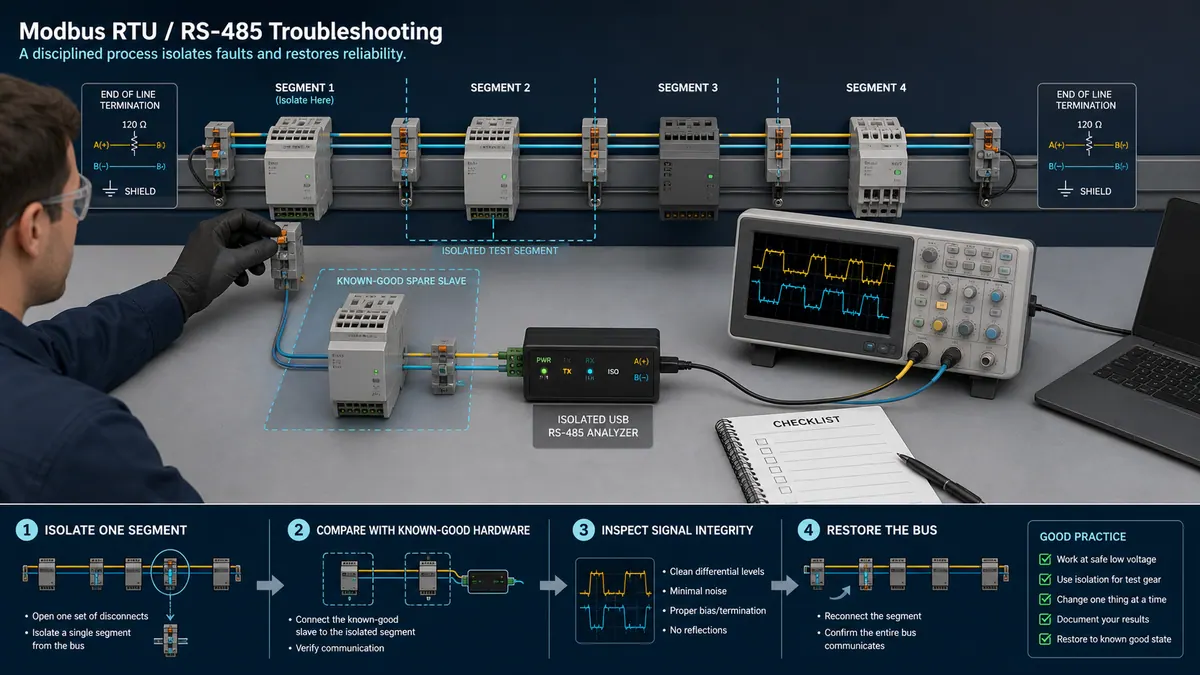
Symptom-to-evidence matrix
| Observed outcome | Last proven boundary | Likely next checks | Avoid concluding |
|---|---|---|---|
| no bytes leave client | application/driver not issuing | state machine, port ownership, enable, configuration, transmit control | “bad cable” |
| request bytes leave, no differential activity | UART/adapter boundary | transceiver power/mode/direction, connector pins, cable continuity | “wrong register” |
| activity present, every server silent | physical/configuration path | polarity mapping, reference/common mode, baud/parity/stop, address, frame boundary, CRC | “all servers failed” |
| one server silent, others respond | segment generally works | exact address, drop, power, local termination, device settings | “client timing is correct for every device” |
| CRC or framing rejects rise | characters reach receiver imperfectly | serial mismatch, reflection, noise, reference, termination, bias, damaged pair | “server sent exception 04” |
| valid exception response | full request/response path works | function support, offset, quantity, access, device state | “RS-485 is down” |
| valid response, wrong plausible value | transport works | table/function, off-by-one, signedness, byte/word order, scale, units, stale cache | “sensor is wrong” |
| intermittent failure after adding nodes | load/topology/timing changed | stubs, unit loads, bias/termination, poll time, duplicate address, power/reference | “Modbus has a random limit” |
| healthy at rest, fails with drive/motor switching | disturbance correlated | routing/separation, shield/bonding, common mode, isolation, surge/EMC, terminations | “increase retries” |
| gateway Ethernet side connects, serial side times out | only TCP-facing service proven | Unit-ID route, serial channel, RTU settings, downstream address and RS-485 path | “gateway conversion is correct” |
Use counters and captures together. “Timeout count increased” is an outcome, not a root cause. Correlate request identity, timestamps, raw bytes, serial errors, server diagnostics and physical measurements. Return temporary settings and test connections to the controlled state after each test.
Forum symptoms worth answering explicitly
Common forum questions expose useful evidence gaps: whether an RS-485-only sensor actually implements Modbus; whether a USB adapter controls transmit direction; why A-to-A fails between manufacturers; whether two client applications are fighting for one port; and why 40001 in a manual becomes 0 or 1 in software. The canonical answer is not a magic pin swap. It is to identify the layer, consult exact manuals and capture one transaction.
Security, reliability and operating boundaries
Traditional Modbus RTU provides no inherent authentication, confidentiality or authorization. A valid serial message is not proof of an authorized sender. Protect physical access, engineering ports, gateways and maintenance laptops; restrict who can alter settings or issue writes; segment OT access; log changes; maintain recoverable configurations; and apply NIST SP 800-82 guidance in the site architecture.
Do not expose a serial gateway merely because TCP connectivity is convenient. Define allowed clients, routes, functions and management paths using capabilities the exact product supports. Modbus Security is a separate TLS-based protocol and does not retrofit cryptographic trust into a traditional RTU frame on an RS-485 pair.
Reliability also needs explicit degraded behavior. Decide what the PLC, HMI and process do when data is stale, one server is missing, a write is not confirmed, a segment is isolated or a gateway restarts. Communication is not a safety function unless the complete safety-related system is designed and validated for that purpose.
Learning and implementation path
- Use the broad Modbus protocol guide to learn the four data tables, PDUs and transport differences.
- Use this owner to combine RTU frames with the RS-485 physical and serial contracts.
- Practise a known-good read, exception, timeout and CRC-rejection case in the Modbus simulator.
- Use the register-addressing guide for offsets, types and word order.
- Use the two-wire diagram, cable guide and physical diagnosis guide for construction evidence.
- Repeat the test with approved hardware, controlled manuals, suitable instruments, project safety controls and a restoration plan.
PLC Programming IO and PLC Simulation Software are operated by the same publisher. The linked simulator is a browser practice environment; it is not an EIA/TIA-485 transceiver, electrical measurement, vendor PLC driver, conformance test or authorization to connect to a control system.
Modbus RS-485 FAQs
What is the difference between Modbus and RS-485?
Modbus defines application messages such as server address, function, data and exception behavior; Modbus RTU also defines serial framing, timing and CRC. RS-485 defines differential electrical driver and receiver behavior. Modbus RTU commonly uses two-wire RS-485, but RS-485 can carry other protocols and an RS-485 port does not automatically support Modbus.
How does Modbus RTU work over two-wire RS-485?
All nodes share one differential pair in half-duplex operation. One client sends an addressed RTU request, releases the transmitter, and the selected server returns one response after the required turnaround. Other servers listen without transmitting. The segment also needs documented polarity, reference/common-mode practice, topology, termination, bias, cable and serial settings.
How should a Modbus RS-485 trunk be wired and terminated?
Use the exact device manuals to map terminals onto one shielded balanced-pair linear trunk with short drops. Identify the two physical electrical ends and apply the termination networks required by the cable/transceiver design there, accounting for built-in terminators. Use one intentional idle-state strategy and follow the approved reference, shield, protective-earth, isolation and surge design.
Why can a Modbus RS-485 device time out when wiring looks correct?
Visual continuity does not prove polarity, common-mode margin, termination, bias, serial format or a valid request. Confirm that request bytes leave the client, observe differential activity safely, match baud/parity/data/stop settings and server address, validate frame timing and CRC, and then verify function, offset and quantity. A timeout means no accepted response arrived before the deadline; it does not identify the failed layer.
Which baud, parity and stop-bit settings should Modbus RS-485 use?
Use one combination supported by every exact endpoint and required by the project. The serial-line guide describes even parity as the default and two stop bits when no parity is used, but product choices vary. Record the complete format, configure every node identically, and validate it with a captured known transaction rather than assuming a universal default.
How many Modbus devices can share one RS-485 segment?
The Modbus serial address space offers server addresses 1–247, but the electrical node limit is separate. It depends on transceiver unit load, termination and bias networks, cable, topology, common-mode conditions, repeaters and device documentation. The acceptable operational count may be lower because the complete poll cycle and worst-case retries must still meet each value’s freshness requirement.
Where should RS-485 bias and termination resistors go?
Parallel termination normally belongs at the two physical ends when the line design requires it; bias belongs at one intentional network location unless the documented transceivers provide suitable integrated fail-safe behavior. Inventory internal switches and networks first. Do not add a resistor at every node or combine multiple strong bias networks without calculating and testing the resulting load.
How is Modbus RTU poll time calculated?
Add request wire time, required frame boundary/turnaround, measured server processing, response wire time and justified margin. Wire time equals character count multiplied by bits per character divided by baud. Then include every poll, retry and timeout to calculate worst-case cycle time and data age. Validate the model with captures in the slowest supported operating state.
How do I distinguish an RS-485 fault from a Modbus register fault?
Prove boundaries in order. If no readable request reaches the server, investigate client issuance, UART format and RS-485 construction. If the server returns a valid Modbus exception, the physical/request-response path works and the next checks are function, address, quantity, access or device state. If a normal response contains a wrong plausible value, check table, offset, width, signedness, word order, scale, units and freshness.
When should Modbus RTU over RS-485 be replaced with Modbus TCP?
Consider TCP when the approved architecture needs switched Ethernet reach, multiple controlled client connections, higher aggregate throughput or easier routed integration. Do not migrate solely because the serial link has an unfixed wiring or data-contract fault; the same register, type, timeout, security and degraded-state problems can remain. Compare lifecycle support, gateways, determinism, cybersecurity, failure domains and commissioning evidence before choosing.
Sources, review scope and limitations
- Modbus Organization — Specifications and implementation guides, accessed 2026-08-29. Official index used to establish document ownership and current published guide set.
- Modbus Application Protocol Specification V1.1b3, accessed 2026-08-29. Used for PDU structure, data tables, function behavior, addressing and exceptions.
- Modbus over Serial Line Specification and Implementation Guide V1.02, accessed 2026-08-29. Used for RTU framing, CRC, character/frame timing, serial addresses, two-wire EIA/TIA-485 topology and line polarisation context.
- Modbus Organization — Introduction to Modbus, accessed 2026-08-29. Used for the application-layer versus lower-layer distinction.
- Modbus Organization — Modbus FAQ, accessed 2026-08-29. Used for protocol-history and implementation context.
- Modbus Security protocol announcement, accessed 2026-08-29. Used only to distinguish the separate TLS-based security protocol from traditional RTU.
- Analog Devices AN-960 — RS-485/RS-422 Circuit Implementation Guide, accessed 2026-08-29. Used for half-/full-duplex, termination, stubs, data-rate/length, fail-safe and isolation context.
- Analog Devices — Guidelines for Proper Wiring of an RS-485 Network, accessed 2026-08-29. Used for balanced-pair cable and topology context.
- Texas Instruments — When Termination Is Necessary and How to Do It Properly, revised 2026-03, accessed 2026-08-29. Used for transmission-line and characteristic-impedance reasoning.
- Texas Instruments — Two Ways to Fail-safe Bias Your Network, accessed 2026-08-29. Used for integrated and external receiver fail-safe context.
- Schneider Electric — Wiring of RS485 Communications Networks, FA221785, accessed 2026-08-29. Used as current manufacturer guidance for two-/four-wire selection and product-family electrical limits.
- Schneider Electric PM8000 — RS-485 wiring, updated 2026-04-27, accessed 2026-08-29. Used as a current device-family wiring example.
- Phoenix Contact EMpro — Modbus/RTU, revision 2025-07-15, accessed 2026-08-29. Used as a device-specific pair, shield, termination, bias and serial-setting example.
- Rockwell Automation PowerMonitor 500 Unit User Manual, 1420-UM001G-EN-P, accessed 2026-08-29. Used as a product-specific terminal-naming and internal-termination example.
- Siemens SITRANS F Modbus RTU Instructions, accessed 2026-08-29. Used for serial settings, diagnostic counters, timing and response examples.
- Schneider Electric TM3 Bus Coupler Diagnostics, accessed 2026-08-29. Used for messages-sent/received, timeout and corrupt-message diagnostic context.
- NIST SP 800-82 Rev. 3 — Guide to Operational Technology Security, accessed 2026-08-29. Used for OT access, segmentation, monitoring and recovery boundaries.
- OSHA 29 CFR 1910.147 — The control of hazardous energy, accessed 2026-08-29. Used for the United States hazardous-energy-control boundary during covered servicing and maintenance.
The generated figures are editorial concepts, not construction drawings, captures, electrical measurements, conformance evidence or safety approval. The numerical frame example is independently CRC-checked but represents no real device. Exact pinout, polarity, cable, termination, bias, common-mode range, device count, distance, functions, register map, word order, processing time and security capability remain controlled-product and project decisions.


