Unitronics PLC Programming: UniLogic & VisiLogic
Choose the correct Unitronics software, build a tested PLC and HMI motor project, verify firmware compatibility, isolate connection faults and retain commissioning evidence.
Review status: Independent editorial guide reviewed against current Unitronics UniLogic, VisiLogic, U90 Ladder, controller, help, firmware and authentication sources plus PLCopen, Modbus Organization, OPC Foundation, NIST, CISA and OSHA references; exact model, software, OS/firmware, I/O, communications, access, electrical and site procedures require project-specific verification
Direct answer
Unitronics PLC programming software depends on the controller family. Use UniLogic for UniStream, VisiLogic for Vision and Samba, and U90 Ladder for Jazz and M90/M91. Read the full controller model before downloading software or opening a project. These editors share the idea of developing PLC and HMI behavior together, but their targets, project files, operands or tags, firmware paths and available features are not interchangeable.
For a first project, build one small motor or tank system with separate HMI start request, PLC run command, physical or modelled running feedback, permissives, timeout and fault state. Configure the HMI from the same signal contract. Compile or build the project, execute normal and abnormal tests in an isolated environment, and repeat target-specific behavior on the authorized controller.
As of the 29 August 2026 review, Unitronics lists UniLogic 1.42.285 on its public UniLogic download page, while current help content is dated May 2026. That is a research timestamp, not a direction to update an installed system. Preserve the approved source, editor build, controller OS/firmware and rollback method before changing any version.
This guide owns the Unitronics software-choice, first integrated PLC/HMI project and evidence-led troubleshooting task. It does not claim to emulate Unitronics firmware, replace the official editors or certify field wiring and safety. The project, tag names, state model, tests and diagrams are original editorial teaching designs.
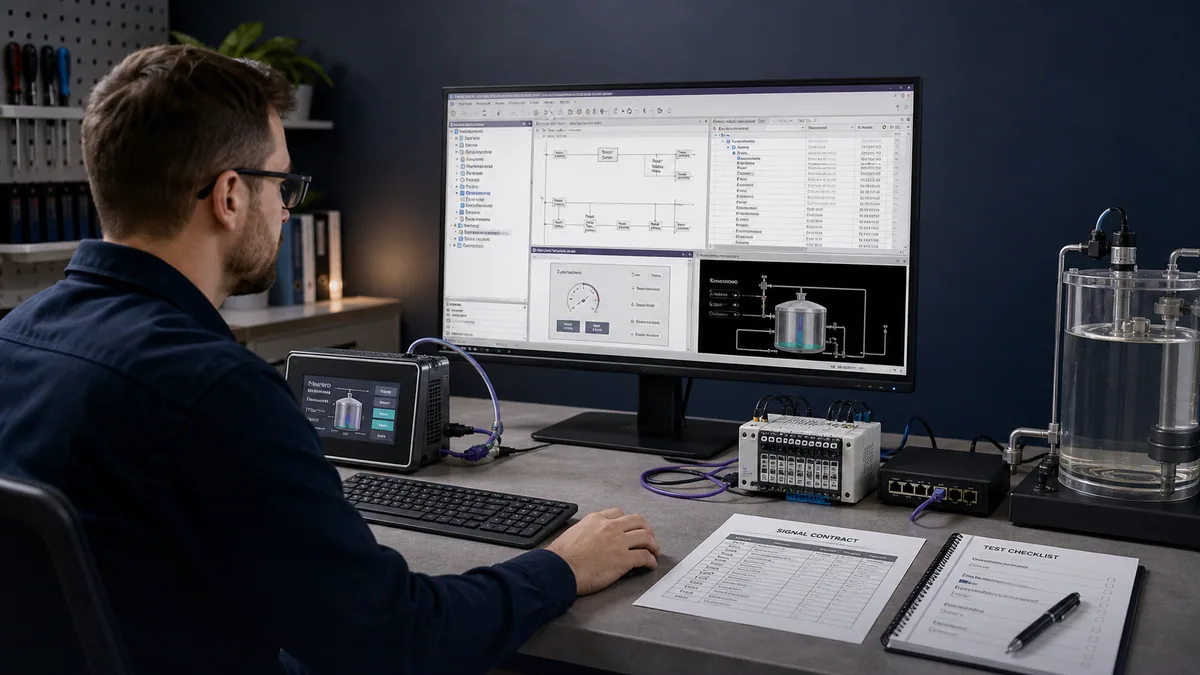
Unitronics PLC programming at a glance
| Controller family | Primary editor | Project focus | First verification |
|---|---|---|---|
| UniStream | UniLogic | PLC, HMI, communications, data, web and supported motion in one environment | exact model, UniLogic build and supplied controller firmware compatibility |
| Vision / Samba | VisiLogic | PLC ladder plus integrated graphical HMI for supported controllers | full controller model, VisiLogic version and controller OS |
| Jazz / M90 / M91 | U90 Ladder | ladder plus controller display/HMI for supported families | exact model, U90 Ladder release, OS and programming interface |
| Task | Strong evidence | Missing evidence |
|---|---|---|
| editor project build | syntax, configuration consistency and build result | physical controller execution and I/O |
| vendor online test/debug | live target tags, logic and controller state | complete field behavior unless all boundaries are tested |
| browser training model | logic reasoning, states, faults and repeatability | Unitronics compiler, OS, proprietary instructions and hardware timing |
| controlled bench test | controller execution, selected I/O, HMI and communications | production process, final panel and site conditions |
| authorized field test | installed equipment behavior under a test plan | no evidence beyond the executed scope |
Which Unitronics programming software do you need?
UniLogic is for UniStream controllers
Unitronics describes UniLogic as the complete configuration and programming environment for the UniStream control platform. Current help lists hardware and communication configuration plus Ladder, C and Structured Text development. The public product page also describes integrated HMI, web, data, alarm, motion and communication features. Availability still varies by the selected UniStream model and software/firmware combination.
Use UniLogic when the exact controller is a UniStream target listed by the current software. Record both the editor version and the controller firmware supplied or required with it. Unitronics states that firmware compatibility is checked during project download; treat that relationship as a controlled change, not an automatic permission to update.
VisiLogic is for Vision and Samba controllers
Unitronics’ VisiLogic help describes it as the tool for Vision control projects. Current Vision product pages identify VisiLogic as the all-in-one PLC and HMI programming environment. Samba is included in the VisiLogic family on Unitronics’ public software and catalog surfaces. Confirm the exact model and OS before opening or converting an established project.
VisiLogic uses an operand-oriented model familiar to existing Vision projects. Do not paste UniLogic tag examples into VisiLogic and expect project compatibility. Translate the control requirement, I/O contract and tests—not editor-specific syntax—when moving between families.
U90 Ladder is for Jazz and M90/M91
Unitronics’ U90 Ladder page and help identify Jazz, M90 and M91 as its target families. U90 Ladder provides ladder, display and variable editors plus hardware and communication configuration for those controllers. Older installations can have specific OS, cable and retention behavior, so preserve the approved environment before an update.
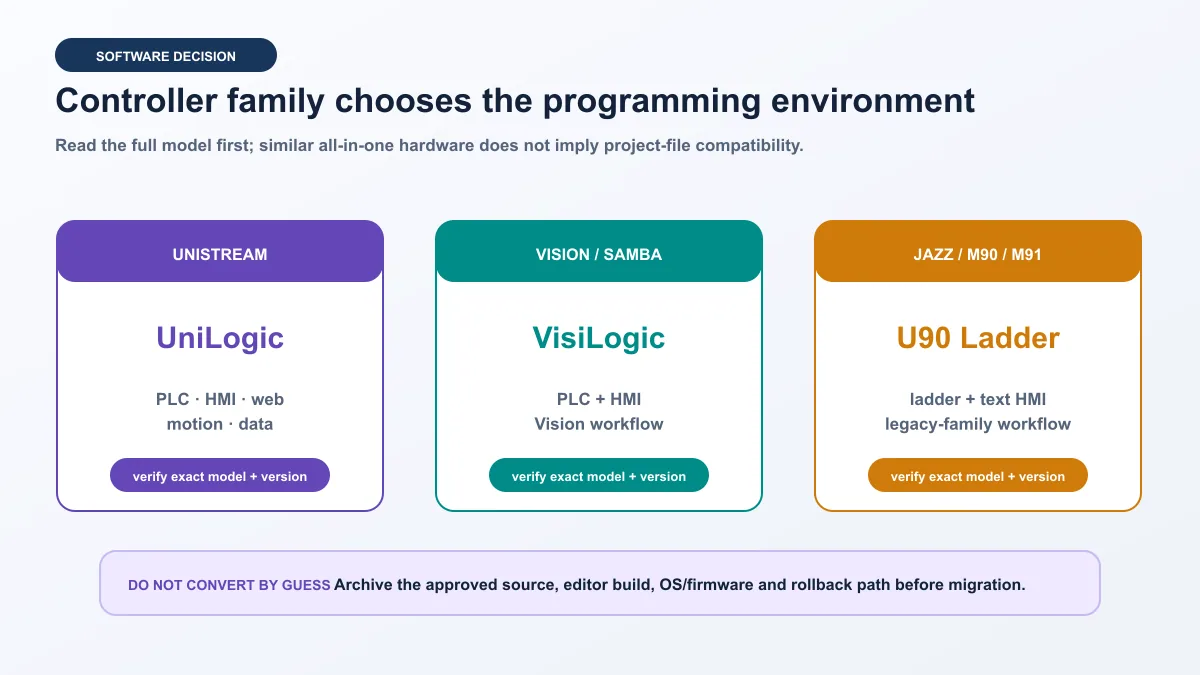
Software selection matrix
| Question | UniLogic | VisiLogic | U90 Ladder |
|---|---|---|---|
| controller family | UniStream | Vision and Samba | Jazz and M90/M91 |
| logic model | tags, structs, Ladder and documented textual options | Vision operands and Ladder/function blocks | M90/M91/Jazz operands and Ladder |
| HMI | integrated graphical HMI/web features by target | integrated graphical Vision/Samba HMI | controller display/HMI editor |
| version evidence | editor build plus supplied/compatible firmware | VisiLogic version plus controller OS | U90 Ladder version plus controller OS |
| first safe action | archive source and read target identity | archive source and read model/OS | archive source and record cable/model/OS |
| migration rule | use documented conversion or rebuild path | never overwrite the only approved project | retain compatible older environment where required |
Unitronics currently says its software, utilities and updates are provided at no charge. Keep the current terms with procurement evidence; “free download” does not eliminate engineering, hardware, Windows environment, support, migration or downtime costs.
Record the target and version before opening a project
Brownfield projects need a recoverable baseline
An upload from a controller may not be equivalent to the original engineering package with comments, libraries, graphics and build history. Obtain the approved source archive where possible. Record the controller model, serial or asset identity, OS/firmware, editor and project revision before connecting. Read-only identity checks still require authorization on a production system.
Build a compatibility manifest
| Manifest field | Example form | Review question |
|---|---|---|
| controller | full UniStream, Vision, Samba, Jazz or M90/M91 model | does the chosen editor list this target? |
| OS/firmware | observed version and approved baseline | does the project require a different version? |
| editor | UniLogic/VisiLogic/U90 Ladder plus exact build | can a copy of the source build reproducibly? |
| project | filename, revision, checksum and source owner | is this the authoritative editable source? |
| I/O/modules | exact installed models and firmware where applicable | does hardware configuration match the bench or field system? |
| communications | adapters, addresses, ports, roles and certificates/password method | can the connection be tested without broadening access? |
| rollback | known-good archive and responsible approver | can the prior state be restored safely? |
Do not upgrade controller firmware solely because the current UniLogic download bundles a newer version. Review release notes, compatibility, project changes, security advisories, downtime, recovery and regression scope. Test on a representative isolated target when the risk warrants it.
Design the integrated PLC and HMI boundary
An all-in-one PLC/HMI reduces integration work, but it does not make the screen the source of physical truth. The HMI creates requests and displays status. PLC logic owns equipment state and commands. Independent field inputs provide feedback. A data logger records history. User roles determine who may request, reset or administer each function.
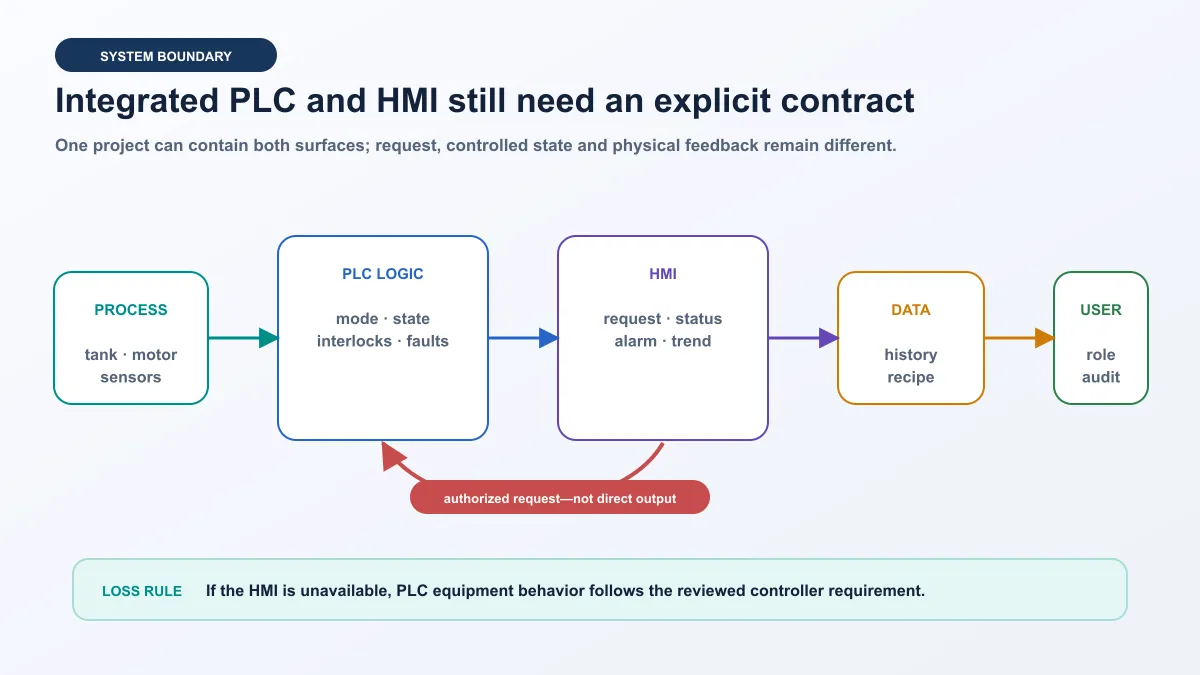
| Surface | Owns | Must not be the only proof of |
|---|---|---|
| HMI start button | authorized request and user feedback | PLC acceptance or motor motion |
| PLC equipment object | mode, permissives, state, commands and diagnostic reasons | electrical isolation or safety validation |
| output channel | command delivery to the field interface | contactor/drive response |
| running input | independent equipment feedback | all aspects of mechanical health |
| alarm | actionable abnormal condition and acknowledgement state | physical cause without supporting evidence |
| trend/history | time-correlated values and events | current value when quality or timestamp is bad |
If the HMI or visualization process becomes unavailable, the PLC follows the reviewed equipment requirement. The loss must not silently create a different control philosophy. When the screen returns, it should show communication quality and current state rather than replaying an old request.
Live mini-lab
Try it: press START, then STOP
A stop-dominant seal-in rung: START latches the motor output through its own contact, and STOP breaks the circuit.
Watch the output lamp: it stays on after START until you press STOP.
Free · no signup to try · runs in your browserOpens plcsimulationsoftware.com — same team
Build the first Unitronics PLC and HMI project
Project requirement
The training system controls a tank transfer pump. The HMI provides Auto/Manual selection within authorization, start and stop requests, level display, pump state, alarm banner and reset request. The PLC owns permissives, sequence, pump run command, feedback timer and first-out reason. A deterministic process model changes level and can inject stuck feedback, bad level quality and communication loss.
This is a low-risk teaching design, not a process or machinery safety specification. Emergency stops, guarding, safe torque off, overpressure protection and hazardous-energy control belong to qualified risk assessment and validated architectures outside the normal HMI request path.
Create the hardware and tag model
Add only the selected controller, HMI/panel arrangement, I/O and communication modules. Record channel type, range, polarity and process meaning. In UniLogic, use typed tags and structures where they improve clarity. In VisiLogic or U90 Ladder, map the same meaning into the target’s documented operand model. The signal contract should survive the translation.
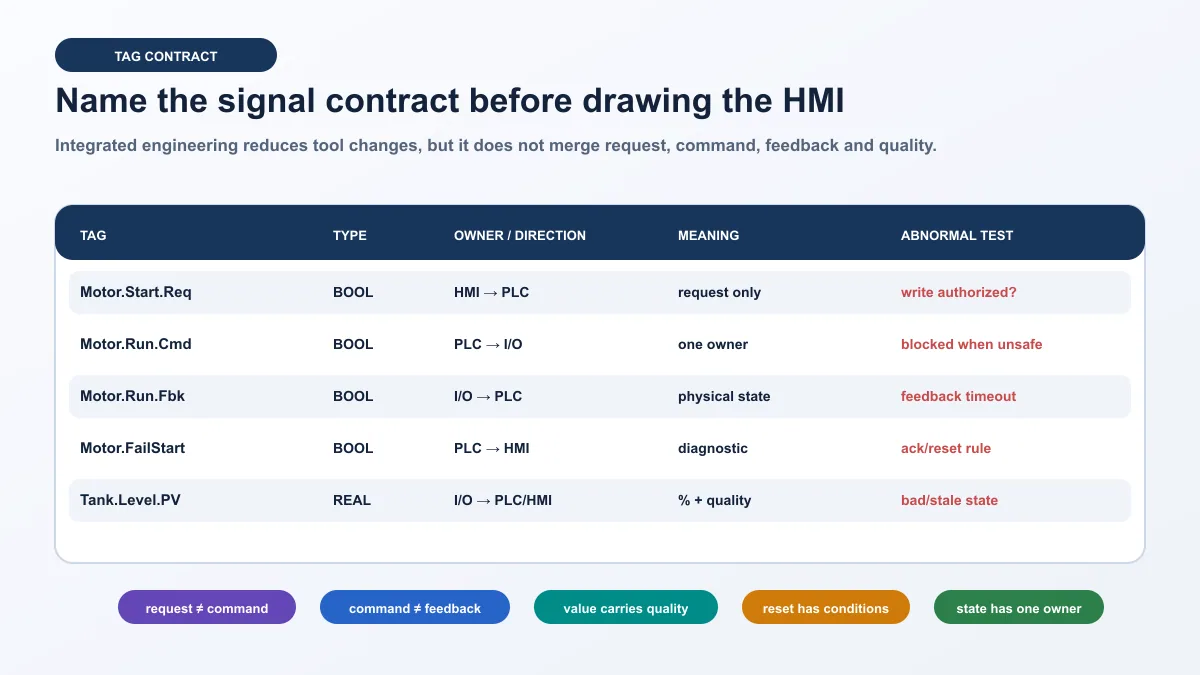
| Tag or meaning | Type | Owner/direction | HMI use | Abnormal test |
|---|---|---|---|---|
Pump.Start.Req |
BOOL | HMI → PLC | momentary or acknowledged request | hold while mode rejects start |
Pump.Stop.Req |
BOOL | HMI → PLC | controlled-stop request | issue during starting state |
Pump.Run.Cmd |
BOOL | PLC → output | command indicator, not running state | withhold feedback |
Pump.Run.Fbk |
BOOL | input → PLC/HMI | confirmed running status | delay beyond timeout |
Pump.FailStart |
BOOL | PLC → HMI/alarm | actionable diagnostic | reset while cause remains |
Tank.Level.PV |
REAL | input/model → PLC/HMI | value, unit, trend and alarm | bad quality or stale timestamp |
System.Mode |
ENUM/code | PLC-owned | current accepted mode | request unavailable transition |
Stop.Reason |
ENUM/code | PLC-owned | first relevant stopped reason | create two causes together |
Program a state, not a collection of screen bits
Use explicit stopped, starting, running, stopping and faulted states where the target and project style support them. A valid start request is accepted only when mode, level demand, availability and permissives are true. The PLC issues the pump command and waits for running feedback. Missing feedback creates a timed diagnostic and reviewed command response. Reset works only when the cause and reset conditions are satisfied.
Do not let the HMI write Pump.Run.Cmd directly. Do not display the command as “Pump Running.” Do not clear the fault solely because the operator pressed reset. Those shortcuts make a small demo appear functional while removing the evidence required for troubleshooting.
Build the HMI from controlled states
Use consistent colors and text for unavailable, stopped, starting, running, stopping, faulted and bad-quality states. Pair color with text or shape. Disable or hide a control only when the operator still receives a reason. A disabled Start button with no explanation forces guessing.
The pump faceplate should show accepted mode, start/stop availability, command, feedback, first-out reason, active permissives and reset status. The level display should include engineering units, range and quality. A trend should include level, command, feedback and relevant alarm or mode changes on the same time axis.
Follow six project gates
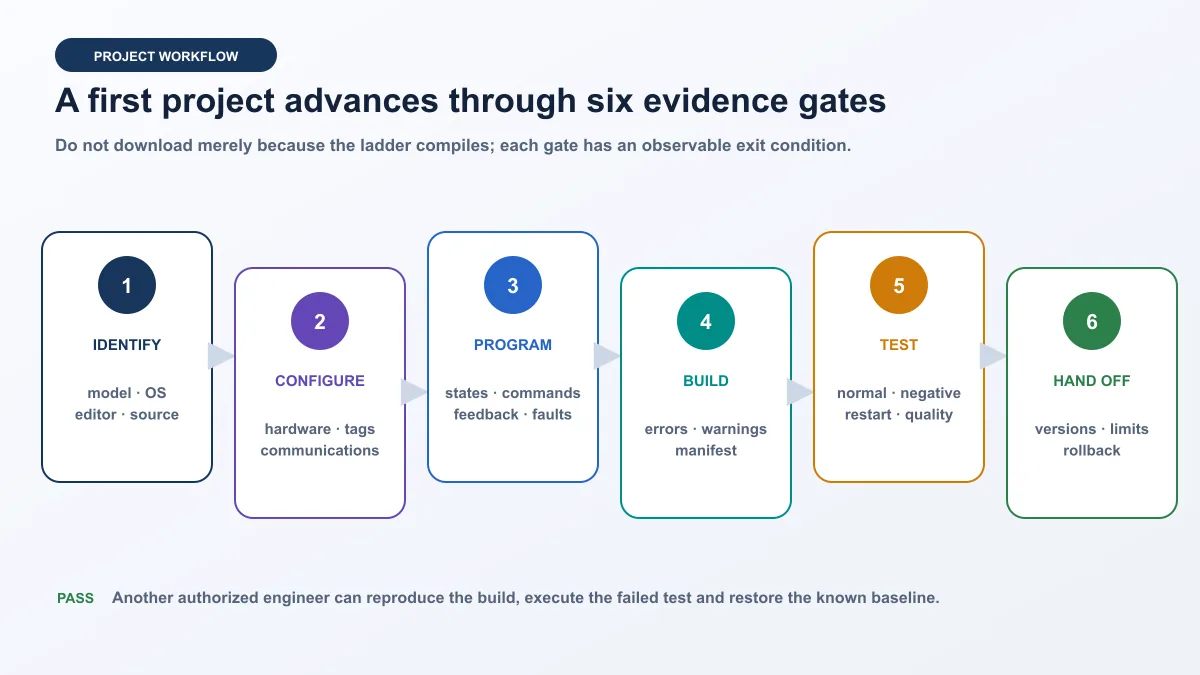
| Gate | Exit condition | Saved artifact |
|---|---|---|
| identify | exact controller, OS/firmware, editor and source owner known | compatibility manifest |
| configure | hardware, I/O, communications and accounts match the lab | configuration export and network sketch |
| program | states, requests, commands, feedback and faults have one owner | code review and cross-reference |
| build | errors resolved; warnings reviewed; version fixed | build record |
| test | normal, negative, quality, restart and recovery cases pass | traceable test matrix |
| handoff | another authorized engineer can reproduce and restore | archive, limits and rollback |
Unitronics PLC programming simulation without hardware
There is no safe universal answer that every Unitronics family includes a software-only controller emulator. Unitronics documentation prominently describes project build, online test/debug and connection to a controller. UniLogic online Test mode is an operation requiring UniLogic-to-UniStream communication and authentication. VisiLogic and U90 Ladder also document testing and debugging within their target workflows. Check the current editor’s help for the exact target rather than assuming “test mode” means a virtual PLC.
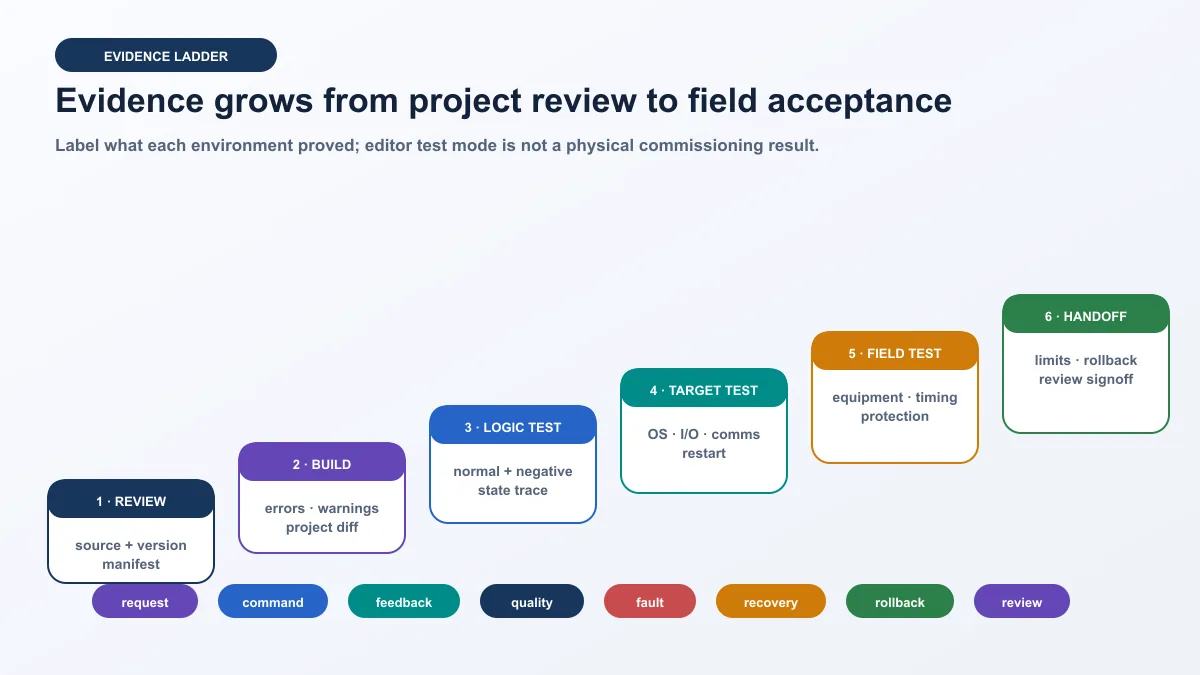
A browser or generic PLC simulator can teach the state model, timer intent, permissive logic and injected faults. It does not compile a Unitronics project or emulate UniStream, Vision, Samba, Jazz or M90/M91 firmware. A hardware bench adds controller execution, target I/O, integrated HMI and communication evidence. Field commissioning adds the installed machine or process boundary.
| Environment | Can prove | Cannot prove |
|---|---|---|
| paper/state review | completeness and expected transitions | code execution |
| browser logic model | deterministic behavior, faults and reset rules | Unitronics syntax, OS, I/O or timing |
| editor build | target configuration and accepted project syntax | controller execution |
| online target test | actual controller tags, tasks, HMI and selected communications | untested field wiring and process behavior |
| isolated I/O bench | physical channels and chosen devices | production scale, final hazards and installation |
| field commissioning | only the executed installed-system tests | scenarios outside the approved test plan |
Simulation cannot validate safety functions, hazardous-energy control or an installed protective circuit. Do not connect a training workstation to production OT or use production credentials for practice.
Test the integrated project
Normal and negative cases
| ID | Initial state | Action or fault | Expected PLC/HMI evidence | Pass rule |
|---|---|---|---|---|
| U01 | stopped, level demand and permissives true | request Auto start | request accepted, command true, feedback follows, state running | trace completes once without alarm |
| U02 | stopped, permissive missing | request start | command remains false; screen names reason | no transient output command |
| U03 | starting | withhold running feedback | timer expires, fail-start appears, command follows design | alarm and first-out reason persist |
| U04 | running | request controlled stop | command drops; feedback clears; state stops | held start does not cause surprise restart |
| U05 | fault active | request reset | reset rejected or fault remains with reason | active cause is not concealed |
| U06 | level input active | mark value bad/stale | quality shown; control follows defined degraded response | plausible last value is not presented as good |
| U07 | any defined state | interrupt HMI/connection | PLC follows reviewed behavior; HMI returns with current quality/state | old request is not replayed |
| U08 | known stopped/faulted state | restart controller/runtime | retained and initialized data match design | no unintended output command |
Capture one timeline
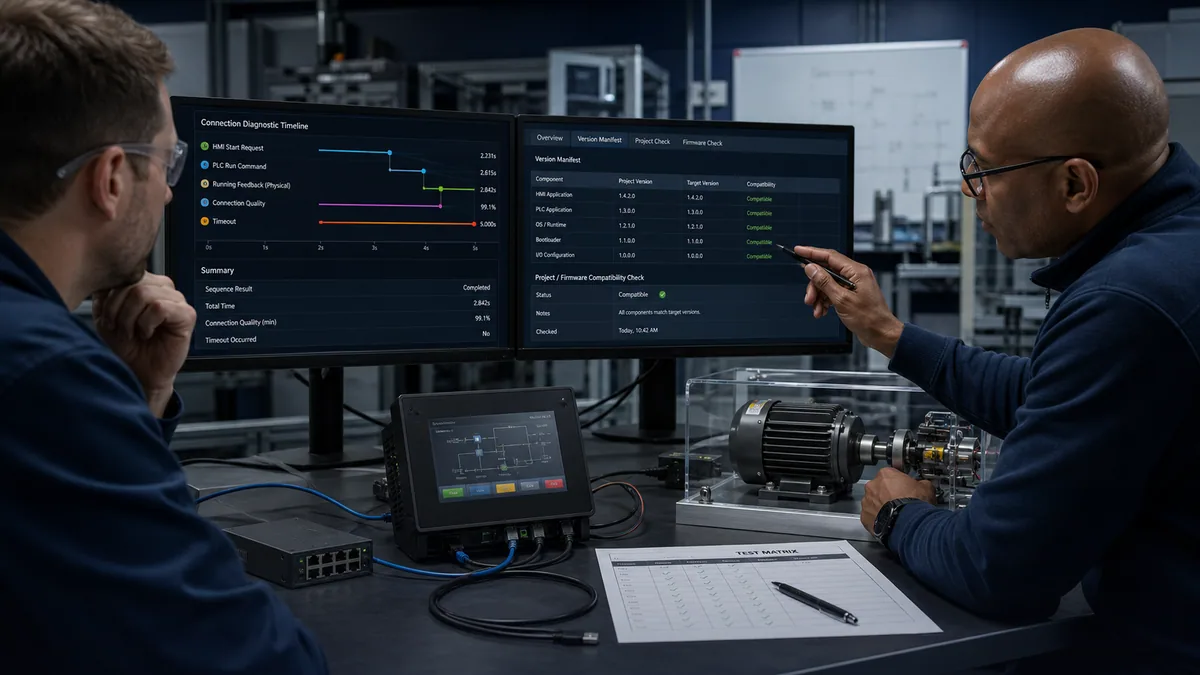
For each case, record the project revision, editor build, controller/firmware, initial state, action time, request, state, command, feedback, fault, communication quality and result. A screen capture of a green rung is incomplete because it does not establish the starting conditions or physical response.
Connect UniLogic to a UniStream controller safely
Use an isolated, documented path
Record the engineering workstation adapter, address, controller/panel addresses where applicable, switch, connection method and permitted ports. Unitronics documents authenticated UniLogic-to-UniStream communication for download, upload, verify, online Test mode and controller work-mode changes. Treat passwords and network access as controlled assets; do not publish or reuse default credentials.
Starting with the documented authentication generation, UniLogic requires a PLC password for operations that communicate with the controller and prompts for a change from the default on the first applicable connection. Follow the current help and the site’s identity process. A password reset procedure is not authorization to take control of an installed system.
Keep firmware compatibility visible
Unitronics help says UniLogic checks controller firmware compatibility when downloading a project and provides Firmware Manager for firmware files. Review the proposed change, backups and rollback before accepting an update. A compatible message is useful evidence, but it does not replace application regression testing.
Troubleshoot a Unitronics PLC connection
Diagnose from physical link to application
When the editor cannot connect, begin with the approved manifest. Confirm controller power and link, the selected workstation adapter, documented address and port, authentication, exact controller identity, editor/firmware compatibility and application state. Do not disable security controls or open a router to the internet as an improvised fix.
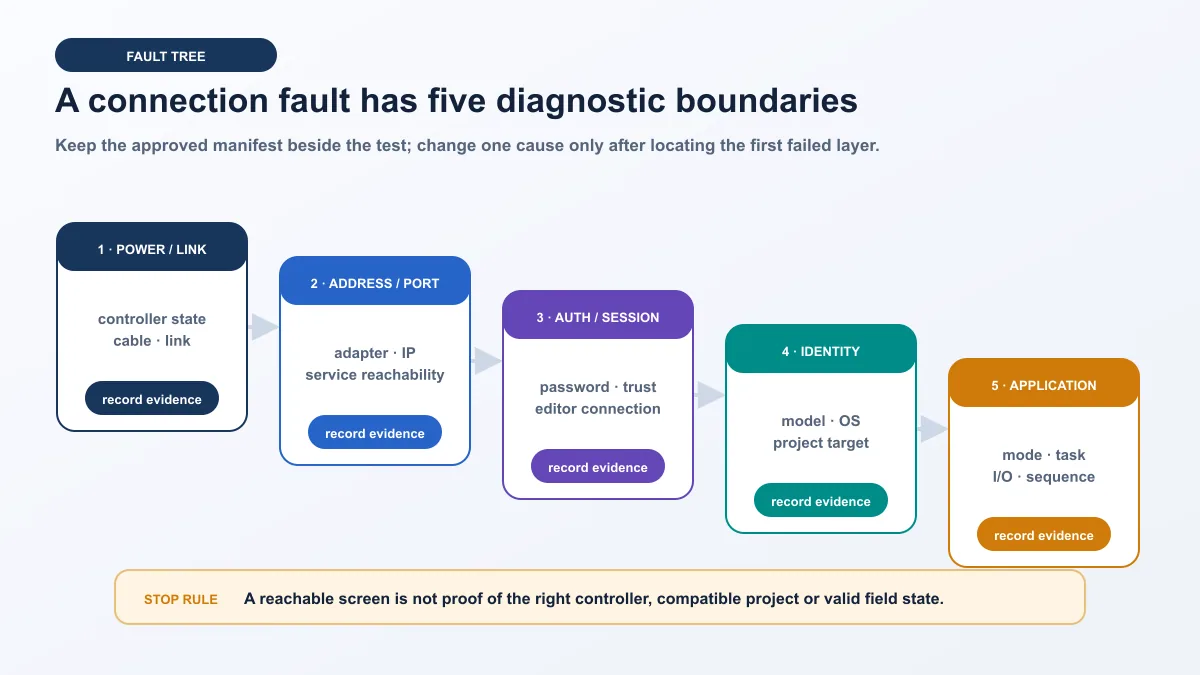
| Symptom | First discriminating check | Boundary | Avoid |
|---|---|---|---|
| no link or target | compare power, cable, link and selected adapter with manifest | physical/link | changing project or firmware |
| address responds but editor does not | verify documented service path and workstation policy | port/session | opening broad inbound or internet forwarding |
| password/authentication rejected | verify authorized account process and correct target | identity/access | repeated defaults or unapproved reset |
| editor connects to wrong target | compare model, serial/asset and project identity | target identity | downloading to “see if it matches” |
| compatibility prompt appears | compare editor, project and OS/firmware evidence | version | accepting update without rollback |
| online values good but motor does not run | trace request, state, command, I/O and feedback | application/field | equating an HMI color with equipment motion |
Follow the first divergence
Write the expected sequence before reproducing the problem. Compare HMI request, PLC state, run command, mapped output, running feedback and diagnostic reason. Stop at the first value that differs. Apply one change, restore the saved baseline, repeat the failed test, then run a regression case.
Configure communications as a data contract
Unitronics publishes communication capabilities by controller and software family. UniLogic’s product page lists interfaces such as Modbus TCP/RTU, EtherNet/IP, CANopen, MQTT, OPC UA and others, with model and feature qualifications. Vision and Samba product pages list their applicable ports and protocols. Confirm exact target support before design.
| Contract field | Question | Failure test |
|---|---|---|
| interface | Ethernet, serial, CAN or documented option? | link/cable removed |
| role | client/server, master/slave, scanner/adapter or publisher/subscriber? | absent or duplicate peer |
| identity | IP, station, endpoint, node or device name? | wrong identity |
| data | tag/operand, type, units, width and byte order? | known boundary pattern |
| quality | how are disconnected or stale values represented? | retain last value after loss |
| authorization | who can read, write, reset or administer? | denied role attempts write |
| timing | update, timeout, retry and watchdog? | delay and silence |
| recovery | reconnection and command replay behavior? | disconnect during request |
For remote access, use the approved security architecture, least privilege, logging and change process. Unitronics documents VNC and web capabilities for applicable UniStream systems; capability is not permission to expose a controller directly to the internet.
Commission and hand off the project
Commission in ordered gates: verify target identity; compare the approved source; validate inputs; test output logic with the field boundary isolated where possible; execute approved physical output checks; test the pump object; then run sequences, communications loss, restart and recovery. Use the employer’s electrical, machinery and process safety procedure.
| Handoff item | Minimum content | Why it matters |
|---|---|---|
| source archive | editable project, checksum and owner | enables controlled future work |
| build manifest | editor, OS/firmware, controller and module versions | makes the result reproducible |
| signal contract | tags/operands, types, units, ownership and quality | connects PLC, HMI and field evidence |
| test record | normal, negative, restart, access and communication cases | shows what was actually executed |
| diagnostic record | unresolved warnings, faults and limitations | prevents hidden assumptions |
| rollback | known-good archive, procedure and approver | supports safe recovery |
Do not include live credentials, proprietary plant diagrams or licensed source in a public portfolio. A useful learning portfolio can include the original requirement, generic I/O contract, state table, selected logic excerpts, HMI state rationale, test matrix, fault trace and explicit simulation/hardware limits.
Diagnostic answer map for Unitronics PLC programming
| Question | Concise answer | Evidence surface |
|---|---|---|
| What software programs Unitronics PLCs? | UniLogic, VisiLogic or U90 Ladder, selected by controller family. | software-family matrix |
| What is the difference between UniLogic and VisiLogic? | UniLogic targets UniStream; VisiLogic targets Vision and Samba. | compatibility decision |
| Is Unitronics software free? | Unitronics currently says its software and updates are provided at no charge. | current source and total-cost caveat |
| Can I simulate without a controller? | Generic logic can be simulated; do not assume a universal Unitronics virtual controller. | evidence-level table |
| How do I start a UniLogic project? | identify target/versions, configure, program, build, test and hand off. | six-gate workflow |
| How do I troubleshoot connection failure? | move from link to port, authentication, identity and application. | five-layer fault tree |
| Can PLC and HMI use one project? | yes on supported all-in-one workflows, with explicit state ownership. | integrated contract |
| What proves commissioning? | target-specific normal, negative, restart and recovery evidence. | test and handoff matrices |
For a requirements-led comparison before committing to one ecosystem, use the PLC brands and hardware shortlist. Return here once Unitronics is selected and the task becomes an exact controller, software, I/O, communications or diagnostic workflow.
Frequently asked questions
What software programs a Unitronics PLC?
Use UniLogic for UniStream, VisiLogic for Vision and Samba, and U90 Ladder for Jazz and M90/M91. Confirm the full controller model and current compatibility source before installing an editor or opening the project.
What is the difference between UniLogic and VisiLogic?
UniLogic is the integrated engineering environment for UniStream controllers. VisiLogic creates PLC and HMI applications for Vision and Samba controllers. Their controller targets, project formats, tag or operand models, firmware paths and features differ; transfer the requirement and tests rather than assuming file compatibility.
Is Unitronics PLC programming software free?
Unitronics currently states that its software, utilities and updates are provided at no charge. Verify the current download terms. Hardware, Windows environments, engineering, training, migration, support and downtime still contribute to total cost.
Can Unitronics PLC programs be simulated without a controller?
You can simulate the generic state and fault logic in a browser or other learning model, but that does not emulate Unitronics firmware. Check the exact editor/target help for any supported software testing. UniLogic online Test mode is documented as a controller communication operation, not proof of a universal virtual PLC.
How do I create my first UniLogic project?
Record the exact UniStream model, UniLogic build and controller firmware; configure the hardware and tags; build one state-based motor or tank object; create HMI requests and status from the signal contract; build; execute abnormal tests; then repeat target-specific tests on an authorized controller.
How do I create a VisiLogic project for a Vision PLC?
Confirm the full Vision or Samba model and controller OS, create the matching hardware configuration, define documented operands, implement the PLC state and HMI screens, build the project, review warnings and test it using the target-specific VisiLogic workflow. Preserve the original source and rollback first.
How do I troubleshoot a UniLogic connection to UniStream?
Compare the connection with the approved manifest. Check power/link, selected adapter, address and service path, authenticated access, exact controller identity, UniLogic/project/firmware compatibility and application state in order. Do not accept firmware changes or open network exposure as first-line fixes.
Can a Unitronics PLC and HMI be programmed together?
Yes. Unitronics all-in-one environments combine supported PLC and HMI development. Keep responsibilities separate: the HMI requests and displays; the PLC owns controlled state and commands; physical inputs provide feedback; roles authorize actions; quality and timestamps identify stale data.
Can Unitronics PLCs communicate with Modbus or OPC UA?
Applicable models and software support documented communication protocols, including Modbus and, on applicable UniStream configurations, OPC UA and other interfaces. Verify the exact model, role, license or feature, port, data mapping, security and failure behavior in current Unitronics documentation.
What should a Unitronics PLC commissioning package contain?
Retain the editable project, editor build, controller and OS/firmware manifest, module list, signal contract, normal and negative test results, access and communication-loss tests, diagnostic trace, known limitations and rollback method. Another authorized engineer should be able to reproduce the build and identify the target.
Sources, review scope, and limitations
This independent guide was reviewed on 29 August 2026. Verify current releases, controller models, OS/firmware, features and terms at the point of work.
- Unitronics UniLogic software for UniStream
- Unitronics UniLogic current online help
- Unitronics UniLogic firmware help
- Unitronics UniLogic-to-UniStream authentication
- Unitronics UniLogic remote-access help
- Unitronics UniStream controller-family overview
- Unitronics 2026 controller and software catalogue
- Unitronics VisiLogic getting-started help
- Unitronics VisiLogic FAQ
- Unitronics Vision350 product and VisiLogic surface
- Unitronics U90 Ladder software page
- Unitronics U90 Ladder getting-started help
- Unitronics official software help index
- Unitronics UniStream remote-I/O help
- PLCopen IEC 61131-3 overview
- Modbus Organization specifications
- OPC Foundation OPC UA overview
- NIST SP 800-82 Rev. 3
- CISA industrial control systems advisories
- OSHA control of hazardous energy
The guide does not reproduce Unitronics manuals, screens or proprietary project code. It does not establish compatibility for an unnamed model, recommend exposing remote services, authorize a firmware change, validate a safety function or replace qualified commissioning. Use official documentation for the exact target and the employer’s approved engineering, cybersecurity, electrical and operational procedures.
Now run it · free · no signup
Skip the installer and run PLC logic now
Run one guided program in your browser without an account or card, then create a free account when you want the practice library.
Ownership disclosure: PLC Programming IO and PLC Simulation Software are operated by the same publisher.
PLC Programming IO Editorial Team
Industrial automation education, references, and software testing
The PLC Programming IO Editorial Team publishes sourced industrial-automation education and documents how material is reviewed, tested, and corrected. A team byline means the publisher is responsible for the page; it does not represent a fictional person or imply an engineering licence.
Coverage:
- • PLC programming concepts and examples
- • Vendor software tutorials and comparisons
- • SCADA, HMI, protocols, and instrumentation
- • Training, careers, and reference material
Review standard:
- • Prefer primary and official sources
- • Record software versions when material
- • Separate tested facts from estimates
- • Publish material corrections
Important scope note
This site provides education, not project-specific engineering approval. Safety, code, and compliance decisions require a qualified person with access to the actual machine and jurisdiction.