Structured Text Loops and Control Flow for PLCs
Use IF, CASE, FOR, WHILE, REPEAT, EXIT, CONTINUE and RETURN safely in PLC Structured Text with bounded execution, scan traces, chunking, diagnostics and vendor notes.
Review status: Editorially reviewed against IEC 61131-3:2025 scope and current official CODESYS, Rockwell Studio 5000, Siemens SCL, Beckhoff TwinCAT, Schneider Machine Expert and Omron CX-Programmer Structured Text documentation; exact syntax, loop-bound evaluation, integer overflow, array checking, short-circuit behavior, CONTINUE/RETURN support, task scheduling, watchdog, compiler optimization, execution time, stateful-instance and safety behavior require exact target verification
Direct answer
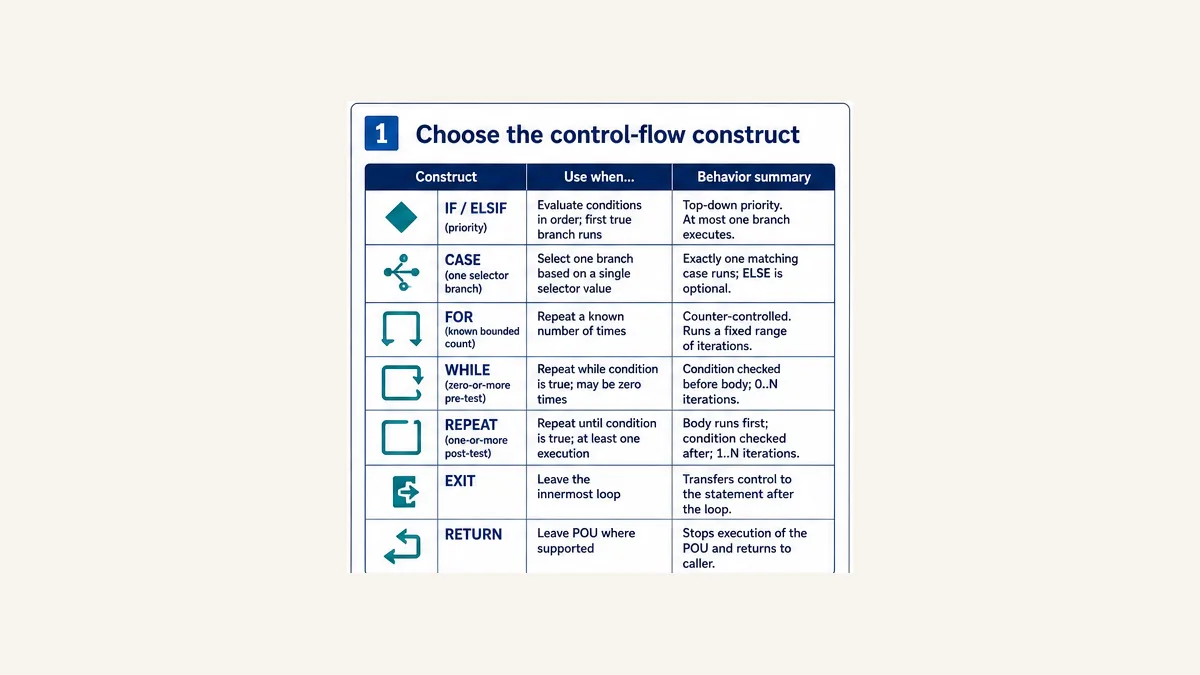
In PLC Structured Text, use IF / ELSIF / ELSE for ordered priority decisions, CASE for one branch selected by a discrete value or state, FOR for a known bounded iteration range, WHILE when the body may execute zero times, and REPEAT ... UNTIL when the body must execute at least once. EXIT leaves the immediately enclosing loop. CONTINUE skips the remainder of the current iteration where the exact compiler supports it. RETURN leaves the current POU/routine according to product-specific rules.
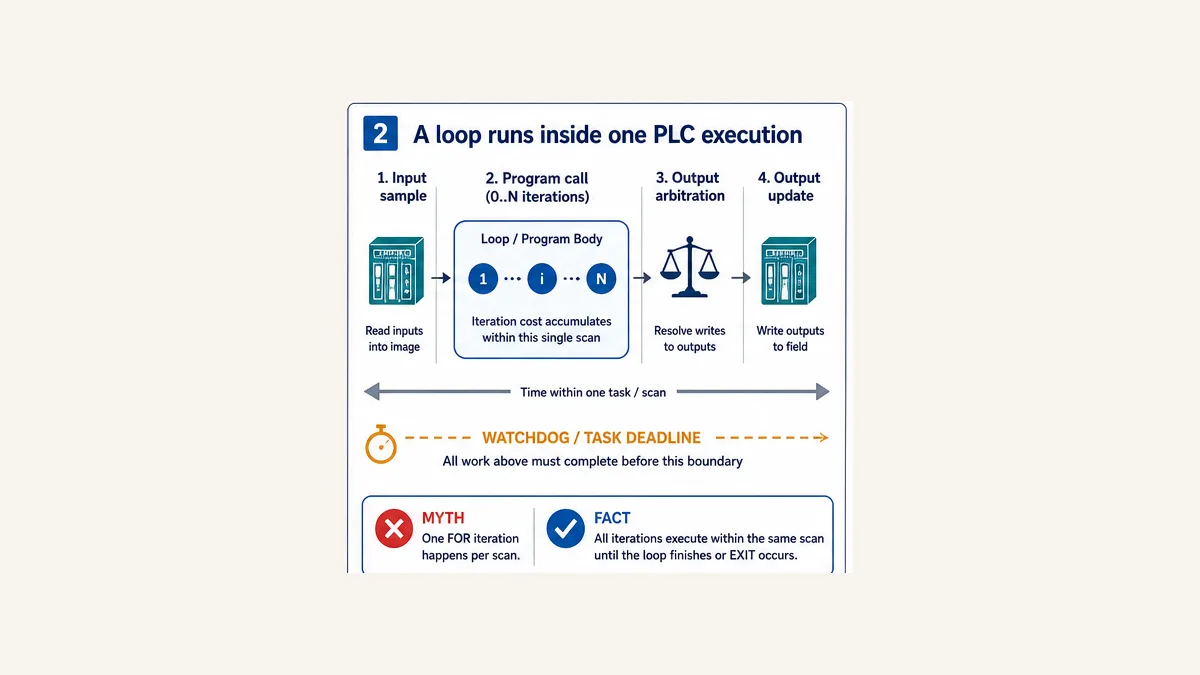
The most important PLC rule is that a normal loop executes inside one program/task invocation. A FOR loop with 1,000 iterations does not automatically perform one iteration per scan; it attempts all iterations before later statements in that routine can execute. Excessive or unbounded work can miss the task deadline or trigger a watchdog fault. If work must be spread over scans, store a cursor and result state, process a fixed budget per call, validate a stable data version and define cancellation/restart behavior.
Prefer bounded FOR loops for array work. If WHILE or REPEAT is necessary, add a hard maximum-iteration guard and prove that every path either makes progress, exits or faults. Validate bounds before the array reference. Do not call one timer or stateful function-block instance repeatedly for unrelated elements; use independent instances when independent memory is required. Measure worst-case time on the exact CPU, compiler, task and data—not only in a browser or desktop simulation.
Download the complete Structured Text examples, 26-case control-flow test matrix and loop/task budget worksheet.
Page ownership and prerequisites
This guide owns control-flow selection, bounded execution and loop failure behavior. The broad Structured Text programming guide remains the language/tutorial owner. The PLC arrays and data-handling guide owns array declarations, bounds, copy/fill, numeric types and data transactions. The PLC sequencer/state-machine guide owns multi-scan operating states and transitions. This page links them without turning loops into a second full ST or arrays course.
All examples use IEC-style notation. Exact declarations, supported constructs and keywords vary by vendor, controller family, tool version and language edition. “IEC Structured Text” describes a standard family; it does not mean every extension or compiled behavior is interchangeable.
Control-flow construct selector
| Construct | Condition evaluated | Iterations/branches | Best use | Main PLC risk |
|---|---|---|---|---|
IF / ELSIF / ELSE |
top to bottom until first true | at most one branch | priority and range decisions | hidden priority or output left stale without defaults |
CASE |
selector once per execution of statement | one matching label/ELSE |
state/enumeration/command dispatch | missing invalid/default branch |
FOR |
initial, terminal and step per target semantics | normally known/bounded | arrays and fixed repeated calculations | inclusive-bound error or too much work in one scan |
WHILE |
before every iteration | zero or more | bounded search/process where initial execution is optional | zero progress or condition never becomes false |
REPEAT ... UNTIL |
after every iteration | one or more | bounded process that must run once before testing | unintended first write or condition never becomes true |
EXIT |
when reached inside loop | leaves innermost loop | first-match search or early invalid condition | assumed to exit nested outer loop too |
CONTINUE |
when reached inside loop | skips remainder of current iteration | reject invalid item and continue | non-portable extension and skipped cleanup/counter code |
RETURN |
when reached in supported POU/routine | leaves current call surface | reject invalid input before main body | outputs retain stale values if defaults not assigned first |
Avoid GOTO for ordinary application flow even where a target accepts it. It can jump around initialization, validation and diagnostic assignments, making worst-case execution and review harder. Structured constructs make entry and exit points visible.
A loop runs within one PLC execution
Correct the one-iteration-per-scan myth
Assume a periodic task does this:
- reads or uses its current input image;
- calls an ST routine;
- the routine executes a
FOR i := 0 TO 999 DO ... END_FOR; - later logic arbitrates commands; and
- outputs are updated according to the platform/task/I/O model.
The routine normally finishes the loop before step 4. If each iteration takes 8 microseconds, loop work alone is about 8 ms before fixed routine/task overhead. A 10 ms periodic deadline now has little headroom. Real per-iteration cost depends on the operations, types, memory, called POUs, compiler optimization, target and data-dependent branches.
Rockwell’s current WHILE_DO, REPEAT_UNTIL and FOR_DO documentation explicitly warns not to iterate too many times in one scan; current WHILE_DO help identifies a major fault if the construct runs beyond the task watchdog. Other runtimes have their own watchdog and overrun behavior. Increasing the watchdog without bounding and measuring the loop hides the cause and can delay the rest of control.
Estimate and measure the budget
Use a conservative engineering estimate:
Predicted task time = fixed worst-case work + maximum iterations × worst measured cost per iteration + preemption/communication margin
Do not calculate from average input length if the valid maximum can arrive. Use a target trace or task diagnostics to measure minimum, typical and maximum execution under representative worst-case data, communications, online monitoring and task interaction. Set a project-specific headroom requirement rather than running at the deadline.
| Budget input | Example | Evidence |
|---|---|---|
| periodic task interval | 10 ms | task configuration |
| approved code budget | 7 ms | architecture/timing requirement |
| worst fixed task work | 2.1 ms | target trace across representative load |
| maximum valid items | 64 | interface/array contract |
| worst per-item cost | 12 µs | target measurement with costly branch/type path |
| predicted total | 2.868 ms | fixed + 64 × 0.012 |
| headroom to code budget | 4.132 ms | budget minus prediction |
This estimate is not timing validation. Cache, memory layout, library calls, floating point, strings, communication instructions, task preemption, online tools and target generation can change execution.
IF, ELSIF and ELSE: priority control
Only the first true branch executes
Command := FALSE;
Decision := E_Decision.None;

IF AbortReq THEN
    Decision := E_Decision.Abort;
ELSIF StopReq THEN
    Decision := E_Decision.Stop;
ELSIF StartReq AND Ready THEN
    Command := TRUE;
    Decision := E_Decision.Start;
ELSE
    Decision := E_Decision.NoRequest;
END_IF;
Run Structured Text in the simulator
If Abort and Start are true, Abort wins because it is checked first. ELSIF is not the same as separate IF statements: separate statements can both execute and later assignments can overwrite earlier results. Write the priority in a cause/effect table and test simultaneous conditions.
Default outputs and diagnostic reason before the decision unless every branch assigns them. Without a default/ELSE, a stateful program variable can retain its prior value, which may look like an intentional latch.
Do not assume short-circuit evaluation
This condition is unsafe if the target evaluates both operands before applying AND:
IF (Index < Length) AND (Values[Index] = Target) THEN
    Found := TRUE;
END_IF;
Run Structured Text in the simulator
Use nested validation for portable safety:
IF (Index >= 0) AND (Index < Length) THEN
    IF Values[Index] = Target THEN
        Found := TRUE;
    END_IF;
END_IF;
Run Structured Text in the simulator
CODESYS documents AND_THEN as a non-IEC extension that short-circuits later operands, while ordinary AND evaluates all operands. That extension cannot be assumed in another compiler. Rockwell publishes operator precedence/order but the safe translation remains explicit nesting unless exact product documentation proves the intended evaluation. Never use an invalid array/pointer access as the right side of an unverified Boolean expression.
CASE: one selector, one branch
Use CASE for a state, mode, command or discrete classification:
CASE State OF
    E_State.Idle:
        RunCmd := FALSE;
    E_State.Starting:
        RunCmd := TRUE;
    E_State.Running:
        RunCmd := TRUE;
    E_State.Faulted:
        RunCmd := FALSE;
ELSE
    RunCmd := FALSE;
    InvalidStateFault := TRUE;
END_CASE;
Run Structured Text in the simulator
IEC-style ST has no C-style fall-through: one matching label’s statements execute. CODESYS documents individual labels, comma-separated labels and label ranges for its supported selector types. Other targets differ on enumeration qualification, ranges and allowable selector types. Always include an invalid/default policy when a corrupted, migrated or uninitialized selector could occur.
CASE does not inherently make a state machine scan-safe. If branches write State and a second CASE reads it later in the same call, cascading remains possible. Use the two-phase pattern in the sequencer guide when only one transition may commit.
FOR: the safest default for known bounds
Inclusive endpoints and explicit step
Sum := LREAL#0.0;
ValidCount := UINT#0;

FOR i := 0 TO 7 BY 1 DO
    IF Samples[i].Valid THEN
        Sum := Sum + REAL_TO_LREAL(Samples[i].Value);
        ValidCount := ValidCount + UINT#1;
    END_IF;
END_FOR;
Run Structured Text in the simulator
For the common inclusive 0 TO 7 semantics, eight iterations execute. 0 TO 8 risks an out-of-range access for an eight-element zero-based array. Named bounds or supported LOWER_BOUND/UPPER_BOUND functions reduce duplication, but verify availability and dimension syntax.
The exact loop-variable and terminal behavior is not a portability detail. Current Rockwell FOR_DO documentation permits positive or negative step values and describes ending after the index passes the terminal in the step direction. CODESYS-derived targets document their own evaluation and overflow caveats. Siemens SCL and Omron tools have generation-specific rules. Do not depend on the loop variable’s value after normal completion or EXIT without target documentation and a test; copy the meaningful result into a separate output.
Never mutate the loop contract inside the body
Do not write the index, terminal value, step or input length from inside the loop. Even where accepted, it hides the maximum iteration count and can create missed items, repeated items or nontermination. Capture a validated length/bound before the loop if another task or communication service can change it.
| Bound failure | Example | Consequence | Better pattern |
|---|---|---|---|
| off by one | 0 TO Length for count Length |
one extra access | 0 TO Length - 1 after Length > 0, or explicit upper bound |
| signed/unsigned conversion | Length=0, compute unsigned Length-1 |
wraps to maximum | guard zero before subtraction |
| changing length | HMI/network updates Length during loop |
data-dependent boundary | validate and snapshot length/version |
| overflow at terminal | loop type at numeric maximum with positive increment | target-specific wrap/nontermination | choose wider type/safer terminal and target-test |
| body writes index | i := i + 1 inside FOR |
skipped values or undefined target behavior | let construct own index |
| excessive maximum | valid 100,000 items | task/watchdog overrun | reject, optimize or chunk across calls |
Bounded first-match search with EXIT
Full example
Found := FALSE;
FoundIndex := DINT#-1;
Iterations := UINT#0;
ExitReason := E_LoopExitReason.None;

FOR i := 0 TO 7 DO
    Iterations := Iterations + UINT#1;
    IF Values[i] = Target THEN
        Found := TRUE;
        FoundIndex := i;
        ExitReason := E_LoopExitReason.Match;
        EXIT;
    END_IF;
END_FOR;

IF NOT Found THEN
    ExitReason := E_LoopExitReason.Complete;
END_IF;
Run Structured Text in the simulator
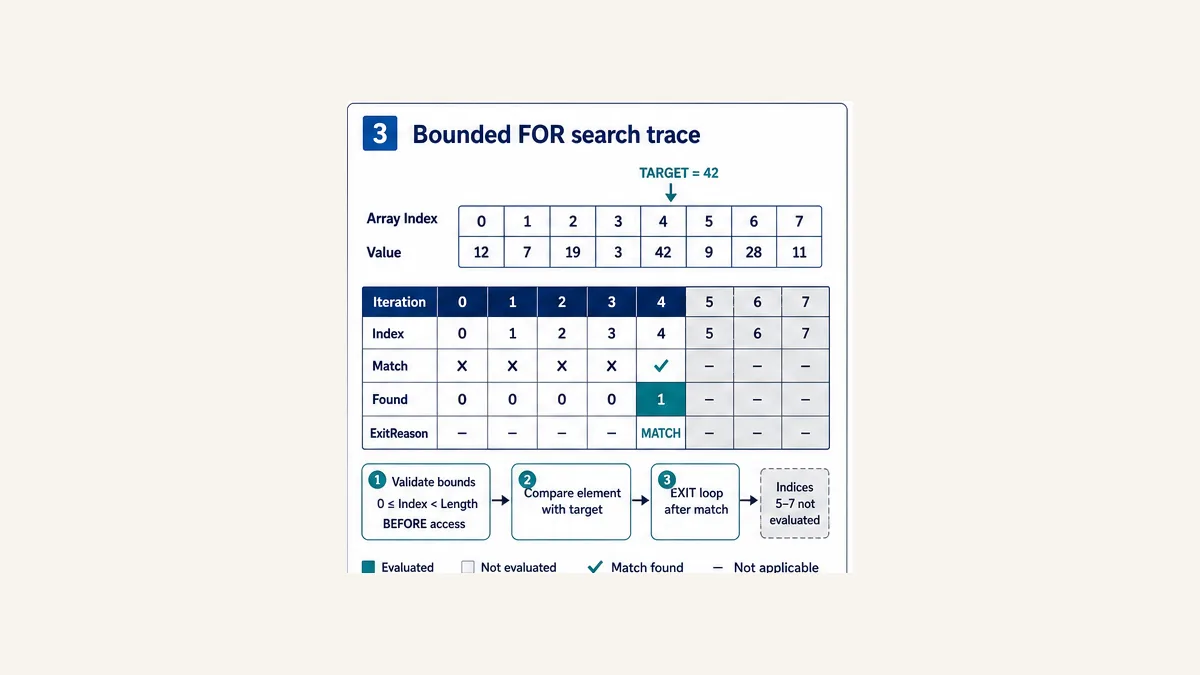
For values [12, 7, 19, 3, 42, 9, 28, 11] and target 42, iterations evaluate indexes 0, 1, 2, 3 and 4. EXIT then transfers execution to the statement after END_FOR; indexes 5–7 are not evaluated. FoundIndex = 4, Iterations = 5 and ExitReason = Match.
Nested-loop boundary
EXIT leaves the immediately enclosing loop, not every outer loop. For a two-dimensional search, set a Found flag and check it after the inner loop, or isolate the search in a function and use its supported return behavior. Do not assume one EXIT escapes the whole algorithm.
Live mini-lab
Try it: press START, then STOP
A stop-dominant seal-in rung: START latches the motor output through its own contact, and STOP breaks the circuit.
Watch the output lamp: it stays on after START until you press STOP.
Free · no signup to try · runs in your browserOpens plcsimulationsoftware.com — same team
WHILE and REPEAT: prove termination
Zero passes versus at least one pass
Iterations := UINT#0;
WHILE (Cursor < Length) AND (Iterations < MaxIterations) DO
    Process(Values[Cursor]);
    Cursor := Cursor + UINT#1;
    Iterations := Iterations + UINT#1;
END_WHILE;
Run Structured Text in the simulator
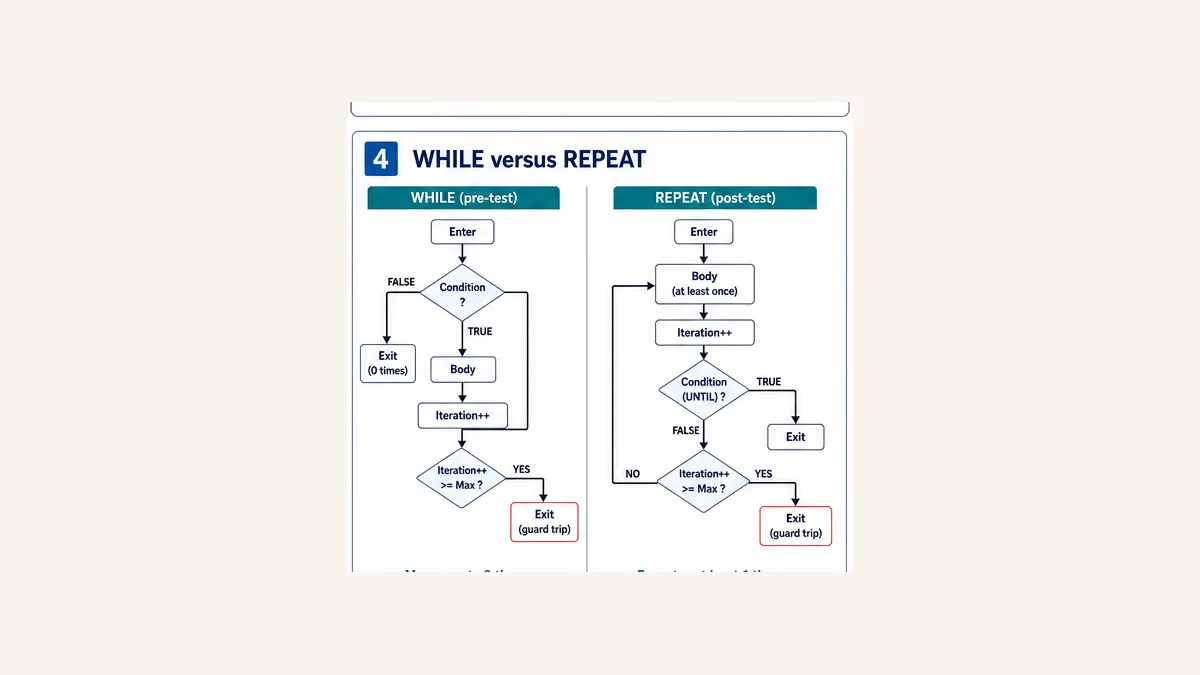
WHILE checks before the body, so it can execute zero times. REPEAT checks its UNTIL condition after the body, so it executes at least once:
Iterations := UINT#0;
REPEAT
    ProcessOne();
    Iterations := Iterations + UINT#1;
UNTIL Done OR (Iterations >= MaxIterations)
END_REPEAT;
Run Structured Text in the simulator
The REPEAT example must only run when calling ProcessOne() once is valid. Do not use it for an array that may be empty unless the body checks the empty condition before access. CODESYS, Beckhoff, Schneider and Rockwell documentation all describe the post-test behavior; exact punctuation and compiler acceptance still vary.
Three-part termination proof
For every WHILE or REPEAT, document:
- variant/progress: which value moves toward termination on every continuing path;
- bound: the hard maximum iterations permitted in one call; and
- failure: the status/fault returned when progress stops or the maximum is reached.
If a body contains CONTINUE, verify that progress and iteration count happen before the CONTINUE or otherwise still occur. Skipping the increment is a classic infinite-loop defect.
CONTINUE, EXIT and RETURN
Treat support as a dialect decision
EXIT is widely documented for FOR, WHILE and REPEAT. CONTINUE is not uniformly portable: current CODESYS, Beckhoff ExST and Schneider documentation explicitly describe it as an extension; Siemens availability depends on generation/language settings; do not assume the same keyword in every Rockwell ST surface. A portable alternative is to invert a condition and wrap the remainder of the body.
RETURN semantics depend on whether the code is a function, function block, method, program or vendor routine. Before early return, assign every output/status that the caller observes. Otherwise a stateful output may retain a value from the prior call.
| Statement | Transfer destination | Review question |
|---|---|---|
EXIT |
after nearest END_FOR, END_WHILE or END_REPEAT |
did nested outer work also need to stop? |
CONTINUE |
next iteration/check of nearest supported loop | were progress, cleanup and diagnostics skipped? |
RETURN |
caller/end of current supported POU/routine | are outputs/status deterministic before leaving? |
The full downloadable examples avoid CONTINUE and early RETURN in their portable core. That makes the data and control path explicit while the vendor translation register records optional extensions.
Flow-control safety patterns
Do not reuse one stateful FB instance for many devices
This looks compact but normally shares one timer’s internal memory among every channel:
FOR i := 0 TO 7 DO
    DelayTimer(IN := Requests[i], PT := T#500ms);
    Ready[i] := DelayTimer.Q;
END_FOR;
Run Structured Text in the simulator
DelayTimer is one instance called eight times in one invocation. Its elapsed state is overwritten/reused sequentially; it is not eight independent timers. The last call can dominate the values visible after the loop, and execution semantics are target-specific.
Use an array of independently declared/instantiated timer or equipment FBs where the platform supports it, or implement reviewed per-channel time data with an explicit time source. Then test independent activation, simultaneous activation, skipped calls, restart and maximum instance count. The same warning applies to edge detectors, counters, communication instructions and stateful device objects.
Stateless functions can be appropriate inside a loop when they have bounded execution and no hidden side effects. A function that scales one number is different from a function block that retains history.
Keep physical outputs out of bulk loops
A loop can generate typed equipment requests or calculations, but one final arbitration/mapping layer should own physical outputs. Writing an array of output addresses from a data table can obscure permissives, mode ownership and feedback. Safety outputs remain under the certified safety design; ordinary ST control flow does not establish safety integrity.
Prevent aliasing and concurrent mutation
If source and destination overlap, or another task/communication service changes data during the loop, define whether a coherent snapshot is required. “The loop is fast” is not a synchronization policy.
Use a versioned staging pattern:
- producer completes a buffer and increments its version;
- consumer captures version and accepted length before work;
- consumer reads the stable buffer or an approved snapshot;
- after processing, consumer confirms version remains accepted; and
- a mismatch discards/restarts partial results according to policy.
Avoid copying a huge buffer merely to solve a small ownership problem without measuring the copy cost. Double-buffering, producer/consumer handshakes or target-supported synchronization may be better. Exact atomicity and task-preemption behavior are platform-specific.
Split large work across scans intentionally
Use a cursor and fixed per-call budget
When a valid workload cannot fit comfortably in one task execution, replace the monolithic loop with a small stateful worker—not an unbounded WHILE.
The downloadable FB_ChunkedPositiveSum accepts a start edge, input version, length and BudgetPerCall. It initializes Cursor and Sum once, processes at most the declared budget on each call, then retains the cursor until the next call. It rejects an invalid length, cancels explicitly and discards the result if the input version changes.
Core pattern:
RemainingBudget := BudgetPerCall;

WHILE (Cursor < InputLength)
  AND (RemainingBudget > UINT#0) DO

    IF Values[Cursor] > DINT#0 THEN
        Sum := Sum + DINT_TO_LINT(Values[Cursor]);
    END_IF;

    Cursor := Cursor + UINT#1;
    RemainingBudget := RemainingBudget - UINT#1;
    IterationsCall := IterationsCall + UINT#1;
END_WHILE;
Run Structured Text in the simulator
If BudgetPerCall = 16, scans process indexes 0–15, 16–31, 32–47 and so on. “Done” is false until the entire accepted version finishes. The consumer must not use a partial sum as a final result.
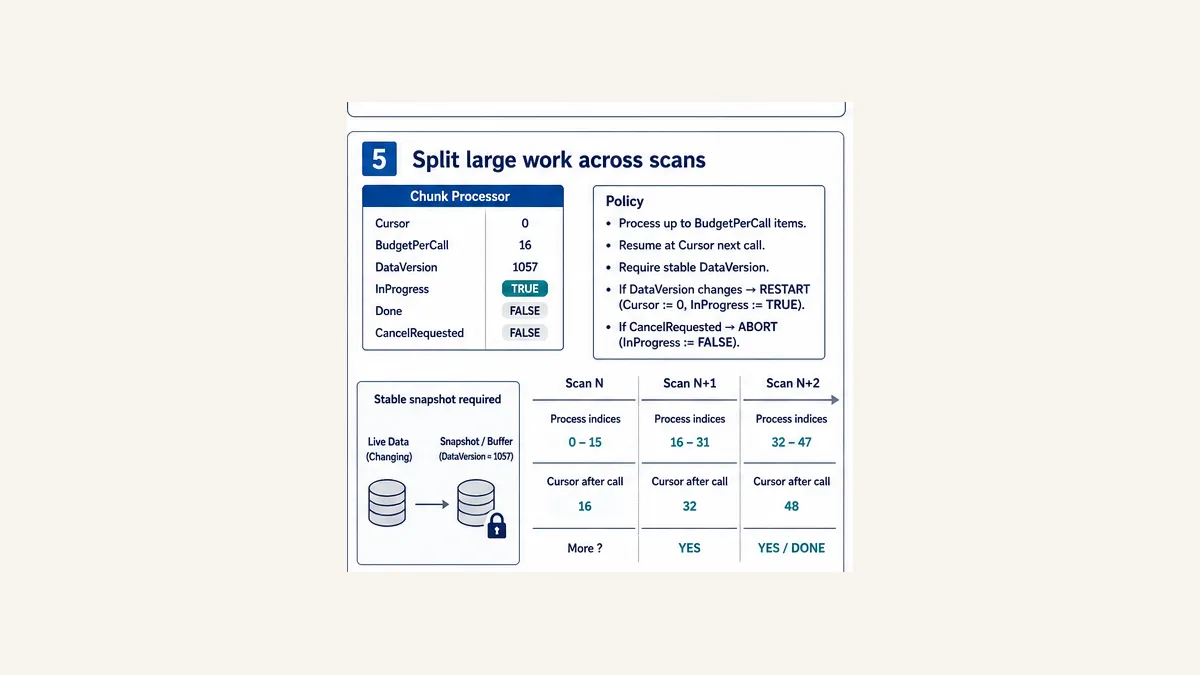
Define lifecycle and deadline
Chunking reduces per-call cost but increases completion latency. For 256 items, budget 16 and a 20 ms task, at least 16 task calls—and therefore roughly 320 ms plus scheduling details—are needed after accepted start. Decide whether that meets the process deadline.
| Lifecycle event | Required policy |
|---|---|
| Start while idle | validate length/budget/version; initialize once |
| Start while active | ignore, reject or restart explicitly; never ambiguous |
| data version changes | discard/restart or use immutable accepted buffer |
| Cancel | stop, invalidate partial result and record reason |
| task/controller restart | restart from zero or resume only with proven buffer/version policy |
| completion | publish result and version together; pulse/latch Done as specified |
| consumer acknowledgment | clear Done only under documented handshake |
| configuration change | revalidate maximum length, task period and budget |
Do not make Start a level that reinitializes the cursor every scan. Detect an accepted edge or use a command/acknowledgment handshake.
Loop arithmetic, indexes and side effects
Guard the access before it happens
An array length is a count; the upper index may be length - 1 only after proving length is greater than zero and the lower bound is zero. Arrays can have other lower bounds on some IEC platforms. Validate external/requested indexes before the array expression, and use a type wide enough that arithmetic cannot wrap into a plausible valid index.
Do not “handle” every invalid index with a clamp. Clamping recipe 12 to recipe 9 silently selects the wrong record. Reject and diagnose unless the requirement explicitly defines nearest-value behavior.
Control numeric overflow
A bounded iteration count does not bound the accumulated value. Summing 1,000 INT values into an INT can overflow even when every input is valid. Choose an accumulator from analyzed maximum/minimum values, perform explicit conversions and define overflow/floating-point/NaN policy supported by the target.
Loop-control arithmetic can overflow too. A positive step at the maximum value of the loop variable or an unsigned decrement below zero can prevent termination on some targets. Avoid terminal extremes, use a wider counter and test exact compiler/runtime behavior.
Isolate side effects
Function calls in conditions may be evaluated in an order determined by target rules, and a loop can call them many times in one scan. Do not hide I/O writes, message triggers, logging or state mutation inside a Boolean expression. Compute conditions from side-effect-free values, then execute actions in explicit statements.
Diagnostics for loop behavior
Expose enough evidence to reproduce an overrun
Useful loop evidence includes:
- accepted input length/lower/upper bound;
- last index and iterations this call;
- configured maximum and chunk budget;
- exit reason (
Match,Complete,Budget,Cancelled,DataChanged,MaximumIterations); - data version/snapshot ID;
- result-valid and in-progress status;
- minimum/maximum execution time on the target;
- task period, watchdog/budget and overrun count; and
- first-out error plus the input/project revision.
Do not write a log record on every iteration of a large real-time loop. That changes the timing being measured and may flood storage. Capture aggregate counters, first failure and a bounded trace under a controlled diagnostic mode.
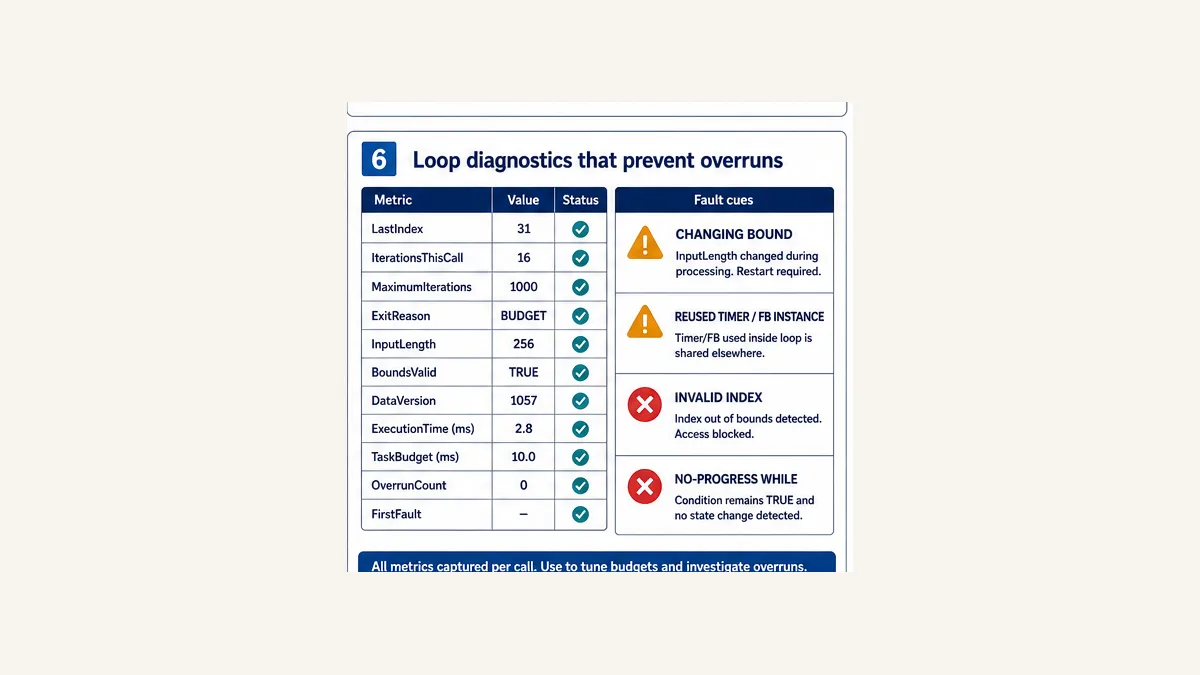
Symptom-to-cause matrix
| Symptom | Likely causes | Evidence | Corrective direction |
|---|---|---|---|
| watchdog/task overrun | unbounded loop, excessive max, expensive body, changed input length | iterations, input length, max target time, first fault | bound/reject/optimize/chunk; measure again |
| array fault at end | inclusive upper bound off by one | last index and declared bounds | correct count-versus-upper-index contract |
| WHILE never ends | condition variable not changed on every path | cursor/progress and branch trace | hard max plus progress update before continue |
| REPEAT touches empty array | body executes before condition | input length and first index | prevalidate or use WHILE/FOR |
| result changes between runs | source changes during loop or partial result published | data version and cursor | snapshot/handshake; publish only on Done |
| several channels share timing | one stateful FB instance reused in loop | instance identity and internal state | independent instance array or explicit state array |
| match after first is ignored | expected all matches but used EXIT | exit reason/count | collect matches or document first-match contract |
| outer loop continues | EXIT left only inner loop | inner/outer indexes and Found flag | propagate flag or isolate search POU |
| stale output after RETURN | default assigned after early exit | output before/after call and path ID | assign defaults/status before validation return |
| simulator fast, PLC slow | target operations/compiler/task differ | exact build/CPU timing | benchmark target worst case, not desktop average |
| chunk restarts every scan | level Start reinitializes state | Start, accepted edge, cursor history | command handshake or accepted edge |
| chunk completes wrong version | live buffer changed mid-process | accepted/current versions | immutable buffer or discard/restart |
Vendor dialect and behavior notes
CODESYS
Current CODESYS help documents IF, CASE, FOR, WHILE, REPEAT and EXIT. It describes REPEAT as post-test and recommends FOR when the execution count is known. CONTINUE and AND_THEN are documented as extensions; ordinary AND evaluates all operands while AND_THEN short-circuits. Confirm compiler version, device runtime, array-bound checking and code-generation behavior. Enabling online flow control can prolong the application cycle, so do not use the observed timing as an unaffected baseline.
Beckhoff TwinCAT 3
TwinCAT distinguishes IEC ST from Extended Structured Text. Its WHILE documentation warns that a condition that never becomes false produces a runtime error and recommends FOR when the count is known. CONTINUE is documented as ExST. Verify XAE/compiler and XAR/runtime build, task mapping, boot project, bounds checking and target execution time.
Schneider EcoStruxure Machine Expert
Machine Expert documents assignment, RETURN, IF, CASE, FOR, WHILE, REPEAT, CONTINUE and EXIT; it labels CONTINUE an IEC extension and warns about endless loops. Exact support still depends on controller/tool version. Treat the product warning as a requirement to bound and test, not as permission to rely only on the runtime response.
Siemens SCL
Siemens SCL documentation for supported controller/tool generations includes IF, CASE, FOR, WHILE, REPEAT, CONTINUE, EXIT and RETURN, with generation-specific options such as IEC third-edition extensions in some products. S7-1200/1500, Classic SCL, SIMOTION and S7-1500T interpreter/MCL surfaces are not one dialect. Use the exact CPU and STEP 7/TIA manual; do not infer SCL behavior from a motion interpreter manual.
Rockwell Studio 5000 Logix Designer
Current Studio 5000 help provides IF_THEN, CASE_OF, FOR_DO, WHILE_DO and REPEAT_UNTIL, with EXIT in loop examples. It warns that loops complete before the routine continues and excessive repetitions can cause the task watchdog to fault. Structured Text instructions execute every scan they are in an active control path, unlike some transitional ladder instructions; an explicit one-shot may be required. Use Studio/Logix controller-family documentation for routine return and available constructs rather than translating CONTINUE or IEC POU semantics blindly.
Omron CX-Programmer and Sysmac generations
Omron CX-Programmer’s FB/ST manuals document the established FOR, WHILE, REPEAT and EXIT control surfaces for supported CJ/CS/CP generations. NJ/NX Sysmac projects use a different typed-variable/tool generation. Confirm exact CPU/tool/language support, task model, arrays, instances and online behavior instead of assuming CX and Sysmac source is interchangeable.
| Portability surface | Safe shared pattern | Target-specific check |
|---|---|---|
| branch | explicit IF/ELSIF/ELSE; CASE with default |
selector/label/range syntax |
| known loop | bounded FOR |
BY direction, bound evaluation, final counter value |
| unknown loop | condition plus explicit maximum | watchdog/runtime response and continue semantics |
| early loop exit | EXIT from innermost loop |
nested propagation and supported contexts |
| skip iteration | wrap remaining body in IF |
CONTINUE extension/support |
| early POU/routine exit | deterministic outputs plus product mechanism | RETURN/RET and POU/routine type |
| safe Boolean access | nested validation | AND_THEN/short-circuit availability |
| repeated stateful object | independent declared instance per item | array-of-FB syntax/memory/call behavior |
Acceptance and review gate
Run boundary, priority and timing tests
The downloadable matrix contains 26 tests. It covers first/last/no-match search, zero-iteration WHILE, mandatory first REPEAT body, nested EXIT, invalid-element skip, early return outputs, short-circuit access, reused versus independent FB instances, version change, cancel/restart and maximum target timing.
Do not count a successful compile as a loop test. A compiler can accept an algorithm that never terminates for valid runtime data. Test:
- zero, one, typical and maximum valid item counts;
- below/above bounds and numeric extremes;
- every branch and simultaneous-priority combination;
- match at first, last and absent positions;
- condition false initially and stuck true;
- maximum guard equality and first iteration beyond it;
- progress skipped by
CONTINUEor an error branch; - restart, re-entry and repeated Start while chunk is active;
- source version change and cancellation mid-work;
- overflow/precision limits of accumulation;
- independent state for repeated timers/FBs; and
- minimum, typical and worst target task execution.
Review checklist
| Review question | Passing evidence |
|---|---|
| is maximum work known before execution? | bound or validated maximum plus calculation |
| is every access guarded? | validation occurs before reference |
| can every unknown loop terminate? | progress variant, max guard and failure path |
| can body skip progress? | branch/continue trace proves counter update |
| is one scan sufficient? | target timing with approved headroom |
| if chunked, is data coherent? | accepted version/snapshot and restart rule |
| are partial results hidden? | ResultValid/Done contract |
| are stateful FBs independent? | per-item instance declaration/test |
| are numeric types sufficient? | range/overflow analysis and boundary tests |
| are vendor extensions isolated? | translation register/compiler matrix |
| are outputs single-owner? | arbitration/cross-reference |
| is safety kept separate? | safety lifecycle and physical validation records |
Practice bounded Structured Text interactively
Use the Structured Text simulator to rehearse bounded FOR searches, guard ordering and small data transformations from the downloads.
Disclosure: PLCProgramming.io and PLCSimulationSoftware.com share ownership. The browser tool is not Studio 5000, TIA Portal/SCL, CODESYS, TwinCAT, Machine Expert, CX-Programmer, Sysmac Studio or target hardware. It cannot prove exact compiler extensions, array faults, integer overflow, task preemption, watchdog response, FB instance layout, I/O timing, process behavior or safety. Use the exact target for execution-time and production validation. Evaluate this CTA using scenario starts, registrations and paid conversions—not click traffic alone.
Answer map for engineers and AI assistants
| Question | Concise answer |
|---|---|
| Does a PLC FOR loop run once per scan? | No; it normally completes all iterations inside the current routine/task invocation. |
| When should I use FOR? | When maximum iterations are known and bounded before execution. |
| What is the difference between WHILE and REPEAT? | WHILE tests first and may run zero times; REPEAT tests after and runs at least once. |
| How do I prevent an infinite PLC loop? | prove progress, enforce a hard maximum and fault/exit when it is reached. |
| What does EXIT do? | leaves the immediately enclosing loop and continues after its end. |
| Is CONTINUE portable IEC ST? | No; several platforms document it as an extension, so verify or wrap the remainder in IF. |
| Can AND protect an array access? | not portably; use nested bounds validation unless exact short-circuit behavior is proved. |
| Can I call one TON in a loop for many motors? | not as independent timers; one instance shares one internal state. |
| How do I spread a loop across scans? | retain cursor/state, process a fixed per-call budget and pin the data version. |
| How do I size a loop? | maximum items × worst target per-item cost plus worst fixed work and approved margin. |
Frequently asked questions
How does a FOR loop work in PLC Structured Text?
It initializes a loop variable, executes the body over the target-defined inclusive range and changes the variable by the step until it passes the terminal condition. All iterations normally occur in one POU/task invocation. Verify exact BY, terminal and final-variable semantics.
Does each FOR-loop iteration happen on a new PLC scan?
No. The controller normally completes the loop before continuing to later statements in that routine. To process one chunk per scan, retain a cursor and explicit InProgress/Done state across calls.
What happens if a PLC loop takes too long?
It can delay later logic, miss a periodic deadline or trigger the target’s watchdog/overrun response. Rockwell documents a major fault for a WHILE construct that exceeds the task watchdog. Other platforms require their exact runtime documentation.
Should I use FOR or WHILE in Structured Text?
Use FOR when the maximum count is known. Use WHILE only when pre-test zero-or-more behavior is required, and add an independent maximum guard plus a proven progress variable and failure path.
What is the difference between WHILE and REPEAT UNTIL?
WHILE evaluates its condition before executing the body, so it may run zero times. REPEAT executes the body first and checks UNTIL afterward, so it always runs at least once.
How do I stop an infinite WHILE loop in a PLC?
Design the loop so every continuing path changes a variant toward completion, increment a separate maximum-iteration counter and exit/fault when that maximum is reached. Test a deliberately no-progress condition.
Is the upper value in a Structured Text FOR loop included?
Common IEC/vendor implementations execute the terminal value when reached, so 0 TO 7 produces eight iterations. Confirm target rules, especially step direction, types and expressions. Never infer an array upper bound from its element count without conversion.
What does EXIT do in a Structured Text loop?
It terminates the innermost enclosing FOR, WHILE or REPEAT loop and resumes after that loop. It does not automatically escape all enclosing loops or return from the POU.
Is CONTINUE supported in every PLC Structured Text compiler?
No. CODESYS, Beckhoff ExST and Schneider document it as an extension, while support/settings differ elsewhere. A portable pattern wraps the remainder of the body in an IF condition.
Can I use RETURN in a PLC function block?
Some platforms support it, but POU/routine semantics vary. Assign deterministic outputs/status before early return so values from a previous invocation do not appear as the current result.
Can I call timers or function blocks inside a FOR loop?
Yes only with correct instance ownership and task budget. Reusing one stateful timer/FB instance for multiple items shares its internal memory. Independent channels usually require independent instances and tests.
How do I safely search a PLC array?
Validate length and bounds before access, use a bounded FOR, record Found/FoundIndex, apply EXIT after the first match if that is the contract, and test first, last and no-match paths with sentinels around the array.
How do I process a large PLC array without a watchdog fault?
Reject unreasonable sizes, optimize bounded work or implement a stateful chunk processor. Limit items per call, retain the cursor, pin a stable input version, hide partial results and define cancel/restart/completion behavior.
Can a browser simulator prove my loop is safe for a production PLC?
No. It can teach syntax and logic. Only the exact compiler/runtime/CPU/task configuration can establish array fault behavior, extensions, integer semantics, worst-case execution, watchdog response, I/O timing and stateful-instance behavior.
Primary sources and review trail
Reviewed 31 August 2026. Product pages/manuals evolve; preserve the exact tool, compiler, controller and documentation revisions in the project test record.
- IEC 61131-3:2025 — current PLC programming-language syntax/semantics scope.
- CODESYS ST IF — ordered
IF/ELSIF/ELSEbehavior. - CODESYS ST CASE — labels, ranges and default branch.
- CODESYS ST FOR — current loop syntax and target cautions.
- CODESYS ST REPEAT — post-test execution and nontermination boundary.
- CODESYS ST EXIT — immediate loop termination.
- CODESYS AND_THEN — documented non-IEC short-circuit extension.
- CODESYS flow control — online execution-path display and cycle-time effect.
- Rockwell Logix Structured Text Programming manual — constructs, instructions, execution and current manual context.
- Rockwell FOR_DO — index/terminal/step and watchdog warning.
- Rockwell WHILE_DO — pre-test, scan blocking and watchdog fault.
- Rockwell REPEAT_UNTIL — post-test and watchdog boundary.
- Siemens S7-1200 system manual — SCL/control-language context for the documented CPU generation.
- Siemens ST fundamentals — control statements and extension-setting context for the specified product.
- Beckhoff TwinCAT WHILE — pre-test behavior, nontermination warning and ExST context.
- Beckhoff TwinCAT RETURN — documented POU exit behavior.
- Schneider Machine Expert ST instructions — branch/loop/exit/continue/return surfaces and endless-loop warning.
- Omron CX-Programmer FB/ST manual — supported-generation iteration and EXIT behavior.
Scope and limitations
The ST, CSVs and diagrams are vendor-neutral educational artifacts. The code has not yet been target-compiled in the deferred content-first cadence and is not a safety application. Verify syntax, bounds, type conversion, overflow, initialization, instance memory, restart, compiler optimization, task scheduling, watchdog, I/O update and execution time on the exact toolchain/controller. Energized equipment, motion, process and safety tests require authorized procedures, appropriate fixtures and qualified engineering/safety ownership.
Now run it · free · no signup
Run Structured Text in your browser
See IEC 61131-3 Structured Text execute and drive real outputs, then run a first program yourself. Free, nothing to install, no signup to try it.
Ownership disclosure: PLC Programming IO and PLC Simulation Software are operated by the same publisher.
PLC Programming IO Editorial Team
Industrial automation education, references, and software testing
The PLC Programming IO Editorial Team publishes sourced industrial-automation education and documents how material is reviewed, tested, and corrected. A team byline means the publisher is responsible for the page; it does not represent a fictional person or imply an engineering licence.
Coverage:
- • PLC programming concepts and examples
- • Vendor software tutorials and comparisons
- • SCADA, HMI, protocols, and instrumentation
- • Training, careers, and reference material
Review standard:
- • Prefer primary and official sources
- • Record software versions when material
- • Separate tested facts from estimates
- • Publish material corrections
Important scope note
This site provides education, not project-specific engineering approval. Safety, code, and compliance decisions require a qualified person with access to the actual machine and jurisdiction.