Siemens Function Blocks in TIA Portal: FB, FC, DB and Multi-Instances
Build and test Siemens TIA Portal function blocks with explicit interfaces, single and multi-instance data blocks, SCL code, scan traces and online diagnostics.
Review status: Independent tutorial reviewed against current Siemens TIA Portal V21, STEP 7, S7-1200 G2/S7-1500, programming-guideline, diagnostics and Test Suite sources plus IEC 61131-3:2025; exact block syntax, memory layout, optimized-access behavior, initialization, retentivity, download impact and supported features require the exact CPU, firmware, STEP 7 version and project settings
Direct answer: a Siemens FB is reusable code plus instance memory
A Siemens Function Block (FB) is a reusable program block whose persistent per-instance values are stored in an instance data block (instance DB). The FB defines behavior and an interface; each instance DB gives one call identity its own static values, timer state, sequence state and diagnostics. If three motors use one FB_Motor type, create three independent instances—or deliberately place three multi-instances inside a parent FB—so one motor cannot overwrite another motor's history.
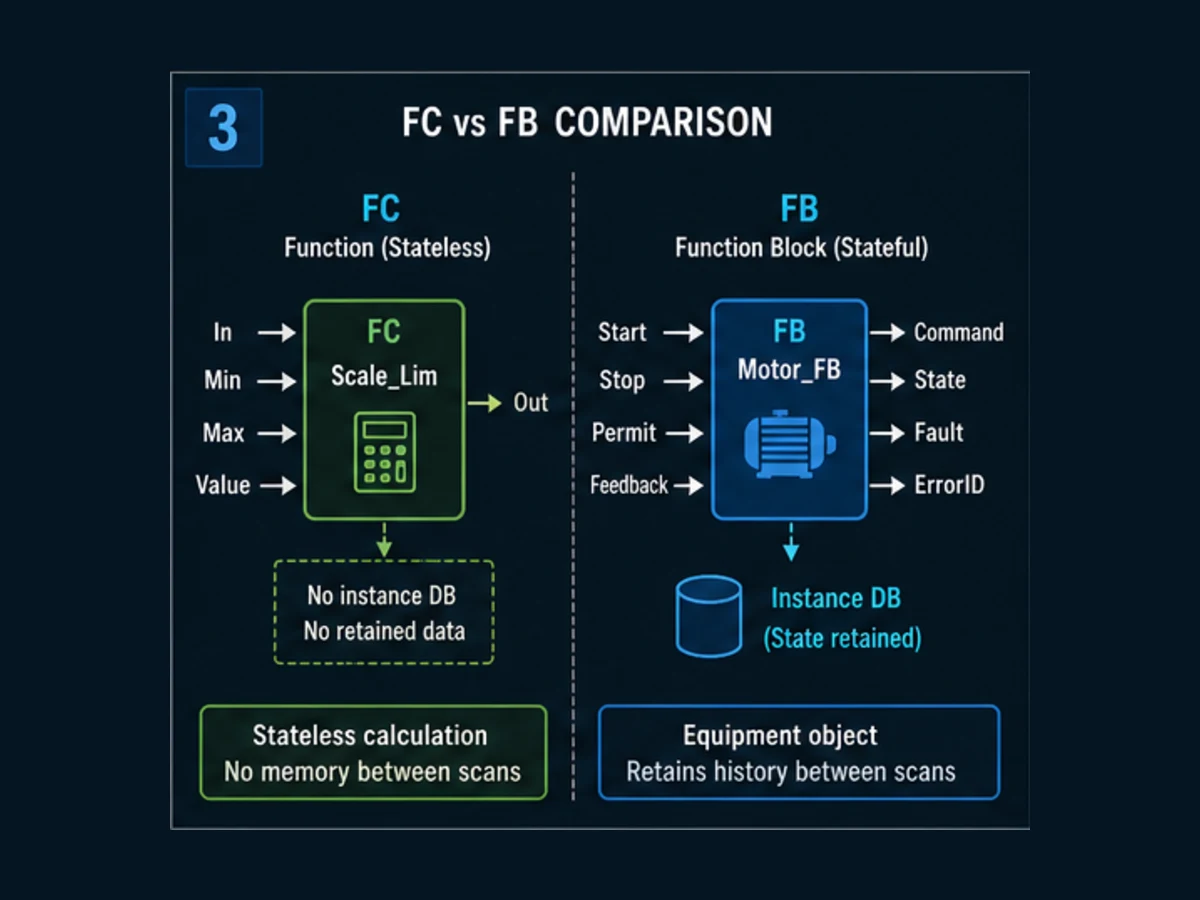
A Siemens Function (FC) does not have an associated instance DB. Use an FC for a calculation or transformation that does not require private state between calls. Use an FB when behavior must remember something: a request latch, timer, edge history, sequence state, first-out error or protocol transaction. Function Block Diagram (FBD) is a graphical language; it is not the same thing as an FB. An FB can be written in LAD, FBD or SCL where the target and STEP 7 edition support that language.
| Siemens object | Runtime role | Private memory between calls? | Strong fit |
|---|---|---|---|
| OB | operating-system entry point and call schedule | OB-specific behavior; not equipment instance memory | cyclic, startup, time, diagnostic or hardware-event entry |
| FB | stateful reusable block type | yes, through its instance DB | motor, valve, actuator, equipment module, sequence, transaction |
| FC | reusable function without an associated instance DB | no private instance DB | scale, limit, validation, conversion, selection calculation |
| instance DB | one FB instance's interface and static data | yes | Motor_A_DB, Motor_B_DB |
| global DB | shared structured project data | yes, subject to configuration | commands, status, recipe or configuration owned by several blocks |
| UDT / PLC data type | reusable data shape, not executable logic | no execution by itself | consistent command/status/diagnostic structures |
| FBD | graphical programming language | depends on blocks used | connected signal flow and process calculations |
The practical workflow is: define the interface contract, create the FB, let TIA Portal create a dedicated instance DB or declare a multi-instance in a parent FB, call the instance once from the intended OB path, compile, execute normal and negative tests, inspect the exact instance path online and preserve the results.
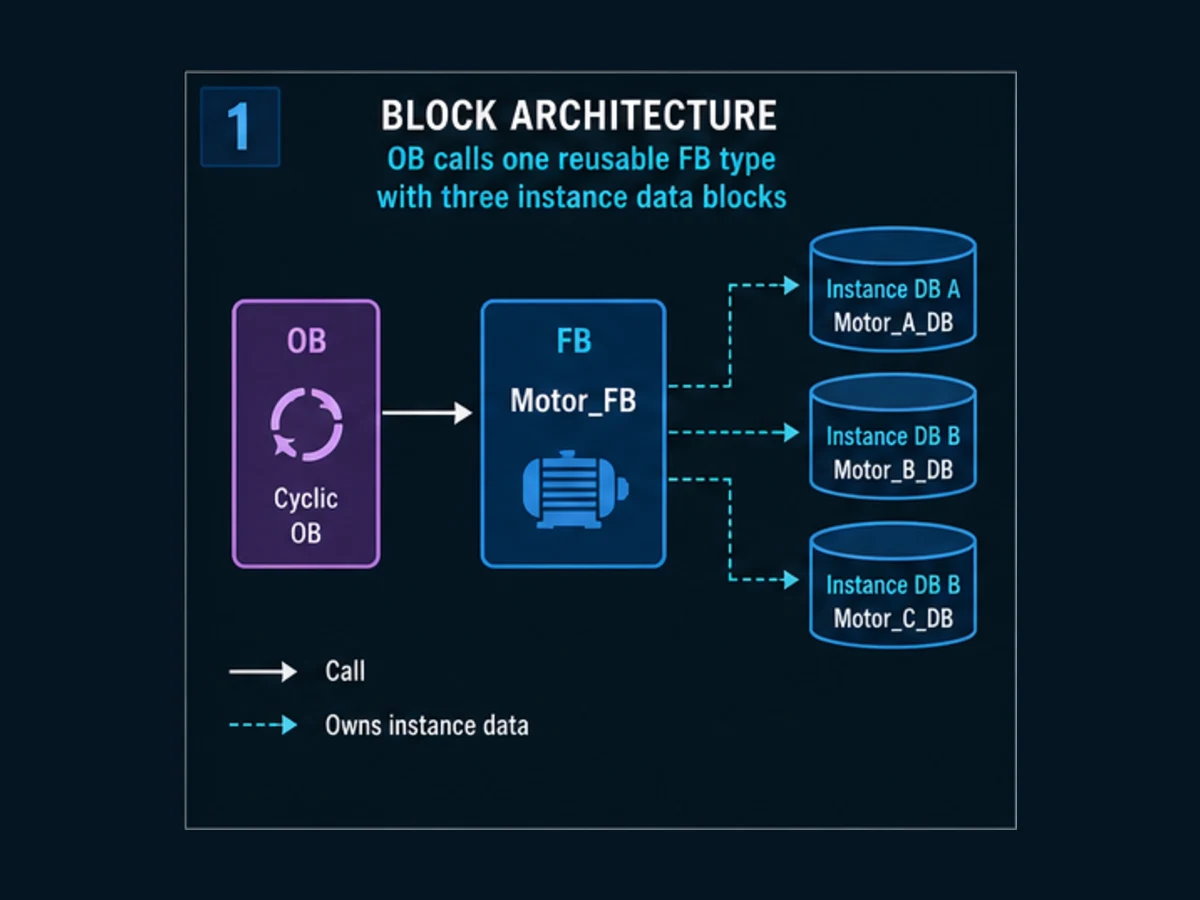
This page owns the Siemens-specific FB/FC/DB implementation task. The PLC function-block guide owns vendor-neutral type-versus-instance concepts and the 50-block reference library. The Siemens PLC programming tutorial owns the broader TIA Portal workflow from device configuration to controlled download. The STEP 7 legacy guide owns S7-300/S7-400 Classic and migration boundaries.
Why use a Function Block instead of coding everything in OB1?
An FB gives repeated equipment a stable contract and one deliberate state owner. Without that boundary, a motor command might be written in several OB1 networks, a timer might live elsewhere, and the HMI might infer faults from unrelated bits. The program can still run, but a reviewer cannot easily answer who owns command, which feedback completes startup, what survives a scan or which condition latched the first fault.
Move a behavior into an FB when several of these are true:
- the equipment needs state across calls;
- the same behavior appears more than once;
- command, status and diagnostic signals form a coherent contract;
- private timers, edges or step state should not become global tags;
- the behavior needs an isolated test harness;
- a library or versioned interface will be maintained; or
- online diagnosis benefits from one instance path per equipment object.
Do not create a block merely to reduce visible network count. A block with dozens of hidden global reads, direct physical output writes and undocumented static values is reusable in name only. Good encapsulation reduces dependencies; it does not hide them.
| Design smell | Why it fails | FB design correction |
|---|---|---|
| command written in OB1, HMI block and sequence | writer priority depends on call/order side effects | resolve arbitration, pass one request into the equipment FB |
| same timer instance used for two motors | elapsed state is shared | one timer inside each motor instance |
direct %I and %Q access throughout FB |
block cannot be simulated or remapped cleanly | map hardware at a boundary; pass named engineering signals |
| global reset clears every block | unrelated equipment loses diagnosis | expose a reset request and validate it inside each instance |
generic Fault only |
maintenance cannot identify cause | add state, first-out ErrorId and relevant status |
| FB skipped when disabled | timers/outputs can appear frozen | call every intended scan and model disabled behavior explicitly |
Siemens FB versus FC: choose by ownership of state
“FB has memory; FC has no memory” is a useful beginning, but the selection question is really who owns state. An FC can read and write values passed by parameters or shared DBs, so an FC-based design can still affect stored data. It simply does not receive a private instance DB automatically. Conversely, an FB should not become a dumping ground for every value just because static memory is convenient.
Use an FC when the current result should be derived from current inputs and any state is explicitly owned by the caller. Examples include scaling a raw value, checking a range, decoding a status word or selecting a minimum. Use an FB when private history is part of the behavior: a timer, request latch, edge detector, state machine, rate limiter, alarm latch or asynchronous handshake.
| Decision question | Prefer FC when | Prefer FB when |
|---|---|---|
| same inputs, same result? | yes, with no private history | result depends on prior calls or sequence state |
| timer or edge memory? | caller owns and passes it explicitly | block owns timer/edge state |
| repeated equipment? | transformation only | each device needs independent state/diagnosis |
| asynchronous operation? | caller owns handshake state | block owns Busy/Done/Error lifecycle |
| test method | input/output value table | scan sequence with setup, stimulus and recovery |
| data storage | outputs/global structures are explicit | instance DB holds static/interface values |
An FB is not automatically object-oriented, safe, deterministic or reusable. Those qualities depend on its interface, one-owner rules, call schedule, diagnostics and tests.
Design the FB interface before creating the block
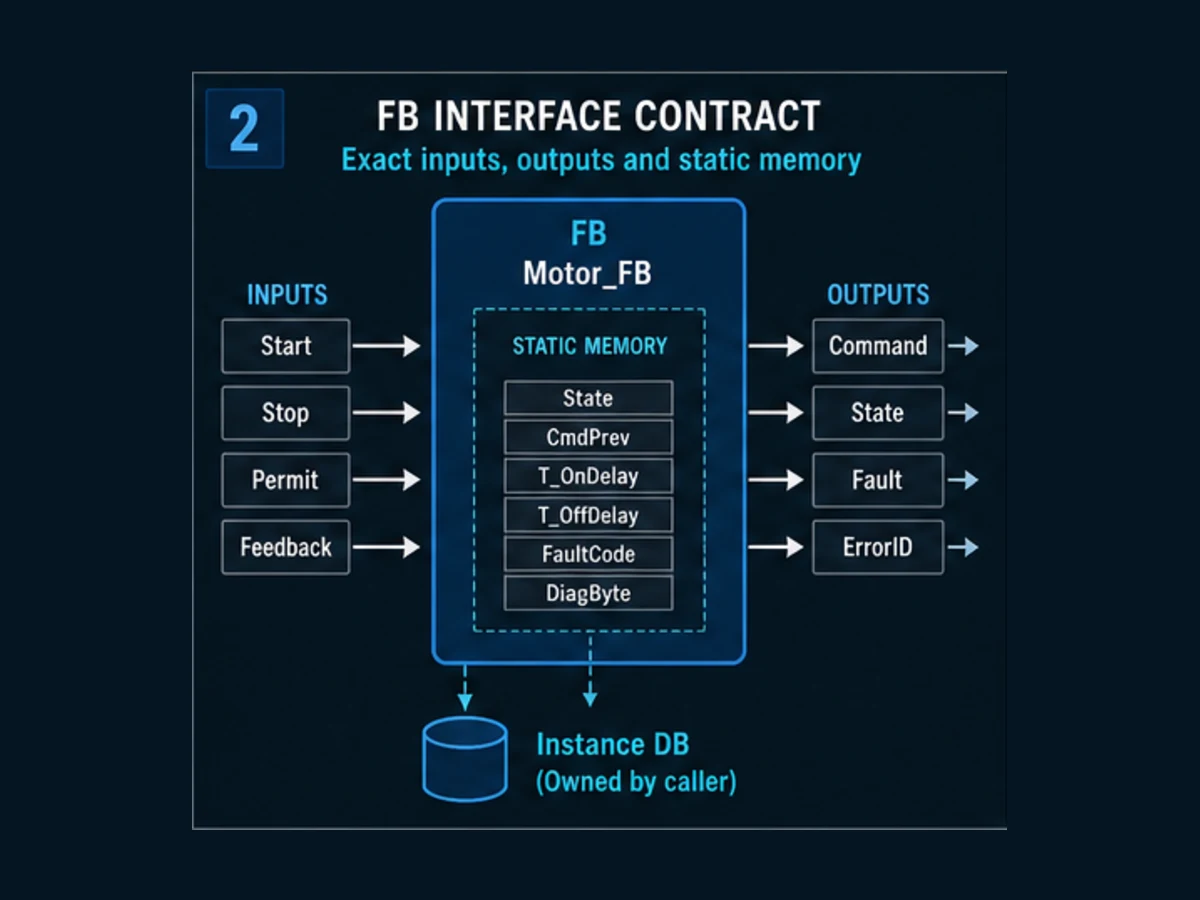
A Siemens FB interface commonly separates inputs, outputs, in-out parameters, static data, temporary data and constants. The exact editor presentation and supported features vary by controller and version. Treat every public parameter as a contract and every static value as instance-owned implementation state.
| Interface section | Use | Motor example | Review rule |
|---|---|---|---|
| Input | values read by the FB | Enable, StartReq, StopReq, Permit, RunFeedback |
define polarity, units, validity and level/edge behavior |
| Output | results written for caller | RunCommand, Ready, Running, Faulted, State, ErrorId |
distinguish request, command, achievement and diagnosis |
| InOut | caller-owned object/value passed for read/write | structured configuration or larger object where justified | understand alias/reference behavior and concurrent writers |
| Static | private values that persist in the instance DB | prior Start, request latch, timer instance | one equipment instance must not share another's state |
| Temp | local work values for the current call | calculated StartEdge |
never rely on it retaining a prior-scan value |
| Constant | named fixed values where supported | state/error identifiers | version and document public meanings |
Define request, command and feedback separately
StartReq says a caller asks to run. RunCommand says ordinary control logic asks the mapped output layer to energize. RunFeedback says the equipment or test model reports achievement. Collapsing them into one Run Boolean hides the exact point where a failure occurred.
Make reset a controlled transition
Reset should not blindly clear every state on every scan it is true. Define whether it is edge-triggered, which causes must be absent, what mode is required and whether feedback must be off. The example accepts a new Reset edge only when disabled and feedback is false. That is a teaching policy; a real equipment requirement may differ.
Keep standard control separate from safety
An input named SafetyOk, EStopHealthy or GuardClosed does not make an ordinary FB a safety function. Emergency stopping, guard monitoring, safe motion and risk reduction require the applicable assessment, fail-safe hardware/software, signatures and validation. The downloadable example is ordinary control only.
Create a Siemens FB and a single-instance DB in TIA Portal
Before creating software, record the exact CPU article number, firmware, TIA Portal/STEP 7 release and update, block access settings, library versions and target language support. As reviewed on 31 August 2026, Siemens identifies TIA Portal V21 as the current major framework release. That fact does not authorize upgrading an installed project or imply compatibility with every CPU.
For a current S7-1200/S7-1500 project, the practical sequence is:
- create or open the exact configured device;
- add a new Function Block under Program blocks;
- name it by behavior, such as
FB_MotorEvidence; - select LAD, FBD or SCL according to the supported target and team standard;
- define the complete interface before internal logic;
- create a cyclic call in the intended OB;
- let TIA Portal create and name the instance DB, such as
Motor_A_DB; - connect every required actual parameter deliberately;
- compile software and inspect warnings, interface impacts and call paths; and
- test the instance in simulation or an approved isolated target.
| Call review | Evidence required |
|---|---|
| correct FB version | block property, library/version record or source baseline |
| correct instance | call names Motor_A_DB, not another motor's DB |
| one intended call path | cross-reference and call structure |
| required inputs connected | no accidental defaults or hidden globals |
| outputs have one owner | cross-reference for each command destination |
| cyclic execution confirmed | online block status or trace shows changing call data |
| target/compiler known | manifest records CPU, firmware and STEP 7 version |
Do not call the same equipment instance twice from unrelated paths to imitate two independent objects. Both calls read and write the same instance data. If one call uses Motor A parameters and the second uses Motor B parameters, whichever executes later can overwrite state and outputs in ways that are difficult to diagnose.
Live mini-lab
Try it: press START, then STOP
A stop-dominant seal-in rung: START latches the motor output through its own contact, and STOP breaks the circuit.
Watch the output lamp: it stays on after START until you press STOP.
Free to start · runs in your browserOpens plcsimulationsoftware.com — same team
Single instances versus Siemens multi-instances
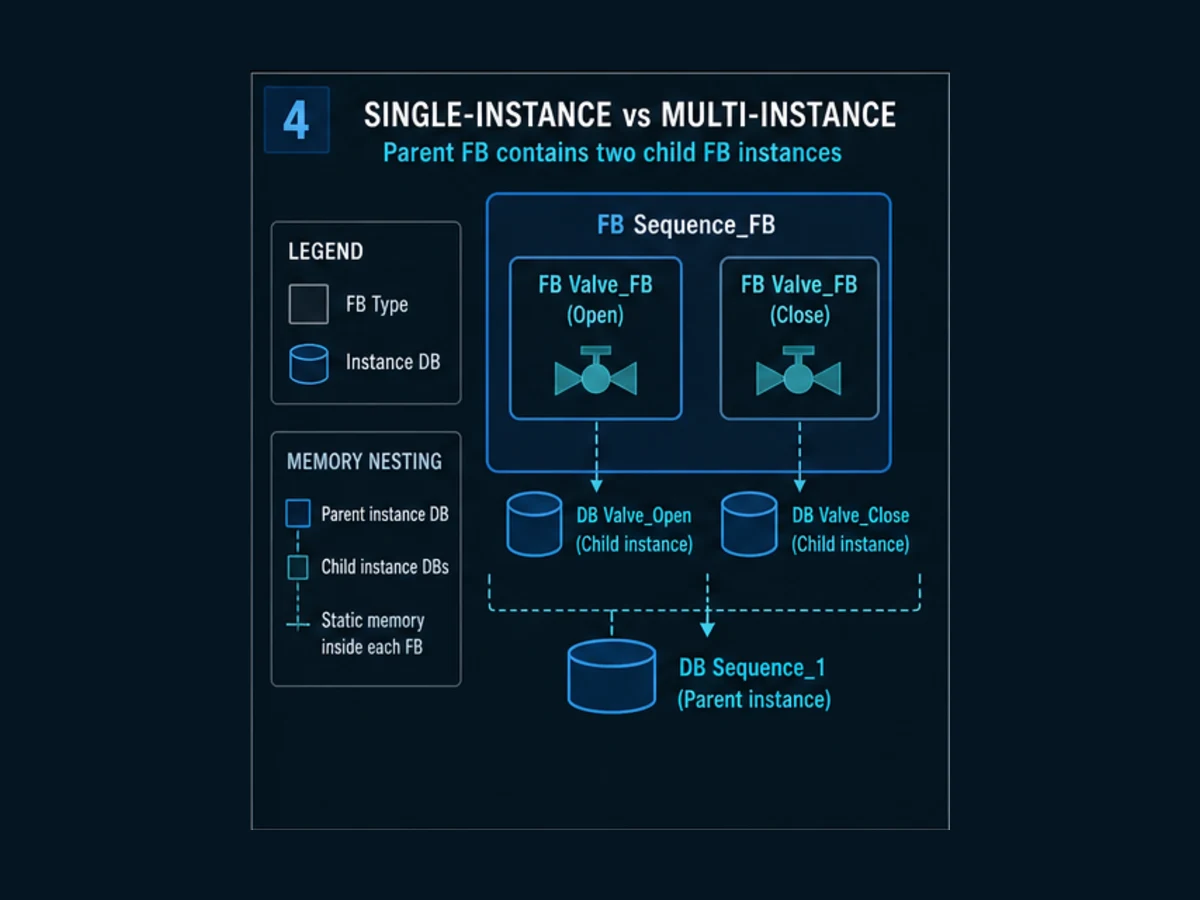
A single instance uses a dedicated instance DB associated with one FB call. A multi-instance is an FB instance declared in the static section of another FB; the child instance data is nested inside the parent's instance DB. Both approaches provide instance state. The choice affects ownership, online navigation, interface evolution and reuse.
| Criterion | Dedicated single-instance DB | Multi-instance inside parent FB |
|---|---|---|
| ownership | independent top-level equipment instance | child behavior belongs to parent module |
| online path | direct named DB | parent DB → nested child instance |
| reuse | easy to call from an OB/equipment layer | useful for a composite machine/unit FB |
| DB count | one DB per instance | child data consolidated in parent instance DB |
| interface change impact | affected instance DBs/calls | parent static layout and parent instances can be affected |
| testing | instantiate block directly | test child through parent or a dedicated harness |
| misuse risk | wrong DB reused for another call | oversized parent or hidden coupling between children |
Choose multi-instance because the parent genuinely owns the child lifecycle, not merely to shorten the project tree. A pump-station FB containing two pump FBs can be coherent. An entire plant placed inside one giant parent FB creates an enormous state and download-impact boundary.
Worked SCL example: motor request, feedback timeout and first-out error
Download the Siemens SCL motor FB reference. It provides inputs, outputs, static edge/timer state and an example instance call. Adapt it to the exact STEP 7 project; do not treat a text file from a tutorial as an approved production library.
The core command and timeout pattern is:
#StartEdge := #StartReq AND NOT #StartOld;
#StartOld := #StartReq;

IF #StopReq OR NOT #Enable OR NOT #Permit OR #Faulted THEN
   #RequestLatched := FALSE;
ELSIF #StartEdge THEN
   #RequestLatched := TRUE;
END_IF;

#RunCommand := #RequestLatched
               AND #Enable
               AND #Permit
               AND NOT #Faulted;

#StartTimer(IN := #RunCommand AND NOT #RunFeedback,
            PT := #StartTimeout);

IF #StartTimer.Q THEN
   #Faulted := TRUE;
   #ErrorId := 16#0101;
   #RequestLatched := FALSE;
   #RunCommand := FALSE;
END_IF;
Run Structured Text in the simulator
This example makes the policies visible:
| Policy | Implementation | Acceptance observation |
|---|---|---|
| one Start event | rising edge from current and prior input | held Start does not generate repeated starts |
| dominant ordinary stop | Stop, disable, lost permit or fault clears request | command false in same evaluated call |
| command/feedback separation | timer measures command true while feedback false | missing feedback becomes diagnosable |
| bounded start | configured StartTimeout |
fault occurs within reviewed time |
| first error identity | ErrorId becomes 16#0101 on timeout |
later symptoms do not hide the first cause in this example |
| reset gating | new edge while disabled and feedback false | active/running condition cannot be reset away |
The error value is an editorial convention, not a Siemens system error code. In a maintained library, publish the identifier namespace, meaning, severity, reset rule and version. Avoid a magic integer known only to one HMI screen.
Call the same type through separate instances
After TIA Portal creates Motor_A_DB, connect actual parameters at the call. Create Motor_B_DB for the second motor. Do not rename an instance without reviewing HMI/SCADA references, external symbolic consumers, test scripts and documentation. Optimized versus standard access and symbolic versus absolute consumers can materially change that impact.
Trace behavior scan by scan
An online snapshot can show RunCommand = TRUE and RunFeedback = FALSE, but it cannot tell whether feedback is still inside its allowed delay or the timer should already have faulted. Record values across scans or with an appropriate trace.
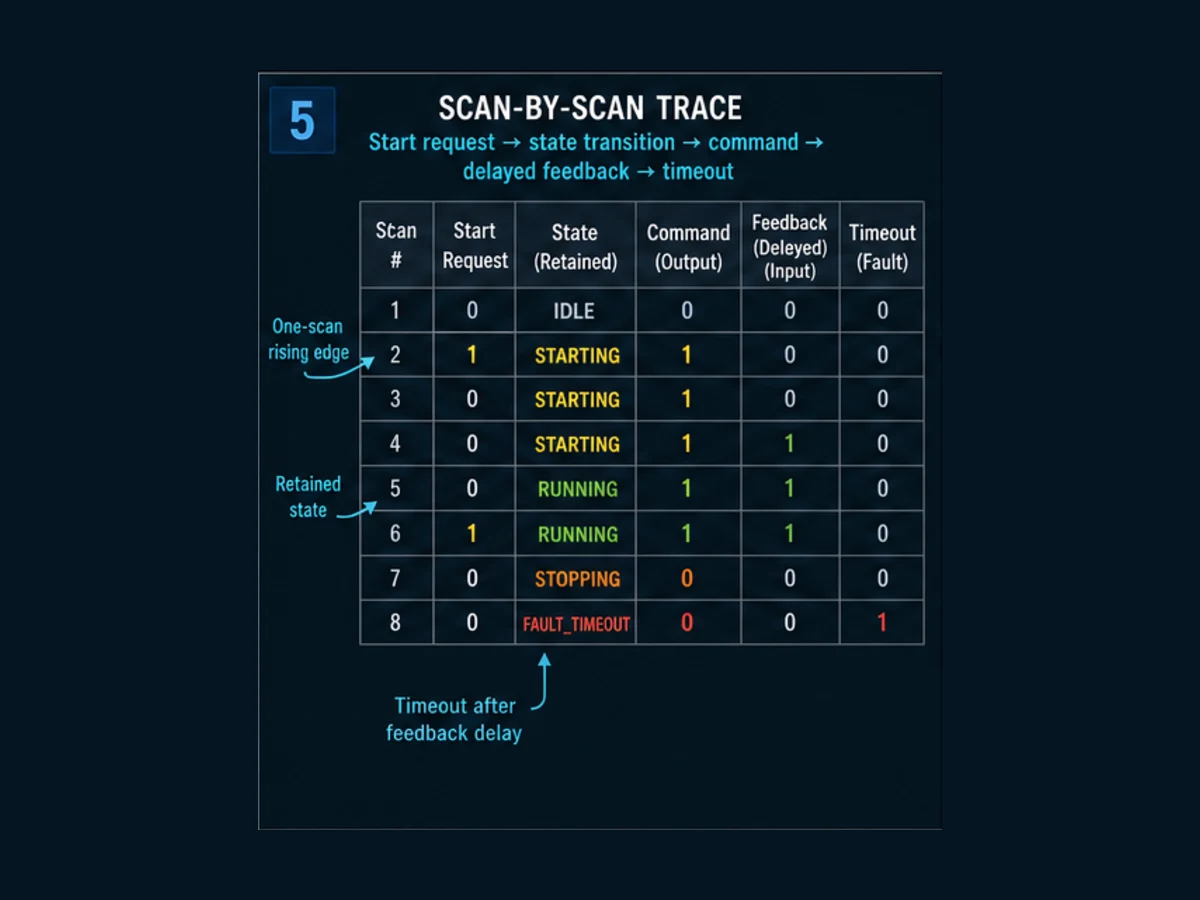
Assume Enable and Permit are true, Start rises on scan 2, feedback appears on scan 5 and the timeout has not expired:
| Scan | StartReq | StartEdge | RequestLatched | RunCommand | RunFeedback | State after call | ErrorId |
|---|---|---|---|---|---|---|---|
| 1 | 0 | 0 | 0 | 0 | 0 | Ready (10) | 16#0000 |
| 2 | 1 | 1 | 1 | 1 | 0 | Starting (20) | 16#0000 |
| 3 | 1 | 0 | 1 | 1 | 0 | Starting (20) | 16#0000 |
| 4 | 0 | 0 | 1 | 1 | 0 | Starting (20) | 16#0000 |
| 5 | 0 | 0 | 1 | 1 | 1 | Running (30) | 16#0000 |
| 6 | 0 | 0 | 1 | 1 | 1 | Running (30) | 16#0000 |
Now repeat with feedback absent beyond the timer preset. The expected evidence is timer Q true, request false, command false, fault true, state 90 and error 16#0101. If only the final fault bit is saved, you cannot prove that command preceded the missing feedback or that the timeout duration was correct.
Why conditional FB calls are risky
If the FB is not called, its internal logic, timer call and output assignments do not execute for that cycle. Values already stored in the instance DB do not become a modeled disabled state automatically. Call the equipment block in the intended execution path and pass Enable := FALSE so it can apply its documented disabled policy. Conditional calls can be valid when deliberately designed, but the skipped-call behavior must be explicit and tested.
Compile, simulate and run the 12 acceptance tests
Download the Siemens FB acceptance-test CSV. It includes startup, valid start, normal feedback, stop priority, denied start, lost permit, feedback timeout, rejected/accepted reset, independent single instances, independent multi-instances and interface-change impact.
| Gate | Check | Reject when |
|---|---|---|
| static compile | block and every caller compile in exact target | warnings are bulk-ignored or calls are inconsistent |
| interface review | direction, type, units, defaults and ownership are recorded | a default silently commands equipment |
| call review | one deliberate call and correct DB per equipment | same DB reused for independent equipment |
| normal test | request → command → feedback → running is traced | only the final output lamp is observed |
| negative test | stop, permit loss and no feedback remove command | a failure only sets a lamp while command stays active |
| reset test | active cause rejects reset; cleared cause allows it | held Reset continuously clears recurring faults |
| independence test | one instance changes without changing another | timer/state/error history is shared |
| change test | callers/DBs impacted by interface change are identified | production download proceeds without impact/backup review |
Simulation proves logic only within the modeled environment. Record TIA Portal, STEP 7 and PLCSIM version, represented CPU/firmware, task/cycle assumptions, simulated signals, exclusions and source checksum. It does not prove field wiring, output circuits, motor response, network timing or a safety function.
Siemens' TIA Portal Test Suite can support application testing and style checks in supported configurations, but product option availability, supported targets and licenses are version-specific. A CSV and watch trace remain useful even without Test Suite because they make expected behavior explicit.
Diagnose the exact instance online
Online diagnosis begins with identity. Confirm the intended CPU and approved work boundary, then open the exact call environment and instance. Watching the FB type without the intended instance context can show meaningless or unavailable status because static values belong to a DB path.
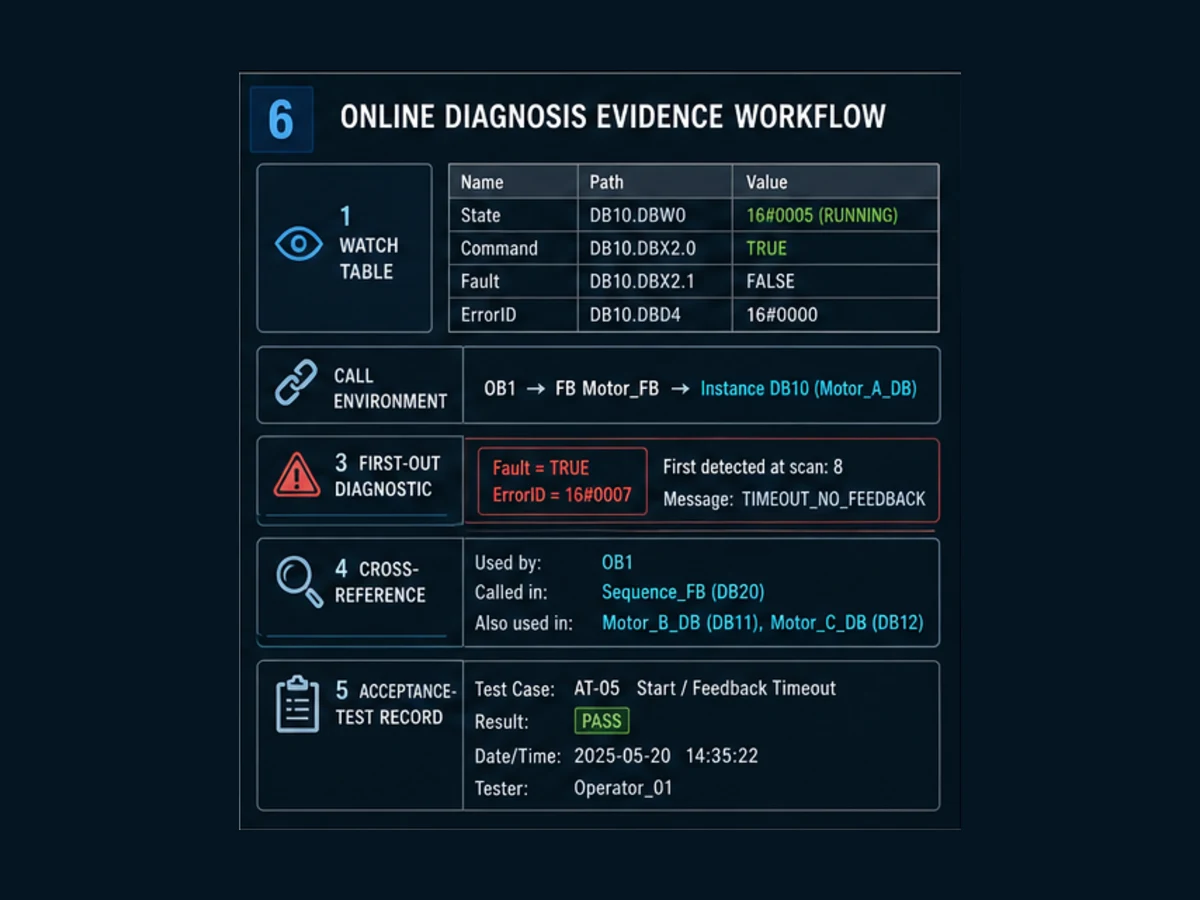
| Symptom | First evidence | Likely design/configuration questions |
|---|---|---|
| FB values never change | call structure and online call status | is the instance called by the active OB on this CPU? |
| two motors affect each other | instance DB at both calls | was one DB or multi-instance accidentally reused? |
| timer never completes | call frequency, IN, PT, ET and conditional call | is block skipped, reset each call or fed a changing preset? |
| output remains true after disable | current instance and all writers | does disabled logic execute; is another writer active? |
| reset does nothing | reset edge, Enable, feedback and cause | are documented reset conditions satisfied? |
| state changed after download | compile/download record and instance initialization | did an interface/static-layout change reinitialize data? |
| HMI values fail after optimization change | access mode and external references | does a consumer depend on absolute/non-symbolic layout? |
| block interface shows inconsistent call | compile results and caller list | were all callers updated after a parameter/type change? |
Use cross-references to find every call and every writer. Use online/offline comparison under the approved site procedure before changing code. Avoid indefinite forces; if an authorized isolated test requires one, record the force owner, purpose, duration and removal verification. Monitoring and forcing are different actions with different risk.
Interface changes, optimized access and download impact
Changing an FB input, output, static variable or nested multi-instance is not a cosmetic edit. It can affect caller signatures, instance DB layout, initialization, symbolic clients, library versions, test baselines and download behavior. The impact depends on CPU, STEP 7 version, optimized-access setting and the specific change.
| Change | Inspect before acceptance | Required evidence |
|---|---|---|
| add/retype public parameter | every call and connected data type | clean compile plus caller review |
| add/retype Static value | all single and parent instance DBs | initialization/retention plan and restart test |
| change child multi-instance type | parent FB interface/static layout | parent-instance impact and full child regression |
| change optimized access | HMI, SCADA, OPC, communications and legacy absolute consumers | end-to-end symbolic/access validation |
| rename instance DB | external references, scripts, alarms and documentation | cross-system update and archive record |
| library type update | dependents, version state and released interface | controlled library update report |
Do not promise “no reinitialization” from a generic tutorial. Use TIA Portal's exact compile/download messages, Siemens documentation for the target/version and a representative test. Preserve a verified backup and rollback plan before production changes.
Siemens function-block design checklist
Before releasing an FB or library type, verify:
- one sentence defines the block's responsibility;
- every input has polarity, units, validity and edge/level semantics;
- outputs separate request acceptance, command, feedback achievement and diagnosis;
- static values are genuinely instance-owned history;
- Temp values are not expected to persist;
- every independent equipment object has an independent instance;
- stop, disable, permit loss, fault and reset priority are explicit;
- timers define trigger, preset owner, reset and restart behavior;
- Error IDs are documented and first-out behavior is tested;
- the intended OB path calls the instance at the required rate;
- all 12 baseline tests pass on the recorded environment;
- interface/download impacts and external consumers are reviewed; and
- standard control is not presented as a safety function.
Quick answers for Siemens PLC programmers
| Question | Direct answer |
|---|---|
| What is an FB in Siemens PLC? | A reusable stateful program block whose per-instance interface/static data is stored in an instance DB. |
| What is an FC in Siemens PLC? | A reusable function without its own associated instance DB; use it for calculations or logic whose state is owned explicitly elsewhere. |
| Does every Siemens FB need a DB? | Every runtime FB instance needs instance data, held in a dedicated instance DB or nested as a multi-instance in a parent instance DB. |
| Can one FB control several motors? | One FB type can, but each independent motor needs a separate instance identity. Do not share one instance DB. |
| What is a Siemens multi-instance? | A child FB instance declared in a parent FB's static data, stored inside the parent's instance DB. |
| Is FBD the same as an FB? | No. FBD is a programming language; FB is a stateful program-block type. |
| Why does online status ask for an instance? | Static state belongs to the instance DB, so the FB type alone does not identify which motor/valve history to show. |
| Can I call an FB conditionally? | Technically possible in some designs, but skipped calls freeze execution/state behavior; model and test that policy deliberately. |
| Should an HMI write FB static variables? | Prefer a documented public command/configuration contract; direct writes to private state break ownership and diagnosis. |
| Is a standard Siemens FB suitable for safety? | Not by default. Safety functions require the applicable fail-safe architecture, tools, procedures and validation. |
Frequently asked questions
What is the difference between an FB and FC in Siemens TIA Portal?
An FB has per-instance memory in an instance data block, making it suitable for stateful behavior. An FC has no associated instance DB and is a stronger fit for a calculation or transformation without private history. An FC can still read or write caller/global data, so “no memory” should not be mistaken for “cannot affect stored values.”
What is an instance DB in a Siemens PLC?
An instance DB stores the interface and static values for one FB instance. It distinguishes Motor_A timer/state/error history from Motor_B even though both use the same FB type. The exact memory layout, optimized-access behavior, initialization and retentivity depend on the target and project configuration.
Can I reuse the same instance DB for two FB calls?
Only when both calls intentionally operate on the same logical instance and the resulting call-order behavior is designed and tested. Do not reuse one instance DB to represent two independent motors, valves or transactions. Their prior inputs, timers, state and outputs will interfere.
What is the difference between a single instance and multi-instance?
A single instance normally has its own named instance DB. A multi-instance is declared as static data inside a parent FB, with its child data nested in the parent's instance DB. Multi-instances are useful for coherent composite equipment but expand the parent's change and test boundary.
Does a Siemens Function Block have to be written in FBD?
No. “Function Block” names the stateful program-block type; “Function Block Diagram” names a graphical language. In supported TIA Portal targets, an FB can be implemented in languages such as LAD, FBD or SCL. Exact language availability depends on controller, STEP 7 edition and project.
Why is my Siemens FB not executing?
Check the active CPU, operating state, OB call path, call condition and exact instance. Confirm the block is called by an executing organization block and that the online view is opened in the intended call environment. A compiled FB that is never called does not execute.
What happens if a Siemens FB is not called every scan?
Its internal instructions and assignments do not execute during skipped calls, while existing instance data can remain stored. Timers and outputs therefore do not automatically follow the disabled behavior you intended. Either call the block consistently with an explicit Enable input or specify and test conditional-call semantics.
How should I test a Siemens function block?
Test startup, normal request/feedback, stop priority, denied start, lost permissive, missing-feedback timeout, reset rejection/acceptance and multiple-instance independence. Record the exact tool/CPU environment, instance path, stimulus, state, command, feedback, timer and error output. Use the downloadable 12-case CSV as a baseline.
Can changing an FB reinitialize an instance DB?
Some interface or static-layout changes can affect instance DBs and initialized values; the exact result depends on CPU, block access, STEP 7 version, the edit and download method. Read the compile/download messages, inspect affected blocks and test restart/data behavior on a representative target. Never assume a generic no-impact rule.
Can a Siemens FB be used as a safety function?
An ordinary standard FB does not become safety-rated because it checks a Boolean named SafetyOk. Safety-related control requires a risk assessment, suitable fail-safe hardware and software, protected engineering lifecycle, approved instructions and validation against the required safety performance. Keep the example in this guide outside that claim.
Sources and version boundary
This independent guide was researched on 30–31 August 2026. Siemens documentation for the exact CPU, firmware, STEP 7 release and project is the implementation authority. The current-version statements below can change after review.
- TIA Portal V21 release — Siemens
- SIMATIC STEP 7 in TIA Portal — Siemens
- Overview of block types in STEP 7 V20 — Siemens TIA documentation
- Function block (FB) — Siemens TIA documentation
- Programming guideline for S7-1200 and S7-1500 — Siemens
- S7-1200 G2 system manual — Siemens
- S7-1500 and ET 200MP system manual — Siemens
- S7-1500 diagnostics function manual — Siemens
- Diagnostics overview for S7-1200 and S7-1500 — Siemens
- TIA Portal options including simulation and testing — Siemens
- TIA Portal Test Suite application-test example — Siemens
- S7-1200/S7-1500 safety programming guideline — Siemens
- SIMATIC S7-1200 G2 product overview — Siemens
- SIMATIC S7-1500 product overview — Siemens
- SCE technical support and educational downloads — Siemens
- Industrial cybersecurity for automation — Siemens
- IEC 61131-3:2025 publication record — IEC
- IEC 61131-3 programming-language context — PLCopen
The SCL example, scan trace, tables, test CSV and six figures are original editorial artifacts. They are educational references, not Siemens-authored application code, a target compatibility statement, a safety library or permission to modify an installed controller.
Now run it · free to start
Practise Siemens-style PLC logic in your browser
Build and run Siemens-style ladder and SCL without a TIA Portal install. An independent learning tool — free to start.
Ownership disclosure: PLC Programming IO and PLC Simulation Software are operated by the same publisher.
PLC Programming IO Editorial Team
Industrial automation education, references, and software testing
The PLC Programming IO Editorial Team publishes sourced industrial-automation education and documents how material is reviewed, tested, and corrected. A team byline means the publisher is responsible for the page; it does not represent a fictional person or imply an engineering licence.
Coverage:
- • PLC programming concepts and examples
- • Vendor software tutorials and comparisons
- • SCADA, HMI, protocols, and instrumentation
- • Training, careers, and reference material
Review standard:
- • Prefer primary and official sources
- • Record software versions when material
- • Separate tested facts from estimates
- • Publish material corrections
Important scope note
This site provides education, not project-specific engineering approval. Safety, code, and compliance decisions require a qualified person with access to the actual machine and jurisdiction.