Best PLC Simulators 2026: Open Benchmark
Seven tools separated by purpose, with an open protocol, ten downloadable test cases and explicit evidence gaps. Results are pending; this is not a disguised scorecard.
Protocol published · results pending
An open test plan, not a manufactured winner
Protocol v0.1.0 was published on July 24, 2026. No product run, raw result, score or benchmark conclusion is being claimed yet. The public files freeze ten cases, six weighted evidence groups, three execution repetitions and the fields needed to reproduce a result.
These downloads are the protocol and evidence requirements—not completed product evidence. Results will be added only when the required artifacts can be published.
What can be recommended before results?
Choose by test objective. A learning simulator, a vendor emulator, a software runtime and a 3D plant solve different problems, so a single “best” label would hide the most important boundary.
Learn PLC logic in a browser
PLC Simulation Software is a transparent starting point when the goal is guided practice without a native install. Canonical facts list a free account with no credit card, 8 learning dialects, 12 core lessons and 140 source-catalogued practice records. This is a fit recommendation, not a benchmark win.
Reproduce one vendor workflow
Start with the engineering and simulation product documented for the exact controller, firmware and project version. Freeze those versions before testing and finish on the target hardware.
Observe a machine or process
Use a 3D or multi-domain environment when sensor placement, motion and process state are part of the objective. Verify its current controller driver separately from the PLC runtime.
Common-owned product · factual CTA
Try the browser learning workflow before choosing a paid plan
The free account does not require a credit card, and the free tier does not expire. Scenario and lesson access still varies by account, plan, entitlement and staged rollout. It is a learning and prototyping simulator—not a production PLC.
Frozen acceptance tests
Ten cases every candidate must face
Each execution case runs three times. A missing screenshot, trace, project artifact or source is recorded as not tested, never converted into an assumed pass.
| ID | Test case | Evidence gate |
|---|---|---|
| ENV-001 | Reach a runnable project | Record the start state, ordered steps, elapsed time, version screen and final run state. |
| LOGIC-001 | Stop-priority motor seal-in | Start latches the motor, stop clears it, and simultaneous start/stop leaves the output off. |
| TIMER-001 | On-delay timer boundary | Trace false, timing, preset-boundary, done and reset states against documented semantics. |
| COUNTER-001 | Counter increment and reset | One increment occurs per qualifying event; done and reset states are captured. |
| EDGE-001 | One-scan rising edge | The edge output lasts one scan and does not repeat while the input stays true. |
| SCAN-001 | Deterministic scan order | Two dependent networks produce the same documented result in three repeated runs. |
| FAULT-001 | Invalid arithmetic handling | A divide-by-zero or closest supported case is blocked, diagnosed or documented without hiding the fault. |
| PROJECT-001 | Save, close, reopen and rerun | Logic, tags, settings and observed behaviour survive the documented restore path. |
| PROJECT-002 | Export or share a project | The artifact reopens within its documented scope, or export is recorded as unsupported. |
| DOCS-001 | Locate versioned capability documentation | Dialect, instruction, tier and limitation claims link to dated official evidence or remain unverified. |
Unranked simulator fit and evidence matrix
Inclusion means a tool represents a useful comparison category. It does not mean the tool has passed the protocol. Exact versions, licences and environments remain unfrozen until the product roster is published.
| Candidate | Tool role | Dialect / target scope | Instruction evidence | Primary limitation |
|---|---|---|---|---|
| CODESYS + compatible soft runtime | IEC development environment and software runtime | IEC language and library scope must be frozen by runtime and version. | Pending a versioned library and runtime evidence snapshot. | Not a universal stand-in for every CODESYS target or device profile. |
| Factory I/O | 3D process and virtual-factory environment | No standalone PLC language claim; it connects through supported drivers. | PLC instruction execution belongs to the connected controller or runtime. | Not a standalone PLC simulator; driver, edition and version compatibility must be checked. |
| LogixPro | Desktop learning simulator | Product-version scope must be captured before testing. | Pending a dated instruction-list and version snapshot. | Learning scope is not evidence of current Logix controller or firmware equivalence. |
| OpenPLC | Open-source editor and runtime project | Editor, runtime and target support must be recorded separately. | Pending a frozen editor/runtime build and supported-feature snapshot. | Open source does not by itself prove target-controller or IEC conformance. |
| PLC Simulation Software | Browser-based PLC learning and practice simulator | 8 learning dialects in canonical facts: IEC 61131-3, Allen-Bradley, Siemens SCL, Mitsubishi, Omron, Schneider Unity, Delta, Instruction List. | Exact per-dialect instruction coverage remains a required benchmark evidence item. | Vendor dialect support teaches transferable syntax and logic patterns; it does not emulate every instruction or firmware behavior of each vendor runtime. |
| Siemens S7-PLCSIM | SIMATIC-targeted vendor simulation | Controller, TIA Portal, PLCSIM and firmware versions must be frozen together. | Pending a versioned Siemens support and instruction snapshot. | Supported CPUs, modules, communications and advanced behaviour vary by edition and release. |
| Studio 5000 Logix Emulate | Logix-targeted vendor emulation | Controller family, Studio 5000 and emulator versions must be frozen together. | Pending a versioned Rockwell compatibility and instruction snapshot. | Emulation does not replace the required target-controller, I/O, network or safety tests. |
Observable benchmark scenarios
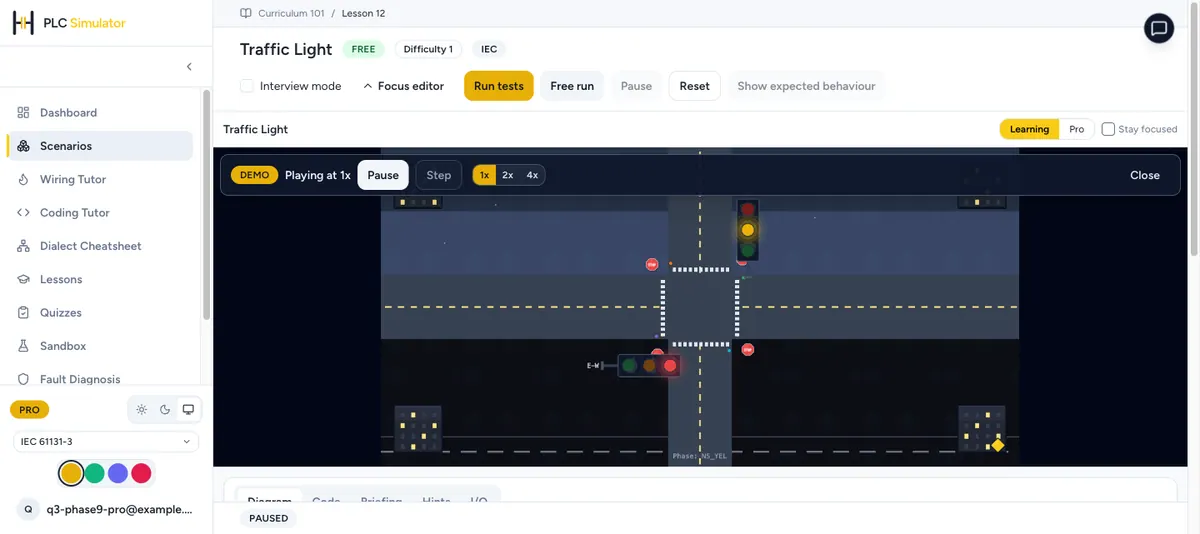
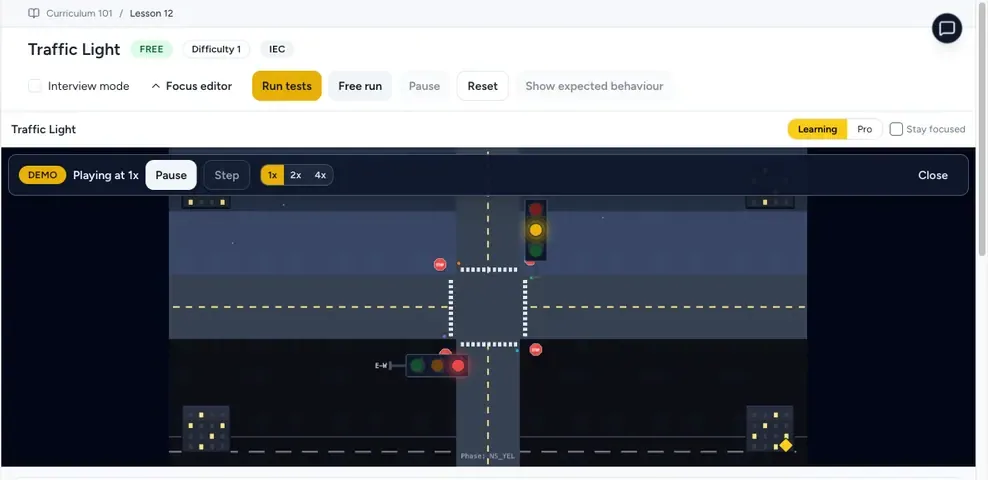
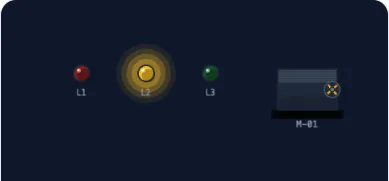
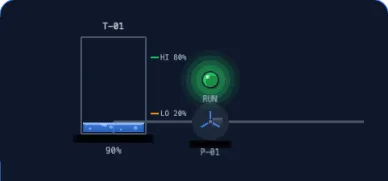
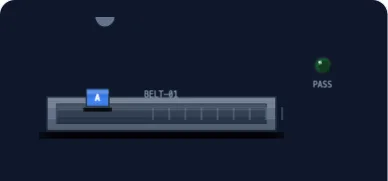
The screenshots below show the common-owned product interface and example observable process panels. They explain what evidence can look like; they are not comparative proof and no other candidate is scored from these images.
How results will be published
Freeze before testing
Product name, URL, build, licence, price-check date, operating environment and commercial relationship are recorded first.
Preserve raw evidence
The first run is retained, each execution case runs three times, and deviations or retests receive a public reason.
Separate unsupported from failed
Allowed outcomes are pass, fail, unsupported, blocked and not tested. Missing evidence never becomes a zero disguised as measurement.
Weighting is frozen at 30% execution correctness, 20% reproducibility and diagnostics, 20% dialect and instruction coverage, 10% portability, 10% access/time-to-first-run and 10% documentation and limitations. Until publishable evidence exists, this page remains an unranked shortlist.
Why Use a PLC Simulator in 2026?
PLC simulators let you practise industrial-control logic without energising a real machine. The right option depends on whether you are learning transferable fundamentals, reproducing one vendor runtime, validating a project, or driving a virtual process.
- No energised training machine. Learn and test logic before moving to a supervised hardware lab.
- Lower setup friction. Browser-based tools avoid a native installer; vendor tools may require specific operating systems, licences, and versions.
- Repeatable faults. Re-run the same stuck input, unsafe transition, reset, and recovery test without risking production equipment.
- Clear scope. Use a learning simulator for fundamentals and the exact vendor environment plus hardware for firmware- or module-specific validation.
- Comparable work. Give every candidate tool the same requirements and acceptance tests instead of comparing marketing checklists.
A practical path is to start with a browser learning environment such as PLC Simulation Software, then reproduce the same tested program in the exact vendor tool required by a course, employer, or controller. The browser product is a learning and prototyping simulator, not a production PLC or a substitute for target-hardware testing.
Simulator vs Emulator: Pick the Right Tool
PLC Simulator
Models the behaviour of a PLC — scan cycle, soft elements, ladder logic — without running real firmware. Great for learning, fundamentals, and cross-brand syntax practice.
- Browser-based: PLC Simulation Software
- Educational: LogixPro, Ladder Logic Online
- 3D process environment: Factory I/O, using a currently supported driver and controller connection
- Open-source project: OpenPLC, with editor and runtime scope checked separately
Use when: learning, prototyping, demonstrating logic, classroom labs.
PLC Emulator
Targets a more specific controller environment than a generic learning simulator. Fidelity varies by product, release, supported modules, firmware, and configuration; the vendor's documented scope is the authority.
- Siemens PLCSIM (TIA Portal)
- Studio 5000 Logix Emulate
- RSLogix Emulate 500 / 5000
- CODESYS Control Win
- Connected Components Workbench Emulator
Use when: reproducing a vendor-specific workflow before the required target-hardware validation.
How to Choose the Right PLC Simulator
1. Identify your goal
Are you learning the fundamentals, practising for a specific brand, or validating production code? Each has a different best simulator.
- Learning fundamentals: compare browser access, lesson scope, dialect coverage, feedback, and limitations.
- Brand-specific practice: use the vendor's own emulator — PLCSIM for Siemens, Studio 5000 Emulate for Rockwell.
- Production project validation: use the exact vendor engineering environment, then verify the required firmware, modules, communications, safety functions, timing, I/O, and fault recovery on the target hardware.
2. Match the simulator to the OS and browser you actually own
Check the current vendor system requirements and run the complete create-save-run workflow on your device. “Browser based” removes a native install but does not prove support for every browser, tablet, or input method.
3. Budget honestly
Record what the free tier actually includes, when an account is required, which scenarios or lessons are gated, and whether vendor runtimes or add-ons are separate. Request a current quote before comparing paid editions.
4. Test the workflow before committing
If a candidate publishes a trial, demo, or free tier, run a bounded proof project before buying. Test sign-in, project creation, save/restore, logic execution, diagnostics, export, accessibility, and licence recovery; record the product version and test date.
Browser learning option · facts reviewed 2026
PLC Simulation Software
Free account with no credit card, 8 learning dialects, 12 core lessons, and 140 source-catalogued practice records. Access varies by account, plan, entitlement, and rollout. It teaches transferable logic patterns and does not emulate every vendor instruction or firmware behaviour.
Verify OS Compatibility
Compatibility changes by product version, browser, processor, virtualisation layer, licence service, and required drivers. The old platform checkmark table has been removed because it did not preserve a dated primary source for every cell.
Native tools
Open the current vendor system-requirements page and record supported OS edition, architecture, RAM, disk, drivers, licence manager, and product version.
Browser tools
Run sign-up, editor input, save, simulation, keyboard controls, and export on the exact browser and device. “Browser based” is not a promise for every device.
Virtual machines
Treat a VM as your own workaround unless the vendor explicitly supports that guest and host combination. Test USB, networking, graphics, and licensing.
Classroom rollout
Test the managed browser or workstation image, firewall, storage policy, sign-in, accessibility, and one complete lesson before enrolment.
10 Things to Evaluate Before Picking a PLC Simulator
Realistic scan-cycle behaviour
Document what the tool models: input sampling, program execution, output updates, task scheduling, timers, edge state, and communications. A learning model can still be useful when its timing and fidelity limits are explicit.
Multi-brand syntax support
Check which syntax, instructions, data types, and execution rules are actually implemented for each named dialect. Cross-brand practice teaches transferable patterns; it does not prove compatibility with a vendor compiler or runtime.
HMI / I/O visualisation
Decide whether you need only rung state, a simple I/O panel, or a process model with observable sequence and fault states. Evaluate the visualisation against the learning or test objective.
Forcing inputs and outputs
If force or override behaviour is part of the objective, verify exactly what can be forced, how the state is identified, and how it is cleared. Never transfer a software-only forcing workflow to a live machine without the site's approved safety and change controls.
Save and share
Test save, restore, version identification, sharing permissions, data retention, and export. A share URL is not equivalent to a native vendor project file.
Built-in examples
Inspect whether examples include requirements, initial conditions, expected outputs, fault cases, reset behaviour, and answer evidence. A polished animation without testable acceptance criteria is not a complete exercise.
Operating system fit
Run the complete workflow on the exact OS, browser, managed-device policy, processor architecture, drivers, and licence service you will use. Do not infer compatibility from the operating-system family alone.
Cost and licence model
Record the current edition, term, renewal, seat rules, lesson or scenario limits, runtimes, add-ons, support, tax, and cancellation path from the publisher or a dated quote.
Documentation and community
Test whether current documentation answers installation, supported instructions, known limitations, recovery, and export questions. Community material can help, but versioned publisher documentation should anchor product-specific claims.
Bridges to real hardware
List which concepts transfer, which project files or tags can move, and which steps must be rebuilt in the vendor IDE. Plan explicit target-controller, I/O, network, safety, and commissioning tests.
PLC Simulator Recommendations by Use Case
Persona
Complete beginner with a Mac
Recommendation
Start by testing a browser-based learning simulator on the exact Mac and browser you own. If the target employer uses a native vendor tool, plan a separate supported environment for that brand-specific stage.
Persona
Career-changer self-funding the journey
Recommendation
Use a free learning tier for fundamentals, then sample current job postings in the target region and reproduce the same proof project in the vendor tool employers actually request. Verify current trial and licence terms directly with the vendor.
Persona
Vocational / technical-school instructor
Recommendation
Pilot the browser, account, keyboard, accessibility, storage, and firewall workflow on the managed student devices. Add a vendor-specific lab only after confirming licences, workstation images, and the exact curriculum outcome.
Persona
Working engineer expanding their stack
Recommendation
Start from the target controller, firmware, engineering-tool release, required modules, and acceptance test. If a 3D environment is useful, verify the exact driver and version combination in its current compatibility documentation before purchasing.
Persona
Hobbyist building home-automation projects
Recommendation
Consider OpenPLC or another documented runtime on supported hardware, but treat mains wiring, output modules, isolation, enclosures, and safety as a separate supervised hardware project.
Persona
Academic researcher needing reproducible experiments
Recommendation
Choose a tool whose source, version, configuration, runtime, dependencies, test inputs, outputs, and licences can be archived well enough to reproduce the experiment. Open source can help inspection, but it does not by itself prove IEC conformance or experimental repeatability.
Persona
Pre-employment skills assessment / interview prep
Recommendation
Match the assessment environment and controller family when they are disclosed. Otherwise practise a vendor-neutral requirements-and-test workflow, then reproduce it in the most relevant vendor environment once the role's stack is known.
What You Can't Learn from a PLC Simulator
Honest limitations matter. A software-only exercise can cover selected logic and diagnostic objectives, but it does not reproduce every physical, organisational, or controller-specific part of industrial work.
- Physical assembly. Terminal preparation, conductor routing, panel layout, grounding, shielding, enclosure selection, and inspection require an appropriate supervised hardware environment.
- Field behaviour. Sensor alignment, loop power, noise, calibration, wiring faults, actuator load, and environmental effects need physical test evidence.
- Commissioning controls. Energisation plans, permits, backups, change control, rollback, communications recovery, and site acceptance involve people and equipment outside the simulator.
- Machine safety. A learning simulator is not a safety-validation tool. Risk assessment, safety requirements, verified components, validation, proof testing, and site procedures remain separate work.
- Exact runtime behaviour. Firmware, task scheduling, modules, motion, safety, redundancy, communications, and fault handling must be checked against the target product and hardware.
- Operational communication. Handover, operator training, incident response, documentation, and customer decisions require evidence and human practice beyond code execution.
This does not make simulation unhelpful. It defines the boundary: use it for objectives the tool can observe and repeat, then use the vendor environment, target hardware, supervised lab, and site procedures for the remaining evidence.
From Simulator to Real PLC: The Migration Path
Use evidence gates instead of fixed study times or hardware budgets:
- Gate 1 — Transferable logic. Turn a written sequence into logic, test normal and fault paths, explain scan-dependent behaviour, and restore the project from an archived version.
- Gate 2 — Vendor workflow. Rebuild the project in the required engineering tool and prove compile, download or virtual run, online diagnostics, backup, restore, and version compatibility.
- Gate 3 — Supervised hardware lab. Work from an approved low-voltage design and bill of materials; verify isolation, terminals, I/O, power-up, safe state, fault recovery, and as-built evidence with a qualified supervisor where required.
- Gate 4 — Guarded machine or process rig. Execute an approved commissioning and acceptance plan covering modes, interlocks, alarms, loss of power or communications, reset, restart, and rollback.
- Gate 5 — Production change control. Demonstrate requirements traceability, risk and safety boundaries, backups, peer review, test records, operator handover, and controlled deployment.
Advance when the evidence passes, not when a calendar expires. For hardware, price the complete safe lab—controller, power, protection, I/O, terminals, enclosure, software, cable, test equipment, and supervision—using current local quotes.
For learners targeting a specific brand, see the cheap PLC buying guide for first-hardware recommendations and the best PLC programming software rankings for vendor-specific IDE choice.
Pairing PLC Simulators with 3D Virtual Environments
A 3D process environment can make sequences, material flow, sensor placement, actuator interactions, and fault recovery easier to observe than a flat I/O panel. It is another test layer, not proof of physical timing, safety, or target-controller behaviour.
Factory I/O publishes a current driver list for connecting supported external controllers or software. Treat each driver, edition, controller, network, and version combination as a compatibility claim to verify before purchase. This page does not claim a direct integration with PLC Simulation Software.
Other simulation suites may model electrical, pneumatic, hydraulic, or mechanical domains. Compare the exact model library, controller connector, licence, export, and validation scope needed for the project rather than assuming the products are interchangeable.
A useful evaluation is to run the same small sequence and fault matrix with and without the 3D layer. Buy only if the additional observable behaviour supports the learning or engineering requirement and the documented connector works in the target environment.
Are Free PLC Simulators Good Enough?
They can be sufficient for a bounded set of learning objectives. “Free” describes a licence or access tier, not the fidelity, curriculum quality, compatibility, or total cost of the workflow.
For logic fundamentals, define the required instructions, execution states, exercises, feedback, save/restore, and fault tests. A free browser tier can satisfy those objectives when the features and limits match.
For a specific controller family, check the vendor's current engineering and simulation product, supported controllers, firmware, operating system, edition, licence, and trial terms. Do not assume the emulator is bundled or free.
For a classroom, pilot the exact managed devices, browsers or workstation image, identity flow, firewall, storage, accessibility, lesson access, instructor controls, support, privacy, and licence administration before enrolment.
A paid tool may be justified when its documented controller fidelity, diagnostics, 3D or multi-domain model, collaboration, curriculum, support, or organisation-wide workflow passes a requirement that the free candidate does not.
See the free PLC software round-up for the broader free-software landscape across IDEs and runtimes.
Verify version-sensitive claims in the publisher's current documentation. Start with the Factory I/O driver documentation, the relevant controller vendor's system requirements, and the PLC Simulation Software product-facts record.
Frequently Asked Questions
What is the best free PLC simulator in 2026?▼
There is no universal best option. Compare the exact language, controller model, operating system, lesson access, scenario access, export limits, and hardware-fidelity requirement. PLC Simulation Software is a browser-based learning option with a free account, 8 learning dialects, 12 core lessons, and 140 source-catalogued practice records; access varies by account, plan, entitlement, and rollout.
Do I need PLC hardware to learn PLC programming?▼
You can learn logic fundamentals, scan-cycle reasoning, timers, counters, and sequence testing without hardware. A simulator does not replace wiring, electrical safety, field instruments, networking, commissioning, or validation on the exact target controller.
What is the difference between PLC simulation and PLC emulation?▼
Simulation reproduces selected controller or process behaviour for a defined purpose. Emulation aims to reproduce a more specific target environment, but fidelity still depends on product, version, firmware, modules, and configuration. Check the vendor’s stated scope instead of assuming any virtual tool is identical to physical hardware.
Can I run PLC simulator software on Mac, Linux, or ChromeOS?▼
A browser-based learning simulator can avoid a native installer, but support still depends on the current browser and device. Vendor engineering and emulation tools often publish narrower operating-system requirements. Check each current system-requirements page and test the exact workflow on your device.
Is Factory I/O a PLC simulator?▼
Factory I/O is a 3D virtual factory environment, not a standalone PLC simulator. It exchanges tags with supported external controllers and software through edition-specific drivers. Check Factory I/O’s current driver list before choosing the controller runtime; this page does not claim a direct PLC Simulation Software integration.
How long does it take to learn PLC programming with a simulator?▼
There is no defensible universal time. Measure outcomes instead: explain the scan cycle, build and test an interlocked motor rung, use timers and counters, implement a sequence, force faults, diagnose failures, and reproduce the work in the target vendor tool.
Are PLC simulators good enough to certify?▼
A simulator can build and demonstrate selected programming skills, but it does not grant a credential. Certification prerequisites, assessment environments, permitted software, hardware tasks, and renewal rules vary by issuer and programme. Check the current issuer syllabus, then practise in the exact environment that syllabus requires.
Explore More Categories
Best PLC Software for Beginners
The easiest PLC programming software to learn for newcomers to industrial automation.
Best Free PLC Software
Top free and open-source PLC programming software options that cost nothing to get started.
Best PLC Software for Professionals
Industry-leading PLC software platforms used by professional automation engineers worldwide.
Best Software for Siemens PLCs
Programming software options for Siemens S7 and SIMATIC PLC systems.
Best Software for Allen-Bradley PLCs
Programming software for Allen-Bradley and Rockwell Automation PLC systems.
Best Budget PLC Software
Affordable PLC programming software that delivers excellent value for money.