Schneider Electric PLC Programming Tutorial: Complete Guide to Modicon and EcoStruxure
Master Schneider Electric PLC programming with this comprehensive tutorial covering Modicon PLCs, EcoStruxure Machine Expert, ladder logic, and practical industrial applications.
π― Master PLC Programming Like a Pro
Preorder our comprehensive 500+ page guide with real-world examples, step-by-step tutorials, and industry best practices. Everything you need to become a PLC programming expert.
- β Complete Ladder Logic Programming Guide
- β Advanced Function Block Techniques
- β Real Industrial Applications & Examples
- β Troubleshooting & Debugging Strategies
π Table of Contents
This comprehensive guide covers:
- Introduction to PLC Programming Fundamentals
- Understanding Ladder Logic Programming
- Function Block Diagrams and Structured Text
- Advanced Programming Techniques
- Real-World Application Examples
- Troubleshooting and Best Practices
- Industry Standards and Compliance
- Career Development and Certification Paths
Schneider Electric PLC programming expertise opens doors to automation opportunities across water treatment facilities, building management systems, food processing plants, and manufacturing operations worldwide. Understanding Modicon PLC programming with EcoStruxure Machine Expert software enables you to implement reliable industrial control solutions leveraging one of the world's most established automation platforms.
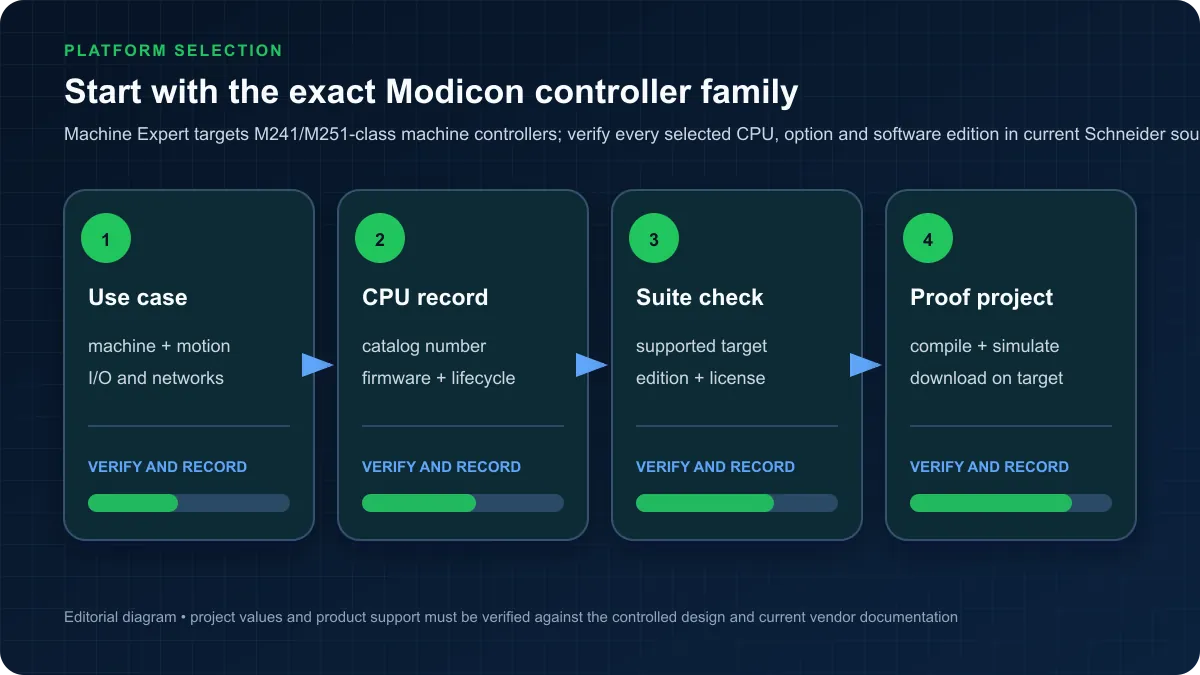
This comprehensive Schneider Electric PLC programming tutorial guides you from fundamental concepts through advanced programming techniques, covering the complete Modicon PLC family including M241 compact controllers, M251/M258 mid-range systems, and M580 high-performance platforms. You'll learn EcoStruxure Machine Expert software navigation, IEC 61131-3 programming language implementation, practical application development, and professional best practices that experienced automation engineers use daily.
Schneider Electric's automation heritage traces back to Modicon's 1968 invention of the programmable logic controller itself, establishing foundational PLC concepts still used today. The company's modern Modicon platform combines this proven reliability with contemporary features including integrated Ethernet communication, comprehensive safety capabilities, and Industry 4.0 connectivityβmaking Schneider Electric PLC programming skills valuable across traditional and emerging industrial applications.
Whether you're migrating from competitive platforms, starting your automation career, or expanding your multi-vendor expertise, this tutorial provides the practical knowledge needed to successfully program Schneider Electric PLCs for real-world industrial applications. Let's begin your journey to Modicon programming mastery.
Table of Contents
- Understanding Schneider Electric PLC Product Lines
- Getting Started with EcoStruxure Machine Expert
- Programming Ladder Logic on Schneider PLCs
- Structured Text Programming
- Communication Protocols and Networking
- Practical Application: Water Tank Level Control
- Programming Best Practices
- Troubleshooting Common Issues
- Frequently Asked Questions
Understanding Schneider Electric PLC Product Lines
Schneider Electric offers comprehensive Modicon PLC families serving applications from simple machine control through complex distributed process systems, each optimized for specific performance requirements and application areas.
Modicon M241/M251/M258: Compact Logic Controllers
Modicon M241: Entry-Level Performance
The Modicon M241 provides cost-effective control for simple to moderate complexity applications including packaging machines, conveyor systems, and basic process control. Key specifications include:
- Processing Power: 0.6 ms typical scan time for 1K Boolean instructions
- Memory: 100 KB program memory, expandable to 256 KB
- I/O Capacity: 264 digital I/O, 60 analog channels
- Communication: 2x Ethernet, 1x serial port, optional CANopen
- Physical Size: Compact 90mm width for space-constrained installations
- Price Range: $400-800 depending on I/O configuration
Typical M241 Applications:
- Simple packaging machinery
- Conveyor belt control systems
- Basic building automation
- Small water treatment systems
- Entry-level OEM machines
Modicon M251: Mid-Range Controller
The M251 extends M241 capabilities with enhanced performance and expanded I/O for moderate to complex machine control:
- Processing Power: 0.4 ms scan time, 50% faster than M241
- Memory: 256 KB program memory, 512 KB data memory
- I/O Capacity: 504 digital I/O, 120 analog channels
- Communication: 2x Ethernet, 1x serial, CANopen master
- Motion Control: Pulse train outputs for stepper/servo control
- Price Range: $800-1,400 for standard configurations
Modicon M258: High-Performance Compact PLC
The M258 delivers maximum performance in compact form factor for demanding machine control applications:
- Processing Power: 0.2 ms scan time for complex logic
- Memory: 1 MB program memory, 2 MB data memory
- I/O Capacity: 1,024 digital I/O, 240 analog channels
- Safety Integration: SIL 3 / PLe safety capabilities (M258S)
- Motion Control: Advanced motion control for up to 16 axes
- Communication: Dual Ethernet with embedded web server
- Price Range: $1,400-2,200 depending on safety features
Compact PLC Comparison Table:
| Feature | M241 | M251 | M258 | |---------|------|------|------| | Scan Time | 0.6 ms | 0.4 ms | 0.2 ms | | Program Memory | 100-256 KB | 256 KB | 1 MB | | Max Digital I/O | 264 | 504 | 1,024 | | Motion Axes | β | Basic | 16 axes | | Safety | No | No | SIL 3 (M258S) | | Typical Application | Simple machines | OEM machines | Complex machines | | Price Range | $400-800 | $800-1,400 | $1,400-2,200 |
Modicon M340: Mid-Range Process Control
The Modicon M340 targets process control, infrastructure, and distributed applications requiring reliable performance, extensive I/O capacity, and comprehensive communication capabilities:
Key Specifications:
- Processing Power: Sub-millisecond scan times for process control
- Memory: Up to 1.5 MB program memory, 8 MB data memory
- I/O Capacity: 1,024 digital I/O per rack, expandable to 8,192
- Rack Architecture: Modular rack-based system with hot-swap modules
- Communication: Ethernet, Modbus, CANopen, Profibus DP
- Redundancy: Hot standby redundancy for critical applications
- Price Range: $1,800-3,500 for processors
M340 Application Areas:
- Water and wastewater treatment
- Building management systems
- Food and beverage processing
- Material handling systems
- Infrastructure control (tunnels, bridges)
- Chemical batch processing
M340 Advantages:
- Extensive process control libraries
- Proven reliability in critical infrastructure
- Strong communication protocol support
- Easy expansion with distributed I/O
- Comprehensive diagnostic capabilities
Modicon M580: High-End Safety and Redundancy
The Modicon M580 represents Schneider Electric's flagship platform for demanding applications requiring maximum performance, integrated safety, and high-availability architectures:
Performance Specifications:
- Processing Power: 0.05 ms for 1K Boolean instructions (ultra-fast)
- Memory: 12 MB program memory, 64 MB data memory
- I/O Capacity: 30,720 I/O points across distributed network
- Redundancy: Hot standby CPU redundancy, redundant networks
- Safety: Integrated SIL 3 / PLe safety control (M580S)
- Cybersecurity: Advanced security with encrypted communications
- Communication: Dual Ethernet, OPC UA server, MQTT support
- Price Range: $4,500-8,000 for advanced safety controllers
M580 Distinguishing Features:
Integrated Safety: M580S controllers combine safety and standard control in unified platforms, eliminating separate safety PLCs and reducing system complexity while meeting stringent SIL 3 / Performance Level e requirements for safety-critical applications.
High Availability Architecture: Hot standby redundancy provides automatic failover in milliseconds, ensuring continuous operation for critical processes. Redundant network connections prevent communication failures from disrupting operations.
Cybersecurity: Built-in security features include role-based access control, encrypted communications, audit logging, and compliance with IEC 62443 industrial cybersecurity standardsβcritical for modern industrial environments.
Industry 4.0 Connectivity: Native OPC UA server capabilities, MQTT protocol support, and embedded web services enable seamless integration with MES systems, cloud platforms, and enterprise IT infrastructure.
M580 Target Applications:
- Pharmaceutical manufacturing (regulatory compliance)
- Chemical processing (safety-critical)
- Oil and gas (hazardous areas)
- Automotive assembly (high reliability)
- Power generation (redundancy required)
Choosing the Right Modicon PLC
Select M241/M251 if:
- Simple to moderate machine control application
- Budget-conscious project (<$5,000 control system)
- Compact installation space requirements
- Standard discrete or simple analog control
- OEM machine manufacturing
Select M258 if:
- Complex machine control with motion
- Integrated safety required (SIL 3)
- High-speed discrete control necessary
- Advanced motion control (up to 16 axes)
- Compact form factor with maximum capability
Select M340 if:
- Process control application emphasis
- Extensive I/O requirements (>1,000 points)
- Distributed control system architecture
- Water/wastewater or infrastructure application
- Rack-based modular system preferred
Select M580 if:
- Maximum performance and reliability required
- Safety integration critical (SIL 3 applications)
- Redundancy necessary (high availability)
- Cybersecurity compliance mandatory
- Large-scale process or hybrid applications
Getting Started with EcoStruxure Machine Expert
EcoStruxure Machine Expert represents Schneider Electric's modern programming environment for Modicon M241, M251, and M258 controllers, providing comprehensive development capabilities with intuitive workflow and extensive function libraries.
Software Installation and Licensing
Obtaining EcoStruxure Machine Expert:
Schneider Electric offers multiple licensing options to accommodate different user needs:
Trial Version (Free):
- 45-day full-featured trial license
- Complete programming capabilities
- All function blocks and libraries included
- Download from Schneider Electric website
- Ideal for evaluation and training
Standard License ($1,200-1,800):
- Programming for M241 controllers
- Basic programming languages (LD, FBD, ST)
- Standard function block libraries
- Single user license
- Annual maintenance optional (20% of license cost)
Professional License ($2,800-3,500):
- Full M241/M251/M258 support
- All IEC 61131-3 programming languages
- Advanced motion control libraries
- Safety programming tools (M258S)
- Simulation and diagnostics tools
Subscription Licensing:
- Monthly or annual subscription options
- Always current with latest features
- Flexible licensing for consultants
- $150-300 per month depending on tier
Installation Requirements:
- Windows 10/11 (64-bit)
- 8 GB RAM minimum (16 GB recommended)
- 10 GB free disk space
- Internet connection for activation
- USB port for hardware key (perpetual licenses)
Installation Process:
- Download installer from Schneider Electric Software Portal
- Run installer with administrator privileges
- Select components (base software, libraries, simulators)
- Enter license key or activate trial license
- Install USB drivers for PLC connection
- Configure firewall exceptions for communication
- Launch software and verify installation
Interface Overview and Navigation
EcoStruxure Machine Expert Workspace Layout:
The programming environment organizes around four primary areas providing comprehensive development capabilities:
Project Tree (Left Panel):
- Hierarchical project organization
- Device configuration
- Programming organization units (POUs)
- Library references
- Global variable lists
- Task configuration
- Communication settings
Programming Editor (Center Panel):
- Multi-tabbed editing workspace
- Ladder logic graphical editor
- Structured text code editor
- Function block diagram canvas
- Cross-reference and search tools
Properties and Configuration (Right Panel):
- Variable declarations and properties
- Device parameter configuration
- Network configuration dialogs
- Library browser and insertion
- Watch windows for debugging
Output and Status (Bottom Panel):
- Compilation messages and errors
- Communication status
- Online debugging information
- Watch tables and force tables
- Trace and trend displays
Key Navigation Features:
Quick Access Toolbar: Customizable toolbar provides one-click access to frequently used functions including compile, download, online mode, start/stop PLC, and simulation.
Keyboard Shortcuts:
- F5: Compile project
- F6: Build all
- F7: Download to PLC
- F8: Login to PLC (online mode)
- F9: Set/remove breakpoint
- Ctrl+Space: IntelliSense completion
Search and Navigation:
- Global search across entire project
- Find usages of variables and functions
- Cross-reference tables showing variable usage
- Navigation history for moving between editors
Creating Your First Project
Step-by-Step Project Creation:
Step 1: Start New Project
Launch EcoStruxure Machine Expert and select "New Project" from welcome screen:
- Enter project name (e.g., "WaterTankControl")
- Choose project location on local drive
- Select controller type (e.g., "TM241CE24R")
- Choose application template (start with "Empty project")
- Click "Create" to initialize project structure
Step 2: Configure Hardware
The Device Tree displays detected controller. Configure hardware settings:
-
Ethernet Configuration:
- IP Address: 192.168.1.10
- Subnet Mask: 255.255.255.0
- Gateway: 192.168.1.1
-
Application Settings:
- Application Name: WaterTankControl
- Cycle Time: 10 ms (default, adjust based on requirements)
- Watchdog Timer: 500 ms
-
I/O Configuration:
- Local digital inputs: %I0.0 through %I0.7
- Local digital outputs: %Q0.0 through %Q0.7
- Local analog inputs: %IW0.0 through %IW0.3
Step 3: Create Program Organization
Establish clear program organization following best practices:
Main Program (PLC_PRG): The default main program executes every scan cycle. Keep this organized and readable:
// PLC_PRG - Main Program
// Calls all program sections in logical order
// Input Processing
InputProcessing();
// Control Logic
TankLevelControl();
// Output Processing
OutputProcessing();
Function Blocks: Create reusable function blocks for common operations:
- Pump control with runtime tracking
- Valve control with feedback verification
- Alarm management
- HMI communication
Data Types: Define structured data types for complex variables:
- Pump status structure (run status, runtime, alarms)
- Process values (level, flow, temperature)
- Setpoints and parameters
Programming Languages Support (IEC 61131-3)
EcoStruxure Machine Expert provides comprehensive implementation of all five IEC 61131-3 programming languages, enabling optimal language selection for each control task:
Ladder Diagram (LD): Traditional relay-logic style programming ideal for discrete control, Boolean logic, and applications where electricians will maintain programs. Schneider Electric's LD implementation follows international standards with extensive instruction set.
Function Block Diagram (FBD): Graphical programming showing signal flow through function blocks, perfect for analog control, PID loops, and process control applications. Particularly effective for engineers with control systems background.
Structured Text (ST): High-level text language similar to Pascal, optimal for complex algorithms, mathematical calculations, and data processing. Enables efficient programming of sophisticated control logic.
Sequential Function Chart (SFC): State-based programming for sequential processes, batch control, and procedural operations. Provides clear visualization of process steps, transitions, and parallel operations.
Instruction List (IL): Low-level assembly-like language rarely used in modern applications but available for legacy compatibility and resource-constrained applications.
Language Selection Guidelines:
| Control Type | Recommended Language | Alternative | |--------------|---------------------|-------------| | Discrete logic | Ladder Diagram | Function Block | | Analog control | Function Block | Structured Text | | Math calculations | Structured Text | β | | Sequential processes | SFC | Ladder + state machine | | PID control | Function Block | Structured Text | | Motion control | Function Block | Structured Text | | Data processing | Structured Text | β |
Mixed-Language Programming: Programs can combine multiple languages within single project, using optimal language for each task. For example:
- Main program in Ladder Diagram
- PID control in Function Block Diagram
- Recipe management in Structured Text
- Batch sequence in Sequential Function Chart
Library Management and Function Blocks
Standard Function Block Libraries:
EcoStruxure Machine Expert includes comprehensive libraries for common industrial applications:
System Libraries:
- Standard IEC functions (timers, counters, math)
- Data type conversion functions
- String manipulation
- Date and time functions
Communication Libraries:
- Modbus RTU master/slave
- Modbus TCP client/server
- CANopen master functions
- Ethernet IP messaging
Motion Control Libraries:
- Axis control (absolute/relative positioning)
- Homing sequences
- Electronic camming
- Multi-axis coordination
Process Control Libraries:
- PID controllers (standard and adaptive)
- Ramp generators
- Filters and scaling
- Alarm management
Application Libraries:
- HVAC control functions
- Water treatment sequences
- Motor control with protection
- Batch control templates
Using Library Functions:
Adding Library to Project:
- Right-click "Library Manager" in project tree
- Select "Add Library"
- Browse available libraries
- Select required library (e.g., "Standard.library")
- Click OK to add to project
Inserting Function Block:
- Open programming editor
- Position cursor at insertion point
- Type function block name (e.g., "TON") or
- Press F2 to open input assistant
- Select function block from list
- Configure instance name and parameters
Example: Using TON Timer:
// Delay-On Timer Example
PROGRAM DelayExample
VAR
StartButton: BOOL;
DelayTimer: TON; // Timer instance
Output: BOOL;
END_VAR
// Ladder Logic Implementation
StartButton
| |-------[TON]-------( Output )
IN Q
PT=T#5s
Creating Custom Function Blocks:
For reusable code, create custom function blocks:
Function Block Definition:
FUNCTION_BLOCK FB_PumpControl
VAR_INPUT
Enable: BOOL;
FeedbackOK: BOOL;
END_VAR
VAR_OUTPUT
RunCommand: BOOL;
AlarmActive: BOOL;
Runtime: TIME;
END_VAR
VAR
StartTimer: TON;
RuntimeTimer: TON;
FaultTimer: TON;
END_VAR
// Function block logic here
This modular approach promotes code reuse, simplifies testing, and improves long-term maintainability.
Programming Ladder Logic on Schneider PLCs
Ladder logic programming on Schneider Electric PLCs follows IEC 61131-3 standards while offering platform-specific instructions and memory addressing optimized for Modicon controllers.
Memory Addressing (%I, %Q, %M)
Schneider Electric uses percentage-based addressing with letter prefixes indicating memory type:
Digital Input Addressing (%I):
%I0.3.5
βββββ
βββββββ Bit number (0-15)
βββββββ Module number
βββββββ Rack number
βββββββ Input type
βββββββ Percentage prefix
Common Addressing Examples:
%I0.0.0= Rack 0, Module 0, Input bit 0 (first input)%I0.1.7= Rack 0, Module 1, Input bit 7%I1.2.4= Rack 1, Module 2, Input bit 4
Digital Output Addressing (%Q): Format identical to inputs but using %Q prefix:
%Q0.0.0= First digital output%Q0.2.15= Module 2, output bit 15
Memory Bits (%M): Internal memory for intermediate results, flags, and status bits:
%M0through%M9999= Available memory bits- Retentive across power cycles (configurable)
- Useful for flag bits, intermediate logic, state machines
Analog Values (%IW, %QW): Word-sized (16-bit) values for analog I/O:
%IW0.0= Analog input word, first channel%QW0.1= Analog output word, second channel- Values typically 0-32767 representing 0-100% or 4-20mA
System Bits and Words:
%S0through%S127= System bits (first scan, watchdog, etc.)%SW0through%SW127= System words (scan time, date/time)
Best Practice: Use Symbolic Naming:
Instead of direct addressing, define symbolic names for clarity:
VAR_GLOBAL
StartButton AT %I0.0.0 : BOOL;
StopButton AT %I0.0.1 : BOOL;
RunningLamp AT %Q0.0.0 : BOOL;
MotorContactor AT %Q0.0.1 : BOOL;
TankLevel AT %IW0.0 : INT;
END_VAR
This approach dramatically improves program readability and maintenance while preventing addressing errors.
Basic Instructions: Contacts, Coils, Timers, Counters
Contact Instructions:
Normally Open Contact (Examine ON):
StartButton
| |
Conducts when input is TRUE (ON), blocking when FALSE.
Normally Closed Contact (Examine OFF):
StopButton
| / |
Conducts when input is FALSE (OFF), blocking when TRUE. Used for stop buttons, limit switches, safety interlocks.
Positive Transition Contact (Rising Edge):
StartPulse
| [P] |
Conducts for one scan when input transitions FALSE to TRUE. Ideal for push-button triggered operations.
Negative Transition Contact (Falling Edge):
StopPulse
| [N] |
Conducts for one scan when input transitions TRUE to FALSE.
Coil Instructions:
Direct Coil (Output):
( MotorOn )
Sets output to power flow state. Energized when logic path TRUE, de-energized when FALSE.
Set Coil (Latch):
( S MotorLatch )
Sets output ON when energized, remains ON even after logic becomes FALSE. Requires separate reset.
Reset Coil (Unlatch):
( R MotorLatch )
Resets latched output to OFF when energized.
Negate Coil (Invert):
( N InvertedOutput )
Inverts logic: output OFF when logic TRUE, output ON when logic FALSE.
Timer Instructions:
TON - On-Delay Timer:
Delays turning on output by specified time:
PROGRAM OnDelayExample
VAR
Start: BOOL;
Delayed: BOOL;
Timer1: TON;
END_VAR
Start
| |-------[TON Timer1]-------( Delayed )
IN Q
PT=T#5s
When Start becomes TRUE, Timer1 begins timing. After 5 seconds, Delayed output energizes. If Start becomes FALSE before timeout, timer resets.
TOF - Off-Delay Timer:
Delays turning off output:
PROGRAM OffDelayExample
VAR
Input: BOOL;
Extended: BOOL;
Timer2: TOF;
END_VAR
Input
| |-------[TOF Timer2]-------( Extended )
IN Q
PT=T#3s
Extended output follows Input ON immediately, but remains ON for 3 seconds after Input turns OFF.
TP - Pulse Timer:
Generates fixed-duration pulse:
PROGRAM PulseExample
VAR
Trigger: BOOL;
Pulse: BOOL;
Timer3: TP;
END_VAR
Trigger
| [P] |-------[TP Timer3]-------( Pulse )
IN Q
PT=T#2s
Rising edge of Trigger generates 2-second pulse on Pulse output, regardless of Trigger duration.
Counter Instructions:
CTU - Up Counter:
Counts rising edges:
PROGRAM CounterExample
VAR
CountInput: BOOL;
Reset: BOOL;
CountDone: BOOL;
Counter1: CTU;
END_VAR
CountInput
| [P] |-------[CTU Counter1]-------( CountDone )
CU Q
Reset --------+RESET
PV=10
Increments count on each rising edge of CountInput. When count reaches 10, CountDone energizes. Reset input clears count to zero.
CTD - Down Counter:
Counts down from preset:
PROGRAM DownCountExample
VAR
CountDown: BOOL;
Load: BOOL;
CountZero: BOOL;
Counter2: CTD;
END_VAR
CountDown
| [P] |-------[CTD Counter2]-------( CountZero )
CD Q
Load ---------+LOAD
PV=5
Decrements count on each CountDown pulse. Output energizes when count reaches zero. Load input resets count to preset value.
CTUD - Up/Down Counter:
Bidirectional counting:
Counter3(CU:=UpPulse, CD:=DownPulse, RESET:=Reset, LOAD:=Load, PV:=100);
CountValue := Counter3.CV;
Complete Example: Start/Stop Motor Control with Interlock
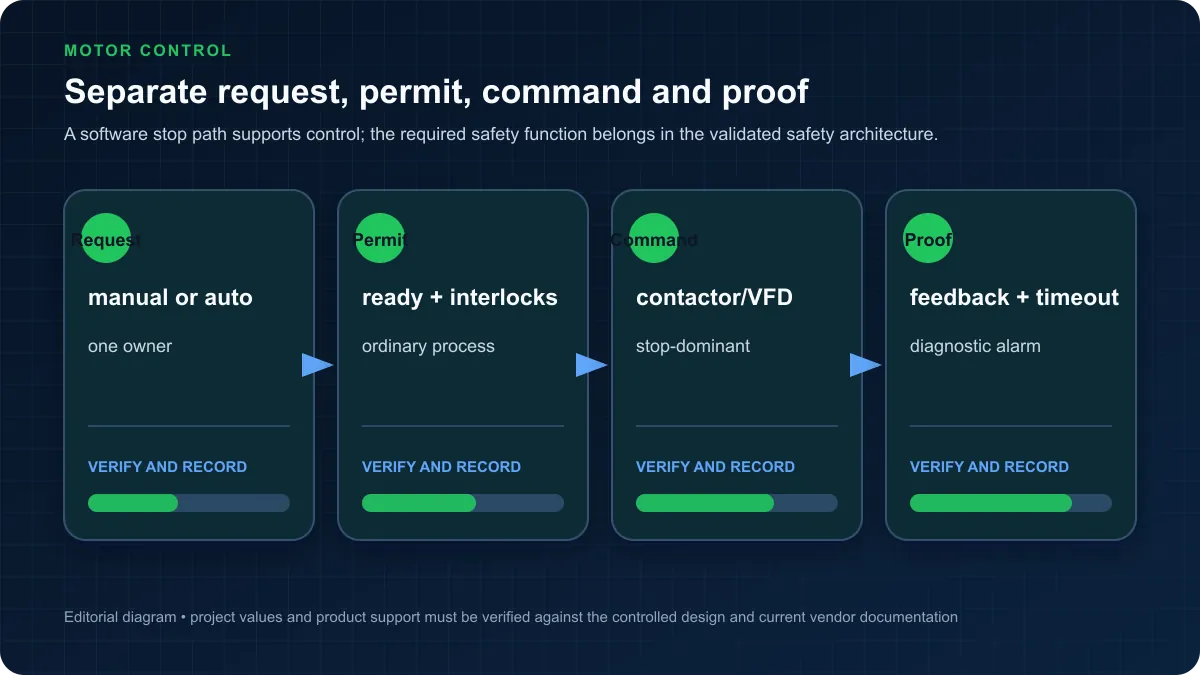
This practical example demonstrates integrating contacts, coils, timers, and safety interlocks for real-world motor control:
Application Requirements:
- Manual start/stop push buttons
- Safety guard interlock prevents operation with guard open
- Run indicator lamp energized when motor running
- 3-second delay between start command and motor energization
- Emergency stop immediately de-energizes motor
- Motor cannot restart for 5 seconds after stop
Variable Declarations:
VAR
// Physical I/O
StartPB AT %I0.0.0 : BOOL; // Start push button
StopPB AT %I0.0.1 : BOOL; // Stop push button
EStopOK AT %I0.0.2 : BOOL; // E-Stop circuit OK
GuardClosed AT %I0.0.3 : BOOL; // Safety guard closed
MotorContactor AT %Q0.0.0 : BOOL; // Motor contactor output
RunLamp AT %Q0.0.1 : BOOL; // Run indicator
FaultLamp AT %Q0.0.2 : BOOL; // Fault indicator
// Internal variables
RunPermissive: BOOL; // All safety conditions met
StartDelayTimer: TON; // Delay motor start
RestartDelayTimer: TOF; // Prevent rapid restart
RunMemory: BOOL; // Motor run status latch
FaultCondition: BOOL; // Safety fault detected
END_VAR
Ladder Logic Implementation:
// Rung 1: Check all safety permissives
EStopOK GuardClosed
| |---------| |-------( RunPermissive )
// Rung 2: Detect fault condition
RunPermissive
| / |-------( FaultCondition )
// Rung 3: Start motor sequence with safety checks
StartPB RunPermissive RestartDelayTimer.Q RunMemory
| [P] |----------| |----------| / |--------(S RunMemory)
// Rung 4: Stop motor on stop button, E-stop, or guard open
StopPB RunPermissive
| [P] |----------| / |--------(R RunMemory)
| |
+------------+
// Rung 5: Start delay timer (3 seconds)
RunMemory
| |-------[TON StartDelayTimer]
IN Q
PT=T#3s
// Rung 6: Energize contactor after delay
RunMemory StartDelayTimer.Q RunPermissive
| |----------| |----------| |-------( MotorContactor )
// Rung 7: Run indicator follows contactor
MotorContactor
| |-------( RunLamp )
// Rung 8: Restart delay timer (prevents rapid cycling)
MotorContactor
| |-------[TOF RestartDelayTimer]
IN Q
PT=T#5s
// Rung 9: Fault indicator
FaultCondition
| |-------( FaultLamp )
Program Logic Explanation:
Rung 1 - Safety Permissive: RunPermissive energizes only when E-Stop circuit is OK AND safety guard is closed. This permissive must be TRUE for motor operation.
Rung 2 - Fault Detection: FaultCondition energizes whenever RunPermissive is FALSE, indicating safety circuit problem requiring operator attention.
Rung 3 - Motor Start: Motor starts (RunMemory latches ON) when:
- Start button pressed (rising edge)
- All safety permissives OK
- Restart delay timer expired (prevents rapid cycling)
Rung 4 - Motor Stop: Motor stops (RunMemory unlatches) when:
- Stop button pressed, OR
- Any safety permissive fails (E-Stop or guard opens)
Rung 5 - Start Delay: 3-second timer delays contactor energization after start command, allowing VFD precharge or soft-start sequence.
Rung 6 - Contactor Output: Motor contactor energizes when motor running, start delay expired, and all safeties OK. This ensures any safety fault immediately de-energizes motor.
Rung 7 - Run Indication: Run lamp mirrors contactor state, providing operator feedback.
Rung 8 - Restart Delay: Off-delay timer prevents motor restart for 5 seconds after stop, protecting motor from rapid cycling and thermal damage.
Rung 9 - Fault Indication: Fault lamp alerts operator to safety circuit problem requiring attention before operation.
Testing and Commissioning:
-
Offline Simulation:
- Use EcoStruxure Machine Expert simulator
- Test all start/stop sequences
- Verify safety interlocks prevent operation
- Confirm timer delays operate correctly
-
Online Debugging:
- Download program to PLC
- Use force tables to simulate inputs
- Monitor all variables in watch window
- Verify outputs respond correctly
-
Physical Commissioning:
- Test with actual hardware
- Verify E-Stop stops motor immediately
- Confirm guard interlock prevents operation
- Validate all indicator lamps
- Document test results
This example demonstrates professional programming practices including comprehensive safety interlocks, descriptive variable naming, logical program organization, and thorough testing procedures essential for industrial applications.
Structured Text Programming
Structured Text (ST) programming provides powerful text-based language for complex algorithms, mathematical calculations, and advanced control logic that would be cumbersome in graphical languages.
ST Syntax on Schneider PLCs
Schneider Electric implements ST following IEC 61131-3 standards with Pascal-like syntax familiar to software programmers:
Basic ST Program Structure:
PROGRAM ST_Example
VAR
// Variable declarations
Temperature: REAL;
Setpoint: REAL := 75.0;
Output: REAL;
Enable: BOOL;
END_VAR
// Program statements
IF Enable THEN
Output := (Setpoint - Temperature) * 2.0;
ELSE
Output := 0.0;
END_IF;
END_PROGRAM
Assignment Statements:
// Simple assignment
Counter := Counter + 1;
// Arithmetic operations
Result := (Value1 + Value2) * Factor / 100.0;
// Boolean assignments
MotorOn := StartButton AND NOT StopButton;
Comparison Operators:
IF Temperature > HighLimit THEN
Alarm := TRUE;
ELSIF Temperature < LowLimit THEN
Alarm := TRUE;
ELSE
Alarm := FALSE;
END_IF;
Logical Operators:
// AND, OR, NOT operations
RunCondition := SafetyOK AND (ManualMode OR AutoMode) AND NOT Fault;
// XOR (exclusive or)
ToggleOutput := Input1 XOR Input2;
Loop Structures:
FOR Loop:
// Iterate through array
FOR i := 0 TO 9 DO
TankLevels[i] := TankLevels[i] + 1.0;
END_FOR;
WHILE Loop:
// Loop while condition true
WHILE Counter < 100 DO
Counter := Counter + 1;
Sum := Sum + Values[Counter];
END_WHILE;
REPEAT Loop:
// Execute at least once
REPEAT
Index := Index + 1;
ProcessValue := Data[Index];
UNTIL Index >= MaxIndex
END_REPEAT;
CASE Statement:
CASE ProcessState OF
0: // Idle state
Output := 0.0;
Status := 'Idle';
1: // Starting
Output := 25.0;
Status := 'Starting';
2: // Running
Output := 100.0;
Status := 'Running';
3: // Stopping
Output := 0.0;
Status := 'Stopping';
ELSE
// Default case
Output := 0.0;
Status := 'Error';
END_CASE;
When to Use ST vs Ladder Logic
Choose Structured Text for:
Complex Mathematical Calculations:
// PID calculation with anti-windup
Error := Setpoint - ProcessVariable;
ProportionalTerm := Kp * Error;
IF NOT IntegralWindup THEN
IntegralTerm := IntegralTerm + (Ki * Error * ScanTime);
END_IF;
DerivativeTerm := Kd * (Error - LastError) / ScanTime;
ControlOutput := ProportionalTerm + IntegralTerm + DerivativeTerm;
// Apply output limits
IF ControlOutput > 100.0 THEN
ControlOutput := 100.0;
IntegralWindup := TRUE;
ELSIF ControlOutput < 0.0 THEN
ControlOutput := 0.0;
IntegralWindup := TRUE;
ELSE
IntegralWindup := FALSE;
END_IF;
LastError := Error;
Array and Data Structure Manipulation:
// Process multiple tank levels
FOR i := 0 TO 9 DO
IF TankLevel[i] > HighAlarm THEN
TankAlarms[i] := TRUE;
AlarmCount := AlarmCount + 1;
ELSIF TankLevel[i] < LowAlarm THEN
TankAlarms[i] := TRUE;
AlarmCount := AlarmCount + 1;
ELSE
TankAlarms[i] := FALSE;
END_IF;
END_FOR;
State Machine Implementation:
// Recipe state machine
CASE RecipeState OF
0: // Wait for start
IF StartRecipe THEN
RecipeState := 10;
StepTimer := 0;
END_IF;
10: // Heat to temperature
HeaterOn := TRUE;
IF Temperature >= TargetTemp THEN
RecipeState := 20;
StepTimer := 0;
END_IF;
20: // Hold temperature
HeaterOn := Temperature < (TargetTemp - 2.0);
StepTimer := StepTimer + ScanTime;
IF StepTimer >= HoldTime THEN
RecipeState := 30;
END_IF;
30: // Cool down
HeaterOn := FALSE;
IF Temperature < SafeTemp THEN
RecipeState := 0;
RecipeComplete := TRUE;
END_IF;
END_CASE;
Choose Ladder Logic for:
- Discrete control sequences
- Motor start/stop control
- Interlocking and safety logic
- Boolean logic operations
- Applications maintained by electricians
Hybrid Approach: Combine both languages in single project:
- Main program organization in Ladder
- Complex calculations in ST function blocks
- Process control loops in ST
- Discrete I/O handling in Ladder
Example: PID Loop Implementation
Complete PID temperature control implementation in Structured Text:
Function Block Definition:
FUNCTION_BLOCK FB_PID_Control
VAR_INPUT
Enable: BOOL; // Enable PID control
Setpoint: REAL; // Desired value
ProcessVariable: REAL; // Measured value
Kp: REAL := 1.0; // Proportional gain
Ki: REAL := 0.1; // Integral gain
Kd: REAL := 0.01; // Derivative gain
ScanTime: REAL := 0.1; // Loop execution time (seconds)
OutputMin: REAL := 0.0; // Minimum output limit
OutputMax: REAL := 100.0; // Maximum output limit
END_VAR
VAR_OUTPUT
ControlOutput: REAL; // PID output value
InAuto: BOOL; // Auto mode active
Saturated: BOOL; // Output at limits
END_VAR
VAR
Error: REAL; // Current error
LastError: REAL; // Previous scan error
ProportionalTerm: REAL; // P component
IntegralTerm: REAL; // I component (accumulator)
DerivativeTerm: REAL; // D component
PreSatOutput: REAL; // Output before limits
IntegralWindup: BOOL; // Anti-windup flag
END_VAR
// PID Algorithm Implementation
IF Enable THEN
InAuto := TRUE;
// Calculate error
Error := Setpoint - ProcessVariable;
// Proportional term
ProportionalTerm := Kp * Error;
// Integral term with anti-windup
IF NOT IntegralWindup THEN
IntegralTerm := IntegralTerm + (Ki * Error * ScanTime);
END_IF;
// Derivative term with filtered derivative
DerivativeTerm := Kd * (Error - LastError) / ScanTime;
// Calculate pre-saturation output
PreSatOutput := ProportionalTerm + IntegralTerm + DerivativeTerm;
// Apply output limits and handle windup
IF PreSatOutput > OutputMax THEN
ControlOutput := OutputMax;
IntegralWindup := TRUE;
Saturated := TRUE;
ELSIF PreSatOutput < OutputMin THEN
ControlOutput := OutputMin;
IntegralWindup := TRUE;
Saturated := TRUE;
ELSE
ControlOutput := PreSatOutput;
IntegralWindup := FALSE;
Saturated := FALSE;
END_IF;
// Store error for next scan
LastError := Error;
ELSE
// Disabled - reset integral and outputs
InAuto := FALSE;
IntegralTerm := 0.0;
ControlOutput := 0.0;
LastError := 0.0;
Saturated := FALSE;
END_IF;
END_FUNCTION_BLOCK
Using the PID Function Block:
PROGRAM TemperatureControl
VAR
TempController: FB_PID_Control; // PID instance
Temperature: REAL; // Current temperature
TempSetpoint: REAL := 150.0; // Target temperature
HeaterOutput: REAL; // Heater power %
END_VAR
// Call PID controller every scan
TempController(
Enable := TRUE,
Setpoint := TempSetpoint,
ProcessVariable := Temperature,
Kp := 2.0,
Ki := 0.5,
Kd := 0.1,
ScanTime := 0.1,
OutputMin := 0.0,
OutputMax := 100.0
);
// Use output to control heater
HeaterOutput := TempController.ControlOutput;
END_PROGRAM
PID Tuning Guidelines:
Start with Conservative Values:
Kp := 1.0; // Moderate proportional gain
Ki := 0.1; // Slow integral action
Kd := 0.0; // Disable derivative initially
Tune Proportional Gain (Kp):
- Increase until system oscillates
- Reduce to 50% of oscillation value
- Typical range: 0.5 to 5.0 for most processes
Add Integral Action (Ki):
- Enables elimination of steady-state error
- Start low (0.01 to 0.1)
- Increase until offset eliminated
- Too high causes overshoot and instability
Add Derivative Action (Kd) if Needed:
- Improves response to rapid changes
- Start very low (0.001 to 0.01)
- Use sparingly - amplifies noise
- Often unnecessary for temperature control
This professional PID implementation includes anti-windup protection, output limiting, and enable/disable functionality suitable for production applications.
Communication Protocols and Networking
Schneider Electric Modicon PLCs support comprehensive communication protocols enabling integration with diverse industrial equipment, HMI systems, and enterprise networks.
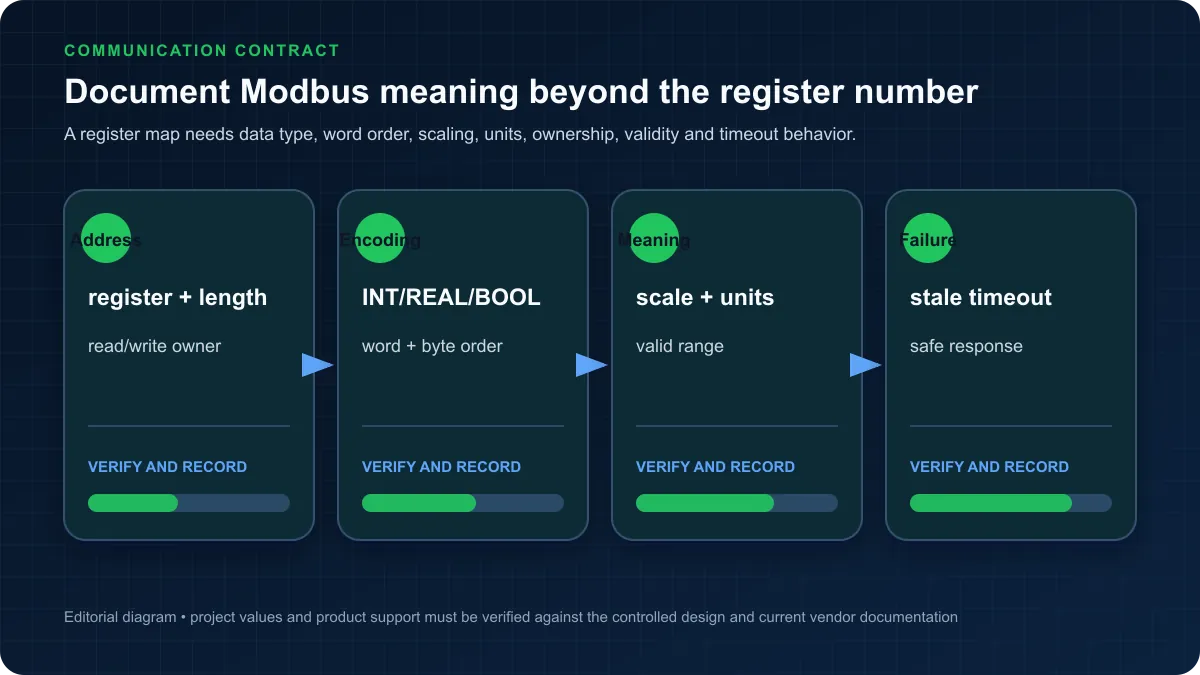
Modbus TCP/RTU Native Support
Modbus protocol support is deeply integrated into Schneider Electric controllers, reflecting the company's Modicon heritage as the original developer of Modbus in 1979.
Modbus TCP Client/Server:
Modicon PLCs natively support Modbus TCP as both client (master) and server (slave):
Server Mode Configuration:
// PLC acts as Modbus TCP server
// External systems read/write PLC registers
// No additional programming required
// Access via IP address (e.g., 192.168.1.10)
// Default Modbus TCP port 502
All program variables are automatically accessible via Modbus TCP when server enabled in configuration. External SCADA systems, HMIs, or other PLCs can read/write values using standard function codes.
Client Mode Implementation:
VAR
ModbusTCPClient: ADDM; // Modbus TCP client function block
ReadRequest: BOOL;
WriteRequest: BOOL;
DataArray: ARRAY[0..9] OF INT;
Status: WORD;
END_VAR
// Read holding registers from remote device
ModbusTCPClient(
ADR_TYPE := 3, // Holding registers
START_ADDR := 40001, // Starting register
QUANTITY := 10, // Number of registers
DATA := ADR(DataArray), // Data buffer
READ := ReadRequest, // Trigger read
WRITE := WriteRequest, // Trigger write
IP_ADDR := '192.168.1.20', // Remote device IP
MODBUS_ID := 1, // Modbus unit ID
PORT := 502, // TCP port
STATUS => Status // Operation status
);
Modbus RTU Serial Communication:
For RS-485 serial networks, use integrated Modbus RTU functionality:
Serial Port Configuration:
- Baud Rate: 9600, 19200, 38400, 57600, 115200
- Parity: None, Even, Odd
- Stop Bits: 1 or 2
- Mode: RS-232 or RS-485
Modbus RTU Master Example:
VAR
ModbusRTUMaster: READ_VAR;
RemoteData: ARRAY[0..4] OF INT;
ReadComplete: BOOL;
END_VAR
// Read registers from serial device
READ_VAR(
ADR_TYPE := 3, // Holding registers
START_ADDR := 100, // Starting address
QUANTITY := 5, // Read 5 registers
DATA := ADR(RemoteData), // Storage buffer
SLAVE_ADDR := 1, // Modbus slave ID
SERIAL_LINE := 1, // Serial port number
DONE => ReadComplete // Completion flag
);
For detailed Modbus RTU implementation including wiring, addressing, and troubleshooting, review our comprehensive Modbus RTU Protocol Tutorial.
EtherNet/IP Integration
EtherNet/IP support enables Schneider Electric PLCs to integrate with Rockwell Automation systems and other CIP-based devices:
EtherNet/IP Scanner (Master):
// Configuration via EcoStruxure Machine Expert
// Add EtherNet/IP devices to I/O scanner
// Map remote I/O to local variables
// Automatic data exchange
Example I/O Mapping:
- Remote digital inputs β %IW100
- Remote digital outputs β %QW100
- Remote analog inputs β %IW200
CANopen for Motion Control
CANopen protocol provides deterministic communication for motion control applications:
CANopen Master Configuration:
M251/M258 controllers support CANopen master with up to 64 nodes:
VAR
Axis1: MC_Power; // Motion control axis
Enable: BOOL;
Status: WORD;
END_VAR
// Enable CANopen servo drive
MC_Power(
Enable := Enable,
Axis := Axis1,
Status => Status
);
Typical CANopen Devices:
- Servo drives and motors
- Stepper motor controllers
- I/O expansion modules
- HMI operator panels
For comprehensive CANopen protocol details, see our CANopen Protocol Tutorial.
OPC UA Support on M580
The Modicon M580 includes embedded OPC UA server enabling secure, standardized communication with MES systems, SCADA platforms, and enterprise applications:
OPC UA Features:
- Industry-standard information modeling
- Secure encrypted communication
- Platform-independent data exchange
- Browse and discover capabilities
- Historical data access
OPC UA Configuration:
Enable OPC UA server in M580 controller configuration:
- Open device configuration in Control Expert
- Enable OPC UA server
- Configure security policies (Sign, SignEncrypt)
- Define user authentication (anonymous, username/password, certificate)
- Map PLC variables to OPC UA address space
Connecting OPC UA Clients:
External systems connect using standard OPC UA client libraries:
opc.tcp://192.168.1.10:4840
This enables integration with:
- Manufacturing execution systems (MES)
- Enterprise resource planning (ERP)
- Cloud analytics platforms
- Cross-vendor SCADA systems
Comparing Schneider vs Siemens Platforms:
For detailed analysis of Schneider Electric versus Siemens control systems, review our Schneider vs Siemens PLC Comparison covering hardware, software, applications, and platform selection criteria.
Practical Application: Water Tank Level Control
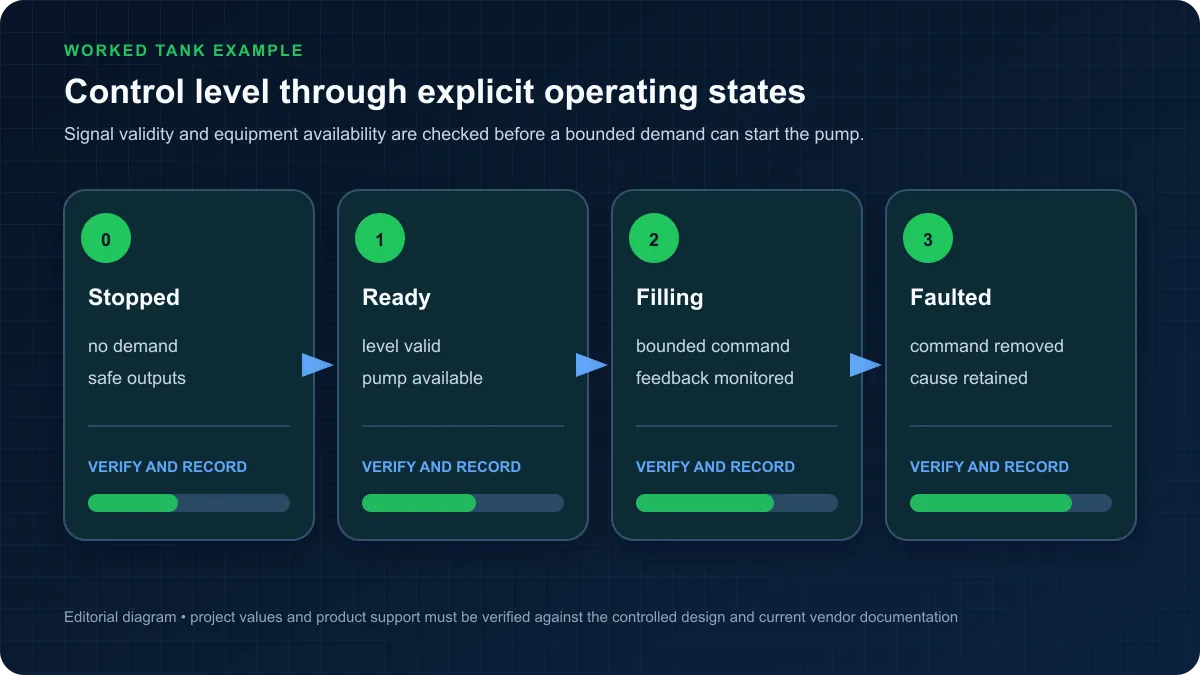
This complete application demonstrates professional Schneider Electric PLC programming practices through realistic water tank level control system.
Application Requirements
Process Description:
Automated water storage tank system maintains level between minimum and maximum setpoints using inlet pump and outlet valve:
Physical System:
- Storage tank capacity: 10,000 gallons
- Ultrasonic level sensor: 4-20mA (0-100% level)
- Inlet pump: On/off control, 100 GPM capacity
- Outlet valve: Modulating control valve, 0-10V (0-100% open)
- High level alarm: 95% tank level
- Low level alarm: 10% tank level
Control Objectives:
- Maintain level between 40% and 60%
- Start inlet pump when level drops below 40%
- Stop inlet pump when level exceeds 60%
- Modulate outlet valve based on demand
- Prevent pump rapid cycling (minimum 60 second off-time)
- Alert operator to high/low level conditions
- Track pump runtime for maintenance scheduling
Hardware Configuration
Modicon M241 PLC Selection:
Selected TM241CE24R controller provides:
- 14 digital inputs, 10 relay outputs
- 2 analog inputs (for level sensor and spare)
- 1 analog output (for valve control)
- Ethernet communication for HMI
- Sufficient memory for application
I/O Assignment:
VAR_GLOBAL
// Digital Inputs
PumpRunFeedback AT %I0.0.0 : BOOL; // Pump auxiliary contact
ManualModeSelect AT %I0.0.1 : BOOL; // Manual/Auto selector
ResetAlarms AT %I0.0.2 : BOOL; // Alarm reset button
EmergencyStop AT %I0.0.3 : BOOL; // E-Stop circuit OK
// Analog Inputs
TankLevelRaw AT %IW0.0 : INT; // Level sensor 4-20mA
// Digital Outputs
InletPumpStart AT %Q0.0.0 : BOOL; // Pump starter
HighLevelAlarm AT %Q0.0.1 : BOOL; // High level horn
LowLevelAlarm AT %Q0.0.2 : BOOL; // Low level horn
PumpFaultAlarm AT %Q0.0.3 : BOOL; // Pump fault indication
// Analog Outputs
OutletValveCommand AT %QW0.0 : INT; // Valve position 0-10V
END_VAR
Complete Ladder Logic Program
Main Program Organization:
PROGRAM PLC_PRG
VAR
// Call individual program sections
END_VAR
// Execute program sections in order
ProcessInputs(); // Scale analog inputs
TankLevelControl(); // Main control logic
AlarmManagement(); // Alarm handling
ProcessOutputs(); // Scale analog outputs
RuntimeTracking(); // Maintenance tracking
Input Processing Section:
PROGRAM ProcessInputs
VAR
TankLevelScaled: REAL; // Tank level 0-100%
LevelRawInt: INT; // Raw level value
END_VAR
// Scale 4-20mA level sensor to 0-100%
// Raw value 0-32000 = 0-10V = 4-20mA
LevelRawInt := TankLevelRaw;
// Linear scaling: 0-32000 β 0-100%
TankLevelScaled := (REAL(LevelRawInt) / 32000.0) * 100.0;
// Limit to valid range
IF TankLevelScaled > 100.0 THEN
TankLevelScaled := 100.0;
ELSIF TankLevelScaled < 0.0 THEN
TankLevelScaled := 0.0;
END_IF;
END_PROGRAM
Tank Level Control Logic:
PROGRAM TankLevelControl
VAR
// Control parameters
LowSetpoint: REAL := 40.0; // Start pump at 40%
HighSetpoint: REAL := 60.0; // Stop pump at 60%
TankLevelScaled: REAL; // From ProcessInputs
// Control variables
AutoMode: BOOL; // Auto control enabled
PumpRunCommand: BOOL; // Pump run latch
PumpOffTimer: TON; // Minimum off-time
PumpStartPermissive: BOOL; // OK to start pump
// Timing
PumpMinOffTime: TIME := T#60s; // 60 second minimum off
END_VAR
// Rung 1: Determine operating mode
ManualModeSelect
| / |----------( AutoMode )
// Rung 2: Pump start conditions
AutoMode TankLevelLowAlarm PumpOffTimer.Q EmergencyStop
| |----------| |----------| |----------| |-------( PumpStartPermissive )
// Rung 3: Start pump when level low
TankLevelScaled < LowSetpoint PumpStartPermissive
| |--------( S PumpRunCommand )
// Rung 4: Stop pump when level high or E-Stop
TankLevelScaled > HighSetpoint EmergencyStop
| |-------| / |----( R PumpRunCommand )
| |
+-----+
// Rung 5: Pump output with feedback check
PumpRunCommand
| |----------( InletPumpStart )
// Rung 6: Pump off-time timer
PumpRunCommand
| / |----------[TON PumpOffTimer]
IN Q
PT = PumpMinOffTime
// Rung 7: Outlet valve modulation
// Valve opens proportionally to tank level
// Higher level = more outflow
OutletValveCommand := INT(TankLevelScaled * 320.0); // 0-100% β 0-32000
END_PROGRAM
Alarm Management:
PROGRAM AlarmManagement
VAR
TankLevelScaled: REAL;
HighAlarmSetpoint: REAL := 95.0;
LowAlarmSetpoint: REAL := 10.0;
HighLevelAlarmActive: BOOL;
LowLevelAlarmActive: BOOL;
AlarmDelay: TON;
PumpFaultActive: BOOL;
END_VAR
// Rung 1: High level alarm with delay
TankLevelScaled > HighAlarmSetpoint
| |----[TON AlarmDelay]----( HighLevelAlarmActive )
IN Q
PT=T#5s
// Rung 2: Low level alarm with delay
TankLevelScaled < LowAlarmSetpoint
| |----[TON AlarmDelay]----( LowLevelAlarmActive )
IN Q
PT=T#5s
// Rung 3: Pump fault detection (running without feedback)
InletPumpStart PumpRunFeedback
| |----------------| / |-------------( PumpFaultActive )
// Rung 4: Alarm outputs with acknowledgement
HighLevelAlarmActive ResetAlarms
| |------------------| / |------------( HighLevelAlarm )
LowLevelAlarmActive ResetAlarms
| |------------------| / |------------( LowLevelAlarm )
PumpFaultActive ResetAlarms
| |------------------| / |------------( PumpFaultAlarm )
END_PROGRAM
Runtime Tracking:
PROGRAM RuntimeTracking
VAR
PumpRunTime: TIME; // Accumulated runtime
RunTimer: TON; // Scan timer
PumpRunHours: REAL; // Runtime in hours
MaintenanceDue: BOOL; // Maintenance threshold
MaintenanceThreshold: REAL := 500.0; // Hours until service
END_VAR
// Accumulate pump runtime
IF InletPumpStart THEN
RunTimer(IN:=TRUE, PT:=T#100ms);
IF RunTimer.Q THEN
PumpRunTime := PumpRunTime + T#100ms;
RunTimer(IN:=FALSE);
END_IF;
END_IF;
// Convert to hours for display
PumpRunHours := TIME_TO_REAL(PumpRunTime) / 3600000.0;
// Maintenance due flag
MaintenanceDue := PumpRunHours >= MaintenanceThreshold;
END_PROGRAM
HMI Integration with Vijeo Designer
Vijeo Designer Overview:
Vijeo Designer creates operator interfaces for Schneider Electric HMI panels including:
- Magelis GTO touchscreens
- Magelis STO compact panels
- Magelis XBT advanced HMIs
Creating HMI Project:
- Launch Vijeo Designer
- Select target panel (e.g., HMISTO511)
- Configure Ethernet communication to M241 PLC
- Import PLC variables for data binding
Main Process Screen Design:
Tank Level Display:
- Animated tank graphic showing current level
- Numeric display of level percentage
- Color-coded level indication (green/yellow/red)
- High/low setpoint indicators
Pump Control:
- Pump run status indication
- Manual start/stop buttons
- Runtime hours display
- Maintenance due indicator
Alarm Summary:
- Active alarm list
- Alarm acknowledgement button
- Alarm history log
Trend Display:
- Tank level trend (24-hour)
- Pump cycle history
- Alarm event markers
Variable Binding Examples:
Tank Level Bar Graph:
- Variable: TankLevelScaled
- Min: 0.0
- Max: 100.0
- Fill Color: Dynamic based on value
Pump Status Indicator:
- Variable: InletPumpStart
- ON Color: Green
- OFF Color: Gray
Alarm Banner:
- Variable: HighLevelAlarmActive OR LowLevelAlarmActive
- Visible When: TRUE
- Background: Red flashing
This complete application demonstrates professional programming organization, comprehensive alarming, runtime tracking, and HMI integration suitable for production deployment.
Programming Best Practices
Professional Schneider Electric PLC programming follows established best practices ensuring reliable, maintainable, and efficient industrial control systems.
Program Organization and Structure
Modular Programming Approach:
Divide programs into logical functional modules:
Main Program (PLC_PRG):
- Calls individual program sections
- Minimal logic in main program
- Clear execution order
- Well-commented structure
Function Blocks for Reusable Code:
- Pump control with runtime tracking
- Valve control with feedback
- PID temperature control
- Motor starter with protection
Separate I/O Processing:
- Input scaling and conditioning in dedicated routine
- Output scaling in separate routine
- Clear separation of I/O from control logic
Example Program Structure:
Project
βββ PLC_PRG (Main)
βββ InputProcessing
βββ TankControl
βββ PumpControl
βββ AlarmManagement
βββ OutputProcessing
βββ HMI_Interface
Naming Conventions
Variable Naming Standards:
Descriptive Names:
// Good naming
TankLevel_Scaled
PumpRuntime_Hours
HighAlarm_Setpoint
// Poor naming
X1
Tmp
Value
Consistent Prefixes:
// Boolean variables
bPumpRunning
bAlarmActive
bManualMode
// Integers
iMotorSpeed_RPM
iCounter
// Real numbers
rTemperature_DegF
rFlowRate_GPM
rPressure_PSI
// Timers
tPumpDelay
tAlarmTimer
Physical I/O Naming:
// Use symbolic names instead of addresses
StartButton AT %I0.0.0 : BOOL; // Not: I_0_0_0
MotorContactor AT %Q0.0.1 : BOOL; // Not: Output1
TankLevel AT %IW0.0 : INT; // Not: AnalogIn_0
Function Block Instances:
// Descriptive instance names
PumpA_Controller: FB_PumpControl;
TankLevel_PID: FB_PID_Control;
InletValve_FB: FB_ValveControl;
Documentation Standards
Inline Comments:
// Rung 1: Safety Permissive Check
// Ensures all safety conditions OK before operation
// E-Stop must be clear AND guard must be closed
EStopOK GuardClosed
| |----------| |----------( SafetyPermissive )
Function Block Documentation:
(*
Function Block: FB_PumpControl
Purpose: Controls pump with runtime tracking and protection
Author: Engineering Department
Date: 2025-12-10
Revision: 1.0
Inputs:
Enable: TRUE to allow pump operation
StartCommand: Rising edge starts pump
StopCommand: Rising edge stops pump
RunFeedback: Pump auxiliary contact feedback
Outputs:
RunOutput: Pump starter command
FaultActive: Pump fault detected
RuntimeHours: Accumulated runtime
*)
FUNCTION_BLOCK FB_PumpControl
Project Documentation Requirements:
- README file with project overview
- I/O assignment list
- Network configuration details
- Alarm list with descriptions
- Modification history log
Backup and Version Control
Regular Backups:
Schedule automated backups:
- Daily backups during commissioning
- Weekly backups during normal operation
- Before any program modifications
- After completing major changes
Backup Naming Convention:
Project_TankControl_2025-12-10_v1.2.smbp
[Project]_[Description]_[Date]_[Version].[ext]
Version Control Integration:
For team environments, use version control:
- Git for source control
- Dedicated automation repository
- Meaningful commit messages
- Branch strategy for development/production
Export Program Documentation:
- Print program to PDF
- Export variable lists to Excel
- Save cross-reference reports
- Document network configuration
Security Features
Password Protection:
Protect programs from unauthorized modification:
Application Password:
- Set in project properties
- Required for online modifications
- Different passwords for read/write access
Web Server Protection:
- Disable if not needed
- Strong password if enabled
- Limit access by IP address
Cybersecurity Best Practices:
Following IEC 62443 industrial cybersecurity standards:
Network Segmentation:
- Separate control network from IT network
- Firewalls between segments
- VLANs for isolation
Access Control:
- Role-based permissions
- Individual user accounts (no shared passwords)
- Regular password changes
- Disable default accounts
Communication Security:
- Use encrypted protocols (HTTPS, OPC UA Security)
- Disable unused communication services
- Configure MAC address filtering
- Enable audit logging
Physical Security:
- Locate PLCs in locked cabinets
- Protect programming ports
- Disable USB ports if not needed
- Use key switches for mode selection
Firmware Updates:
- Regularly check for security updates
- Test updates in non-production environment
- Document firmware versions
- Maintain update procedures
Troubleshooting Common Issues
Understanding common Schneider Electric PLC programming issues and resolution procedures accelerates problem-solving during commissioning and maintenance.
Communication Errors
Issue: Cannot Connect to PLC
Symptoms:
- EcoStruxure Machine Expert cannot establish connection
- "PLC not responding" errors
- Timeout during connection attempts
Diagnostic Steps:
-
Verify Physical Connection:
- Check Ethernet cable connection
- Verify cable continuity
- Try different Ethernet port
- Test with known-good cable
-
Check Network Configuration:
- Verify PLC IP address (check DIP switches or display)
- Confirm PC and PLC on same subnet
- Ping PLC IP address from command prompt
- Disable Windows firewall temporarily for testing
-
Verify Communication Settings:
- Correct controller type selected in project
- Matching IP address in communication settings
- Correct communication driver selected
Solutions:
PC IP: 192.168.1.100
PLC IP: 192.168.1.10
Subnet: 255.255.255.0
Both devices must be on same subnet (192.168.1.x)
Issue: Intermittent Communication
Causes and Solutions:
- Loose Ethernet connection β Secure connectors
- Network congestion β Separate control and IT networks
- EMI interference β Use shielded cables, proper grounding
- Faulty switch/router β Replace network equipment
License Activation Problems
Issue: License Not Activated
Common Scenarios:
USB Hardware Key Not Detected:
- Check USB connection
- Install Wibu CodeMeter drivers
- Try different USB port
- Verify key LED illuminated
Activation Code Invalid:
- Verify activation code entry (case-sensitive)
- Check internet connection for online activation
- Confirm license type matches software version
- Contact Schneider Electric technical support
License Server Unavailable:
- Check network connection to license server
- Verify license server running
- Confirm firewall allows license traffic (port 1947)
- Restart license server service
Trial License Expired:
- Request license extension
- Purchase full license
- Use different trial license (new email)
I/O Configuration Mistakes
Issue: Inputs/Outputs Not Working
Digital Input Problems:
Input always OFF:
- Check field wiring connections
- Verify correct common (COM) connection
- Measure voltage at input terminal (should be 24VDC)
- Test input forcing in online mode
- Verify input not failed in diagnostics
Input always ON:
- Check for short circuit in wiring
- Verify correct polarity (DC inputs)
- Inspect for damaged input module
- Check diagnostic LED on module
Analog Input Problems:
Reading 0 or out of range:
- Verify 4-20mA loop powered correctly
- Check loop continuity with multimeter
- Confirm 250Ξ© termination resistor (for current inputs)
- Verify scaling factors in program
- Check for 0-based vs 1-based register addressing
Example Analog Scaling Issue:
// Incorrect - raw value used directly
Temperature := TankLevel_Raw; // Wrong!
// Correct - scale 0-32000 to engineering units
Temperature := (REAL(TankLevel_Raw) / 32000.0) * 500.0; // 0-500Β°F
Digital Output Problems:
Output not energizing:
- Check output wiring to field device
- Verify output current capacity (relay rating)
- Test output forcing in online mode
- Check fuse on output common (if fused)
- Measure voltage at output when ON
Output stuck ON:
- Check for program logic holding output ON
- Verify no force condition active
- Inspect for damaged output module
- Check for short circuit in wiring
Download/Upload Issues
Issue: Cannot Download Program
Error Messages and Resolutions:
"PLC in RUN mode":
- Stop PLC before download
- Use menu: Online β Stop
- Physical mode switch in STOP position
"Application mismatch":
- Rebuild application (F6)
- Clean build (delete all build files)
- Restart EcoStruxure Machine Expert
- Verify controller type matches project
"Insufficient memory":
- Program size exceeds controller memory
- Remove unused code and variables
- Use smaller data arrays
- Upgrade to higher-memory controller
"Safety application active" (M258S):
- Safety applications require special procedures
- Use safety unlock procedure
- Verify safety key switch position
- Follow safety application download protocol
Issue: Upload from PLC Fails
Resolution Steps:
- Verify online connection established
- Select menu: Online β Upload
- Choose destination project file
- Wait for complete upload (may take minutes for large programs)
- Verify uploaded project compiles successfully
Best Practice: Always maintain offline backup copies. Upload from PLC should be last resort, not primary source control.
Program Comparison Issues:
When comparing online vs offline:
- Some values differ normally (runtime variables)
- Compare program logic only, not data values
- Use compare function to identify differences
- Document any online changes before download
Frequently Asked Questions
What programming software does Schneider Electric use?
Schneider Electric uses EcoStruxure Machine Expert (formerly SoMachine) for programming M241, M251, and M258 compact logic controllers, and EcoStruxure Control Expert (formerly Unity Pro) for M340 and M580 process controllers. Both environments support IEC 61131-3 programming languages including Ladder Diagram, Function Block Diagram, Structured Text, Sequential Function Chart, and Instruction List.
EcoStruxure Machine Expert provides modern interface with integrated simulation, comprehensive function libraries, and support for safety programming on M258S controllers. Pricing ranges from $1,200 for basic licenses to $3,500 for professional editions with full capabilities.
Control Expert targets larger process systems with advanced features for M340/M580 platforms including redundancy configuration, comprehensive diagnostics, and extensive process control libraries. Professional licenses cost $8,000-15,000 depending on functionality.
For detailed software comparison with other platforms, see our TIA Portal vs Studio 5000 comparison.
Is Schneider Electric PLC easy to learn?
Schneider Electric PLC programming difficulty depends on your background and chosen controller platform. Engineers with electrical or automation experience typically achieve basic proficiency in 2-3 months with structured training and hands-on practice.
Learning curve factors:
Easier aspects:
- Standard IEC 61131-3 languages familiar across platforms
- Intuitive EcoStruxure Machine Expert interface
- Comprehensive function block libraries reduce coding
- Good simulation tools for offline learning
- Extensive documentation and training materials
Challenging aspects:
- Memory addressing concept (%I, %Q, %M) requires understanding
- Multiple programming languages to master
- Function block parameter configuration
- Communication protocol setup
- Hardware configuration knowledge
Recommended learning path:
- Complete vendor training courses (3-5 days)
- Practice with simulation (no hardware required)
- Build simple projects (traffic light, tank control)
- Study example programs from Schneider Electric
- Progress to complex applications
Engineers familiar with competing platforms (Siemens, Allen-Bradley) typically learn Schneider Electric programming in 6-12 weeks, transferring fundamental PLC knowledge while adapting to platform-specific features.
What is the difference between Modicon M241 and M251?
The primary differences between Modicon M241 and M251 controllers are performance, memory capacity, and I/O capabilities:
Processing Performance:
- M241: 0.6 ms scan time for 1K Boolean instructions
- M251: 0.4 ms scan time (50% faster than M241)
- M251 better suits higher-speed applications
Memory:
- M241: 100-256 KB program memory
- M251: 256 KB program memory, 512 KB data memory
- M251 handles larger, more complex programs
I/O Capacity:
- M241: 264 digital I/O, 60 analog channels
- M251: 504 digital I/O, 120 analog channels
- M251 supports larger systems
Communication:
- Both: 2x Ethernet ports, 1x serial port
- M251: Enhanced CANopen master capabilities
- M251: Better protocol handling for multi-network applications
Motion Control:
- M241: Basic pulse train outputs
- M251: Advanced motion control features
- M251: Better suited for servo/stepper applications
Price Difference:
- M241: $400-800
- M251: $800-1,400
- 50-75% price premium for M251 capabilities
Selection guidance: Choose M241 for simple machines with moderate I/O (<200 points) and standard performance requirements. Select M251 for complex machines requiring faster response, more I/O capacity, or advanced motion control features.
Does Schneider Electric support ladder logic?
Yes, Schneider Electric fully supports Ladder Diagram (LD) programming as one of the five IEC 61131-3 languages implemented in all Modicon PLCs. Ladder logic represents the most common programming language for Schneider Electric controllers, particularly in North American and discrete manufacturing applications.
Schneider Electric ladder logic features:
- Standard IEC 61131-3 compliance
- Comprehensive instruction set (contacts, coils, timers, counters)
- Function block integration in ladder networks
- Online editing capabilities
- Cross-reference and search tools
- Graphical debugging with runtime values
Instruction availability:
- Basic bit logic (AND, OR, NOT)
- Timers (TON, TOF, TP)
- Counters (CTU, CTD, CTUD)
- Math and comparison operations
- PID control blocks
- Communication functions
- Motion control instructions
Ladder logic programming workflow:
- Create ladder networks in graphical editor
- Insert contacts, coils, and function blocks
- Define variables and addresses
- Compile and simulate offline
- Download to PLC and debug online
Engineers familiar with ladder logic on competitive platforms (Allen-Bradley, Siemens) find Schneider Electric ladder programming intuitive with minimal learning curve for basic applications. The standard IEC 61131-3 implementation ensures consistent ladder logic concepts across vendors.
How much does EcoStruxure Machine Expert cost?
EcoStruxure Machine Expert pricing varies by license type and features:
License Tiers:
Trial Version: FREE
- 45-day full-featured trial
- All programming capabilities
- No hardware limitations
- Download from Schneider Electric website
Basic Edition: $1,200-1,800
- M241 controller programming
- Ladder, FBD, ST languages
- Standard function libraries
- Single-user license
Professional Edition: $2,800-3,500
- Full M241/M251/M258 support
- All IEC 61131-3 languages
- Motion control libraries
- Safety programming (M258S)
- Simulation tools
- Advanced diagnostics
Subscription Licensing: $150-300/month
- Flexible monthly or annual subscriptions
- Always current software version
- Ideal for consultants or project-based work
- Lower initial investment
Additional Costs:
- Annual maintenance: 20% of license cost (optional)
- HMI programming (Vijeo Designer): $1,500-3,000
- Training courses: $1,500-2,500 per person
- Technical support: Included with maintenance
Educational Discounts:
- 70% discount for qualifying educational institutions
- Free classroom licenses for accredited programs
Comparison to competitors:
- Less expensive than Allen-Bradley Studio 5000 ($8,000-12,000)
- Comparable to CODESYS ($1,000-3,000)
- Lower than Siemens TIA Portal Professional ($6,500-8,500)
For detailed platform cost comparison, review our Best PLC Programming Software guide.
Can Schneider PLCs communicate with Siemens?
Yes, Schneider Electric PLCs can communicate with Siemens PLCs through multiple standard industrial protocols:
Communication Methods:
1. Modbus TCP/IP (Most Common): Both Schneider and Siemens support Modbus TCP enabling direct communication:
- Configure Schneider PLC as Modbus TCP server
- Configure Siemens PLC as Modbus TCP client
- Exchange process data over Ethernet
- Standard function codes (read/write registers)
2. OPC UA (Modern Standard): M580 controllers include OPC UA server:
- Industry-standard information model
- Secure encrypted communication
- Siemens S7-1500 includes OPC UA client
- Platform-independent data exchange
3. Profinet (Hardware Module): Schneider Electric offers Profinet-compatible modules:
- Profinet scanner modules for M340/M580
- Integrate as Profinet I/O device with Siemens
- Real-time performance
- Additional hardware cost
4. EtherNet/IP: Both vendors support EtherNet/IP (Common Industrial Protocol):
- Standardized data exchange
- Multi-vendor interoperability
- Explicit and implicit messaging
5. Protocol Gateways: Third-party gateways convert between protocols:
- HMS Anybus gateways
- Moxa protocol converters
- ProSoft gateway modules
- Converts Modbus β Profinet β EtherNet/IP
Practical Implementation:
Example: Modbus TCP between Schneider M241 and Siemens S7-1200:
Schneider side:
// M241 as Modbus TCP server
// Variables automatically accessible
// Configure in EcoStruxure Machine Expert
IP: 192.168.1.10
Port: 502
Siemens side:
// S7-1200 as Modbus TCP client
// Use MB_CLIENT function block
// Configure connection to 192.168.1.10:502
// Read holding registers
Considerations:
- Simple data exchange works well
- Complex control coordination requires careful design
- Update rates limited by network and protocol (typically 50-500ms)
- Single-vendor deployments simpler for long-term maintenance
For detailed protocol comparison, see our PLC Communication Protocols Guide.
What industries use Schneider Electric PLCs?
Schneider Electric Modicon PLCs are widely deployed across multiple industries with particular strength in infrastructure, process industries, and building automation:
Primary Industry Segments:
Water and Wastewater (Strong Presence):
- Municipal water treatment plants
- Wastewater treatment facilities
- Pumping stations and distribution
- Irrigation control systems
- 20-25% market share in water/wastewater
Building Automation (Market Leader):
- HVAC control systems
- Lighting control and management
- Access control integration
- Energy management systems
- Data center infrastructure
Food and Beverage:
- Batch processing and mixing
- Bottling and packaging lines
- Pasteurization and sterilization
- Recipe management and traceability
- CIP (Clean-in-Place) systems
Critical Infrastructure:
- Tunnel ventilation and safety
- Bridge and highway monitoring
- Airport systems
- Railway control systems
- Smart city applications
Mining and Minerals:
- Conveyor control systems
- Crusher and mill control
- Ventilation management
- Environmental monitoring
- Harsh environment applications
Data Centers:
- Power distribution monitoring
- Cooling system control
- Backup power management
- Energy efficiency optimization
- Integration with Schneider Electric power equipment
Manufacturing:
- Material handling systems
- Packaging machinery
- Assembly automation
- Process control
- Batch production
Industry-Specific Advantages:
Water/Wastewater:
- Robust SCADA integration
- RTU capabilities for remote sites
- Excellent communication protocol support
- Long-term reliability
- Low lifecycle costs
Building Automation:
- Integration with EcoStruxure Building platform
- Energy management capabilities
- BACnet and Modbus support
- Web-based monitoring
- Cloud connectivity
Food Processing:
- Hygienic design options
- Recipe management features
- Batch control capabilities
- Data logging and traceability
- Regulatory compliance support
Regional Adoption:
- Strong in Europe (particularly France, Southern Europe)
- Growing in North America (infrastructure, buildings)
- Significant presence in Middle East and Africa
- Expanding in Asia-Pacific markets
For industry-specific platform comparison, see our Siemens vs Allen Bradley comparison analyzing automotive, process, and discrete manufacturing applications.
Is Modicon the same as Schneider Electric?
Modicon is the brand name for Schneider Electric's PLC product line, not a separate company. Understanding this relationship clarifies product naming and company history:
Historical Background:
Modicon Corporation (1968-1977):
- Founded 1968 in Bedford, Massachusetts
- Invented the first programmable logic controller (PLC) in 1968
- Name derived from "MOdular DIgital CONtroller"
- Revolutionary product replacing relay panels with programmable control
Acquisition by Gould Electronics (1977-1987):
- Gould purchased Modicon in 1977
- Continued PLC development and manufacturing
- Expanded product line and market presence
Acquisition by AEG (1987-1997):
- German company AEG purchased division from Gould
- Further developed Modicon product line
- European market expansion
Schneider Electric Acquisition (1997-Present):
- Schneider Electric acquired AEG's automation division in 1997
- Retained Modicon brand for PLC products
- Integrated into Schneider Electric automation portfolio
- Current Modicon controllers manufactured and supported by Schneider Electric
Current Product Naming:
Official Product Names:
- Modicon M241 Logic Controller
- Modicon M251 Logic Controller
- Modicon M258 Logic Controller
- Modicon M340 Programmable Controller
- Modicon M580 Programmable Automation Controller
Company Branding:
- All products manufactured by Schneider Electric
- Technical support provided by Schneider Electric
- Sales through Schneider Electric distribution channels
- Documentation branded with both Modicon and Schneider Electric
Practical Implications:
When purchasing or specifying equipment:
- "Modicon PLC" and "Schneider Electric PLC" refer to same products
- Order through Schneider Electric distributors
- Technical support from Schneider Electric
- Software licensed by Schneider Electric
Legacy Considerations:
- Older installations may have vintage Modicon controllers (984, Quantum)
- Schneider Electric maintains migration paths from legacy platforms
- Spare parts available for discontinued models
- Upgrade paths to modern M340/M580 platforms
The Modicon brand recognition remains valuable in the automation industry, representing the pioneering PLC heritage now backed by Schneider Electric's global resources and modern technology development.
What communication protocols do Schneider PLCs support?
Schneider Electric Modicon PLCs provide comprehensive communication protocol support enabling integration with diverse industrial equipment and enterprise systems:
Native Protocol Support:
Modbus (Native):
- Modbus TCP: Ethernet-based Modbus (built-in)
- Modbus RTU: Serial RS-232/RS-485 (built-in)
- Both master and slave/server modes
- No additional licensing required
- Most widely used protocol on Schneider PLCs
Ethernet Protocols:
- EtherNet/IP: Industrial Ethernet with CIP
- OPC UA: Industry 4.0 standard (M580)
- MQTT: IoT cloud connectivity (M580)
- SNMP: Network management
- HTTP/HTTPS: Web server functionality
- FTP: File transfer capabilities
Serial Protocols:
- CANopen: Motion control and I/O (M251/M258)
- Modbus RTU: Universal serial communication
- ASCII: Custom serial protocols
- DF1: Allen-Bradley compatibility (with modules)
Fieldbus Protocols (with Modules):
- Profibus DP: Process fieldbus (M340/M580 with module)
- Profinet: Industrial Ethernet (M340/M580 with module)
- DeviceNet: CIP-based network (with adapter)
Proprietary Schneider Protocols:
- Uni-Telway: Legacy Schneider communication
- Modbus Plus: High-speed token-passing network (legacy)
Protocol Support by Controller:
M241/M251:
- Modbus TCP (2x Ethernet ports)
- Modbus RTU (1x serial port)
- CANopen (integrated on M251)
- EtherNet/IP (configuration required)
M258:
- All M241/M251 protocols
- Enhanced CANopen master
- Advanced EtherNet/IP capabilities
- Safety communication (M258S)
M340:
- Comprehensive protocol support
- Multiple communication modules
- Profibus DP module option
- Remote I/O via Ethernet
M580:
- Maximum protocol flexibility
- Dual Ethernet (hot standby capable)
- OPC UA server integrated
- MQTT for cloud connectivity
- Cybersecurity features
Real-World Integration Examples:
SCADA System Integration:
- Use Modbus TCP or OPC UA
- Connect to FactoryTalk, WinCC, Ignition, Wonderware
- Real-time data exchange
- Alarm and event reporting
MES Integration:
- OPC UA for production data
- Recipe management
- Batch tracking and reporting
- Industry 4.0 connectivity
Multi-Vendor Systems:
- Modbus TCP for universal compatibility
- Protocol gateways where needed
- EtherNet/IP for Rockwell equipment
- Profinet for Siemens integration
For detailed protocol tutorials:
How do I get started with Schneider PLC programming?
Getting started with Schneider Electric PLC programming follows a structured learning path from basic concepts through professional competency:
Step 1: Obtain Programming Software
Download EcoStruxure Machine Expert:
- Visit Schneider Electric Software Portal
- Register free account
- Download EcoStruxure Machine Expert trial (45-day full version)
- Install on Windows 10/11 computer
- Activate trial license
System Requirements:
- Windows 10/11 (64-bit)
- 8 GB RAM minimum (16 GB recommended)
- 10 GB free disk space
- Internet connection for activation
Step 2: Learn Fundamental Concepts
Essential Knowledge Areas:
PLC Basics:
- Scan cycle operation
- Input/output processing
- Memory types (%I, %Q, %M, %MW)
- Data types (BOOL, INT, REAL)
Programming Languages:
- Start with Ladder Diagram (most intuitive)
- Progress to Structured Text for algorithms
- Learn Function Block Diagram for process control
Study Resources:
- Schneider Electric online training portal
- YouTube tutorial series
- PLC Programming for Beginners Guide
- Automation community forums
Step 3: Hands-On Practice
Simulation (No Hardware Required):
Create practice projects in EcoStruxure Machine Expert:
- Traffic light controller (timers, sequences)
- Start/stop motor control (interlocks)
- Tank level control (analog, PID)
- Conveyor system (multiple motors)
Use built-in simulator to test programs offline.
Hardware Practice (Recommended):
Starter Kit Options:
- Modicon M241 starter kit: $1,200-1,500
- Includes controller, power supply, I/O simulator
- Programming cable included
- Enables real hardware debugging
Budget Alternative:
- Educational kits from third-party suppliers
- Online simulators and virtual labs
- Practice at trade schools or community colleges
Step 4: Structured Training
Vendor Training Courses:
Schneider Electric offers comprehensive training:
- M241 Basic Programming (3 days, $1,800-2,500)
- M258 Advanced Programming (3 days, $2,000-2,800)
- M580 System Programming (5 days, $3,500-4,500)
Self-Paced Online Training:
- Schneider Electric University courses
- LinkedIn Learning automation courses
- Udemy PLC programming courses
- Free YouTube tutorial series
Community College Programs:
- Industrial automation certificates
- PLC programming courses
- Hands-on lab experience
- Industry-recognized credentials
Step 5: Build Portfolio Projects
Complete Practical Applications:
- Motor control with interlocks
- Water tank level control
- Conveyor belt system
- Batch mixing process
- Temperature control with PID
Document projects with:
- Program descriptions
- I/O lists and wiring diagrams
- HMI screens
- Test procedures
- Code comments
Step 6: Certification and Career Development
Industry Certifications:
- ISA Certified Automation Professional (CAP)
- Schneider Electric Certified Programmer
- NIMS Industrial Technology Maintenance
Career Progression:
- Entry-level: Controls technician ($48K-62K)
- Mid-level: Automation engineer ($65K-85K)
- Senior: Lead automation engineer ($85K-120K)
- Specialist: Systems integrator or consultant ($100K-150K+)
Timeline Expectations:
Basic Competency: 2-3 months
- Complete vendor training
- Practice with simulation
- Build simple projects
Professional Proficiency: 8-12 months
- Regular programming practice
- Real hardware experience
- Multiple complete projects
Advanced Expertise: 2-3 years
- Diverse application experience
- Motion and safety programming
- Communication protocols mastery
Recommended Resources:
Official Schneider Electric:
- EcoStruxure Machine Expert documentation
- Application examples library
- Technical support portal
- Training course catalog
Community Resources:
- PLCs.net forum
- Reddit r/PLC community
- Automation.com knowledge base
- LinkedIn automation groups
Books:
- "Programmable Logic Controllers" by Frank Petruzella
- "PLC Programming Using RSLogix 5000" (concepts transfer to Schneider)
- Schneider Electric product manuals
Start your Schneider Electric PLC programming journey today with the free trial software and structured practice projects to build professional automation engineering skills.
Ready to Master Schneider Electric PLC Programming?
This comprehensive tutorial has equipped you with essential knowledge for successful Schneider Electric PLC programming, from understanding Modicon product families through advanced programming techniques and real-world applications. You've learned EcoStruxure Machine Expert software navigation, ladder logic and Structured Text programming, communication protocol implementation, and professional best practices that deliver reliable industrial control systems.
Key Takeaways:
- Modicon Product Selection: Choose M241 for simple machines, M251/M258 for complex machine control, M340 for process applications, and M580 for high-performance safety and redundancy requirements
- Programming Environment: EcoStruxure Machine Expert provides comprehensive IEC 61131-3 language support with powerful simulation and debugging capabilities
- Practical Skills: Apply ladder logic for discrete control, Structured Text for complex algorithms, and function blocks for reusable modular code
- Communication: Leverage native Modbus TCP/RTU support plus EtherNet/IP, CANopen, and OPC UA for diverse integration requirements
- Professional Practices: Follow established naming conventions, documentation standards, and security protocols for maintainable industrial systems
Next Steps for Your Automation Career:
- Practice Immediately: Download EcoStruxure Machine Expert trial and create the water tank control project from this tutorial
- Expand Knowledge: Study related protocols including Modbus RTU, EtherNet/IP, and CANopen
- Compare Platforms: Review our Schneider vs Siemens comparison for strategic platform selection insights
- Develop Expertise: Invest in formal training courses and hands-on hardware practice for professional competency
- Build Portfolio: Document complete application projects demonstrating programming skills to potential employers
Platform Comparison Resources:
Evaluate multiple automation platforms for comprehensive expertise:
- Siemens PLC Programming Tutorial - Learn competing platform
- TIA Portal vs Studio 5000 Comparison - Software comparison
- Best PLC Programming Software 2025 - Complete market overview
Continue Your PLC Programming Education:
Master the complete spectrum of industrial automation programming through our comprehensive tutorial library:
- Complete PLC Programming Guide - Foundation concepts through advanced techniques
- PLC Programming Best Practices - Professional development standards
- PLC Communication Protocols - Industrial networking mastery
Schneider Electric PLC programming skills open career opportunities across water treatment, building automation, food processing, and manufacturing industries worldwide. The Modicon platform's proven reliability, comprehensive communication capabilities, and strong industry presence ensure long-term value for automation professionals investing in this essential industrial automation expertise.
Begin your Schneider Electric programming journey today with hands-on practice, structured learning, and real-world application development that transforms theoretical knowledge into practical professional capabilities driving successful industrial automation projects.
π‘ Pro Tip: Download Our Complete PLC Programming Resource
This comprehensive 11Β 056-word guide provides deep technical knowledge, but our complete 500+ page guide (coming December 2025) includes additional practical exercises, code templates, and industry-specific applications.Preorder the complete guide here (60% off) β
π Ready to Become a PLC Programming Expert?
You've just read 11Β 056 words of expert PLC programming content. Preorder our complete 500+ page guide with even more detailed examples, templates, and industry applications.
β December 2025 release β Full refund guarantee
Frequently Asked Questions
How long does it take to learn PLC programming?
With dedicated study and practice, most people can learn basic PLC programming in 3-6 months. However, becoming proficient in advanced techniques and industry-specific applications typically takes 1-2 years of hands-on experience.
What's the average salary for PLC programmers?
PLC programmers earn competitive salaries ranging from $55,000-$85,000 for entry-level positions to $90,000-$130,000+ for senior roles. Specialized expertise in specific industries or advanced automation systems can command even higher compensation.
Which PLC brands should I focus on learning?
Allen-Bradley (Rockwell) and Siemens dominate the market, making them excellent starting points. Schneider Electric, Mitsubishi, and Omron are also valuable to learn depending on your target industry and geographic region.