CANopen Protocol Tutorial 2026 | Complete Industrial Network Guide
Master CANopen protocol for industrial automation. Learn object dictionary, PDO/SDO communication, NMT state machine, and PLC integration examples.
Introduction: Mastering CANopen Protocol for Industrial Automation in 2026
CANopen protocol stands as one of the most widely adopted communication standards in industrial automation, particularly for motion control, embedded systems, and distributed control applications. Built on the robust CAN (Controller Area Network) foundation originally developed for automotive applications, CANopen has evolved into a comprehensive higher-layer protocol that enables sophisticated device networking, real-time communication, and standardized device integration across diverse industrial environments.
The CANopen communication protocol provides a complete application layer specification that defines communication profiles, device profiles, and standardized object dictionaries enabling seamless interoperability between devices from different manufacturers. This standardization, maintained by the CiA (CAN in Automation) international users' and manufacturers' organization, has made CANopen the protocol of choice for applications requiring reliable, real-time communication with moderate bandwidth requirements and excellent electromagnetic interference immunity.
This comprehensive CANopen tutorial covers everything from fundamental protocol architecture to advanced implementation techniques including PDO and SDO communication mechanisms, object dictionary configuration, network management state machines, and practical PLC integration examples. Whether you're implementing motion control systems, building automation networks, or developing embedded control applications, this guide provides the technical depth and practical knowledge needed to master CANopen protocol programming and integration.
Modern industrial automation increasingly relies on CANopen for applications ranging from medical devices and building automation to mobile machinery and renewable energy systems. Understanding CANopen communication protocol fundamentals and advanced features has become essential for automation engineers working with distributed control systems that demand deterministic performance, robust error handling, and standardized device integration capabilities.
Chapter 1: Introduction to CANopen Protocol
What is CANopen Protocol?
CANopen is a higher-layer protocol based on the CAN (Controller Area Network) physical and data link layers specified in ISO 11898. While CAN provides the reliable communication foundation, CANopen defines the application layer that standardizes device behavior, data structures, and communication mechanisms enabling true interoperability between devices from different manufacturers.
The CANopen protocol emerged in the 1990s from collaborative efforts within the CiA organization to create a standardized, open protocol for industrial automation applications. Unlike proprietary protocols, CANopen specifications are publicly available and supported by extensive device profiles, conformance testing, and a large ecosystem of compatible devices and development tools.
Key Characteristics of CANopen Communication Protocol:
- Multi-master capability enabling distributed intelligence without central control
- Event-driven and time-driven communication modes supporting diverse application requirements
- Standardized object dictionary providing consistent device configuration and data access
- Comprehensive device profiles defining functionality for specific application types
- Built-in network management capabilities including node state control and error handling
- Support for safety-critical applications through extensions like CANopen Safety
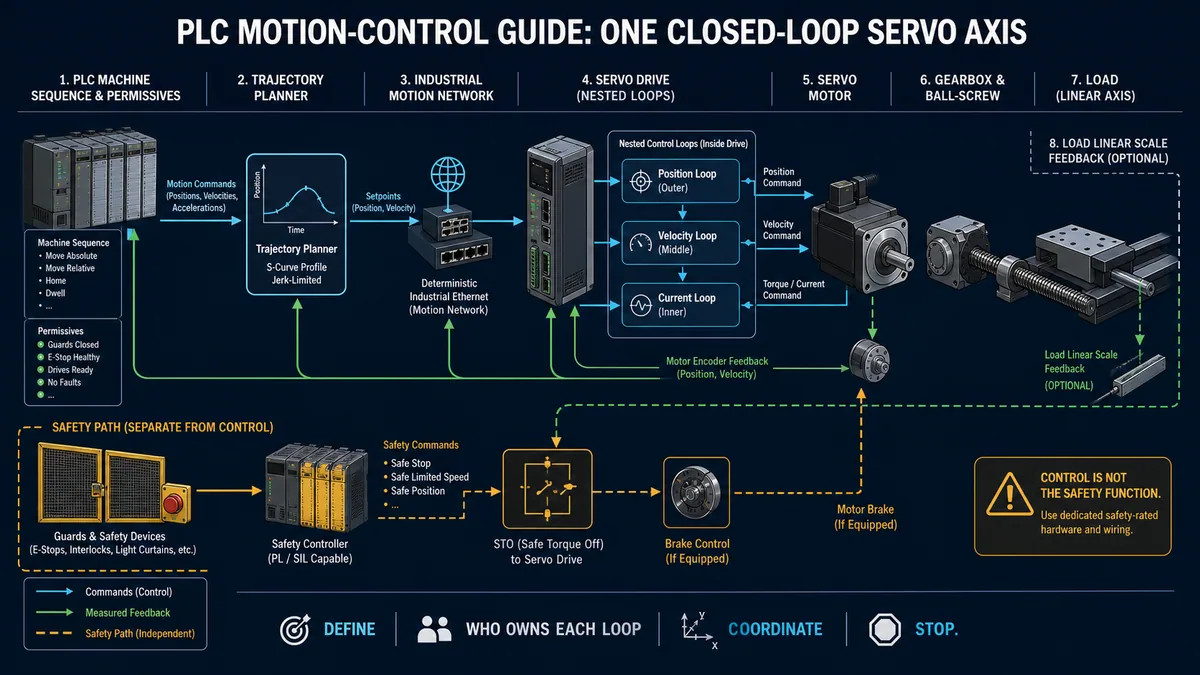
CANopen Protocol Applications Motion control systems represent the most common CANopen application, where the DS402 device profile defines standardized interfaces for servo drives, stepper motors, and frequency inverters. This standardization enables control systems to communicate with drives from different manufacturers using identical command structures and feedback mechanisms.
Building automation and HVAC systems leverage CANopen for connecting sensors, actuators, and controllers in distributed control networks where reliable communication and moderate data rates meet application requirements effectively.
Medical device applications utilize CANopen's deterministic behavior and safety extensions to create reliable, certifiable medical equipment networks that meet stringent regulatory requirements for patient safety.
Mobile machinery and agricultural equipment implement CANopen networks to integrate diverse subsystems including engines, transmissions, hydraulics, and operator interfaces into coordinated control systems.
CANopen vs CAN: Understanding the Relationship
CAN (Controller Area Network) provides the physical layer and data link layer functionality including bit timing, arbitration, error detection, and frame transmission. CAN defines how individual messages are transmitted on the bus but does not specify what those messages mean or how devices should behave.
CANopen builds upon CAN by defining the application layer that standardizes message interpretation, device behavior, and network management. This layered approach allows CANopen to leverage CAN's proven reliability while providing the structure needed for complex industrial applications.
Physical Layer (CAN Foundation) The CAN physical layer defines electrical characteristics, connector types, cable specifications, and termination requirements. Standard CAN supports bus lengths up to 40 meters at 1 Mbps or extended distances at lower baud rates, with proper termination resistors (120 Ohms) at both bus ends.
Data Link Layer (CAN Protocol) The CAN data link layer implements CSMA/CD with arbitration on message priority (COB-ID), automatic retransmission of disrupted messages, and comprehensive error detection mechanisms including CRC checks, bit monitoring, and frame checks. These features provide excellent reliability even in electrically noisy industrial environments.
Application Layer (CANopen Protocol) The CANopen application layer defines communication objects (PDO, SDO, NMT, SYNC, etc.), object dictionaries, device profiles, and network management mechanisms that enable standardized device integration and sophisticated distributed control applications.
CiA Organization and Standards Development
CAN in Automation (CiA) serves as the international users' and manufacturers' organization that develops and maintains CANopen specifications, conformance test specifications, and application recommendations. CiA membership includes over 400 companies worldwide representing device manufacturers, system integrators, and end users.
CANopen Standard Documents Structure:
- CiA 301: CANopen Application Layer and Communication Profile (foundation specification)
- CiA 302: CANopen Framework for Managers and Programmers
- CiA 303: Indicator Specification
- CiA 304: Application Layer for Safety-Relevant Communication
- CiA 401: Device Profile for Generic I/O Modules
- CiA 402: Device Profile for Drives and Motion Control (most widely used)
- CiA 404: Device Profile for Measuring Devices and Closed-Loop Controllers
- CiA 405: Device Profile for IEC 61131-3 Programmable Systems
- CiA 406: Device Profile for Encoders
The comprehensive device profile library enables plug-and-play integration of compliant devices while the conformance testing program ensures that certified devices meet specification requirements.
Chapter 2: CANopen Architecture and OSI Model
CANopen Protocol Stack and OSI Layers
The CANopen communication protocol architecture maps to the OSI (Open Systems Interconnection) model, utilizing specific layers while omitting others that are unnecessary for industrial fieldbus applications. Understanding this architecture is essential for effective CANopen implementation and troubleshooting.
Physical Layer (OSI Layer 1) The physical layer implements CAN bus electrical characteristics using differential signaling on twisted pair cables. CAN High and CAN Low signal lines provide excellent noise immunity through common-mode rejection, enabling reliable operation in electrically hostile industrial environments with motors, drives, and switching power supplies.
Data Link Layer (OSI Layer 2) The CAN data link layer provides MAC (Media Access Control) and LLC (Logical Link Control) functions including message framing, arbitration, acknowledgment, and error detection. Priority-based arbitration ensures that high-priority messages gain bus access without collisions or delays, providing deterministic behavior essential for real-time control applications.
Application Layer (OSI Layer 7) CANopen implements the application layer directly above the data link layer, skipping intermediate OSI layers unnecessary for fieldbus communication. This application layer defines communication services, device profiles, and network management capabilities that enable sophisticated industrial automation applications.
Communication Object Model
The CANopen communication object model defines how devices exchange different types of information using standardized message formats and transmission mechanisms. Understanding these communication objects is fundamental to CANopen programming and integration.
Communication Object Identifier (COB-ID) The COB-ID combines function code and node ID to create unique message identifiers that determine arbitration priority and message routing. Standard CANopen allocates predefined COB-ID ranges for different communication objects ensuring consistent network behavior.
Pre-Defined Connection Set CANopen defines a pre-defined connection set that specifies standard COB-IDs for common communication objects including NMT, SYNC, Emergency, and default PDO assignments. This standardization simplifies network configuration while supporting dynamic reconfiguration when needed.
Dynamic Configuration Capability While pre-defined connection sets simplify basic implementations, CANopen supports dynamic reconfiguration of COB-IDs, communication parameters, and PDO mappings through SDO communication. This flexibility enables optimization for specific application requirements and complex network topologies.
Device Profiles and Standardization
Device profiles define standardized object dictionaries and behaviors for specific device types, enabling plug-and-play integration and multi-vendor interoperability. These profiles specify mandatory and optional objects, communication parameters, and application-specific functionality.
DS402 Motion Control Profile The DS402 device profile for drives and motion control represents the most widely implemented CANopen profile, defining standardized interfaces for positioning modes, velocity control, torque control, and homing procedures. This profile enables control systems to communicate with servo drives, stepper controllers, and frequency inverters from different manufacturers using identical programming.
State Machine Definition Device profiles define state machines that govern device behavior during initialization, operation, and error conditions. Understanding these state machines is essential for proper device integration and error recovery programming.
Manufacturer-Specific Extensions While device profiles ensure basic interoperability, manufacturers can extend profiles with additional functionality in manufacturer-specific object dictionary regions. Accessing these extensions requires manufacturer documentation but enables utilization of advanced device features.
Chapter 3: Object Dictionary - The Heart of CANopen
Object Dictionary Structure and Organization
The object dictionary serves as the central data structure in every CANopen device, organizing all accessible parameters, configuration settings, and process data in a standardized hierarchy. Understanding object dictionary structure is absolutely essential for CANopen programming and device integration.
The object dictionary uses 16-bit index addresses (0x0000 to 0xFFFF) with optional 8-bit sub-indices (0x00 to 0xFF) to organize data hierarchically. This addressing scheme provides sufficient space for standardized objects, profile-specific objects, and manufacturer-specific parameters while maintaining logical organization.
Standardized Object Dictionary Regions:
| Index Range | Description | Typical Contents |
|---|---|---|
| 0x0001-0x0FFF | Data types | Reserved for future use |
| 0x1000-0x1FFF | Communication profile area | Device type, error register, identity objects |
| 0x2000-0x5FFF | Manufacturer-specific | Device-specific parameters and functions |
| 0x6000-0x9FFF | Standardized device profile | Profile-specific objects (e.g., DS402 motion control) |
| 0xA000-0xFFFF | Reserved | Future standardization |
Critical Standard Objects:
- 0x1000: Device Type - Identifies device functionality and supported profiles
- 0x1001: Error Register - Indicates current error conditions
- 0x1008: Manufacturer Device Name - Human-readable device identification
- 0x1009: Manufacturer Hardware Version - Hardware revision information
- 0x100A: Manufacturer Software Version - Firmware version information
- 0x1018: Identity Object - Complete device identification including vendor ID and serial number
Index and Sub-Index Addressing
The hierarchical addressing scheme using indices and sub-indices provides organized access to device parameters while supporting both simple variables and complex data structures like arrays and records.
Simple Variables Simple variables use only the main index (sub-index 0x00) to access single data values such as device status, configuration flags, or measurement values. Reading or writing these objects requires specifying only the main index in SDO communication.
Arrays Array objects use sub-index 0x00 to indicate array length (number of elements) while sub-indices 0x01 through 0xFF address individual array elements. This structure enables efficient storage of multiple related values such as PDO mapping entries or manufacturer parameter sets.
Records Record objects use sub-index 0x00 to indicate the number of entries while subsequent sub-indices address individual record fields. This structure suits complex objects like PDO communication parameters where multiple related configuration values must be managed together.
Example: PDO Communication Parameter (0x1400)
Index 0x1400, Sub-index 0x00: Number of entries (0x02)
Index 0x1400, Sub-index 0x01: COB-ID (Communication Object Identifier)
Index 0x1400, Sub-index 0x02: Transmission type
Data Types and Object Access
CANopen defines standardized data types that ensure consistent data interpretation across devices from different manufacturers. Understanding these data types is essential for proper data exchange and avoiding communication errors.
Basic Data Types:
- BOOLEAN: Single bit (true/false)
- INTEGER8/16/32/64: Signed integers in various sizes
- UNSIGNED8/16/32/64: Unsigned integers in various sizes
- REAL32/64: IEEE 754 floating-point numbers
- VISIBLE_STRING: ASCII text strings
- OCTET_STRING: Binary data sequences
- TIME_OF_DAY: Absolute time representation
- TIME_DIFFERENCE: Relative time representation
Access Attributes Object dictionary entries specify access rights controlling whether objects can be read, written, or both. Common access types include:
- rw: Read-write access (configuration parameters)
- ro: Read-only access (status information, measurements)
- wo: Write-only access (commands, rare usage)
- const: Constant value (device identification)
PDO Mapping Capability Objects may be designated as mappable into PDOs (Process Data Objects) for efficient real-time data exchange. The PDO mapping attribute indicates whether an object can be included in PDO messages, enabling optimized communication for time-critical data.
EDS and DCF Files
Electronic Data Sheet (EDS) files provide machine-readable descriptions of device object dictionaries, supported communication features, and device capabilities. EDS files enable configuration tools to automatically configure and integrate devices without requiring manual parameter entry.
EDS File Structure EDS files use INI file format organizing device information into sections including device identification, communication parameters, supported objects, and mapping capabilities. Configuration tools parse EDS files to generate appropriate device interfaces and configuration dialogs.
Device Configuration File (DCF) DCF files extend EDS format by including actual parameter values for specific device instances. These files enable storage and restoration of complete device configurations including application-specific parameters, PDO mappings, and communication settings.
Practical Usage Modern CANopen configuration tools import EDS files during device integration, presenting user-friendly interfaces for parameter configuration while automatically generating proper SDO communication sequences. This dramatically simplifies system commissioning and reduces configuration errors.
Chapter 4: Communication Objects - PDO, SDO, NMT, and More
Process Data Objects (PDO) - Real-Time Communication
Process Data Objects provide the primary mechanism for real-time data exchange in CANopen networks, enabling efficient transmission of process variables, control commands, and status information with minimal overhead and deterministic timing characteristics.
PDOs implement producer-consumer communication model where one device transmits data (producer) and one or more devices receive that data (consumers) without requiring request-response handshaking. This broadcast approach minimizes latency and bus utilization for time-critical data exchange.
TPDO (Transmit PDO) Configuration TPDOs transmit data from the local device to the network. Each device supports up to 512 TPDOs (in theory), though practical implementations typically provide 4-8 TPDOs. TPDO configuration includes:
- COB-ID assignment determining message priority
- Transmission type (synchronous, asynchronous, event-driven)
- Inhibit time limiting transmission frequency
- Event timer enabling periodic transmission
- Mapped objects defining transmitted data content
RPDO (Receive PDO) Configuration RPDOs receive data from the network into the local device. RPDO configuration specifies:
- COB-ID indicating which transmitted PDO to receive
- Mapped objects determining where received data is stored
PDO Mapping Flexibility PDO mapping defines which object dictionary entries are packed into PDO messages. Flexible mapping enables optimization of PDO content for specific applications, though many devices provide pre-configured default mappings for common use cases.
Example: Mapping a 4-Byte Object into TPDO1
Object 0x1A00 (TPDO1 Mapping):
  Sub-index 0: Number of mapped objects (1)
  Sub-index 1: 0x60410010 (Index 0x6041, sub-index 0, 16 bits - Status Word)
  Sub-index 2: 0x60640020 (Index 0x6064, sub-index 0, 32 bits - Position Actual Value)
This mapping includes a 16-bit status word and 32-bit position value in TPDO1, totaling 48 bits (6 bytes) fitting within CAN's 8-byte data limit.
Service Data Objects (SDO) - Configuration and Diagnostics
Service Data Objects provide confirmed communication for configuration, diagnostics, and access to object dictionary entries not included in PDO mappings. SDO implements client-server communication where the client (typically a master or configuration tool) requests data from or writes data to the server (typically a slave device).
Expedited Transfer Expedited SDO transfer sends data (up to 4 bytes) within a single request-response exchange, minimizing communication overhead for small data items like configuration parameters or status flags. Most object dictionary access uses expedited transfer for efficiency.
Segmented Transfer Segmented SDO transfer handles data larger than 4 bytes by splitting the transfer into multiple segments. Each segment is acknowledged before transmitting the next, ensuring reliable transfer of complex data structures, strings, or large parameter sets.
SDO Upload and Download SDO terminology uses "upload" for reading from device (client uploads data from server) and "download" for writing to device (client downloads data to server). Understanding this terminology is essential when working with configuration tools and protocol documentation.
Practical SDO Communication Example Reading motor rated current from DS402 device:
SDO Request: Read Index 0x6075, Sub-index 0
  COB-ID: 0x600 + Node ID
  Data: [0x40, 0x75, 0x60, 0x00, 0x00, 0x00, 0x00, 0x00]

SDO Response:
  COB-ID: 0x580 + Node ID
  Data: [0x43, 0x75, 0x60, 0x00, 0xE8, 0x03, 0x00, 0x00]
  (0x03E8 = 1000 in decimal, represents 1000 mA)
Network Management (NMT) - State Control
Network Management provides centralized control over device operational states, enabling coordinated network initialization, operation, and error recovery. The NMT master (typically the PLC or master controller) issues NMT commands that control slave device behavior.
NMT State Machine CANopen devices implement a standardized state machine with defined states and transitions:
Initialization State Devices enter initialization state at power-up, executing self-tests, loading configuration from non-volatile memory, and preparing for network communication. Devices automatically transition to Pre-operational state after successful initialization.
Pre-Operational State In pre-operational state, devices respond to SDO communication for configuration but do not process PDO communication. This state enables safe configuration and reconfiguration without affecting real-time process data exchange.
Operational State Operational state represents normal operation where devices process both SDO and PDO communication. Most application-level functionality occurs in operational state including motion control, process data acquisition, and distributed control functions.
Stopped State Stopped state disables PDO communication while maintaining SDO communication for diagnostics and troubleshooting. Devices may be commanded to stopped state for testing or maintenance while maintaining network connectivity.
NMT Commands
- Start Remote Node (0x01): Transition device to operational state
- Stop Remote Node (0x02): Transition device to stopped state
- Enter Pre-Operational (0x80): Transition device to pre-operational state
- Reset Node (0x81): Reset device (application and communication)
- Reset Communication (0x82): Reset communication parameters only
SYNC Object - Synchronization
SYNC objects provide network-wide synchronization for coordinated action across multiple devices. The SYNC producer (typically the NMT master) broadcasts periodic SYNC messages at defined intervals enabling synchronized PDO transmission and coordinated process operations.
Synchronous PDO Transmission PDOs configured for synchronous transmission wait for SYNC messages before transmitting, ensuring that multiple devices transmit data at precisely coordinated times. This synchronization is essential for motion control applications requiring coordinated multi-axis movements.
SYNC Windows The SYNC window defines the maximum time after SYNC transmission during which synchronous communication must occur. This window prevents timing violations and maintains deterministic behavior even when devices have different processing speeds.
TIME Object - Network Time Distribution
TIME objects distribute absolute time information throughout CANopen networks enabling coordinated scheduling, time-stamped data logging, and synchronized operations based on wall-clock time rather than relative timing.
Emergency Objects (EMCY) - Error Reporting
Emergency objects provide rapid notification of device errors and exceptional conditions. EMCY messages transmit automatically when devices detect errors, enabling immediate fault response without waiting for polling or scheduled communication.
Error Code Classification Emergency messages include standardized error codes classifying failures as communication errors, device profile specific errors, manufacturer specific errors, or additional information. Error codes enable automated error handling and diagnostic systems.
Chapter 5: CANopen Communication Modes
Event-Driven Communication
Event-driven communication transmits data when specific conditions occur rather than at predetermined times. This mode optimizes bus utilization by transmitting only when data changes or events occur, reducing unnecessary traffic while ensuring timely communication of important changes.
Change of State (COS) Transmission Change of state transmission sends PDOs only when mapped data values change by more than a specified threshold. This approach dramatically reduces bus utilization for slowly changing values while ensuring updates when significant changes occur.
Inhibit Time Configuration Inhibit time prevents excessive transmission of rapidly changing values by enforcing minimum time intervals between successive PDO transmissions. Proper inhibit time configuration balances update frequency against bus utilization and system responsiveness.
Event Timer (Watchdog) Event timers ensure periodic transmission even when no changes occur, providing watchdog functionality that detects communication failures and ensures consumers receive updated data at known intervals.
Time-Driven (Synchronous) Communication
Time-driven communication uses SYNC objects to coordinate periodic data exchange at precise time intervals. This deterministic communication mode is essential for motion control and other applications requiring precise timing coordination between multiple devices.
Cyclic Synchronous Transmission PDOs configured for cyclic synchronous transmission send data at integer multiples of the SYNC period. This provides deterministic, periodic data exchange with precisely controlled timing essential for coordinated motion control applications.
Acyclic Synchronous Transmission Acyclic synchronous transmission waits for SYNC but transmits based on application trigger rather than every SYNC cycle. This mode balances synchronization requirements with efficient bus utilization.
Polling Communication
Polling communication uses RTR (Remote Transmission Request) frames to request data transmission from remote devices. While less common in modern CANopen implementations, RTR polling provides backwards compatibility and alternative communication patterns for specific applications.
Remote Transmission Request (RTR)
RTR frames request data transmission from devices configured to respond to remote requests. The responding device transmits its PDO when it receives a matching RTR frame. This mechanism enables on-demand data retrieval without continuous polling through SDO communication.
Chapter 6: Physical Layer - CAN Bus Implementation
Wiring and Termination
Proper CAN bus wiring and termination are absolutely critical for reliable CANopen communication. Even perfect protocol implementation fails if physical layer issues cause communication errors and message corruption.
Cable Specifications CANopen typically uses twisted pair cable with characteristic impedance of 120 Ohms. Shielded cable provides better noise immunity in electrically hostile environments, though unshielded cable works in benign applications. Common cable types include DeviceNet-style thick cable for trunk lines and thin cable for drop lines.
Termination Requirements CAN bus requires 120-Ohm termination resistors at both physical ends of the trunk line. These termination resistors match the cable characteristic impedance preventing signal reflections that cause bit errors. Missing or incorrect termination causes unreliable communication and intermittent errors.
Topology Considerations Linear topology with short drop lines provides the best electrical characteristics and most reliable operation. Star topology should be avoided as it creates impedance mismatches. When branch lines are necessary, they should be kept as short as possible (typically under 1 meter).
Grounding and Shielding Proper grounding prevents ground loops while maintaining effective EMI shielding. Shield should typically be grounded at one point only (usually at the master or power supply) to prevent circulating ground currents that can induce noise.
Baud Rates and Distance Relationships
CAN bus baud rate and maximum network length have inverse relationship due to signal propagation delay and bit timing requirements. Understanding this relationship is essential for network design and troubleshooting timing-related communication problems.
Standard Baud Rates:
| Baud Rate | Max Bus Length | Typical Application |
|---|---|---|
| 1 Mbps | 40 meters | High-speed motion control |
| 800 Kbps | 50 meters | Motion control |
| 500 Kbps | 100 meters | General automation |
| 250 Kbps | 250 meters | Process control |
| 125 Kbps | 500 meters | Building automation |
| 50 Kbps | 1000 meters | Extended networks |
Bit Timing Configuration CAN bit timing involves several parameters including baud rate prescaler, time quantum, propagation segment, phase segment 1, phase segment 2, and synchronization jump width. Proper bit timing configuration accounts for cable length, node processing time, and oscillator tolerances ensuring reliable communication across the entire network.
Connector Standards and Pinouts
While CAN and CANopen do not mandate specific connectors, several de facto standards have emerged supporting interoperability and simplified installation.
Common Connector Types:
- 9-pin D-Sub: Common in industrial automation, pinout varies by convention
- 5-pin M12: Increasingly common, compact, vibration-resistant
- DeviceNet-style: Round connectors with sealed contacts for harsh environments
- RJ45: Sometimes used but not ideal due to impedance mismatch
Standard Pinout (CiA 303-1)
Pin 1: Reserved
Pin 2: CAN_L (CAN Low)
Pin 3: CAN_GND (CAN Ground)
Pin 4: Reserved
Pin 5: CAN_SHLD (Shield, optional)
Pin 6: GND (Ground, optional power supply)
Pin 7: CAN_H (CAN High)
Pin 8: Reserved
Pin 9: CAN_V+ (Power supply, optional)
Power Distribution Considerations
Many CANopen networks incorporate power distribution through the communication cable, simplifying installation especially for sensors and small actuators. However, power distribution requires careful consideration of voltage drop, current capacity, and isolation from communication signals.
Bus-Powered Devices Bus-powered devices draw operating power from the communication cable. Total bus current must remain within cable and power supply capacity while voltage drop along the cable must not reduce voltage below device minimum requirements.
Separate Power Distribution Separate power wiring eliminates concerns about voltage drop and current capacity affecting communication reliability. This approach is preferred for high-power devices and large networks.
Chapter 7: CANopen vs Other Industrial Protocols
CANopen vs EtherCAT
EtherCAT provides significantly higher bandwidth and tighter synchronization than CANopen, making it preferred for high-performance motion control applications with dozens of synchronized axes requiring microsecond-level coordination. However, EtherCAT requires specialized master hardware and tends to have higher implementation cost.
CANopen Advantages:
- Lower cost implementation with simple CAN transceivers
- Mature ecosystem with thousands of available devices
- Multi-master capability enabling distributed intelligence
- Proven reliability in harsh industrial environments
- Lower power consumption suitable for battery-powered applications
EtherCAT Advantages:
- Much higher bandwidth (100+ Mbps vs 1 Mbps)
- Tighter synchronization (sub-microsecond vs millisecond)
- Longer network distances without repeaters
- Better scalability for large node counts
- More powerful diagnostic capabilities
Application Selection: Choose CANopen for moderate-performance motion control (fewer than 10-15 axes), embedded applications, mobile machinery, and building automation where CANopen's cost effectiveness and proven reliability provide excellent value.
Choose EtherCAT for high-performance motion control with many synchronized axes, applications requiring ultra-precise timing, and large-scale automation systems where EtherCAT's performance justifies higher implementation cost.
CANopen vs PROFINET
PROFINET leverages standard Ethernet infrastructure providing higher bandwidth and easier integration with enterprise IT systems compared to CANopen. However, PROFINET typically requires more expensive components and more complex configuration.
CANopen Advantages:
- Simpler implementation with lower cost
- Better EMI immunity due to differential signaling
- Lower power consumption
- Smaller connectors suitable for compact devices
- Multi-master architecture enabling flexible topologies
PROFINET Advantages:
- Higher bandwidth (100+ Mbps vs 1 Mbps)
- Integration with IT infrastructure and protocols
- Support for larger data volumes
- More sophisticated diagnostic capabilities
- Wide adoption in process automation
Application Selection: Choose CANopen for embedded control, mobile machinery, and applications where cost, power consumption, and EMI immunity are priorities. CANopen excels in harsh environments and applications requiring compact, rugged components.
Choose PROFINET for factory automation, process control, and applications requiring high bandwidth, enterprise integration, and sophisticated diagnostics. PROFINET works well in controlled industrial environments with IT infrastructure support.
CANopen vs Modbus
Modbus remains popular due to simplicity and universal support, but provides minimal standardization above basic register access. CANopen offers much more sophisticated device profiles, network management, and real-time communication capabilities.
CANopen Advantages:
- Standardized device profiles enabling true plug-and-play
- Real-time PDO communication with deterministic timing
- Sophisticated network management and diagnostics
- Comprehensive object dictionary standardization
- Multi-master capability for distributed control
Modbus Advantages:
- Simpler protocol easier to implement and troubleshoot
- Universal support across virtually all industrial devices
- No licensing or certification requirements
- TCP/IP variant enables long-distance communication
- Abundant low-cost implementation options
Application Selection: Choose CANopen for motion control, embedded control, and applications requiring real-time communication, device interoperability, and sophisticated network management.
Choose Modbus for simple monitoring and control applications, systems integrating diverse devices from many manufacturers, and applications where simplicity and universal support outweigh performance requirements.
When to Use CANopen Protocol
CANopen represents the optimal choice for specific application scenarios where its unique combination of features provides superior value:
Motion Control Applications CANopen's DS402 device profile provides standardized motion control interfaces enabling multi-vendor drive integration with deterministic real-time performance. Networks supporting up to 15-20 motion axes work excellently with CANopen's bandwidth and timing characteristics.
Embedded Distributed Control Multi-master capability and efficient PDO communication enable distributed intelligence without requiring centralized control. Embedded controllers can coordinate sophisticated control strategies using peer-to-peer communication.
Mobile Machinery and Vehicles Proven reliability in harsh environments with vibration, temperature extremes, and EMI make CANopen ideal for construction equipment, agricultural machinery, and commercial vehicles. Low power consumption suits battery-powered applications.
Building Automation and HVAC Moderate bandwidth requirements, long cable runs at lower baud rates, and cost-effective implementation make CANopen excellent for building automation connecting sensors, actuators, and controllers throughout facilities.
Medical Devices CANopen Safety extensions provide certifiable safe communication for medical equipment. Mature ecosystem and proven reliability meet stringent medical device regulatory requirements.
Chapter 8: PLC Integration and Programming
CANopen Integration with Siemens PLCs
Siemens PLCs integrate CANopen networks through communication modules that implement CANopen master functionality, enabling control programs to exchange data with CANopen slave devices using standard PLC communication instructions.
CP 343-2 and CP 443-1 Modules These communication processors provide CANopen master interfaces for S7-300 and S7-400 PLCs. Configuration through STEP 7 defines network parameters, connected devices, and data mapping between CANopen objects and PLC memory areas.
TIA Portal Configuration Modern Siemens automation projects use TIA Portal for CANopen configuration. Import device EDS files, configure network parameters, map process data to PLC data blocks, and generate communication instructions automatically.
Practical Programming Example - Siemens SCL:
// Read actual velocity from CANopen servo drive (Node ID 3)
// Object 0x606C - Velocity Actual Value
#ActualVelocity := CANopen_SDO_Read(
    Node := 3,
    Index := 16#606C,
    SubIndex := 0,
    Data => #VelocityValue,
    Error => #CommError
);

// Write target position for motion
// Object 0x607A - Target Position
#WriteCommand := CANopen_SDO_Write(
    Node := 3,
    Index := 16#607A,
    SubIndex := 0,
    Data := #TargetPosition,
    Error => #CommError
);

// Monitor PDO data automatically mapped to data block
IF #DriveStatus.Ready AND NOT #DriveStatus.Fault THEN
    #EnableMotion := TRUE;
END_IF;
CANopen Integration with Beckhoff TwinCAT
Beckhoff TwinCAT provides excellent CANopen support through both software CANopen master implementations and hardware CANopen interfaces. TwinCAT's object-oriented programming approach maps naturally to CANopen's object dictionary structure.
TwinCAT CANopen Configuration Add CANopen master to TwinCAT I/O configuration, scan for connected devices, import EDS files, and configure PDO mappings through TwinCAT's configuration interface. Mapped process data appears as structured variables in PLC programs.
Structured Text Programming Example:
// CANopen motion control in TwinCAT ST
PROGRAM Motion_Control
VAR
    Servo : CANopen_Servo_DS402;  // Function block for DS402 drive
    MoveCommand : MC_MoveAbsolute;
END_VAR

// Monitor drive status from PDO data
IF Servo.StatusWord.ReadyToSwitchOn THEN
    Servo.ControlWord.EnableOperation := TRUE;
END_IF;

// Execute absolute move
MoveCommand(
    Axis := Servo,
    Execute := StartMove,
    Position := TargetPos,
    Velocity := MoveVelocity,
    Done => MoveComplete,
    Error => MoveError
);
Generic CANopen Integration Steps
Regardless of PLC platform, CANopen integration follows similar fundamental steps:
Step 1: Network Physical Installation
- Install CAN bus cable with proper termination
- Connect all devices with node ID switches configured
- Verify power distribution and grounding
- Test physical layer with bus monitoring tools
Step 2: Device Configuration
- Set baud rate consistently on all devices
- Configure node IDs (1-127, unique for each device)
- Load device EDS files into configuration tool
- Configure manufacturer-specific parameters
Step 3: PDO Mapping
- Define which process data requires real-time exchange
- Configure TPDO mappings on slave devices
- Configure RPDO subscriptions in master
- Set transmission types and timing parameters
Step 4: PLC Programming
- Map PDO data to PLC memory structures
- Implement SDO communication for configuration and diagnostics
- Program NMT state management for network initialization
- Develop error handling and recovery logic
Step 5: Testing and Commissioning
- Verify all devices enter operational state
- Test PDO data exchange with process monitoring
- Validate timing and synchronization
- Test error handling and recovery procedures
CANopen Programming Best Practices
Initialize Network Systematically Implement structured startup sequence: reset all nodes, configure devices through SDO communication, verify configuration, transition to operational state. This systematic approach ensures consistent behavior and simplifies troubleshooting.
Implement Comprehensive Error Handling Monitor communication status, detect timeout conditions, handle emergency messages, and implement automatic recovery procedures. Production systems must handle communication errors gracefully without operator intervention.
Use PDO for Real-Time Data Reserve PDO communication for time-critical process data requiring fast, deterministic exchange. Use SDO for configuration, diagnostics, and non-time-critical data access to optimize bus utilization.
Monitor Device Health Implement heartbeat or node guarding to detect device failures. Monitor error registers and device-specific diagnostic objects to enable predictive maintenance.
Document Configuration Thoroughly Maintain complete documentation of object dictionary configurations, PDO mappings, network topology, and device settings. Documentation is essential for troubleshooting and system maintenance.
Chapter 9: Troubleshooting CANopen Networks
Common CANopen Communication Issues
Problem: Devices Not Entering Operational State
Symptoms: Devices remain in pre-operational state after boot sequence, NMT commands appear ignored.
Causes:
- Baud rate mismatch between master and slaves
- Hardware node ID conflicts (duplicate node IDs)
- Missing or incorrect termination resistors
- Mandatory SDO configuration not completed
Solutions:
- Verify baud rate configuration on all devices matches exactly
- Check node ID switches/configuration ensuring each device has unique ID
- Measure termination resistance (should be ~60 Ohms between CAN_H and CAN_L)
- Review device documentation for mandatory pre-operational configuration
Problem: Intermittent Communication Errors
Symptoms: Bus-off conditions, CRC errors, periodic communication timeouts, data corruption.
Causes:
- Electrical noise from motors, drives, or switching power supplies
- Improper cable routing near high-voltage or high-frequency sources
- Damaged cables or loose connections
- Inadequate shielding or grounding
Solutions:
- Route CAN cable separately from power cables (minimum 4-inch separation)
- Use shielded cable in electrically noisy environments
- Inspect connectors and cable for physical damage
- Verify shield grounding at single point only
- Add ferrite chokes if EMI suspected
Problem: PDO Data Not Updating
Symptoms: Process data remains stale, no PDO messages observed on bus monitor.
Causes:
- PDO transmission type configured incorrectly
- SYNC messages not being transmitted for synchronous PDOs
- Inhibit time preventing transmission
- COB-ID conflicts between devices
Solutions:
- Verify transmission type matches application requirements
- Ensure SYNC producer is operating at configured interval
- Check inhibit time setting isn't preventing updates
- Review COB-ID allocation ensuring no conflicts
CANopen Diagnostic Tools
CAN Bus Analyzers Hardware CAN bus analyzers (Peak PCAN, Kvaser, Vector CANalyzer) capture and decode CANopen messages enabling detailed protocol analysis. These tools display PDO content, SDO transactions, NMT commands, and emergency messages in human-readable format.
Built-in PLC Diagnostics CANopen communication modules typically provide diagnostic information including:
- Device operational state
- Communication error counters
- PDO receive status
- Emergency message log
- Bus load statistics
Device-Specific Diagnostic Objects CANopen devices expose diagnostic information through object dictionary:
- 0x1001: Error Register - Indicates current error categories
- 0x1003: Pre-defined Error Field - Logs recent errors
- 0x1029: Error Behavior Object - Defines error response behavior
Software Monitoring Tools CANopen configuration software packages (CANopen Magic, ProCANopen) provide runtime monitoring displaying device states, process data values, and communication statistics. These tools simplify commissioning and troubleshooting without requiring hardware analyzers.
Bus-Off Recovery Procedures
Bus-off condition occurs when a device detects excessive transmission errors, typically caused by physical layer problems or configuration mismatches. Devices enter bus-off state automatically to prevent further disruption of network communication.
Automatic Recovery Most CANopen devices implement automatic bus-off recovery, attempting to re-enter bus communication after waiting for bus idle condition. Persistent bus-off indicates serious hardware or configuration problems requiring investigation.
Manual Recovery Some applications require manual intervention before attempting bus-off recovery to ensure problems have been corrected. Implement monitoring of device states and provide operator interface for authorizing recovery attempts.
Root Cause Analysis Persistent bus-off conditions require systematic troubleshooting:
- Monitor bus with analyzer to identify error patterns
- Verify physical layer: cable continuity, termination, grounding
- Check bit timing configuration on all devices
- Isolate sections to identify problematic device or cable segment
- Replace suspect devices or cables and retest
Performance Optimization
Bus Load Analysis Monitor bus utilization ensuring average load remains below 60-70% to maintain timing determinism and allow for communication peaks. High bus load causes timing violations and potential PDO loss.
PDO Optimization
- Map multiple related values into single PDOs to minimize message count
- Use appropriate inhibit times preventing excessive transmission
- Implement change-of-state transmission for slowly changing values
- Reserve highest priority PDOs for most time-critical data
Baud Rate Selection Select highest baud rate compatible with cable length and environmental conditions. Higher baud rates provide better performance and lower latency but require shorter cable lengths and better quality installation.
Chapter 10: Frequently Asked Questions
What is CANopen protocol used for?
CANopen protocol is used for real-time industrial communication in motion control systems, building automation, medical devices, mobile machinery, and embedded control applications. The protocol enables standardized device integration, deterministic data exchange, and sophisticated distributed control while maintaining cost-effectiveness and robust operation in harsh industrial environments.
How does CANopen differ from CAN?
CAN provides the physical and data link layers handling electrical signaling and message transmission. CANopen adds the application layer defining device profiles, object dictionaries, communication objects (PDO, SDO, NMT), and network management. While CAN ensures reliable message delivery, CANopen defines what those messages mean and how devices should behave.
What are PDO and SDO in CANopen?
PDO (Process Data Objects) provide real-time, unconfirmed communication for exchanging time-critical process data with minimal latency. SDO (Service Data Objects) provide confirmed communication for configuration, diagnostics, and accessing object dictionary entries not included in PDO mappings. PDOs optimize for speed, SDOs optimize for reliability and flexibility.
What is the CANopen object dictionary?
The object dictionary is a standardized data structure organizing all accessible parameters, configuration settings, and process data in a CANopen device. It uses 16-bit indices and optional 8-bit sub-indices to address values hierarchically. The object dictionary enables standardized device access regardless of manufacturer, supporting plug-and-play integration.
What baud rates does CANopen support?
CANopen supports standard CAN baud rates from 10 Kbps to 1 Mbps. Common rates include 125 Kbps, 250 Kbps, 500 Kbps, and 1 Mbps. Baud rate selection depends on network length, with higher rates supporting shorter distances (1 Mbps up to 40m) and lower rates supporting longer distances (125 Kbps up to 500m).
How many devices can a CANopen network support?
CANopen networks theoretically support up to 127 devices (node IDs 1-127) though practical limits depend on bus load and application requirements. Networks with many high-bandwidth devices may be limited to 20-30 devices by bus utilization constraints, while networks with low-bandwidth devices can approach theoretical limits.
What is the NMT state machine in CANopen?
The NMT (Network Management) state machine defines four operational states: Initialization (power-up), Pre-operational (SDO only), Operational (SDO and PDO), and Stopped (SDO only, PDO disabled). The NMT master controls slave device states through NMT commands, enabling coordinated network initialization and operation.
Can CANopen work with industrial PLCs?
Yes, most major PLC manufacturers provide CANopen master interfaces through communication modules or embedded controllers. Siemens, Beckhoff, Allen-Bradley, Omron, and other manufacturers support CANopen integration enabling PLC programs to communicate with CANopen devices. Configuration tools simplify device integration and data mapping.
Conclusion: Master CANopen Protocol for Industrial Automation Success
CANopen protocol mastery has become essential for automation engineers working in motion control, embedded systems, and distributed industrial automation applications. The protocol's unique combination of standardization, real-time performance, cost-effectiveness, and robust operation in harsh environments ensures its continued relevance as technology evolves toward Industry 4.0 and smart manufacturing.
The comprehensive device profile library, particularly DS402 for motion control, enables true multi-vendor interoperability eliminating vendor lock-in while maintaining sophisticated functionality. Understanding object dictionaries, communication objects, and network management provides the foundation for implementing reliable, maintainable CANopen networks.
Future developments including CANopen FD (Flexible Data-rate) extending bandwidth, Time-Sensitive Networking (TSN) integration, and IoT connectivity ensure that CANopen continues evolving to meet emerging application requirements while maintaining backwards compatibility with the enormous installed base of CANopen devices.
Related Industrial Automation Resources
Expand your industrial communication protocol knowledge:
- PLC Communication Protocols Complete Guide - Master Modbus, EtherNet/IP, Profinet, and other protocols
- Siemens PLC Programming Tutorial - Learn PLC programming with CANopen integration
- HMI Programming Tutorial - Create operator interfaces for CANopen systems
- Structured Text Programming Guide - Advanced PLC programming techniques for protocol handling
Accelerate Your PLC Programming and Industrial Networking Career
Ready to become an industrial automation expert with advanced protocol knowledge? Our comprehensive Master PLC Programming Guide covers everything from basic PLC concepts to advanced industrial communication techniques including CANopen, EtherCAT, and other modern protocols. Download your complete resource today and master the skills that drive modern industrial automation.
Continue developing your CANopen expertise through hands-on implementation projects, formal training from CiA-certified training providers, and staying current with emerging CANopen specifications and device profiles that expand the protocol's capabilities and application range in 2026 and beyond.