Free Electrical CAD Software 2026: 11 Tools Compared
Compare 11 electrical CAD and diagram tools by licence, schematic fit, panel workflow, export limits and commercial-use boundary.
The best free electrical CAD choice depends on the deliverable. Start with QElectroTech or SkyCAD Standard for industrial schematics, KiCad or EasyEDA for electronics and PCB work, and TinyCAD or a browser diagram tool for lightweight drawings. “Free” can mean open-source software, a restricted home licence, a feature-limited tier or only a trial, so verify the current terms before standardizing.
This comparison does not reproduce vendor interfaces or award a universal winner. It checks each tool against official licence, download or pricing pages available on 25 July 2026, then supplies a repeatable pilot task you can run with your own drawing standard.

Quick comparison
| Tool | Best-fit starting point | Free status reviewed 25 July 2026 | Important boundary |
|---|---|---|---|
| KiCad | Electronics schematic and PCB | Open-source application | PCB workflow, not industrial panel-documentation automation |
| QElectroTech | Industrial and power schematics | GNU/GPL download | Prove reports and library depth for your project |
| SkyCAD | Industrial schematics | Free Standard licence | Panel layout, cable management and I/O import are paid-tier features |
| EasyEDA | Browser/desktop electronics and PCB | Core editor free; commercial use stated | Review account, storage, data and service terms |
| ProfiCAD | Home/hobby electrical diagrams | Free non-commercial home licence | Maximum three pages; paid licence for company, freelance or school use |
| TinyCAD | Lightweight schematic capture | Open-source and supplied free of charge | Validate current package and export workflow |
| Fritzing | Breadboard-style education and hobby work | Source available; official binaries are paid downloads | Not an industrial documentation system |
| LibreCAD | General 2D drafting and panel outlines | Open-source | No electrical project database by default |
| Circuit Diagram Maker | Quick browser circuit drawing | Browser access available | Re-check current terms and export behavior |
| SmartDraw | General business diagramming | Free trial, not a perpetual free tier | Paid workflow after evaluation |
| EdrawMax | General diagramming with electrical shapes | Free tier/trial | Official comparison shows default watermarks and other limits |
The table distinguishes the software-access model. It does not certify that a tool meets your drafting standard, customer specification, cybersecurity requirements or commercial-use policy.
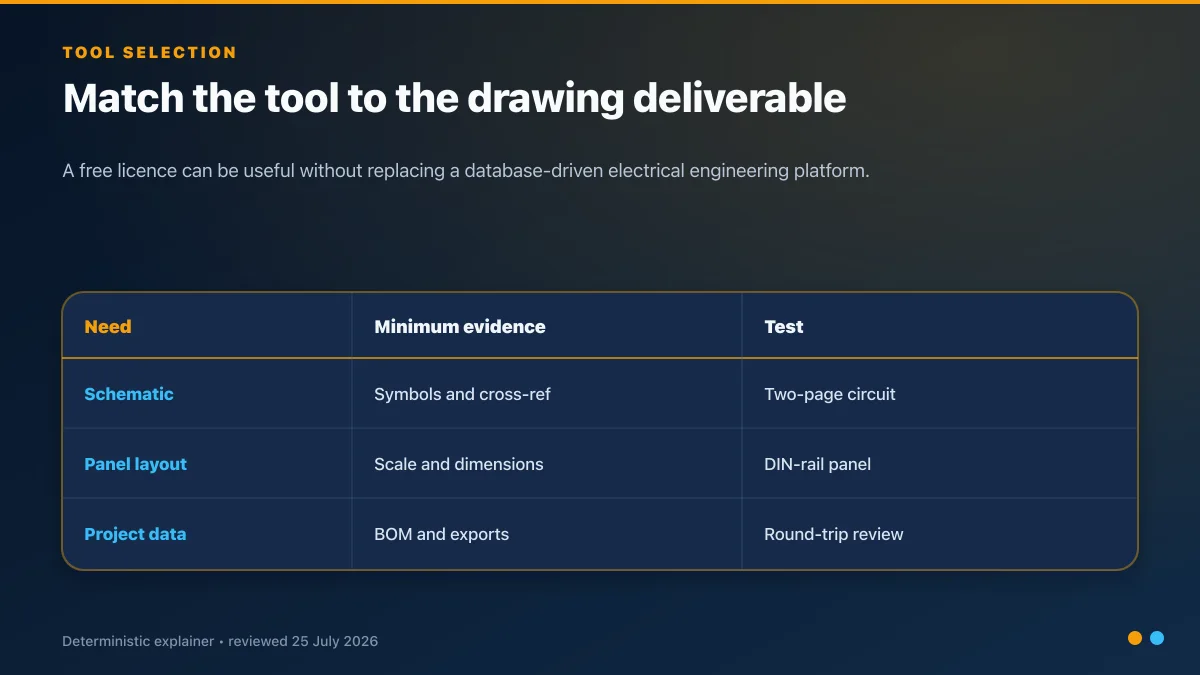
What “free electrical CAD” means
Open-source application
The source is available under an open-source licence. That does not automatically remove obligations around redistribution or third-party libraries. KiCad says most of its program is GPL v3 or later; QElectroTech states GNU/GPL; TinyCAD describes itself as an open-source, community-driven project; and LibreCAD publishes an open-source 2D CAD application.
Free commercial editor or standard licence
The vendor supplies a no-cost tier and states whether commercial use is permitted. EasyEDA's current pricing page says its editor features are free and that PCBs designed with it can be used commercially. SkyCAD says every account receives a free Standard licence, while paid tiers add capabilities such as panel layout and I/O-list import.
Free non-commercial or home licence
ProfiCAD's official download page says the free version is for non-commercial use. Its edition comparison currently limits the home licence to three pages and says a paid licence is for company, freelancer or school use. The old “ten-element cap” description is not current and has been removed from this guide.
Paid binary for an open-source project
Fritzing publishes source code and charges for supported binary downloads. That is compatible with an open-source project; it simply means “open source” does not guarantee the current official installer is a zero-cost download.
Trial or watermarked tier
SmartDraw's official FAQ describes a free trial. EdrawMax's official plan comparison shows a free tier with default watermarks and other export, shape and file limits. Neither should be described as an unrestricted free electrical CAD system.
Live mini-lab
Try it: press START, then STOP
A stop-dominant seal-in rung: START latches the motor output through its own contact, and STOP breaks the circuit.
Watch the output lamp: it stays on after START until you press STOP.
Free · no signup to try · runs in your browserOpens plcsimulationsoftware.com — same team
The 11 tools, reviewed by use case
1. KiCad: electronics schematic and PCB
KiCad combines schematic capture, PCB layout and related electronics design tools. Its licence page states that KiCad is free software and that most source code is GPL v3 or later.
Choose it when the deliverable is an electronic circuit or PCB. Do not choose it solely because it is powerful: industrial control drawings need terminal plans, cable schedules, device cross-references and revision conventions that are different from PCB design.
Pilot: draw a two-sheet power-supply and I/O board, annotate, run electrical checks, produce the BOM and reopen the exported manufacturing files.
2. QElectroTech: industrial and power schematics
QElectroTech targets electrical diagrams rather than PCB layout. Its download page states that it is GNU/GPL and offers packages for Windows, macOS and Linux.
It is a sensible first pilot for motor-control, power-distribution and PLC panel schematics. Validate the exact report, terminal, cable and symbol-library workflow you require; a free licence does not prove that every project artifact is automated.
Pilot: draw a motor starter with a PLC output, auxiliary feedback, terminal strip and cross-reference, then generate the available reports.
3. SkyCAD Standard: free industrial schematic tier
SkyCAD's features and pricing page says the free Standard licence includes its main schematic tools, automated numbering, cross-references and parts-list/BOM functions. Its paid Advanced tier lists panel layout, cable/connector management and I/O-list import.
This makes Standard more than a time-limited trial, correcting the old version of this article. It also means users should not assume the free tier includes every panel engineering feature shown elsewhere on the product site.
Pilot: build the same motor-starter drawing as in QElectroTech, then note which desired reports or panel tasks cross into a paid tier.
4. EasyEDA: free electronics editor and services ecosystem
EasyEDA's official pricing page says its core editor is free, allows commercial PCB use and offers both Standard and Pro editor editions without an editor-feature charge. Paid plans add service, storage and support benefits.
The tool is a fit for browser or desktop electronics/PCB work, not an industrial control-documentation default. Review the current account, data-location, backup and manufacturing-service terms before using it for proprietary designs.
Pilot: draw a small sensor board, run the checks, generate fabrication outputs and verify that another team member can reopen the project from the approved storage path.
5. ProfiCAD Home: non-commercial, three-page limit
ProfiCAD's current download page supplies a free non-commercial Windows version. The edition comparison states a three-page maximum for the home licence and reserves company, freelancer and school use for the paid licence.
That can suit personal learning or a hobby drawing. It is not a free commercial recommendation.
Pilot: if your use is eligible, create a three-page sample and confirm the cross-reference, output and DXF constraints before investing time in a library.
6. TinyCAD: lightweight open-source schematic capture
TinyCAD's official download site describes the project as open source and supplied free of charge. It is useful when a lightweight circuit schematic matters more than an integrated electrical project database.
Pilot: import or create the required symbols, draw a small circuit, export to the format your document-control process accepts, then reopen it on a second machine.
7. Fritzing: breadboard-oriented education
Fritzing remains useful for explaining hobby electronics with breadboard, schematic and PCB views. Its official release page states that source code is available and that purchasing the current binary funds development.
Use it for the visual transition from a physical prototype to a schematic. Do not use its breadboard presentation as an industrial panel drawing or wiring work instruction.
Pilot: reproduce one known breadboard circuit, compare every pin to the physical prototype and export the documentation used by the learner.
8. LibreCAD: general 2D drafting
LibreCAD is an open-source 2D CAD tool. It can support enclosure outlines, mounting plates and custom drawing libraries, but it is not an electrical database platform by default.
Pilot: draw a scaled panel backplate, place DIN rails and ducts, dimension the assembly and verify the DXF/PDF round trip. If you need automatic wire or terminal intelligence, compare it with an electrical-specific tool.
9. Circuit Diagram Maker: quick browser diagrams
circuitdiagrammaker.app is useful when the immediate requirement is a quick browser circuit diagram without installing a desktop suite. Because browser products can change quickly, verify the current privacy, storage, export and commercial-use terms in your own review.
Pilot: draw the same five-component circuit, export it, close the session, and prove how the source can be reopened and versioned.
10. SmartDraw: trial of a general diagram platform
SmartDraw includes electrical-planning content inside a broader diagramming product. Its official FAQ describes a free trial. Treat it as a paid-product evaluation, not a perpetual free tool.
Pilot: test the electrical template, scaling, custom symbol and export workflow, then obtain the exact subscription terms before adopting it.
11. EdrawMax: limited free diagram tier
EdrawMax covers many diagram types, including electrical drawings. Its free-versus-paid comparison currently lists default watermarks and limits on shapes, files and exports for free users.
Use the free tier to evaluate the editor. Do not assume watermarked output is acceptable for a controlled engineering deliverable.
Pilot: reproduce the representative circuit, export every required format and record which artifacts carry a watermark or hit a limit.
Judge the complete project output
The schematic editor is only one part of a usable documentation workflow.
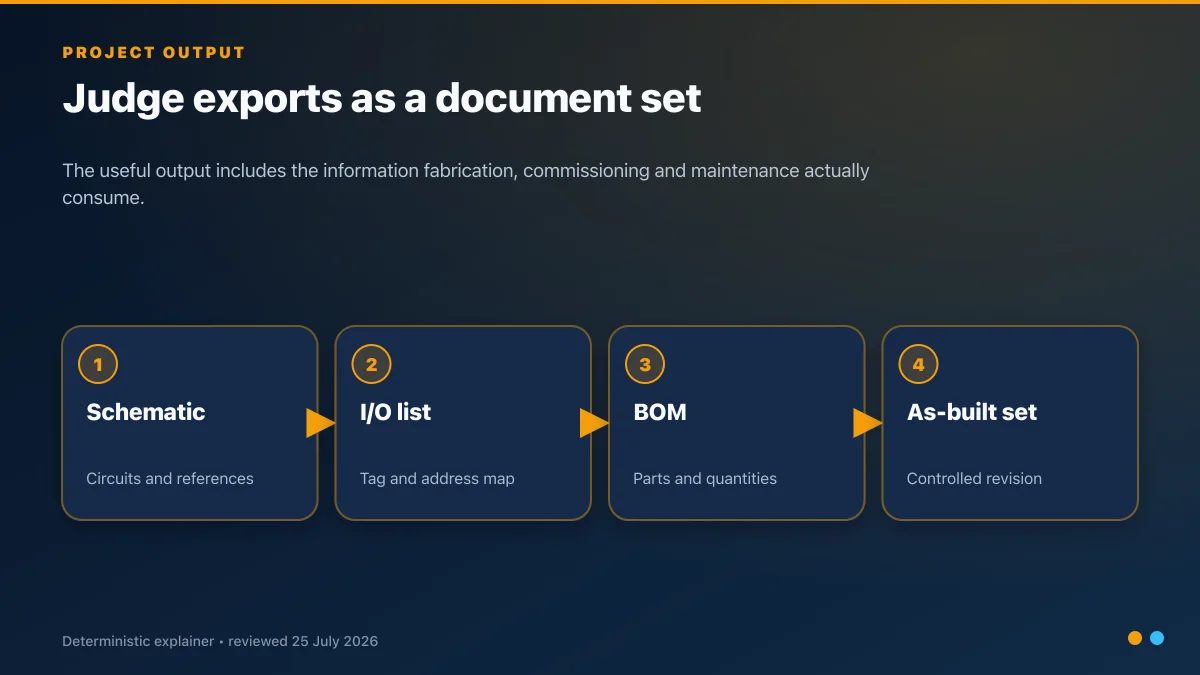
For an industrial control project, inspect:
- schematic sheet numbering and title blocks;
- coil/contact and off-page cross-references;
- terminal strips, cables and wire data;
- PLC I/O addresses and comments;
- parts-list or BOM data;
- revision, approval and as-built controls;
- PDF readability and searchable text;
- native project backup and reopen procedure; and
- long-term access when the original author leaves.
The I/O list guide explains what the drawing-to-PLC handoff must preserve. Once the I/O and sequence are defined, plcsimulationsoftware.com can be used to practise the corresponding PLC logic before target-hardware commissioning.
Test file interchange before committing
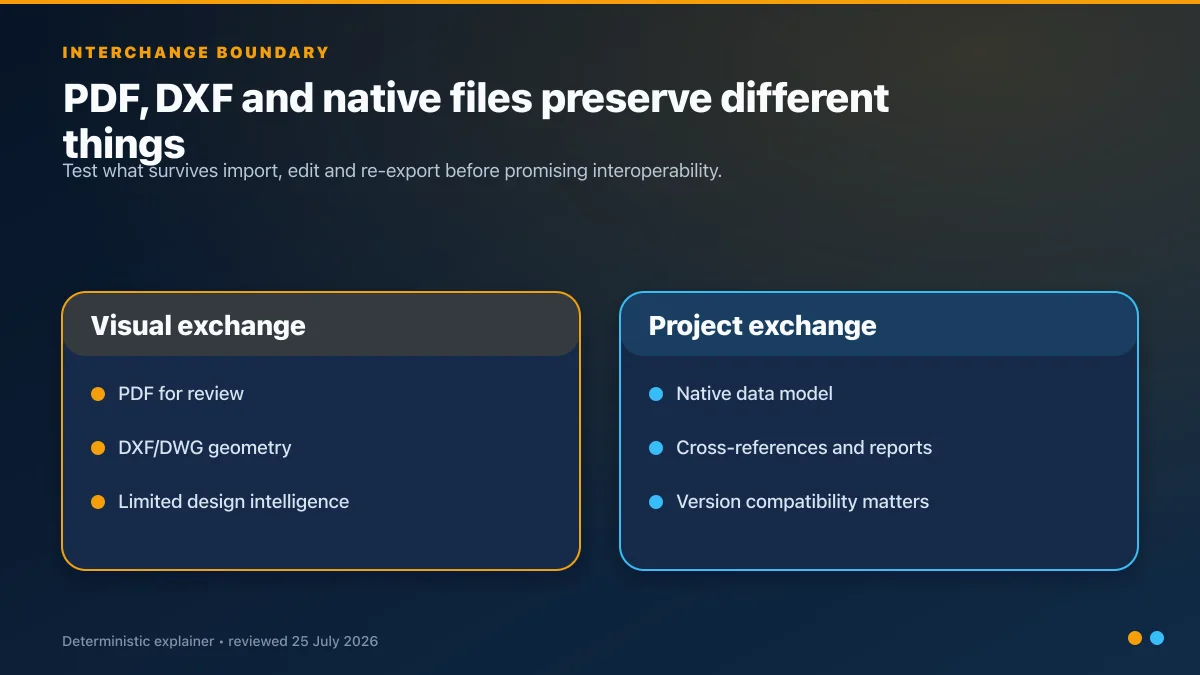
Run a round-trip test:
- create two linked sheets in the candidate tool;
- export PDF and any required DXF/DWG format;
- open the export in the customer's review tool;
- edit one device or wire;
- import or reopen the changed artifact;
- check references, layers, fonts, line types, scale and metadata; and
- record which format is authoritative.
Do not promise “DWG compatibility” from an export checkbox alone.
Govern the symbol and part library
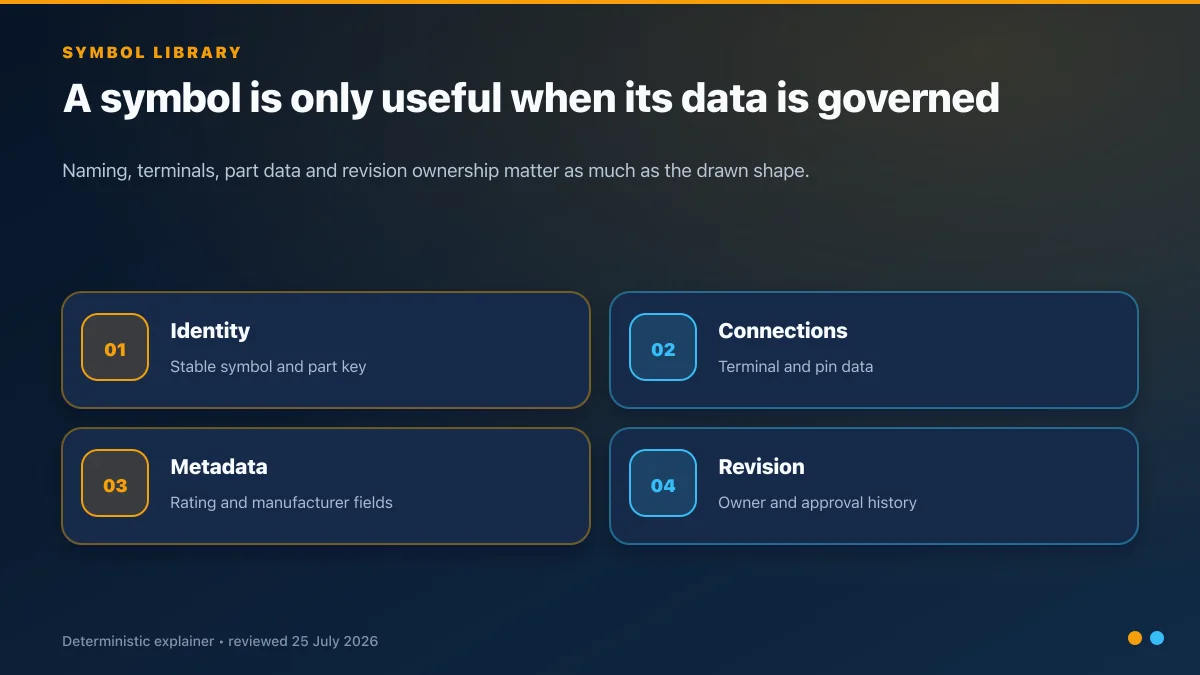
For each approved symbol or device record, capture:
- stable identifier and human-readable name;
- drawing standard and symbol source;
- terminal/pin designations;
- manufacturer and order data where allowed;
- ratings and datasheet revision;
- footprint or panel dimensions when used;
- library owner, reviewer and approval date; and
- supersession or obsolescence status.
A repeatable 30-minute evaluation
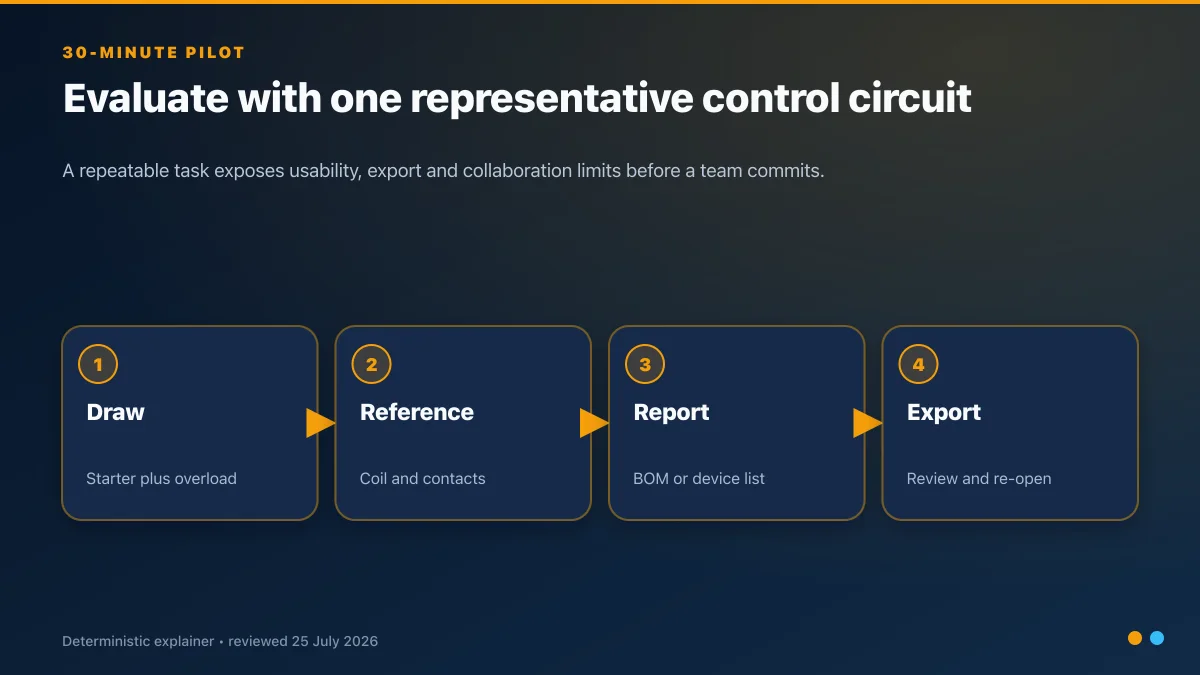
Use one representative motor starter:
- control supply and protection;
- Stop and Start devices;
- contactor coil and auxiliary seal contact;
- overload contact;
- PLC run output and feedback input;
- terminal strip;
- one off-page cross-reference; and
- three BOM items.
Score each tool from 0 to 3 for setup, symbol creation, wiring, cross-references, reports, export, reopen, version control and licence fit. Attach the output files and official terms to the score—do not rely on memory.
FAQ
Which free tool is best for industrial electrical schematics?
QElectroTech and SkyCAD Standard are the strongest first pilots in this list because both explicitly target electrical schematics. The winner depends on your required reports, libraries, operating system and whether paid-tier panel features are needed.
Which free tool is best for PCB schematics?
KiCad is an open-source desktop choice; EasyEDA provides free browser and desktop editor options with a broader services ecosystem. Test the same board and data-governance requirements in both.
Is ProfiCAD free for business?
No. ProfiCAD's current official comparison says the home licence is for hobby use and the paid licence is for a company, freelancer or school.
Is SkyCAD only a free trial?
No. SkyCAD currently says every account receives a free Standard licence. Some advanced electrical engineering functions are in paid tiers, so compare the exact feature table.
Can a free CAD tool produce controlled engineering drawings?
Potentially, if it passes your document, library, export, revision, backup and licence requirements. Free access alone is neither approval nor rejection evidence.
Official sources checked
- KiCad licences
- QElectroTech downloads and GNU/GPL statement
- SkyCAD features and pricing
- EasyEDA plans and pricing
- ProfiCAD download and licence boundary
- ProfiCAD paid versus home edition
- TinyCAD download
- Fritzing current releases
- SmartDraw official FAQ
- EdrawMax free versus paid comparison
Related: control-panel design software, electrical control-panel design, AutoCAD Electrical vs EPLAN, and PLC documentation practices.
Now run it · free · no signup
Skip the installer and run PLC logic now
Run one guided program in your browser without an account or card, then create a free account when you want the practice library.
Ownership disclosure: PLC Programming IO and PLC Simulation Software are operated by the same publisher.
