HMI Alarms, Events and Trends: Design and Troubleshooting
Design actionable HMI alarms, reconstruct events with trustworthy timestamps, and configure trends whose sampling, quality and history support diagnosis.
Review status: Editorially reviewed against cited ISA alarm-management material, OPC UA Alarms and Conditions specifications, and current Rockwell Automation, Siemens and Schneider Electric HMI/logging documentation; alarm philosophy, priorities, operator response, suppression, retention, timestamp architecture, cybersecurity and safety-related use require the facility lifecycle, risk assessment and installed-system manuals
Direct answer
An effective HMI alarm identifies an abnormal condition that requires timely operator awareness or action. It has a justified consequence, an expected response, an available response time, a rationalized priority, a clearly named source and a lifecycle owner. An event records a state change or action but may not require operator response. An interlock or permissive allows, blocks or sequences operation. A trip or protective action automatically moves equipment or process toward a defined state. These concepts can be related without being interchangeable.
The alarm display should make active, acknowledged, returned, shelved, suppressed, out-of-service and bad-quality states understandable without relying on color alone. Acknowledgment records awareness; it does not clear the process condition. The event history must preserve source identity, state transitions, user actions, quality and timestamps. The trend must disclose how values were acquired, sampled, deadbanded, compressed, stored and interpolated, because a smooth line does not prove that every intermediate value was captured.
Build the system through an alarm-management lifecycle rather than as a late HMI styling task. ISA-18.2 organizes work around philosophy, identification, rationalization, detailed design, implementation, operation, maintenance, monitoring and assessment, management of change, and audit. The facility's alarm philosophy owns definitions, priority method, presentation, response documentation, shelving/suppression governance, performance expectations, testing and audit.
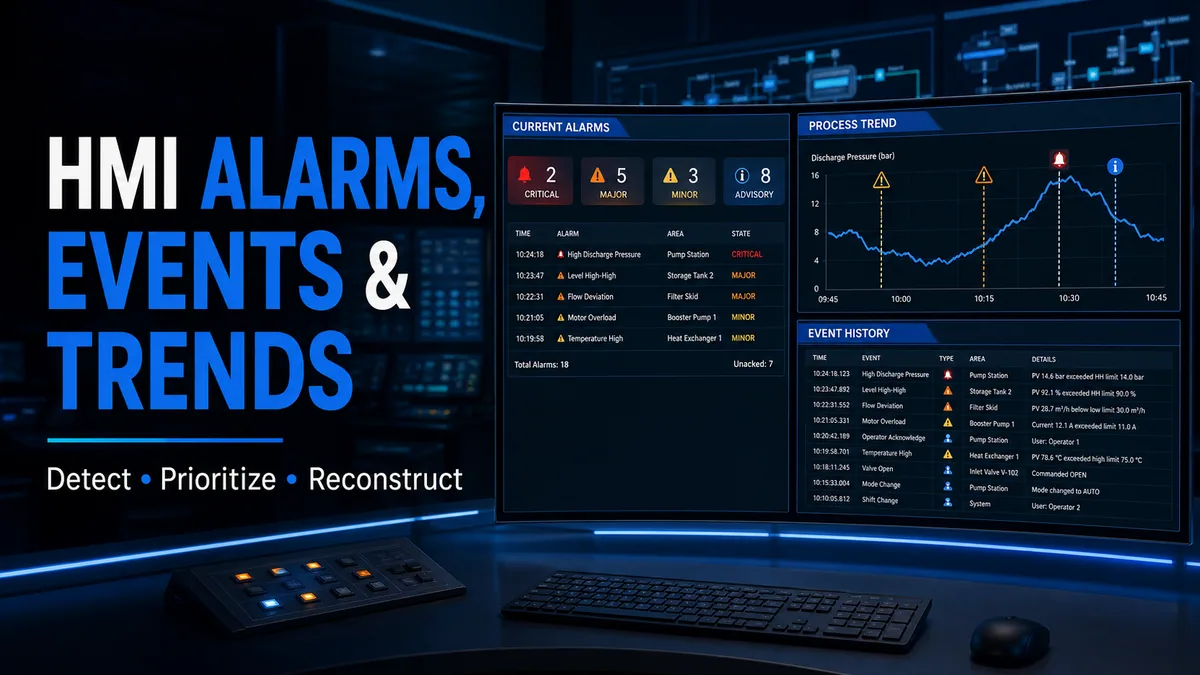
Define alarms, events, interlocks and trips separately
An alarm must justify operator attention
ISA material describes alarms as part of a lifecycle intended to support safety, quality and productivity. A useful test during rationalization is: what abnormal situation exists, what consequence can follow, what can the operator do, and how much time is available? If no timely operator action exists, the notification may be an event, status, maintenance alert or prompt rather than an alarm. Calling every fault or status an alarm consumes attention without creating response value.
Events remain important. Mode changes, setpoint edits, recipe loads, controller restarts, interlock changes, alarm acknowledgments, shelving actions and user logins may be essential to diagnosis and audit even though they do not demand immediate response. Rockwell FactoryTalk documentation distinguishes condition-related alarm events, tracking/audit events and other event types in its historical logging model.
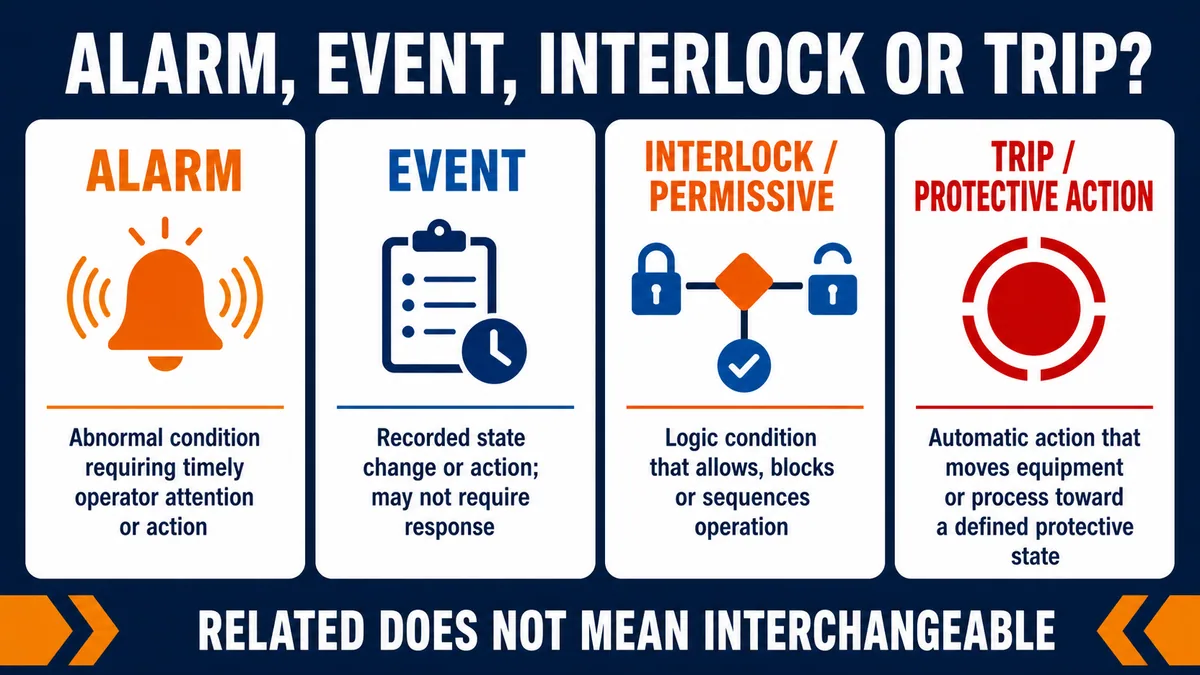
| Concept | Primary purpose | Does it require operator response? | Example record |
|---|---|---|---|
| alarm | call timely attention to an abnormal condition | yes, by the alarm definition/philosophy | high discharge pressure: reduce load and verify cooling |
| event | preserve a meaningful occurrence or action | not necessarily | pump changed from manual to automatic |
| permissive | state whether operation is allowed to start/continue | usually informs sequence or operator | suction valve proven open |
| interlock | block or sequence action under defined conditions | may create a separate alarm if response is needed | start blocked by low seal pressure |
| trip/protective action | automatically change equipment/process state | operator investigates/recoveries separately | compressor stopped on high-high pressure |
| system diagnostic | expose HMI, server, network or controller health | only when an actionable response is defined | alarm server connection lost |
Do not use alarm priority as process severity decoration
Priority exists to help the operator decide what to address first when alarms compete. Assign it through the facility's documented consequence and response-time method, not by equipment importance, tag naming or a developer's preferred color. Classification is different: ISA describes classes as groups with common management requirements such as testing, training, monitoring or audit. One alarm can be high priority because response time is short and also belong to a specially managed class because of its safety or environmental role.
| Rationalization field | Question to answer | Evidence/document owner |
|---|---|---|
| abnormal condition | what has departed from intended operation? | process/control description |
| consequence | what credible outcome follows if no response occurs? | hazard, operability, quality or reliability analysis |
| operator response | what specific action is expected? | operating procedure and subject-matter review |
| response time | how long before the action loses value? | process dynamics and consequence analysis |
| priority | how should this alarm compete with other alarms? | philosophy priority matrix |
| class | what additional lifecycle controls apply? | site alarm-class definitions |
| setpoint/deadband/delay | what condition should be detected without chatter or masking? | process data and detailed design |
| documentation | what cause, consequence, confirmation and escalation help is available? | rationalization record/procedure |
Design alarm states before styling the display
Process state and acknowledgment state are independent
OPC UA Part 9 models alarms as conditions with an Active state and acknowledgment-related states; implementations may also support confirmation, retention, shelving, suppression and out-of-service state. “Active” means the represented condition currently exists. “Acknowledged” means the relevant alarm event/state has been acknowledged. A process can remain active after acknowledgement, or it can return before the operator acknowledges it.
Rockwell FactoryTalk Optix documents normal, in-alarm unacknowledged, in-alarm acknowledged, and confirmed variants. Other products use different retained/cleared models. Define the intended state table and test it; do not infer semantics from a lamp color or from another HMI family.
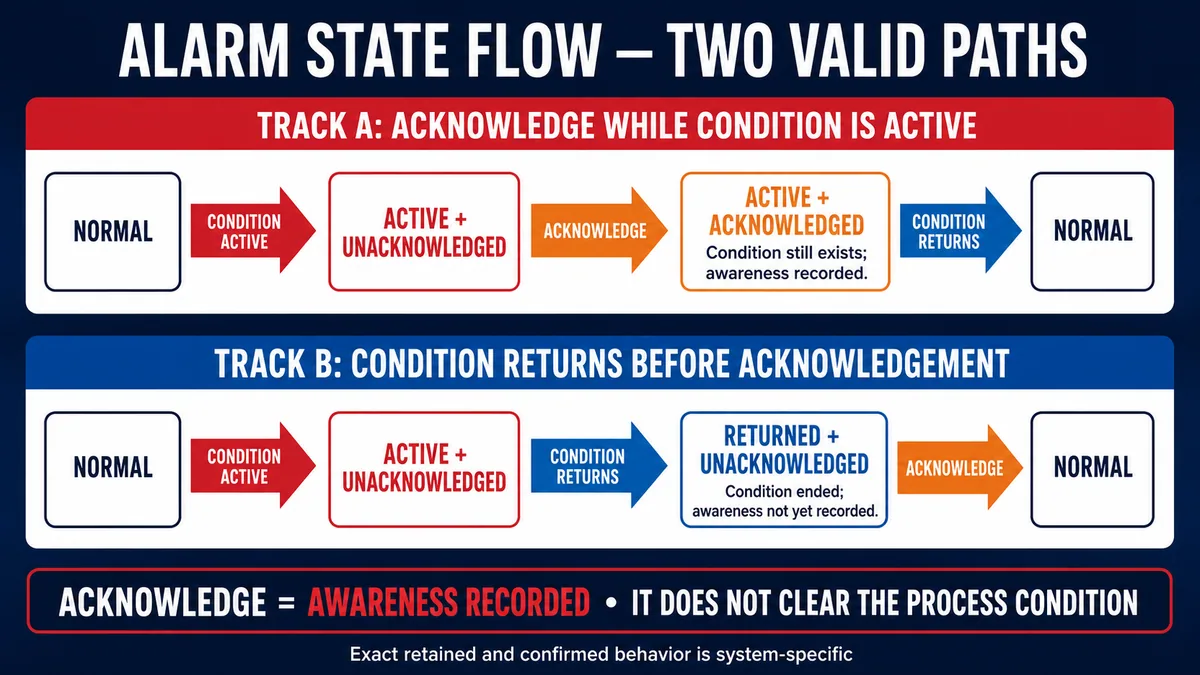
| Condition active? | Acknowledged? | Useful operator meaning | Typical display requirement |
|---|---|---|---|
| no | not applicable/no retained event | normal | normal process indication; no current alarm row |
| yes | no | abnormal and not yet acknowledged | prominent current alarm, audible policy and response help |
| yes | yes | abnormal still exists; awareness recorded | remain visible as active with acknowledged distinction |
| no | no, event retained | returned before acknowledgement | show returned/unacknowledged until model requirement satisfied |
| no | yes/confirmed | condition ended and lifecycle response completed | leave current list per model; retain history |
| unknown/bad quality | any | active truth cannot be trusted | explicit bad/uncertain quality and defined consumer behavior |
Silence, acknowledge, reset and confirm are different actions
Silence controls audible presentation. Acknowledge records awareness. Reset may clear a latch or request equipment recovery if conditions permit. Confirm, where implemented, records an additional workflow state. None should be labeled “clear alarm” without defining whether it affects annunciation, retention, a PLC latch or the physical trip. A single button that acknowledges, resets a trip and restarts equipment hides important boundaries and can create unexpected motion.
Write alarm messages for diagnosis and action
Name the condition, equipment and consequence-relevant context
Messages such as FAULT 17, MOTOR FAIL or TEMP HIGH force the operator to search for identity and meaning. A stronger message states the source and condition in consistent order: P-204 discharge pressure high — reduce load; verify cooler flow. The HMI details view can provide configured threshold, current value/quality, priority, first-out cause, response procedure, suppression state and related trend.
Do not put an entire procedure in the alarm banner. The current list must scan quickly; one concise response cue plus a linked response record is usually more usable. Localize messages carefully while preserving tag/equipment identity and units. Track message changes through management of change because an apparently cosmetic edit can change operator response.
| Message field | Strong content | Weak pattern to avoid |
|---|---|---|
| source | unique equipment/area identifier | “machine” or missing area |
| condition | measured abnormal state | generic “fault” |
| current context | value, units, state and quality where useful | stale value with no timestamp |
| action cue | concise first response or procedure link | vague “check system” |
| cause/consequence help | rationalized, retrievable detail | speculative cause stated as fact |
| priority/class | derived from philosophy | manual color chosen in screen editor |
Make alarm presentation perceivable without color alone
Use text, icon/shape, ordering and state labels in addition to color. Maintain contrast, readable type, touch targets and keyboard access appropriate to the deployed HMI. Do not animate every alarm; motion and sound should preserve meaning and stop according to the acknowledgement/silence model. Show filters and counts clearly so operators know whether the view is complete or scoped.
Live mini-lab
Try it: press START, then STOP
A stop-dominant seal-in rung: START latches the motor output through its own contact, and STOP breaks the circuit.
Watch the output lamp: it stays on after START until you press STOP.
Free to start · runs in your browserOpens plcsimulationsoftware.com — same team
Control nuisance alarms without hiding risk
Fix the source before adding suppression
Chattering, fleeting, stale and duplicate alarms consume attention and distort history. First verify transmitter quality, process dynamics, control performance, setpoint, scan/update rate and logic. Deadband prevents repeated crossings near an analog threshold; on- and off-delays require a condition to persist. Both change detection behavior and must be supported by process response time. A delay that removes chatter can also delay a real alarm.
State-based suppression can prevent alarms that are not meaningful in a documented operating state—for example, a low-flow alarm while equipment is intentionally stopped—provided the suppression logic, visibility and return conditions are designed and tested. Operator shelving is a temporary, authorized action. OPC UA explicitly distinguishes operator shelving, internal/server suppression and maintenance out-of-service state.
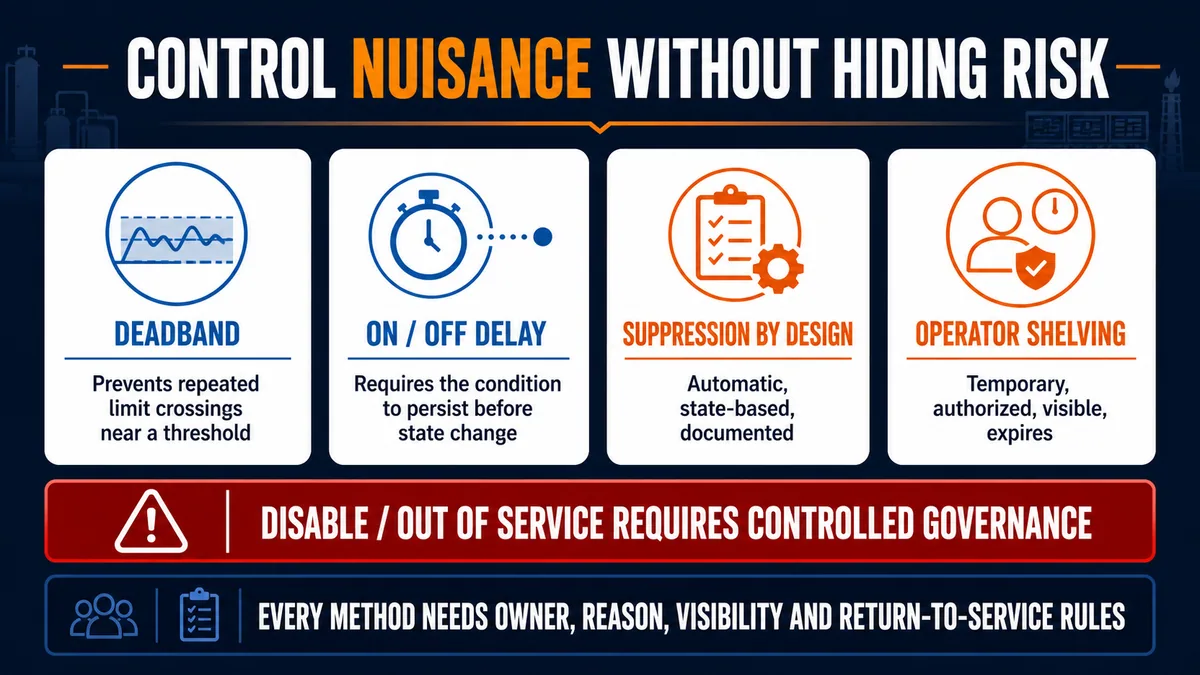
| Method | Who/what initiates it | Intended use | Governance evidence |
|---|---|---|---|
| deadband | configured detection logic | prevent repeat crossings around a threshold | process basis, set/clear values and test |
| on-delay/off-delay | configured detection logic | reject conditions shorter than justified persistence | response-time basis and transition tests |
| state-based suppression | automatic system logic | make alarm relevance depend on documented operating state | suppression reason, state visibility and recovery test |
| timed/one-shot shelving | authorized operator | temporary management of a known nuisance alarm | user, reason, start, expiry and unshelve state |
| out of service | maintenance/governed role | instrument/alarm unavailable during controlled work | authorization, substitute measures and return test |
| disable | controlled configuration/maintenance | stop alarm function where lifecycle permits | management of change, audit trail and re-enable verification |
Never let shelving become silent deletion
Rockwell FactoryTalk Optix supports timed and one-shot shelving with configured duration; OPC UA provides a maximum shelving time property where supported. The current display should make shelved/suppressed/out-of-service counts and drill-down lists available. Log who acted, why, when, duration and return. Review standing shelves during shift handover and alarm-performance assessment.
Preserve first-out evidence and trustworthy event order
Timestamp as close to the source as the required resolution demands
An HMI can assign time when it polls or receives a bit, but that time includes controller scan, communications, server processing and queueing. Siemens WinCC documentation distinguishes bit-message procedures timestamped in Alarm Logging from chronological reporting where the controller assigns the timestamp. OPC UA defines a source timestamp as the time assigned by the data source and a server timestamp as when the server received or knew the value to be accurate.
Source time is generally more useful for causal order, but only if clocks are synchronized and the source detection/update resolution is adequate. A nanosecond-formatted timestamp does not create nanosecond accuracy. Record clock source, synchronization health, drift alarms, time zone/UTC conversion and daylight-saving presentation. OPC UA conveys UTC time while clients handle local display conversion.
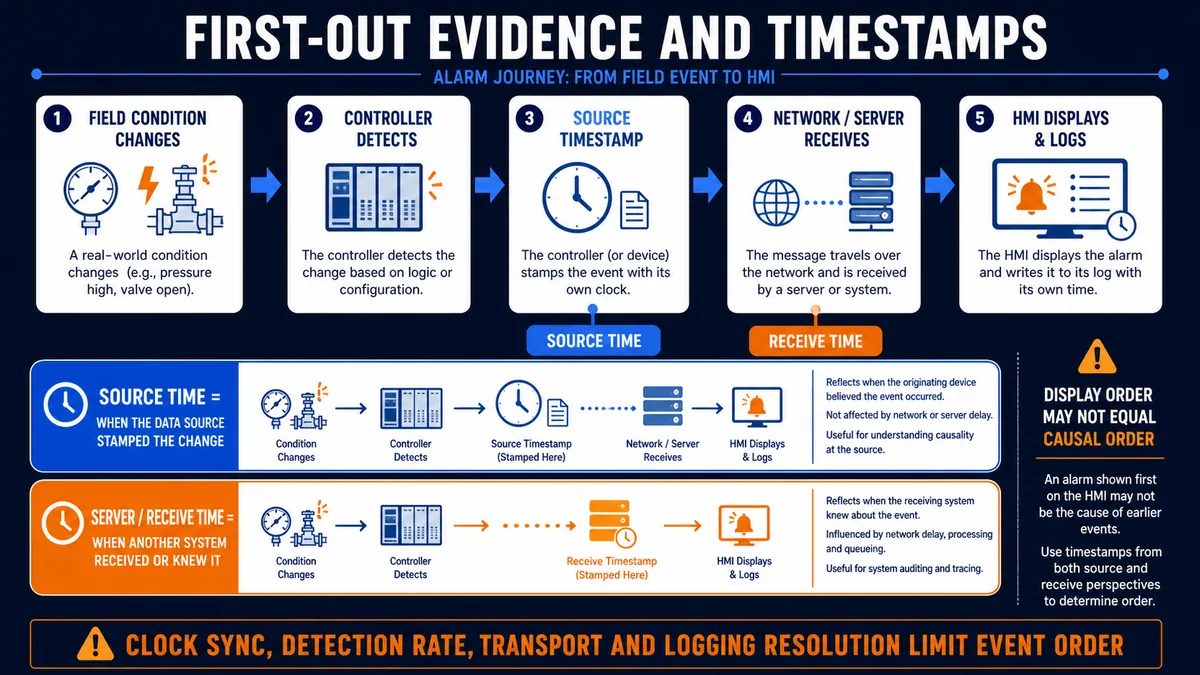
| Time field | Represents | Main limitation |
|---|---|---|
| physical occurrence | real-world condition changed | often not directly observable at infinite resolution |
| controller detection | program/module recognized the change | scan, module update and debounce/delay |
| source timestamp | originating source stamped the value/event | source clock accuracy, sync and timestamp implementation |
| server/receive timestamp | server received or knew the data | network, polling, queue and processing delay |
| HMI display time | client rendered or refreshed the row | client refresh and UI scheduling |
| database insert time | storage transaction committed | buffering, batching and database load |
Record state transitions, not only a final alarm row
Keep active, return, acknowledge, confirm, shelve, unshelve, suppress, unsuppress, disable, enable and reset actions as distinct event records where the platform supports them. Include event/condition identity, source, priority/class, user, comment/reason, value/quality and source/receive time. FactoryTalk's event logger can record alarm method audit events; its Alarm and Event Log Viewer supports historical alarm/event data in a configured database.
Configure trends for fidelity, not decoration
Trace the complete acquisition-to-pixel path
A trend can combine live values and historical records. Rockwell FactoryTalk View Machine Edition documents current data from its value table and historical data from a data log model. FactoryTalk Optix supports periodic, change-of-value and manual logging, with optional operation codes and variable timestamps. Siemens WinCC Unified describes event-driven logging and warns that logging can only be as precise as PLC data acquisition.
Choose logger sampling from the fastest process feature or diagnostic transient that must be preserved—not from screen refresh alone. A display can refresh quickly while its historian stores slowly, or display a line between sparse historical points. Rockwell's current Optix help explicitly notes that a historical trend line may be drawn between points when the logger did not capture data.
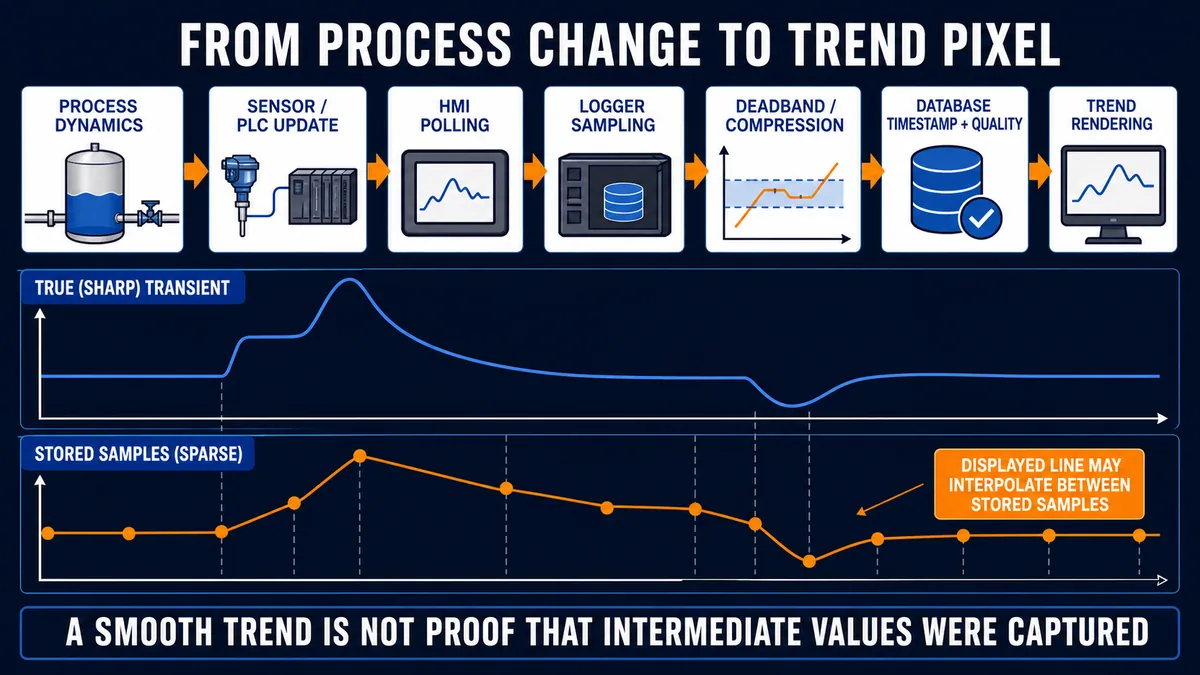
| Trend layer | Configuration to document | Diagnostic consequence |
|---|---|---|
| sensor/PLC update | signal/filter/module and program update rate | faster events may never enter the tag value |
| communications/poll | subscription/poll period, queue and quality behavior | changes can be delayed, skipped or grouped |
| logger mode | periodic, change-of-value or triggered/manual | determines which values are candidates for storage |
| deadband/compression | absolute/percentage/change rule and heartbeat | small or repeated changes may be absent |
| timestamp | source, variable read, sample or insert time | determines cross-tag alignment credibility |
| storage/retention | buffer, database, rollover and loss behavior | gaps or overwritten history limit reconstruction |
| rendering | interpolation, aggregation, scale and time zone | display may imply unstored intermediate values |
Preserve quality, gaps and scales visibly
Log quality or operation codes when the platform supports it. A line should not bridge a communications outage as though the process was known. Make gaps, stale data and bad quality apparent. Label units and axes, keep consistent scales for comparisons, support zoom and cursor inspection, and mark alarm/event times on the trend. Do not use dual axes to imply correlation without clear labels.
Change-of-value logging with deadband reduces storage, but it can miss slow drift below each threshold or create irregular sample spacing. Periodic logging supports regular analysis but can miss transients between samples. A hybrid—periodic heartbeat plus change capture, where supported—can preserve both context and significant changes. Storage, network and controller performance constraints still require validation.
Build an alarm and trend performance loop
Monitor what operators actually face
ISA's lifecycle includes ongoing monitoring and assessment because an initially good alarm system can deteriorate as processes, sensors, logic and operating practices change. Review alarm floods, standing alarms, chattering/fleeting alarms, frequently occurring alarms, shelved/out-of-service inventory, priority distribution, acknowledgment/response patterns and bad-quality/system alarms against the facility philosophy. Avoid copying target numbers without context or a licensed source; the site must define its performance criteria.
Pair metrics with causal review. A low alarm count can reflect good design or disabled detection. Rapid acknowledgement can reflect good response or indiscriminate “ack all.” A reduction after a trip may hide suppression. Inspect representative event records, operator feedback and actual response procedures.
| Review surface | Question | Corrective lifecycle route |
|---|---|---|
| top frequent/chattering | is the condition real, unstable or poorly detected? | maintenance, control improvement or detailed design |
| standing alarms | why is abnormal state tolerated or unrecoverable? | operations, maintenance or rationalization |
| flood periods | which initiating event and consequential alarms dominate? | first-out analysis, suppression design and response review |
| priority distribution | does priority method discriminate response urgency? | rationalization and philosophy |
| shelves/out of service | are reasons, expiry and substitute measures valid? | operations/maintenance governance |
| missing history/gaps | did logging, storage, clock or communications fail? | infrastructure maintenance and testing |
| operator feedback | are messages/action help usable under stress? | HMI detailed design and training |
Govern every alarm change
Treat setpoint, priority, delay, deadband, message, suppression rule, shelving limit, response text and class changes as controlled configuration. Record justification, approver, test evidence, implementation time and rollback. Re-test history, state transitions, audible behavior and recovery—not only the alarm trigger. Maintain backups and audit trails appropriate to the site's cybersecurity and regulatory requirements.
Commission the complete state and history model
Test normal paths before flood and failure cases
Use a controlled test environment or approved simulation wherever possible. Confirm tag identity, value/quality, condition detection, source timestamp, priority/class, message, current-list state, audible/visual presentation, response help, history record and trend marker together. Verify both paths: acknowledge while active, and return before acknowledgement. Then test shelve expiry, state-based suppression entry/exit, out-of-service governance, bad quality, communications loss, server restart and clock behavior.
| Commissioning case | Expected current state | Expected history/trend evidence |
|---|---|---|
| condition becomes active | active + unacknowledged | active transition with source/value/quality and marker |
| acknowledge while active | active + acknowledged | user/time/comment action; condition remains active |
| process returns after ack | normal/cleared per model | return transition retained in history |
| process returns before ack | returned + unacknowledged where configured | return captured; acknowledgement still possible/required |
| timed shelf | hidden from current attention per policy, visible as shelved inventory | shelf user/reason/start/expiry and state changes retained |
| suppression state starts/ends | automatic documented visibility | suppression transitions and underlying condition behavior |
| bad tag quality | explicit uncertain/bad presentation | quality transition and gap—not a normal-looking frozen value |
| communications/server restart | defined degraded state and recovery | gap, reconnect and retained alarm refresh behavior |
| trend transient | display appropriate to stored evidence | raw/stored timestamps reveal whether peak was captured |
| clock offset/failure | time-health indication and controlled fallback | source/receive discrepancy traceable, no silent false ordering |
Do not create hazardous conditions to test alarms
Test inputs, simulators and staging systems must follow the machine/process risk assessment and site authorization. Do not overpressure equipment, bypass protection or disable safety functions to prove an HMI row. Safety-related alarms and independent protective functions require their own validated procedures; an ordinary HMI acknowledgment is not a safety reset.
Troubleshoot alarms, events and trends by layer
Find the first missing or contradictory boundary
Start with the real/approved simulated condition, then controller tag and quality, alarm detection logic, alarm server condition, client filter/current list, historical logger/database and trend source. A missing HMI row can be a false condition, wrong namespace/tag, bad quality, disabled alarm, active suppression, shelf, priority/filter scope, server connection, user permission or client rendering issue.
| Symptom | First comparison | Likely boundary |
|---|---|---|
| PLC alarm bit true, no HMI alarm | server condition/source, enabled/suppressed/shelved state and client filters | tag mapping, alarm server or display scope |
| alarm visible, no history | current condition versus logger/database configuration and health | historical logging/storage |
| history order contradicts PLC sequence | source versus receive timestamps and clock/update resolution | time architecture or polling |
| trend shows flat line during fault | raw tag/quality versus logger samples and interpolation | stale/bad data hidden or sampling gap |
| alarm chatters | raw value/quality and set/clear/delay logic | sensor/process instability or detailed design |
| acknowledge appears to restart equipment | HMI command mapping versus PLC reset/start logic | unsafe command coupling |
| shelved alarm never returns | shelf expiry, unshelve state, clock and authorization | shelving configuration/governance |
| many alarms follow one trip | first-out event and consequential state changes | alarm flood/consequence design |
Reconstruct a causal narrative from synchronized evidence
Export or preserve the relevant raw event set before filters and retention remove it. Record system versions, alarm configuration revision, clock health, source/receive timestamps, PLC sequence state, process values/quality, user actions, suppression/shelving states and communications diagnostics. State what is observed versus inferred. “Pump trip preceded low flow in source time” is stronger than “low flow caused trip” unless the logic and physical evidence support causation.
Diagnostic answer map for HMI alarms, events and trends
| Question a technician or AI assistant may ask | Short, extractable answer | Evidence that decides it |
|---|---|---|
| What is the difference between an alarm and an event? | An alarm requires timely operator awareness/action for an abnormal condition; an event records an occurrence and may need no response. | rationalization record and alarm philosophy |
| Does acknowledging an HMI alarm clear the fault? | It should record awareness only; process return, trip reset and restart are separate states/actions. | configured state model and PLC/HMI command mapping |
| Why is the first alarm on the HMI not necessarily first-out? | HMI order may use receive/display time after scan, network and queue delays; source timestamps and synchronized clocks are needed. | source/receive times, clock health and detection resolution |
| What is the difference between shelving and suppression? | Shelving is typically a temporary operator action; suppression is usually automatic/system logic based on state. | platform state fields, user/reason/expiry and suppression condition |
| How do you stop an alarm from chattering? | Fix the source/control instability, then justify deadband or delays from process dynamics and response time. | raw trend, quality, threshold crossings and rationalization basis |
| Why is an HMI trend smooth when data was missing? | The renderer may connect sparse stored points across gaps; inspect timestamps, quality and raw samples. | database records, logger mode/deadband and interpolation settings |
| Should every PLC fault become an alarm? | No. Make it an alarm only when an abnormal condition needs timely operator response; otherwise use event/status/maintenance handling. | consequence, action and response-time review |
| What should be logged for alarm diagnosis? | State transitions, source/value/quality, source and receive time, priority/class, user actions, shelving/suppression and configuration revision. | alarm/event schema and database/audit configuration |
Frequently asked questions
What makes a good HMI alarm?
A good alarm represents a justified abnormal condition, requires a specific timely operator response, uses a rationalized priority, names the equipment and condition clearly, provides consequence/response help, exposes trustworthy state and quality, and is tested/maintained through the facility alarm-management lifecycle.
What is alarm acknowledgement in an HMI?
Acknowledgment records that an operator or system has become aware of a reported alarm state. It does not make the process normal, remove a trip cause or prove corrective action. Exact retained and confirmed behavior depends on the configured alarm model.
What is the difference between active, unacknowledged and returned alarms?
Active means the represented abnormal condition currently exists. Unacknowledged means awareness has not been recorded for the relevant event/state. Returned means the condition ended. An alarm can be active and acknowledged, or returned but still unacknowledged in a retained model.
How should HMI alarm priorities be assigned?
Use the facility's documented matrix based on credible consequence and available operator response time, then validate the distribution during rationalization. Do not assign priority from equipment importance, PLC fault number, message color or developer preference alone.
What is alarm shelving?
Shelving temporarily prevents an alarm from normal current attention according to platform and site rules, usually through an authorized operator action. It should be visible, time-bounded where appropriate, logged with user/reason, reviewed at handover and automatically or deliberately returned according to governance.
What is state-based alarm suppression?
It automatically suppresses alarms that are not meaningful in a documented operating state, such as a flow alarm when equipment is intentionally stopped. The suppression condition, visibility, lifecycle history and return behavior must be designed, rationalized and tested; it is not silent deletion.
Why do HMI alarms appear in the wrong order?
Different sources may use different clocks, detection rates and timestamp locations. Polling, controller scans, network delay, server queues and client refresh can reorder receive/display time. Compare source and receive timestamps, clock synchronization health and actual source resolution.
How often should HMI trends sample data?
Fast enough to preserve the shortest process feature or diagnostic transient the use case must see, while respecting controller, network and storage constraints. Screen refresh is not logger sampling. Validate with known transitions and inspect stored samples rather than only the rendered line.
What is trend deadband or compression?
It stores a new value only after a configured change or compression rule, reducing volume. It also removes information and creates irregular time spacing. Keep heartbeat/context where required, retain quality/timestamps and disclose interpolation so missing values are not mistaken for measured behavior.
How do you troubleshoot a missing HMI alarm?
Trace the real condition, PLC tag and quality, alarm detection, enabled/suppressed/shelved state, server connection, current-list filters and user permissions, then historical logging. Find the first boundary where expected and observed state diverge; do not recreate the alarm blindly.
Sources, review scope, and limitations
This guide synthesizes lifecycle, state-model and implementation evidence from the primary sources below. It does not reproduce proprietary standard performance tables or prescribe universal alarm-rate targets. Facility philosophy, licensed standards, risk assessment, operating procedures and exact product/version documentation control the installed system.
- ISA-18 Series of Standards — current official scope of ISA-18.1, ISA-18.2 and supporting technical reports.
- ISA: Alarm Management Life Cycle — lifecycle, alarm classes and ongoing governance context.
- ISA: Applying Alarm Management — basic versus enhanced alarm design, alerts and lifecycle application.
- ISA-TR18.2.5-2022 preview — monitoring, assessment and audit lifecycle context.
- OPC UA Part 9: Alarms — Active, Shelving and Suppressed state concepts.
- OPC UA Part 9: Alarm Model — acknowledgement, confirmation, suppression, out-of-service, shelving, silence and retention semantics.
- OPC UA Part 4: DataValue — source timestamp, server timestamp and quality/status semantics.
- OPC UA Part 3: UtcTime — UTC transport and possible clock independence.
- Rockwell Automation FactoryTalk Alarms and Events System Configuration Guide — device/tag alarm servers, historical logging and alarm/event viewer behavior.
- Rockwell Automation FactoryTalk Optix Alarm Summary — current alarm states, priority, event time, acknowledgment, confirmation, shelving and suppression controls.
- Rockwell Automation FactoryTalk Optix Data Logger — periodic/change sampling, deadband, UTC/variable timestamps and operation codes.
- Rockwell Automation FactoryTalk Optix Trend Configuration — current/historical sources, refresh and interpolation between stored samples.
- Siemens WinCC Unified V19 System Manual — alarm configuration, data logging, event-driven acquisition and trend controls.
- Siemens WinCC V8.1 Working with WinCC Part 2 — message procedures, controller versus Alarm Logging timestamps and state-change reporting.
- Schneider Electric Machine Expert Trend Recording Overview — persistent trend recording, controller database behavior and data-loss warning.
- Schneider Electric Machine Expert Trend Record Settings — acquisition task/cycle, timestamp resolution, buffering, storage limits and rollover behavior.
Now run it · free to start
Try an HMI exercise in your browser
Build a small operator screen from tags, pushbuttons and pilot lamps in a guest exercise. Free to start, nothing to install.
Ownership disclosure: PLC Programming IO and PLC Simulation Software are operated by the same publisher.
PLC Programming IO Editorial Team
Industrial automation education, references, and software testing
The PLC Programming IO Editorial Team publishes sourced industrial-automation education and documents how material is reviewed, tested, and corrected. A team byline means the publisher is responsible for the page; it does not represent a fictional person or imply an engineering licence.
Coverage:
- • PLC programming concepts and examples
- • Vendor software tutorials and comparisons
- • SCADA, HMI, protocols, and instrumentation
- • Training, careers, and reference material
Review standard:
- • Prefer primary and official sources
- • Record software versions when material
- • Separate tested facts from estimates
- • Publish material corrections
Important scope note
This site provides education, not project-specific engineering approval. Safety, code, and compliance decisions require a qualified person with access to the actual machine and jurisdiction.