CX-Programmer Function Blocks: Create, Call and Test
Create reusable Omron CX-Programmer function blocks with correct CPU and unit-version checks, variable contracts, independent instances, Ladder or ST bodies, EN behavior, scan traces, testing and .cxf library control.
Review status: Editorially reviewed against Omron W447-E1-18 CX-Programmer Function Blocks/Structured Text Operation Manual, W446 CX-Programmer Operation Manual, R144 and R132 official guides, and current Omron product/download pages; exact CPU, unit version, instruction support, addresses, memory, retention, timing and online procedures require target-specific verification
Direct answer
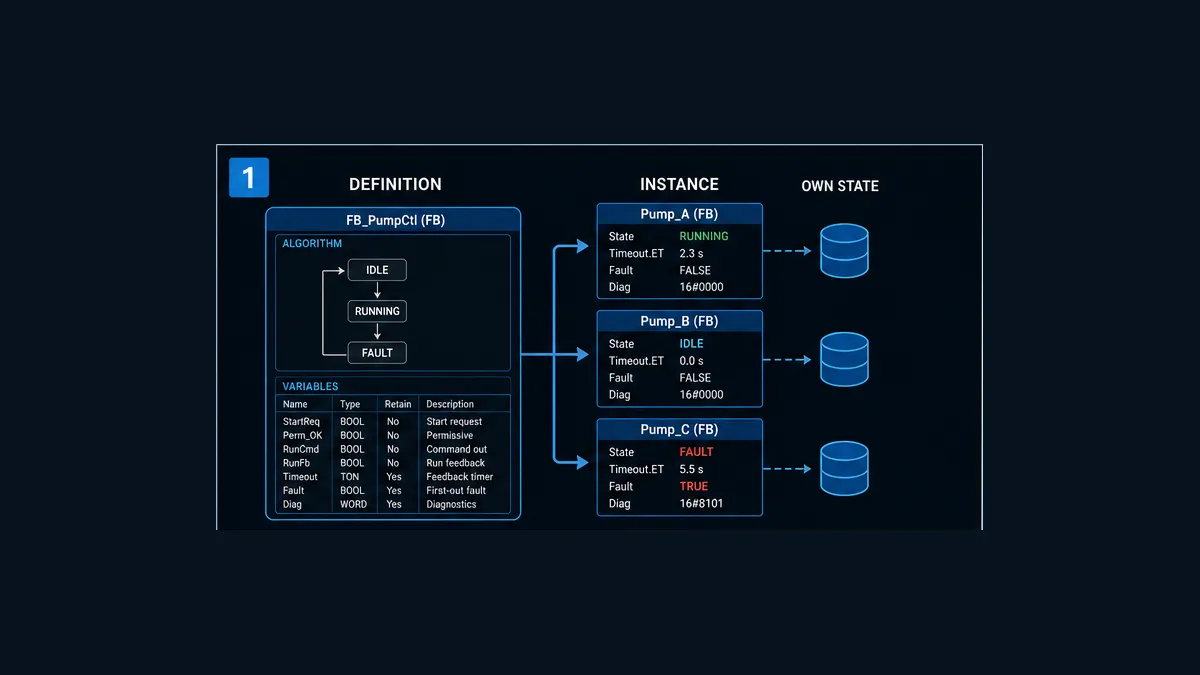
An Omron CX-Programmer function block has a reusable definition—its Ladder or Structured Text algorithm and variable table—and one or more named instances inserted or invoked in the user program. Each distinct instance name normally gives that call its own internal state. Inputs pass values into the instance before execution, outputs pass results out after execution, In Out variables exchange through addresses, and internals remain private instance state. CX-Programmer can export one definition as a .cxf library file for controlled reuse.
Before creating a block, verify the exact CPU and unit version against Omron’s W447 support table. The current official manual covers CJ2, supported CS1/CJ1 families, CP1H/CP1L/CP2E, NSJ and FQM1 targets with material model/version restrictions; it is not the programming manual for modern NJ/NX Sysmac Studio projects. Then define the interface, choose Ladder or ST for the body, call every stateful instance continuously where required, program-check the definition, test independent instances and scan behavior, and retain source, library, target and acceptance evidence together.
This guide includes an original stop-dominant pump-feedback FB with a scan trace and sixteen tests. Download the reviewable CX-Programmer pump FB teaching source and the function-block acceptance matrix. They are not an importable .cxf or production project because compatibility, memory, addresses and safe behavior cannot be established generically.
Confirm CX-Programmer is the correct Omron environment
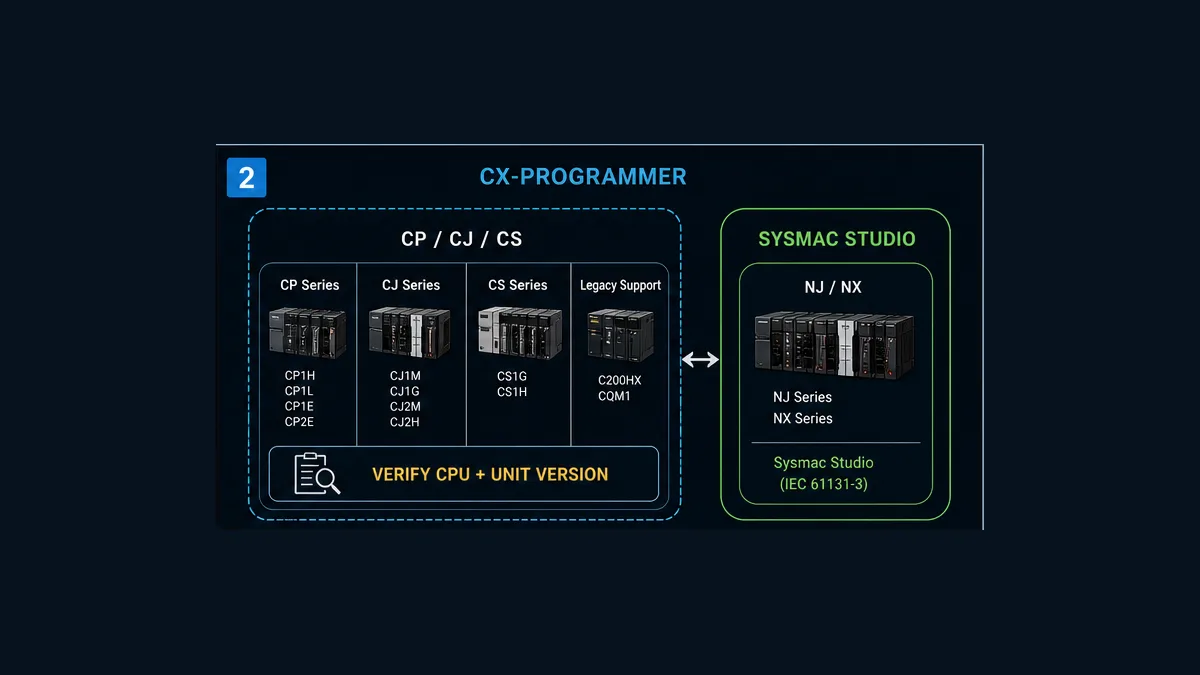
Classic CP, CJ and CS are not NJ and NX
CX-Programmer is part of CX-One and serves traditional Omron PLC projects. Omron’s W447-E1-18 manual, revised October 2022, lists compatible targets including CJ2H/CJ2M, supported CS1/CJ1 CPU Units with unit-version conditions, CP1H/CP1L/CP2E, NSJ and FQM1. Modern NJ/NX machine-automation controllers are normally engineered in Sysmac Studio with that platform’s POU, variable and task model. Similar IEC terms do not make their project files, libraries or runtime behavior interchangeable.
W447 says the function-block feature arrived with CX-Programmer 5.0 and lists CS/CJ support from unit version 3.0 with features that require unit version 4.0 or later. It warns that downloading a function-block program to an unsupported older CPU makes instances illegal commands. That is why the CPU label on a cabinet door is not enough.
| Check | Record | Failure prevented |
|---|---|---|
| CPU catalog | full model, not “Omron PLC” | wrong project type and unavailable features |
| unit version | controller’s actual unit version | using features not supported by the installed revision |
| CX-Programmer/CX-One version | installed build and license | project/library incompatibility and missing editor behavior |
| function-block language | Ladder or ST | importing code into an unsupported or wrong editor surface |
| instruction set | CPU-specific supported instructions and operands | definition passes concept review but cannot compile for target |
| instance memory | configured FB instance area and retained/non-retained ranges | overlap, capacity or restart defects |
| source/library version | project revision, .cxf revision and owner |
two definitions with the same friendly name diverge |
| online target | communications path and verified controller identity | monitoring or changing the wrong PLC |
Do not universalize the manual’s maxima
W447 publishes different maximum function-block definitions and instances by CPU. For example, the table ranges from tens/hundreds on compact targets to much larger counts on selected CJ2/CS/CJ models. It also documents member and name limits, one-dimensional array restrictions, nested calls and unsupported instruction families. Do not copy one controller’s maximum into a site standard. Capacity also includes program steps, instance execution time and memory—not merely the number of blocks.
Understand definition, invocation and instance
Definition is reusable source
The definition contains the algorithm and variable declarations. W447 permits Ladder or Structured Text bodies. It can be checked independently and saved as a single .cxf file. The definition should state purpose, caller contract, timing assumptions, states, reset/restart behavior, diagnostics, version and test reference.
Invocation connects parameters and execution condition
In a Ladder caller, the instance appears with EN on the left, parameter connections and ENO on the right. The invocation says which values/addresses map to the definition’s interface and whether it executes this scan. Calling from ST has its own syntax and instance declaration requirements in W447. Use the exact CX editor workflow rather than translating a Sysmac or IEC example by appearance.
Instance owns state
W447 describes an instance as a copy of the definition inserted/used in a program. It warns that instances are managed by name: calls with the same instance name use the same internals, while different names have different internals. Reusing one instance name for two pumps therefore shares state unless that is a deliberate, stateless use approved by the design.
| Asset/call | Correct example | Risky example |
|---|---|---|
| Pump A | definition FB_PumpFeedback, instance Pump_A_FB |
instance Pump_FB shared with Pump B |
| Pump B | same definition, distinct Pump_B_FB |
copied invocation retains Pump_A_FB name |
| stateless conversion | shared-name exception only after proving no persistent or call-sensitive state | assuming “no obvious timer” means stateless |
| nested block | named child instance and documented nesting depth/dependency | hidden shared child state or uncontrolled recursion assumption |
Design the variable contract
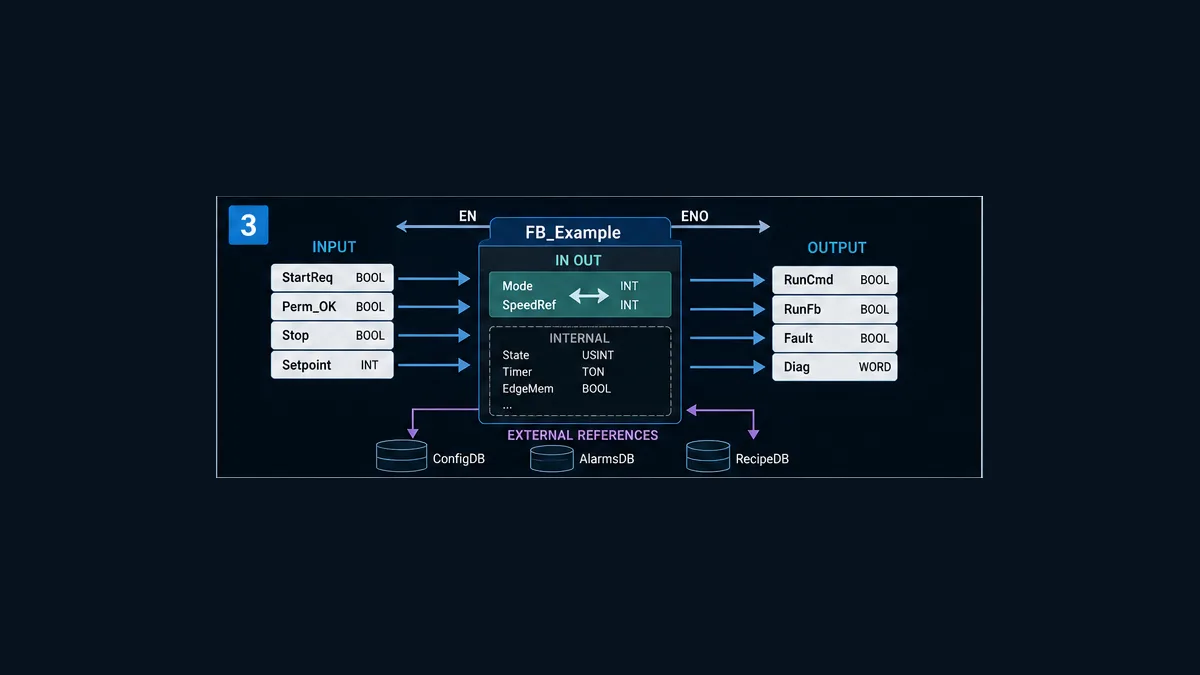
W447 defines Inputs, Outputs, In Out, Internals and Externals. The manual also creates default EN and ENO variables. Each category has a distinct data-transfer and visibility model.
| Variable usage | Role | Design rule |
|---|---|---|
| Input | value copied from invocation parameter before algorithm execution | use for commands, settings and read-only values the FB should not modify |
| Output | result copied to invocation parameter after processing | expose behavior and diagnostics; W447 notes output values retain between executions |
| In Out | address-oriented exchange into and out of the FB | use only when mutation/address passing is genuinely required and documented |
| Internal | hidden state for one instance | timers, edge memory, state and work values; define retention/restart behavior |
| External | approved reference outside normal parameter passing | keep dependencies explicit; avoid turning reusable code into hidden global coupling |
| EN | execution condition | for stateful FBs, understand the exact “not called” behavior before gating it |
| ENO | execution/output-status surface | define what callers may infer; do not equate it automatically with process success |
Input/output copies are not simultaneous shared memory
W447 explains that input values pass to the FB before algorithm execution and output values pass outward after processing. If a caller or another task changes related addresses, do not assume atomicity beyond the documented execution model. For data that must be handled as a related address set, review In Out, array and task behavior against the exact manual and architecture.
Internal state needs restart ownership
The manual says internals are hidden from outside the instance and retain their value until the instance executes again; it also documents retain settings, initial values and IOM Hold interactions. “Retained” can mean across an EN-off period, across task behavior or across power interruption depending on the setting and memory. Specify each separately and test the target’s restart case.
Live mini-lab
Try it: press START, then STOP
A stop-dominant seal-in rung: START latches the motor output through its own contact, and STOP breaks the circuit.
Watch the output lamp: it stays on after START until you press STOP.
Free to start · runs in your browserOpens plcsimulationsoftware.com — same team
Create a function block in CX-Programmer
Menu names can vary by version, but the engineering sequence is stable:
- Create a controlled backup and verify the offline project against the intended target.
- Confirm CPU, unit version and function-block support in W447 and the CPU manual.
- Add a function-block definition under the correct PLC project.
- Choose Ladder or Structured Text for the definition body.
- Name the block and write purpose, interface, timing, state, reset, safety boundary and revision comments.
- Define typed Input, Output,
In Out, Internal and External variables; minimize actual addresses. - Enter the algorithm using variable names and only supported instructions/functions.
- run the definition-level program check and resolve warnings.
- Insert/invoke the definition in a normal program, create a distinct instance name, connect parameters and set the correct
ENcontract. - check the full program, inspect memory/instance allocations and execution-time impact.
- simulate supported behavior or use an approved isolated target; monitor the exact instance.
- execute normal, abnormal,
EN, restart and multi-instance tests before library export.
W447 says function blocks and instances are stored in the normal CX project/program files and a definition can be stored as a .cxf library file. Export is packaging, not proof. Keep the source project, checked .cxf, version metadata, dependencies and tests together.
Worked ST example: pump feedback and timeout
Behavior contract
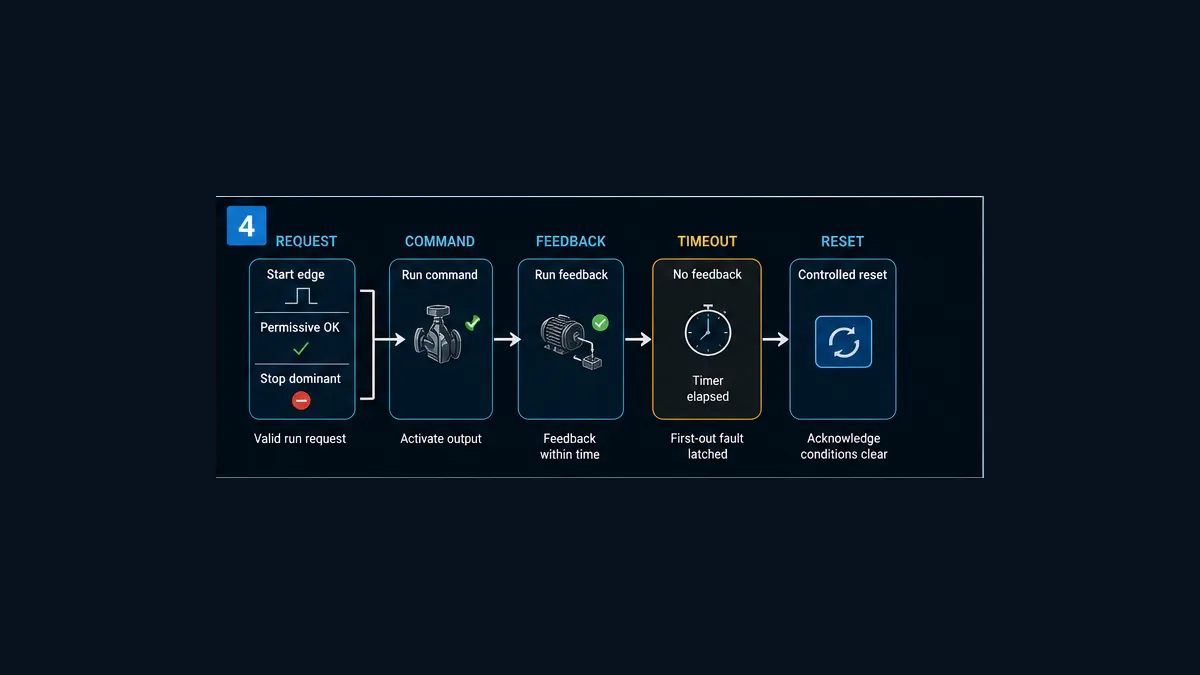
The example FB_PumpFeedback accepts StartReq, StopReq, Permissive, RunFb, ResetReq, an externally generated one-scan Tick100ms, and TimeoutTicks. It publishes RunCmd, Running, Fault, FaultCode, State and ElapsedTicks.
The behavior is deliberately explicit:
- a rising Start request latches run only when permissive is true and fault is clear;
- Stop or loss of ordinary-control permissive dominates a simultaneous Start;
- command waits for independent feedback;
- each verified tick without feedback increments an observable count;
- reaching the nonzero limit latches fault code 1 and removes command;
- reset is accepted only when command and feedback are both off;
- reset does not restart; and
- State is 0 idle, 1 commanded, 2 running or 3 fault.
Why the teaching block uses an external tick
Omron instructions and timer types have CPU, language and unit-version rules. The example therefore uses a reviewed external 100 ms one-scan pulse and a UINT counter to make scan behavior visible without pretending one timer syntax is universal. In a real project, select the supported timing method, measure it and prove its behavior on the target.
The full downloadable file includes the variable table and this ST structure:
calculate Start, Reset and Tick rising edges
update each edge memory
accept reset only while command and feedback are off
apply stop/permissive before start-latch logic
publish RunCmd
count verified tick edges while command has no feedback
latch timeout fault and clear command at the limit
publish one diagnostic State
The source uses standard-looking ST assignments and IF/ELSIF statements supported by the W447 ST subset, but it must be entered and checked in the exact CX project. It is not an L5X-style universal import and it intentionally omits physical addressing.
Scan-by-scan timeout trace
With TimeoutTicks = 3, permissive true and no feedback:
| Scan | Start edge | Tick edge | RunCmd | Elapsed | Fault | State | Meaning |
|---|---|---|---|---|---|---|---|
| 1 | 0 | 0 | 0 | 0 | 0 | 0 | idle baseline |
| 2 | 1 | 0 | 1 | 0 | 0 | 1 | request accepted; command begins |
| 3 | 0 | 1 | 1 | 1 | 0 | 1 | first no-feedback tick |
| 4 | 0 | 1 | 1 | 2 | 0 | 1 | second no-feedback tick |
| 5 | 0 | 1 | 0 | 3 | 1 | 3 | timeout latches and command clears |
| 6 | 0 | 0 | 0 | 0 | 1 | 3 | fault retains; restart is blocked |
| 7 | 0 | 0 | 0 | 0 | 1 | 3 | no reset edge yet |
| 8 | 0 | 0 | 0 | 0 | 0 | 0 | controlled reset edge accepted |
Each displayed tick edge requires the source pulse to return false between edges. The exact scan result is acceptance evidence only when captured from the checked target implementation.
The EN condition can freeze state
This is the most important CX-Programmer-specific trap. W447 states that when an FB instance’s EN is off, the block is not called; internals and outputs do not change and retain their values. It specifically cautions that differentiation and timer instructions are not initialized while EN is off. If their source conditions change during disabled scans, behavior after re-enable may not match a programmer’s expectation.
For a stateful edge/timer FB, use an always-on invocation condition such as the documented Always ON Flag P_On where appropriate, and put process enabling on an explicit input interpreted inside the algorithm. That lets the block see transitions and manage its own state. This is not a universal mandate for every stateless calculation; it is a call-contract decision.
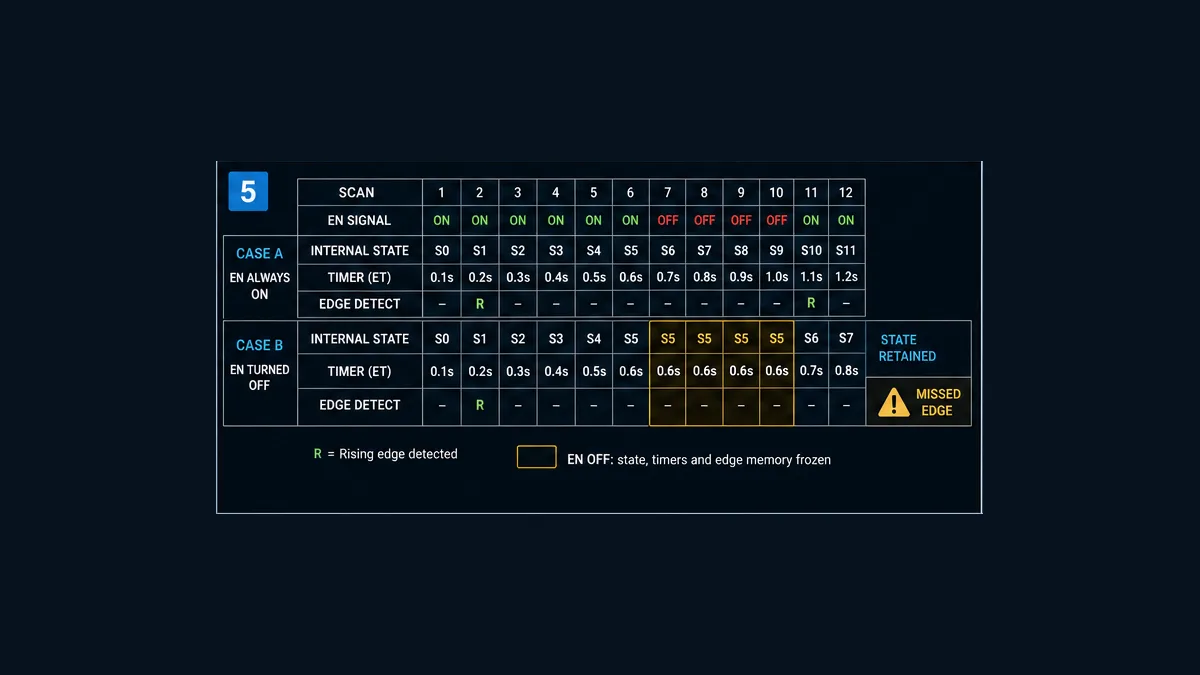
| Event while EN is off | Retained surface | Risk after re-enable | Design response |
|---|---|---|---|
| StartReq changes | previous internal edge memory | missed or delayed differentiated event | continuously call and interpret an explicit Enable/Permissive input |
| timer’s condition changes | timer/internal state does not execute normally | elapsed/reset assumption is false | use documented call pattern and test disabled duration |
| output should clear | output retains last value | stale command/status remains visible | clear it in an executing state path or design caller override deliberately |
| reset request pulses | instance never sees the pulse | fault remains latched | transaction/edge must persist until acknowledged or block must execute continuously |
| configuration input changes | copy/processing occurs only when called | change is applied later than expected | expose pending/applied configuration state if consequential |
Memory, addresses and arrays
CX-Programmer can automatically allocate FB variables in configured ranges. W447 also documents actual-address (AT) settings for cases that require system flags, multiword operands or fixed areas, and supports one-dimensional arrays only for particular variable categories. These features increase coupling.
Before using an AT address or array, record owner, range, type/width, CPU support, overlap check, retentive behavior, external consumers and test. Do not hide field I/O or shared global memory as an unexplained internal. A reusable block is easier to review when inputs/outputs carry normal data and target-specific addresses remain at a thin adapter layer.
| Memory question | Evidence |
|---|---|
| where is the instance area configured? | project PLC memory settings and W447 target table |
| how many words does each instance consume? | compiled allocation and definition variable report |
| can two definitions overlap? | project check and memory map |
| what survives power interruption? | retain/IOM Hold settings and restart test |
| which operands need consecutive words? | instruction manual plus boundary test |
| does an array remain inside supported size/category? | variable table and target compile |
Build a controlled .cxf library
Export only after the definition and its target matrix pass. A useful library bundle contains:
.cxffile from the checked definition;- readable source/variable export;
- semantic version and change log;
- compatible CPUs, unit versions and CX-Programmer range;
- instruction, memory, array and external dependencies;
- caller
EN, timing, reset, retention and startup contract; - input/output units, ranges and ownership;
- test matrix with results and known limitations;
- migration notes and rollback version; and
- owner/approval date.
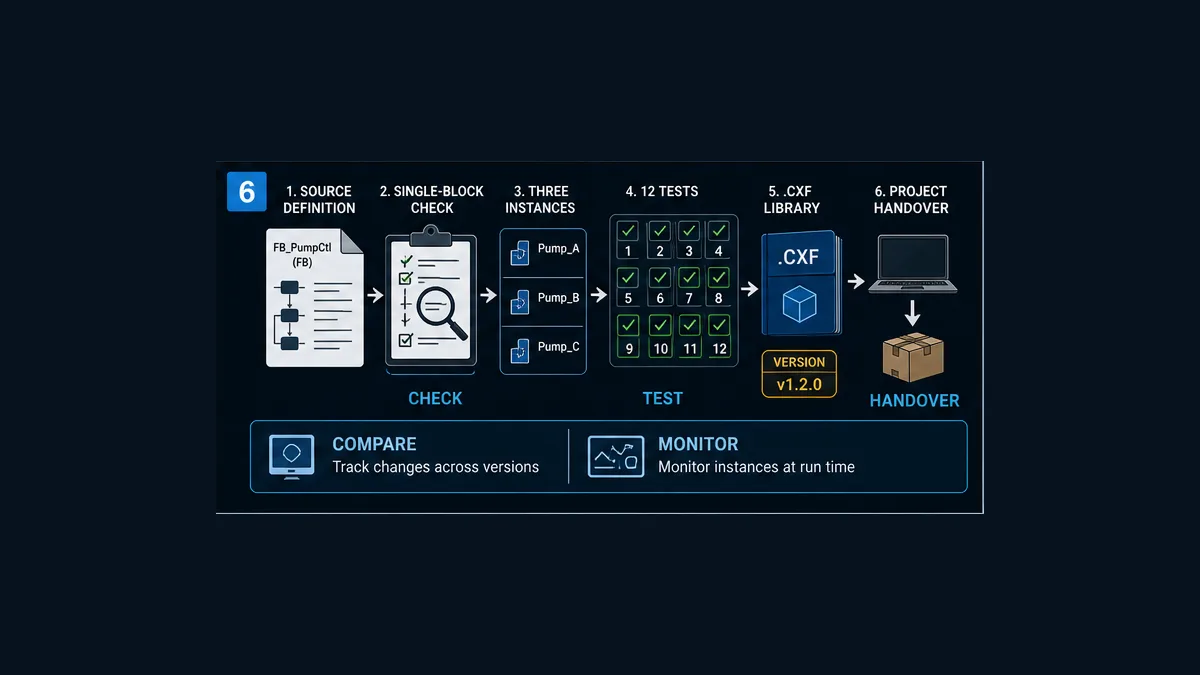
When importing, compare definition name, variables, types, comments, version and dependencies before accepting replacement. An identical filename does not prove identical source. Perform the round-trip test in a controlled empty or reference project, then run regression on every consuming project affected by an upgrade.
Test the block as code and as instances
The downloadable sixteen-test matrix covers compatibility, definition check, independent instances, Start edge, Stop dominance, permissive loss, feedback success/timeout, unsafe/controlled reset, EN edge and timer hazards, retention/restart, .cxf round trip, online monitoring and regression/handover.
Minimum multi-instance test
Create Pump_A_FB and Pump_B_FB. Keep both EN paths continuously true. Drive only Pump A’s Start input. Verify Pump A’s run latch, timer count and outputs change while Pump B remains at its baseline. Then timeout Pump A and run Pump B successfully. If Pump B inherits Pump A’s elapsed count or fault, investigate duplicate instance names, shared external/AT addresses or unintended caller aliasing.
Online monitoring without unsafe forcing
W447/CX-Programmer support instance monitoring appropriate to version. Confirm the communications path and online controller identity, use read-only observation by default, and capture values for the precise instance. A monitored green path can show program truth; it does not prove physical output, motor movement or safe state. Forcing and online edits require site authorization, impact analysis and recovery.
Performance matters
W447 includes instance execution-time and program-step guidance. Measure task/cycle impact using representative instance counts and input paths. Nested calls, ST calculations, array work and many instances can change scan time. The correct test includes maximum expected calls and target load, not one block in an empty simulator.
Common CX-Programmer FB defects
| Symptom | Likely boundary | Evidence-led correction |
|---|---|---|
| instance is illegal on PLC | CPU/unit version unsupported | verify target against W447 before changing code |
| Pump B shows Pump A’s state | same instance name or shared AT/external address | compare instance names and allocation map |
| timer resumes strangely after disabled call | EN gated the instance |
use supported always-on call contract and explicit input state |
| edge missed while machine disabled | request changed while EN off |
keep instance executing or use acknowledged request semantics |
output remains true after EN off |
outputs retain when not executed | design explicit executing clear or safe caller selection |
| import compiles but behavior changes | library/source revision or target difference | compare source, interface, version and regression evidence |
| ST example from Sysmac fails | wrong platform/dialect | use W447 CX ST subset and target instructions |
| array/operand rejected | category, size, consecutive-word or instruction restriction | check W447 and CPU instruction manual |
| restart creates unexpected command | retention/initial value/IOM Hold not specified | execute restart matrix and correct initialization ownership |
| monitor shows command but motor is stopped | feedback/field path outside FB | compare RunCmd, output, field feedback and equipment state |
Frequently asked questions
What is a function block in CX-Programmer?
It is a reusable definition containing a Ladder or Structured Text algorithm and typed variables. A named instance invokes that definition in the PLC program and normally owns its own internal state.
Which Omron PLCs support CX-Programmer function blocks?
W447-E1-18 lists compatible CJ2, selected CS1/CJ1 with unit-version requirements, CP1H/CP1L/CP2E, NSJ and FQM1 models. Support and limits differ. Verify full CPU catalog and unit version; do not infer support from family name.
Are CX-Programmer function blocks the same as Sysmac Studio function blocks?
No. Both use IEC concepts, but projects, target controllers, variable/task models, libraries, supported language features and tooling differ. CX-Programmer commonly serves CP/CJ/CS; Sysmac Studio commonly serves NJ/NX.
Can a CX-Programmer function block be written in Structured Text?
Yes for supported targets and versions. W447 documents Ladder and ST function-block definitions and the supported CX ST subset. Program-check against the exact CPU.
What is the difference between a definition and an instance?
The definition is reusable source and variables. An instance is a named use with its own internal values. Multiple distinct instances can execute the same algorithm for different equipment.
Can two calls use the same CX function-block instance name?
They can refer to the same instance state. That is usually wrong for independent equipment. Use distinct names unless the definition is proven stateless and shared use is deliberate and tested.
What happens when EN is off on a CX function-block instance?
W447 says the instance is not called; internals and outputs do not change and retain their values. Timer and differentiation behavior can therefore surprise after re-enable. Test the exact design.
Should I connect a machine permissive to EN?
For a stateful FB with edges/timers, generally keep invocation executing using the supported call pattern and pass the permissive as an explicit input. That lets the algorithm observe transitions and clear state. Confirm the project contract rather than applying one rule blindly.
What are Input, Output, In Out and Internal variables?
Inputs pass values in before execution; Outputs pass results out after; In Out exchanges through an address; Internals are private instance state. Externals reference approved outside data. Each has different reuse and coupling implications.
How do I export a CX-Programmer function block?
W447 documents saving one definition as a .cxf library file. Check the definition first, version it, include compatibility/dependencies/tests and prove an import round trip in a controlled target project.
Why does a CX function block retain an old output?
If EN is off, the block does not execute and W447 says outputs retain. Retention across restart also depends on variable/memory settings. Capture EN, execution, output, retain and restart evidence before changing logic.
How do I test independent function-block instances?
Create at least two distinct instances, stimulate one at a time, and monitor internals/outputs side by side. Then run one into fault while the other succeeds. Any cross-coupling exposes names or shared-address defects.
Can I use a downloaded Omron FB library without review?
No. Confirm source, license, version, CPU/unit support, variables, external/AT addresses, instructions, timing, retention, failure behavior and tests. Run it in an isolated project before controlled deployment.
Is the downloadable pump example ready for a live motor?
No. It is readable teaching ST and a variable contract. It omits project-specific I/O, motor protection, safety, field wiring and commissioning authority. Enter and check it only in the approved target environment and replace every assumption.
Sources, review scope and limitations
This guide was reviewed on August 31, 2026. Omron software, downloads and support lifecycles can change. Confirm the exact current target manuals and regional support resources.
- CX-Programmer product page and official downloads — Omron Europe
- W447-E1-18 CX-Programmer Function Blocks/Structured Text Operation Manual — Omron
- W446 CX-Programmer Operation Manual — Omron
- R144 CX-Programmer Function Blocks/Structured Text Getting Started Guide — Omron
- R132 CX-Programmer Function Block Library Getting Started Guide — Omron
- W366 CX-Simulator Operation Manual — Omron
- CP-series Function Block downloads — Omron Industrial Automation
- Import and use existing Function Blocks in CX-Programmer — Omron New Zealand
- CX-One Instruction Manual R135 — Omron
- IEC 61131-3:2025 programmable-controller programming languages — IEC
- PLCopen software construction guidelines — PLCopen
- 29 CFR 1910.147, control of hazardous energy — OSHA
The function-block architecture, pump sequence, ST teaching body, scan tables, diagnostics, acceptance matrix and six generated illustrations are original editorial material. Omron documentation is cited for product behavior; no Omron screen or library code is reproduced.
This guide does not authorize connecting, downloading, editing online, forcing, bypassing, energizing, operating or testing installed equipment. Qualified, authorized personnel must follow the exact target manuals, site hazard assessment, hazardous-energy/electrical safe-work requirements, independent protection, backups, management of change, commissioning plan and rollback process.
Now run it · free to start
Practise Omron-style PLC logic in your browser
Work channel-bit I/O, latches, TIM and CNT instructions without CX-Programmer. An independent learning tool — free to start.
Ownership disclosure: PLC Programming IO and PLC Simulation Software are operated by the same publisher.
PLC Programming IO Editorial Team
Industrial automation education, references, and software testing
The PLC Programming IO Editorial Team publishes sourced industrial-automation education and documents how material is reviewed, tested, and corrected. A team byline means the publisher is responsible for the page; it does not represent a fictional person or imply an engineering licence.
Coverage:
- • PLC programming concepts and examples
- • Vendor software tutorials and comparisons
- • SCADA, HMI, protocols, and instrumentation
- • Training, careers, and reference material
Review standard:
- • Prefer primary and official sources
- • Record software versions when material
- • Separate tested facts from estimates
- • Publish material corrections
Important scope note
This site provides education, not project-specific engineering approval. Safety, code, and compliance decisions require a qualified person with access to the actual machine and jurisdiction.