CODESYS Structured Text: Project, Examples and Debugging
Build a CODESYS Structured Text application from project and task setup through typed code, function-block instances, scan traces, simulation, online monitoring and safe fault tests.
Review status: Editorially reviewed against current CODESYS Development System, Standard library and IEC 61131-3:2025 publication records; exact target, runtime, compiler, library, task, I/O, online-change, remanence, simulation and safety behavior require project-specific verification
Direct answer: how to program Structured Text in CODESYS
To program Structured Text in CODESYS, create or open a project for the exact target controller or a supported simulation/runtime target, add an Application, create a Program Organization Unit of type Program with implementation language Structured Text, and assign that program to a task. Declare typed variables in the POU declaration, write scan-safe logic in its implementation, map symbolic variables to I/O, build the application, then log in, download and start only in a controlled test state.
The task is what causes a Program POU to execute. A source file that compiles but is not in a task call chain does not run. A function block type also does not run merely because it exists: declare a separate instance and call that instance on each scan where its state must update. Timers, edge detectors and counters are stateful function blocks, so conditional calls can freeze or distort their internal history.
This tutorial builds a bounded tank-fill example with a start edge, permissive, high-level stop, fill timeout, first-out fault and deliberate reset. It then traces the program across scans, separates one-time writes from persistent forces, and shows how to verify task, array, conversion, remanence and portability boundaries. It teaches the CODESYS engineering workflow rather than repeating the broad language reference.
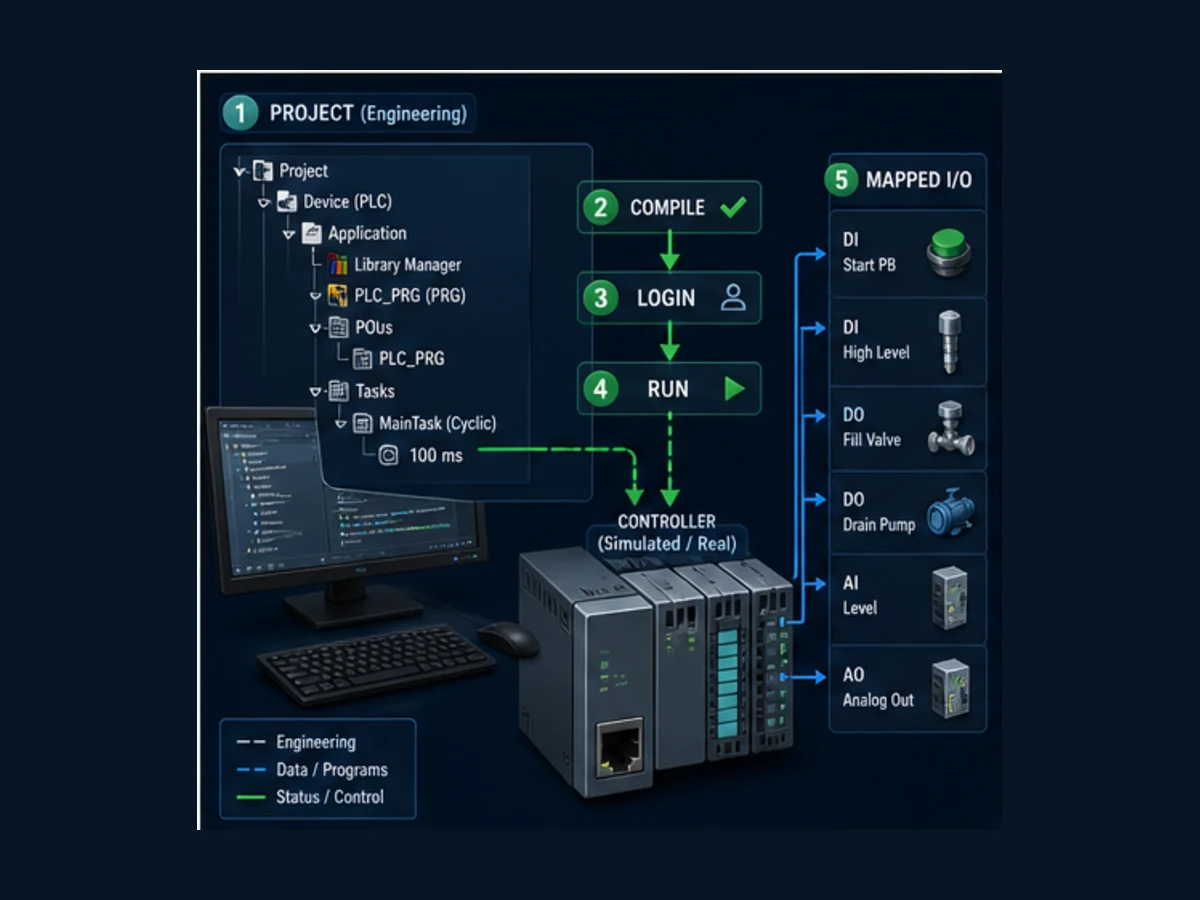
This page owns the CODESYS-specific project, code, task, online-debug and portability workflow. Use the vendor-neutral Structured Text guide for the full IEC language model and cross-vendor state-machine patterns. Use the PLC arrays, data and math guide for deeper data workflows. Use the IEC 61131-3 standards pillar for Edition 4 scope and terminology.
Create a CODESYS project that can actually execute
A CODESYS installation is an engineering environment; runtime behavior comes from the selected device package, compiler, runtime and libraries. Begin by recording the Development System build, target device/order code, device-description package, runtime/firmware and library placeholders. A generic simulation can prove much of the IEC logic, but it cannot validate the target's physical I/O, scheduler, retention, communication drivers or safety behavior.
Project-to-task checklist
| Object or setting | Purpose | Evidence before running |
|---|---|---|
| Device | defines target capabilities, compiler/runtime interface and device tree | exact approved device and description version |
| Application | contains executable IEC objects for that target | correct application is active and buildable |
| POU of type Program | top-level state evaluated when its task calls it | symbolic I/O contract and code review |
| POU of type Function Block | reusable type with per-instance memory | every required instance is declared and called |
| Data Unit Type | structure, enumeration, alias or other project data type | online representation and migration behavior reviewed |
| Global Variable List | shared names where justified | ownership, write authority and naming controlled |
| Task Configuration | defines chronological Program call chain | type, interval/trigger, priority, watchdog and call order |
| I/O mapping | connects symbolic values to physical channels | exact module/channel, polarity, safe state and force policy |
| Library Manager | resolves Standard and project libraries | placeholders, versions and compatibility locked or recorded |
The current CODESYS task documentation describes cyclic, freewheeling, event-triggered and status-triggered task types. It also defines task priority, program call order and optional watchdog behavior. A beginner lab should usually use one cyclic task with a deliberately visible interval, such as 100 ms, so scan traces are easy to reason about. That is a teaching setting, not a recommendation for machine response time.
Minimal setup sequence
- Create a Standard project and select the intended device or a supported simulation target.
- Confirm that the device tree contains an Application and Task Configuration.
- Add a POU named
PLC_PRG, choose type Program and language Structured Text. - Open the cyclic task and confirm
PLC_PRGappears in its ordered call list. - Set the lab interval to 100 ms and enable an appropriate watchdog only after understanding its target behavior.
- Add a Global Variable List only for values that genuinely need shared scope.
- Use device I/O mapping to connect tested symbols; keep the example symbolic during pure simulation.
- Build and resolve every error and unexplained warning.
- Review whether login will perform an online change, download or target reset.
- Start with outputs isolated or energy controlled under the approved procedure.
The Standard project template commonly creates a MainTask, but templates and device packages vary. Verify the call chain instead of assuming a name means the program is scheduled.
Learn the CODESYS Structured Text syntax model
CODESYS divides a POU into a declaration and an implementation. Variables have explicit types and scopes. Assignment uses :=; equality comparison uses =. Boolean expressions can use AND, OR, XOR and NOT. Control flow includes IF, CASE, FOR, WHILE, REPEAT, EXIT and RETURN. CODESYS also documents CONTINUE as an extension in loop contexts.
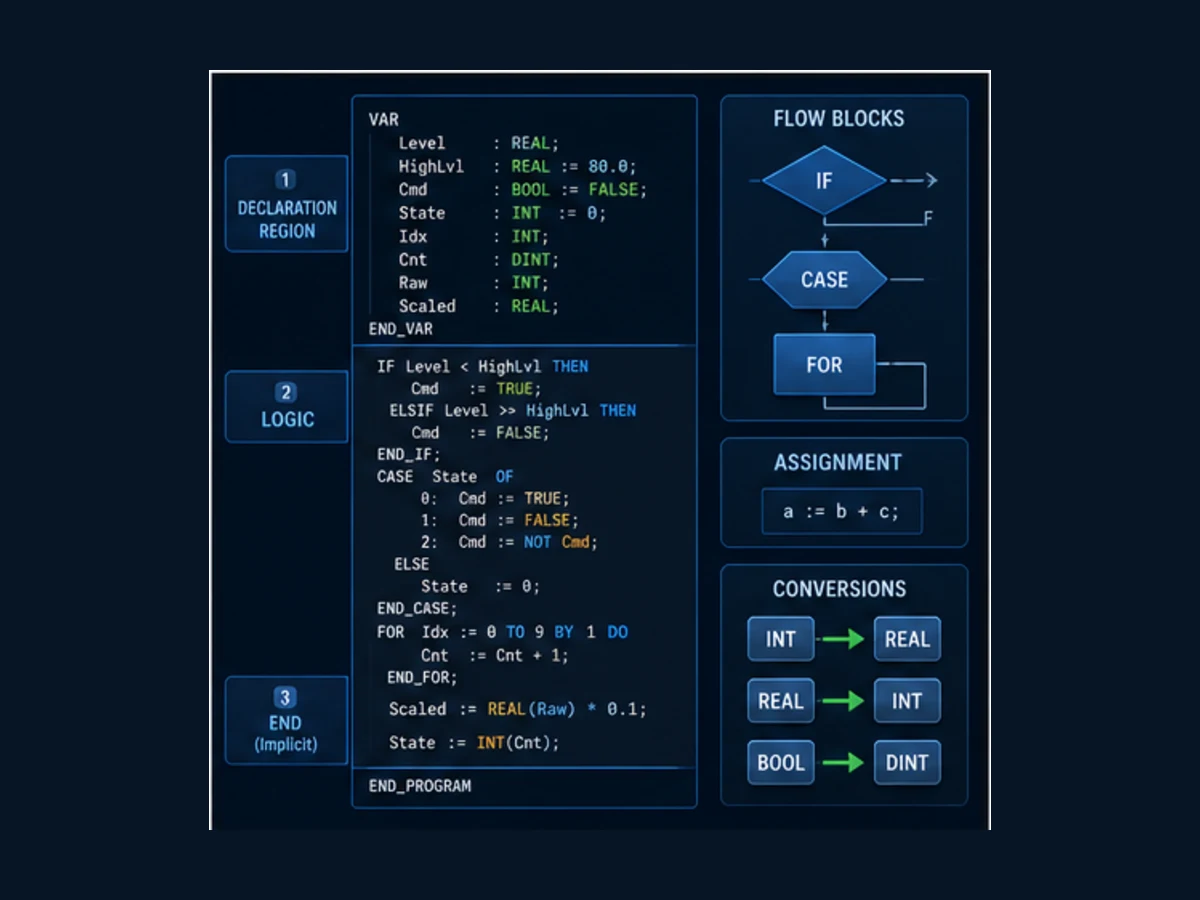
Core syntax examples
| Intent | CODESYS ST pattern | Edge to check |
|---|---|---|
| assign | xValve := xCommand; |
do not write = as assignment |
| compare | IF rLevel >= 80.0 THEN |
type, scale, NaN/invalid status and boundary |
| select state | CASE eState OF ... END_CASE; |
default/else behavior and invalid enum value |
| bounded loop | FOR i := 0 TO 7 DO ... END_FOR; |
array bounds, worst scan time and counter overflow |
| explicit cast | rScaled := DINT_TO_REAL(diRaw) * 0.1; |
target/compiler conversion and overflow before cast |
| timer call | fbDelay(IN := xEnable, PT := T#2s); |
instance declared and called every required scan |
| output read | xDone := fbDelay.Q; |
read after the call when current result is required |
| comment | (* why the rule exists *) |
comment explains intent, units and fail behavior |
Prefer symbolic I/O names over raw addresses in application logic. The mapping layer should own the channel address; logic should own meaning. A name such as xHighLevelHealthy is more useful than %IX0.3, provided the team defines whether TRUE means process high, electrical healthy, or both.
CODESYS ST versus ExST
Current CODESYS documentation describes the ST editor as supporting Structured Text and Extended Structured Text. CODESYS adds capabilities beyond the portable IEC core, including object-oriented function-block features, methods, interfaces, properties, access specifiers and vendor extensions. These can improve a CODESYS library while reducing portability to another platform.
| Surface | Portable starting point | CODESYS-specific decision |
|---|---|---|
| Program/Function/Function Block | IEC-style POU structure | methods, properties, interfaces and inheritance |
| basic types and control flow | BOOL/integer/real/time/string, IF/CASE/loops | extended types, namespaces and target-dependent sizes/features |
| timer/edge/counter blocks | common IEC names and behavior principles | exact Standard library version and target execution |
| retention | concept exists across platforms | target memory plus CODESYS RETAIN/PERSISTENT lifecycle |
| I/O | symbolic application contract | device tree, channel mapping and target diagnostics |
| online debug | monitor and test logic | exact runtime support for trace, breakpoints, online change and forcing |
If code must move between vendors, isolate extensions behind small interfaces, use explicit conversions, avoid absolute addressing in core logic, record library dependencies and test restart/task semantics on both targets.
Build a complete scan-safe tank-fill example
The example has six inputs: start, stop, reset, permissive, high level and simulated process level. It controls a fill valve. A start edge begins filling only when the permissive is healthy and the high-level switch is not already active. High level completes the fill. Loss of permissive or a 30-second timeout latches a first-out fault. Reset returns from Complete or Faulted only when the command and process conditions are safe.
Create the state enumeration
Add a DUT named E_TankState:
TYPE E_TankState :
(
    Stopped := 0,
    Filling := 10,
    Complete := 20,
    Faulted := 90
);
END_TYPE
Run Structured Text in the simulator
Explicit numeric values make online evidence and future migrations easier to interpret. Do not use those state numbers as an HMI protocol contract without versioning them.
Create the function block
Add a Function Block named FB_TankFill. Put this in its declaration:
FUNCTION_BLOCK FB_TankFill
VAR_INPUT
    xStart       : BOOL;
    xStop        : BOOL;
    xReset       : BOOL;
    xPermissive  : BOOL;
    xHighLevel   : BOOL;
    tMaxFill     : TIME := T#30s;
END_VAR
VAR_OUTPUT
    xFillValve   : BOOL;
    xComplete    : BOOL;
    xFaulted     : BOOL;
    uiFaultCode  : UINT;
    eState       : E_TankState := E_TankState.Stopped;
END_VAR
VAR
    rtStart      : R_TRIG;
    fbFillTimer  : TON;
END_VAR
Run Structured Text in the simulator
Put this in the implementation:
(* Stateful blocks are called on every execution of this FB. *)
rtStart(CLK := xStart);
fbFillTimer(
    IN := (eState = E_TankState.Filling) AND NOT xHighLevel,
    PT := tMaxFill
);

(* Safe defaults; active states must earn each command every scan. *)
xFillValve := FALSE;
xComplete := FALSE;
xFaulted := FALSE;

CASE eState OF

    E_TankState.Stopped:
        uiFaultCode := 0;

        IF rtStart.Q AND xPermissive AND NOT xHighLevel THEN
            eState := E_TankState.Filling;
        END_IF;

    E_TankState.Filling:
        xFillValve := xPermissive AND NOT xHighLevel;

        IF xStop THEN
            eState := E_TankState.Stopped;
        ELSIF NOT xPermissive THEN
            uiFaultCode := 1; (* permissive lost *)
            eState := E_TankState.Faulted;
        ELSIF xHighLevel THEN
            eState := E_TankState.Complete;
        ELSIF fbFillTimer.Q THEN
            uiFaultCode := 2; (* fill timeout *)
            eState := E_TankState.Faulted;
        END_IF;

    E_TankState.Complete:
        xComplete := TRUE;

        IF xReset AND xPermissive AND NOT xStart THEN
            eState := E_TankState.Stopped;
        END_IF;

    E_TankState.Faulted:
        xFaulted := TRUE;

        IF xReset AND xPermissive AND NOT xStart THEN
            uiFaultCode := 0;
            eState := E_TankState.Stopped;
        END_IF;

ELSE
    uiFaultCode := 16#FFFF; (* invalid state first-out *)
    eState := E_TankState.Faulted;
END_CASE;
Run Structured Text in the simulator
The output defaults are written before the state logic so an unexpected state does not retain a previous valve command. The timer input is derived from the previous/current state at the start of the scan; when the state first enters Filling, timer timing begins on the following function-block execution. At a 100 ms task interval that is a bounded scan-order effect. If the application requires a different timing definition, specify and test it rather than hiding it.
Instantiate and call the block in PLC_PRG
Declaration:
PROGRAM PLC_PRG
VAR
    fbTank        : FB_TankFill;

    xStartPB      : BOOL;
    xStopPB       : BOOL;
    xResetPB      : BOOL;
    xPermissiveOK : BOOL;
    xLevelHigh    : BOOL;

    xFillValveDO  : BOOL;
    xTankComplete : BOOL;
    xTankFaulted  : BOOL;
    uiTankFault   : UINT;
    eTankState    : E_TankState;
END_VAR
Run Structured Text in the simulator
Implementation:
fbTank(
    xStart := xStartPB,
    xStop := xStopPB,
    xReset := xResetPB,
    xPermissive := xPermissiveOK,
    xHighLevel := xLevelHigh,
    tMaxFill := T#30s,
    xFillValve => xFillValveDO,
    xComplete => xTankComplete,
    xFaulted => xTankFaulted,
    uiFaultCode => uiTankFault,
    eState => eTankState
);
Run Structured Text in the simulator
Map the five command/status inputs and fill-valve output through the selected device's I/O mapping. The example is standard control logic, not a safety function. A real tank also needs independent overfill protection, valve fail-state analysis, instrumentation diagnostics, hydraulic response, interlocks and the site's safe operating procedure.
Live mini-lab
Try it: press START, then STOP
A stop-dominant seal-in rung: START latches the motor output through its own contact, and STOP breaks the circuit.
Watch the output lamp: it stays on after START until you press STOP.
Free · no signup to try · runs in your browserOpens plcsimulationsoftware.com — same team
Trace the example scan by scan
Structured Text statements execute in order when the task calls the POU. Assigning eState during one branch does not jump into the next branch in the same CASE evaluation. The next scan evaluates that new state. Outputs written before the state transition can therefore reflect the old state until the next call unless the logic explicitly changes them.
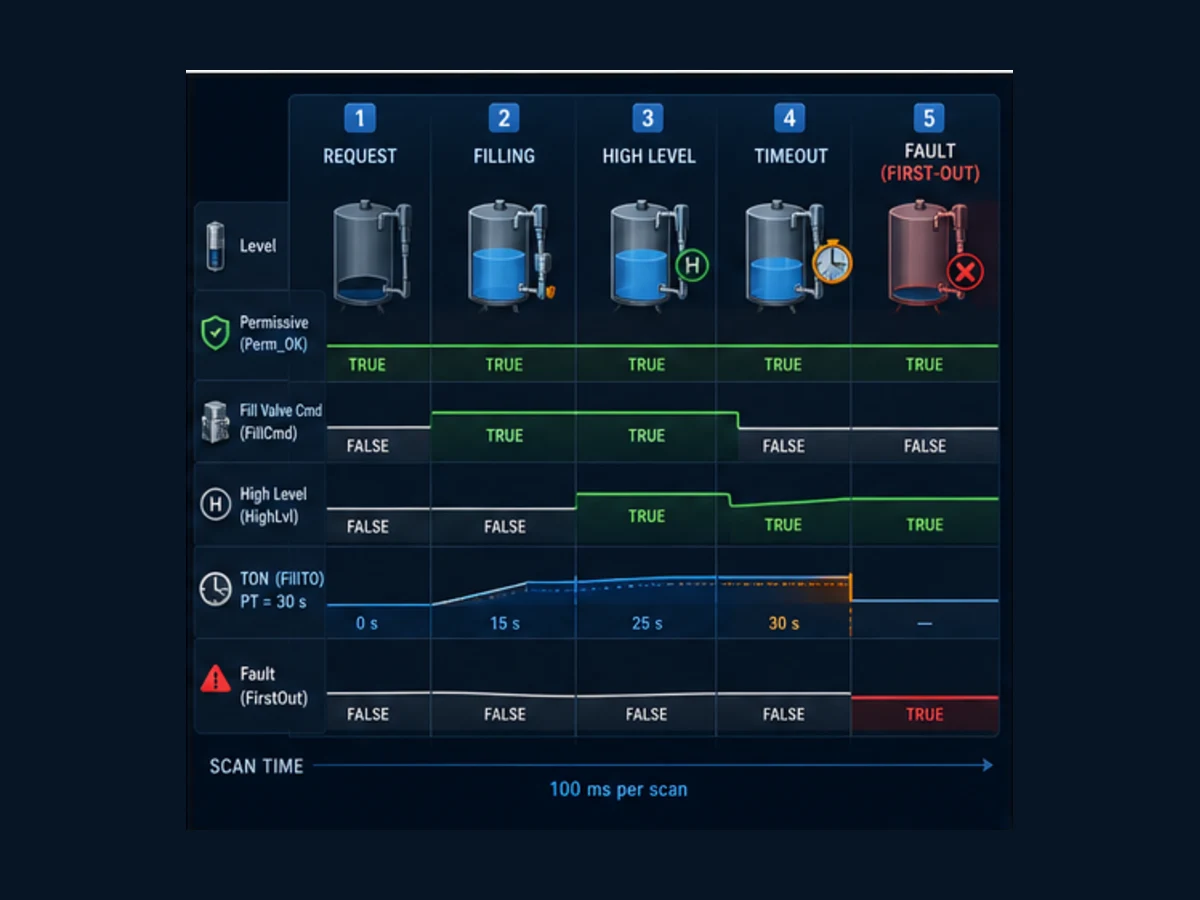
Normal completion trace
Assume a 100 ms cyclic task, all values initially FALSE except xPermissiveOK, and the start button held for three scans.
| Scan | Start edge Q | State on entry | High level | Timer IN/Q | Valve command | State after CASE |
|---|---|---|---|---|---|---|
| 1 | TRUE | Stopped | FALSE | FALSE/FALSE | FALSE | Filling |
| 2 | FALSE | Filling | FALSE | TRUE/FALSE | TRUE | Filling |
| 3 | FALSE | Filling | FALSE | TRUE/FALSE | TRUE | Filling |
| 4 | FALSE | Filling | TRUE | FALSE/FALSE | FALSE | Complete |
| 5 | FALSE | Complete | TRUE | FALSE/FALSE | FALSE | Complete |
The rising-edge instance prevents a held start from retriggering every scan. The high-level condition removes the valve command in the same scan that the Filling branch observes it, then changes state to Complete.
Timeout trace
| Event | Required evidence | Expected result |
|---|---|---|
| start accepted | start edge TRUE, permissive TRUE, high level FALSE | transition to Filling |
| timer begins | next execution sees state Filling | TON IN TRUE and ET increases |
| process never reaches high | high-level input remains FALSE | valve stays commanded while permissive remains TRUE |
| preset reached | timer Q becomes TRUE | fault code 2 stored; state changes to Faulted |
| following scan | Faulted branch executes | valve FALSE and fault output TRUE |
| reset held with start held | reset TRUE, start TRUE | no reset because release is required |
| deliberate reset | reset TRUE, permissive TRUE, start FALSE | fault clears and state returns Stopped |
The fault code is first-out evidence only because later scans do not overwrite it in Faulted. If multiple failure conditions can appear together, define a documented priority. Add timestamps or event records where maintenance needs more than one numeric code.
Use function blocks as stateful instances
A CODESYS function block is called through an instance. Each instance has its own outputs and internal variables, and those values remain until later execution changes them. Two instances of FB_TankFill run the same implementation with independent state, timer and fault code. A Function, by contrast, should produce a return value without the same retained instance model for application state.
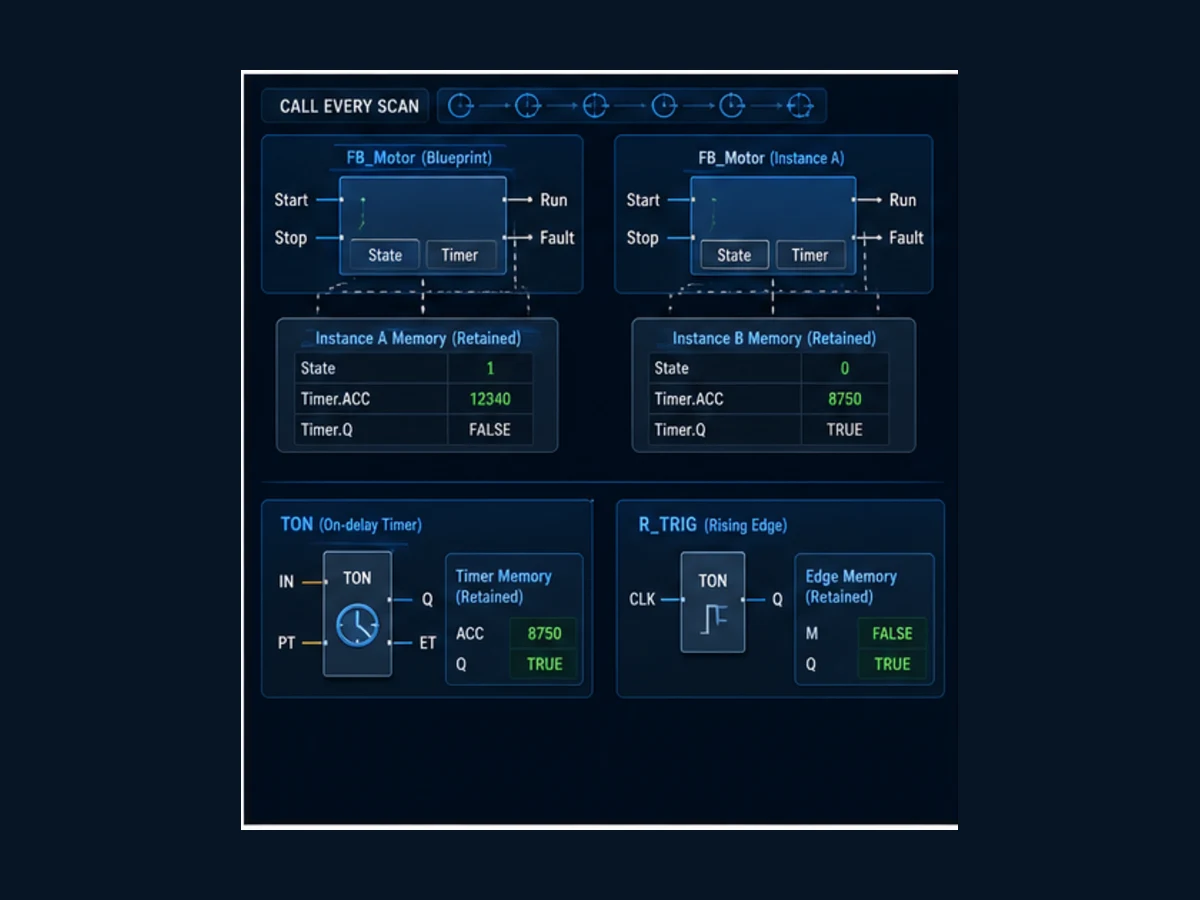
POU selection guide
| Object | Best use | State behavior | Common defect |
|---|---|---|---|
| Program | scheduled top-level coordination | instance is associated with application/task call | created but never assigned to a task |
| Function Block | reusable component with memory and multiple outputs | each declared instance retains independent values | sharing one instance across two machines |
| Function | calculation returning a value | use for deterministic computation without application state | hiding I/O or mutable global side effects |
| Method | operation attached to a Program or Function Block | acts on its owning instance and access rules | using CODESYS OOP without lifecycle/portability design |
| DUT structure | typed record such as command/status contract | data only | changing layout without interface versioning |
| DUT enumeration | named state/mode set | data only | missing invalid/default state handling |
Timer and edge rules
| Block | Principle | Call rule | Test |
|---|---|---|---|
| TON | Q becomes TRUE after IN remains TRUE for PT according to library behavior | call every scan that should update elapsed time | IN drops before PT, reaches PT and restarts |
| TOF | delayed falling output behavior | call continuously through start and off-delay | short input pulse and retrigger behavior |
| TP | fixed-duration pulse on documented trigger | call continuously and verify retrigger/cancel semantics | held and repeated triggers |
| R_TRIG | one-execution rising-edge indication using prior CLK memory | call every relevant scan | held TRUE gives one pulse; reset to FALSE re-arms |
| F_TRIG | one-execution falling-edge indication | call every relevant scan | held FALSE gives one pulse after transition |
| CTU/CTD | count documented edges and expose status/current value | call and reset under explicit conditions | bounce/repeated input, limit and reset |
Use the Standard library reference selected in Library Manager as the executable contract. A familiar block name does not prove identical initialization, overflow, timing or skipped-call behavior on another platform.
Handle arrays, loops and conversions without scan surprises
Arrays make recipe, alarm, channel and batch code concise, but an invalid index can corrupt data, raise a runtime check or stop the application depending on target and checks. A loop also completes within one task execution; it is not automatically spread over scans.
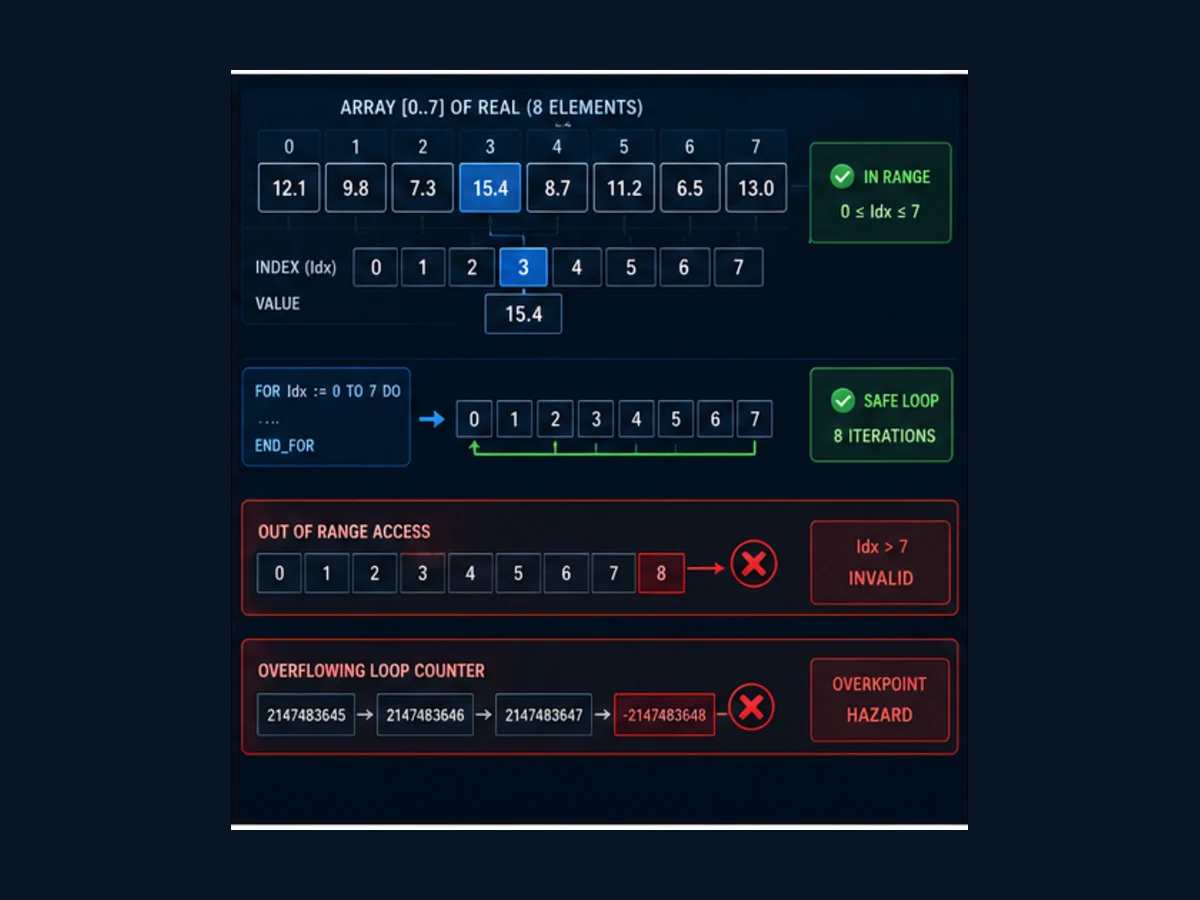
Bounded channel-average example
VAR
    arSample : ARRAY[0..7] OF REAL;
    i        : DINT;
    rSum     : REAL;
    rAverage : REAL;
END_VAR

rSum := 0.0;

FOR i := 0 TO 7 DO
    rSum := rSum + arSample[i];
END_FOR;

rAverage := rSum / 8.0;
Run Structured Text in the simulator
The CODESYS FOR documentation warns against using an end value equal to the upper limit of the loop-counter data type because increment overflow can create an infinite loop. Here a DINT counter ending at 7 avoids that specific trap. The loop is still bounded only because both array and end value are controlled. Never use an operator-entered limit directly without range validation.
Guard dynamic access
IF (diRequestedIndex >= 0) AND (diRequestedIndex <= 7) THEN
    rSelected := arSample[diRequestedIndex];
    xIndexValid := TRUE;
ELSE
    rSelected := 0.0;
    xIndexValid := FALSE;
END_IF;
Run Structured Text in the simulator
| Edge | Failure if ignored | Evidence/test |
|---|---|---|
| negative index | invalid access or runtime check | request -1; verify no array access and quality FALSE |
| index 8 | one past upper bound | request 8; verify rejected |
| long loop | task overrun/watchdog | measure maximum task cycle under worst data count |
| integer sum | overflow before later REAL conversion | choose width; test near min/max before conversion |
| REAL to integer | rounding/truncation and out-of-range result | use intended conversion and boundary table |
| divide by zero | runtime exception/invalid result | validate denominator and expose fault/quality |
| NaN/invalid field data | comparisons can behave unexpectedly | use channel quality and finite-range policy |
An explicit conversion such as DINT_TO_REAL(diRaw) communicates intent. Still test what happens before the conversion: multiplying two DINT values can overflow in integer arithmetic even if the result is later assigned to LREAL.
Understand RETAIN, PERSISTENT and restart behavior
Ordinary variables are initialized according to declaration and target lifecycle. CODESYS documents RETAIN variables as retaining values across warm restart, while downloads and cold/origin resets can initialize them according to the documented target behavior. Persistent variables have a stronger lifecycle and are managed through a Persistent Variable List; exact storage depends on the runtime and controller.
| Need | Candidate | Qualification |
|---|---|---|
| keep a production count across warm restart | RETAIN | requires supported protected memory or controlled file-backed behavior |
| keep recipe/calibration across downloads | PERSISTENT RETAIN / persistence design | list structure, update lifecycle and target storage must be validated |
| reset a sequence state after restart | ordinary initialized variable | make reset/restart policy explicit |
| preserve first-out event history | dedicated event/persistence mechanism | raw retained code alone may lack timestamp, quality and integrity |
| retain one FB member | examine full instance effect | CODESYS documents that retaining a member can protect the whole FB instance |
Do not retain physical output commands merely to make a restart convenient. Reconstruct machine state from validated inputs, device feedback, mode and recovery procedure. Persistent pointers are unsafe because addresses can change across download; current CODESYS documentation explicitly warns against POINTER TO in persistent lists.
Simulate, monitor and debug safely
Build checks syntax and compile-time consistency; it does not prove the task calls the code or that the process is safe. In a supported Simulation mode or soft runtime, log in, start and drive a structured test vector. Record the exact target because Simulation availability and behavior are device-dependent.
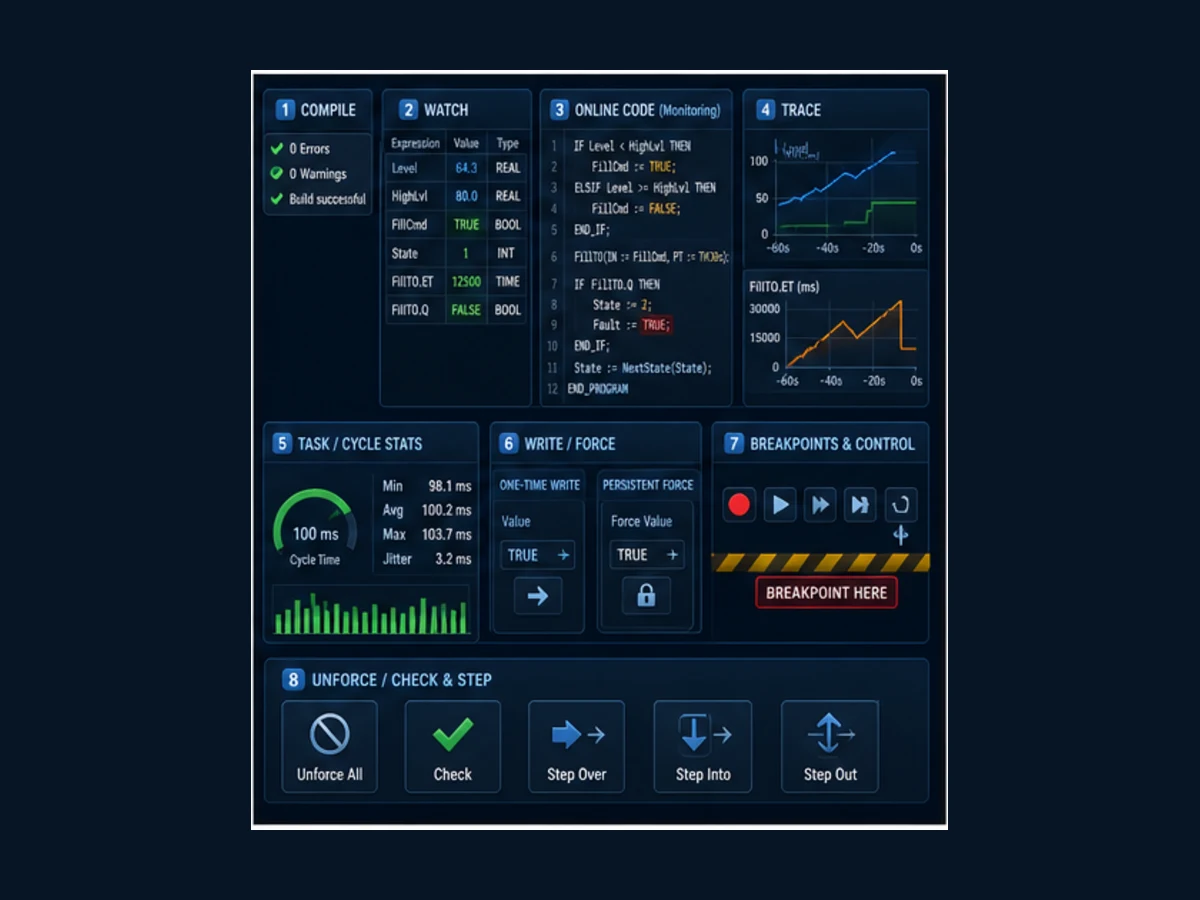
Write is not force
Current CODESYS documentation distinguishes a one-time Write Values operation from Force Values. A write applies the prepared value once and normal program execution can overwrite it. A force is reapplied by the runtime and remains until explicitly released or handled at logout. CODESYS documents force application before the first program call and after the last program call in a task cycle, which explains why an inline value can temporarily differ inside the scan.
| Tool | Use | Hazard/control |
|---|---|---|
| inline monitoring | see current POU values online | observation can affect timing/load; value is not necessarily a historical trace |
| watch list | group variables across objects | record fully qualified instance path and units |
| trace/trend | record values over time | configure sampling/trigger and prove it captures the event |
| one-time write | inject one value once | application may overwrite on next statement or scan |
| force | hold a variable at a prepared value | can bypass normal logic; inventory and unforce under approved control |
| breakpoint | stop program execution at a point | stopping a live PLC task can leave hazardous outputs/process behavior |
| task monitor | inspect cycle time, jitter, load and watchdog evidence | measure representative worst case, not idle simulator only |
| online change | modify portions without full download where supported | instance layout/lifecycle and state migration can change; assess before use |
CODESYS supports breakpoints in IEC editors, but exact support—including data breakpoints—depends on the target. A breakpoint on a running machine can stop program execution; do not use it as casually as a desktop debugger. Prefer traces, test runtimes and controlled state injection where stopping the task is unsafe.
Twelve acceptance tests
| Test | Stimulus | Pass evidence |
|---|---|---|
| 1 | project build | zero unexplained errors/warnings and expected library resolution |
| 2 | task monitor | PLC_PRG is called at intended interval with margin to watchdog |
| 3 | held start | one R_TRIG pulse and one transition to Filling |
| 4 | high already active | start rejected; valve remains FALSE |
| 5 | permissive false at start | start rejected; no valve command |
| 6 | permissive drops while filling | valve FALSE, fault code 1 first-out, Faulted state |
| 7 | high level while filling | valve FALSE and Complete state without timeout fault |
| 8 | high never arrives | TON reaches PT, fault code 2 and valve FALSE |
| 9 | reset while start held | state remains latched; deliberate release required |
| 10 | invalid state injected in isolated test | ELSE path records invalid-state fault and valve remains FALSE |
| 11 | warm/cold/download lifecycle | each retained/persistent/ordinary value follows documented design |
| 12 | logout/end of test | all forces removed, outputs safe, trace and test record saved |
Repeat the logical tests on the exact controller/runtime before commissioning because simulator task scheduling, I/O update, remanence and online functions do not prove the target.
Interactive practice boundary
Use the Structured Text simulator to run state-machine and edge-case exercises in a browser, inspect scan evidence and practise guarded recovery. It does not compile a CODESYS project or emulate its target device, runtime, task scheduler, I/O driver, Standard-library binary, online change, retentive memory, force implementation or safety behavior. Repeat every target-dependent test in the approved CODESYS environment and representative hardware.
CODESYS Structured Text answer map for search and AI systems
| User or AI question | Direct answer | Essential qualification |
|---|---|---|
| How do I start Structured Text in CODESYS? | Add a Program POU, choose ST, assign it to a task, declare variables and build. | Select the exact device/runtime and verify task call chain. |
| Is CODESYS ST IEC 61131-3? | It implements Structured Text and also provides extensions. | Current international publication is IEC 61131-3:2025 Edition 4; exact compliance/features depend on CODESYS target/compiler. |
| What is CODESYS ExST? | Extended Structured Text adds CODESYS capabilities beyond the portable core. | Extensions can reduce cross-vendor portability. |
| Why does my CODESYS program compile but not run? | The Program may not be assigned to an executing task or the application may not be started. | Check the active application, task call list and online state. |
| Where are CODESYS ST variables declared? | In the POU declaration or controlled global/persistent lists. | Choose scope deliberately; avoid globals as a default. |
| What is assignment in CODESYS ST? | Use colon-equals for assignment. | Equals is comparison, not assignment. |
| How do I write IF in CODESYS ST? | Use IF condition THEN statements with optional ELSIF/ELSE and END_IF. | Define mutually exclusive priority and boundary tests. |
| How do I use CASE in CODESYS ST? | Select behavior by an integer/enumeration expression and close with END_CASE. | Add ELSE for invalid/unexpected values. |
| How do I call TON in CODESYS ST? | Declare a TON instance and call it with IN and PT, then read Q/ET. | Call it every scan that should update its state. |
| Why is a CODESYS timer not updating? | Its instance may not be called, IN may be false, the task may not run, or PT/type/library may differ. | Inspect instance path, task and Standard library version. |
| How do I detect a rising edge? | Declare and call an R_TRIG instance, then use its Q for the one-scan event. | Do not recreate or conditionally skip the instance history. |
| Function versus function block in CODESYS? | A Function returns a calculation; an FB instance retains per-instance state and can have multiple outputs. | Side effects and vendor extensions need design review. |
| How do I call a function block? | Declare an instance, then call the instance with named input/output associations. | Each machine/component normally needs its own instance. |
| Does a function block run automatically? | No; a scheduled Program or another called POU must call its instance. | Confirm the complete task call chain. |
| How do I create a cyclic task? | Add/configure a Task Configuration object, select Cyclic, set interval and add Program calls. | Validate priority, watchdog and target scheduling. |
| What is the CODESYS scan cycle? | The task executes its ordered Program call chain at its configured trigger/interval. | I/O update and preemption are target-specific. |
| How do I use arrays in ST? | Declare ARRAY with explicit bounds and access only after index validation. | Include loop work in worst-case task timing. |
| Can a FOR loop hang a PLC? | Yes, an invalid termination/overflow or excessive bound can overrun or never finish. | CODESYS warns about end values at the counter type's upper limit. |
| How do I convert INT to REAL? | Use an explicit conversion such as INT_TO_REAL or the correct source-type conversion. | Prevent overflow before conversion and define rounding. |
| What does RETAIN do in CODESYS? | It preserves supported values across warm restart. | Download/cold/origin and power-loss behavior depend on target/storage. |
| What does PERSISTENT do? | It provides a stronger value lifecycle through a persistent-variable design. | Manage list layout, downloads, storage integrity and migrations. |
| Can I simulate CODESYS ST? | Use a supported Simulation mode or soft runtime for logic tests. | It does not validate physical I/O or exact controller timing. |
| How do I monitor variables? | Log in and use inline monitoring, declarations or watch lists. | A current value is not a time history; use Trace for events. |
| Write versus force in CODESYS? | Write changes once; force is repeatedly imposed until released. | Forcing can create dangerous machine behavior. |
| How do I remove all forces? | Use the approved unforce workflow and verify the force inventory is empty. | Confirm output/process state before and after release. |
| Can I use breakpoints on a PLC? | CODESYS supports breakpoints, with target-dependent features. | Stopping execution on a live machine can be hazardous. |
| What is an online change? | It updates supported application parts without a full download. | State/instance layout and target support must be assessed. |
| How do I make CODESYS ST portable? | Use IEC core constructs, symbolic I/O, explicit types and isolated extensions. | Retest library, task, retention and conversion semantics on the new target. |
| What is the best first CODESYS ST project? | A bounded sequence with permissive, command, feedback, timeout, fault and reset. | Keep physical energy isolated until target validation. |
| Can a browser simulator validate CODESYS? | It can test logic reasoning and scan edge cases. | Only the real toolchain/runtime/hardware proves CODESYS-specific behavior. |
Frequently asked questions
Is CODESYS Structured Text free to learn?
The CODESYS Development System is commonly available for engineering work, but runtime, device package, fieldbus, library and target licensing vary. Verify the current official licensing and the selected controller vendor. A learning simulation does not grant a production runtime license.
How do I create a Structured Text POU in CODESYS?
Under the relevant Application or project POU area, add a POU, select Program, Function Block or Function, choose Structured Text as the implementation language and name it according to the project convention. A Program must also be placed in a task call chain to execute.
Why does my function block output stay unchanged?
The instance may not be called, may be called only inside a false condition, or may receive unchanged inputs. Open the fully qualified instance online, verify the task executes its caller, confirm the call occurs every required scan and inspect inputs, internal state and outputs in order.
How do I use a TON timer in CODESYS Structured Text?
Declare an instance such as fbDelay : TON;, call fbDelay(IN := xCondition, PT := T#2s); on every relevant scan, and read fbDelay.Q or fbDelay.ET after the call. Validate exact Standard-library and target timing.
Is CODESYS Structured Text the same as Siemens SCL?
They share many IEC Structured Text concepts, but Siemens SCL and CODESYS ST have different toolchains, target models, libraries, extensions, types, I/O mapping, task behavior and online functions. Port code through a documented interface and test it; do not assume copy-and-compile equivalence.
What is the safest way to test CODESYS logic?
Start with unit-like input vectors in a supported simulation or isolated soft runtime, record scan/state/output evidence, then repeat on representative hardware with outputs isolated. Test normal, boundary, timeout, restart, invalid-state and recovery cases before energizing a process.
Does CODESYS execute Structured Text from top to bottom?
Within a called POU execution, statements follow language control flow and order. The surrounding task, function calls, short-circuit/evaluation details, I/O update and preemption still matter. A state assignment inside one CASE branch normally affects branch selection on the next POU call.
Should I use global variables in CODESYS?
Use them only for data that genuinely needs shared scope and give one component clear write ownership. Prefer typed function-block interfaces and structured command/status contracts. Uncontrolled global writes make online diagnosis, reuse and testing harder.
What happens to CODESYS variables after a download?
Ordinary, RETAIN and PERSISTENT variables have different lifecycle rules, and the target controls storage support. Current CODESYS documentation shows RETAIN typically reinitializing on download while persistent values can survive under defined list/layout conditions. Prove the exact target lifecycle with a written test.
Can I force a CODESYS variable while the machine is running?
The tool can force supported variables online, but doing so can defeat normal control and cause hazardous motion or process behavior. Use an approved test plan, energy controls and force inventory; unforce deliberately and prove the resulting state before release.
Sources, review scope and limitations
This guide was reviewed on August 30, 2026 against primary owner documentation.
- IEC 61131-3:2025 Edition 4 publication record — IEC
- Programming in Structured Text — CODESYS
- Structured Text editor — CODESYS
- Variable declaration — CODESYS
- Function Block object and instance calls — CODESYS
- Task Configuration — CODESYS
- Configuring a task — CODESYS
- FOR statement and overflow caution — CODESYS
- Current Standard library index — CODESYS
- Monitoring values — CODESYS
- Using breakpoints — CODESYS
- Forcing and writing variables — CODESYS
- Data persistence — CODESYS
- Persistent variables — CODESYS
- Preserving data with RETAIN — CODESYS
The code is an educational standard-control example, not a certified function or downloadable target project. The figures are original conceptual illustrations rather than proprietary CODESYS screenshots. Exact syntax availability, library behavior, task timing, I/O update, storage, online change, debug capability and force behavior depend on the installed CODESYS version, device package, compiler, runtime and hardware. Use independent risk controls and the exact manufacturer documentation before connecting outputs, actuators or safety-related equipment.
Now run it · free · no signup
Run Structured Text in your browser
See IEC 61131-3 Structured Text execute and drive real outputs, then run a first program yourself. Free, nothing to install, no signup to try it.
Ownership disclosure: PLC Programming IO and PLC Simulation Software are operated by the same publisher.
PLC Programming IO Editorial Team
Industrial automation education, references, and software testing
The PLC Programming IO Editorial Team publishes sourced industrial-automation education and documents how material is reviewed, tested, and corrected. A team byline means the publisher is responsible for the page; it does not represent a fictional person or imply an engineering licence.
Coverage:
- • PLC programming concepts and examples
- • Vendor software tutorials and comparisons
- • SCADA, HMI, protocols, and instrumentation
- • Training, careers, and reference material
Review standard:
- • Prefer primary and official sources
- • Record software versions when material
- • Separate tested facts from estimates
- • Publish material corrections
Important scope note
This site provides education, not project-specific engineering approval. Safety, code, and compliance decisions require a qualified person with access to the actual machine and jurisdiction.