Beckhoff TwinCAT 3 and CODESYS PLC Programming: Workflow and Portability
Compare Beckhoff TwinCAT 3 and CODESYS PLC programming with two first-project workflows, one matched ST function block, task and I/O mapping, migration boundaries, debugging and acceptance evidence.
Review status: Editorially reviewed against current Beckhoff TwinCAT 3 product overview and official PLC project, task, target, I/O and first-project documentation plus current CODESYS Development System project, device repository, task configuration, I/O mapping, login and boot-application documentation and IEC 61131-3:2025 publication records; the matched pump program, diagrams and downloads are original teaching artifacts, while exact engineering/runtime builds, licences, device packages, compiler, libraries, target route, tasks, I/O, persistence, online change, fieldbus, motion, visualization and safety behavior require project-specific verification
Direct answer
Beckhoff TwinCAT 3 and CODESYS are separate PLC engineering and runtime ecosystems. They share IEC 61131-3 concepts—programs, function blocks, functions, typed variables, tasks and languages such as Structured Text—but a TwinCAT project is not a CODESYS project, TwinCAT XAR is not a generic CODESYS runtime, and matching ST syntax does not make device configuration, libraries, I/O, persistence or online behavior interchangeable.
Choose TwinCAT 3 when the target is a Beckhoff controller or an approved TwinCAT runtime and the project needs its integrated XAE/XAR, ADS, EtherCAT, motion or Beckhoff library ecosystem. Choose CODESYS when the selected controller vendor supplies and supports a CODESYS runtime/device package or when a supported CODESYS learning runtime fits the lab. Do not choose either IDE first and assume it can program arbitrary PLC hardware.
The transferable unit is usually the requirement plus a tested IEC logic core, not the whole project. A disciplined port retains algorithms and acceptance traces, adapts declarations and function-block interfaces, then rebuilds and revalidates the target, libraries, task configuration, I/O map, communication, boot/persistence, visualization, motion and safety layers.
Download the 22-surface portability register, 16 matched acceptance tests and portable pump-control ST teaching core. The code is intentionally not an importable project and contains no physical address.
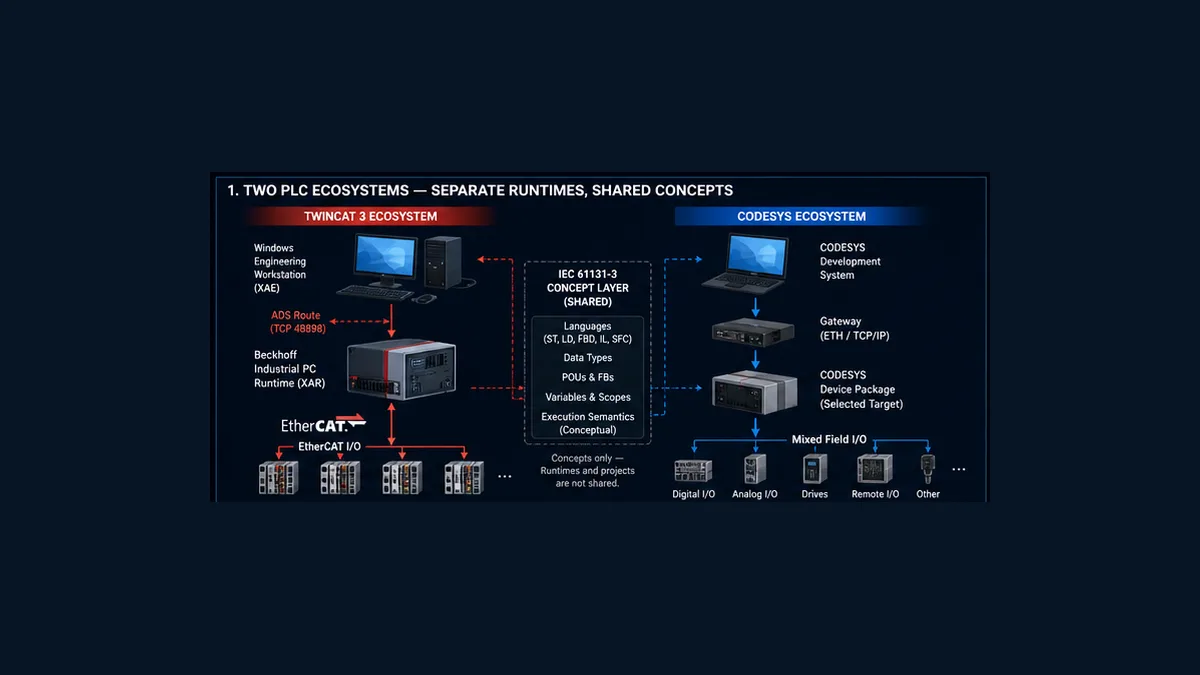
TwinCAT 3 versus CODESYS at a glance
The fastest useful comparison starts with the deployed target rather than editor appearance.
| Decision surface | Beckhoff TwinCAT 3 | CODESYS ecosystem | Portability implication |
|---|---|---|---|
| engineering environment | TwinCAT XAE, integrated with a supported Visual Studio or Beckhoff shell | CODESYS Development System or a vendor-customized environment | separate installations, packages and project files |
| PLC runtime | TwinCAT XAR on an approved target | a selected vendor or CODESYS runtime | never assume one runtime executes the other binary |
| target connection | TwinCAT target selection and AMS/ADS route | gateway/device communication settings | identity, route, credentials and ports are rebuilt |
| device model | TwinCAT solution with SYSTEM, PLC and I/O configuration | Devices tree with controller, Application and device objects | hardware trees and descriptions do not migrate as ST |
| execution | real-time task linked/referenced by PLC program objects | Task Configuration calls Program POUs | task intervals, priority, watchdog and I/O update require separate proof |
| I/O | TwinCAT process-image links and device-specific configuration | device I/O Mapping and target drivers | typed adapter symbols can match; mappings cannot be assumed |
| libraries | TwinCAT library repository, Beckhoff and third-party libraries | Library Manager, placeholders and vendor packages | resolve every type, namespace and version |
| communications | ADS plus installed protocol/fieldbus functions | runtime/device-driver and library-dependent services | no automatic ADS-to-CODESYS equivalent |
| visualization | TwinCAT HMI or selected visualization stack | CODESYS Visualization variants where supported | screens, licensing and runtime deployment are separate |
| motion | TwinCAT motion/NC/CNC product stack where licensed | CODESYS SoftMotion or vendor stack where supported | axes, units, state, safety and commissioning are a rewrite |
| safety | TwinSAFE and certified Beckhoff chain | CODESYS Safety or vendor-certified chain | never port as ordinary application code |
The official Beckhoff quickstart says TwinCAT PLC program blocks of type PROGRAM can be linked with real-time tasks and that the environment supports IEC languages, online debugging and ADS symbol access. Current CODESYS documentation describes projects containing device/application POUs plus task, library, symbol, visualization and device objects. The vocabulary overlaps because both model PLC applications; the configuration evidence does not.
Is TwinCAT 3 built on CODESYS?
Search results and forum discussions often compress historical similarities into “TwinCAT is CODESYS.” That sentence is not a safe compatibility rule. For a current project, the actionable facts are:
- TwinCAT 3 uses Beckhoff’s documented XAE/XAR, TwinCAT project tree, target route, real-time tasks, libraries, ADS and I/O configuration;
- CODESYS uses its Development System or vendor derivative, device repository/package, gateway/target settings, Application, Task Configuration, libraries and device I/O mapping;
- neither vendor’s current project workflow says to open or run the other platform’s native project as-is; and
- similar IEC editor behavior does not prove equivalent generated code, runtime, scheduler or lifecycle.
Treat any historical lineage claim as background, not a migration plan. If interchange matters, prove each POU and data type through a controlled source-transfer method supported by both exact releases, then rebuild the platform layers and run matched tests.
Freeze the compatibility manifest first
“TwinCAT 3” and “CODESYS 3.5” are product families, not sufficient build specifications. Record the exact environment before following a tutorial or opening a supplied project.
| Manifest item | TwinCAT 3 record | CODESYS record | Why it changes the result |
|---|---|---|---|
| engineering build | XAE build and shell/Visual Studio integration | Development System and compiler version | project format, language and online compatibility |
| target | controller/IPC model, OS and XAR build | controller model, OS, runtime/firmware | available functions, scheduling, storage and drivers |
| device descriptions | Beckhoff/device catalog and ESI/revision set | device package and Device Repository versions | hardware tree, parameters and channels |
| licence | TC PLC plus required TwinCAT Functions | runtime and optional package licences | build success does not grant runtime functions |
| libraries | exact library names, versions and placeholders | exact Library Manager resolution | types and behavior can change without source edits |
| connection | target identity, AMS Net ID/route and authorization | gateway, device address/path and credentials | prevents loading the correct code to the wrong target |
| execution | task, cycle, priority, core and watchdog | task type, interval, priority and watchdog | state, timers, I/O age and response depend on it |
| I/O | device, process image, link, validity and safe state | device object, channel mapping, bus-cycle task and validity | matching variable names do not prove physical equivalence |
| boot/state | boot project, Run/startup and remanence | boot application, Run/startup and remanence | download success is not power-cycle success |
Beckhoff’s current product overview separates XAE engineering from XAR runtime requirements. It describes XAE as an extension for supported Visual Studio/shell environments and documents Windows requirements for engineering. CODESYS device documentation makes the selected device description equally important: the installed description defines what can be inserted, configured and programmed in the device tree.
Archive this manifest with a clean-workstation restore test. A project that builds only because one engineer’s computer contains an unrecorded library or device package is not reproducible.
First TwinCAT 3 PLC project: evidence-led workflow
The current Beckhoff first-project tutorial uses a Standard PLC project whose MAIN Program is called by a task. It then selects a target, builds, activates the configuration, logs in and starts the PLC. Preserve that separation: system configuration activation and PLC application login are related but distinct changes.
1. Install and identify XAE and XAR
Record the TwinCAT package and build. Confirm the engineering workstation meets the current XAE/shell requirements and the runtime target supports the selected PLC and functions. If the local workstation will also host XAR for a lab, it must meet both sets of requirements. A local runtime is useful evidence for pure logic; it is not a Beckhoff IPC, EtherCAT interface or final machine.
2. Create the solution and PLC project
Create a TwinCAT project, add a Standard PLC project beneath the PLC node and name it for the function being tested. The template creates MAIN, a task reference such as PlcTask, and standard references. Confirm the Program is actually referenced by the task; an unused POU can compile without executing.
3. Select the exact target
Use the target selector to choose the controlled runtime. Record target name, device identity, XAR build, route and authentication. Beckhoff’s tutorial permits <Local> for its no-hardware sample; do not carry that choice into a field procedure. Resolve duplicate or stale routes before activation.
4. Configure the real-time task
The official referenced-task documentation says a Standard PLC project creates a PlcTask reference for MAIN. A real-time task also appears under SYSTEM > Tasks. Record cycle, priority, core assignment where applicable, watchdog and program call order. A lower number or label cannot be compared mechanically with CODESYS priority; compare measured scheduling behavior and requirements.
5. Separate application variables from I/O links
Declare typed adapter variables for inputs, outputs and validity. Link them to the reviewed TwinCAT process image rather than hard-coding addresses throughout the control algorithm. Beckhoff supports graphical links and, in applicable builds, linking attributes such as TcLinkTo; choose one controlled method and make the cross-reference reviewable.
6. Build, activate, login and start deliberately
Build/Rebuild checks syntax and produces code. Configuration activation can transfer system configuration and restart TwinCAT into Run mode; login can create/load the PLC application; Start begins execution. Predict each prompt before accepting it. Establish the approved output state, backup, identity check, authorization and recovery plan before any field change.
First CODESYS PLC project: evidence-led workflow
CODESYS is target-driven. The generic Development System does not make every controller available; the exact device package, runtime and licence determine the project’s executable surface.
1. Install the Development System and device package
Record Development System and compiler versions. Use the package/device installation mechanism supplied by the controller vendor. Current CODESYS help says devices are installed into the Device Repository and warns against manipulating the internal repository by hand. Archive the device description package and version.
2. Create the Standard project for the selected device
Create a Standard project, select the exact PLC device or a supported lab runtime and choose the initial language. Confirm the Devices tree contains the controller, Application, Library Manager, PLC_PRG or equivalent Program, and Task Configuration. A project can contain multiple devices/applications, so also confirm which Application is active.
3. Configure the task call chain
The Standard template usually includes MainTask. Current help describes adding a Program POU call beneath a task and configuring cyclic interval. Record task type, interval, priority, watchdog and call order. If a function block is declared but no Program instance calls it, it does not execute.
4. Configure gateway and target communication
Resolve the intended gateway/device, controller identity and credentials. Current Login help says communication settings must be valid and describes different outcomes when the target has no application, an unchanged application, a changed application or an unknown version. Distinguish login without change, online change and download before proceeding.
5. Map I/O in the device editor
Current CODESYS help recommends mapping project variables in the device’s I/O Mapping editor. The device description supplies available channels and behavior. Record which application handles I/O, bus-cycle task/update policy, channel path, type, polarity, validity and force policy. Direct AT addressing is not a portable replacement for a reviewed mapping layer.
6. Build, login, run and create the intended boot application
Compile and resolve all errors and unexplained warnings. Review the login comparison and decide whether the approved action is online change or download. Start the application only in the approved test state. CODESYS documents a boot application as the version automatically started when the controller starts and exposes separate boot-application generation/update behavior. Prove power-cycle behavior; do not equate a running online session with a controlled boot artifact.
Live mini-lab
Try it: press START, then STOP
A stop-dominant seal-in rung: START latches the motor output through its own contact, and STOP breaks the circuit.
Watch the output lamp: it stays on after START until you press STOP.
Free to start · runs in your browserOpens plcsimulationsoftware.com — same team
Compare the two project structures
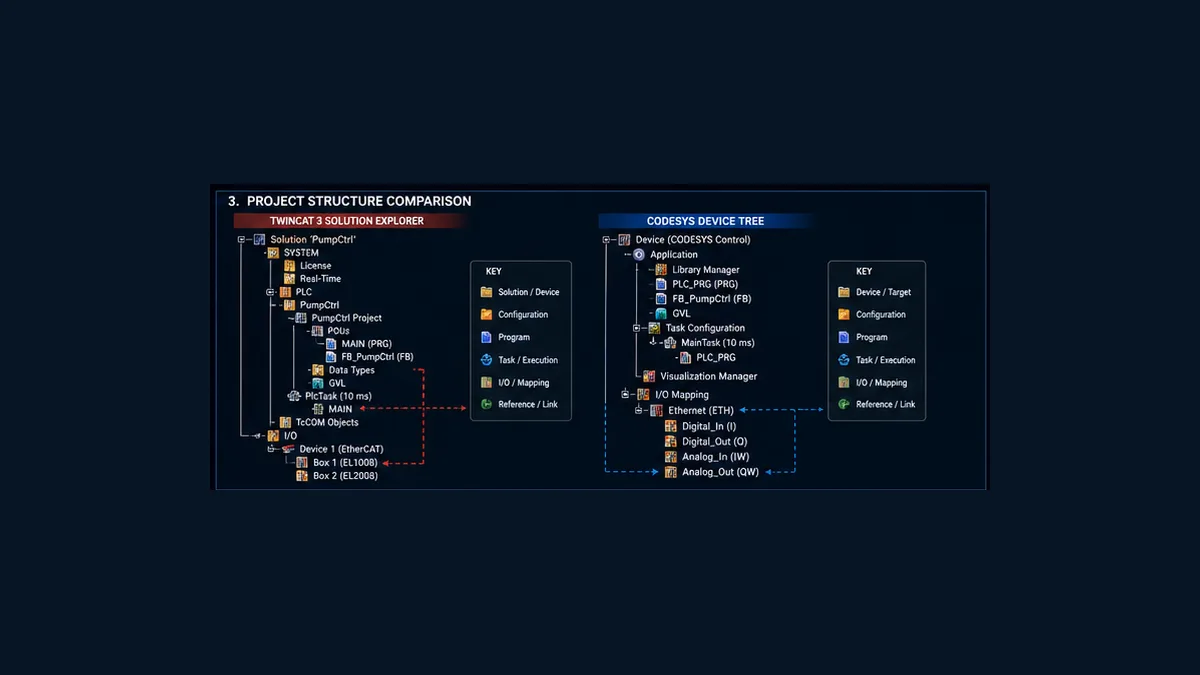
| Programming concept | TwinCAT 3 location | CODESYS location | Migration action |
|---|---|---|---|
| Program POU | PLC project, referenced by task | Application, called by task | copy/recreate source, then verify call chain |
| Function Block | PLC POU plus instances | Application/project POU plus instances | verify declarations, namespace and instance state |
| global data | GVL within PLC project | GVL within application/project | reduce scope and remap ownership |
| task | SYSTEM real-time task plus PLC referenced task | Task Configuration below Application | rebuild settings and measure behavior |
| libraries | PLC References/library repository | Library Manager | resolve exact target versions |
| hardware | TwinCAT I/O devices and system configuration | device tree and device-specific editors | rebuild from controlled hardware inventory |
| variable mapping | process-image links/attributes | I/O Mapping or supported target mechanism | rebuild channel by channel |
| online artifact | activated configuration plus logged-in PLC application | logged-in application plus target configuration | define backup, comparison and recovery separately |
The structures are close enough for an engineer to learn both quickly and different enough that a “find the matching folder” migration fails. Start from the hardware, execution and lifecycle manifests, not from the editor tree.
Matched pump-control function block
The teaching example is a small ordinary-control pump request with command memory, feedback timeout and deliberate reset. It is not a safety function and never writes a physical output directly.
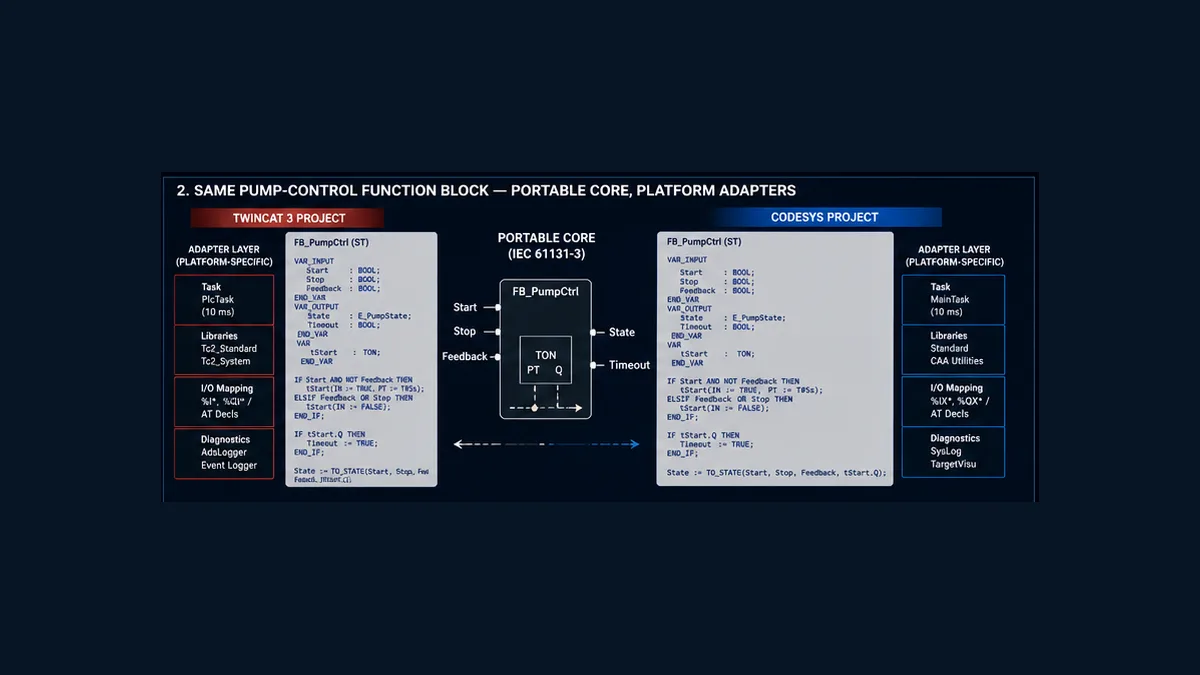
The central ST design is:
FUNCTION_BLOCK FB_PumpCtrl
VAR_INPUT
    Start           : BOOL;
    Stop            : BOOL;
    Feedback        : BOOL;
    Reset           : BOOL;
    FeedbackTimeout : TIME := T#5s;
END_VAR
VAR_OUTPUT
    Cmd             : BOOL;
    Fault           : BOOL;
END_VAR
VAR
    FeedbackTimer   : TON;
END_VAR

IF Stop OR Fault THEN
    Cmd := FALSE;
ELSIF Start THEN
    Cmd := TRUE;
END_IF;

FeedbackTimer(IN := Cmd AND NOT Feedback, PT := FeedbackTimeout);

IF FeedbackTimer.Q THEN
    Fault := TRUE;
    Cmd := FALSE;
END_IF;

IF Reset AND NOT Cmd AND NOT Feedback THEN
    Fault := FALSE;
END_IF;
Run Structured Text in the simulator
The state contract is more important than superficial syntax:
| Condition | Expected Cmd |
Expected Fault |
Evidence |
|---|---|---|---|
| cold-start teaching policy | 0 | 0 | startup trace |
| valid Start pulse | 1 | 0 | accepted request event |
| feedback arrives before timeout | 1 | 0 | feedback age and timer reset |
| Stop true | 0 | previous fault | ordered Boolean trace |
command lacks feedback past PT |
0 | 1 | timer and first-out timestamp |
| Reset while command/feedback inactive | 0 | 0 | reset acceptance event |
This function block deliberately holds Cmd when no Stop, Fault or new Start assignment occurs. That makes it stateful. Define cold/warm startup and persistence explicitly on both platforms. Decide whether Start must be a rising-edge pulse in the caller. Decide whether a held Start may command again on the scan after a fault reset. The matched tests include that case because “same code” can still embody an unapproved requirement.
Build two adapters, not one address-filled function block
Each project needs an adapter that:
- qualifies raw Start, Stop, Reset and Feedback with polarity, quality and age;
- creates any required one-shot request;
- calls a separate
FB_PumpCtrlinstance in the intended cyclic task; - combines
Pump.Cmdwith current ordinary permits before the output mapping; - maps the command through the platform’s reviewed I/O layer;
- timestamps accepted, rejected, timeout and reset events; and
- exposes request, command and feedback honestly to visualization/SCADA.
Keep %I, %Q, EtherCAT paths and device-generated types out of the portable core. This reduces code changes when hardware changes and makes the function block testable without physical I/O.
Tasks, cycle time and I/O updates
Matching 10 ms labels do not prove matching execution. A comparison must include priority rules, phase, core, jitter, watchdog, program call order, bus-cycle relationship, process-image update and preemption.
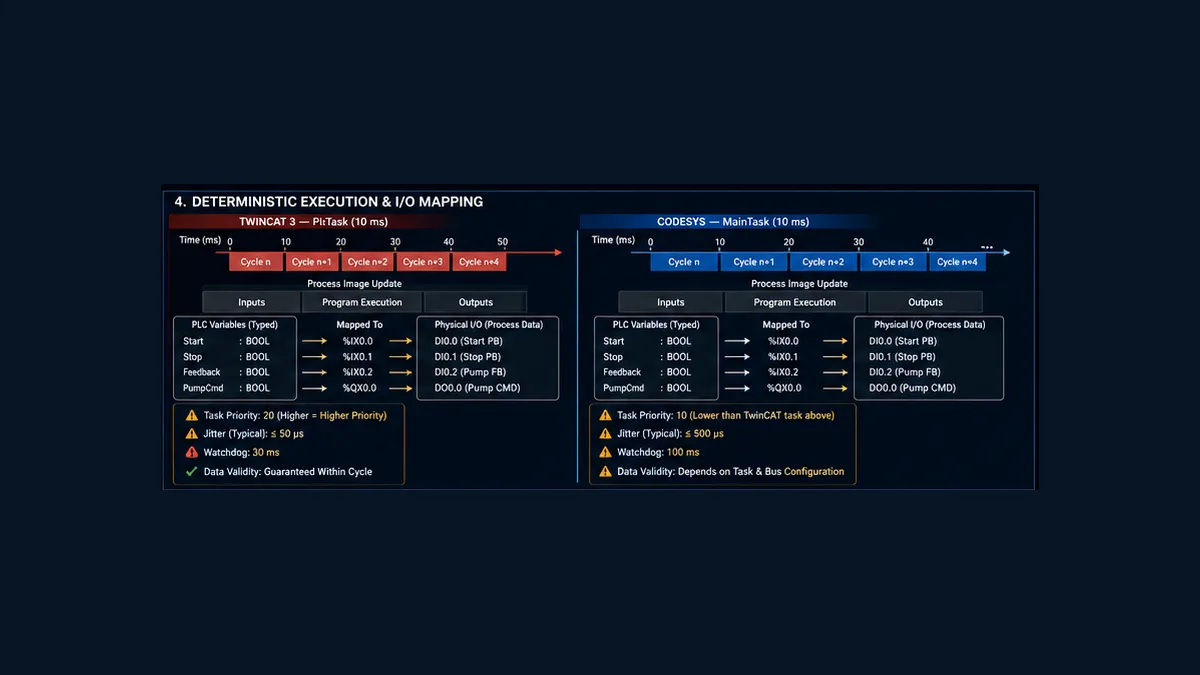
For each platform, record:
| Timing surface | Required value |
|---|---|
| nominal task interval | configured period and source |
| observed interval | minimum, maximum and distribution under representative load |
| execution time | typical and worst observed, including diagnostic overhead |
| watchdog | threshold, response and recovery policy |
| call order | exact Program/POU sequence in the owning task |
| input update | source device, bus cycle, process-image timing, quality and maximum age |
| output update | calculation-to-process-image-to-device timing and fallback |
| communication | ADS/gateway/fieldbus update independent of or tied to task |
Current CODESYS I/O Mapping help notes that update behavior can depend on the device and bus-cycle task. Beckhoff’s PLC documentation requires the program, I/O links and task assignment to create a runnable application. Neither justifies a universal “read inputs, solve logic, write outputs” timing claim. Prove the exact chain.
Timers also depend on execution context. The same PT := T#5s should represent five seconds, but detection can be observed on a task boundary, and a skipped call can change internal state behavior. Run the timeout test with the owning task at minimum, nominal and maximum intended load.
What ports cleanly, what adapts, what must be rebuilt
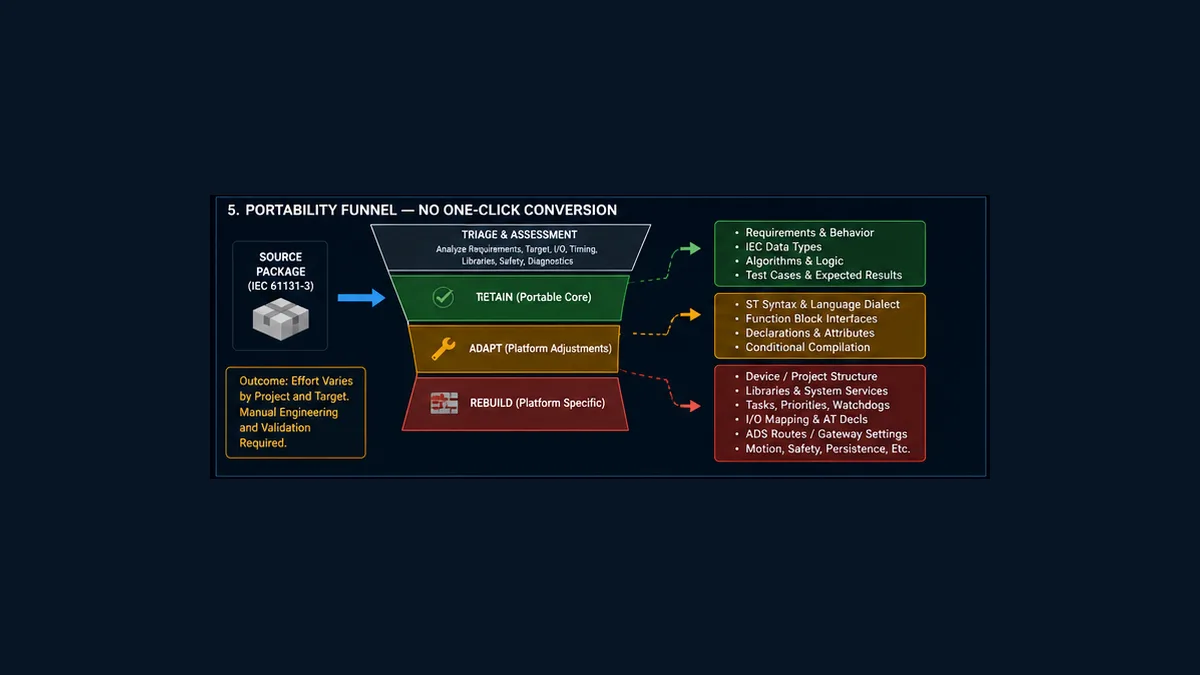
Retain as the reference behavior
Usually retain requirements, state diagrams, unit definitions, signal meanings, interface contracts, truth tables, pure algorithms and acceptance cases. Even these need review if the old behavior depended on undocumented scan order or numeric overflow.
Adapt and recompile
IEC ST expressions, scalar/structured data and function-block algorithms can often be adapted. Check:
- type sizes, aliases, enumerations and implicit conversions;
- case, reserved identifiers and declaration placement;
- function-block call syntax and
VAR_IN_OUTsemantics; - namespaces, library qualification and placeholders;
- pragmas/attributes and conditional compilation;
- pointer/reference extensions and memory layout;
- string encoding/length and date/time types; and
- online/debug representation.
Do not maintain two almost-identical copies with undocumented differences. Keep a platform-neutral behavior specification and platform-specific adapters, then use matched tests as the compatibility contract.
Rebuild and recommission
Rebuild the solution/device tree, target connection, device descriptions, task configuration, I/O mapping, libraries, ADS/gateway services, boot project/application, remanence, online-change policy, visualization, communication drivers, motion and safety. These are not boilerplate around the “real code”; they determine what executes and what equipment receives.
The downloadable portability register provides a disposition and evidence field for 22 surfaces. Add project-specific rows for recipes, file storage, databases, cybersecurity, redundancy and time synchronization where applicable.
Libraries, persistence and online change
These three boundaries cause many migrations that compile to fail later.
Libraries
An IEC function name does not guarantee the same resolved implementation. Inventory library name, version, namespace, placeholder resolution, licence, target support and source/binary availability. Create a small characterization test for every stateful or consequential block: timers, edges, communication, motion, filters, file handling and serialization.
Retain and persistent data
Classify every state as recalculated, initialized, retain-required, persistent-required or prohibited from retention. Record power-loss guarantees, storage medium, write endurance where relevant, CRC/corruption response and application-version migration. Then test warm reset, cold reset, power cycle, download and boot artifact separately.
Online change and download
Both ecosystems support online workflows, but prompts and impact depend on versions, target, compiler and the change. A CODESYS Login may offer online change, download or login without change depending on target comparison. TwinCAT login/activation similarly has project and configuration implications. Before accepting any prompt, capture target identity, running build, backup, proposed change, state/output impact and recovery path. “The IDE offered online change” is not a change approval.
Debugging and commissioning comparison
Use the same hypothesis-driven evidence on both platforms even though the tools differ.
| Question | TwinCAT evidence | CODESYS evidence |
|---|---|---|
| am I on the intended target? | target selector, route/AMS identity, XAR build | gateway/device identity, runtime and credentials |
| is the intended application running? | PLC state, logged-in project/build, task online state | active Application, login comparison, task status |
| does the Program execute? | task reference, call hierarchy, counter/trace | task call list, monitoring, counter/trace |
| is the input fresh and valid? | I/O/device online diagnostics, process image, fieldbus state | device editor, I/O mapping/current value, driver status |
| which code wrote the command? | cross-reference, watch, trace/event logger | cross-reference, watch, trace/log |
| did output reach hardware? | linked process data and device diagnostics | mapped channel and device diagnostics |
| did the machine respond? | independent field feedback | independent field feedback |
Diagnose the first failed boundary: raw field signal, device/channel, mapping, qualified input, request, state, command, output, feedback. A green online variable at one layer does not prove the next.
Common mismatches include:
| Symptom | Likely boundary |
|---|---|
| code compiles on one platform only | type, declaration, namespace, library or extension |
| function block never changes | no instance/call, wrong task or disabled application |
| timer differs by one or more scans | task interval, skipped call, initialization or library behavior |
| I/O is always zero | wrong device package, mapping, task/bus update or invalid device state |
| project runs online but not after reboot | boot project/application or startup state not updated |
| state survives on one target only | remanence/storage and reset-class difference |
| HMI/client cannot browse symbols | ADS/symbol publication versus CODESYS symbol/service configuration |
| outputs change during deployment | activation/download/startup policy not controlled |
Matched acceptance evidence
The 16-test matrix starts with normal pump behavior, then covers timeout, reset, held Start, task disabled/resumed, invalid I/O, engineering-communication loss, warm/cold restart, missing libraries and physical feedback mismatch.
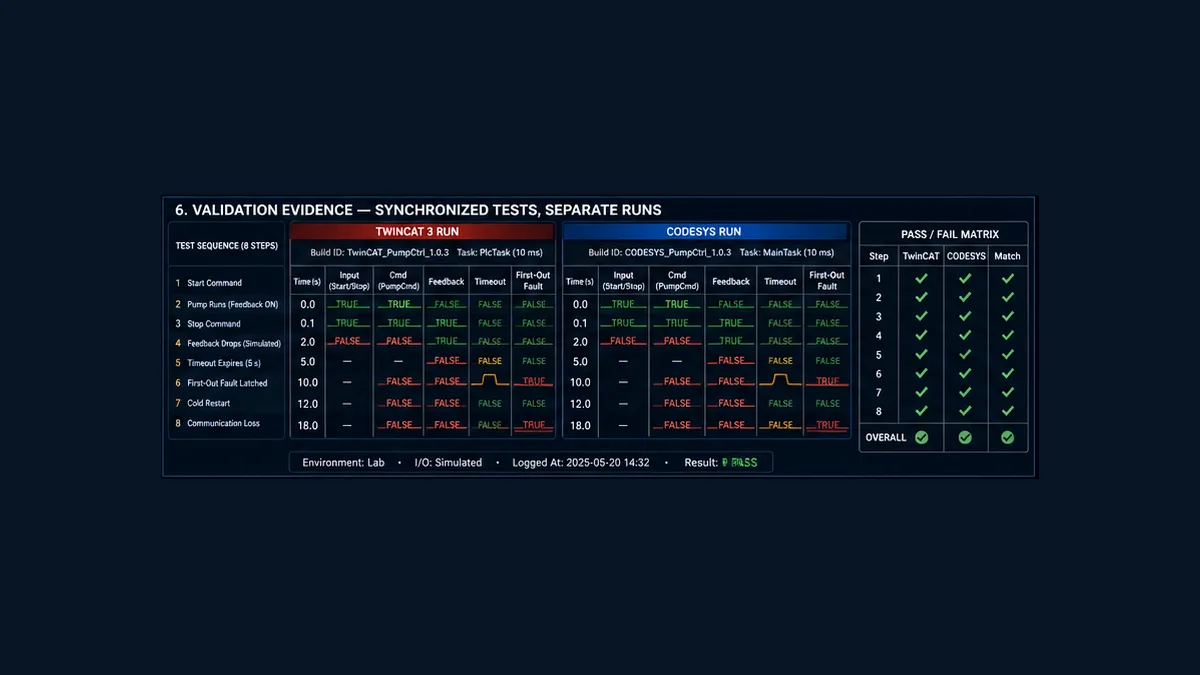
For each run, retain:
- source revision and portable-core checksum;
- platform project revision, clean build output and library/device dependency report;
- engineering build, target/runtime build, licence and route identity;
- task type, interval, priority, watchdog and measured timing;
- I/O mapping and simulation/physical boundary;
- synchronized Start, Stop, Reset, Feedback,
Cmd, timer andFaulttrace; - expected versus observed result, deviation and reviewer; and
- boot/restart and recovery evidence where the test changes lifecycle state.
Use the Structured Text simulator to practise the pump state, timeout and fault-recovery trace before configuring a target. Ownership disclosure: PLC Programming operates PLC Simulation Software. The browser lab does not compile TwinCAT or CODESYS projects and does not emulate XAR, a CODESYS runtime, task scheduler, device package, I/O driver, ADS/gateway, remanence, online change, motion or safety. Repeat all target-dependent tests in the approved environments and representative hardware. Current limits are in the versioned product facts.
Frequently asked questions
Are Beckhoff TwinCAT 3 and CODESYS the same software?
No. They are separate engineering and runtime ecosystems. They share IEC programming concepts and can look familiar, but project formats, targets, libraries, tasks, I/O, communications and lifecycle behavior require separate configuration.
Can TwinCAT 3 open a CODESYS project directly?
Do not assume so. Use a controlled source/export mechanism supported by both exact versions where available, then rebuild the TwinCAT project layers and test. Native project compatibility is not established by similar ST syntax.
Can CODESYS program a Beckhoff PLC?
Only if the exact target/runtime and device package are explicitly supported for that architecture. The normal supported Beckhoff PLC engineering path is TwinCAT. Beckhoff EtherCAT I/O can also be used in other approved MainDevice ecosystems, but that does not make a TwinCAT project portable.
Which is better for learning PLC Structured Text?
Either can teach IEC concepts when you have a legal supported runtime or simulation target. Choose the platform relevant to the hardware or employer, then learn the target, task, I/O and debugging layers rather than only typing ST.
Is Structured Text portable between TwinCAT and CODESYS?
Pure algorithms and common IEC types are often adaptable. Libraries, extensions, attributes, references, strings, persistence, tasks and I/O reduce portability. A clean compile plus matched behavior tests is the minimum evidence.
What is TwinCAT XAE versus XAR?
XAE is the TwinCAT engineering environment; XAR is the runtime environment on the target. Their system requirements and roles differ. Record both builds and compatibility in the project manifest.
What is the CODESYS Device Repository?
It manages installed device descriptions that can be inserted into projects. Current CODESYS help recommends installing through the repository tools rather than manually copying internal files.
What connects CODESYS to a PLC?
The Development System uses configured gateway/device communication settings for the selected target. Exact transport, credentials and runtime behavior depend on the target and package.
What connects TwinCAT engineering to a target?
TwinCAT uses its target selection and AMS/ADS routing model. Verify the target identity, route and authorization before activation or login; do not select a device merely because it answers on the network.
Are TwinCAT and CODESYS task priorities equivalent?
Do not compare the number or label directly. Compare task type, period, priority semantics, core/preemption, watchdog, call order and measured response on the exact runtimes.
Can the same TON timer code run on both?
Often with the correct standard library/type resolution, but verify library version, task call, initialization, skipped execution and observed timeout. Identical PT text is not the full timing contract.
How should I map I/O for portable code?
Keep the algorithm symbolic. Build a platform-specific adapter that qualifies device values and maps typed variables through TwinCAT links or CODESYS I/O Mapping. Keep physical addresses out of the core function block.
What must be retested after porting from TwinCAT to CODESYS?
Test types, arithmetic, state, timers, edges, task timing, I/O updates, invalid data, communications, boot, warm/cold restart, persistence, outputs, feedback, performance and every machine acceptance case. Revalidate safety separately in the certified target chain.
Can this guide validate TwinSAFE or CODESYS Safety migration?
No. Safety applications, certified libraries, I/O, communication, signatures, tools and lifecycle evidence require a dedicated approved safety process. Do not port safety logic as standard application code.
Sources, scope and limitations
This guide was reviewed on August 31, 2026. Product builds, supported operating systems, device packages, libraries and licences change; re-resolve the controlled documentation for the actual releases.
- IEC 61131-3:2025, Edition 4 — programmable-controller programming languages
- Beckhoff TwinCAT 3 PLC Quickstart
- Beckhoff — programming a TwinCAT PLC project
- Beckhoff — your first TwinCAT 3 PLC project
- Beckhoff — TwinCAT referenced task and Program calls
- Beckhoff — TwinCAT programming languages and editors
- Beckhoff — current TwinCAT 3 product overview and XAE/XAR requirements
- Beckhoff — TwinCAT I/O quickstart and variable links
- CODESYS — creating and configuring a project
- CODESYS — creating a project and selecting the PLC device
- CODESYS — installing devices in the Device Repository
- CODESYS — configuring a task
- CODESYS — device object and generic device editor
- CODESYS — configuring devices and I/O mapping
- CODESYS — Login, target comparison, online change and download
- CODESYS — creating and updating a boot application
- CODESYS Development System product overview
The diagrams, code, tables and downloads are original teaching material, not copied software screenshots, native projects, licensing advice, electrical drawings, risk assessments, safety code or authorization to connect, activate, download, force or operate equipment. Only qualified, authorized personnel following controlled backups, target identity verification, change approval, hazardous-energy control, electrical safe-work procedures, manufacturer documentation and a validated test plan should modify an installed control system.
Now run it · free to start
Practise IEC 61131-3 logic before opening CODESYS
Run ladder and Structured Text in your browser, then move the verified logic into the real CODESYS or TwinCAT project. Free to start.
Ownership disclosure: PLC Programming IO and PLC Simulation Software are operated by the same publisher.
PLC Programming IO Editorial Team
Industrial automation education, references, and software testing
The PLC Programming IO Editorial Team publishes sourced industrial-automation education and documents how material is reviewed, tested, and corrected. A team byline means the publisher is responsible for the page; it does not represent a fictional person or imply an engineering licence.
Coverage:
- • PLC programming concepts and examples
- • Vendor software tutorials and comparisons
- • SCADA, HMI, protocols, and instrumentation
- • Training, careers, and reference material
Review standard:
- • Prefer primary and official sources
- • Record software versions when material
- • Separate tested facts from estimates
- • Publish material corrections
Important scope note
This site provides education, not project-specific engineering approval. Safety, code, and compliance decisions require a qualified person with access to the actual machine and jurisdiction.