PLC control pattern · worked examples · test evidence
PLC Interlocks: Design Patterns, Examples and Testing
A practical engineering guide to permissives, running interlocks, trips, first-out diagnostics, reset behavior, overrides and acceptance tests—with separate boundaries for ordinary control and functional safety.
Reviewed and updated August 29, 2026 · examples are basic-control training patterns, not a substitute for application-specific safety design
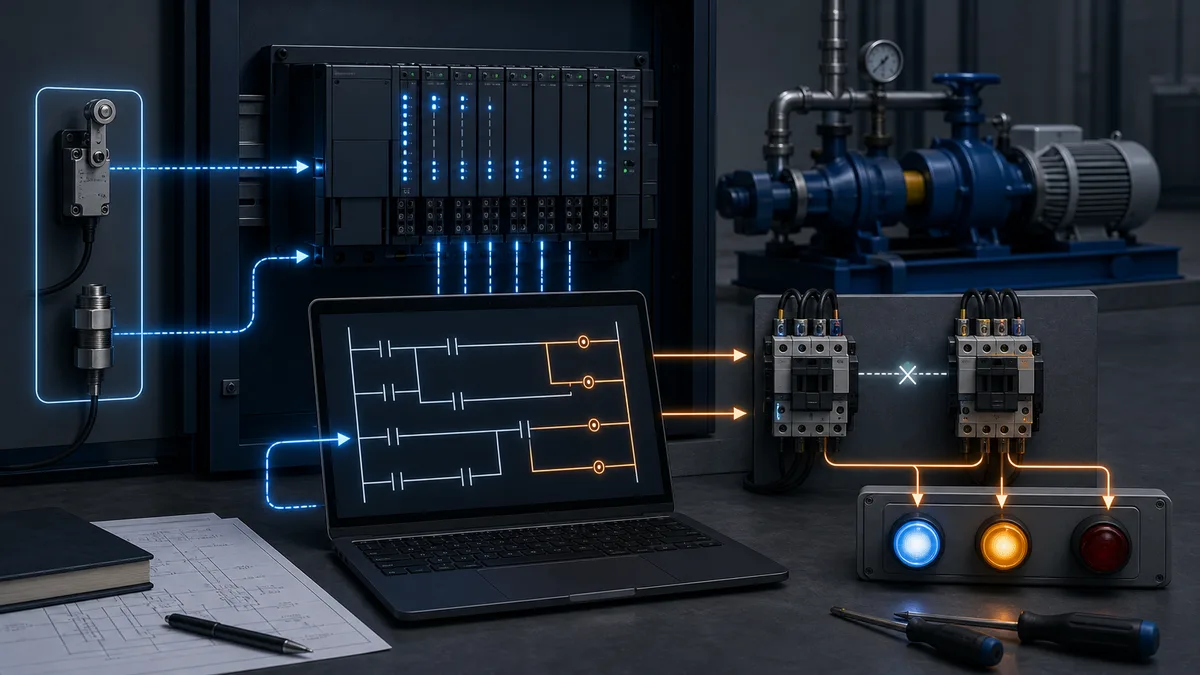
PLC interlock answer map
An interlock expresses a required relationship between equipment or process states. It can prevent a command from being accepted, remove an active command, hold a sequence, select an alternate state, or initiate a defined protective response. That definition is intentionally broader than “a normally closed contact in a rung.” The rung is an implementation; the engineered behavior is the requirement.
Use the short answers below to choose the right section before copying any example.
| If you need to answer… | Start with… | Evidence you should leave behind |
|---|---|---|
| Why will this motor not start? | separate the request, permissives, interlocks and final command | individual reason bits plus the final command owner |
| Why did running equipment stop? | first-out and cause-versus-consequence timing | captured first cause, event time and later cascade states |
| Can forward and reverse energize together? | command arbitration plus electrical and mechanical layers | mutual-exclusion truth table and contactor feedback test |
| Can a guard switch be handled in normal ladder? | functional-safety boundary | risk assessment, safety requirements, architecture and validation record |
| Should the condition latch? | consequence, restart and reset requirements | state transition and power-cycle acceptance cases |
| Can maintenance bypass it? | controlled bypass lifecycle | authorization, scope, indication, expiry, audit and restoration evidence |
| Is the PLC bit the same as field state? | command-to-feedback chain | output point status, auxiliary feedback and process response |
| Does scan order matter? | task model and single-writer ownership | execution order, cross-reference and final-write test |
The central design question is not “NO or NC contact?” It is: what condition is credible, what action owns the equipment, what must dominate, what feedback proves the action, and what evidence demonstrates the behavior under failure?
How to read a PLC interlock diagram
A PLC interlock diagram should let a reviewer trace one proposed action from the physical condition to the final equipment response. Start at the left with field evidence and signal quality; follow the mapped PLC condition through state/time qualification and command arbitration; then continue past the output bit to the electrical device, actuator feedback and process result. A ladder screenshot that ends at a coil shows logic state, not the complete interlock.
Different diagrams answer different questions. Keep their identities visible instead of treating every drawing as “the PLC diagram.”
| Diagram or artifact | Best question it answers | Evidence it should expose | What it does not prove alone |
|---|---|---|---|
| P&ID or machine schematic | where is the sensed condition and what process/equipment relationship matters? | instrument/equipment identity, flow or mechanical relationship | PLC address, execution order or electrical terminal state |
| cause-and-effect matrix | which condition acts in which state, with what delay/latch/reset? | start block, running action, alarm, trip, first-out and test case | physical wiring or implemented scan behavior |
| PLC ladder/FBD diagram | how are requests, conditions, timers, state and commands evaluated? | named raw/qualified conditions, dominance, one writer and diagnostics | that input/output wiring or field feedback is healthy |
| electrical wiring diagram | how do devices, commons, contacts, coils and protection connect? | terminal, conductor, voltage/reference and device contact ownership | that software uses the mapped signal correctly |
| state/sequence diagram | when is each condition relevant and what transition follows? | states, guards, timeouts, recovery and rejected transitions | exact Boolean instruction order unless linked to code |
| timing/event diagram | which condition changed first and whether delays are satisfied? | common time base, raw/qualified signal, command and feedback | causal root without corroborating physical evidence |
For a basic motor, a readable ladder-logic interlock can be represented as three reviewable layers:
StartEligible := StartRequest AND ModePermits
                 AND AllStartPermissives
                 AND NOT TripLatched;

RunRequest := (RunRequest OR StartEligible)
              AND NOT StopRequest
              AND AllRunningInterlocks
              AND NOT TripLatched;

MotorCommand := RunRequest AND OutputAvailable;
RunningProved := MotorCommand AND MotorFeedback;
That compact diagram still needs a feedback pickup timeout, a first-out cause, controlled reset and an explicit output owner. Keep individual conditions visible. Reducing ten requirements to one unlabeled Interlock_OK contact makes the rung shorter and the outage longer.
Read a fault from both directions. From left to right, ask where the expected true/false transition first disappears. From right to left, start at the physical symptom and prove feedback, actuator, field output, PLC output image, final command, trip state, qualified conditions and raw source. The first mismatch determines the next controlled test; it does not automatically prove the failed component.
Define permissive, interlock, trip, alarm and bypass separately
Industrial sites do not use these nouns consistently. Some call every blocking condition an interlock; others reserve “permissive” for start conditions and “interlock” for conditions that stop running equipment. Do not resolve a terminology dispute by assumption. Put exact behavior in the control narrative, cause-and-effect matrix and acceptance test.
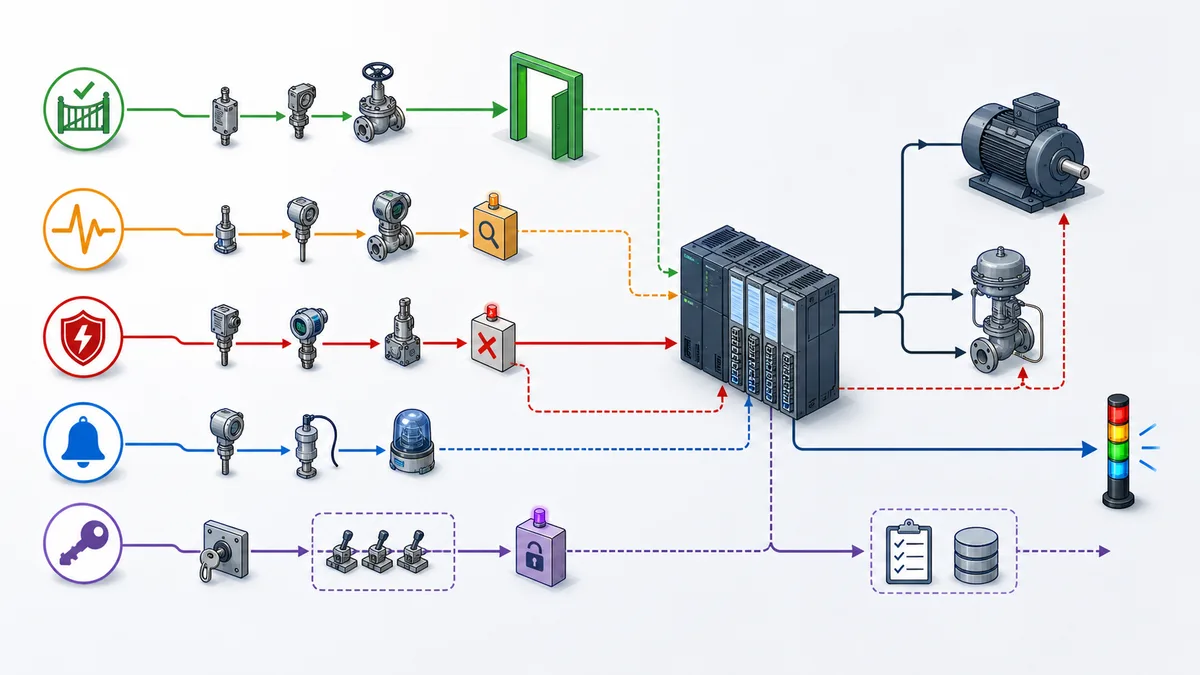
| Term | Primary purpose | Typical action | Memory behavior | Operator surface |
|---|---|---|---|---|
| permissive | decide whether a command or transition may begin | reject or hold the request | often live, sometimes captures denied reason | “start blocked” with individual reasons |
| running interlock | supervise a condition while equipment is commanded or in a defined state | remove command, hold state or initiate alternate action | live or latched according to consequence | active cause, first out, time and reset status |
| trip | execute a protective response | force a defined equipment/process state | commonly latched until cause and reset rules are met | trip cause, response and reset readiness |
| alarm | request timely operator awareness or action | notify; does not by itself define control action | acknowledged/returned-to-normal lifecycle | priority, message, response and timestamp |
| inhibit | deliberately prevent an alarm, command or function from participating | suppress the configured behavior | controlled configuration or temporary state | conspicuous active indication and audit |
| bypass/override | temporarily substitute for or exclude a condition under an approved procedure | allows limited operation under stated constraints | time/task bounded and audited | owner, reason, start, expiry and remaining protection |
| feedback fault | declare that requested action was not proven | alarm, stop, retry or degrade as specified | usually retained for diagnosis | command-versus-feedback discrepancy |
An alarm acknowledgement should not silently reset a trip. A reset should not silently issue a start. Returning a guard or process condition to normal should not cause unexpected restart. These are different state transitions even when a vendor faceplate presents them near one another.
Classify the consequence before writing logic
Start with the hazard and process consequence, not the controller language. Basic control can protect product, availability and ordinary equipment operation. A safety-related control function is part of a risk-reduction claim and needs a competent, application-specific lifecycle.
| Question | Basic process or equipment interlock | Safety-related function |
|---|---|---|
| primary consequence | off-spec product, nuisance shutdown, loss of production, ordinary equipment stress | injury or unacceptable machinery/process risk identified by assessment |
| design basis | approved control narrative, equipment data, operating philosophy | safety requirements specification plus applicable machinery/process standards |
| implementation | standard PLC, relays, mechanical/electrical layers as required | assessed safety architecture using suitable components and systematic measures |
| claimed integrity | no PL or SIL claim merely from using an interlock | required PL or SIL determined and verified by the applicable method |
| validation | FAT/SAT against the functional requirement | independent or appropriately separated functional-safety validation as required |
| change control | normal software/configuration management | controlled safety lifecycle, signatures/records and revalidation impact assessment |
For machinery, ISO 14119:2024 covers principles for interlocking devices associated with guards; processing their signals is connected to standards including ISO 13849-1 and IEC 62061. ISO 13849-1:2023 provides a design methodology for safety-related parts of control systems. IEC 62061 is the machinery-sector functional-safety standard and had amendments through 2026 at this review date. Process-industry safety instrumented systems have a different lifecycle under IEC 61511-1. The applicable Type-C machinery standard, jurisdiction, owner specification and current editions still control the real project.
A standard PLC stop condition is not upgraded into a safety function by calling its tag Safety_Interlock. Conversely, a basic-control interlock can still be operationally important and deserves deterministic design, diagnostics and testing.
The six-part interlock contract
Write one small contract for every interlock before writing code.
| Contract field | Pump example | Why it matters |
|---|---|---|
| monitored condition | suction pressure valid and above approved low limit | names the evidence and its quality requirement |
| evaluation window | required before start; supervised after a 2 s running grace; 1 s validated low delay | separates start, transition and running behavior |
| commanded action | reject start or remove pump run request | identifies what the logic actually owns |
| proof of action | starter auxiliary drops within 500 ms; flow decays as expected | distinguishes PLC command from physical outcome |
| memory/reset | latch first-out trip; reset only when pressure healthy and pump stopped | prevents a fleeting cause from disappearing |
| diagnostic/test | show raw value, quality, threshold, timer, first out and case ID | turns a shutdown into explainable evidence |
Add mode and authority. A local hardwired station, manual HMI command, automatic sequence, maintenance jog and remote supervisory request must not become five independent writers to the same output. They should feed one command arbiter, followed by dominating interlock logic and one final output writer.
Worked example 1: forward–reverse motor interlock
A reversing starter swaps two phases to reverse motor direction. Closing both contactors is an invalid and potentially destructive condition. The design therefore uses independent layers rather than trusting a single software contact.
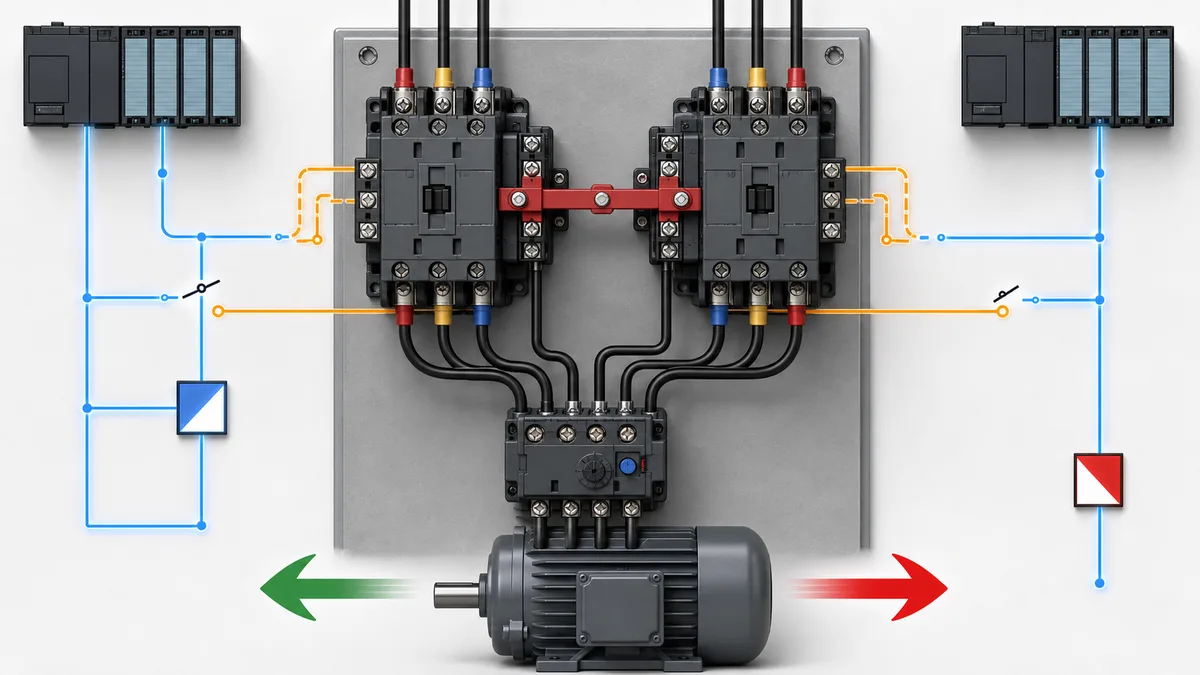
Requirement and truth table
Assume ForwardRequest and ReverseRequest are already mode-authorized requests. ForwardFeedback and ReverseFeedback come from contactor auxiliary feedback selected for the diagnostic requirement. The exact circuit, contact selection, ratings and transition delay come from the starter manufacturer and electrical design.
| Forward request | Reverse request | Existing feedback | Required result |
|---|---|---|---|
| 0 | 0 | neither | both commands off |
| 1 | 0 | neither | forward may energize if common conditions are healthy |
| 0 | 1 | neither | reverse may energize if common conditions are healthy |
| 1 | 1 | either/neither | reject both; raise conflicting-request diagnostic |
| 1 | 0 | reverse still proven | hold both off until reverse drops and transition delay completes |
| 0 | 1 | forward still proven | hold both off until forward drops and transition delay completes |
| any | any | both proven | remove commands; declare impossible-feedback fault; investigate wiring/device state |
One portable Structured Text expression of command arbitration is:
Conflict := ForwardRequest AND ReverseRequest;
BothFeedback := ForwardFeedback AND ReverseFeedback;

ForwardEligible := CommonPermissive
                   AND NOT Conflict
                   AND NOT ReverseFeedback
                   AND DirectionChangeDelayDone;

ReverseEligible := CommonPermissive
                   AND NOT Conflict
                   AND NOT ForwardFeedback
                   AND DirectionChangeDelayDone;

ForwardCommand := ForwardRequest AND ForwardEligible AND NOT BothFeedback;
ReverseCommand := ReverseRequest AND ReverseEligible AND NOT BothFeedback;
This fragment is deliberately incomplete: it does not define a motor starter for a real voltage, motor, load or jurisdiction. It demonstrates single-owner mutual exclusion. A real design also defines stop dominance, overload behavior, contactor pickup/dropout monitoring, minimum reversal interval, restart policy, output-module failure response and the electrical/mechanical interlock specified for the selected assembly. Siemens documentation for 3RA13 reversing contactor assemblies describes assemblies with mechanical and electrical interlocking and product-specific dead-time considerations.
Test the layers independently
| Test | Safe stimulus or simulation | Expected evidence |
|---|---|---|
| software conflict | assert both authorized requests on the simulation bench | both software commands false; conflict reason true |
| opposite feedback | hold reverse feedback true, request forward | forward remains false; opposite-feedback reason visible |
| output discrepancy | command forward but withhold forward feedback | pickup timer expires; command response follows requirement; first-out retained |
| electrical interlock | under approved de-energized test procedure, verify cross-contact circuit continuity/state | circuit record matches controlled drawing and device state |
| mechanical interlock | follow manufacturer inspection/test instruction | physical mechanism prevents simultaneous closure |
| power restoration | cycle controller/control power in every relevant mode | no unexpected direction start; stored faults behave as specified |
Worked example 2: pump low-suction interlock with first out
The pump example exposes a harder diagnostic problem. A low-suction event can cause low discharge flow, loss of motor load, valve-state changes and several alarms. If the program simply ORs everything into PumpTrip, the initiating condition is buried by the cascade.
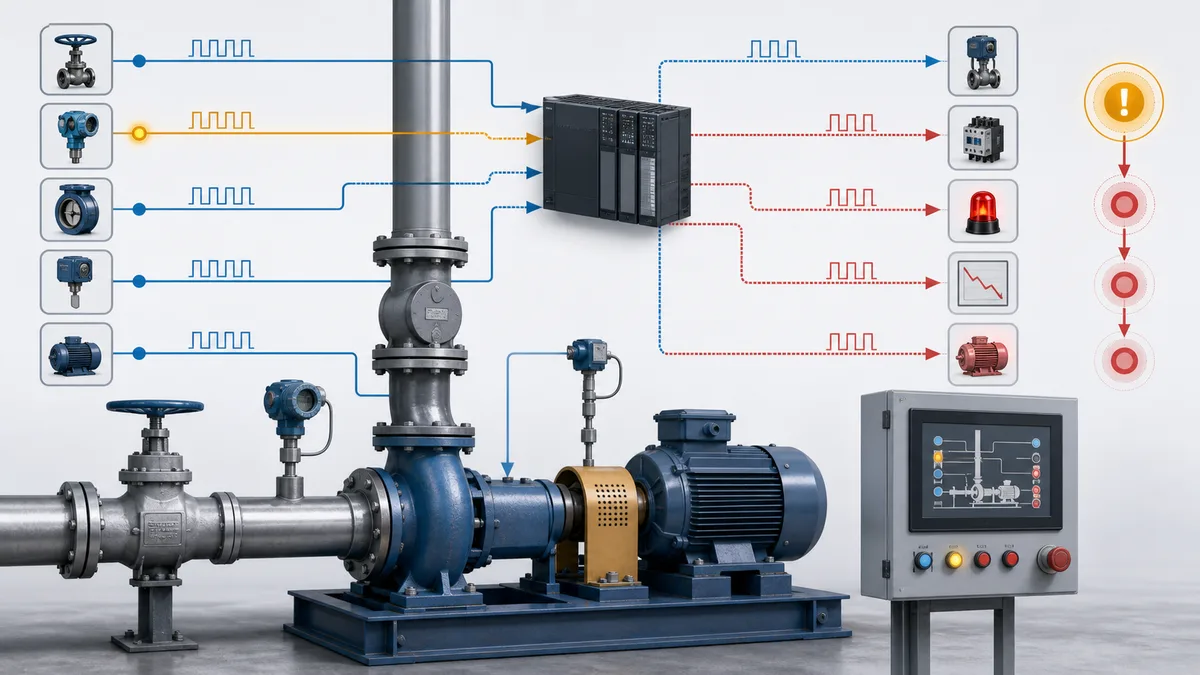
Separate pre-start, transition and running conditions
| Condition | Before start | Starting grace | Running steady state | Loss response |
|---|---|---|---|---|
| suction valve proven open | permissive required | remains required | running interlock | stop and latch per requirement |
| suction pressure signal quality | valid required | valid required | valid required | fail to defined state; distinguish bad quality from low value |
| suction pressure above low limit | permissive required | delay may be masked only if justified by process | delayed running trip | first-out low suction |
| starter ready | permissive required | supervise pickup | supervise availability | command off/fault as specified |
| run feedback | not expected | must arrive before pickup timeout | must remain credible | feedback discrepancy action |
| discharge flow | may be zero | allow process-proven establishment time | must remain above threshold where required | low-flow response after validated delay |
The word “delay” is not permission to hide a bad sensor. Each timer needs an engineering reason, time basis, boundary behavior and reset behavior. A startup grace should be active only in the intended transition and should not mask loss of signal quality or a condition that must dominate immediately.
A simple first-out model stores the first qualified cause while the trip memory is clear:
LowSuctionQualified := RunActive
                       AND SuctionPressureValid
                       AND LowSuctionTimer.Q;

FeedbackTimeout := PumpCommand AND PickupTimer.Q AND NOT RunFeedback;

IF NOT TripLatched THEN
    IF NOT SuctionPressureValid THEN
        FirstOutCode := 10;     // bad or unavailable pressure evidence
    ELSIF LowSuctionQualified THEN
        FirstOutCode := 20;     // validated low suction
    ELSIF FeedbackTimeout THEN
        FirstOutCode := 30;     // command not physically proven
    END_IF;
END_IF;

TripRequest := (FirstOutCode <> 0);

IF ResetAccepted THEN
    FirstOutCode := 0;
END_IF;
The numeric codes should be named constants or an enumeration in a real project. More importantly, the evaluation order is a declared contract. When two causes become qualified in the same task execution, this example gives priority to bad pressure evidence. If that is not the required policy, change and test it. For high-resolution sequence-of-events systems, source timestamps and device time synchronization may be more authoritative than PLC evaluation order.
Rockwell’s current PlantPAx Process Control Instructions reference exposes separate permissive and interlock object integration in process device objects. The older dedicated P_Perm reference also points to an interlock object with first-out and bypass behavior. These vendor objects are useful references, not universal semantics; pin the library/version and verify every configuration used in the project.
Worked example 3: a guard-door interlock is a safety lifecycle
An interlocked guard can stop or prevent hazardous machine motion when the guard is opened. OSHA’s machine-guarding guidance describes interlocked guards that shut off or disengage power, stop moving parts and prevent starting while open, and it states that replacing the guard should not automatically restart the machine. That behavior is only one part of a real safety design.
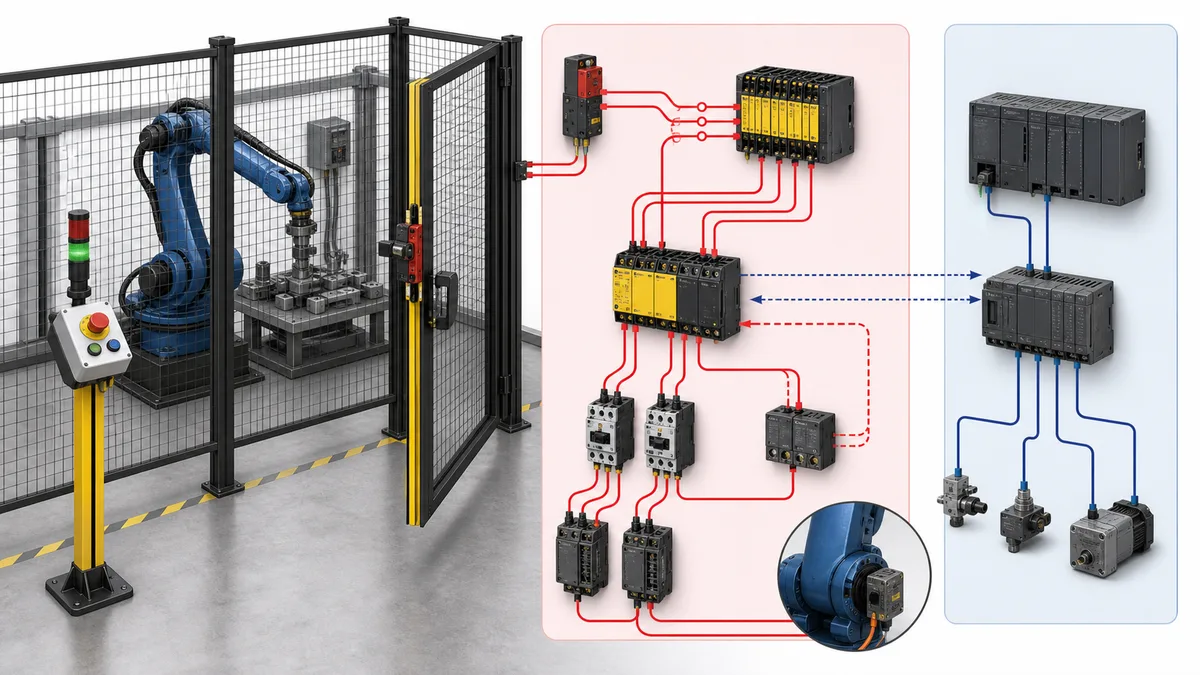
| Safety-function concern | Question the design record must answer |
|---|---|
| hazard and safe state | which hazardous motion or energy is controlled, and what state reduces risk? |
| access and stopping | can a person reach the hazard before it reaches the safe condition? |
| guard device | which interlocking/guard-locking principle is selected, and how is defeat minimized? |
| input architecture | how are channels, discrepancy, shorts, device faults and connection status handled? |
| logic solver | which certified/suitable platform, task, instruction and signature/version apply? |
| final elements | how are contactors, STO or other outputs monitored and de-energized? |
| restart | where is reset located, what area can the operator observe, and why does reset not restart? |
| validation | who tests every requirement, fault case, timing assumption and achieved integrity? |
Rockwell’s 2025 GuardLogix Safety Application Instruction Set describes certified safety instructions and explicitly ties use to trained, experienced safety practitioners. Its GuardLogix safety reference shows that channel and I/O status must be considered before using safety data as an interlock or energizing a safety output. Those details illustrate why copying a normal XIC/OTE rung is not a safety design.
An interlocked guard is also not lockout/tagout. In the United States, 29 CFR 1910.147 addresses control of hazardous energy during covered servicing and maintenance, including isolation and verification. OSHA has specifically explained that an interlock can be effective guarding without replacing required energy-control procedures for covered servicing. Always apply the current jurisdiction and site procedure.
Eight reusable PLC interlock programming patterns
1. Single command owner with stop dominance
Collect mode-specific requests, arbitrate them once, apply dominating stop/interlock conditions, and write the output once. Multiple OTE/coils or assignments to the same command make the result depend on execution order and hide ownership.
| Layer | Example tags | Rule |
|---|---|---|
| requests | AutoRunReq, ManualRunReq, LocalRunReq |
requests do not write hardware outputs |
| authority | ModeAuto, ModeManual, local-selector state |
exactly one authority path is valid, or conflict is rejected |
| eligibility | AllPermissivesOK, transition constraints |
names why a start may be accepted |
| dominance | StopReq, TripLatched, bad-quality response |
required stop state wins over run demand |
| command | MotorCommand |
one owner produces the final basic-control command |
| output | physical output mapping | one controlled mapping plus channel/module diagnostics |
2. Individual reason bits plus aggregate
An aggregate is convenient for control; individual reasons are necessary for diagnosis. Calculate both from one source of truth.
StartBlock.LowSuction := NOT SuctionOK;
StartBlock.ValveNotOpen := NOT SuctionValveOpen;
StartBlock.StarterNotReady := NOT StarterReady;
StartBlock.ModeConflict := ModeConflict;

AnyStartBlock := StartBlock.LowSuction
                 OR StartBlock.ValveNotOpen
                 OR StartBlock.StarterNotReady
                 OR StartBlock.ModeConflict;
3. State-qualified supervision
Do not evaluate every condition in every state. Run feedback is expected only after a command and pickup window. Zero flow may be normal before a pump starts. A valve limit pair may be intermediate while moving but contradictory when both are on. Encode the state and time window rather than adding undocumented delays until nuisance trips disappear.
4. Feedback discrepancy timers
Supervise both failure to reach and failure to leave a state. A contactor can fail to pick up after a run command or fail to drop after the command is removed.
| Command | Feedback | Time context | Interpretation |
|---|---|---|---|
| 0 | 0 | steady | expected off state |
| 1 | 0 | within pickup allowance | transition, not yet faulted |
| 1 | 0 | after pickup allowance | failed-to-start discrepancy |
| 1 | 1 | steady | commanded state proven at selected feedback point |
| 0 | 1 | within dropout allowance | transition, not yet faulted |
| 0 | 1 | after dropout allowance | failed-to-stop/stuck-feedback discrepancy |
5. First-out capture with cascade context
Capture the earliest qualifying cause, but retain the subsequent event trail. First-out without later context can miss a compound event; a flat alarm list without first-out can hide sequence. Preserve both.
6. Explicit reset acceptance
Build ResetAccepted from conditions, not from the reset pushbutton alone. The edge of an authorized reset request may clear memory only while the equipment is in the required state, all reset prerequisites are healthy and no higher-priority cause remains. Decide how a held reset behaves. Prevent reset from acting as a start command.
7. Bad-quality and communications-loss states
A Boolean value without quality can be misleading. For networked I/O and safety platforms, include connection/channel status according to the vendor manual. For process measurements, distinguish low value from invalid measurement. The defined response may be stop, hold last only where justified, degrade, transfer to backup or inhibit a start; it is not automatically the same for every signal.
8. Controlled bypass as a state machine
A bypass is not a spare OR contact around the interlock. Treat it as a lifecycle with Requested, Approved, Active, Expiring, Removed and Restoration-Tested states, or the equivalent site procedure. Safety-function muting/override requires its own applicable design and is outside a generic basic-control pattern.
Scan order, task order and the “stale output” myth
The statement “output coils only update at the end of the scan, so reading an output bit is always one scan stale” is not portable. Many PLCs separate the program data or output image from the physical terminal update, and program assignments may be visible to later logic before the physical output changes. Task priorities, routines, process-image partitions, immediate access, distributed I/O update rates and vendor semantics matter.
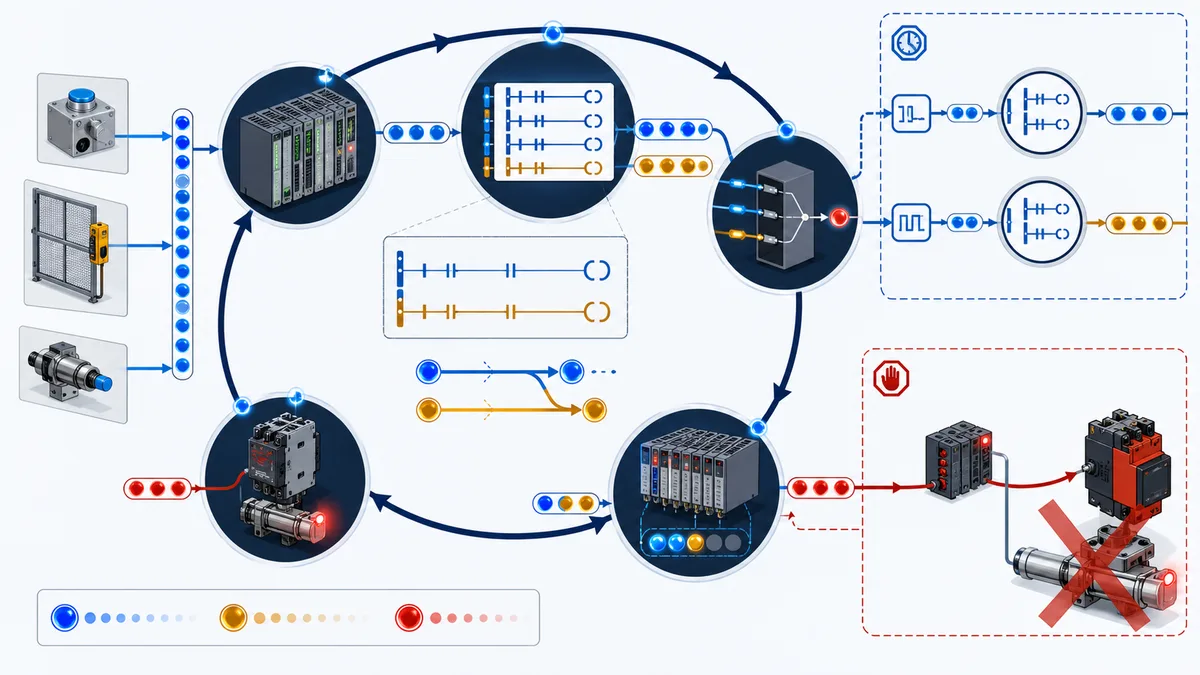
Siemens’ S7-200 SMART system manual documents a cycle that reads digital inputs into the process image, executes logic and writes the process-image outputs to digital outputs. Other platforms and access modes differ. IEC 61131-3:2025 defines language syntax and semantics; it does not make every vendor’s I/O refresh and scheduling behavior identical.
Use these review questions:
| Review question | Failure it catches |
|---|---|
| Where is this tag written? | duplicate coils/assignments and hidden ownership |
| Which task/routine writes last, and can a higher-priority task pre-empt it? | nondeterministic or unexpected final command |
| Is the contact reading raw input, mapped input, internal state, output image or feedback? | false confidence about physical state |
| When does the physical module refresh relative to logic? | timing assumptions that fail on real I/O |
| What happens on connection loss or inhibited module? | apparently healthy Boolean with invalid evidence |
| Is forcing possible, authorized and indicated? | test state persisting into operation |
For interlocks, prefer named internal requests and feedbacks over treating the output address as both command and proof. Cross-reference every writer. Then test the real target CPU, task configuration, I/O modules and network behavior.
Reset, restart and power-cycle behavior
Restart behavior is part of the interlock requirement, not an afterthought. Build a state table for cold start, warm restart, controller fault recovery, communications restoration and return of the field condition.
| Event | Unsafe ambiguity | Required design question |
|---|---|---|
| interlock condition returns healthy | equipment might restart from a retained request | is a new start edge required? |
| reset pressed while cause active | memory may clear for one scan and re-latch | should reset be rejected and diagnosed? |
| reset held | automatic repeated reset attempts | is rising-edge acceptance required? |
| PLC power cycle | retained command/trip data may produce a surprising state | which tags retain, initialize or reconcile with field feedback? |
| remote I/O reconnect | stale or default input values may be consumed | how are connection and channel status qualified? |
| HMI reconnect | old button/request data may be replayed or remain set | is command handshake/sequence validation required? |
| safety reset | reset might be mistaken for restart permission | how is manual reset separated from machine start? |
ISO 14118:2017 addresses prevention of unexpected start-up across energy sources. OSHA’s interlocked-guard guidance likewise says guard replacement should not automatically restart the machine. Apply the applicable standard and risk assessment rather than turning this into a universal “always latch” coding rule.
Engineer bypasses and overrides as temporary risk states
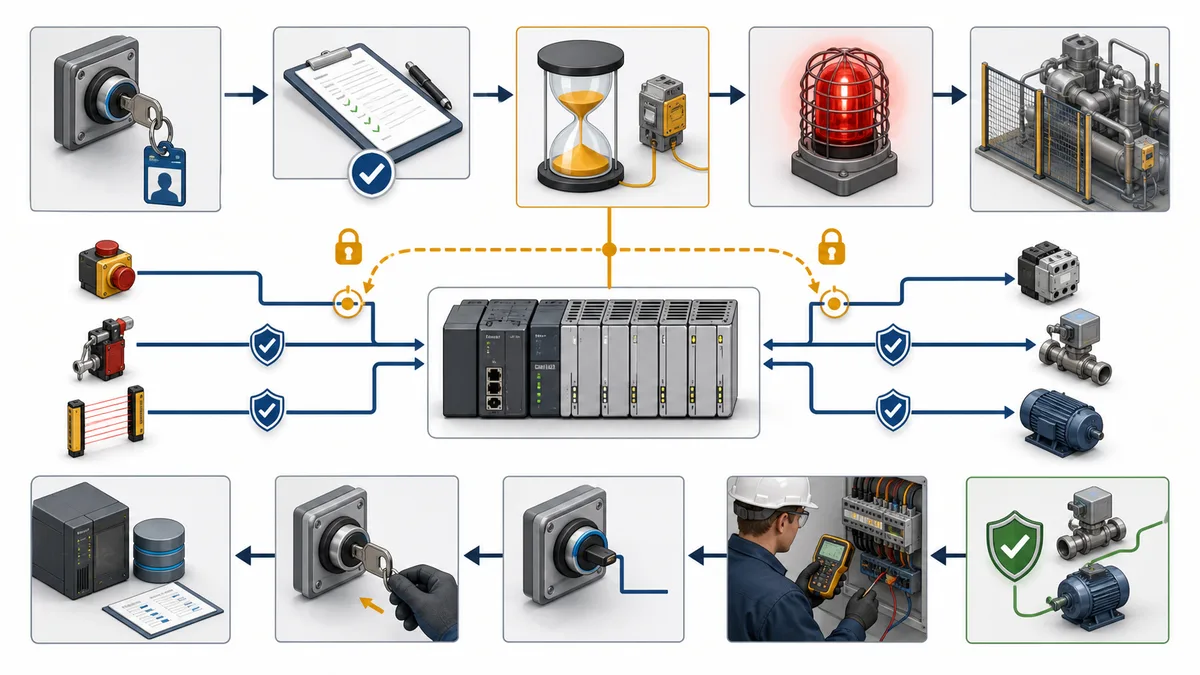
| Required control | Weak implementation | Stronger evidence surface |
|---|---|---|
| authorization | any HMI user can toggle one bit | named role plus independent approval where required |
| scope | global “bypass all” | one named condition or approved group tied to a work order |
| duration | retained indefinitely | explicit expiry/time-to-live or task-completion condition |
| visibility | small maintenance-screen icon | persistent equipment and overview indication; active alarm/event as designed |
| remaining protection | undocumented | approved list of independent controls and restricted operating envelope |
| audit | current Boolean only | who, why, when, source, expiry, removal and related record |
| handover | verbal only | controlled shift/crew handover and reauthorization requirement |
| restoration | toggle bit off | prove original input, interlock action, diagnostics and normal operating mode |
Never present a software bypass as permission to defeat a guard, enter a hazard zone or avoid lockout/tagout. OSHA’s control-of-hazardous-energy standard requires documented energy-control measures for covered servicing and maintenance. Local law and site procedures may be more stringent.
Troubleshoot the evidence chain instead of bypassing the symptom
When an interlock will not clear, walk from intent to physics. Stop when the evidence first diverges from the requirement.
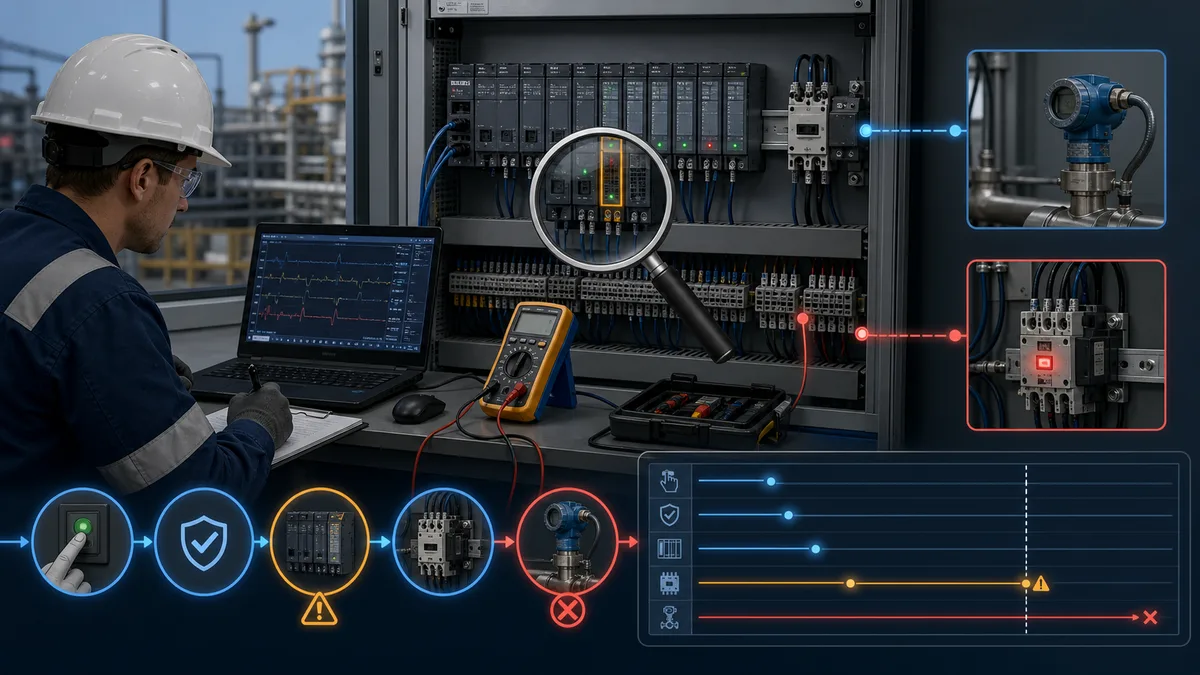
| Boundary | Inspect | A useful observation proves | It does not prove |
|---|---|---|---|
| request | HMI/local/sequence request plus sequence or toggle | an intent arrived and is current | PLC accepted or executed it |
| authority | mode, ownership, remote/local and conflicts | the source is allowed to request | process is safe/ready |
| conditions | each permissive/interlock raw value, quality and timer | why eligibility is true or false | field device is physically correct without independent evidence |
| aggregate | start-ready/trip result and first-out | logic evaluation outcome | final command has one writer |
| command | cross-reference and online command tag | intended software command state | output terminal changed |
| electrical output | module/channel status and approved measurement | output channel/circuit response at measured point | actuator moved |
| equipment feedback | auxiliary contact, drive status, position switch | selected device state is proven | process effect occurred |
| process response | flow, pressure, level, speed or downstream sensor | physical outcome followed | root cause if measurement is bad |
A practical diagnostic order
- Read the control narrative and active bypass/force record before editing anything.
- Confirm the exact command source, mode and ownership.
- Expand the aggregate into individual reasons; capture raw value, quality, limit and timer state.
- Check first-out and event order, including controller, HMI and device time bases.
- Cross-reference every writer to the final command and output mapping.
- Compare command, module/channel status, electrical energization, equipment feedback and process response.
- Test only under the approved procedure and safe state; remove forces/simulations and record restoration.
- Fix the failed boundary, then repeat the complete normal and fault case—not only the symptom that originally failed.
Build an interlock test matrix before commissioning
Download the PLC interlock acceptance matrix and replace its example values with the approved project requirements. The matrix is an editorial template, not a commissioning authorization or safety-validation record.
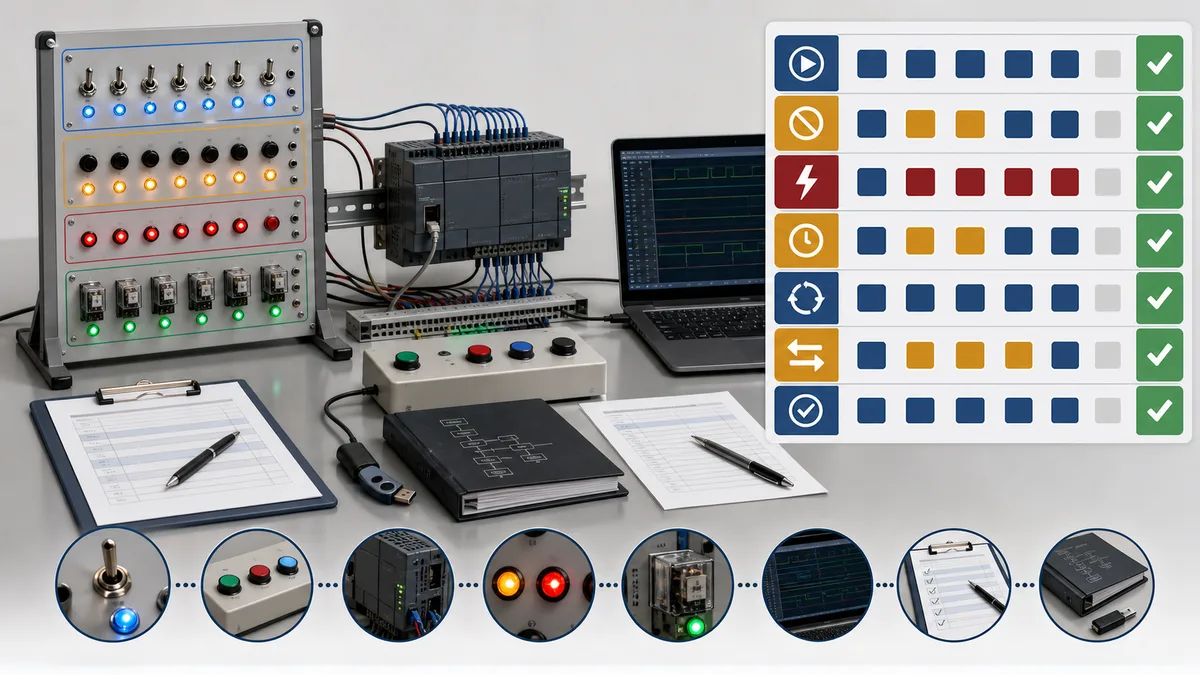
| Case | Initial state | Stimulus | Expected command | Expected feedback/evidence |
|---|---|---|---|---|
| INT-001 healthy start | stopped, all required conditions healthy | issue one authorized start | command turns on once | pickup feedback arrives within approved time; no trip |
| INT-002 blocked start | stopped, one named permissive false | issue start | command remains off | exact blocked reason and request disposition visible |
| INT-003 active trip | running and stable | make one running interlock false | command follows defined stop response | first-out captures cause; feedback drops in tolerance |
| INT-004 cause chatter | running | toggle condition around threshold | result follows validated filter/delay policy | no undocumented chatter or hidden excessive delay |
| INT-005 bad quality | running or starting as specified | invalidate signal/channel/connection | defined fail/degrade response | bad quality distinct from a valid low/high value |
| INT-006 failed pickup | stopped and eligible | command on; withhold feedback | command/action follows timeout requirement | failed-to-start reason stored |
| INT-007 failed dropout | running | remove command; hold feedback | defined fault/escalation | failed-to-stop evidence retained |
| INT-008 reset denied | trip latched, cause still active | request reset | trip remains latched | reset-rejected reason shown |
| INT-009 restore and reset | cause healthy, equipment in reset state | valid reset edge | memory clears only | no automatic restart unless explicitly required and validated |
| INT-010 power cycle | run/trip/bypass states prepared per case | cycle relevant power | initialized/retained state matches design | no unexpected energization; version and state recorded |
| INT-011 bypass expiry | approved test bypass active | reach time/task boundary | bypass leaves or escalates per procedure | event, warning and restoration requirement persist |
| INT-012 competing writers | one valid request plus injected conflicting path | execute all relevant tasks | final owner remains deterministic | cross-reference and trace show no hidden last-write behavior |
Every test record should include requirement ID, controlled software and configuration versions, target CPU/I/O identity, initial state, stimulus method, expected result and tolerance, actual result, trace/screenshot or measurement reference, deviation, tester, witness and restoration status.
Interlock design review checklist
| Review surface | Pass question |
|---|---|
| terminology | are permissive, interlock, trip, alarm, inhibit and bypass behaviors explicitly defined? |
| consequence | is each condition classified through the applicable process and safety lifecycle? |
| ownership | is there one final command/output writer with documented task order? |
| signal meaning | are healthy value, bad quality, broken connection and contradictory states defined? |
| time | do delay, grace, pickup, dropout and expiry timers have requirements and boundary tests? |
| diagnostics | can an operator see individual reasons, first out, time, raw evidence and reset readiness? |
| feedback | is commanded state separated from electrical, equipment and process proof? |
| memory | are latch, reset, restart, retention and power-cycle behaviors explicit? |
| bypass | are authorization, scope, duration, visibility, audit and restoration controlled? |
| safety | are safety functions kept in the applicable assessed architecture and validation lifecycle? |
| cybersecurity | can only authorized sources change modes, setpoints, reset or bypass, with suitable audit? |
| acceptance | does the matrix cover normal, blocked, fault, contradictory, timeout, restart and restoration cases? |
What simulation can and cannot prove
Simulation can prove Boolean truth tables, state ownership, timer boundaries, first-out priority, reset acceptance, mode arbitration, retained-state assumptions and diagnostic presentation. It is especially good at repeating cases that are awkward to create consistently in a live plant.
Simulation does not establish the selected guard switch’s installation, contactor ratings, mechanical interlock, field wiring, stopping time, safety distance, achieved PL/SIL, I/O fault reaction, firmware behavior, network timing, environmental suitability or actual safe state. Translate the pattern into the approved vendor environment, then complete hardware-in-the-loop, FAT, SAT and functional-safety validation required for the project.
Sources, edition scope and limitations
This guide was reviewed on August 29, 2026. It distinguishes basic control from functional safety and uses vendor examples only within their documented product context. Standards are often paywalled and can be amended; confirm the current edition, applicable Type-C standard, jurisdiction and owner requirements before design or validation.
Primary and first-party sources:
- IEC 61131-3:2025 — programmable-controller languages
- ISO 14119:2024 — interlocking devices associated with guards
- ISO 13849-1:2023 — safety-related parts of control systems
- IEC 62061:2021 and amendments through 2026 — machinery functional safety
- ISO 14118:2017 — prevention of unexpected start-up
- IEC 61511-1:2016/AMD1:2017 — process-industry safety instrumented systems
- OSHA 29 CFR 1910.212 — general machine guarding
- OSHA machine-guarding guidance — interlocked guards
- OSHA 29 CFR 1910.147 — control of hazardous energy
- OSHA interpretation — interlock requirements and LOTO boundary
- Rockwell PlantPAx Process Control Instructions, PROCES-RM215C-EN-P
- Rockwell Permissives with Bypass reference, SYSLIB-RM007
- Rockwell GuardLogix Safety Application Instruction Set, 1756-RM095
- Rockwell GuardLogix 5580 Safety Reference, 1756-RM012
- Siemens S7-200 SMART system manual — scan and process-image behavior
- Siemens switching-device reference — 3RA13 reversing assemblies
- Schneider Electric TeSys motor-function status and interlock behavior
- PLCopen Coding Guidelines, version 1.0
- NIST SP 800-82 Rev. 3 — operational-technology security
PLC interlock frequently asked questions
What is an interlock in PLC programming?
A PLC interlock is a defined condition that inhibits a command, removes a command, or holds equipment in a specified state when the required operating relationship is not satisfied. A useful interlock definition states the monitored condition, when it is evaluated, the required action, whether it latches, how it resets, what the operator sees, and how the result will be tested. The word alone does not establish a safety function or a risk-reduction level.
What is the difference between a permissive and an interlock?
A permissive is normally checked before a start or transition is accepted; a running interlock is normally evaluated while the command or process state is active and can remove that command or force a defined response. Plants use these labels differently, so the control narrative and cause-and-effect matrix should define exact behavior. In both cases, expose the individual reason, not only one opaque all-conditions-OK Boolean.
What is the difference between an interlock, a trip and an alarm?
An interlock is a logical relationship that blocks or changes operation. A trip is an automatic protective action, often latched, that moves equipment or process toward a defined state. An alarm is an operator notification for a condition that requires awareness or response. One field condition can participate in all three, but the action, acknowledgement and reset semantics should remain separate and testable.
Can a normal PLC program implement a safety interlock?
Ordinary PLC logic may provide useful basic control, diagnostics and an additional layer, but it must not be called a safety function merely because it stops equipment. A machinery safety function requires risk assessment, an appropriate architecture, suitable components, systematic measures, verification and validation under standards such as ISO 13849-1 or IEC 62061. Use the machine-specific standard and qualified functional-safety process for the actual application.
Should PLC interlocks be normally closed or fail safe?
There is no universal instruction to make every software condition normally closed. The complete input circuit, device behavior, diagnostics, de-energized state, loss-of-power response and process consequence determine the architecture. For each signal, document what Boolean value means healthy, what a broken wire or lost connection produces, whether channel status is valid, and which state the controlled equipment must reach. Safety circuits require their own assessed design.
Why should interlock logic record first out?
First-out logic captures the earliest qualifying cause in an event sequence before later cascade conditions obscure it. For example, low suction pressure may stop a pump; loss of flow and motor feedback then follow. If every later condition is shown equally, the operator may chase consequences. First-out must use a clear evaluation order, trustworthy timestamps or scan capture, and a reset policy that does not erase evidence prematurely.
How should a PLC interlock reset work?
Reset should clear stored diagnostic or trip state only after the initiating condition has returned to the defined healthy state, required feedback is credible, the reset source is authorized, and automatic restart is prevented where the requirement calls for a separate start. A reset is not an instruction to force the field device healthy. The acceptance test should cover reset while unhealthy, held reset, remote reset, power cycle and post-reset restart behavior.
How do you troubleshoot an interlock that will not clear?
Trace the evidence chain in order: requested command, mode and authority, individual permissives, individual running interlocks, aggregated result, final command owner, physical output, electrical energization, actuator feedback and process response. Confirm signal quality and timing before changing logic. Use the first-out record and event history where available, and never bypass a protective function merely to make the symptom disappear.
When is an interlock bypass acceptable?
Only an approved site procedure and risk assessment can determine whether a bypass is allowed. A robust basic-process bypass has named authorization, a specific reason and scope, independent remaining protection, visible active indication, event logging, a time or task limit, shift-handover control, and a restoration test. Safety-function muting, override or suspension follows the applicable safety design and operating procedure; a generic PLC bypass pattern is not sufficient.
What tests should every PLC interlock include?
At minimum, test healthy start, each blocked-start cause, each active-trip cause, contradictory or bad-quality inputs, feedback timeout, reset while the cause remains active, restoration and restart, power-cycle behavior, mode changes, communications loss where relevant, and any authorized bypass lifecycle. Record initial state, stimulus, expected command, expected feedback, timing tolerance, actual result, evidence reference, software version and witness.