SCADA Best Practices: Architecture, Alarms & Security
Apply SCADA engineering best practices across architecture, segmentation, redundancy, alarm management, HMI design, cybersecurity, testing, and lifecycle governance.
SCADA best practices span six disciplines: architecture (Purdue model and the ISA-112 lifecycle), network segmentation (IEC 62443 zones and conduits), redundancy and high availability, alarm management (ISA-18.2 and EEMUA 191), HMI design (ISA-101 high-performance principles), and cybersecurity (NIST SP 800-82, IEC 62443). Security is one chapter of the story, not the whole guide.
Implementing SCADA systems following industry best practices is essential for creating reliable, secure, and maintainable supervisory control and data acquisition systems that serve as the backbone of modern industrial operations. Properly designed SCADA systems improve operational efficiency, reduce downtime, enhance safety, and provide the critical visibility needed for effective process management and decision-making.
SCADA best practices encompass every aspect of system lifecycle from initial architecture design and network segmentation through programming standards, HMI interface design, alarming strategies, cybersecurity implementation, and long-term maintenance planning. Following established guidelines and industry standards ensures SCADA systems meet performance requirements while remaining scalable, secure, and supportable throughout their operational lifespan.
This comprehensive guide organizes practical checks around standards and guidance including ANSI/ISA-112.00.01-2025 (SCADA lifecycle), ISA-18.2 (alarm management), ISA/IEC 62443 (industrial cybersecurity), NIST SP 800-82 Revision 3 (OT security), and ISA-101 (HMI design). It is an editorial implementation aid, not a substitute for licensed standards, a hazard analysis or product-specific engineering manuals. New to SCADA? Start with our SCADA tutorial for beginners before diving into this guide.
The complexity of modern SCADA systems demands systematic approaches to architecture design, data management, security implementation, and operational support. By applying these best practices consistently, you can avoid common pitfalls, reduce project risks, and create SCADA systems that operators trust and management values.
Table of Contents
- Why SCADA Best Practices Matter
- SCADA Architecture: Purdue Model & the ISA-112 Lifecycle
- SCADA Design Standards You Should Know
- SCADA System Architecture Best Practices
- Network Segmentation (IEC 62443 Zones and Conduits)
- SCADA Network Design and Segmentation
- Tag and Point Naming Conventions
- Alarm Management (ISA-18.2 & EEMUA 191)
- Alarming Best Practices - ISA-18.2 Standards
- Trending and Historical Data Management
- HMI Design (ISA-101)
- HMI and Operator Interface Best Practices
- Database Design and Optimization
- Communication Protocol Selection
- Redundancy & High Availability
- Redundancy and High Availability Design
- SCADA Security Best Practices
- Performance Optimization Strategies
- Backup and Disaster Recovery Planning
- Documentation Standards and Requirements
- Testing and Commissioning Procedures
- Maintenance and Support Planning
- Integration with Enterprise Systems
- Common SCADA Mistakes to Avoid
- SCADA Best Practices Checklist
- SCADA Implementation Checklist
- Frequently Asked Questions
Why SCADA Best Practices Matter
SCADA best practices directly impact system reliability, operational efficiency, cybersecurity posture, and total cost of ownership throughout the system lifecycle. Organizations that implement SCADA systems following established best practices experience fewer outages, respond more effectively to operational challenges, and achieve better return on automation investments.
Business Impact of Proper SCADA Design
Well-designed SCADA can improve visibility, fault investigation, and operator response, but there is no universal downtime-reduction percentage. Establish a local baseline for availability, detection time, diagnosis time, recovery time, nuisance alarms, data gaps, and failed changes; then measure the effect of each architecture or workflow change against comparable operating periods.
Financial benefits extend beyond uptime improvements to include reduced engineering costs during system modifications, faster troubleshooting during failures, lower training requirements for new operators, and extended system lifespan through proper architecture and maintainability considerations.
Safety and Regulatory Compliance
SCADA design can help critical information reach operators reliably and clearly, but the SCADA layer does not by itself establish process safety or regulatory compliance. Safety functions, alarm-system responsibilities, operating procedures, proof tests, and independent protection layers must be defined by the applicable hazard analysis and engineering standards.
Applicable rules depend on the facility, jurisdiction, sector, data record, and system boundary. For example, NERC CIP has a defined North American bulk-electric-system scope, while FDA electronic-record requirements and API publications address different use cases. Record which requirements actually apply instead of treating a list of standards as a universal SCADA checklist.
Long-Term Maintainability
Industrial control assets can remain in service longer than their servers, operating systems, drivers, and vendor support windows. Define a lifecycle and obsolescence plan for every layer, with owners, supported-version evidence, spare and licence strategy, migration triggers, tested backups, and a funded replacement path. Consistent naming, versioned source, as-built documentation, modular logic, and recorded design decisions make later maintenance and migration materially safer.
SCADA Architecture: Purdue Model & the ISA-112 Lifecycle
Understanding how the Purdue Reference Model and the new ISA-112 standard frame SCADA architecture is essential before making any design decisions.

The Purdue Reference Model (Levels 0–4)
The Purdue Model — formally the Purdue Reference Model for Computer Integrated Manufacturing — organizes industrial automation into five hierarchical levels (0–4, sometimes extended to Level 5 for cloud/enterprise):
| Level | Name | Typical Components |
|---|---|---|
| 0 | Field / Process | Sensors, actuators, field instruments |
| 1 | Basic Control | PLCs, RTUs, DCS controllers |
| 2 | Area Supervisory Control | SCADA servers, HMI workstations |
| 3 | Site Operations / MES | Historian, MES, batch servers |
| 4 | Enterprise Logistics | ERP, supply chain, business analytics |
SCADA systems primarily live at Levels 2–3, collecting data from Level 0–1 field devices and passing aggregated data upward to Level 4 enterprise systems. Security controls — firewalls, demilitarized zones (DMZ), and conduits — are applied at the boundaries between levels, particularly between Level 3 and Level 4, which represents the OT/IT boundary.
Important caution: The Purdue Model is a conceptual hierarchy for plant automation. ISA-95 (also published as IEC 62264) is a separate integration standard that defines information exchange between Levels 3 and 4. The two share similar level numbering and are often discussed together, but they are not the same document or specification. Do not equate them in design documentation.
ANSI/ISA-112.00.01-2025: The SCADA Lifecycle Standard
Published in February 2026, ANSI/ISA-112.00.01-2025, SCADA Systems — Part 1: SCADA Lifecycle, Diagrams and Terminology is the first installment in what will become a multi-part series covering the full breadth of SCADA engineering. Part 1 is currently the only published part; further parts covering topics such as implementation, security integration, and testing are pending. Do not treat the series as complete.
What Part 1 establishes:
- Vendor-neutral SCADA lifecycle phases — from concept and requirements definition through design, procurement, FAT/SAT, operations, and decommissioning.
- Standardized SCADA terminology reducing ambiguity between suppliers, system integrators, and end users.
- Reference diagrams for typical SCADA architectures providing a common language for specifications and contracts.
The lifecycle model aligns with how most experienced integrators already work, but its value is the shared vocabulary it creates. When writing SCADA specifications, referencing ISA-112 Part 1 ensures that terms like "SCADA server," "remote station," and "communication front-end" carry consistent meanings across the project team.
Centralized, Distributed, and Hybrid Architectures
The ISA-112 lifecycle applies regardless of which topology you choose:
Centralized: All SCADA servers reside in a single secure data center. Simple to maintain and secure, but remote sites depend entirely on WAN connectivity. Best for compact geographic footprints or organizations with strong centralized IT governance.
Distributed: SCADA intelligence is spread across multiple geographic nodes. Each remote site retains autonomous control during communication failures, improving resilience at the cost of higher maintenance overhead.
Hybrid: A central SCADA server handles supervision and historian duties while distributed RTUs or sub-controllers at remote sites provide local autonomy. This is the most common architecture for water/wastewater, pipelines, and large energy utilities.
Choose the topology during the concept/requirements phase of the ISA-112 lifecycle — reversing this decision mid-project is expensive.
SCADA Design Standards You Should Know
SCADA design is governed by a layered set of standards. Understanding what each one covers — and what it does not — prevents scope confusion during engineering.
ANSI/ISA-112.00.01-2025 (SCADA Systems, Part 1)
Covers: SCADA lifecycle, reference diagrams, and terminology. Published February 2026. Vendor-neutral. Use this as the project lifecycle framework and as the basis for SCADA system specifications and RFPs.
ISA/IEC 62443 (Industrial Cybersecurity)
Developed originally as ISA-99, this multi-part series (co-published as IEC 62443) addresses cybersecurity for industrial automation and control systems. It introduces the zones-and-conduits model: the system is divided into security zones (groups of assets with common security requirements) connected by conduits (controlled communication paths). Security Levels describe increasing resistance to attackers with greater intent, resources, skills, and motivation; they are not labels for particular industries.
ISA/IEC 62443 can be applied to SCADA, DCS, PLC, and related industrial automation and control-system environments. Select the relevant parts and requirements for the roles, assets, and lifecycle activities in scope.
NIST SP 800-82 Revision 3 (2023)
The U.S. National Institute of Standards and Technology's Guide to Operational Technology (OT) Security, Revision 3 was published in 2023. It provides OT-specific guidance on applying the NIST Cybersecurity Framework (CSF) to industrial environments — covering SCADA, DCS, and other OT systems. It addresses OT-specific constraints (availability over confidentiality, real-time requirements, legacy protocol limitations) that IT-centric security guidance often ignores.
Use NIST SP 800-82 Rev 3 alongside IEC 62443 for OT security program development, particularly in U.S. federal, defense, and critical infrastructure contexts.
NERC CIP (Critical Infrastructure Protection)
NERC CIP is a set of mandatory reliability standards enforced by the North American Electric Reliability Corporation. It applies specifically to bulk electric system assets in North America — generation, transmission, and utility control systems. If your SCADA system is not part of the North American electric grid, NERC CIP does not apply to you directly. It is frequently cited in other industry contexts as a security benchmark, but be precise about its scope.
Protocol Selection: Modbus, DNP3, OPC UA, and IEC 61850
Protocol selection is a design decision, not an afterthought:
- Modbus TCP/IP: Universal support, minimal overhead. No built-in security. Still appropriate for isolated Level 1–2 device communications where network security is handled at the conduit level.
- DNP3: Designed for utility SCADA (water, electric). Includes Secure Authentication (DNP3-SA) and time synchronization. The default choice for electric utility and water/wastewater SCADA.
- OPC UA: Platform-independent, built-in security (TLS, certificate authentication), rich data modeling. The preferred protocol for Level 2–4 integration and enterprise connectivity.
- IEC 61850: The IEC standard for communication in electrical substations. Essential for protection relay, bay controller, and substation automation communications. If your SCADA system integrates electrical substation equipment, IEC 61850 GOOSE and Sampled Values messaging is non-negotiable.
See our best SCADA software guide for how major platforms implement these protocols.
SCADA System Architecture Best Practices
Proper SCADA architecture forms the foundation for reliable, scalable, and secure supervisory control systems. Architecture decisions made during initial design phase have long-lasting impacts on system performance, expandability, and maintainability throughout the operational lifetime.
Hierarchical Architecture Design
Modern SCADA architectures follow hierarchical designs separating field devices, control systems, SCADA servers, operator workstations, and enterprise integration into logical layers with defined interfaces and security boundaries. This layered approach improves security, simplifies troubleshooting, and enables independent upgrades of different system components.
Field Level:
- RTUs and PLCs performing local control and data acquisition
- Intelligent field devices with built-in processing capabilities
- Local I/O systems connected via fieldbus networks
- Edge computing devices for preliminary data processing
Control Level:
- SCADA servers managing data collection and distribution
- Historical data storage and archiving systems
- Alarm management and notification servers
- Report generation and analytics engines
Supervision Level:
- Operator workstations for process monitoring and control
- Engineering stations for system configuration and maintenance
- Mobile clients for remote access and monitoring
- Web-based interfaces for management dashboards
Enterprise Level:
- Manufacturing execution systems (MES) integration
- Enterprise resource planning (ERP) data exchange
- Business intelligence and analytics platforms
- Cloud services for advanced analytics and remote support
Distributed vs Centralized Architectures
Distributed SCADA architectures deploy intelligence across multiple locations, improving reliability through geographic separation while reducing communication bandwidth requirements. Remote sites maintain autonomous operation capabilities during communication failures, ensuring critical processes continue operating safely even when supervisory systems are unavailable.
Centralized architectures consolidate SCADA servers in secure data center environments, simplifying IT support, backup procedures, and security management while reducing hardware costs and administrative overhead. The optimal approach depends on geographic distribution, communication infrastructure, autonomy requirements, and operational preferences.
Scalability Considerations
Scalable SCADA architectures accommodate future expansion without major redesign or replacement of core infrastructure. Modular designs enable adding new processes, facilities, or monitoring points through configuration rather than programming, reducing expansion costs and implementation timelines.
Key scalability factors include:
- Tag database capacity and performance with projected growth
- Network bandwidth and latency with additional remote sites
- Historical data storage requirements over extended timeframes
- Concurrent operator connections and client performance
- Redundancy and failover capabilities as system grows
- License costs and restrictions on expansion
Virtual and Cloud-Based SCADA
Virtualization technologies enable SCADA servers running on enterprise virtualization platforms, improving hardware utilization, simplifying disaster recovery, and reducing physical infrastructure costs. Proper implementation requires understanding virtual machine resource allocation, network configuration, and real-time performance considerations specific to SCADA applications.
Cloud-based SCADA architectures leverage hosted infrastructure for scalability and accessibility while raising important considerations around security, latency, availability, and regulatory compliance. Hybrid approaches combining on-premises control systems with cloud-based analytics and dashboards offer balanced solutions for many applications.
Network Segmentation (IEC 62443 Zones and Conduits)
Network segmentation is the single highest-impact security and reliability control in any SCADA design. The IEC 62443 zones-and-conduits model provides the industry-standard framework for doing this correctly.
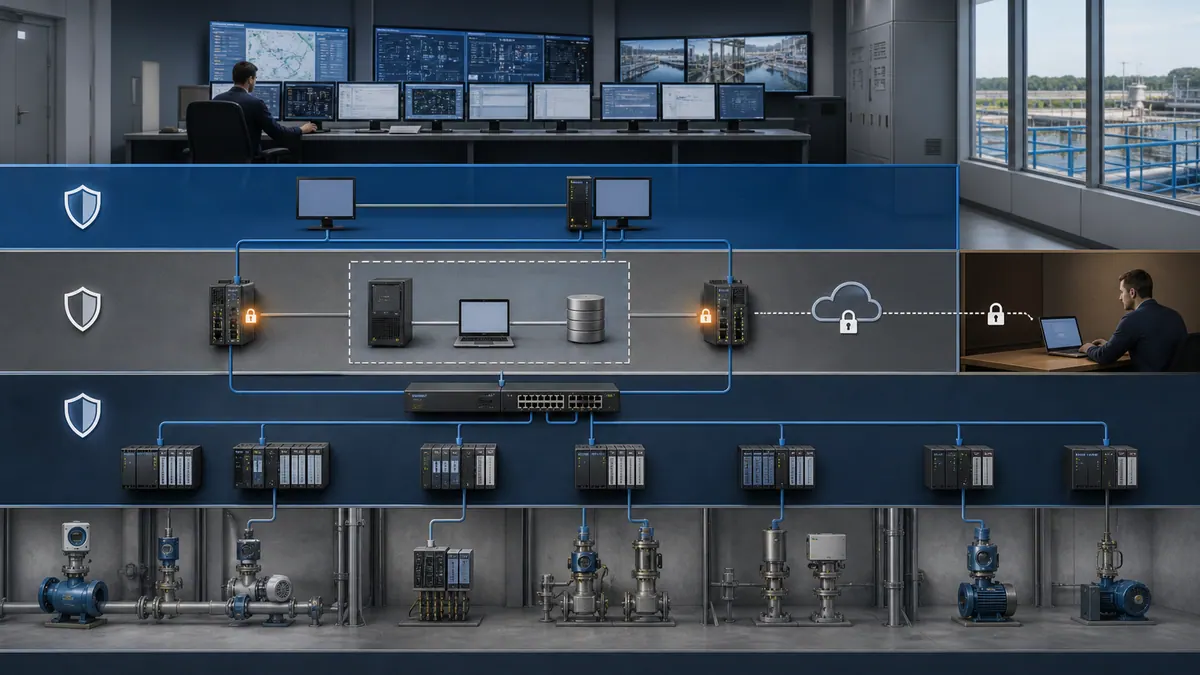
OT/IT DMZ Architecture
The most critical boundary in a SCADA network is the one between the OT (Operational Technology) network — where control systems live — and the IT (Information Technology) corporate network. Never connect these directly. The correct approach is a DMZ (Demilitarized Zone) sitting between the two:
[Corporate IT Network — Level 4]
           |
     [Firewall / UTM]
           |
    [OT/IT DMZ — Historian mirrors,
     data replication servers,
     remote access jump hosts,
     patch management servers]
           |
     [Firewall / IDS/IPS]
           |
[SCADA Network — Level 2-3
 (SCADA servers, HMI workstations,
  engineering stations)]
           |
[Control Network — Level 1
 (PLCs, RTUs, field devices)]
Data flows from the OT side toward the IT side — not the reverse. For the most sensitive applications (power generation, water treatment), unidirectional security gateways (data diodes) physically prevent any inbound path from the IT network to the OT network while allowing historian data to replicate outward.
IEC 62443 Zones and Conduits Applied
In the ISA/IEC 62443 model, you partition the system into Security Zones and control inter-zone communication through Conduits:
Defining Zones:
- Group assets with similar security requirements, criticality, and operational function.
- Common zones in a SCADA system: Field Device Zone (Level 0–1), Control Zone (Level 2), Operations Zone (Level 3), Enterprise Zone (Level 4), Remote Access Zone (VPN/jump server).
- Assign a Security Level target (SL-T) to each zone based on consequences of compromise.
Defining Conduits:
- A conduit is the controlled communication path between two zones (firewall rule set, VPN tunnel, data diode).
- Document which protocols traverse each conduit, the direction of data flow, and the security controls applied.
- Every conduit must be explicitly justified — if there is no business need, there is no conduit.
Security Level (SL) concept:
- SL 1: Resistance to casual or coincidental violation.
- SL 2: Resistance to intentional violation using simple means, low resources, generic skills, and low motivation.
- SL 3: Resistance to intentional violation using sophisticated means, moderate resources, IACS-specific skills, and moderate motivation.
- SL 4: Resistance to intentional violation using sophisticated means, extended resources, IACS-specific skills, and high motivation.
Do not copy a universal SL target from an example architecture. Derive the target security level (SL-T) for each zone and conduit from the project's risk assessment and document the assumptions, consequences, threat capability, compensating controls, and residual risk. Safety integrity levels and IEC 62443 security levels are different concepts.
Secure Remote Access
Remote access to SCADA systems is one of the most common attack vectors. Best practices:
- Jump server / bastion host in the DMZ: Remote users authenticate to the jump server; they never have direct network routing to SCADA servers.
- MFA (multi-factor authentication): Mandatory for all remote access sessions.
- VPN with certificate-based authentication: Avoid simple username/password VPNs.
- Session recording: Log all remote sessions for audit and incident investigation.
- Least-privilege access: Remote engineers access only the specific systems they need, not the entire SCADA network.
- Time-limited access windows: Emergency remote access should open for a defined window and close automatically.
SCADA Network Design and Segmentation
Network architecture design critically impacts SCADA system performance, security, and reliability. Proper network segmentation following defense-in-depth principles protects critical control systems while enabling necessary data exchange with business systems.
Defense-in-Depth Network Segmentation
Defense-in-depth strategies implement multiple layers of security controls separating SCADA networks from corporate networks and external connections. This approach limits attack surfaces while containing security incidents to prevent lateral movement between network segments.
Typical Network Segmentation Model:
[Enterprise Network]
        |
    [DMZ Zone]
        |
   [Firewall]
        |
[SCADA Network - Level 3]
        |
   [Firewall]
        |
[Control Network - Level 2]
        |
[Field Devices - Level 1]
Data diodes and unidirectional gateways provide the highest security level for critical infrastructure, physically preventing inbound traffic while allowing necessary operational data to flow to business systems for analytics and reporting purposes.
Network Performance Requirements
SCADA networks require careful bandwidth planning and quality of service (QoS) configuration ensuring critical control traffic maintains priority over less time-sensitive data transfers. Network latency, jitter, and packet loss directly impact system responsiveness and operator effectiveness.
Specify and test SCADA network performance per traffic class:
- Operator interaction and process-data latency: derived from the task, process dynamics, communications path, and risk assessment
- Screen refresh and data age: specified separately so a fast redraw cannot hide stale source data
- Alarm propagation: measured end to end from source timestamp through annunciation, against the rationalized response need
- Historical collection: selected per signal dynamics, event reconstruction, analysis, and retention requirements
- Network loading: baselined by segment and traffic class, with tested headroom for bursts, failover, diagnostics, and recovery
Redundant Network Architectures
Where the availability analysis requires redundant paths, use a topology and convergence protocol supported by every participating device. Measure packet loss, data staleness, alarm delivery, and operator-session behavior during each credible link, switch, power, and controller failure. The acceptable convergence time comes from the control and supervisory requirements, not a universal millisecond target.
Consider implementing separate physical networks for:
- Critical control traffic requiring real-time performance
- Historical data collection and trending systems
- Operator stations and HMI workstations
- Remote access and enterprise integration
- Engineering and maintenance systems
Wireless SCADA Networks
Wireless technologies enable cost-effective connectivity for remote monitoring points, mobile equipment, and geographically dispersed facilities where wired infrastructure is impractical. Wireless SCADA implementations demand careful attention to security, reliability, latency, and environmental factors affecting radio propagation.
Licensed radio frequencies provide dedicated spectrum with better reliability and security than unlicensed bands, justifying higher costs for critical applications. Mesh networking topologies improve coverage and reliability through multiple communication paths between remote sites and central systems.
Tag and Point Naming Conventions
Consistent tag naming conventions are fundamental SCADA best practices enabling efficient engineering, simplified troubleshooting, and effective long-term maintenance. Well-designed naming standards provide self-documenting tag names that communicate location, function, and signal type without requiring database lookups.
Hierarchical Naming Structure
Hierarchical tag naming structures organize process variables logically by physical location, process unit, equipment type, and measurement point. This systematic approach creates intuitive tag names supporting both operators and engineers throughout system lifecycle.
Recommended Structure:
[Site][Area][Unit][Equipment][Measurement][Suffix]
Example Tag Names:
PLT1_TANK_01_LVL_PV      (Plant 1, Tank 01, Level, Process Value)
PLT1_PUMP_03_RUN_CMD     (Plant 1, Pump 03, Run Command)
PLT1_RX_02_TEMP_SP       (Plant 1, Reactor 02, Temperature Setpoint)
PLT2_COMP_05_PRESS_HI_ALM (Plant 2, Compressor 05, Pressure High Alarm)
Standard Suffixes and Abbreviations
Standardized suffixes identify signal types, reducing confusion and supporting automated alarming, trending, and report generation. Common suffix conventions include:
Process Values and Setpoints:
- PV: Process Value (actual measurement)
- SP: Setpoint (desired value)
- OP: Output (controller output signal)
- MV: Manipulated Variable
Status and Commands:
- STS: Status indication
- CMD: Command signal
- FB: Feedback confirmation
- MODE: Operating mode indicator
Alarms and Limits:
- HH: High-High alarm
- HI: High alarm
- LO: Low alarm
- LL: Low-Low alarm
- DEV: Deviation alarm
- ROC: Rate of change alarm
Device Type Identification
Include equipment type identification in tag names for clarity during troubleshooting and system navigation:
- PMP: Pump
- VLV: Valve
- TNK: Tank
- MTR: Motor
- XMTR: Transmitter
- PID: PID Controller
- COMP: Compressor
- CONV: Conveyor
Character Set and Length Limitations
Define a character set, case policy, separators, namespace rules, and maximum length from the actual SCADA, PLC, historian, OPC, database, and export/import limits in the project. Test the longest qualified names end to end. Do not impose a generic 32- or 64-character limit: the shortest enforced limit in the toolchain and the readability needs of operators and engineers should drive the convention.
Establish naming conventions early in project execution and document thoroughly in design specifications. Enforce standards through configuration templates, automated validation scripts, and engineering review procedures.
Alarm Management (ISA-18.2 & EEMUA 191)
Alarm management deserves its own strategic section because an operator cannot respond effectively when notifications are ambiguous, unactionable, stale, or concentrated into floods. Two useful primary references are the ISA-18 series and EEMUA Publication 191, Edition 4. Buy or access the publications for normative project work; this section is an implementation aid.

The ISA-18.2 Alarm Lifecycle
ANSI/ISA-18.2-2016 organizes alarm management as a lifecycle rather than a one-time cleanup. The working sequence includes:
- Philosophy and governance: Define what qualifies as an alarm, roles, priority method, performance targets, shelving/suppression rules, audit cadence, and management of change.
- Identification and rationalization: For each candidate, document the abnormal condition, consequence of no response, available response time, operator action, priority, limits, deadband, delays, and operating-state rules.
- Detailed design and implementation: Configure presentation, annunciation, logging, suppression, shelving, security, and interfaces from the approved rationalization record.
- Operation and maintenance: Train operators, control access, repair bad actors, manage out-of-service alarms, and keep the master alarm database synchronized with the running system.
- Monitoring, assessment, audit, and change: Calculate performance from time-stamped event data, investigate adverse trends and floods, audit the work process, and route modifications through management of change.
EEMUA 191 Benchmarks
The current EEMUA product page identifies Publication 191 as Edition 4 and describes it as guidance for designing, managing, and procuring alarm systems, aligned with ISA-18.2 and IEC 62682:2023. Its detailed benchmarks are licensed content, so verify them in the edition your project has adopted instead of copying an unattributed web table.
For a transparent public reference, an ISA article on alarm performance metrics gives examples based on at least 30 days of data: about 6 annunciated alarms per hour per operator console as “very likely to be acceptable,” about 12 per hour as “maximum manageable,” and flood exposure as a separate metric. These are assessment examples, not universal limits or proof that every upset is manageable.
Calculate at least: alarms per console-hour, ten-minute rate distribution, percent time in the site-defined flood state, top bad actors, chattering alarms, standing/stale alarms by age, priority distribution, suppressed/shelved alarms, and operator-response evidence. Segment them by operating state rather than hiding startup or upset performance inside a monthly average.
Alarm Priority Tiers
Define priority classes in the alarm philosophy, then assign them from consequence and available response time during rationalization. Do not paste fixed response times or database percentages into a project without site evidence. After rationalization, review the resulting distribution for priority inflation and confirm that each displayed label maps consistently to color, sound, sorting, escalation, and operator procedure.
Alarming Best Practices - ISA-18.2 Standards
Effective alarm management following ISA-18.2 (ANSI/ISA-18.2-2016) standards is critical for SCADA system effectiveness and operator performance. Poorly designed alarm systems overwhelm operators with nuisance alarms, desensitizing them to critical conditions and contributing to incidents.
Alarm Philosophy Development
Alarm philosophy documents establish comprehensive guidelines for alarm management including alarm identification, rationalization, prioritization, and response expectations. This living document guides alarm system design, configuration, and continuous improvement throughout system lifecycle.
Key alarm philosophy elements:
- Alarm definition and purpose criteria
- Alarm priority classification scheme
- Maximum manageable alarm rates
- Alarm response time expectations
- Shelving and suppression policies
- Performance monitoring and improvement processes
Turn performance data into an improvement queue
The alarm philosophy should define the adopted metrics, calculation windows, exclusions, and targets. Use measured data to rank work:
- Remove or redesign alarms that do not require a defined operator action.
- Investigate top bad actors and repeating transitions.
- Resolve standing and stale alarms with named owners.
- Replay the largest floods and identify initiating versus consequential alarms.
- Validate state-based alarming and suppression against startup, shutdown, maintenance, and degraded modes.
- Recalculate the same metrics after change and retain the before/after dataset.
Alarm Prioritization Strategies
For every priority, define the consequence range, time available, presentation, audible behavior, escalation, and expected operator workflow. If a notification requires no operator response, evaluate whether it should be an event, status, or maintenance notification rather than an alarm.
Alarm Deadbands and Delay Timers
Deadband configuration prevents chattering as a process value oscillates around a limit. Derive it from sensor resolution, measurement noise, normal variability, process dynamics, and the gap between the alarm limit and the safe or quality boundary. Record units and rationale; a generic percentage of span can be dangerously large or too small.
Delay timers can filter transient conditions that do not require action, but they also delay detection. Set on-delay and off-delay independently from process evidence and the available response time, then test the worst credible transient and genuine abnormal condition.
Alarm Grouping and Suppression
State-based alarm suppression automatically disables alarms inappropriate for current operating modes, preventing nuisance alarms during startup, shutdown, and maintenance activities. Implement suppression through automated logic rather than manual operator actions to ensure consistent application.
Equipment-based grouping consolidates related alarms, presenting the highest priority or first-occurring alarm while suppressing cascaded consequences until root causes are addressed.
Live mini-lab
Try it: press START, then STOP
A stop-dominant seal-in rung: START latches the motor output through its own contact, and STOP breaks the circuit.
Watch the output lamp: it stays on after START until you press STOP.
Free · no signup to try · runs in your browserOpens plcsimulationsoftware.com — same team
Trending and Historical Data Management
Historical data collection and trending capabilities provide essential process insights supporting troubleshooting, optimization, regulatory compliance, and performance analysis. Effective historical data management balances storage requirements against data resolution and retention needs.
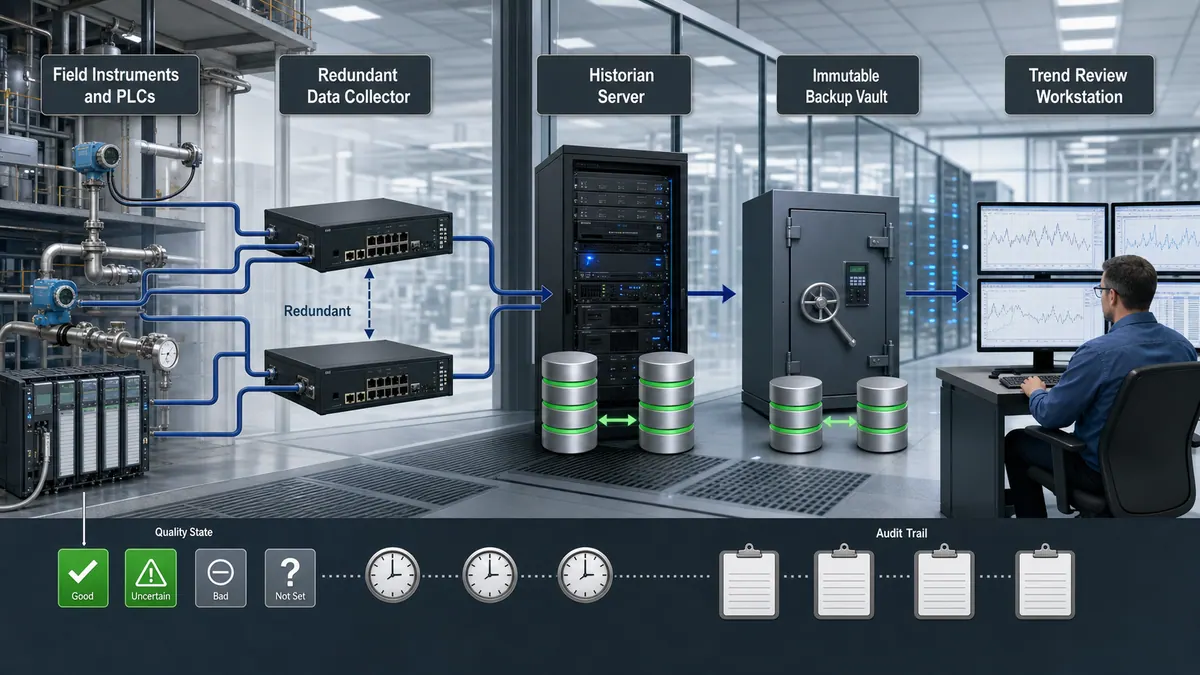
Data Collection Strategies
Sample-based collection stores values at fixed time intervals (1 second, 10 seconds, 1 minute, etc.) providing consistent time-series data for trending and analysis. This approach works well for slowly changing process values with predictable update rates.
Exception-based collection (swinging door, box-car algorithms) stores data only when values change significantly, reducing storage requirements while maintaining accuracy. This adaptive approach suits applications with highly variable update patterns or large tag counts.
Historical Data Compression
Historian compression can reduce storage while preserving the signals needed for operations and analysis. Derive deviation and time limits from sensor accuracy, process dynamics, event reconstruction, calculation needs, and compliance requirements. Validate the compressed series against known transients before applying the configuration broadly.
Time-based downsampling can reduce older data volume, but averages can erase excursions, states, totals, and event order. Define a retention class per use case—operator troubleshooting, quality genealogy, regulatory evidence, maintenance analysis, or long-term reporting—and preserve the raw or event data each one requires.
Data Retention Policies
Establish data retention policies based on operational needs, regulatory requirements, and storage capacity:
Create a retention matrix rather than a generic timetable:
| Data class | Define from |
|---|---|
| Process samples | Troubleshooting horizon, signal dynamics, quality genealogy, and analysis needs |
| Alarms and events | Incident review, audit, operator-performance, and regulatory requirements |
| Configuration and engineering source | Change history, rollback, asset lifecycle, and legal hold |
| Environmental or regulated records | The exact jurisdiction, permit, product, and record type |
| Security logs | Threat model, incident-response needs, storage constraints, and governing policy |
For each class, record resolution, online duration, archive duration, downsampling rule, legal basis, owner, deletion rule, and restore test.
Database Backup and Archiving
Implement automated historical database backups on daily/weekly schedules with off-site storage protecting against site disasters. Consider separate retention periods for online operational access versus long-term regulatory compliance archives.
Database maintenance procedures including vacuuming, reindexing, and integrity checking should run during low-activity periods ensuring optimal query performance and data reliability.
HMI Design (ISA-101)
ANSI/ISA-101.01-2015, Human Machine Interfaces for Process Automation Systems provides a lifecycle framework for HMI design and management. Its supporting technical reports address HMI philosophy and usability/performance. Apply the principles through a project style guide and verify results with representative operators rather than assuming a visual style proves an operational improvement.
High-Performance HMI Core Principles
The philosophy behind ISA-101's high-performance approach is that an HMI should communicate the state of the process, not impress the viewer. Key principles:
- Use color to convey state, not decoration. In steady-state normal operations, the dominant color of the display should be achromatic (gray scales). Color is reserved for deviation from normal — alarms, off-spec values, equipment faults.
- Reduce unnecessary graphical detail. 3D effects, gradients, photo-realistic equipment renders, and animation loops add cognitive load without adding information. Simplified P&ID-style or symbolic representations are more effective.
- Visual hierarchy. The most critical information—process values deviating from normal, active alarms, and constraint indicators—must be discoverable in the site's validated operator task. Define the expected assessment and navigation time for each scenario, then test it.
- Consistent symbol libraries. Use the same graphical representation for the same equipment type across all displays. Inconsistency forces operators to re-orient rather than pattern-match.
- Trend context on every process value. Where space allows, embed a small trend sparkline next to dynamic values so operators can see direction and rate of change without navigating to a separate trend display.
ISA-101 Lifecycle
Like ISA-112 for SCADA systems, ISA-101 frames HMI as a lifecycle — from philosophy and design standards through implementation, testing, and continuous improvement. Organizations that implement HMI once and never revisit it accumulate display debt: screens built to early-project assumptions that no longer reflect how operators actually use the system.
For the complete HMI design guide — including display hierarchy, screen navigation architecture, color palette selection, and alarm visualization patterns — see our dedicated HMI design best practices guide.
HMI and Operator Interface Best Practices
Human-machine interface design directly impacts operator effectiveness, response times, and situational awareness. Following HMI best practices based on standards including ISA-101 (HMI Design) and high-performance HMI principles creates intuitive, efficient operator interfaces.
High-Performance HMI Principles
High-performance HMI design emphasizes information visualization over decorative graphics, using simplified graphics, consistent color meanings, and data-driven displays that highlight abnormal conditions requiring operator attention.
Key Principles:
- Use color to indicate state, not attract attention to normal conditions
- Gray out or de-emphasize normal operating equipment
- Highlight abnormal conditions with color and animation
- Minimize 3D graphics, gradients, and decorative elements
- Implement clear visual hierarchy prioritizing critical information
- Define and test acceptable recognition and navigation time for priority scenarios
For comprehensive HMI design guidelines, see our detailed HMI design best practices guide.
Screen Hierarchy and Navigation
Organize SCADA screens in logical hierarchy supporting efficient navigation:
Level 1 - Overview Screens:
- Entire operator responsibility area or multiple process units
- KPI summaries and overall status
- High-level alarm summaries
- Production metrics and targets
Level 2 - Process Unit Screens:
- Individual process units or areas
- Detailed equipment status and measurements
- Control loops and automation status
- Unit-specific alarm information
Level 3 - Equipment Detail Screens:
- Individual equipment control and monitoring
- Detailed diagnostic information
- Manual control interfaces
- Equipment-specific trends and analytics
Level 4 - Faceplate and Diagnostic Screens:
- Controller faceplates for setpoint adjustment
- Advanced diagnostics and troubleshooting information
- Maintenance data and equipment history
Consistent Design Standards
Establish and enforce HMI design standards ensuring consistency across all displays:
- Standard color palette with defined meanings
- Consistent symbol libraries for equipment representation
- Standard layouts for similar process units
- Uniform fonts, sizes, and text formatting
- Consistent navigation button locations
- Standard alarm presentation and acknowledgment methods
Performance and Responsiveness
Optimize HMI performance against documented, task-specific requirements:
- Measure screen navigation, first useful render, and steady-state update separately
- Display source timestamp or data-quality state where stale data could mislead
- Derive control-feedback latency from the process, communications path, and risk assessment
- Avoid excessive animation or unnecessary graphics updates
- Implement efficient data binding and update mechanisms
- Test performance with realistic data loads and multiple clients
Database Design and Optimization
SCADA database design impacts system performance, scalability, and maintainability. Proper database structure, indexing, and optimization ensure responsive queries even as tag counts and historical data volumes grow.
Tag Database Organization
Organize tag databases logically grouping related points, implementing hierarchical structures supporting efficient browsing, searching, and bulk operations. Folder structures should mirror physical plant layout or functional process organization.
Organizational Approaches:
- Geographic/physical location hierarchy
- Process unit or functional grouping
- System or discipline-based organization
- Equipment-type classification
- Hybrid approaches combining multiple methods
Database Performance Optimization
Implement database indexing on frequently queried fields including tag names, device addresses, alarm priorities, and timestamps. Regular database maintenance including statistics updates, index rebuilding, and query plan optimization maintains performance as databases grow.
Performance Best Practices:
- Index tag name fields for rapid lookups
- Partition large tables by time period or location
- Implement read replicas for reporting and analytics
- Use appropriate data types minimizing storage requirements
- Archive old data to separate databases
- Monitor query performance and optimize slow queries
Redundant Database Configurations
Select database redundancy from the approved recovery-time and recovery-point objectives, failure modes, consistency requirements, vendor support, and network latency. Synchronous replication can reduce committed-data loss for supported transactions, but it does not protect against bad writes, configuration errors, corruption, or a shared-site failure; tested backups and recovery procedures remain necessary.
Database redundancy architectures include:
- Hot standby with automatic failover
- Active-active with load balancing
- Geographic redundancy for disaster recovery
- Backup/restore strategies for non-critical systems
Communication Protocol Selection
Selecting appropriate communication protocols for SCADA systems requires balancing performance requirements, device compatibility, security considerations, and long-term support availability. Modern SCADA systems typically implement multiple protocols supporting different device types and network segments.
Industrial Protocol Comparison
Modbus TCP/IP:
- Advantages: Universal device support, simple implementation, low cost
- Limitations: Limited security, no built-in redundancy
- Best for: General-purpose SCADA communications, simple applications
- Learn more: Modbus RTU protocol guide
OPC UA (Open Platform Communications Unified Architecture):
- Advantages: Secure, platform-independent, rich data models, built-in redundancy
- Limitations: More complex configuration, higher computational requirements
- Best for: Enterprise integration, secure communications, complex data structures
EtherNet/IP:
- Advantages: Real-time performance, implicit messaging, broad industrial support
- Limitations: Proprietary to Rockwell ecosystem, requires specialized hardware
- Best for: Allen-Bradley SCADA systems, manufacturing automation
Profinet:
- Advantages: High performance, built-in redundancy, strong European support
- Limitations: Complex configuration, specialized network infrastructure
- Best for: Siemens-based systems, process automation applications
DNP3:
- Advantages: Designed for utility SCADA, built-in security (DNP3-SA), time synchronization
- Limitations: Primarily utility sector, limited industrial device support
- Best for: Electric utility, water/wastewater SCADA applications
IEC 61850:
- Advantages: Purpose-built for electrical substation communication; supports GOOSE (protection/control messaging), Sampled Values (metering), and MMS (supervisory); enables vendor-interoperability in substations
- Limitations: Complex to configure; specialized engineering tools required; primarily relevant to power and substation environments
- Best for: Substation automation, protection relay integration, smart grid SCADA — any project where SCADA supervises breakers, protection relays, or bay controllers
For detailed protocol comparisons, see our comprehensive PLC communication protocols guide.
Protocol Security Considerations
Modern SCADA protocols should support encryption, authentication, and authorization mechanisms protecting against cyber threats:
- TLS/SSL encryption for data in transit
- Certificate-based authentication
- Role-based access control
- Audit logging of all communications
- Secure key management and distribution
Legacy protocols lacking built-in security require network-level protection through firewalls, VPNs, or protocol conversion gateways adding security layers.
Multi-Protocol Integration
Enterprise SCADA systems often integrate multiple protocols supporting diverse field devices, legacy systems, and enterprise applications. Protocol conversion gateways, OPC servers, and middleware platforms provide translation and data normalization across heterogeneous systems.
Consider maintainability, licensing costs, and performance impacts when implementing multi-protocol architectures. Minimize protocol types where practical, standardizing on modern secure protocols for new installations while supporting legacy protocols only where necessary.
Redundancy & High Availability
Unplanned SCADA downtime has direct operational, safety, and financial consequences. High availability design eliminates single points of failure systematically — server, network, and data tiers each require their own redundancy strategy.
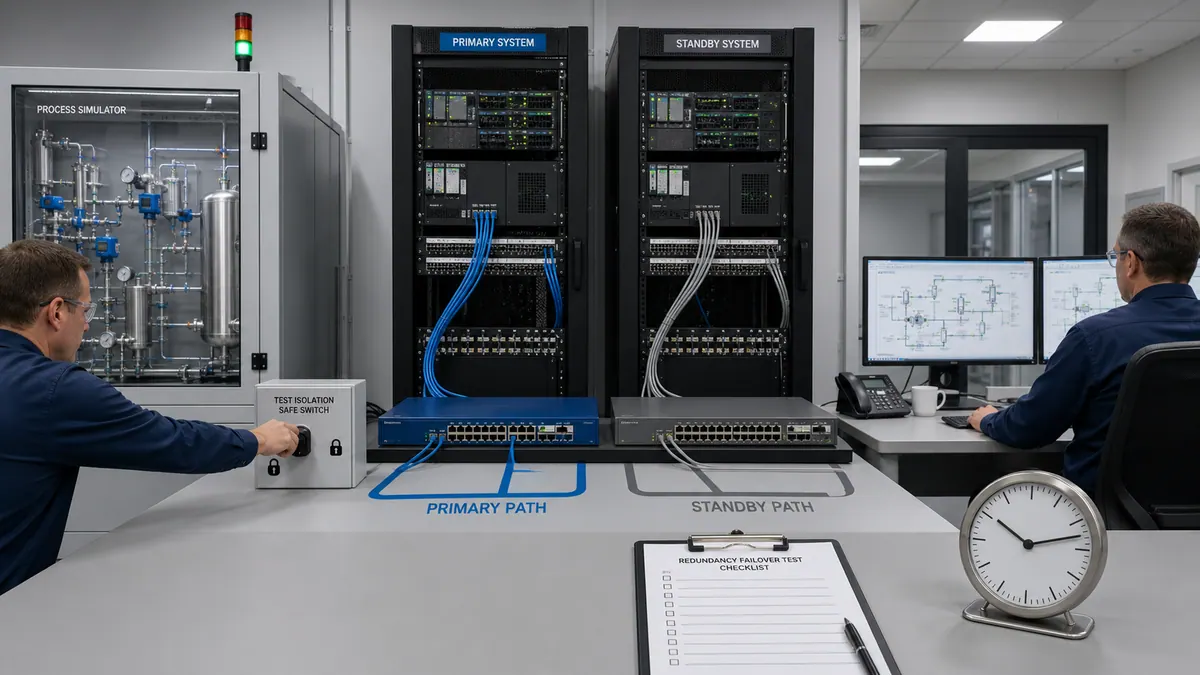
Hot, Warm, and Cold Standby: Choosing the Right Tier
| Standby Type | State | Failover trigger | What must be verified | |---|---|---|---|---| | Hot standby | Backup runs in parallel and maintains supported state | Automatic | Detection, switchover, session behavior, data gap, split-brain prevention | | Warm standby | Backup is running but requires synchronization or activation | Automatic or manual | Configuration currency, activation procedure, reconciliation, operator handoff | | Cold standby | Replacement capacity exists but requires build or restore | Manual | Media, licenses, compatible hardware, restore time, validation, trained personnel |
Hot standby is a candidate where the approved recovery objective cannot be met by restore or manual activation. Confirm the exact product edition, licensed feature, supported topology, shared dependencies, and failure behavior with the current vendor documentation.
Warm standby can fit systems whose hazard and operability analysis permits its measured recovery interval. Confirm what control remains autonomous at PLC/RTU level and how operators retain awareness during the transition.
Cold standby can be appropriate only when its tested end-to-end restore time, data loss, and operational workaround meet the approved objectives.
Communication Path Redundancy
A redundant SCADA server is useless if the communication path to field devices is a single cable. Implement redundancy at every tier:
- Dual NICs with bonding or active-standby: Protects against NIC failure on servers and workstations.
- Ring topology with RSTP/MRP: Managed switches forming rings with Rapid Spanning Tree or Media Redundancy Protocol achieve sub-200ms link failover.
- Parallel WAN paths: For geographically distributed SCADA, use diverse carriers (fiber + cellular or satellite backup) with automatic route failover in the router.
- Redundant communication processors in RTUs/PLCs: Many industrial RTUs support dual communication cards polling from independent SCADA servers simultaneously. Configure both servers to poll all devices; the active server writes to the historian, the standby monitors but does not write.
Historian Failover
The historian is frequently overlooked in redundancy planning. A failed historian means gaps in process data that cannot be recovered. Best practices:
- Store-and-forward buffering at the RTU/edge level: RTUs and modern edge devices buffer locally when the historian connection is lost and forward accumulated records when connectivity is restored. Verify your RTU firmware supports this and that buffer capacity covers your worst-case outage window.
- Historian replication: Run a primary and secondary historian server in sync. If the primary fails, the secondary continues collecting. On primary recovery, the two servers reconcile their databases.
- Compression and backfill verification: After a failover event, validate that historical data is contiguous. Unexplained gaps in the trend database are a sign that store-and-forward or replication is not working correctly.
Redundancy and High Availability Design
Mission-critical SCADA systems require redundancy architectures ensuring continuous operation during component failures, maintenance activities, and disaster scenarios. High availability design eliminates single points of failure throughout system architecture.
Server Redundancy Strategies
Hot Standby Redundancy:
- Primary and backup servers continuously synchronized
- Automatic failover upon primary server failure
- Session and data behavior depends on the vendor architecture
- Failover time and data gap must be measured under the required load and failure modes
Active-Active Redundancy:
- Both servers actively processing requests
- Load balancing across server resources
- Can improve utilization where the product supports consistent state and client routing
- Still requires failure detection, client reconnection, split-brain prevention, and validation
N+1 Redundancy:
- Multiple servers with one backup supporting any failure
- Cost-effective for large distributed systems
- Shared backup server reduces redundant hardware
- Common in multi-site SCADA deployments
Network Redundancy Implementation
Where the availability analysis requires it, implement independent network paths using supported architectures such as:
- Dual network interface cards (NICs) with active-standby or bonding
- Ring or parallel topologies with a convergence protocol selected for the required recovery time
- Parallel networks with automatic failover routing
- Redundant communications processors in PLCs and RTUs
Test network failover regularly under realistic load conditions, verifying failover times meet operational requirements without disrupting critical control functions.
Geographic Redundancy
Geographic redundancy protects against site-level disasters including fires, floods, or regional power outages by maintaining backup SCADA servers at physically separate locations. This approach requires:
- Wide-area network connectivity between sites
- Database synchronization across geographic distance
- Considerations for increased latency
- Regular testing of disaster recovery procedures
- Clear operational procedures for site failover
Component Reliability Enhancement
Beyond redundancy, enhance individual component reliability through:
- Industrial-grade computing hardware rated for automation environments
- Uninterruptible power supplies (UPS) sized for controlled shutdowns
- RAID storage configurations protecting against disk failures
- Regular preventive maintenance and component replacement
- Environmental controls maintaining appropriate operating conditions
SCADA Security Best Practices
SCADA cybersecurity protects critical infrastructure from increasing cyber threats while maintaining operational availability and safety. Comprehensive OT security programs implement defense-in-depth strategies across people, processes, and technology — guided by ISA/IEC 62443, NIST SP 800-82 Revision 3 (2023), and where applicable, NERC CIP.
Standard scope summary:
- ISA/IEC 62443: The primary global industrial cybersecurity standard. Applies to all OT environments — SCADA, DCS, PLCs, safety systems. Introduces zones, conduits, and Security Levels. Use this as your primary design framework.
- NIST SP 800-82 Rev 3 (2023): U.S.-focused OT security guidance applying the NIST Cybersecurity Framework to industrial environments. Complements IEC 62443 with detailed OT-specific controls, particularly useful for federal and defense-adjacent projects.
- NERC CIP: Mandatory reliability standards for the North American bulk electric system only. Not applicable outside that specific scope, though its controls are often referenced as a benchmark in other critical infrastructure sectors.
Defense-in-Depth Security Architecture
Implement multiple security layers ensuring compromise of single control doesn't enable full system access:
Physical Security:
- Controlled access to server rooms and control systems
- Surveillance and intrusion detection
- Secure disposal of retired equipment
- Visitor management and escort requirements
Network Security:
- Network segmentation and firewalls
- Virtual LANs (VLANs) isolating SCADA traffic
- Intrusion detection/prevention systems (IDS/IPS)
- Data diodes for critical infrastructure
- VPN encryption for remote access
Application Security:
- Strong authentication and password policies
- Role-based access control (RBAC)
- Application whitelisting
- Secure protocols (TLS/SSL encryption)
- Code signing and integrity verification
Data Security:
- Database encryption at rest and in transit
- Backup encryption and secure storage
- Audit logging with tamper protection
- Data integrity verification
- Secure key management
Access Control Implementation
Implement least-privilege access control ensuring users access only necessary system functions:
Role-Based Access Control:
- Operator: View process, acknowledge alarms, basic control actions
- Advanced Operator: Full control capabilities, setpoint changes
- Engineer: Configuration changes, system modifications
- Administrator: User management, system administration
- View-only: Read access for management and reporting
For password-based access, align policy with the current NIST SP 800-63B guidance and the constraints of the supported OT products:
- For a NIST-conforming verifier, require at least 15 characters when the password is the only factor, or at least eight when it is used within MFA; permit a maximum of at least 64 characters. Record and mitigate any shorter legacy-product limit.
- Allow password managers, autofill and paste, and permit the supported character set so users can choose long passphrases.
- Screen new passwords against common, expected, and compromised-value blocklists.
- Use MFA for remote and privileged access where the validated architecture supports it.
- Use unique named accounts; remove or secure default credentials and tightly control any documented emergency account.
- Apply rate limiting or vendor-supported failed-attempt controls without creating an unsafe denial-of-service condition.
- Do not require arbitrary periodic password changes or composition rules unless an applicable requirement demands them; force a change when compromise is known or suspected.
Patch Management Strategies
Establish formal patch management processes balancing security updates against operational stability:
- Assessment: Evaluate security patches for applicability and risk
- Testing: Validate patches in isolated test environments
- Approval: Formal review and approval before production deployment
- Deployment: Install during scheduled maintenance windows
- Verification: Confirm successful installation and system functionality
- Documentation: Record all patches and configuration changes
Critical security patches require expedited deployment, potentially accepting increased risk from reduced testing in exchange for eliminating critical vulnerabilities.
Security Monitoring and Incident Response
Implement continuous security monitoring detecting suspicious activities:
- Failed login attempt monitoring and alerting
- Unusual network traffic pattern detection
- Unauthorized configuration change detection
- File integrity monitoring on critical systems
- Security event correlation and analysis
Develop incident response procedures including:
- Defined roles and responsibilities
- Communication protocols and escalation paths
- Evidence collection and preservation methods
- System isolation and containment strategies
- Recovery and restoration procedures
- Post-incident analysis and improvement processes
Performance Optimization Strategies
SCADA system performance optimization ensures responsive operator interfaces, timely alarm notifications, and efficient data collection even under high load conditions. Proactive performance management prevents degradation as systems grow and age.
System Sizing and Capacity Planning
Size SCADA systems from a measured workload model and the vendor's supported architecture. Define an explicit growth scenario instead of adding a universal percentage.
Resources to model and test:
- CPU and memory under normal, peak, report, backup, and failover states
- Storage capacity, write rate, retention, rebuild time, and failure mode
- Network throughput, latency, burst behavior, and redundant-path convergence
- Supported client, tag, historian, alarm, driver, and connection limits
Capacity Planning Factors:
- Tag count and update rates
- Historical data collection and retention periods
- Concurrent operator and client connections
- Report generation and data exports
- Third-party integrations and calculations
Database Query Optimization
Optimize database performance through:
- Proper indexing on frequently queried fields
- Query optimization using execution plan analysis
- Materialized views for complex recurring queries
- Database statistics updates and maintenance
- Partitioning large tables by time or location
- Read replicas offloading reporting from operational databases
Network Bandwidth Management
Manage network bandwidth preventing congestion:
- Quality of Service (QoS) prioritizing critical traffic
- Update rate optimization balancing freshness and bandwidth
- Data compression for WAN communications
- Efficient protocol selection minimizing overhead
- Scheduled bulk transfers during off-peak periods
- Network utilization monitoring and capacity planning
Client Performance Optimization
Optimize operator workstation and client performance:
- Efficient graphics minimizing unnecessary updates
- Screen and data update rates derived from task and process requirements
- Lazy loading for large displays
- Client-side caching of static data
- Graphics acceleration hardware support
- Regular workstation maintenance and updates
Monitor system performance continuously using:
- CPU and memory utilization trending
- Database query performance metrics
- Network latency and packet loss monitoring
- Client response time measurements
- Historical data collection and storage rates
Backup and Disaster Recovery Planning
Comprehensive backup and disaster recovery planning protects SCADA systems against data loss, hardware failures, and catastrophic events ensuring rapid recovery to operational status.

Backup Strategy Development
Implement layered backup strategies protecting different data types and timeframes:
System Backups:
- Backup cadence derived from the approved recovery-point objective and change rate
- Offline or otherwise isolated copies that are not exposed to the same failure
- Retention and geographic separation matched to the threat and compliance model
- Verified backup restoration capability
Database Backups:
- Replication where required for availability, without treating it as a backup
- Configuration and transaction-log backups sized to the approved recovery point
- Point-in-time recovery where the product and data model support it
- Separate retention periods for operational vs. compliance data
Configuration Backups:
- Automatic backups before configuration changes
- Version control for application and graphics
- Documentation of all customizations
- Backup of third-party integrations and licenses
Recovery Time and Point Objectives
Define the recovery-time objective (RTO) from the maximum tolerable outage for each service and the recovery-point objective (RPO) from the acceptable amount of lost or unreconciled data. SCADA visualization, alarm history, configuration, historian samples, reports, and engineering source may need different objectives. “Real-time replication” does not guarantee zero data loss or protect against corruption.
Disaster Recovery Testing
Regular disaster-recovery testing validates backup procedures and recovery capabilities:
- Full exercises at the frequency approved by the risk owner
- Component restoration tests after material platform or backup changes
- Automated backup monitoring plus scheduled integrity and restore verification
- Documentation of test results and improvement actions
- Update procedures based on testing findings
Spare Parts and Equipment Management
Maintain critical spare parts enabling rapid hardware replacement:
- Server hardware (matching current production)
- Network switches and communications equipment
- Operator workstations or thin clients
- UPS batteries and power components
- Critical software installation media and licenses
Document hardware specifications, firmware versions, and configuration details enabling rapid replacement and restoration.
Documentation Standards and Requirements
Comprehensive documentation enables effective system understanding, maintenance, troubleshooting, and knowledge transfer throughout SCADA system lifecycle. Establish documentation standards ensuring consistency, completeness, and maintainability.
Required Documentation Deliverables
Design Documentation:
- System architecture diagrams showing all major components
- Network architecture and IP addressing schemes
- Communication architecture and protocol specifications
- Security architecture and access control policies
- Redundancy and failover designs
- Interface specifications for all external systems
Configuration Documentation:
- Tag database exports with full attribute documentation
- Alarm setpoint justifications and priority assignments
- HMI screen inventory with navigation maps
- User account and permission matrices
- Report and trend configurations
- Calculation and scripting logic with detailed comments
Operational Documentation:
- Operator training materials and quick reference guides
- Normal operating procedures
- Alarm response procedures
- Startup and shutdown procedures
- Emergency response procedures
- System limitation and constraint documentation
Maintenance Documentation:
- Preventive maintenance schedules and procedures
- Backup and recovery procedures
- Software update and patching procedures
- Troubleshooting guides with common issues
- Vendor contact information and support contracts
- As-built drawings and configuration baselines
Documentation Management
Implement document control processes ensuring currency and accessibility:
- Version control for all documentation
- Review and approval workflows
- Regular update schedules tied to system changes
- Centralized accessible storage (physical and electronic)
- Controlled distribution and access
- Retention policies aligned with regulatory requirements
Graphics and Diagram Standards
Standardize technical diagrams and graphics:
- Consistent symbology following industry standards (ISA, IEC)
- Detailed legends and notation keys
- Layer management for complex drawings
- Appropriate detail levels for different audiences
- Electronic formats enabling updates
- Integration with asset management systems
Testing and Commissioning Procedures
Systematic testing and commissioning ensures SCADA systems meet requirements, perform reliably, and integrate correctly with field devices before operational deployment. Comprehensive testing catches issues during controlled conditions rather than production operations.
Factory Acceptance Testing (FAT)
Factory acceptance testing validates system functionality in controlled environments before site installation:
FAT Test Scope:
- Server and client software installation verification
- Database configuration and performance testing
- HMI graphics functionality and navigation
- Alarm generation and notification testing
- Communication protocol verification using simulated devices
- Redundancy and failover operation
- User interface and role-based access control
- Report generation and historical data trending
- Performance testing under simulated loads
Document all FAT results, issue logs, and resolutions providing baseline for site acceptance testing.
Site Acceptance Testing (SAT)
Site acceptance testing validates complete system integration with actual field devices and production environment:
SAT Test Scope:
- Point-to-point verification of all I/O and data points
- Communication testing with all field devices
- Alarm testing from field device through operator notification
- HMI display accuracy with actual process data
- Historical data collection verification
- Network performance under actual loading
- Backup and recovery procedure execution
- Security controls and access restrictions
- Integration with external systems
- Performance testing with production configuration
Loop Testing Procedures
Comprehensive loop testing validates complete signal paths from field device through SCADA display and control actions:
- Signal Injection: Apply known inputs at field device
- SCADA Display Verification: Confirm correct value displayed with proper scaling
- Alarm Testing: Verify alarm generation at configured setpoints
- Historical Verification: Confirm data collection and trending
- Control Output Testing: Verify control commands reach field devices correctly
- Feedback Verification: Confirm status feedback matches commanded states
Document all loop test results with deviations and resolutions, providing baseline for future troubleshooting.
Performance and Load Testing
Validate system performance under realistic and peak loading conditions:
- Maximum tag count with worst-case update rates
- Maximum concurrent client connections
- Alarm flood scenarios testing operator interface
- Historical data query performance testing
- Network bandwidth utilization verification
- Failover testing under load conditions
Identify performance bottlenecks and optimize before production deployment.
Maintenance and Support Planning
Proactive maintenance and support planning extends SCADA system lifespan, maintains performance, and minimizes unexpected downtime. Establish comprehensive support strategies addressing both routine maintenance and emergency response.
Preventive Maintenance Programs
Implement scheduled preventive maintenance activities:
Daily/Weekly Tasks:
- Monitor system performance and error logs
- Verify backup completion and success
- Check alarm system health and nuisance alarm rates
- Review security logs for suspicious activity
Monthly Tasks:
- Database maintenance and optimization
- Software update review and planning
- UPS battery testing
- Historical data archiving verification
- Performance metrics review
Quarterly Tasks:
- Disaster recovery testing
- Security assessment and vulnerability scanning
- System capacity review and planning
- Documentation review and updates
Annual Tasks:
- Full disaster recovery exercise
- Comprehensive security audit
- Hardware refresh planning
- Vendor support contract renewal
- Performance benchmarking and optimization review
Support Team Organization
Define support roles and responsibilities:
Tier 1 - Operations Support:
- Basic troubleshooting and restart procedures
- Alarm acknowledgment and escalation
- User account unlocking
- Routine operator questions
Tier 2 - Engineering Support:
- Configuration changes and updates
- Detailed troubleshooting and diagnostics
- Performance optimization
- Integration issues
Tier 3 - Vendor Support:
- Complex platform issues
- Software bugs and patches
- Major upgrades and migrations
- Specialized technical support
Vendor Management
Maintain effective vendor relationships and support contracts:
- Active software maintenance agreements
- Defined support response times (4-hour, next-business-day, etc.)
- Access to software updates and security patches
- Technical support contact information and procedures
- Regular vendor health checks and system reviews
- Upgrade planning and lifecycle management
Knowledge Management
Capture and maintain operational knowledge:
- Troubleshooting knowledge bases
- Lessons learned documentation
- Configuration change history
- Performance optimization techniques
- Custom script and calculation libraries
- Training materials and reference guides
Integration with Enterprise Systems
Modern SCADA systems integrate with enterprise systems providing operational data supporting business analytics, decision-making, and optimization initiatives. Effective integration balances data accessibility with security and performance considerations.
Manufacturing Execution Systems (MES)
SCADA-MES integration provides production data supporting:
- Order tracking and genealogy
- Quality management and traceability
- Production scheduling and dispatching
- Material management and tracking
- Equipment effectiveness monitoring (OEE)
- Batch/lot tracking and reporting
Implement integration using:
- Standard protocols (OPC UA, MQTT) for real-time data
- Transactional databases for historical queries
- Web services APIs for bidirectional communication
- Message queuing ensuring reliable delivery
Enterprise Resource Planning (ERP)
ERP integration provides business context to operational data:
- Production order management
- Inventory levels and consumption
- Maintenance work order integration
- Cost accounting and allocation
- Asset management synchronization
Use middleware or integration platforms managing complexity and providing:
- Data transformation and normalization
- Protocol translation and conversion
- Error handling and retry logic
- Audit logging and traceability
- Performance monitoring and optimization
Business Intelligence and Analytics
Business intelligence systems consume SCADA data for:
- Production performance dashboards
- Asset performance management
- Predictive maintenance analytics
- Energy management and optimization
- Process optimization opportunities
- Regulatory compliance reporting
Implement data warehouses consolidating multiple data sources, providing consistent historical analysis without impacting operational SCADA performance.
Cloud and IoT Integration
Cloud integration enables:
- Remote monitoring and diagnostics
- Advanced analytics using cloud computing resources
- Mobile access to operational data
- Predictive maintenance using machine learning
- Vendor remote support capabilities
Security considerations for cloud integration:
- Data classification and sensitivity assessment
- Encryption for data in transit and at rest
- Access control and authentication
- Compliance with data residency requirements
- Network security and segmentation
- Incident response procedures
Common SCADA Mistakes to Avoid
Understanding common SCADA implementation mistakes helps avoid costly errors, rework, and operational problems. Learn from industry experience to implement SCADA systems correctly the first time.
Poor Alarm Management
Mistake: Configuring excessive alarms without proper rationalization, creating alarm floods overwhelming operators during process upsets.
Solution: Follow the ISA-18.2 alarm-management lifecycle: define the philosophy, rationalize alarms, measure rates and floods by operating state, remove bad actors, and verify the result against site-adopted targets.
Inadequate Network Security
Mistake: Connecting SCADA networks directly to corporate networks or the internet without proper security controls, exposing critical systems to cyber threats.
Solution: Implement defense-in-depth network segmentation, firewalls, intrusion detection, and secure remote access using VPNs or jump boxes. Regular security assessments and penetration testing.
Insufficient Testing
Mistake: Deploying SCADA systems with minimal testing, discovering integration issues, performance problems, and functionality gaps during production operations.
Solution: Comprehensive FAT and SAT testing covering all functionality, performance under load, failover scenarios, and integration with all connected systems.
Poor Tag Naming Conventions
Mistake: Inconsistent or cryptic tag names making system difficult to understand, troubleshoot, and maintain.
Solution: Establish comprehensive naming conventions early in project, document thoroughly, and enforce through configuration templates and review procedures.
Inadequate Documentation
Mistake: Minimal or outdated documentation making system modifications difficult and creating dependence on specific individuals.
Solution: Comprehensive documentation covering design, configuration, operations, and maintenance updated throughout system lifecycle.
Over-Complicated Designs
Mistake: Unnecessarily complex architectures, custom code, and non-standard implementations creating maintenance nightmares.
Solution: Prefer standard configurations and vendor-supported features over custom development. Implement only necessary complexity with clear documentation and justification.
Neglecting Performance Planning
Mistake: Undersized servers, insufficient network bandwidth, or poor database design causing performance problems as systems grow.
Solution: Model the approved growth scenario, test current and forecast peak workloads plus failure states, and monitor resource trends against vendor-supported limits.
Insufficient Redundancy
Mistake: Single points of failure in critical systems causing extended outages during component failures.
Solution: Redundant servers, network paths, and power supplies for mission-critical applications with regular failover testing.
Poor Change Management
Mistake: Uncontrolled configuration changes causing operational problems, lack of audit trail, and inability to recover from errors.
Solution: Formal change management procedures including testing, approval, backups before changes, documentation, and rollback procedures.
Ignoring Cybersecurity
Mistake: Treating SCADA cybersecurity as afterthought, leaving systems vulnerable to attacks.
Solution: Security by design including network segmentation, access control, encryption, monitoring, and regular security assessments following IEC 62443 standards.
SCADA Best Practices Checklist
This scannable checklist consolidates the engineering best practices from this guide into a single reference. Use it during design reviews, project kickoffs, and audits of existing systems. It is organized by discipline, not by project phase — for the phase-by-phase implementation checklist, see the section below.
Architecture & Standards
- SCADA lifecycle documented using ISA-112 Part 1 as the framework
- System topology selected (centralized / distributed / hybrid) and justified in design basis
- Purdue model levels assigned to all major components; OT/IT boundary explicitly defined
- ISA-95 data exchange requirements (Level 3 to Level 4) scoped separately from Purdue topology decisions
- Protocol selection documented: Modbus, DNP3, OPC UA, IEC 61850 (substation) as appropriate
Network Segmentation & Security
- OT/IT DMZ implemented; no direct routing between corporate IT and SCADA networks
- IEC 62443 security zones and conduits defined for all system boundaries
- Security Level targets (SL-T) assigned to each zone and conduit from the documented risk assessment
- Unidirectional gateways, protocol breaks, or other boundary controls evaluated where consequence and data-flow requirements justify them
- All conduit protocols and data-flow directions documented
- NIST SP 800-82 Rev 3 controls reviewed for applicability (U.S. federal/defense projects)
- NERC CIP applicability assessed (apply only if system is part of the North American bulk electric system)
- Remote access implemented via authenticated jump server in DMZ with MFA and session recording
- Patch management procedure defined (test → approve → scheduled maintenance window → verify)
Redundancy & High Availability
- Standby tier selected (hot / warm / cold) and justified against availability requirements
- Hot-standby failover time, data gap, session behavior, and recovery meet the approved RTO/RPO
- Communication path redundancy implemented (dual NICs, ring topology, or parallel WAN paths)
- RTU/PLC communication processor redundancy verified
- Historian store-and-forward buffering configured and tested with a simulated WAN outage
- Historian replication and post-failover data reconciliation procedure documented
Alarm Management
- Alarm philosophy document exists and has been approved before alarm configuration begins
- Every alarm has been rationalized: unique condition, requires operator action, within required response time
- Site-defined alarm priority scheme applied consistently
- Alarm-rate, flood, bad-actor, standing/stale, and shelving KPIs defined in the alarm philosophy
- Adopted ISA/EEMUA metrics are verified against the licensed edition and reviewed at the approved cadence
- Deadbands and delay timers applied to prevent alarm chattering
- State-based suppression implemented for startup, shutdown, and maintenance modes
- Alarm shelving procedure defined with maximum shelve duration enforced by the system
HMI Design
- HMI design philosophy document exists (ISA-101 lifecycle)
- High-performance HMI color scheme applied: achromatic normal state, color for deviation
- Screen hierarchy defined (Level 1 overview → Level 2 unit → Level 3 equipment → Level 4 faceplate)
- Consistent symbol library used across all displays
- Critical process values include embedded trend sparklines or direct trend navigation
- Navigation, useful render, data age, and control feedback meet the task-specific requirements
Tag Naming
- Hierarchical naming convention defined: [Site][Area][Unit][Equipment][Measurement][Suffix]
- Standard suffix list documented (PV, SP, OP, HH, HI, LO, LL, CMD, STS, FB)
- Tag names limited to alphanumeric characters and underscores; maximum length enforced
- Naming convention enforced via configuration templates and engineering review
Cybersecurity Controls
- Role-based access control (RBAC) implemented with least-privilege principle
- Default passwords changed on all devices and software platforms
- MFA enforced for all remote access and engineering station logins
- Application whitelisting or equivalent endpoint control deployed on SCADA servers
- Security event logging enabled; logs forwarded to centralized SIEM or log server
- Annual security assessment or penetration test scheduled
SCADA Implementation Checklist
Use this comprehensive checklist ensuring all critical aspects of SCADA implementation receive proper attention:
Planning and Design Phase
- Define functional requirements and success criteria
- Establish performance requirements and targets
- Develop system architecture and network design
- Create security architecture and access control policies
- Define redundancy and high availability requirements
- Establish naming conventions and configuration standards
- Develop alarm philosophy and management procedures
- Define historical data collection and retention policies
- Plan integration with external systems
- Create project schedule and resource allocation
- Obtain necessary approvals and funding
- Select vendors and establish contracts
Engineering and Configuration Phase
- Configure servers and install SCADA software
- Implement network infrastructure and security
- Configure tag database and communication drivers
- Develop HMI graphics following design standards
- Configure alarm system per alarm philosophy
- Implement historical data collection
- Configure user accounts and security permissions
- Develop reports and dashboards
- Implement backup and recovery procedures
- Document all configurations and customizations
- Conduct factory acceptance testing (FAT)
- Resolve all FAT issues and retest
Installation and Commissioning Phase
- Install and configure server hardware
- Deploy operator workstations and clients
- Establish network connectivity to field devices
- Verify communication with all RTUs and PLCs
- Perform point-to-point verification of all I/O
- Test all control loops end-to-end
- Validate alarm generation and notification
- Verify historical data collection
- Test redundancy and failover operation
- Conduct performance and load testing
- Perform security vulnerability assessment
- Conduct site acceptance testing (SAT)
- Resolve all SAT issues and retest
- Conduct operator training
- Perform final documentation review
Operations and Maintenance Phase
- Establish preventive maintenance schedules
- Implement monitoring and alerting systems
- Conduct regular backup verification
- Perform quarterly disaster recovery tests
- Monitor system performance metrics
- Review alarm performance and optimize
- Manage software updates and patches
- Conduct annual security assessments
- Maintain documentation currency
- Perform capacity planning and expansion
- Conduct periodic operator refresher training
- Review and optimize system performance
Frequently Asked Questions
What are the most important SCADA best practices?
The most important SCADA practices are a documented lifecycle and requirements baseline, risk-based zones and conduits, rationalized alarms with measured performance, availability and recovery designed from consequences, maintainable source and as-built documentation, controlled change, and acceptance testing that covers normal, degraded, failover, and recovery states.
How do I design a scalable SCADA architecture?
Design a scalable SCADA architecture from a dated growth scenario: future tags, update classes, history rate, alarms, clients, reports, sites, protocols, and integrations. Test that scenario against vendor-supported limits and licensing, including peak, backup, and failover workloads. Revisit the model as the plant plan changes; a universal growth percentage is not a capacity test.
What alarm rate targets should SCADA systems achieve?
ISA-18.2 requires an alarm philosophy and lifecycle, while its technical reports and EEMUA 191 provide performance guidance. Define the site's adopted metrics and targets, calculate them over a documented period, and segment by console and operating state. Use rates, flood exposure, bad actors, chattering, standing/stale alarms, shelving, and response evidence together; one average number cannot prove alarm-system effectiveness.
How should I implement SCADA security following industry standards?
Implement SCADA security following IEC 62443 industrial cybersecurity standards using defense-in-depth approaches including network segmentation separating SCADA from corporate networks, firewalls controlling traffic between zones, intrusion detection monitoring suspicious activity, strong authentication and role-based access control, encryption for sensitive communications, regular security assessments identifying vulnerabilities, patch management procedures, security monitoring and incident response capabilities, and physical security protecting critical infrastructure components.
What redundancy level do I need for my SCADA system?
Redundancy requirements depend on consequences of system unavailability and acceptable downtime. Mission-critical applications controlling safety systems, critical infrastructure, or high-value continuous processes require hot-standby server redundancy with automatic failover, redundant network paths, and geographic separation protecting against site disasters. Important but non-critical systems may use cold-standby approaches with manual failover or accelerated recovery from backups. Non-critical monitoring applications may accept single server deployments with robust backup and recovery procedures.
How do I optimize SCADA system performance?
Optimize SCADA performance through proper server sizing with adequate CPU, memory, and SSD storage, database optimization including indexing frequently queried fields and partitioning large tables, efficient HMI design minimizing unnecessary graphics updates, appropriate data collection rates balancing freshness and system load, network bandwidth management using QoS prioritization, client performance optimization, regular maintenance including database vacuuming and statistics updates, and continuous monitoring identifying bottlenecks before they impact operations.
What documentation is required for SCADA systems?
Required SCADA documentation includes design documents covering system architecture, network design, and security architecture, configuration documentation with tag database exports, alarm setpoint justifications, HMI navigation maps, and calculation logic, operational documentation including training materials, operating procedures, and alarm response guides, maintenance documentation covering preventive maintenance schedules, backup procedures, and troubleshooting guides, and as-built drawings reflecting actual installed configurations. All documentation should follow version control with regular updates.
How often should I backup SCADA systems?
Derive backup frequency and retention from the approved RPO, change rate, threat model, and record requirements. Keep isolated copies, version engineering source, capture configuration before changes, and treat replication as availability rather than backup. Test restoration at a risk-approved cadence and after material platform changes, measuring the full path to a validated operational system.
What are common SCADA integration protocols?
Common SCADA integration protocols include Modbus TCP/IP for universal device connectivity, OPC UA for secure platform-independent enterprise integration, DNP3 for utility SCADA applications, MQTT for IoT and cloud integration, REST APIs for web-based integrations, database replication for historical data sharing, and proprietary vendor protocols for specific equipment. Modern implementations should prefer secure protocols supporting encryption and authentication, with legacy protocol support only where necessary for existing equipment integration.
How do I implement effective change management for SCADA systems?
Implement SCADA change management through formal procedures requiring change requests documenting purpose and scope, technical review and approval processes, comprehensive testing in isolated environments before production deployment, automatic configuration backups before changes, scheduled implementation windows minimizing operational impact, verification testing confirming successful changes, rollback procedures for failed changes, documentation updates reflecting modifications, and post-implementation reviews identifying improvement opportunities. All changes should maintain audit trails supporting regulatory compliance and troubleshooting.
What training do SCADA operators need?
SCADA operators require training covering system architecture and capabilities, normal operating procedures and process fundamentals, HMI navigation and control functions, alarm response procedures and priorities, trend analysis and interpretation, abnormal situation recognition and response, security awareness and access control compliance, basic troubleshooting procedures, communication protocols and escalation paths, and regulatory compliance requirements. Initial comprehensive training should be supplemented with regular refresher sessions, procedure updates, and scenario-based exercises maintaining proficiency and awareness.
How do I choose between SCADA and DCS systems?
Choose SCADA systems for geographically distributed processes requiring wide-area monitoring and control, applications with numerous remote sites, systems prioritizing supervisory oversight over detailed control, and implementations requiring cost-effective scalability. Choose DCS for complex continuous processes requiring tight coordinated control, applications demanding millisecond control loop execution, single-site or campus deployments, and processes requiring extensive regulatory control and advanced control strategies. For detailed comparison, see our comprehensive SCADA vs DCS comparison guide.
What historical data resolution and retention should I implement?
Define historian resolution and retention per data class. Start from signal dynamics, event reconstruction, control and maintenance analysis, quality genealogy, reporting, and the exact regulatory record. Prove that exception compression and downsampling preserve excursions, totals, state transitions, and timestamps needed by those use cases; then document online duration, archive duration, deletion rule, owner, and restore test.
How do I troubleshoot SCADA communication problems?
Troubleshoot SCADA communication issues systematically by verifying physical connectivity including cables, network switches, and indicator lights, confirming IP addressing and subnet masks match design, checking firewall rules permit necessary traffic, validating device configuration matches SCADA driver settings, monitoring communication statistics for errors and timeouts, using network analysis tools capturing traffic, testing communication with simple utilities (ping, telnet), examining SCADA diagnostic logs for error messages, verifying device status and operational readiness, and isolating problems to specific network segments, devices, or protocols through methodical testing.
What SCADA performance metrics should I monitor?
Monitor SCADA performance metrics including server CPU and memory utilization, database query response times, network latency and bandwidth utilization, client screen load and update times, alarm rates and response times, historical data collection rates and storage growth, concurrent client connection counts, communication driver success rates, disk I/O performance, backup completion times, and application-specific KPIs. Establish baselines during commissioning and implement alerting thresholds detecting degradation before it impacts operations. Regular trending and capacity planning prevent resource exhaustion.
Conclusion: Implementing Professional SCADA Systems
Applying a documented SCADA lifecycle can improve reliability, security and maintainability, but the result must be verified on the actual system. The checks in this guide are grounded in the cited standards and guidance; record project-specific assumptions, test evidence, exceptions and residual risks.
Success requires systematic attention to architecture design, security implementation, alarm management, HMI interface quality, performance optimization, and operational support planning from initial concept through decades of operational service. Organizations investing properly in SCADA design and implementation realize significant returns through improved uptime, enhanced operational visibility, reduced maintenance costs, and better regulatory compliance.
The SCADA landscape continues evolving with cloud integration, advanced analytics, mobile access, and IoT convergence creating new opportunities and challenges. Fundamental best practices around security, reliability, performance, and operator effectiveness remain constant while implementation technologies advance, making solid foundational understanding essential for long-term success.
Start your SCADA implementation by thoroughly understanding requirements, learning from industry experience, following established standards, engaging experienced professionals when appropriate, and maintaining focus on creating systems that operators trust, engineers can maintain, and management values for the critical role SCADA plays in modern industrial operations.
For specialized SCADA topics, explore our detailed guides on HMI design best practices, industrial communication protocols, SCADA vs DCS system comparison, and our best SCADA software roundup for 2026. If you're earlier in your learning journey, our SCADA tutorial for beginners provides the conceptual foundation for everything covered in this guide. To practise the PLC side of SCADA integration before deploying to real hardware, PLC Simulation Software's SCADA training track provides browser-based scenarios covering Modbus register mapping, alarm state logic, and HMI interaction — a safe environment to validate your control philosophy before connecting SCADA to a live PLC.
Now run it · free · no signup
Practise the PLC side of a SCADA system
Complete a guided first program in the browser without an account, then build the tags, alarms and operator views a SCADA layer reads.
Ownership disclosure: PLC Programming IO and PLC Simulation Software are operated by the same publisher.


