POWERLINK Protocol Tutorial: Complete Guide to Real-Time Ethernet Communication
Master POWERLINK protocol for real-time industrial automation. Learn architecture, motion control, synchronization, and implementation strategies.
Introduction: Understanding POWERLINK for Real-Time Industrial Automation
POWERLINK protocol represents an innovative approach to real-time Ethernet communication, delivering deterministic performance competitive with traditional fieldbus systems while leveraging standard Ethernet hardware and infrastructure. As an open industrial communication standard developed by the POWERLINK Special Interest Group (now part of the OPC Foundation), POWERLINK enables cost-effective, high-performance real-time automation systems suitable for motion control, process automation, and synchronized multi-axis applications.
Developed by B&R Industrial Automation in the late 1990s and opened through standardization initiatives, POWERLINK ingeniously operates over standard Ethernet infrastructure while achieving cycle times from 1 millisecond down to 100 microseconds depending on network configuration and device capabilities. This unique characteristic eliminates the need for specialized industrial Ethernet hardware while delivering real-time performance exceeding traditional fieldbus systems, making POWERLINK an attractive choice for applications requiring both Ethernet integration and real-time determinism.
Unlike traditional industrial Ethernet protocols that sacrifice determinism for bandwidth or require complex Quality of Service (QoS) configuration, POWERLINK implements a simple polling cycle with deterministic frame timing. The protocol operates alongside standard Ethernet enabling seamless integration with IT systems, cloud connectivity, and OPC-UA interfaces while maintaining guaranteed cycle timing for critical control loops.
This comprehensive POWERLINK protocol tutorial covers everything from fundamental real-time Ethernet concepts through advanced motion control implementation, network synchronization strategies, and integration with modern automation architectures. Understanding POWERLINK enables design of high-performance automation systems combining Ethernet connectivity with real-time reliability essential for competitive manufacturing operations.
Chapter 1: POWERLINK Protocol Fundamentals
What is POWERLINK Protocol?
POWERLINK is an open, real-time Ethernet communication protocol enabling deterministic, synchronized communication between automation devices over standard Ethernet infrastructure. Operating at 100 Mbps full-duplex over CAT5e/CAT6 twisted-pair cabling, POWERLINK delivers cycle times as low as 1 millisecond while coexisting with standard Ethernet traffic through sophisticated frame scheduling and collision avoidance mechanisms.
The fundamental innovation enabling POWERLINK's performance lies in its collision-free polling architecture. Unlike standard Ethernet's CSMA/CD contention-based communication, POWERLINK operates in dedicated time slots where specific devices transmit predetermined frames during assigned periods. This deterministic scheduling ensures perfect cycle repeatability, zero collisions, and guaranteed response times essential for motion control and synchronized applications.
Key POWERLINK Characteristics
- Real-Time Performance: Cycle times from 1ms to 100μs achievable
- Deterministic Communication: Zero collisions, guaranteed frame delivery
- Standard Ethernet Hardware: Uses CAT5e/CAT6 cabling and standard connectors
- Coexistence with Standard Traffic: Shares physical infrastructure with non-real-time Ethernet
- Master-Slave Architecture: Centralized cycle management enables synchronization
- Network Redundancy: Ring topologies support automatic failover
- Comprehensive Diagnostics: Detailed error reporting and monitoring
- Multi-Vendor Interoperability: Open standard certification ensures compatibility
POWERLINK History and Development
Origins (1997): B&R Industrial Automation developed POWERLINK as a response to the emerging need for real-time Ethernet in manufacturing automation. Initial implementations focused on motion control applications requiring synchronized communication beyond traditional fieldbus capabilities.
Standardization (2003): Establishment of the POWERLINK Special Interest Group (PSI) opened specifications, promoted vendor participation, and created the foundation for standardized implementations across diverse platforms.
Modern Applications (2026): POWERLINK deployment continues growing in motion control, robotics, and machine automation where deterministic Ethernet communication provides advantages over legacy fieldbus while maintaining cost effectiveness compared to EtherCAT or SERCOS alternatives.
Chapter 2: POWERLINK Network Architecture
Real-Time Ethernet Foundation
POWERLINK operates over standard Ethernet infrastructure while implementing sophisticated mechanisms ensuring real-time performance:
POWERLINK Real-Time Architecture:

Physical Layer:
├── CAT5e/CAT6 Twisted-Pair Cabling
├── Standard RJ-45 Connectors
├── 100 Mbps Full-Duplex Operation
└── Repeaters/Switches for Extended Networks

Timing Structure:
├── Configurable Cycle Time (1ms to 1s)
├── Synchronous Phase: Real-time data exchange
│   ├── Manager Poll Frame (Master → Slaves)
│   ├── Slave Response Frames (Synchronized)
│   └── Deterministic 100% of cycle
└── Asynchronous Phase: Standard Ethernet traffic
    └── Best-effort delivery for non-critical data

Network Topology Options:
├── Linear: Device-to-device daisy-chain
├── Star: Central switch with device connections
├── Ring: Devices interconnected forming loop
│   └── Enables automatic failover on break
└── Tree: Mixed topology with repeaters
POWERLINK Device Types
Managing Node (Master): Controls network timing, issues polling commands, collects device responses, and manages network synchronization. Typically implemented in main control PLC or motion controller.
Controlled Nodes (Slaves): Respond to managing node polls with status and measurement data. Execute control commands and participate in network synchronization maintaining precise timing alignment.
Device Types Include:
- Motion controllers and drives with POWERLINK support
- Distributed I/O modules with real-time capabilities
- Safety-rated controllers
- Communication gateways enabling integration with non-POWERLINK devices
Synchronization and Timing
POWERLINK's strength lies in precise network synchronization enabling deterministic control:
POWERLINK Synchronization Mechanism:

Cycle Structure (Example 10ms cycle):

Timeline: 0ms ─────────────────── 10ms ────────────────── 20ms
          │                       │                       │
Sync Phase│ 1ms                   │ 1ms                   │
    (Manager)    Poll Request    │ Poll Request    ...
          │ ─────────────────────>│
          │                       │
Poll/Response  2ms               2ms
(All Slaves)   Response 1    ────>│ Response 1      ...
          │<──────────────────────│<────────────────
          │    Response 2    ────>│    Response 2
          │<────────────────────── │<────────────────
          │                       │
Process Data  5ms                5ms
Transfer      Data Exchange      Data Exchange
(Synchronized)  with Devices      with Devices
          │                       │
Async Phase   4ms                 4ms
(Flexible)    Standard Ethernet   Standard Ethernet
              (Non-Real-Time)     (Non-Real-Time)
Network Topology Implementation
Linear Topology: Simplest topology with devices connected sequentially. Suitable for distributed systems along assembly lines or processing lines.
Linear POWERLINK Network:

[Manager Node] ──── [Device 1] ──── [Device 2] ──── [Device 3]
  (Main PLC)       (Drive/IO)      (Actuator)      (Sensor)
Ring Topology: Devices form complete loop enabling redundancy. If any cable breaks, network continues operating with remaining path.
Ring POWERLINK Network:

       [Device 1]
      /         \
[Manager]      [Device 2]
     \           /
      [Device 3]

(Devices interconnected forming ring)
Enables automatic failover if connection breaks
Chapter 3: POWERLINK Communication and Control
Cycle Structure and Timing
Each POWERLINK cycle consists of synchronous real-time phase and asynchronous flexible phase:
Synchronous Phase:
- Manager node broadcasts Start of Cycle (SoC) frame
- All nodes synchronize to frame timing
- Manager issues isochronous commands
- Devices respond with measurement data
- Process data updated atomically across all nodes
Asynchronous Phase:
- Remaining cycle time available for standard Ethernet
- Non-real-time traffic (diagnostics, configuration)
- Best-effort delivery suitable for IT integration
- Network can serve as standard Ethernet during idle time
Process Data Mapping
POWERLINK process data maps device I/O to PLC variables enabling real-time control:
POWERLINK Process Data Assignment:

Motion Control Example:

Device 1 (Servo Drive):
├─ Input: Position Feedback (32-bit)
├─ Input: Status Bits (Servo Ready, Error, etc.)
├─ Output: Velocity Command (32-bit)
└─ Output: Control Bits (Enable, Clear Error)

Device 2 (Distributed I/O):
├─ Inputs: 16 Digital Inputs
├─ Inputs: 4 Analog Inputs (0-10V)
├─ Outputs: 8 Digital Outputs
└─ Outputs: 2 Analog Outputs (4-20mA)

Device 3 (Safety Controller):
├─ Inputs: Emergency Stop Status
├─ Inputs: Safety Interlock Status
├─ Outputs: Safety Relay Control
└─ Outputs: Status Indication

Data Exchange (Each POWERLINK Cycle):
1. Manager sends command data to all devices
2. Devices update outputs based on received commands
3. Devices collect sensor inputs and measurements
4. Devices transmit measurement data to manager
5. Manager updates PLC variables with new data
6. PLC control logic processes new measurements
7. PLC prepares next command cycle
Configuration and Commissioning
POWERLINK network configuration involves device enumeration, cycle time selection, process data mapping, and synchronization verification:
POWERLINK Configuration Process:

1. Network Planning
   └─ Determine required cycle time (1ms to 1s)
   └─ Select topology (linear, star, ring)
   └─ Plan device locations and cabling
   └─ Verify sufficient network bandwidth

2. Device Discovery
   └─ Connect all devices to POWERLINK network
   └─ Apply power and verify network activity
   └─ Enumerate all connected nodes
   └─ Retrieve device capabilities

3. Node Addressing
   └─ Assign unique node IDs (1-254)
   └─ Assign descriptive names
   └─ Configure device parameters
   └─ Enable synchronization features

4. Process Data Mapping
   └─ Define input/output process data for each device
   └─ Map device variables to PLC memory
   └─ Configure data update timing
   └─ Verify data consistency across devices

5. Synchronization Configuration
   └─ Enable synchronization on all participating nodes
   └─ Configure tolerance windows
   └─ Test synchronization accuracy
   └─ Document final configuration

6. Network Verification
   └─ Test data flow at configured cycle time
   └─ Monitor synchronization jitter
   └─ Verify deterministic performance
   └─ Archive configuration backup
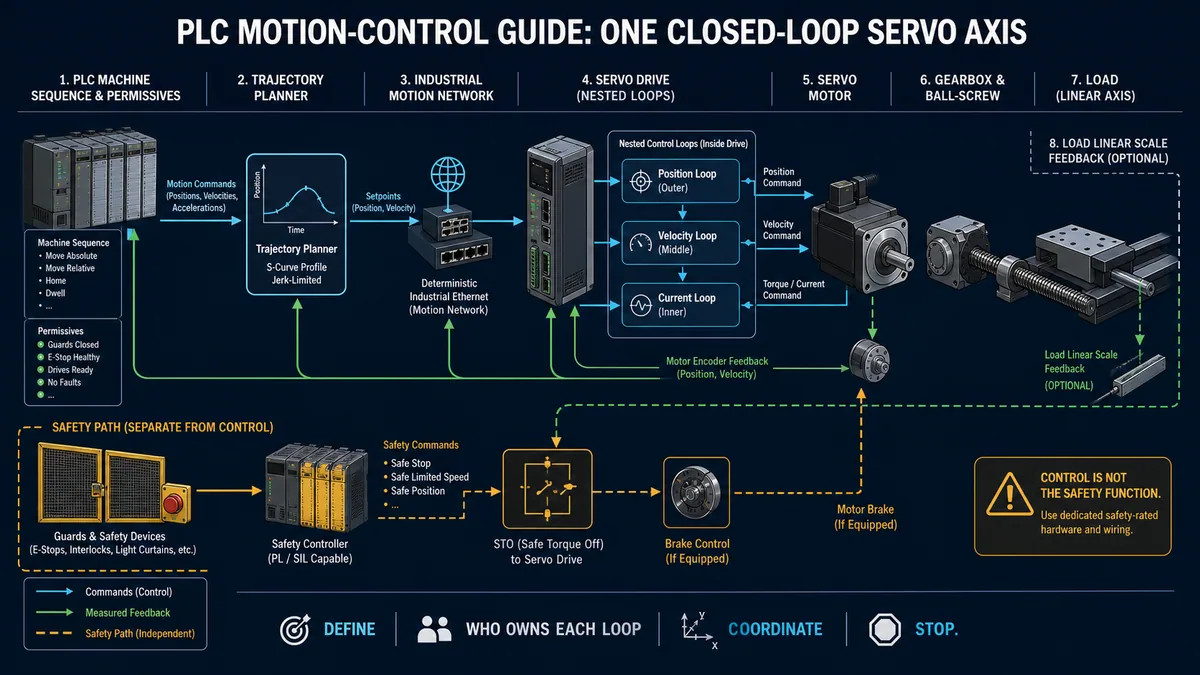
Chapter 4: PLC Integration and Motion Control
POWERLINK Integration with Motion Control
POWERLINK's deterministic performance makes it ideal for multi-axis motion control:
Multi-Axis Motion Control with POWERLINK:

System Architecture:
┌─────────────────────────────────────────┐
│ Main Controller (Managing Node)         │
│ ├─ Trajectory Planning                 │
│ ├─ Interpolation (velocity profiles)   │
│ └─ Cycle Timing (1ms)                  │
└────────┬────────────────────────────────┘
         │ POWERLINK Network
         │
  ┌──────┼──────┬──────────────┬──────────┐
  │      │      │              │          │
[X-Axis] [Y-Axis] [Z-Axis] [Spindle] [Tool Change]
 Drive    Drive    Drive     Motor      Actuator

Coordinated Motion Example (Pick-and-Place):
1ms Cycle: Read joint positions → Update velocity commands →
           All axes move in synchronized fashion

Control Flow:
X_Velocity_Out = 500 mm/s (toward target)
Y_Velocity_Out = 300 mm/s (toward target)
Z_Velocity_Out = 200 mm/s (downward)
Spindle_Speed_Out = 2000 RPM

Feedback Flow (Each Cycle):
X_Position_In = 5432 mm
Y_Position_In = 2156 mm
Z_Position_In = -50 mm
Spindle_Speed_In = 1999 RPM
PLC Implementation Example
POWERLINK Motion Control Program (Structured Text):

PROGRAM LinearMotionControl
VAR
  (* Output Commands (to POWERLINK devices) *)
  X_Axis_Velocity   : REAL;    (* mm/s *)
  Y_Axis_Velocity   : REAL;
  Z_Axis_Velocity   : REAL;
  Spindle_Speed     : REAL;    (* RPM *)

  (* Input Feedback (from POWERLINK devices) *)
  X_Position        : REAL;    (* mm *)
  Y_Position        : REAL;
  Z_Position        : REAL;
  Spindle_Speed_FB  : REAL;

  (* Control Parameters *)
  X_Target          : REAL := 100.0;
  Y_Target          : REAL := 50.0;
  Z_Target          : REAL := -25.0;
  MaxVelocity       : REAL := 500.0;  (* mm/s *)

  (* Status *)
  MotionComplete    : BOOL;
  FollowingError    : REAL;

END_VAR

BEGIN
  (* Calculate position error *)
  VAR Error_X := X_Target - X_Position END_VAR;
  VAR Error_Y := Y_Target - Y_Position END_VAR;
  VAR Error_Z := Z_Target - Z_Position END_VAR;

  (* Simple proportional control *)
  X_Axis_Velocity := Error_X * 2.0;    (* Kp = 2.0 *)
  Y_Axis_Velocity := Error_Y * 2.0;
  Z_Axis_Velocity := Error_Z * 2.0;

  (* Limit velocity to maximum *)
  IF ABS(X_Axis_Velocity) > MaxVelocity THEN
    X_Axis_Velocity := SIGN(X_Axis_Velocity) * MaxVelocity;
  END_IF;

  (* Same for Y and Z... *)

  (* Check if motion complete *)
  FollowingError := SQRT(Error_X*Error_X + Error_Y*Error_Y +
                         Error_Z*Error_Z);
  MotionComplete := FollowingError < 1.0;  (* Within 1mm *)

  (* Enable spindle when Z movement completes *)
  IF MotionComplete THEN
    Spindle_Speed := 2000.0;
  ELSE
    Spindle_Speed := 0.0;
  END_IF;

END_PROGRAM;
Chapter 5: Best Practices and Advanced Features
Network Design Guidelines
Cable Installation:
- Use CAT5e or CAT6 twisted-pair cable (standard Ethernet quality)
- Maintain standard Ethernet installation practices
- 100-meter maximum segment length
- Avoid EMI sources (power cables, motors)
- Proper cable termination and grounding
Topology Selection:
- Linear: Simple installations, up to 16 devices per segment
- Ring: Provides redundancy for critical systems
- Star: Flexibility with switch-based distribution
- Multi-segment: Repeaters extend network range
Cycle Time Selection:
- 1-10 milliseconds: Motion control, synchronized applications
- 10-100 milliseconds: General real-time control
- 100+ milliseconds: Standard automation
Redundancy and Failover
Ring topologies enable automatic failover when physical connections break:
POWERLINK Ring Redundancy:

Normal Operation:        Cable Break Between Device2 & Device3:
Device1                  Device1
  |‾|                      |‾|
  | |──Device2             | |──Device2
  |_|  ‾‾‾|                |_|  ‾‾‾|
Device4   |                Device4  | (broken)
  |‾|     |                  |‾|    |
  | |──Device3              | |──Device3
  |_|‾‾‾|                   |_|‾‾‾|

Ring remains connected through backup path
All nodes continue normal operation
Automatic detection and rerouting
Diagnostic and Monitoring Capabilities
POWERLINK provides comprehensive diagnostics:
- Synchronization jitter monitoring
- Frame transmission statistics
- Device health indicators
- Error counters and trending
- Network bandwidth utilization
- Latency measurement
Chapter 6: POWERLINK FAQ
What is POWERLINK Protocol?
POWERLINK is an open real-time Ethernet protocol delivering deterministic communication over standard Ethernet infrastructure. It enables cycle times as low as 1 millisecond, making it suitable for motion control and synchronized automation requiring guaranteed performance.
How Does POWERLINK Achieve Real-Time Performance?
POWERLINK uses deterministic polling cycles where specific devices transmit during assigned time slots. This eliminates collisions and ensures perfect timing repeatability, distinguishing it from standard Ethernet's contention-based approach.
Can POWERLINK Coexist with Standard Ethernet?
Yes, POWERLINK uses only a portion of cycle time for real-time communication, leaving remaining bandwidth for standard Ethernet traffic. This enables IT system integration without sacrificing real-time performance.
What Devices Support POWERLINK?
Major motion control vendors (B&R, KEBA, Philips, Leuze) offer POWERLINK-capable devices. Growing ecosystem includes drives, I/O modules, controllers, and safety-rated devices.
How Does POWERLINK Compare to EtherCAT?
POWERLINK: Better for mixed real-time and IT integration, simpler synchronization, lower device cost. EtherCAT: Faster (sub-microsecond), better for extreme motion control, more device ecosystem.
What Happens if Network Connection Breaks in Ring Topology?
Ring topology automatically detects breaks and reroutes communication through remaining path, maintaining network operation without manual intervention.
Is POWERLINK Suitable for Safety Applications?
Safety-rated POWERLINK devices available with SIL/PLd certification enable integration of safety-critical functions into real-time networks.
How Do I Select Cycle Time for My Application?
1-10ms: Motion control requiring precise synchronization 10-100ms: General real-time control loops 100ms+: Standard automation with relaxed timing requirements Verify device capabilities support selected cycle time.
Conclusion: POWERLINK for Advanced Real-Time Automation
POWERLINK protocol delivers a compelling alternative for real-time industrial automation, combining deterministic performance with standard Ethernet integration. Its ability to coexist with standard Ethernet while maintaining guaranteed cycle times makes POWERLINK uniquely valuable for applications bridging real-time control and IT systems.
Understanding POWERLINK architecture, synchronization mechanisms, and motion control implementation enables design of high-performance automation systems leveraging Ethernet's ubiquity while maintaining real-time reliability. As manufacturing continues digital transformation, POWERLINK technology provides proven, open-standard infrastructure for competitive automation systems combining reliability, flexibility, and cost-effectiveness.